button HYUNDAI SANTA FE 2021 Owners Manual
[x] Cancel search | Manufacturer: HYUNDAI, Model Year: 2021, Model line: SANTA FE, Model: HYUNDAI SANTA FE 2021Pages: 636, PDF Size: 81.2 MB
Page 459 of 636
07
7-7 7
LAnE FOLLOWIng A ssIsT (LF A) (IF E QUIppED)
Lane Following Assist is designed to help
detect lane markings and/or vehicles on
the road, and assists the driver’s steering
to help center the vehicle in the lane.
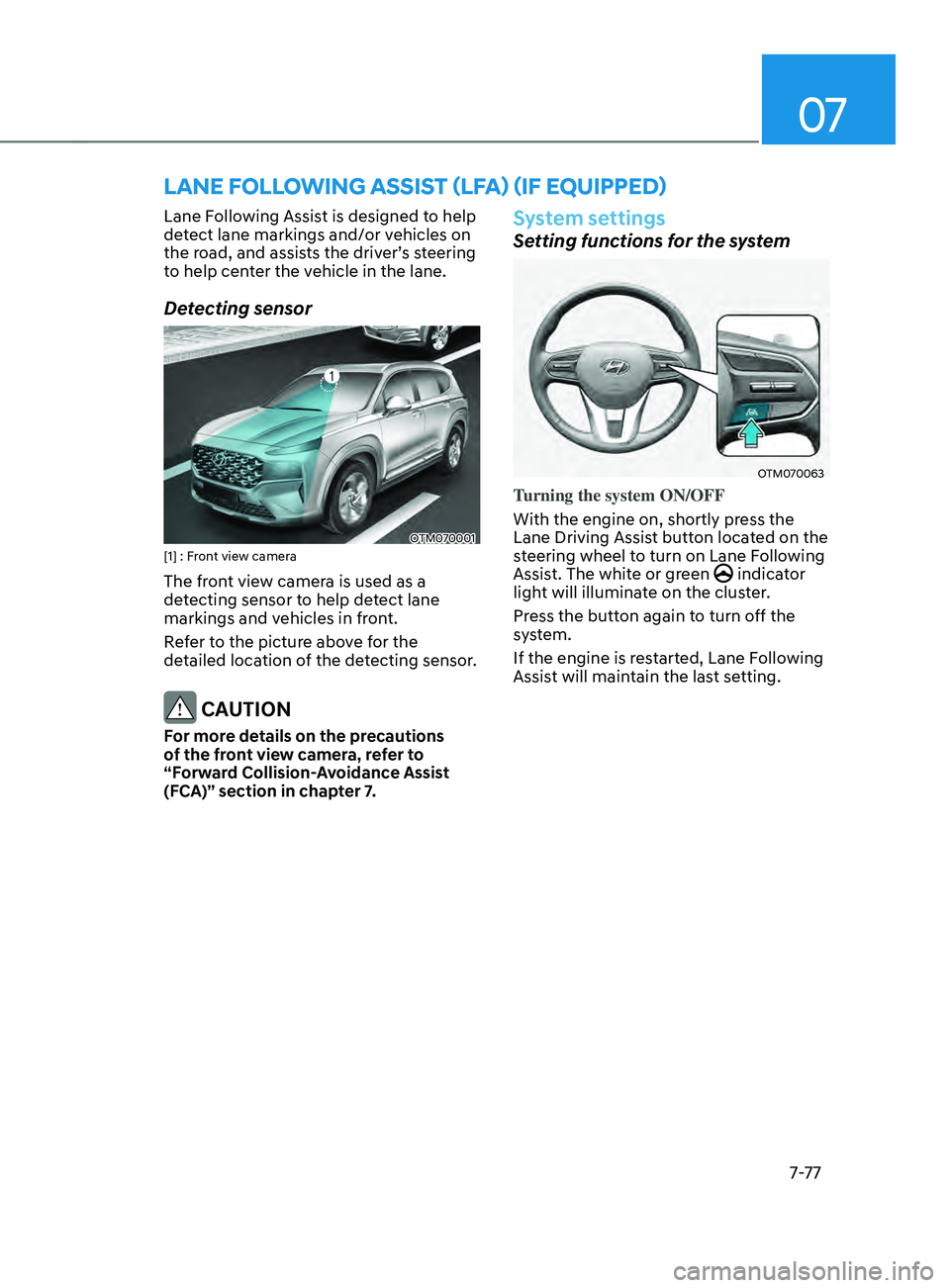
Detecting sensor
OTM070001[1] : Front view camera
The front view camera is used as a
detecting sensor to help detect lane
markings and vehicles in front.
Refer to the picture above for the
detailed location of the detecting sensor.
CAUTION
For more details on the precautions
of the front view camera, refer to
“Forward Collision-Avoidance Assist
(FCA)” section in chapter 7.
System settings
Setting functions for the system
OTM070063
Turning the system ON/OFF
With the engine on, shortly press the
Lane Driving Assist button located on the
steering wheel to turn on Lane Following
Assist. The white or green
indicator
light will illuminate on the cluster.
Press the button again to turn off the
system.
If the engine is restarted, Lane Following
Assist will maintain the last setting.
Page 471 of 636
07
7-89
System settings
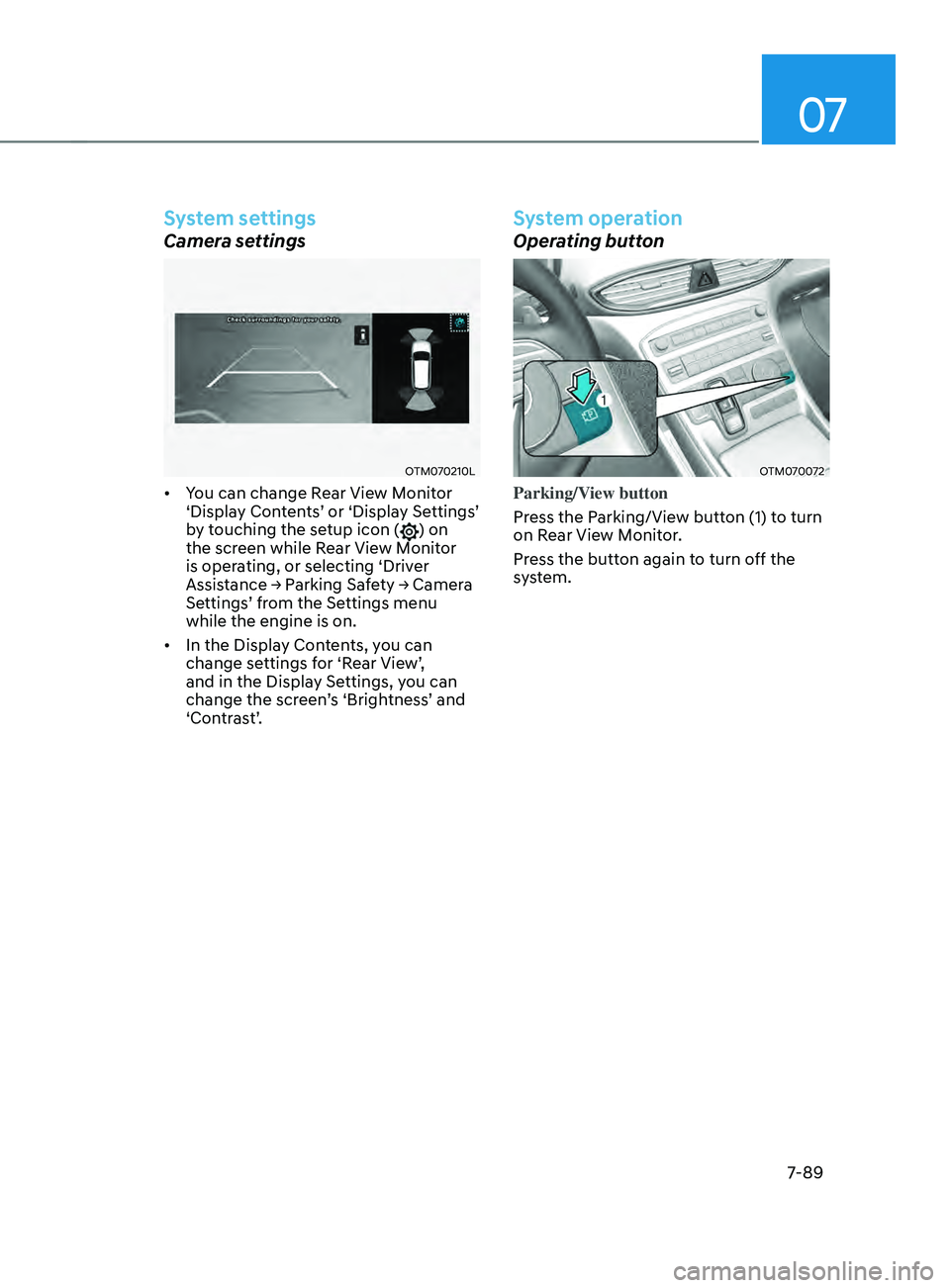
Camera settings
OTM070210L
• You can change Rear View Monitor
‘Display Contents’ or ‘Display Settings’
by touching the setup icon (
) on
the screen while Rear View Monitor
is operating, or selecting ‘Driver
Assistance → Parking Safety → Camera
Settings’ from the Settings menu
while the engine is on.
• In the Display Contents, you can
change settings for ‘Rear View’,
and in the Display Settings, you can
change the screen’s ‘Brightness’ and
‘Contrast’.
System operation
Operating button
OTM070072
Parking/View button
Press the Parking/View button (1) to turn
on Rear View Monitor.
Press the button again to turn off the
system.
Page 472 of 636
Driver assistance system
7-90
Rear view
Operating conditions
• Shift the gear to R (Reverse), the
image will appear on the screen.
• Press the Parking/View button (1)
while the gear is in P (Park), the image
will appear on the screen. However,
parking guidance is not displayed.
Off conditions
• The rear view cannot be turned off
when the gear is in R (Reverse).
• Press the Parking/View button (1)
again while the gear is in P (Park) with
the rear view on the screen, the rear
view will turn off.
• Shift the gear from R (Reverse) to P
(Park), the rear view will turn off.
Maintaining rear view
The rear view will maintain showing on
the screen to help you when parking.
However, parking guidance is not
displayed.
Operating conditions
Shift the gear from R (Reverse) to N
(Neutral) or D (Drive), the rear view will
appear on the screen.
Off conditions
• When vehicle speed is above 6 mph
(10 km/h), the rear view will turn off.
• Shift the gear to P (Park), the rear view
will turn off.
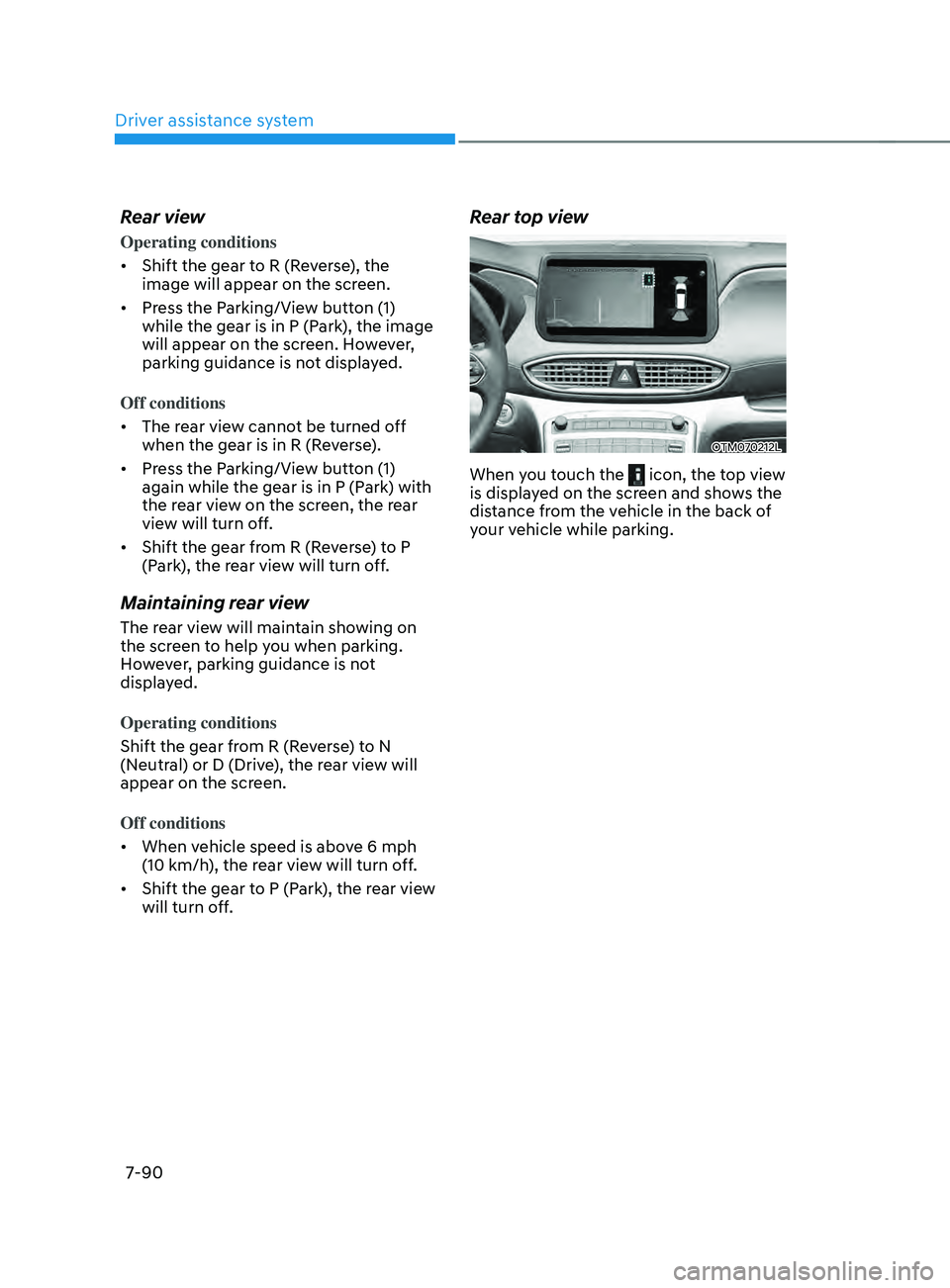
Rear top view
OTM070212L
When you touch the icon, the top view
is displayed on the screen and shows the
distance from the vehicle in the back of
your vehicle while parking.
Page 476 of 636
Driver assistance system
7-94
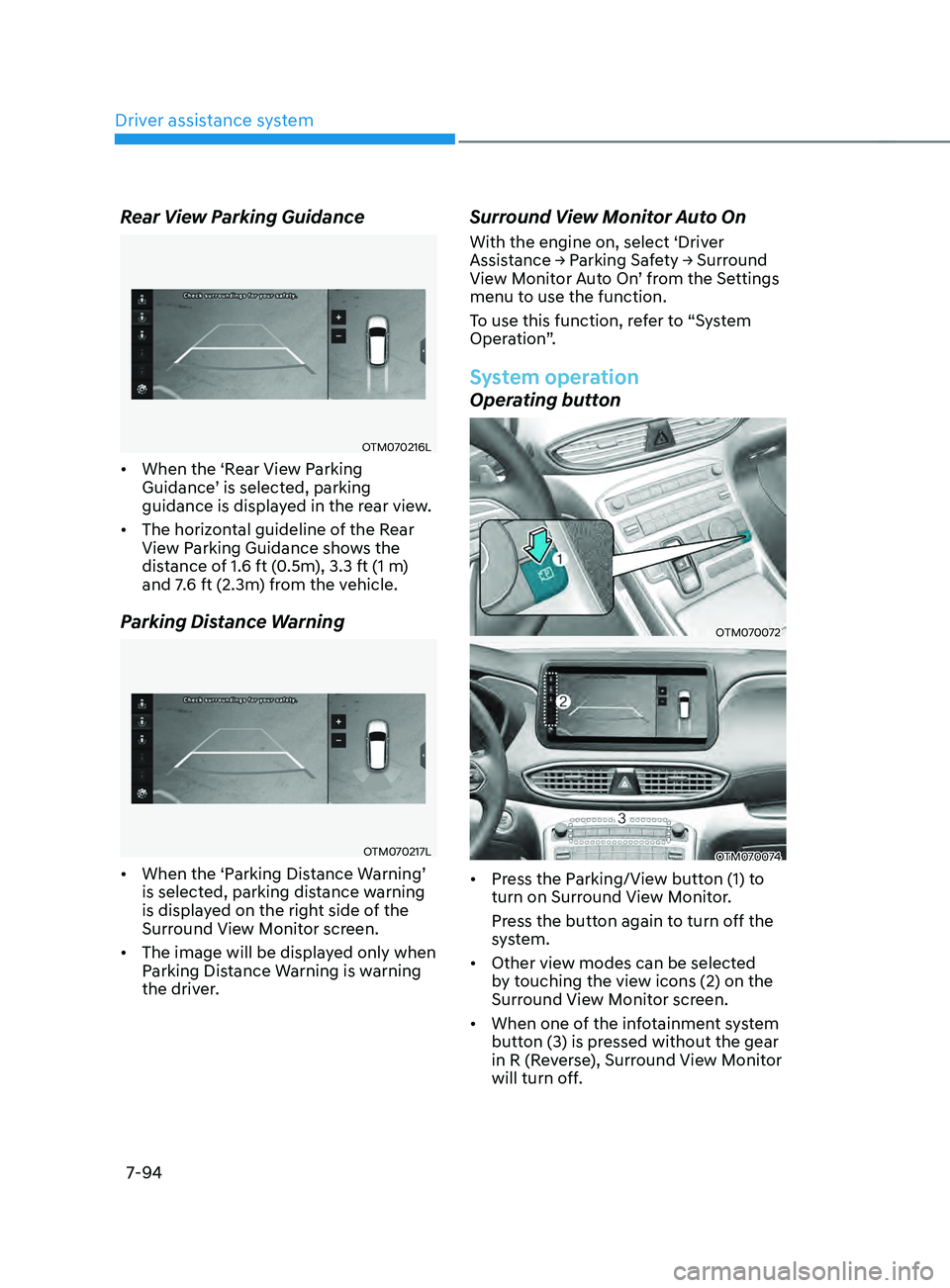
Rear View Parking Guidance
OTM070216L
• When the ‘Rear View Parking
Guidance’ is selected, parking
guidance is displayed in the rear view.
• The horizontal guideline of the Rear
View Parking Guidance shows the
distance of 1.6 ft (0.5m), 3.3 ft (1 m)
and 7.6 ft (2.3m) from the vehicle.
Parking Distance Warning
OTM070217L
• When the ‘Parking Distance Warning’
is selected, parking distance warning
is displayed on the right side of the
Surround View Monitor screen.
• The image will be displayed only when
Parking Distance Warning is warning
the driver.
Surround View Monitor Auto On
With the engine on, select ‘Driver
Assistance → P
arking Sa fety → Surr ound View M
onitor Auto On’ from the Settings
menu to use the function.
To use this function, refer to “System
Operation”.
System operation
Operating button
OTM070072
OTM070074
• Press the Parking/View button (1) to
turn on Surround View Monitor.
Press the button again to turn off the
system.
• Other view modes can be selected
by touching the view icons (2) on the
Surround View Monitor screen.
• When one of the infotainment system
button (3) is pressed without the gear
in R (Reverse), Surround View Monitor
will turn off.
Page 477 of 636
07
7-95
Front view
The front image is displayed on the
screen when the gear is in N (Neutral) or
D (Drive) to assist in parking. The front
view has a top view/front view/side view.
Operating conditions
• Front view function will operate when
the following conditions are satisfied:
- While the inf
otainment system
screen is being displayed, press the
Parking/View button (1) briefly when
the gear is in D (Drive) or N (Neutral)
and vehicle speed is below 9 mph
(15 km/h).
• Surround View Monitor Auto On
function will operate when the
following conditions are satisfied:
-With ‘Driv
er
Assis
tance
→ P
arking
Saf
ety
→ Surr
ound
Vie
w
M
onitor
Aut
o On’ selected from the Settings
menu, the front parking assist view
screen is displayed when Parking
Distance Warning warns the driver
while driving in D (Drive).
Off conditions
• Press the Parking/View button (1)
again, the image will turn off.
• When vehicle speed is above 9 mph
(15 km/h) with the gear in D (Drive),
Surround View Monitor will turn off
and the screen will change back to the
previous infotainment system screen.
Although you drive below 9 mph (15
km/h) again, Surround View Monitor
will not turn on.
• Press one of the infotainment system
button (3), the screen will change to
the infotainment system screen.
• Shift the gear to P (Park), the image
will turn off.
Rear view
The rear image is displayed on the screen
when the gear is in R (Revers) or P (Park)
to assist in parking. The rear view has a
top view/rear view/side view.
Operating conditions
• Shift the gear to R (Reverse), the
image will appear on the screen.
• Press the Parking/View button (1)
while the gear is in P (Park), the image
will appear on the screen. However,
parking guidance is not displayed.
Off conditions
• The image cannot be turned off when
the gear is in R (Reverse).
• Shift the gear from R (Reverse) to P
(Park), the image will turn off.
• Press the Parking/View button (1)
again while the gear is in P (Park) with
the image on the screen.
Page 490 of 636
Driver assistance system7-108
REVERsE p ARkIng DIsTAnCE WARnIng (pD W) (IF
EQUI
ppED)
Reverse Parking Distance Warning will
help warn the driver if an obstacle is
detected within a certain distance when
the vehicle is moving in reverse at low
speeds.
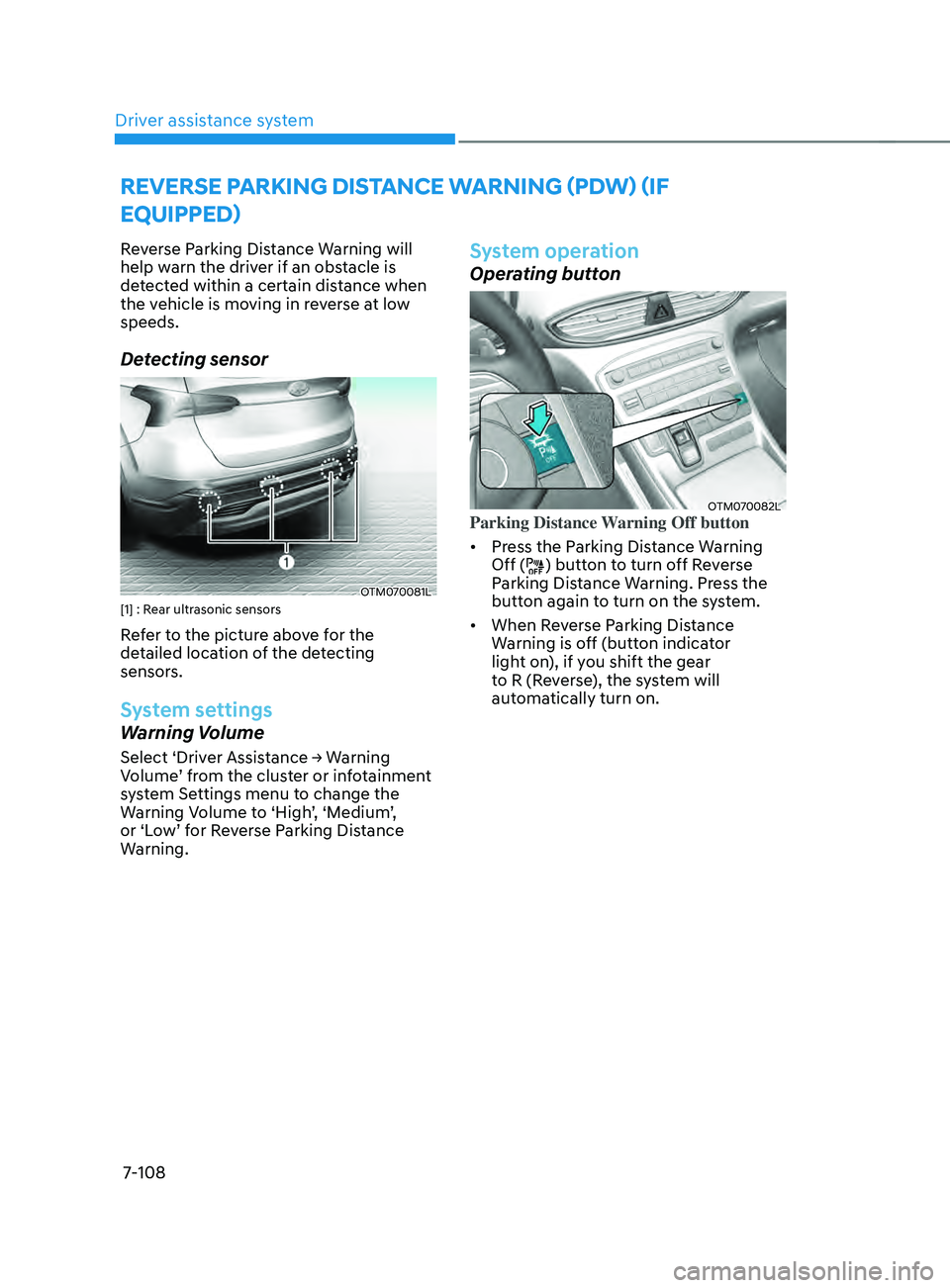
Detecting sensor
OTM070081L[1] : Rear ultrasonic sensors
Refer to the picture above for the
detailed location of the detecting
sensors.
System settings
Warning Volume
Select ‘Driver Assistance → Warning Volume ’ from the cluster or infotainment
system Settings menu to change the
Warning Volume to ‘High’, ‘Medium’,
or ‘Low’ for Reverse Parking Distance
Warning.
System operation
Operating button
OTM070082LParking Distance Warning Off button
• Press the Parking Distance Warning
Off (
) button to turn off Reverse
Parking Distance Warning. Press the
button again to turn on the system.
• When Reverse Parking Distance
Warning is off (button indicator
light on), if you shift the gear
to R (Reverse), the system will
automatically turn on.
Page 493 of 636
07
7-111
FORWARD/REVERsE pARkIng DIsTAnCE WARnIng (pD W)
(IF EQUI
ppED)
Forward/Reverse Parking Distance
Warning will help warn the driver if an
obstacle is detected within a certain
distance when the vehicle is moving
forward or in reverse at low speeds.
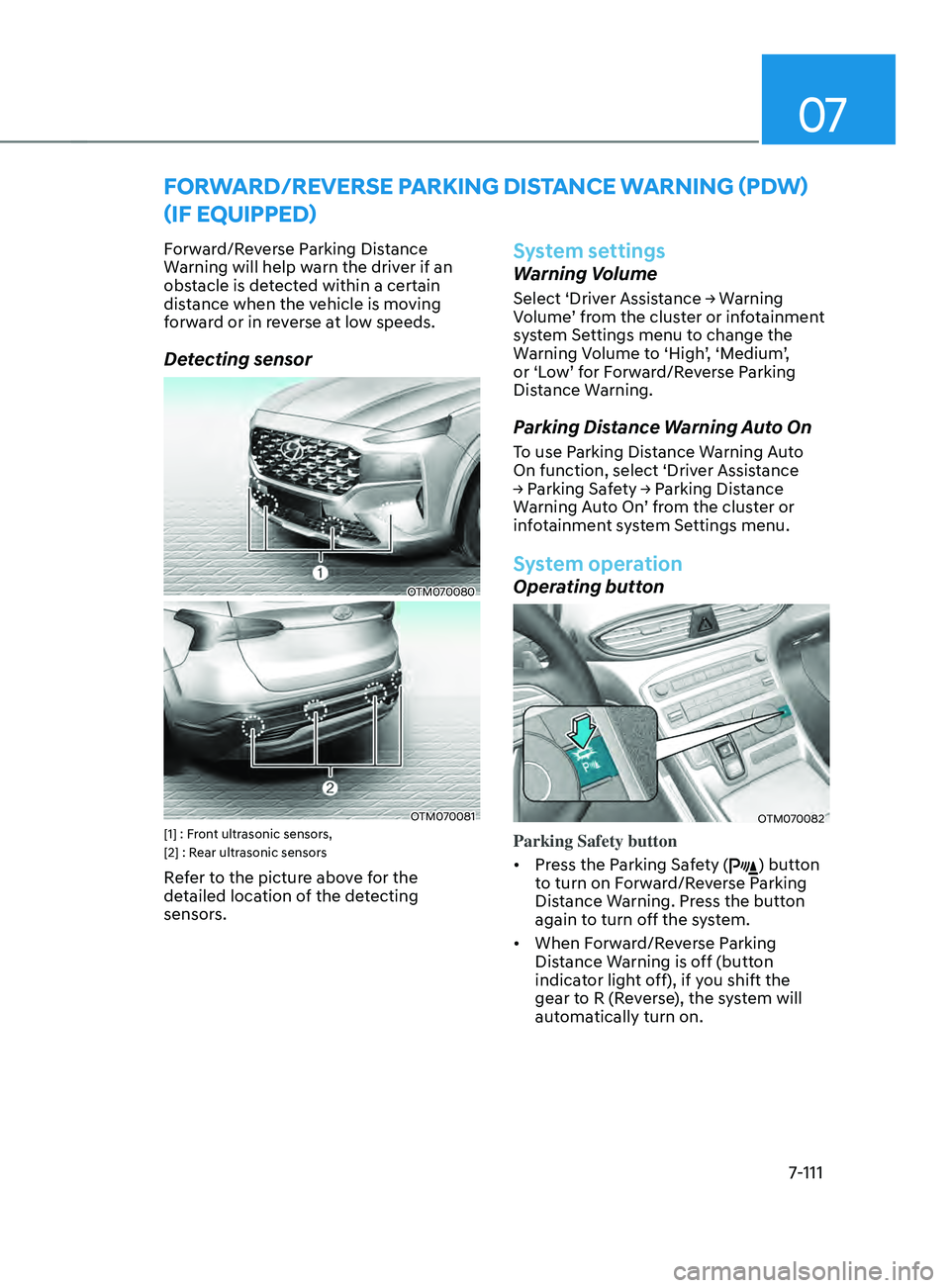
Detecting sensor
OTM070080
OTM070081[1] : Front ultrasonic sensors,
[2] : Rear ultrasonic sensors
Refer to the picture above for the
detailed location of the detecting
sensors.
System settings
Warning Volume
Select ‘Driver Assistance → Warning Volume ’ from the cluster or infotainment
system Settings menu to change the
Warning Volume to ‘High’, ‘Medium’,
or ‘Low’ for Forward/Reverse Parking
Distance Warning.
Parking Distance Warning Auto On
To use Parking Distance Warning Auto
On function, select ‘Driver Assistance
→
P
arking
Sa
fety
→ P
arking
Dis
tance
Warning A
uto On’ from the cluster or
infotainment system Settings menu.
System operation
Operating button
OTM070082
Parking Safety button
• Press the Parking Safety (
) button
to turn on Forward/Reverse Parking
Distance Warning. Press the button
again to turn off the system.
• When Forward/Reverse Parking
Distance Warning is off (button
indicator light off), if you shift the
gear to R (Reverse), the system will
automatically turn on.
Page 494 of 636
Driver assistance system
7-112
• When Forward/Reverse Parking
Distance Warning turns on, the button
indicator light will turn on. If vehicle
speed is above 12 mph (20 km/h),
Forward/Reverse Parking Distance
Warning will turn off (button indicator
light off).
ÃIf equipped with Re
verse Parking
Collision-Avoidance Assist or
Remote Smart Parking Assist,
Forward/Reverse Parking Distance
Warning will turn off (button
indicator light off) when vehicle
speed is above 18 mph (30 km/h).
Forward Parking Distance Warning
• Forward Parking Distance Warning will
operate when one of the condition is
satisfied.
- The gear is shifted fr
om R (Reverse)
to D (Drive) with Reverse Parking
Distance Warning on
- The gear is in D (Drive
) and the
Parking Safety button indicator light
is on
- ‘Parking Dis
tance Warning Auto On’
is selected from the Settings menu
and the gear is in D (Drive)
• Forward Parking Distance Warning
detects a person, animal or object
in front when the vehicle’s forward
speed is below 6 mph (10 km/h).
• Forward Parking Distance Warning
does not operate when the vehicle's
forward speed is above 6 mph (10
km/h) even when the Parking Safety
button indicator is on. Forward
Parking Distance Warning will operate
again when the vehicle's forward
speed decreases below 6 mph (10
km/h) while the Parking Safety button
indicator is on.
• When ‘Parking Distance Warning Auto
On’ is selected, the Parking Safety
button indicator light stays on. •
When ‘Parking Distance Warning Auto
On’ is deselected, and the vehicle’s
forward speed is above 12 mph (20
km/h), the Parking Safety button
indicator will turn off. Although you
drive below 6 mph (10 km/h), the
system will not turn on.
ÃIf equipped with Re
verse Parking
Collision-Avoidance Assist or
Remote Smart Parking Assist,
Forward/Reverse Parking Distance
Warning will turn off when vehicle
speed is above 18 mph (30 km/h).
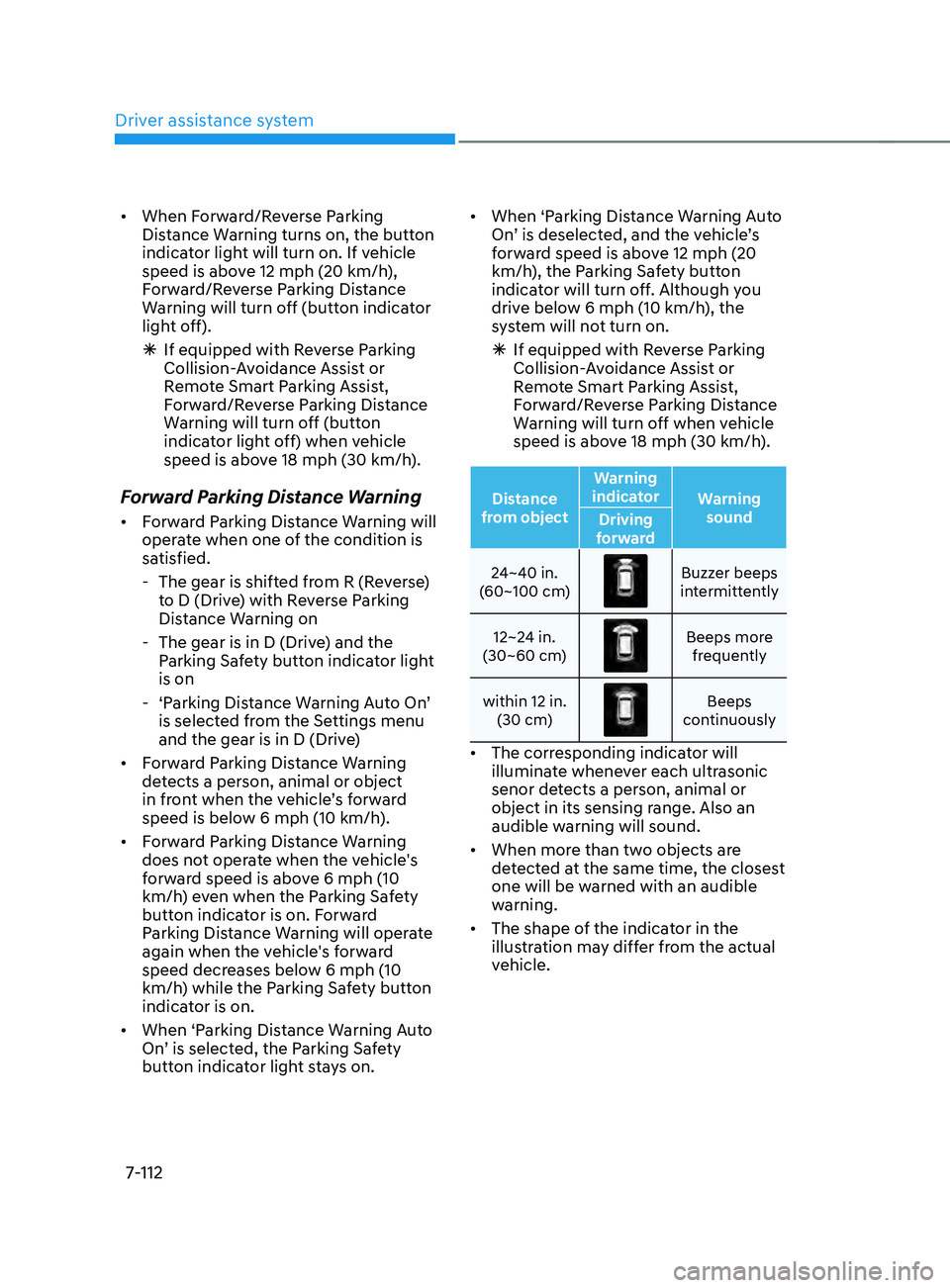
Distance
from object Warning
indicator Warning
sound
Driving
forward
24~40 in.
(60~100 cm)
Buzzer beeps
intermittently
12~24 in.
(30~60 cm)
Beeps more frequently
within 12 in. (30 cm)
Beeps
continuously
• The corresponding indicator will
illuminate whenever each ultrasonic
senor detects a person, animal or
object in its sensing range. Also an
audible warning will sound.
• When more than two objects are
detected at the same time, the closest
one will be warned with an audible
warning.
• The shape of the indicator in the
illustration may differ from the actual
vehicle.
Page 507 of 636
07
7-125
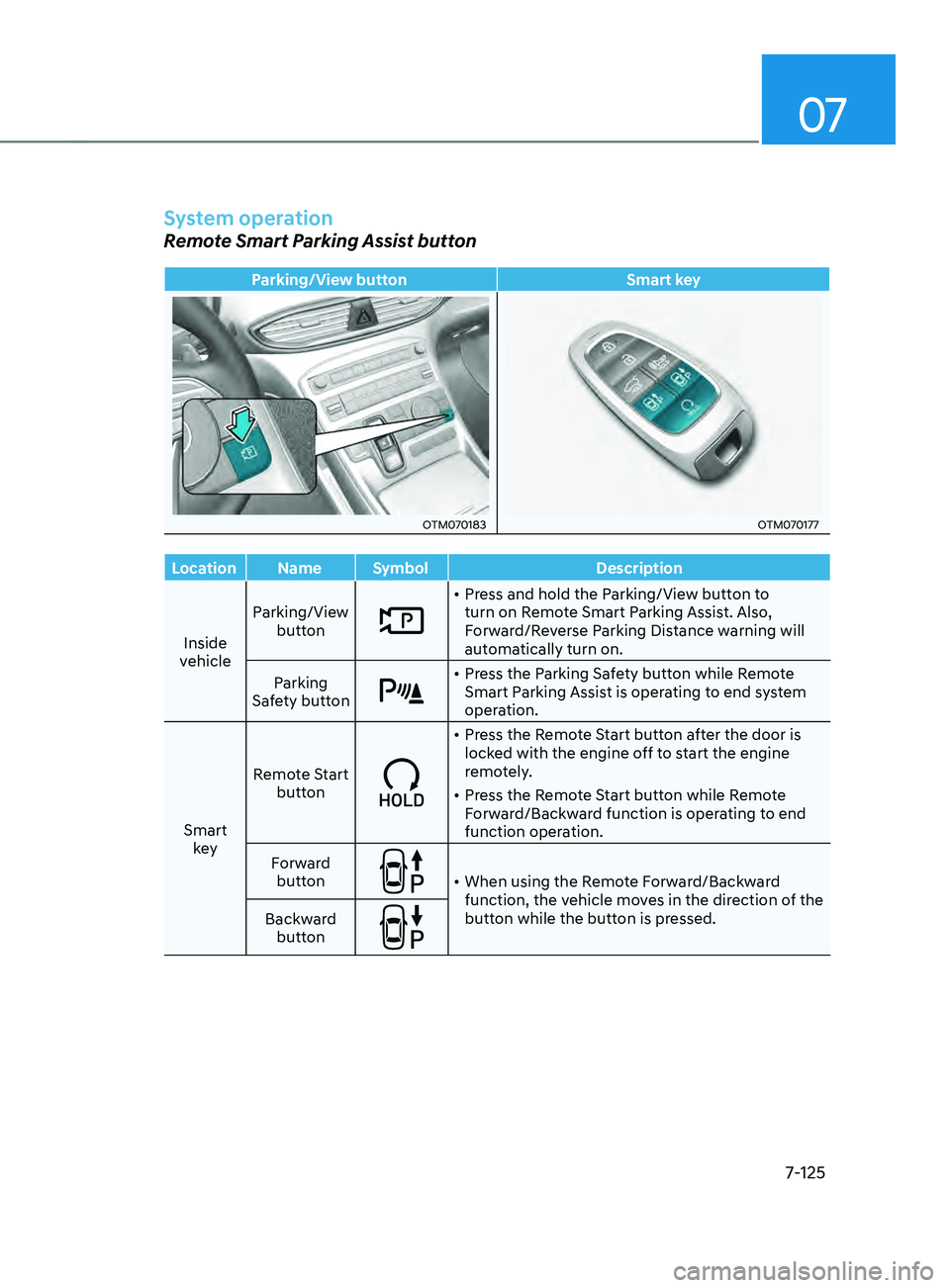
System operation
Remote Smart Parking Assist button
Parking/View buttonSmart key
OTM070183OTM070177
Location Name Symbol Description
Inside
vehicle Parking/View
button
• Press and hold the Parking/View button to
turn on Remote Smart Parking Assist. Also,
Forward/Reverse Parking Distance warning will
automatically turn on.
Parking
Safety button
• Press the Parking Safety button while Remote
Smart Parking Assist is operating to end system
operation.
Smart key Remote Start
button
• Press the Remote Start button after the door is
locked with the engine off to start the engine
remotely.
• Press the Remote Start button while Remote
Forward/Backward function is operating to end
function operation.
Forward button
• When using the Remote Forward/Backward
function, the vehicle moves in the direction of the
button while the button is pressed.
Backward
button
Page 508 of 636
Driver assistance system
7-126
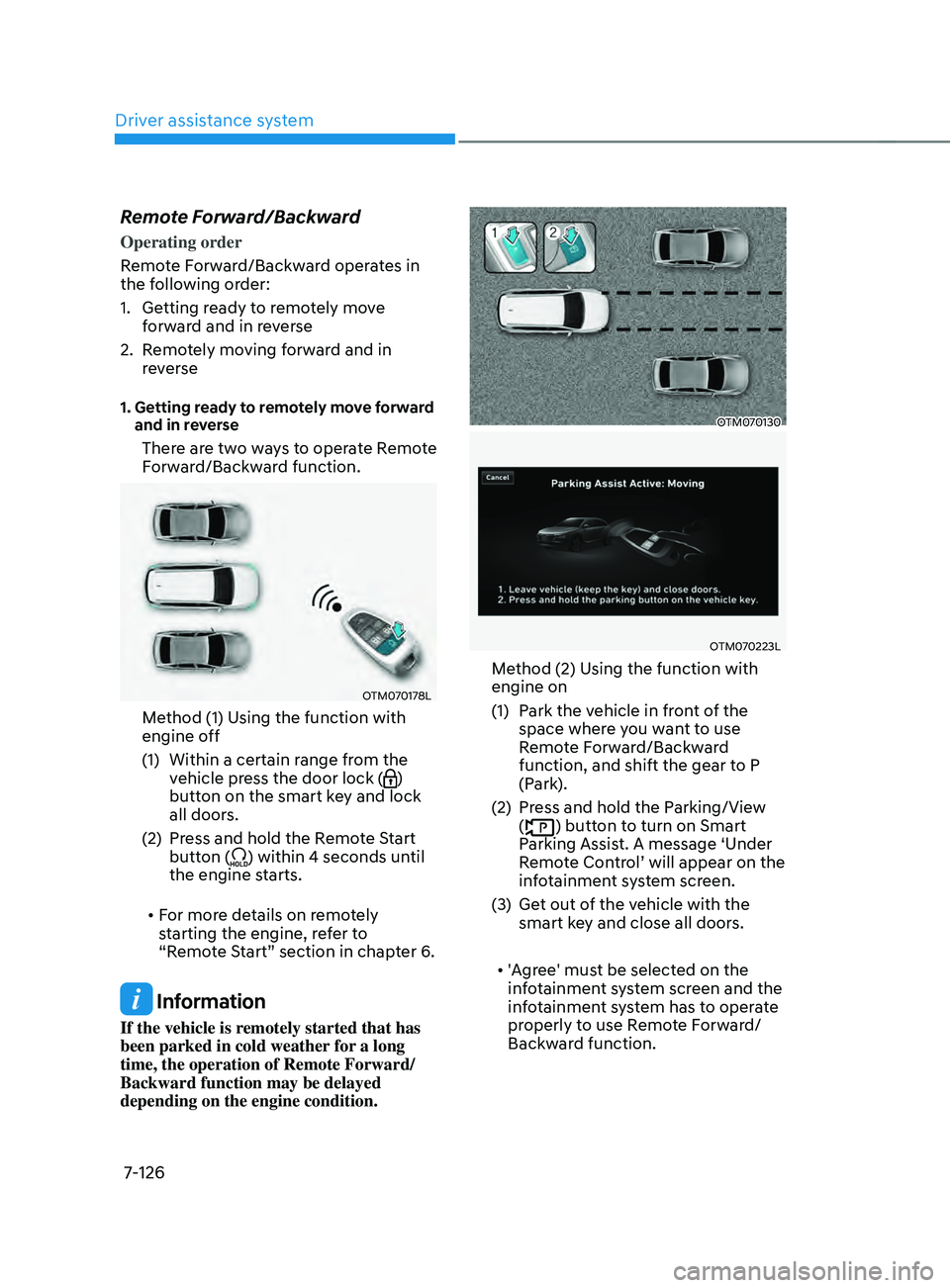
Remote Forward/Backward
Operating order
Remote Forward/Backward operates in
the following order:
1.
Getting r
eady to remotely move
forward and in reverse
2.
Remo
tely moving forward and in
reverse
1. Getting ready to remotely move forward
and in r
everse
There are two ways to operate Remote
Forward/Backward function.
OTM070178L
Method (1) Using the function with
engine off
(1)
Within a certain range fr
om the
vehicle press the door lock (
)
button on the smart key and lock
all doors.
(2)
Press and hold the R
emote Start
button (
) within 4 seconds until
the engine starts.
• For more details on remotely
starting the engine, refer to
“Remote Start” section in chapter 6.
Information
If the vehicle is remotely started that has
been parked in cold weather for a long
time, the operation of Remote Forward/
Backward function may be delayed
depending on the engine condition.
OTM070130
OTM070223L
Method (2) Using the function with
engine on
(1)
Park the v
ehicle in front of the
space where you want to use
Remote Forward/Backward
function, and shift the gear to P
(Park).
(2)
Press and hold the P
arking/View
(
) button to turn on Smart
Parking Assist. A message ‘Under
Remote Control’ will appear on the
infotainment system screen.
(3)
Get out o
f the vehicle with the
smart key and close all doors.
• 'Agree' must be selected on the
infotainment system screen and the
infotainment system has to operate
properly to use Remote Forward/
Backward function.