alert HYUNDAI SANTA FE 2021 User Guide
[x] Cancel search | Manufacturer: HYUNDAI, Model Year: 2021, Model line: SANTA FE, Model: HYUNDAI SANTA FE 2021Pages: 636, PDF Size: 81.2 MB
Page 220 of 636

Convenient features
5 -76
Information
Do not approach the detecting area if you
do not want the liftgate to open. If you
have unintentionally entered the detecting
area and the hazard warning lights and
chime starts to operate, move away from
the area behind the vehicle with the smart
key. The liftgate will remain closed.
3.
Aut
omatic opening
After the hazard warning lights blink
and the chime sounds 6 times, the
smart liftgate will open.
Deactivating smart liftgate
„„Type A „„Type B
OTMA050009OTMA050010
1. Door lock
2.
Door unlock
3.
Liftga
te open (Liftgate)
Liftgate open / close (Power liftgate) If you press any button on the smart key
during the Detect and Alert stage, the
smart liftgate will be deactivated.
Make sure to be aware of how to
deactivate the smart liftgate for
emergency situations.
•
If you press the door unlock button
(2), the smart liftgate will be
deactivated temporarily. But, if you do
not open any door for 30 seconds, the
smart liftgate will be activated again.
• If you press the liftgate open button
(3) for more than 1 second, the liftgate
opens.
• The smart liftgate will still be activated
if you press the door lock button (1) or
liftgate open/close button (3) on the
smart key as long as the smart liftgate
is not already in the Detect and Alert
stage.
• In case you have deactivated the
smart liftgate by pressing the smart
key button and opened a door, the
smart liftgate can be activated again
by closing and locking all doors.
Page 221 of 636
05
5-77
Detecting area
OTM050060
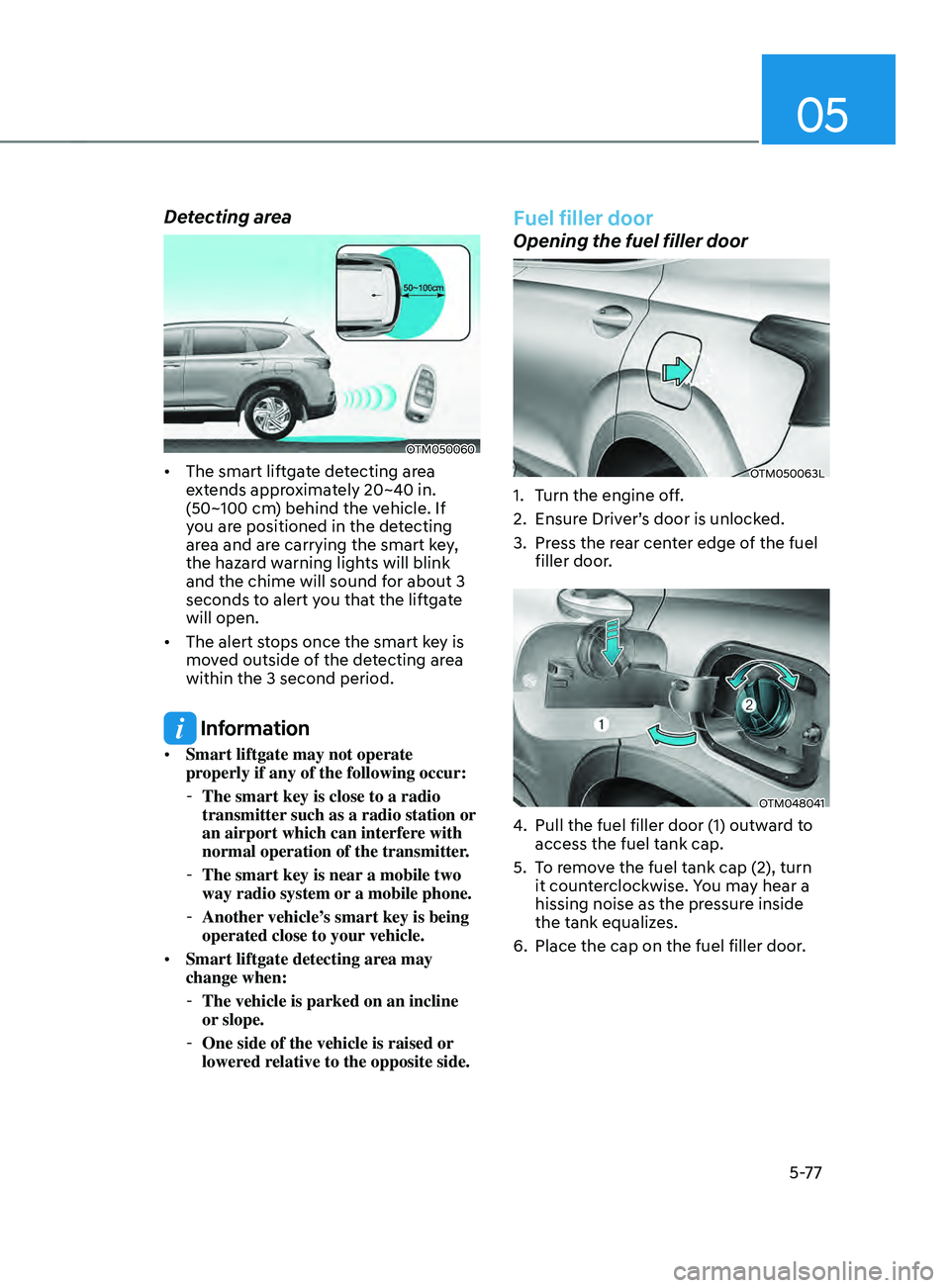
• The smart liftgate detecting area
extends approximately 20~40 in.
(50~100 cm) behind the vehicle. If
you are positioned in the detecting
area and are carrying the smart key,
the hazard warning lights will blink
and the chime will sound for about 3
seconds to alert you that the liftgate
will open.
• The alert stops once the smart key is
moved outside of the detecting area
within the 3 second period.
Information
• Smart liftgate may not operate
properly if any of the following occur:
-The smart key is close to a radio
transmitter such as a radio station or
an airport which can interfere with
normal operation of the transmitter.
- The smart key is near a mobile two
way radio system or
a mobile phone.
-Another vehicle’
s smart key is being
operated close to your vehicle.
• Smart liftgate detecting area may
change when:
-The vehicle is parked on an incline
or slope.
-One side of the vehicle is raised or
lower
ed relative to the opposite side.
Fuel filler door
Opening the fuel filler door
OTM050063L
1. Turn the engine off.
2.
Ensur
e Driver’s door is unlocked.
3.
Press the r
ear center edge of the fuel
filler door.
OTM048041
4. Pull the fuel filler door (1) outwar d to
access the fuel tank cap.
5.
To r
emove the fuel tank cap (2), turn
it counterclockwise. You may hear a
hissing noise as the pressure inside
the tank equalizes.
6.
Place the cap on the fuel filler door.
Page 245 of 636
05
5-101
WARNING
• Continued climate control system
operation in the recirculated air
position may allow humidity to
increase inside the vehicle which
may fog the glass and obscure
visibility.
• Do not sleep in a vehicle with the air
conditioning or heating system on. It
may cause serious harm or death due
to a drop in the oxygen level and/or
body temperature.
• Continued climate control system
operation in the recirculated air
position can cause drowsiness
or sleepiness, and loss of vehicle
control. Set the air intake control
to the outside (fresh) air position as
much as possible while driving.
Fan speed control
Turn the knob to the right to increase
the fan speed and airflow. Turn the knob
to the left to decrease fan speed and
airflow.
Setting the fan speed control knob to the
“0” position turns off the fan.
NOTICE
Operating the fan speed when the
ignition switch is in the ON position
could cause the battery to discharge.
Operate the fan speed when the engine
is running.
Air conditioning (A/C) (if equipped)
Press the A/C button to turn the air
conditioning system on (indicator light
will illuminate). Press the button again to
turn the air conditioning system off.
System operation
Ventilation
1. Set the mode to the position.
2.
Set the air in
take control to the
outside (fresh) air position.
3.
Set the t
emperature control to the
desired position.
4.
Set the f
an speed control to the
desired speed.
Heating
1. Set the mode to the position.
2.
Set the air in
take control to the
outside (fresh) air position.
3.
Set the t
emperature control to the
desired position.
4.
Set the f
an speed control to the
desired speed.
5.
If dehumidified heating is desir
ed,
turn the air conditioning system (if
equipped) on.
If the windshield fogs up, set the mode
to the
or position.
Operation Tips
• To help keep dust or unpleasant fumes
from entering the vehicle through the
ventilation system, temporarily set the
air intake control to the recirculated
air position. Be sure to return the
control to the fresh air position when
the irritation has passed to keep fresh
air in the vehicle. This will help keep
the driver alert and comfortable.
• To prevent interior fog on the
windshield, set the air intake control
to the fresh air position and fan speed
to the desired position, turn on the air
conditioning system, and adjust the
temperature control to the desired
temperature.
Page 255 of 636
05
5-111
Fan speed control
The fan speed can be set as desired by
pushing the fan speed control button.
More air is delivered with higher fan
speeds.
Pressing the OFF button turns off the fan.
NOTICE
Operating the fan when the ignition
switch is in the ON position could cause
the battery to discharge. Operate the
fan when the engine is running.
Air conditioning
Push the A/C button to turn the air
conditioning system on (indicator light
will illuminate).
Push the button again to turn the air
conditioning system off.
OFF mode
Push the OFF button to turn the climate
control system off. However, you can still
operate the mode and air intake buttons
as long as the ignition switch is in the ON
position.
System operation
Ventilation
1. Set the mode to the position.
2.
Set the air in
take control to the
outside (fresh) air position.
3.
Set the t
emperature control to the
desired position.
4.
Set the f
an speed control to the
desired speed.
Heating
1. Set the mode to the position.
2.
Set the air in
take control to the
outside (fresh) air position.
3.
Set the t
emperature control to the
desired position.
4.
Set the f
an speed control to the
desired speed.
5.
If dehumidified heating is desir
ed,
turn the air conditioning system on.
If the windshield fogs up, set the mode
to the
or position.
Operation Tips
• To help keep dust or unpleasant fumes
from entering the vehicle through the
ventilation system, temporarily set the
air intake control to the recirculated
air position. Be sure to return the
control to the fresh air position when
the irritation has passed to keep fresh
air in the vehicle. This will help keep
the driver alert and comfortable.
• To prevent interior fog on the
windshield, set the air intake control
to the fresh air position and fan speed
to the desired position, turn on the air
conditioning system, and adjust the
temperature control to the desired
temperature.
Page 373 of 636
06
6-85
Backing up
Hold the bottom of the steering wheel
with one hand. Then, to move the trailer
to the left, move your hand to the left. To
move the trailer to the right, move your
hand to the right. Always back up slowly
and, if possible, have someone guide
you.
Making turns
When you’re turning with a trailer, make
wider turns than normal. Do this so your
trailer won’t strike soft shoulders, curbs,
road signs, trees, or other objects. Avoid
jerky or sudden maneuvers. Signal well in
advance.
Turn signals
When you tow a trailer, your vehicle has
to have a different turn signal flasher and
extra wiring. The green arrows on your
instrument panel will flash whenever you
signal a turn or lane change. Properly
connected, the trailer lights will also flash
to alert other drivers you’re about to turn,
change lanes, or stop.
When towing a trailer, the green arrows
on your instrument panel will flash for
turns even if the bulbs on the trailer
are burned out. Thus, you may think
drivers behind you are seeing your
signals when, in fact, they are not. It’s
important to check occasionally to be
sure the trailer bulbs are still working.
You must also check the lights every time
you disconnect and then reconnect the
wires.
WARNING
Do not connect a trailer lighting system
directly to your vehicle’s lighting
system. Use an approved trailer wiring
harness. Failure to do so could result in
damage to the vehicle electrical system
and/or personal injury. We recommend
that you consult an authorized
HYUNDAI dealer for assistance.
Driving on hills
Reduce speed and shift to a lower gear
before you start down a long or steep
downgrade. If you don’t shift down, you
might have to use your brakes so much
that they would get overheated and may
not operate efficiently.
On a long uphill grade, shift down and
reduce your speed to around 45 mph (70
km/h) to reduce the possibility of engine
and transmission overheating.
If your trailer weighs more than the
maximum trailer weight without trailer
brakes and you have a automatic
transmission, you should drive in D
(Drive) when towing a trailer.
Operating your vehicle in D (Drive)
when towing a trailer will minimize heat
build-up and extend the life of your
transmission.
Page 427 of 636
07
7-45
DRIVER ATTEnTIOn WARnIng (DAW)
Basic function
Driver Attention Warning will help
determine the driver's attention level by
analyzing driving pattern, driving time,
etc. while vehicle is being driven. The
system will recommend a break when
the driver’s attention level falls below a
certain level.
Leading Vehicle Departure Alert
function
Leading Vehicle Departure Alert function
will inform the driver when a detected
vehicle in front departs from a stop.
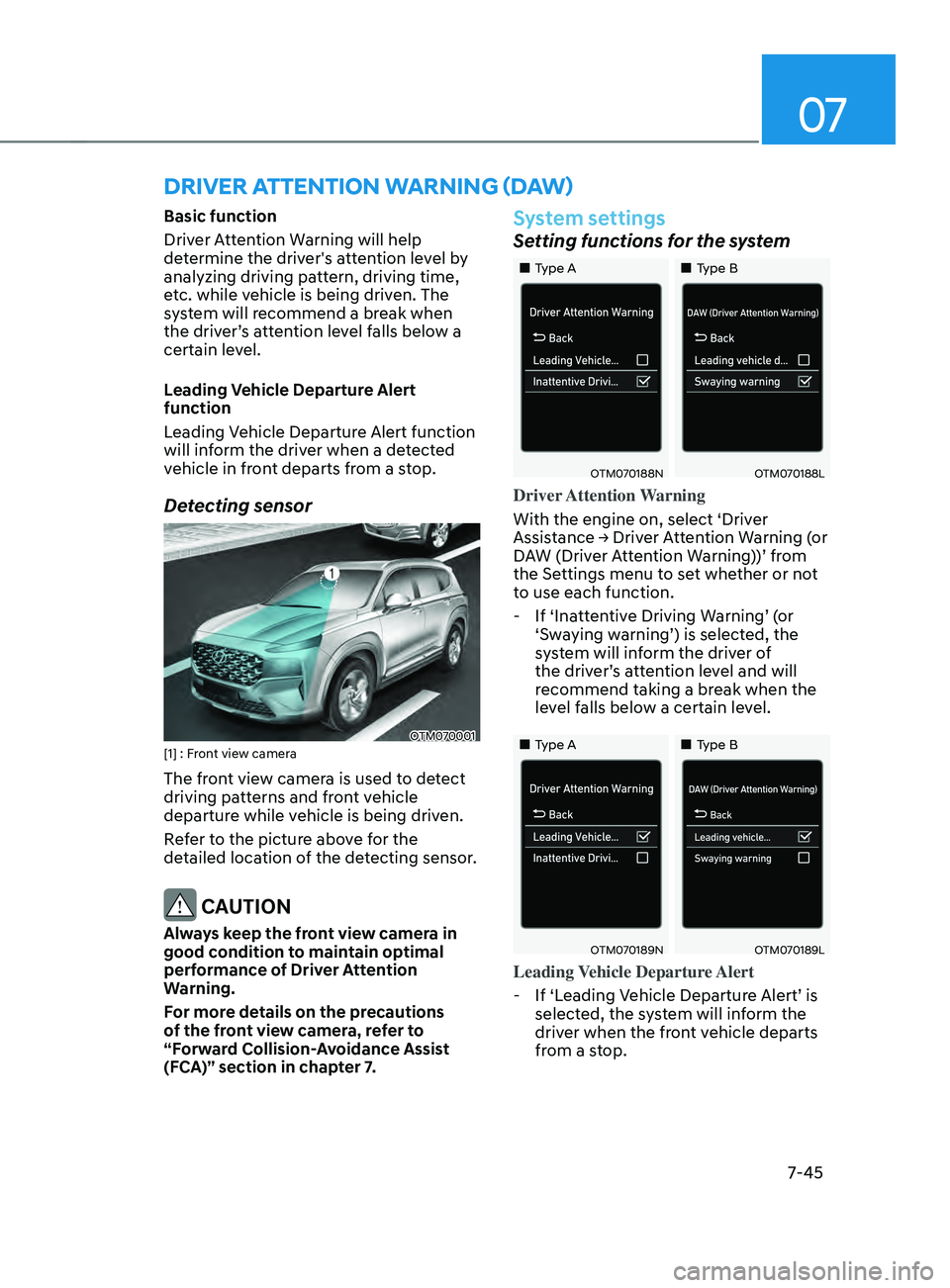
Detecting sensor
OTM070001[1] : Front view camera
The front view camera is used to detect
driving patterns and front vehicle
departure while vehicle is being driven.
Refer to the picture above for the
detailed location of the detecting sensor.
CAUTION
Always keep the front view camera in
good condition to maintain optimal
performance of Driver Attention
Warning.
For more details on the precautions
of the front view camera, refer to
“Forward Collision-Avoidance Assist
(FCA)” section in chapter 7.
System settings
Setting functions for the system
„„Type A„„Type B
OTM070188NOTM070188L
Driver Attention Warning
With the engine on, select ‘Driver
Assistance
→ Driv
er
A
ttention
W
arning
(
or
DA
W (Driver Attention Warning))’ from
the Settings menu to set whether or not
to use each function.
- If ‘Inatt
entive Driving Warning’ (or
‘Swaying warning’) is selected, the
system will inform the driver of
the driver’s attention level and will
recommend taking a break when the
level falls below a certain level.
„„Type A „„Type B
OTM070189NOTM070189L
Leading Vehicle Departure Alert
- If ‘Leading V
ehicle Departure Alert’ is
selected, the system will inform the
driver when the front vehicle departs
from a stop.
Page 430 of 636
Driver assistance system
7-48
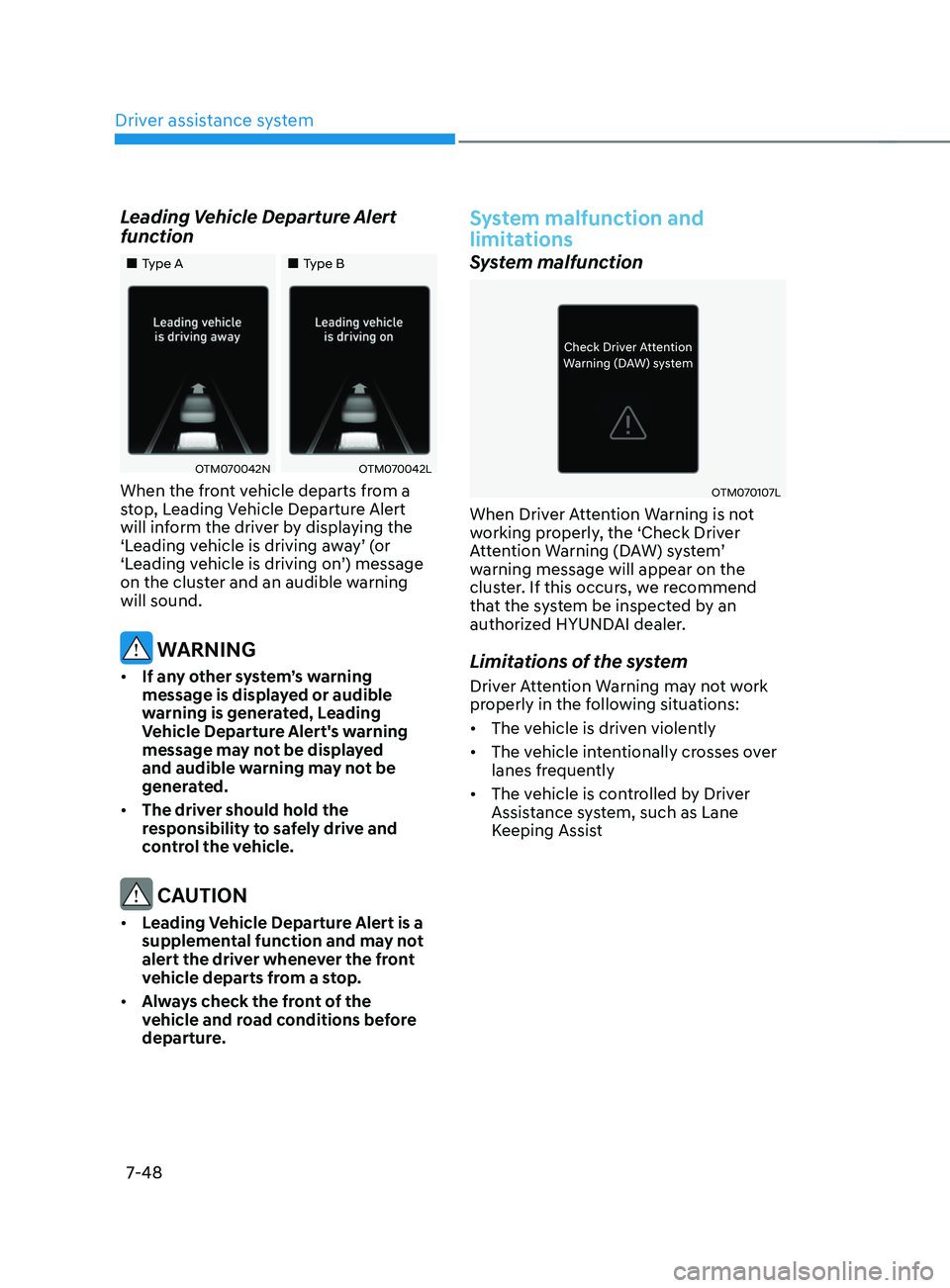
Leading Vehicle Departure Alert
function
„„Type A„„Type B
OTM070042NOTM070042L
When the front vehicle departs from a
stop, Leading Vehicle Departure Alert
will inform the driver by displaying the
‘Leading vehicle is driving away’ (or
‘Leading vehicle is driving on’) message
on the cluster and an audible warning
will sound.
WARNING
• If any other system’s warning
message is displayed or audible
warning is generated, Leading
Vehicle Departure Alert's warning
message may not be displayed
and audible warning may not be
generated.
• The driver should hold the
responsibility to safely drive and
control the vehicle.
CAUTION
• Leading Vehicle Departure Alert is a
supplemental function and may not
alert the driver whenever the front
vehicle departs from a stop.
• Always check the front of the
vehicle and road conditions before
departure.
System malfunction and
limitations
System malfunction
OTM070107L
When Driver Attention Warning is not
working properly, the ‘Check Driver
Attention Warning (DAW) system’
warning message will appear on the
cluster. If this occurs, we recommend
that the system be inspected by an
authorized HYUNDAI dealer.
Limitations of the system
Driver Attention Warning may not work
properly in the following situations:
• The vehicle is driven violently
• The vehicle intentionally crosses over
lanes frequently
• The vehicle is controlled by Driver
Assistance system, such as Lane
Keeping Assist
Page 431 of 636
![HYUNDAI SANTA FE 2021 User Guide 07
7-49
Leading Vehicle Departure Alert feature
• When the vehicle cuts in
OADAS021
OADAS022[A] : Your vehicle, [B] : Front vehicle
If a vehicle cuts in front of your
vehicle, Leading Departure Ale](/img/35/41163/w960_41163-430.png "HYUNDAI SANTA FE 2021 User Guide 07
7-49
Leading Vehicle Departure Alert feature
• When the vehicle cuts in
OADAS021
OADAS022[A] : Your vehicle, [B] : Front vehicle
If a vehicle cuts in front of your
vehicle, Leading Departure Ale")
07
7-49
Leading Vehicle Departure Alert feature
• When the vehicle cuts in
OADAS021
OADAS022[A] : Your vehicle, [B] : Front vehicle
If a vehicle cuts in front of your
vehicle, Leading Departure Alert may
not operate properly. •
When the vehicle ahead sharply steers
OADAS034[A] : Your vehicle, [B] : Front vehicle
If the vehicle in front makes a sharp
turn, such as to turn left or right or
make a U-turn, etc., Leading Vehicle
Departure Alert may not operate
properly.
• When the vehicle ahead abruptly
departures
OADAS024
If the vehicle in front abruptly
departures, Leading Vehicle Departure
Alert may not operate properly.
Page 432 of 636
Driver assistance system
7-50
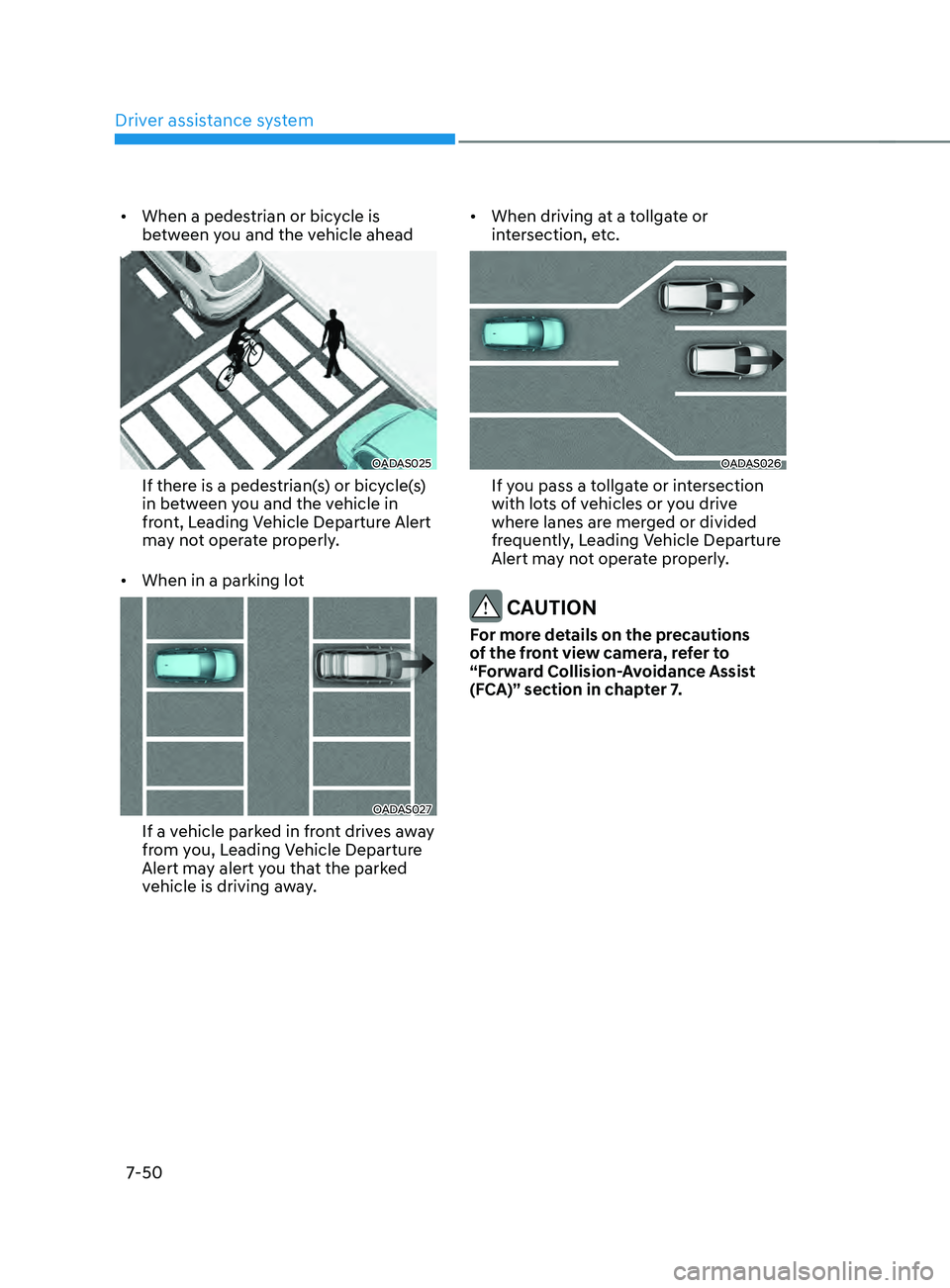
• When a pedestrian or bicycle is
between you and the vehicle ahead
OADAS025
If there is a pedestrian(s) or bicycle(s)
in between you and the vehicle in
front, Leading Vehicle Departure Alert
may not operate properly.
• When in a parking lot
OADAS027
If a vehicle parked in front drives away
from you, Leading Vehicle Departure
Alert may alert you that the parked
vehicle is driving away. •
When driving at a tollgate or
intersection, etc.
OADAS026
If you pass a tollgate or intersection
with lots of vehicles or you drive
where lanes are merged or divided
frequently, Leading Vehicle Departure
Alert may not operate properly.
CAUTION
For more details on the precautions
of the front view camera, refer to
“Forward Collision-Avoidance Assist
(FCA)” section in chapter 7.
Page 526 of 636
Emergency situations
8-8
6. If you cannot find the cause of the
overheating, wait until the engine
temperature has returned to normal.
Then, if coolant has been lost,
carefully add coolant to the reservoir
to bring the fluid level in the reservoir
up to the halfway mark.
7.
Proceed with caution, k
eeping alert
for further signs of overheating.
If overheating happens again,
we recommend that you call an
authorized HYUNDAI dealer for
assistance. CAUTION
• Serious loss of coolant indicates a
leak in the cooling system and we
recommend the system be checked
by an authorized HYUNDAI dealer.
• When the engine overheats from
low engine coolant, suddenly adding
engine coolant may cause cracks
in the engine. To prevent damage,
add engine coolant slowly in small
quantities. It may require several
refilling cycles to properly fill the
engine cooling system. If necessary,
an authorized HYUNDAI dealer
should be consulted to perform this
task.