remote start HYUNDAI SANTA FE 2021 User Guide
[x] Cancel search | Manufacturer: HYUNDAI, Model Year: 2021, Model line: SANTA FE, Model: HYUNDAI SANTA FE 2021Pages: 636, PDF Size: 81.2 MB
Page 289 of 636

Before driving ........................................................................\
............................6-4Before entering the vehicle ........................................................................\
................6-4
Bef ore starting ........................................................................\
..................................... 6-4
Ignition switch ........................................................................\
...........................6-5Key ignition switch ........................................................................\
............................... 6-5
Ke y ignition switch positions ........................................................................\
.............. 6-6
S
tarting the engine
........................................................................\
............................... 6
-7
Engine Start/Stop button ........................................................................\
.........6-9Engine Stop/Start button positions ........................................................................\
..6-10
S tarting the engine ........................................................................\
.............................. 6-
11
Turning off the engine
........................................................................\
........................ 6-
12
Remote start
........................................................................\
....................................... 6-
13
Automatic transmission ........................................................................\
..........6-14Automatic transmission operation ........................................................................\
....6-14
L CD display message (button type) ........................................................................\
.. 6-19
P
addle shifter (Manual shift mode)
........................................................................\
.. 6-20
Good driving pr
actices
........................................................................\
....................... 6-
21
Dual clutch transmission ........................................................................\
........6-23Dual clutch transmission operation ........................................................................\
..6-23
P arking ........................................................................\
............................................... 6-
30
LCD display message (button type)
........................................................................\
. 6-30
P
addle shifter (Manual shifter mode)
....................................................................... 6-32
Good driving pr
actices
........................................................................\
...................... 6-
33
Braking system ........................................................................\
........................6-34Power-assist brakes ........................................................................\
...........................6-34
Disc br akes wear indicator ........................................................................\
................ 6-34
Electronic Parking Brake (EPB)
........................................................................\
......... 6-35
A
uto Hold (if equipped)
........................................................................\
..................... 6-
39
Anti-lock Brake System (ABS)
........................................................................\
........... 6-43
Electronic S
tability Control (ESC)
........................................................................\
.... 6-44
V
ehicle Stability Management (VSM)
...................................................................... 6-4
7
Hill-Start Assist Control (HAC)
........................................................................\
......... 6-48
Do
wnhill Brake Control (DBC)
........................................................................\
......... 6-48
Good br
aking practices
........................................................................\
...................... 6-51
Four wheel drive (4WD) ........................................................................\
..........6-52Four Wheel Drive (4WD) operation ........................................................................\
...6-53
Emer gency precautions ........................................................................\
.................... 6-58
R
educing the risk of a rollover
........................................................................\
.......... 6-59
6. Driving your vehicle
Driving your vehicle
6
Page 301 of 636
06
6-13
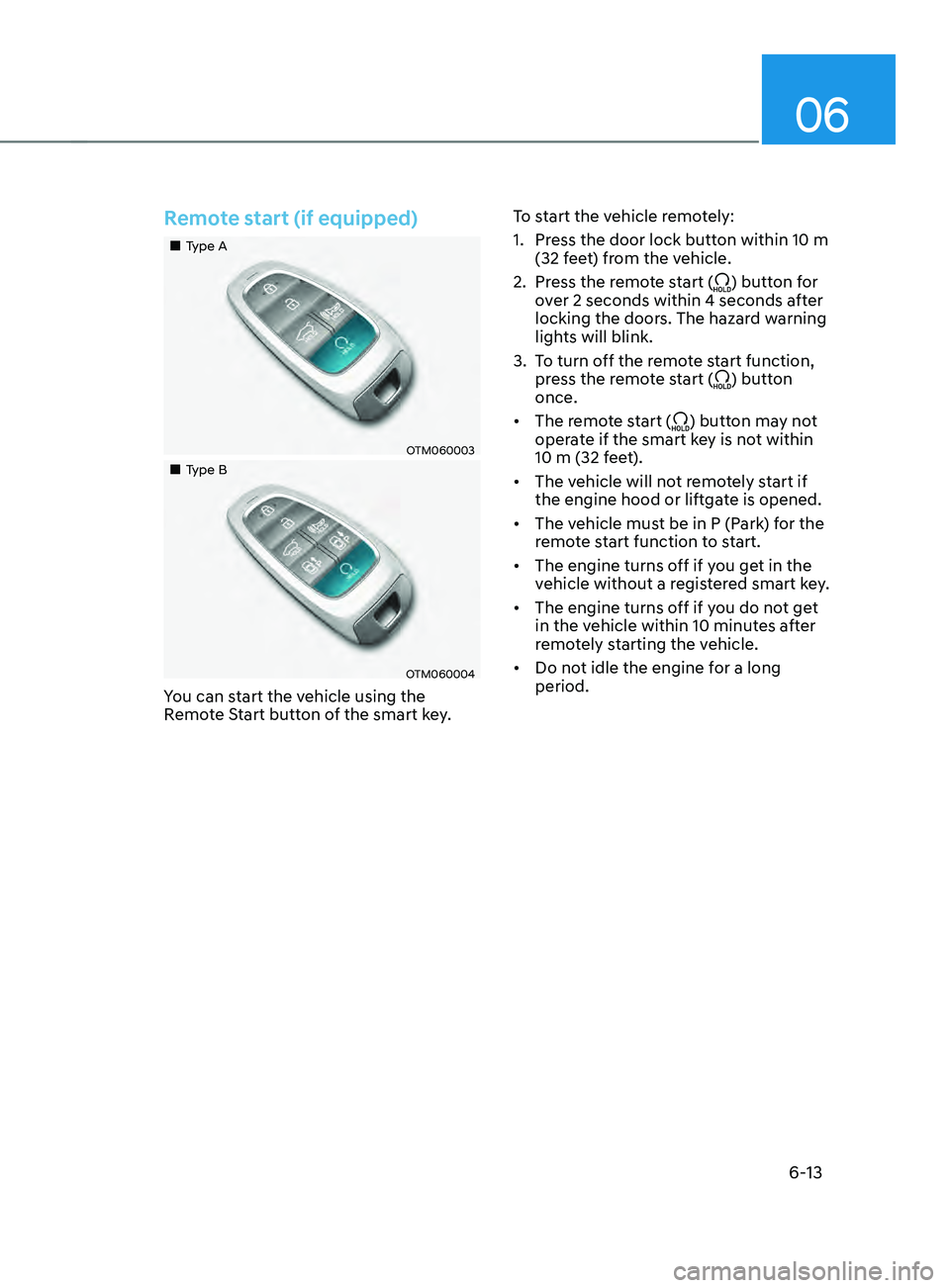
Remote start (if equipped)
„„Type A
OTM060003
„„Type B
OTM060004
You can start the vehicle using the
Remote Start button of the smart key.To start the vehicle remotely:
1.
Press the door lock butt
on within 10 m
(32 feet) from the vehicle.
2.
Press the r
emote start (
) button for
over 2 seconds within 4 seconds after
locking the doors. The hazard warning
lights will blink.
3.
To turn o
ff the remote start function,
press the remote start (
) button
once.
• The remote start (
) button may not
operate if the smart key is not within
10 m (32 feet).
• The vehicle will not remotely start if
the engine hood or liftgate is opened.
• The vehicle must be in P (Park) for the
remote start function to start.
• The engine turns off if you get in the
vehicle without a registered smart key.
• The engine turns off if you do not get
in the vehicle within 10 minutes after
remotely starting the vehicle.
• Do not idle the engine for a long
period.
Page 439 of 636
07
7-57
„„Type A„„Type B
OTM070142NOTM070142L
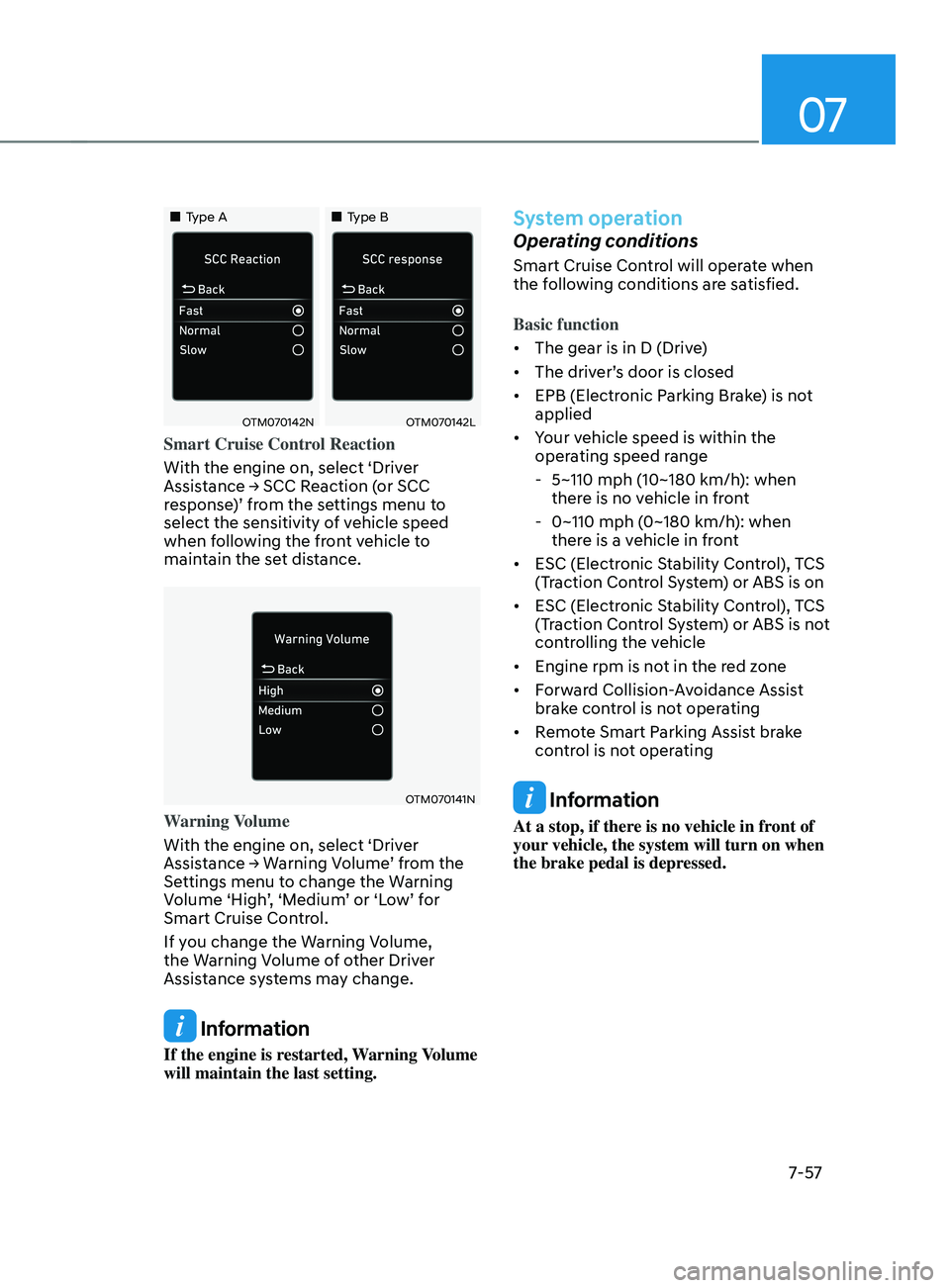
Smart Cruise Control Reaction
With the engine on, select ‘Driver
Assistance
→ SCC R
eaction
(
or
SCC response
)’ from the settings menu to
select the sensitivity of vehicle speed
when following the front vehicle to
maintain the set distance.
OTM070141N
Warning Volume
With the engine on, select ‘Driver
Assistance
→ W
arning
V
olume’
fr
om
the Settings menu t
o change the Warning
Volume ‘High’, ‘Medium’ or ‘Low’ for
Smart Cruise Control.
If you change the Warning Volume,
the Warning Volume of other Driver
Assistance systems may change.
Information
If the engine is restarted, Warning Volume
will maintain the last setting.
System operation
Operating conditions
Smart Cruise Control will operate when
the following conditions are satisfied.
Basic function
• The gear is in D (Drive)
• The driver’s door is closed
• EPB (Electronic Parking Brake) is not
applied
• Your vehicle speed is within the
operating speed range
- 5~110 mph (10~180 km/h): when
ther
e is no vehicle in front
- 0~110 mph (0~180 km/h
): when
there is a vehicle in front
• ESC (Electronic Stability Control), TCS
(Traction Control System) or ABS is on
• ESC (Electronic Stability Control), TCS
(Traction Control System) or ABS is not
controlling the vehicle
• Engine rpm is not in the red zone
• Forward Collision-Avoidance Assist
brake control is not operating
• Remote Smart Parking Assist brake
control is not operating
Information
At a stop, if there is no vehicle in front of
your vehicle, the system will turn on when
the brake pedal is depressed.
Page 507 of 636
07
7-125
System operation
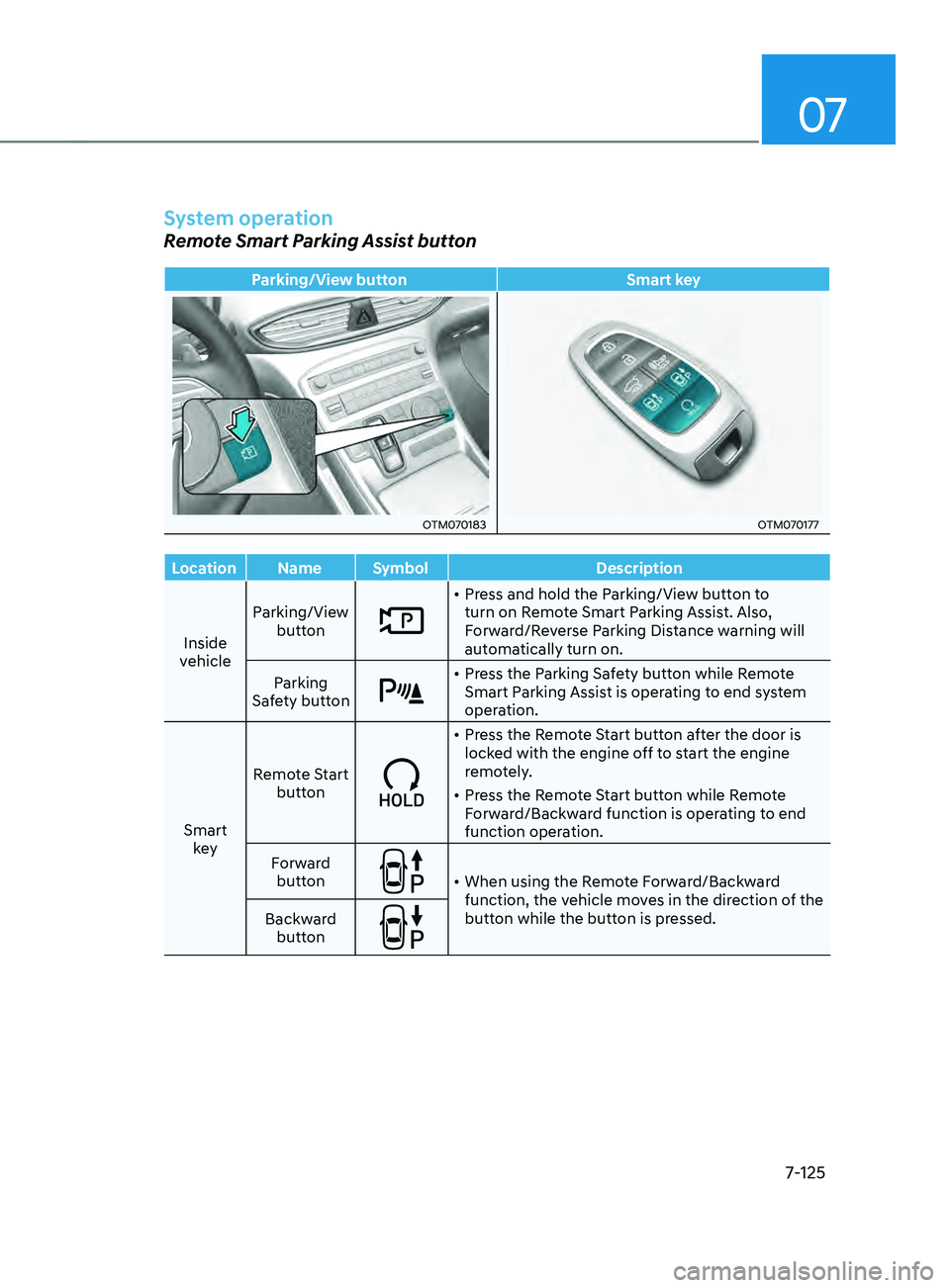
Remote Smart Parking Assist button
Parking/View buttonSmart key
OTM070183OTM070177
Location Name Symbol Description
Inside
vehicle Parking/View
button
• Press and hold the Parking/View button to
turn on Remote Smart Parking Assist. Also,
Forward/Reverse Parking Distance warning will
automatically turn on.
Parking
Safety button
• Press the Parking Safety button while Remote
Smart Parking Assist is operating to end system
operation.
Smart key Remote Start
button
• Press the Remote Start button after the door is
locked with the engine off to start the engine
remotely.
• Press the Remote Start button while Remote
Forward/Backward function is operating to end
function operation.
Forward button
• When using the Remote Forward/Backward
function, the vehicle moves in the direction of the
button while the button is pressed.
Backward
button
Page 508 of 636
Driver assistance system
7-126
Remote Forward/Backward
Operating order
Remote Forward/Backward operates in
the following order:
1.
Getting r
eady to remotely move
forward and in reverse
2.
Remo
tely moving forward and in
reverse
1. Getting ready to remotely move forward
and in r
everse
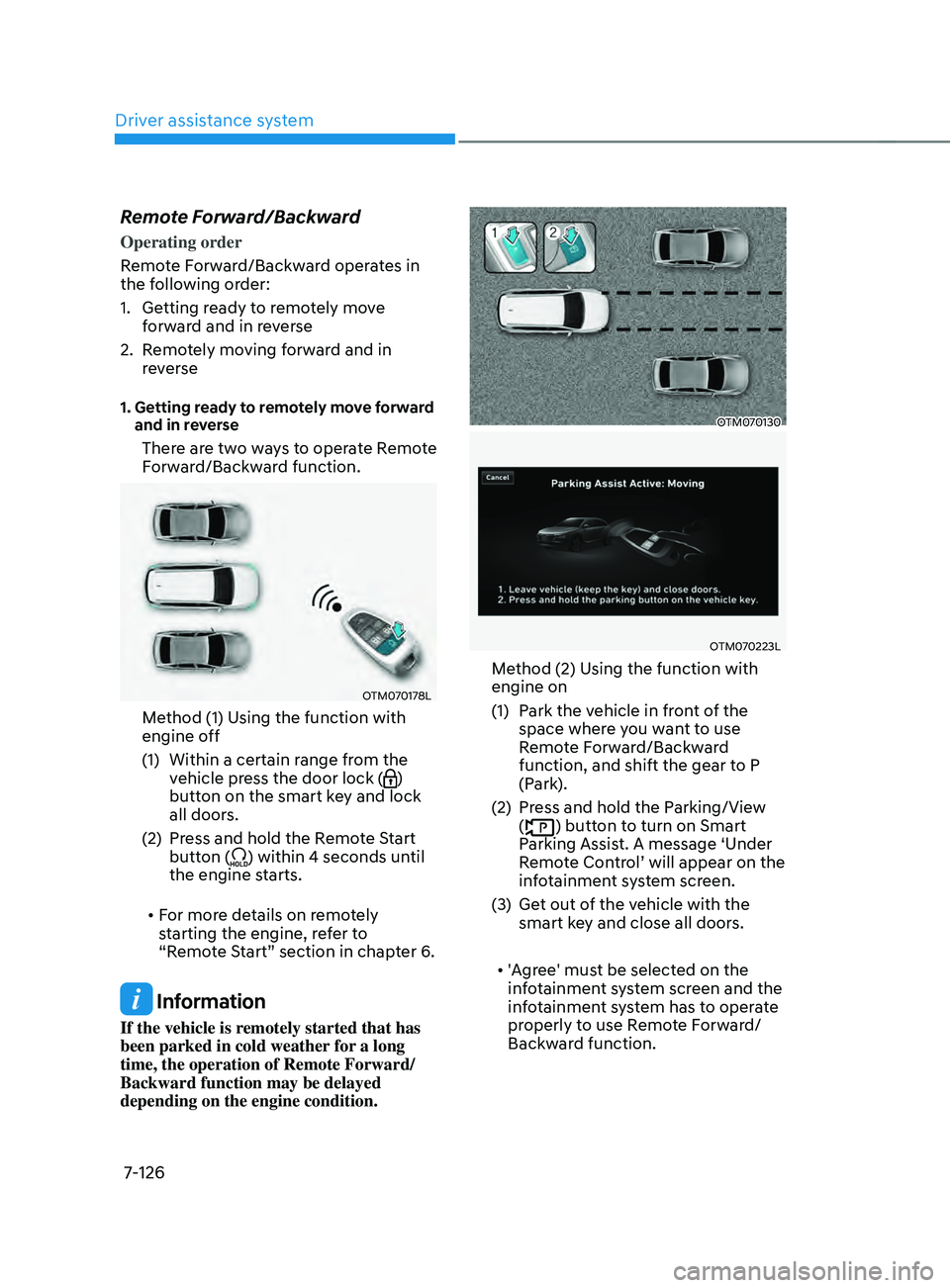
There are two ways to operate Remote
Forward/Backward function.
OTM070178L
Method (1) Using the function with
engine off
(1)
Within a certain range fr
om the
vehicle press the door lock (
)
button on the smart key and lock
all doors.
(2)
Press and hold the R
emote Start
button (
) within 4 seconds until
the engine starts.
• For more details on remotely
starting the engine, refer to
“Remote Start” section in chapter 6.
Information
If the vehicle is remotely started that has
been parked in cold weather for a long
time, the operation of Remote Forward/
Backward function may be delayed
depending on the engine condition.
OTM070130
OTM070223L
Method (2) Using the function with
engine on
(1)
Park the v
ehicle in front of the
space where you want to use
Remote Forward/Backward
function, and shift the gear to P
(Park).
(2)
Press and hold the P
arking/View
(
) button to turn on Smart
Parking Assist. A message ‘Under
Remote Control’ will appear on the
infotainment system screen.
(3)
Get out o
f the vehicle with the
smart key and close all doors.
• 'Agree' must be selected on the
infotainment system screen and the
infotainment system has to operate
properly to use Remote Forward/
Backward function.
Page 509 of 636
07
7-127
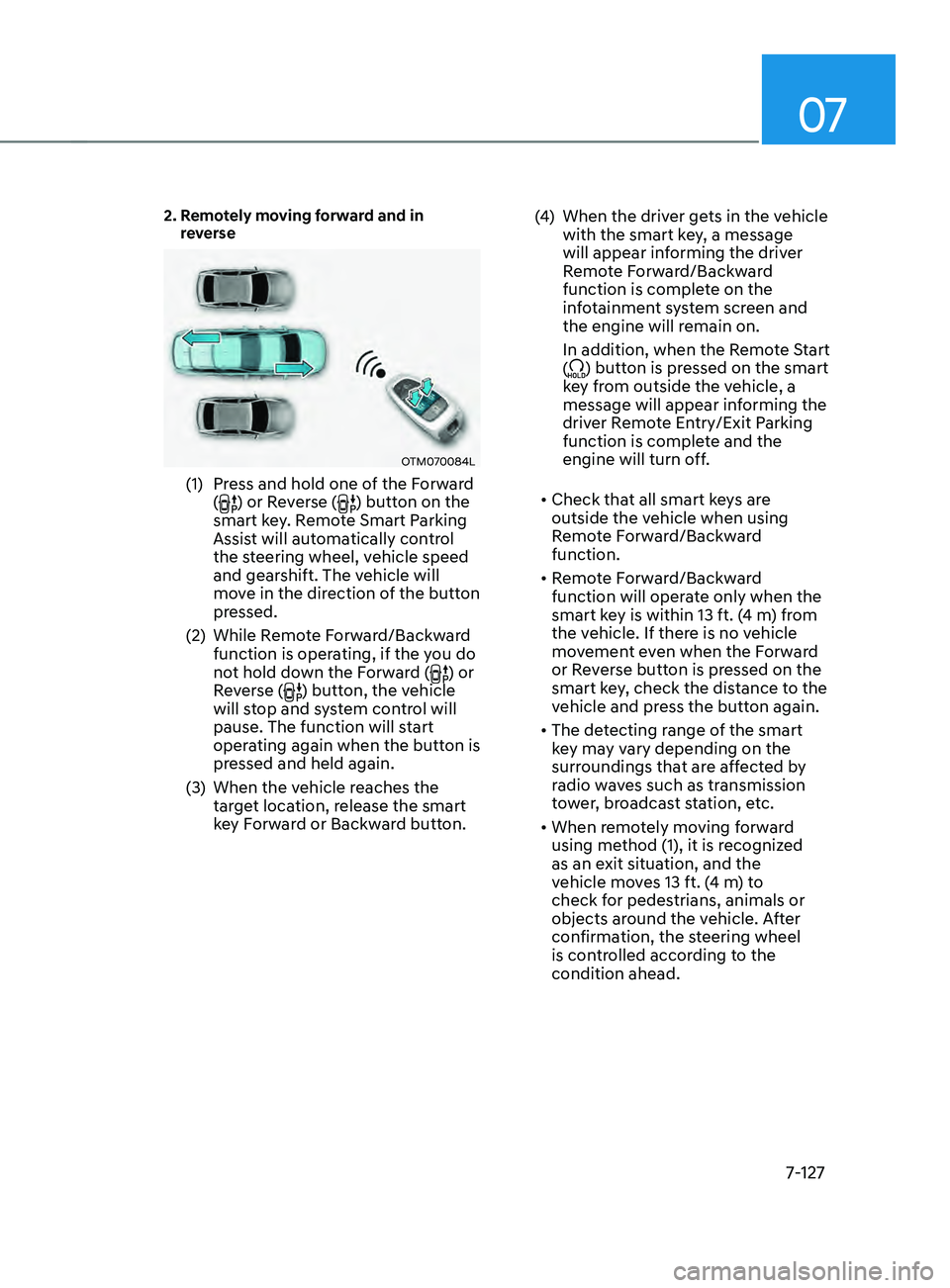
2. Remotely moving forward and in
reverse
OTM070084L
(1) Press and hold one of the Forward
() or Reverse () button on the
smart key. Remote Smart Parking
Assist will automatically control
the steering wheel, vehicle speed
and gearshift. The vehicle will
move in the direction of the button
pressed.
(2)
While Remo
te Forward/Backward
function is operating, if the you do
not hold down the Forward (
) or
Reverse () button, the vehicle
will stop and system control will
pause. The function will start
operating again when the button is
pressed and held again.
(3)
When the vehicle r
eaches the
target location, release the smart
key Forward or Backward button. (4)
When the driver ge
ts in the vehicle
with the smart key, a message
will appear informing the driver
Remote Forward/Backward
function is complete on the
infotainment system screen and
the engine will remain on.
In addition, when the Remote Start
(
) button is pressed on the smart
key from outside the vehicle, a
message will appear informing the
driver Remote Entry/Exit Parking
function is complete and the
engine will turn off.
• Check that all smart keys are
outside the vehicle when using
Remote Forward/Backward
function.
• Remote Forward/Backward
function will operate only when the
smart key is within 13 ft. (4 m) from
the vehicle. If there is no vehicle
movement even when the Forward
or Reverse button is pressed on the
smart key, check the distance to the
vehicle and press the button again.
• The detecting range of the smart
key may vary depending on the
surroundings that are affected by
radio waves such as transmission
tower, broadcast station, etc.
• When remotely moving forward
using method (1), it is recognized
as an exit situation, and the
vehicle moves 13 ft. (4 m) to
check for pedestrians, animals or
objects around the vehicle. After
confirmation, the steering wheel
is controlled according to the
condition ahead.
Page 511 of 636
07
7-129
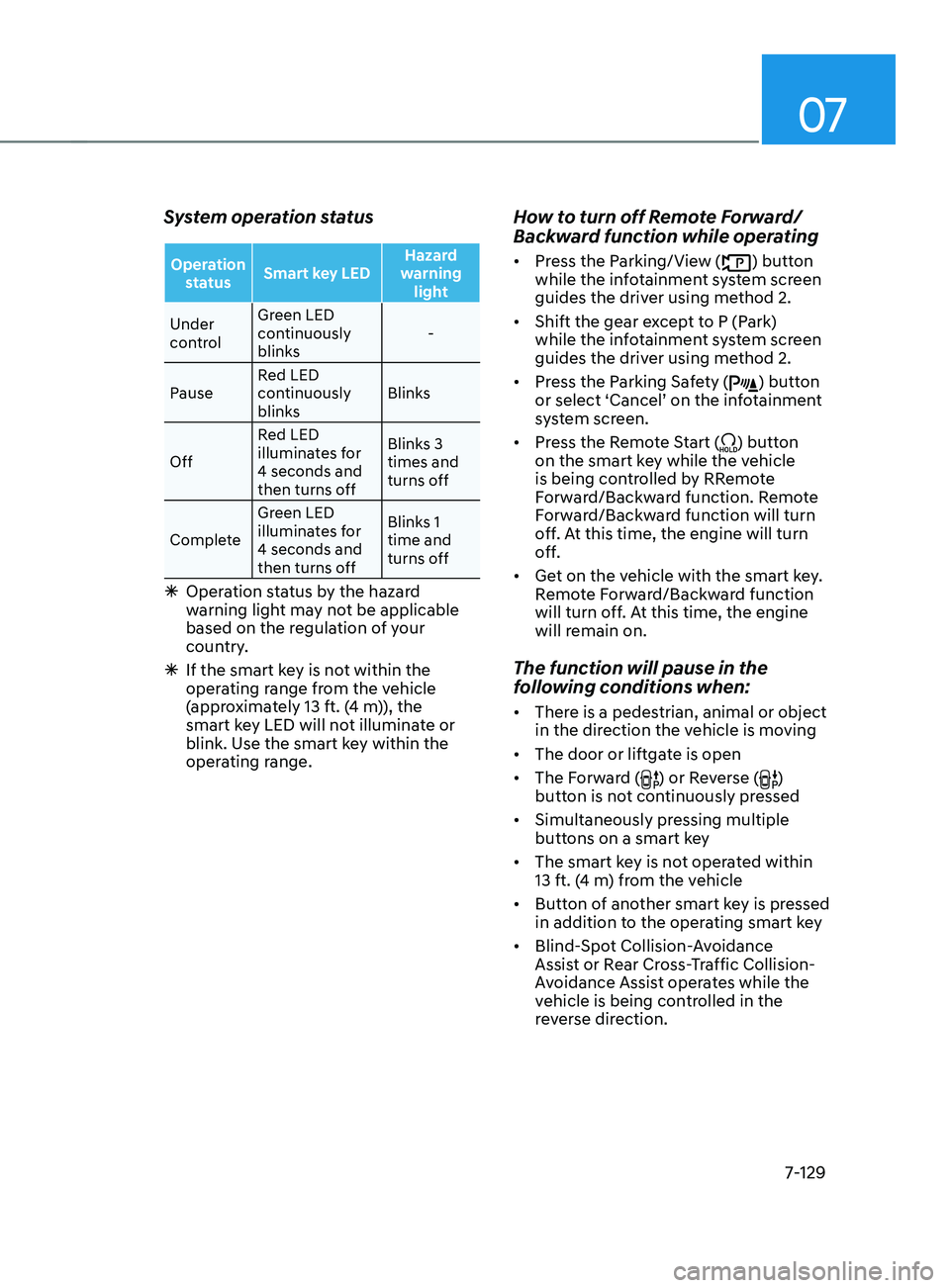
System operation status
Operation status Smart key LED Hazard
warning light
Under
control Green LED
continuously
blinks
-
Pause Red LED
continuously
blinks Blinks
Off Red LED
illuminates for
4 seconds and
then turns off Blinks 3
times and
turns off
Complete Green LED
illuminates for
4 seconds and
then turns off Blinks 1
time and
turns off
Ã
Operation status by the hazard
w
arning light may not be applicable
based on the regulation of your
country.
à If the smart ke
y is not within the
operating range from the vehicle
(approximately 13 ft. (4 m)), the
smart key LED will not illuminate or
blink. Use the smart key within the
operating range.
How to turn off Remote Forward/
Backward function while operating
• Press the Parking/View () button
while the infotainment system screen
guides the driver using method 2.
• Shift the gear except to P (Park)
while the infotainment system screen
guides the driver using method 2.
• Press the Parking Safety (
) button
or select ‘Cancel’ on the infotainment
system screen.
• Press the Remote Start (
) button
on the smart key while the vehicle
is being controlled by RRemote
Forward/Backward function. Remote
Forward/Backward function will turn
off. At this time, the engine will turn
off.
• Get on the vehicle with the smart key.
Remote Forward/Backward function
will turn off. At this time, the engine
will remain on.
The function will pause in the
following conditions when:
• There is a pedestrian, animal or object
in the direction the vehicle is moving
• The door or liftgate is open
• The Forward (
) or Reverse ()
button is not continuously pressed
• Simultaneously pressing multiple
buttons on a smart key
• The smart key is not operated within
13 ft. (4 m) from the vehicle
• Button of another smart key is pressed
in addition to the operating smart key
• Blind-Spot Collision-Avoidance
Assist or Rear Cross-Traffic Collision-
Avoidance Assist operates while the
vehicle is being controlled in the
reverse direction.
Page 512 of 636
Driver assistance system
7-130
• The vehicle moves 22 ft. (7 m)
while the smart key is pressed with
Remote Forward/Backward function
(maximum travel distance per button
press)
When Remote Forward/Backward
function is paused, the vehicle will stop.
If the condition that made the function
to pause disappears, the function may
operate again.
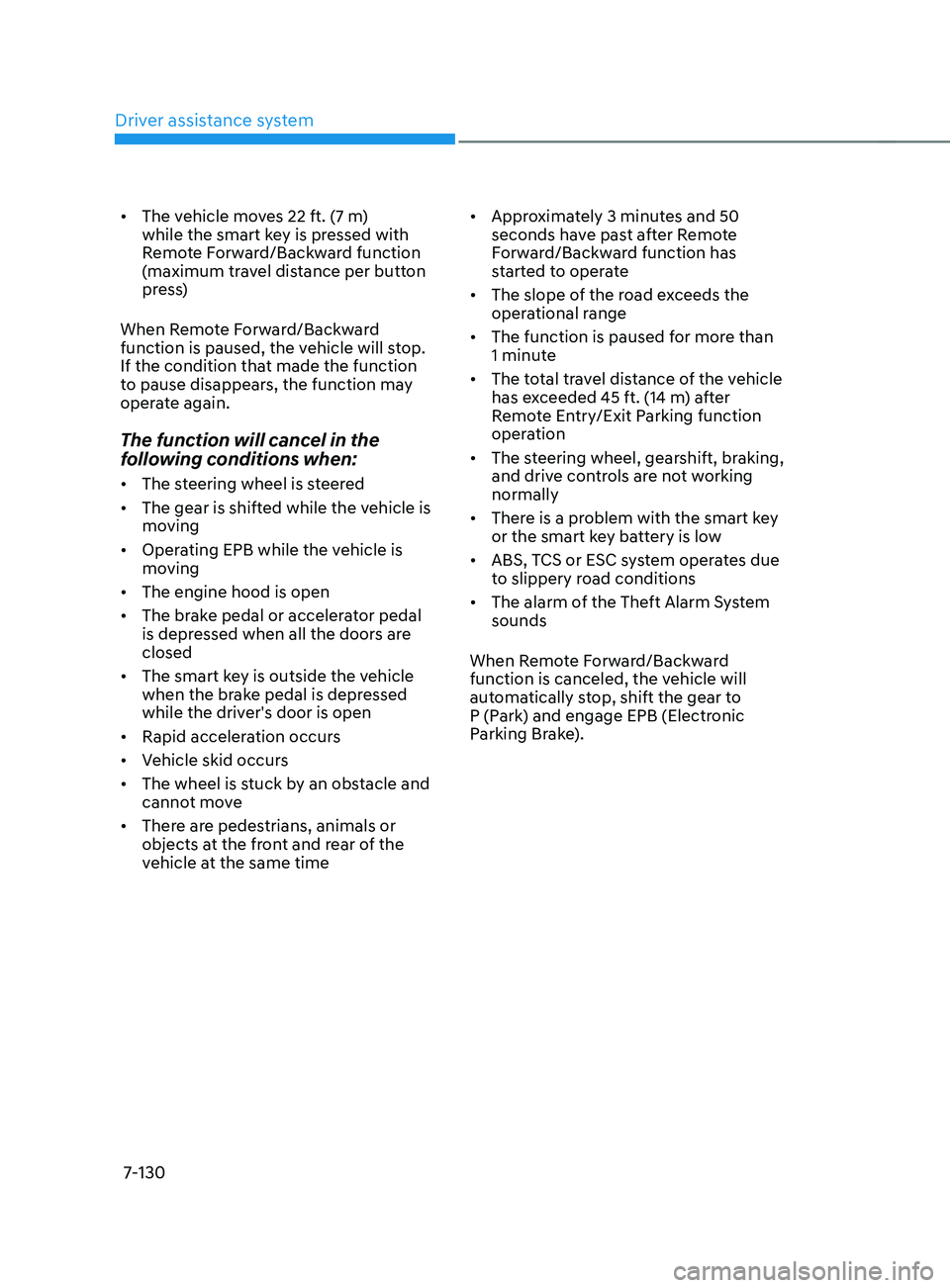
The function will cancel in the
following conditions when:
• The steering wheel is steered
• The gear is shifted while the vehicle is
moving
• Operating EPB while the vehicle is
moving
• The engine hood is open
• The brake pedal or accelerator pedal
is depressed when all the doors are
closed
• The smart key is outside the vehicle
when the brake pedal is depressed
while the driver's door is open
• Rapid acceleration occurs
• Vehicle skid occurs
• The wheel is stuck by an obstacle and
cannot move
• There are pedestrians, animals or
objects at the front and rear of the
vehicle at the same time •
Approximately 3 minutes and 50
seconds have past after Remote
Forward/Backward function has
started to operate
• The slope of the road exceeds the
operational range
• The function is paused for more than
1 minute
• The total travel distance of the vehicle
has exceeded 45 ft. (14 m) after
Remote Entry/Exit Parking function
operation
• The steering wheel, gearshift, braking,
and drive controls are not working
normally
• There is a problem with the smart key
or the smart key battery is low
• ABS, TCS or ESC system operates due
to slippery road conditions
• The alarm of the Theft Alarm System
sounds
When Remote Forward/Backward
function is canceled, the vehicle will
automatically stop, shift the gear to
P (Park) and engage EPB (Electronic
Parking Brake).
Page 530 of 636
Emergency situations
8-12
TPMS malfunction
indicator
The TPMS Malfunction Indicator
will illuminate after it blinks for
approximately one minute when there
is a problem with the Tire Pressure
Monitoring System.
We recommend that you have the
system checked by an authorized
HYUNDAI dealer as soon as possible.
NOTICE
If there is a malfunction with the
TPMS, the individual tire pressures
in the cluster LCD display will not be
available. Have the system checked by
an authorized HYUNDAI dealer as soon
as possible.
NOTICE
The TPMS Malfunction Indicator may
illuminate after blinking for one minute
if the vehicle is near electric power
supply cables or radio transmitters
such as police stations, government
and public offices, broadcasting
stations, military installations, airports,
transmitting towers, etc.
Additionally, the TPMS Malfunction
Indicator may illuminate if snow chains
are used or electronic devices such as
computers, chargers, remote starters,
navigation, etc. This may interfere with
normal operation of the TPMS.
Changing a tire with TPMS
If you have a flat tire, the Low Tire
Pressure and Position telltales will come
on. We recommend that you have the flat
tire repaired by an authorized HYUNDAI
dealer as soon as possible or replace the
flat tire with the spare tire.
NOTICE
It is recommended that you do not
use a puncture-repairing agent not
approved by HYUNDAI dealer or the
equivalent specified for your vehicle to
repair and/or inflate a low pressure tire.
Tire sealant not approved by HYUNDAI
dealer or the equivalent specified for
your vehicle may damage the tire
pressure sensor.
The spare tire (if equipped) does not
come with a tire pressure monitoring
sensor. When the low pressure tire or
the flat tire is replaced with the spare
tire, the Low Tire Pressure Telltale will
remain on. Also, the TPMS Malfunction
Indicator will illuminate after blinking
for one minute if the vehicle is driven
at speed above 15.5 mph (25 km/h) for
approximately 10 minutes.
Once the original wheel equipped with
a tire pressure monitoring sensor is
reinflated to the recommended pressure
and reinstalled on the vehicle, the
Low Tire Pressure Telltale and TPMS
Malfunction Indicator will go off within a
few minutes of driving.
Page 627 of 636

I
I-5
Dual clutch transmission........................................................................\
.............. 6-23
Dual clutch transmission operation ..................................................................6-23
Good driving practices ........................................................................\
............ 6-33
LCD display message (button type) .................................................................6-30
Paddle shifter (Manual shifter mode) ...............................................................6-32
Parking ........................................................................\
..................................... 6-30
E
Emer
gency commodity
........................................................................\
................ 8-32
Fire extinguisher ........................................................................\
....................... 8-32
First aid kit ........................................................................\
............................... 8-32
Tire pressure gauge ........................................................................\
..................8-32
Triangle reflector ........................................................................\
...................... 8-32
Emission control system
........................................................................\
.............. 9-69
Gasoline Particulate Filter (GPF) .....................................................................9-72
Engine
........................................................................\
............................................ 2-8
Engine compartment
........................................................................\
...................... 2-7
Engine compartment
........................................................................\
...................... 9-3
Engine coolant /liquid-cooled intercooler coolant
............................................... 9-18
Changing coolant ........................................................................\
...................... 9-20
Checking the coolant level ........................................................................\
.......9-18
Engine number
........................................................................\
............................. 2-16
Engine oil
........................................................................\
..................................... 9-16
Checking the engine oil and filter ....................................................................9-17
Checking the engine oil level ........................................................................\
... 9-16
Engine Start/Stop button
........................................................................\
................ 6-9
Engine Stop/Start button positions ...................................................................6-10
Remote start ........................................................................\
.............................. 6-13
Starting the engine ........................................................................\
....................6-1
1
Turning of
f the engine
........................................................................\
.............. 6-12
Explanation of scheduled maintenance items
...................................................... 9-14
Fuel filter (for gasoline engine) ........................................................................\
9-14
Parking brake ........................................................................\
............................ 9-15
Exterior features
........................................................................\
........................... 5-67
Fuel filler door ........................................................................\
.......................... 5-77
Hood ........................................................................\
......................................... 5-67
Liftgate ........................................................................\
.....................................5-68
Power liftgate ........................................................................\
...........................5-70
Smart liftgate ........................................................................\
............................ 5-75