steering HYUNDAI SANTA FE 2021 Owner's Manual
[x] Cancel search | Manufacturer: HYUNDAI, Model Year: 2021, Model line: SANTA FE, Model: HYUNDAI SANTA FE 2021Pages: 636, PDF Size: 81.2 MB
Page 143 of 636
04
4-45
„„Type A„„Type B
OTMA040016OTMA040017
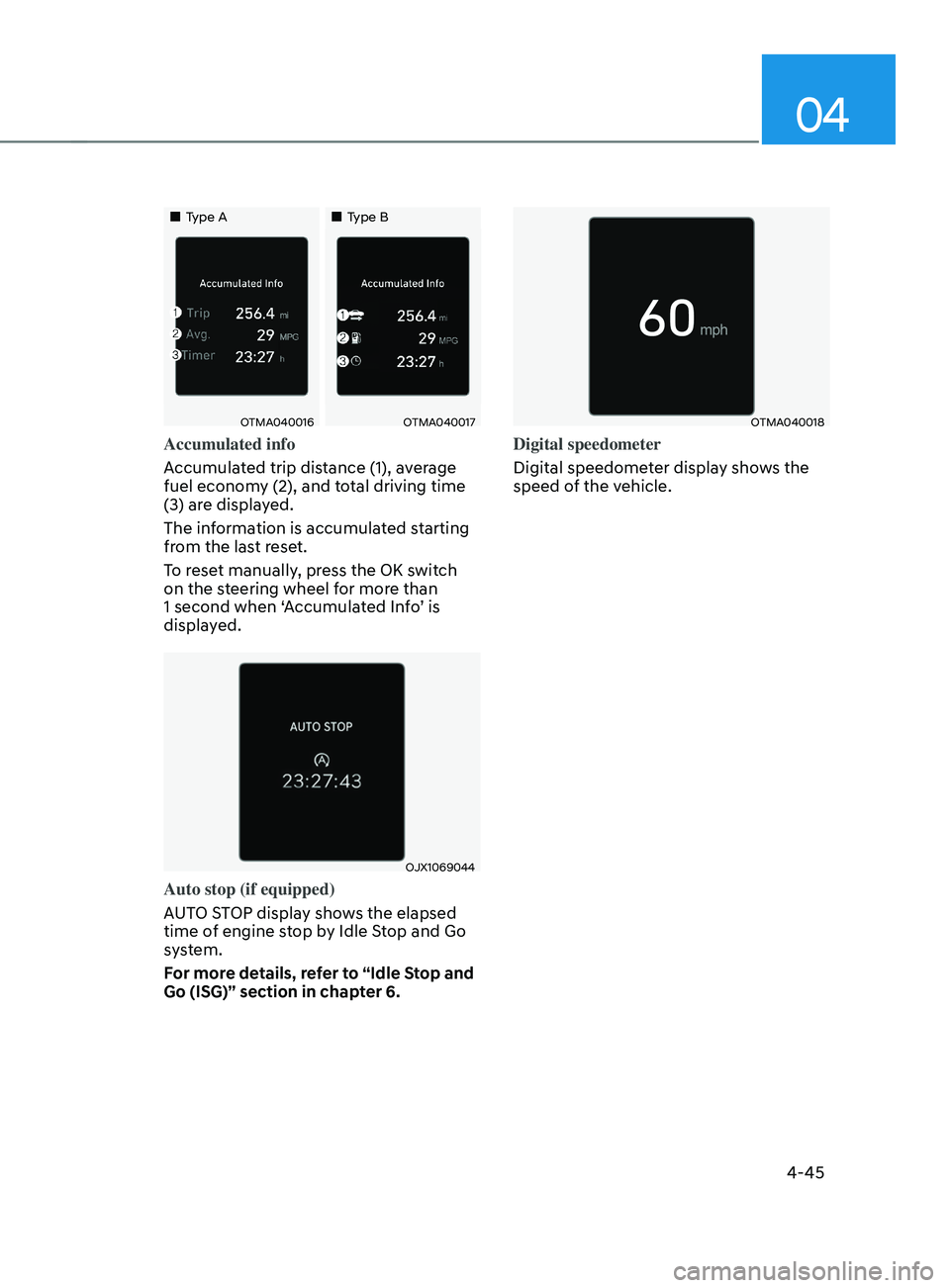
Accumulated info
Accumulated trip distance (1), average
fuel economy (2), and total driving time
(3) are displayed.
The information is accumulated starting
from the last reset.
To reset manually, press the OK switch
on the steering wheel for more than
1 second when ‘Accumulated Info’ is
displayed.
OJX1069044
Auto stop (if equipped)
AUTO STOP display shows the elapsed
time of engine stop by Idle Stop and Go
system.
For more details, refer to “Idle Stop and
Go (ISG)” section in chapter 6.
OTMA040018
Digital speedometer
Digital speedometer display shows the
speed of the vehicle.
Page 145 of 636

Convenient features
Accessing your vehicle ........................................................................\
.............5-5Remote key ........................................................................\
........................................... 5-5
Smart ke y ........................................................................\
..................................... .........5-8
Immobilizer system
........................................................................\
............................ 5-
14
Hyundai Digital Key
........................................................................\
............................. 5-
15
Door locks.......................................................................\
.................................. 5-31Operating door locks from outside the vehicle.........................................................5-31
Operating door locks from inside the vehicle ..........................................................5-
32
Auto door lock/unlock features........................................................................\
......... 5-35
Child-protector rear door locks
........................................................................\
......... 5-35
Electr
onic child safety lock
........................................................................\
................ 5-
36
Theft-alarm system ........................................................................\
.................5-38
In tegrated memory system
........................................................................\
.... 5-39
Storing memory positions ........................................................................\
................. 5-39
R ecalling memory positions ........................................................................\
............. 5-40
R
esetting the system
........................................................................\
........................ 5-40
E
asy access function
........................................................................\
.......................... 5-4
1
Steering wheel ........................................................................\
........................5-42Electric Power Steering (EPS) ........................................................................\
............5-42
Tilt / Telescopic s teering ........................................................................\
.................... 5-43
H
eated steering wheel
........................................................................\
....................... 5-43
H
orn........................................................................\
.................................................... 5-44
Mirrors ........................................................................\
..................................... 5-45Inside rearview mirror ........................................................................\
........................5-45
Side View mirr ors ........................................................................\
............................... 5-55
R
everse parking aid
........................................................................\
............................ 5-57
Windows ........................................................................\
.................................. 5-58Power windows ........................................................................\
..................................5-59
Panoramic sunroof ........................................................................\
..................5-62Sunshade ........................................................................\
............................................ 5-63
Sliding the sunroo f ........................................................................\
............................. 5-63
Tilting the sunr
oof
........................................................................\
............................. 5-64
Closing the sunr
oof
........................................................................\
........................... 5-64
R
esetting the sunroof
........................................................................\
........................ 5-65
Sunr
oof open warning
........................................................................\
...................... 5-66
5. Convenient features
5
Page 148 of 636

Infotainment system ........................................................................\
..............5-137USB Port ........................................................................\
............................................. 5-137
An tenna ........................................................................\
..................................... .........5-137
Steering wheel remote controls
........................................................................\
....... 5-137
In
fotainment system
........................................................................\
........................ 5-
138
Voice recognition
........................................................................\
............................. 5-
138
Bluetooth® Wireless Technology
........................................................................\
..... 5-139
H
ow vehicle radio works
........................................................................\
.................. 5-
139
Infotainment System specifications ............................................................5-143USB ........................................................................\
.................................................... 5-143
Blue tooth ........................................................................\
.......................................... 5-
144
Trademarks ........................................................................\
.............................5-144
5
Page 183 of 636
05
5-39
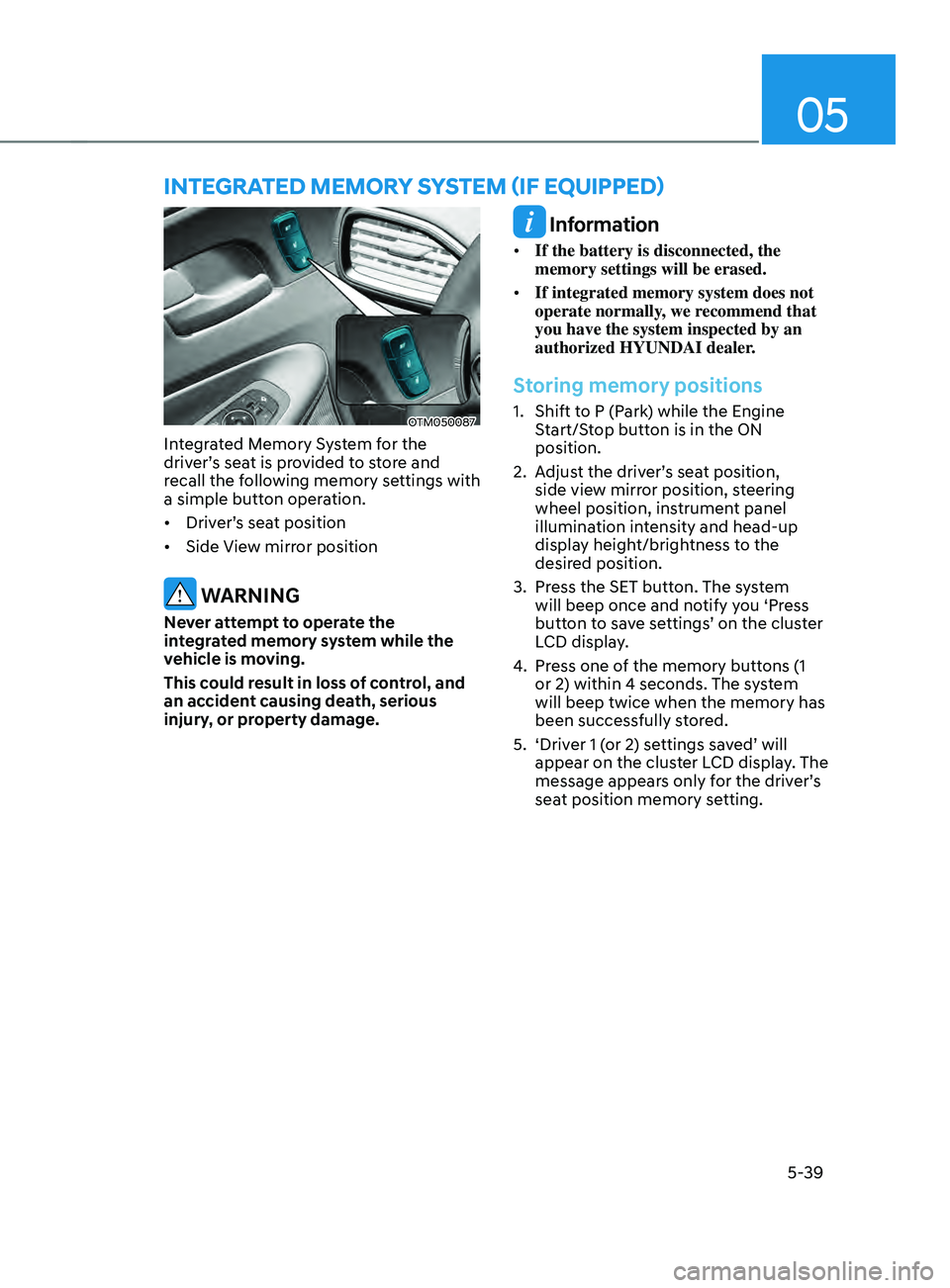
OTM050087
Integrated Memory System for the
driver’s seat is provided to store and
recall the following memory settings with
a simple button operation.
• Driver’s seat position
• Side View mirror position
WARNING
Never attempt to operate the
integrated memory system while the
vehicle is moving.
This could result in loss of control, and
an accident causing death, serious
injury, or property damage.
Information
• If the battery is disconnected, the
memory settings will be erased.
• If integrated memory system does not
operate normally, we recommend that
you have the system inspected by an
authorized HYUNDAI dealer.
Storing memory positions
1. Shift to P (Park) while the Engine
S
tart/Stop button is in the ON
position.
2.
Adjus
t the driver’s seat position,
side view mirror position, steering
wheel position, instrument panel
illumination intensity and head-up
display height/brightness to the
desired position.
3.
Press the SET butt
on. The system
will beep once and notify you ‘Press
button to save settings’ on the cluster
LCD display.
4.
Press one o
f the memory buttons (1
or 2) within 4 seconds. The system
will beep twice when the memory has
been successfully stored.
5.
‘Driver 1 (
or 2) settings saved’ will
appear on the cluster LCD display. The
message appears only for the driver’s
seat position memory setting.
InTEgRATED mEmOR Y sYsTEm (IF E QUIppED)
Page 184 of 636
Convenient features
5-40
Recalling memory positions
1. Shift to P (Park) while the Engine
Start/Stop button is in the ON
position.
2.
Press the desir
ed memory button (1
or 2). The system will beep once, and
then the driver’s seat position, side
view mirror position, steering wheel
position, instrument panel illumination
intensity and head-up display height/
brightness will automatically adjust to
the stored positions.
3.
‘Driver 1 (
or 2) settings applied’ will
appear on the cluster LCD display.
Information
• If you press the SET button or the
corresponding button which the
setting is being recalled, the setting will
temporarily deactivate. If you press the
other buttons, the setting of the pressed
button will activate.
For example, if you press the SET
button or number 1 button with the
number 1 setting in operation, the
setting will temporarily deactivate. If
you press the number 2 button, the
number 2 setting will activate.
• If you adjust the seat, rearview mirror,
steering wheel, instrument panel
illumination or head-up display while
recalling the stored positions, the pre-
set settings will become ineffective.
Resetting the system
Take the following procedures to reset
integrated memory system, when it does
not operate properly.
Resetting integrated memory
system
1. Stop the vehicle and open the driver’s
door with the E
ngine Start/Stop
button in the ON position and the
vehicle shifted to P (Park).
2.
Adjus
t the driver’s seat and seatback
to the foremost position.
3.
Press the SET butt
on and push
forward the driver’s seat movement
switch over 2 seconds simultaneously.
While resetting integrated memory
system
1. Resetting starts with a notification
sound.
2.
The driver’
s seat and seatback is
adjusted to the rearward position with
the notification sound.
3.
The driver’
s seat and seatback is
re-adjusted to the default position
(central position) with the notification
sound.
However, in the following cases, the
resetting procedure and the notification
sound may stop.
• The memory button is pressed.
• The seat control switch is operated.
• The gear is shifted out of P (Park).
• The driving speed exceeds
2 mph (3km/h).
• The driver’s door is closed.
Page 186 of 636
Convenient features
5-42
Electric Power Steering (EPS)
The system assists you with steering the
vehicle. If the vehicle is turned off or
if the power steering system becomes
inoperative, you may still steer the
vehicle, but it will require increased
steering effort.
Should you notice any change in the
effort required to steer during normal
vehicle operation, we recommend that
you have the system checked by an
authorized HYUNDAI dealer.
CAUTION
If Electric Power Steering does not
operate normally, the warning light
and the message ‘Check motor driven
power steering’ will illuminate on the
instrument cluster. You may steer the
vehicle, but it will require increased
steering efforts. We recommend that
you take your vehicle to an authorized
HYUNDAI dealer or to a service station
and have the system checked as soon as
possible.
Information
The following symptoms may occur during
normal vehicle operation:
• The steering effort may be high
immediately after pressing the Engine
Start/Stop button to the ON position.
This happens as the system performs
the EPS system diagnostics. When the
diagnostics are completed, the steering
wheel effort will return to its normal
condition.
• When the battery voltage is low, you
might have to put more steering effort.
However, it is a temporary condition so
that it will return to normal condition
after charging the battery.
• A click noise may be heard from the
EPS relay after the Engine Start/Stop
button is in the ON or OFF position.
• Motor noise may be heard when the
vehicle is at a stop or at a low driving
speed.
• When you operate the steering wheel
in low temperatures, abnormal noise
may occur. If the temperature rises, the
noise will disappear. This is a normal
condition.
• When an error is detected from EPS,
the steering effort assist function will
not be activated in order to prevent
fatal accidents. Instrument cluster
warning lights may be on or the
steering effort may be high. If these
symptoms occur, drive the vehicle
to a safe area as soon as it is safe to
do so. We recommend that you have
the system checked by an authorized
HYUNDAI dealer as soon as possible.
STEERING WHEEL
Page 187 of 636
05
5-43
Tilt / Telescopic steering
When adjusting the steering wheel to a
comfortable position, adjust the steering
wheel so that it points toward your chest,
not toward your face. Make sure you can
see the instrument cluster warning lights
and gauges. After adjusting, push the
steering wheel both up and down to be
certain it is locked in position.
Always adjust the position of the steering
wheel before driving.
WARNING
NEVER adjust the steering wheel while
driving. This may cause loss of vehicle
control resulting in an accident.
OTM050008
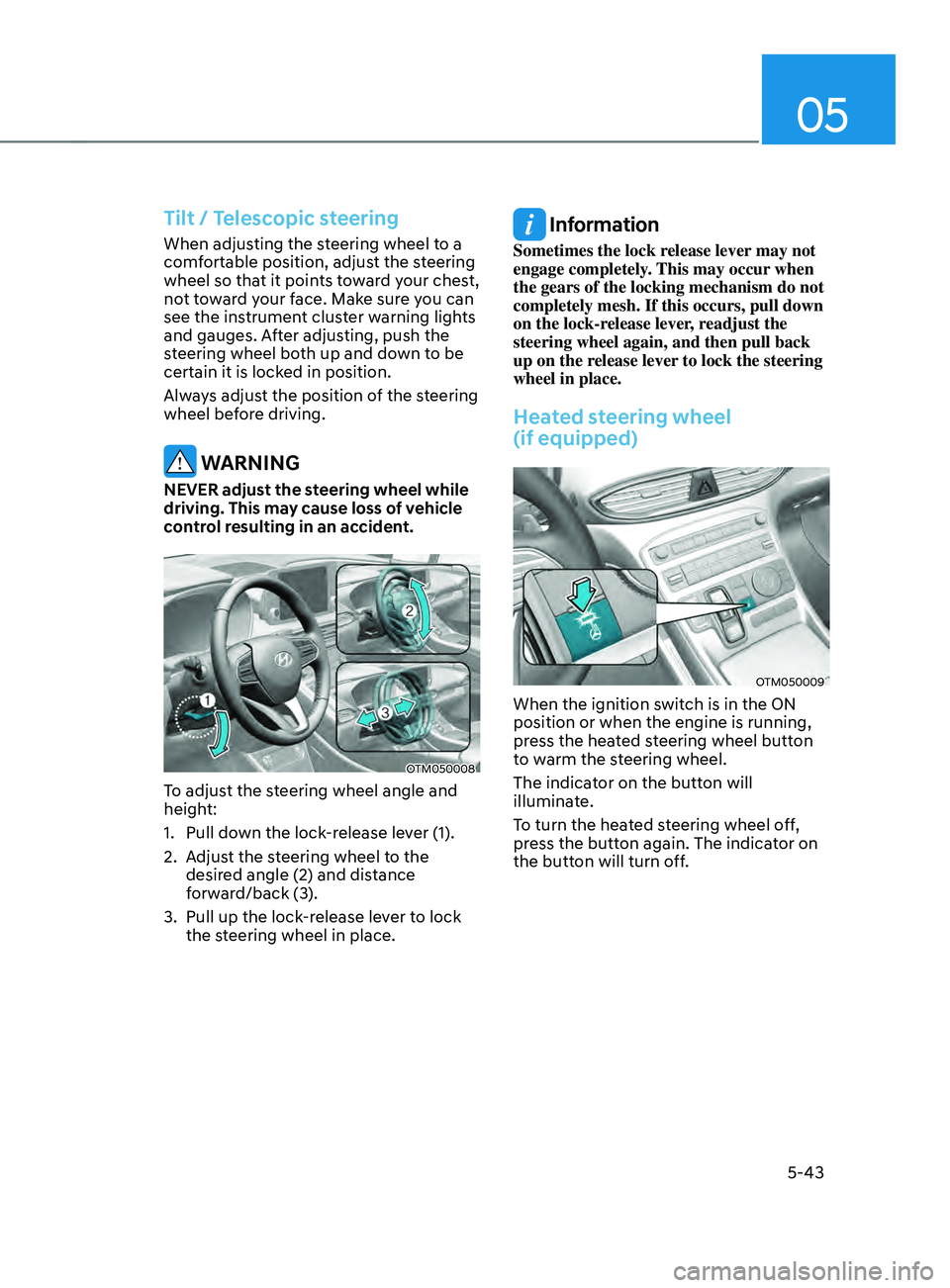
To adjust the steering wheel angle and
height:
1.
Pull down the lock
-release lever (1).
2.
Adjus
t the steering wheel to the
desired angle (2) and distance
forward/back (3).
3.
Pull up the lock-r
elease lever to lock
the steering wheel in place.
Information
Sometimes the lock release lever may not
engage completely. This may occur when
the gears of the locking mechanism do not
completely mesh. If this occurs, pull down
on the lock-release lever, readjust the
steering wheel again, and then pull back
up on the release lever to lock the steering
wheel in place.
Heated steering wheel
(if equipped)
OTM050009
When the ignition switch is in the ON
position or when the engine is running,
press the heated steering wheel button
to warm the steering wheel.
The indicator on the button will
illuminate.
To turn the heated steering wheel off,
press the button again. The indicator on
the button will turn off.
Page 188 of 636
Convenient features
5-44
• Auto Comfort Control (for driver’s
seat) (if equipped)
- The heat
ed steering wheel
automatically controls the steering
wheel temperature depending on
the ambient temperature and the
set climate control temperature
when the engine is running. If the
heated steering wheel switch is
pushed, the heated steering wheel
will have to be controlled manually.
To use this function, it must be
activated from the Settings menu in
the AVN system screen.
- The heat
ed steering wheel defaults
to the OFF position whenever the
ignition switch is ON. However, if
the Auto Comfort Control function
is ON, the heated steering wheel
will turn on and off depending on
the ambient temperature and the
set climate control temperature.
For more details, we recommend that
you contact an authorized HYUNDAI
dealer.
Information
The heated steering wheel will turn off
automatically approximately 30 minutes
after the heated steering wheel is turned
on.
NOTICE
Do not install any cover or accessory
on the steering wheel. This cover or
accessory could cause damage to the
heated steering wheel system.
Horn
OTM050088
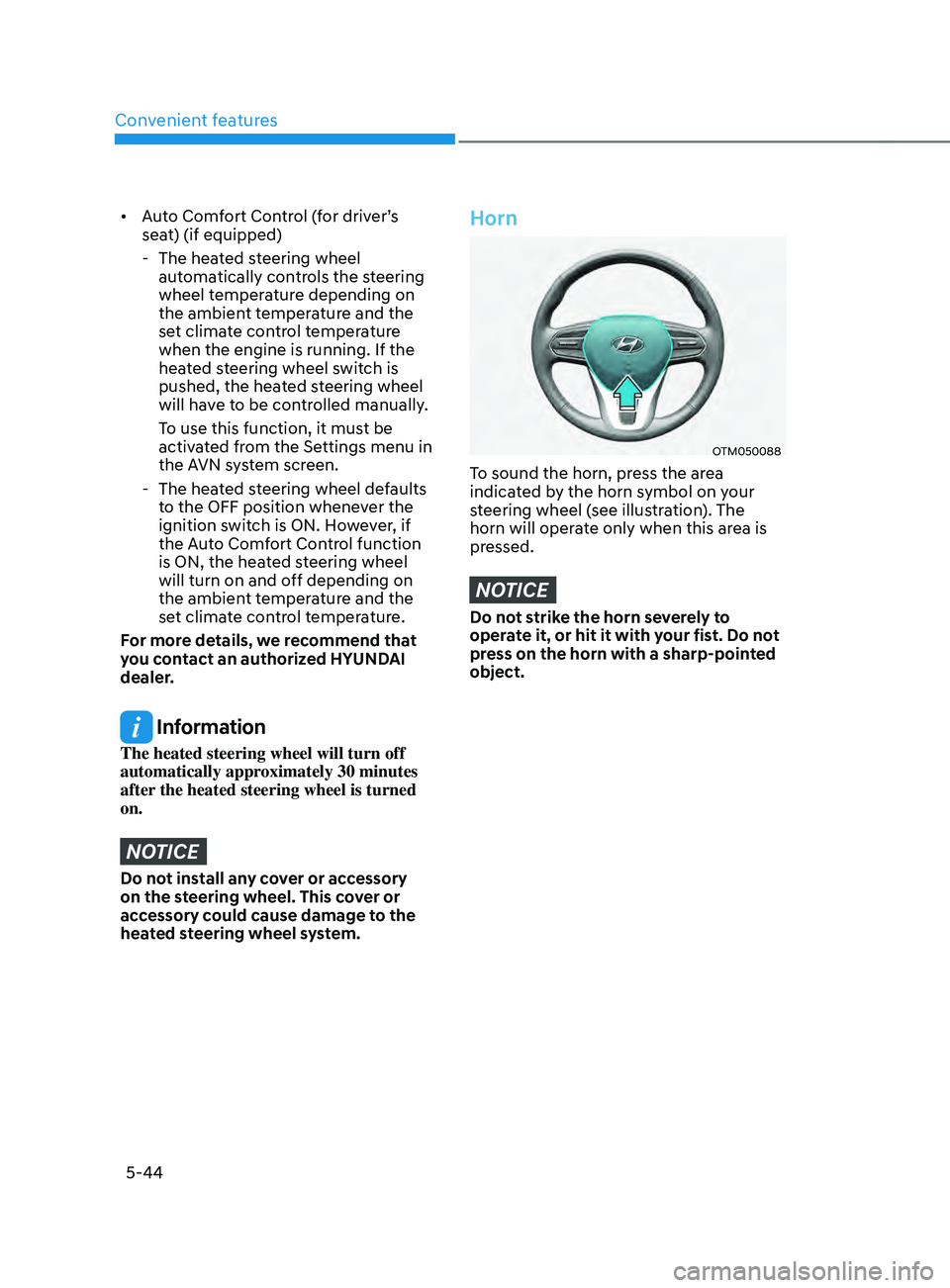
To sound the horn, press the area
indicated by the horn symbol on your
steering wheel (see illustration). The
horn will operate only when this area is
pressed.
NOTICE
Do not strike the horn severely to
operate it, or hit it with your fist. Do not
press on the horn with a sharp-pointed
object.
Page 228 of 636
Convenient features
5-84
Turn signals and lane change signals
OIG046417
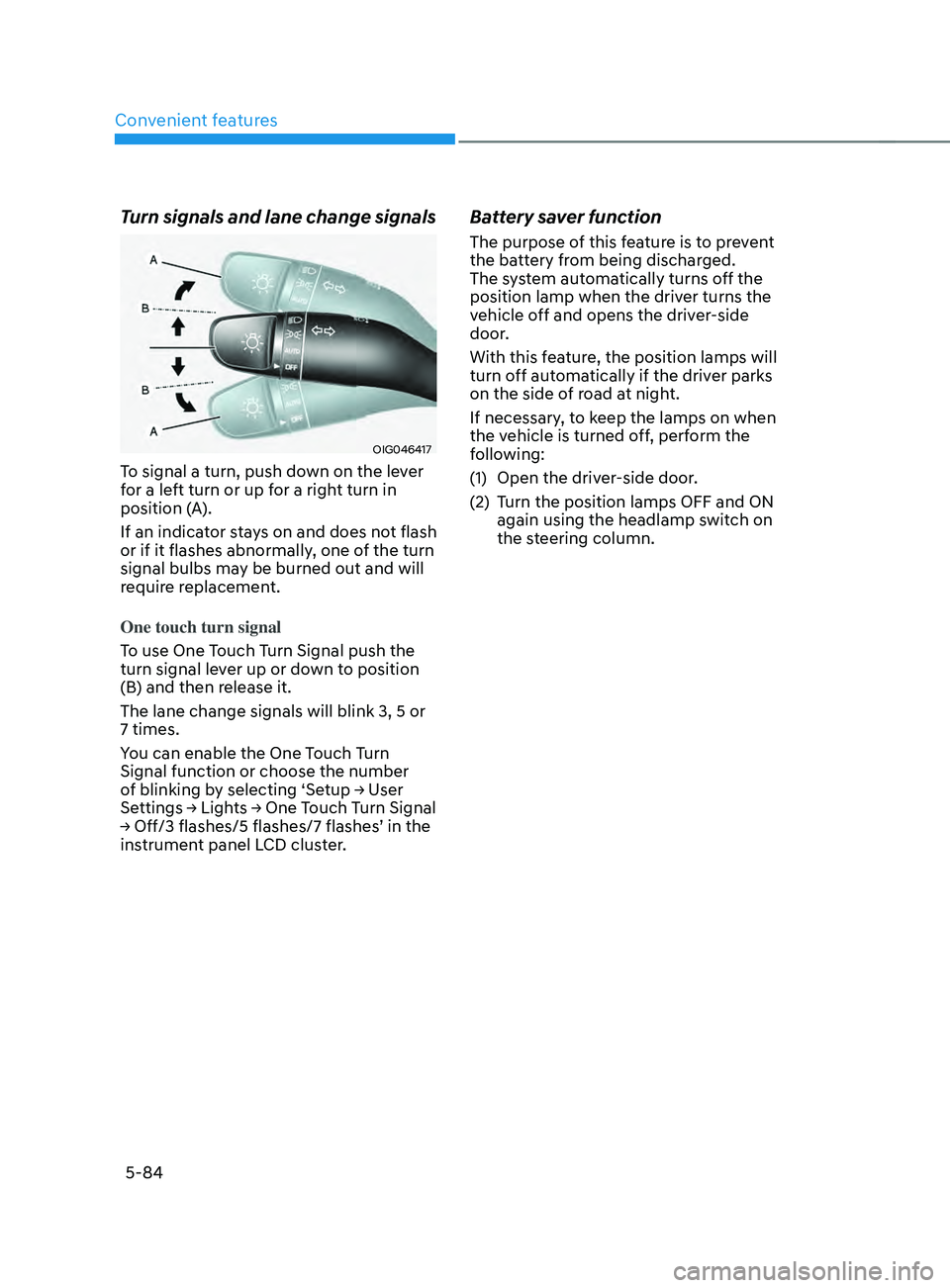
To signal a turn, push down on the lever
for a left turn or up for a right turn in
position (A).
If an indicator stays on and does not flash
or if it flashes abnormally, one of the turn
signal bulbs may be burned out and will
require replacement.
One touch turn signal
To use One Touch Turn Signal push the
turn signal lever up or down to position
(B) and then release it.
The lane change signals will blink 3, 5 or
7 times.
You can enable the One Touch Turn
Signal function or choose the number
of
blinking b
y
selecting ‘Se
tup
→ U
ser
Settings → Ligh
ts
→ One T
ouch
T
urn
Signal → Off/3 flashes/5 flashes/7 flashes
’
in the instrumen
t panel LCD cluster.
Battery saver function
The purpose of this feature is to prevent
the battery from being discharged.
The system automatically turns off the
position lamp when the driver turns the
vehicle off and opens the driver-side
door.
With this feature, the position lamps will
turn off automatically if the driver parks
on the side of road at night.
If necessary, to keep the lamps on when
the vehicle is turned off, perform the
following:
(1)
Open the driver
-side door.
(2)
Turn the position lamps OFF and ON
again using the headlamp s
witch on
the steering column.
Page 265 of 636
05
5-121
Recirculating air when washer
fluid is used
Recirculation mode automatically
activates to reduce any objectionable
scent of the washer fluid from entering
the cabin when the windshield washer is
used.
Turning Activate upon Washer Fluid
Use ON or OFF
Climate control system
To turn the Activate upon Washer Fluid
Use feature on or off, select Floor level
(
) mode, and then press the air
intake control () button four times
within two seconds while pressing the
A/C icon.
When Activate upon Washer Fluid Use
ON is turned on, the air intake control
button indicator will blink 6 times. When
turned off, the indicator will blink 3
times.
Infotainment system
Activate upon Washer Fluid Use can be
turned
on and o
ff
b
y
selecting ‘Se
tup
→ Vehicle Se
ttings
→ Clima
te
→ R
ecirculate
Air → A
ctivate
upon W
asher
Fluid U
se
(or In
terlocking washer fluid)’ from the
infotainment system screen.
For detailed information, refer to the
separately supplied infotainment
system manual.
However, in cold weather to prevent
the windshield from fogging up, the
recirculation mode may not be selected.
Sunroof inside air recirculation
(if equipped)
When the is sunroof opened, fresh
mode will be automatically selected.
At this time, if you press the air intake
control button, recirculation mode will
be selected but will change back to fresh
mode after 3 minutes. When the sunroof
is closed, the air intake position will
return to the original position that was
selected.
Auto. Controls That Use Climate
Control Settings (for driver’s
seat)
The temperature of the driver’s seat
warmer, air ventilated seat and heated
steering wheel is automatically
controlled depending on the inside and
outside temperature of the vehicle when
the engine is running.
To use these features, it must be
enabled from the Settings menu in the
infotainment system screen. Select:
- Setup → V
ehicle
Se
ttings
→ Sea
t
→ Hea
ted/Ventilated
F
eatures
→ H
eated/
Ventilated
F
eatures
→ A
uto.
Con
trols
That U
se Climate Control Settings
For more details on Auto Comfort
Control, refer to “Seat Warmers” and
“Air ventilation seats” section in chapter
3 and “Heated Steering Wheel” section
in chapter 5.