Radio HYUNDAI SANTA FE 2022 Owner's Manual
[x] Cancel search | Manufacturer: HYUNDAI, Model Year: 2022, Model line: SANTA FE, Model: HYUNDAI SANTA FE 2022Pages: 637, PDF Size: 11.89 MB
Page 465 of 637
07
7-87
Information
This device complies with Part 15 of the
FCC rules.
Operation is subject to the following three
conditions:
1. This device may not cause harmful
interference, and
2. This device must accept any
interference received, including
interference that may cause undesired
operation.
3. Changes or modifications not expressly
approved by the party responsible
for compliance could void the user's
authority to operate the device.
Information
Radio frequency radiation exposure
information:
This equipment complies with FCC
radiation exposure limits set forth for an
uncontrolled environment.
This equipment should be installed and
operated with minimum distance of 8 in.
(20 cm) between the radiator (antenna)
and your body.
This transmitter must not be co-located or
operating in conjunction with any other
antenna or transmitter.
007_TMa_HMA.indd 7-872021-08-26 9:26:47
Page 485 of 637
07
7-107
Information
This device complies with Part 15 of the
FCC rules.
Operation is subject to the following three
conditions:
1. This device may not cause harmful
interference, and
2. This device must accept any
interference received, including
interference that may cause undesired
operation.
3. Changes or modifications not expressly
approved by the party responsible
for compliance could void the user's
authority to operate the device.
Information
Radio frequency radiation exposure
information:
This equipment complies with FCC
radiation exposure limits set forth for an
uncontrolled environment.
This equipment should be installed and
operated with minimum distance of 8 in.
(20 cm) between the radiator (antenna)
and your body.
This transmitter must not be co-located or
operating in conjunction with any other
antenna or transmitter.
007_TMa_HMA.indd 7-1072021-08-26 9:26:55
Page 505 of 637
07
7-127
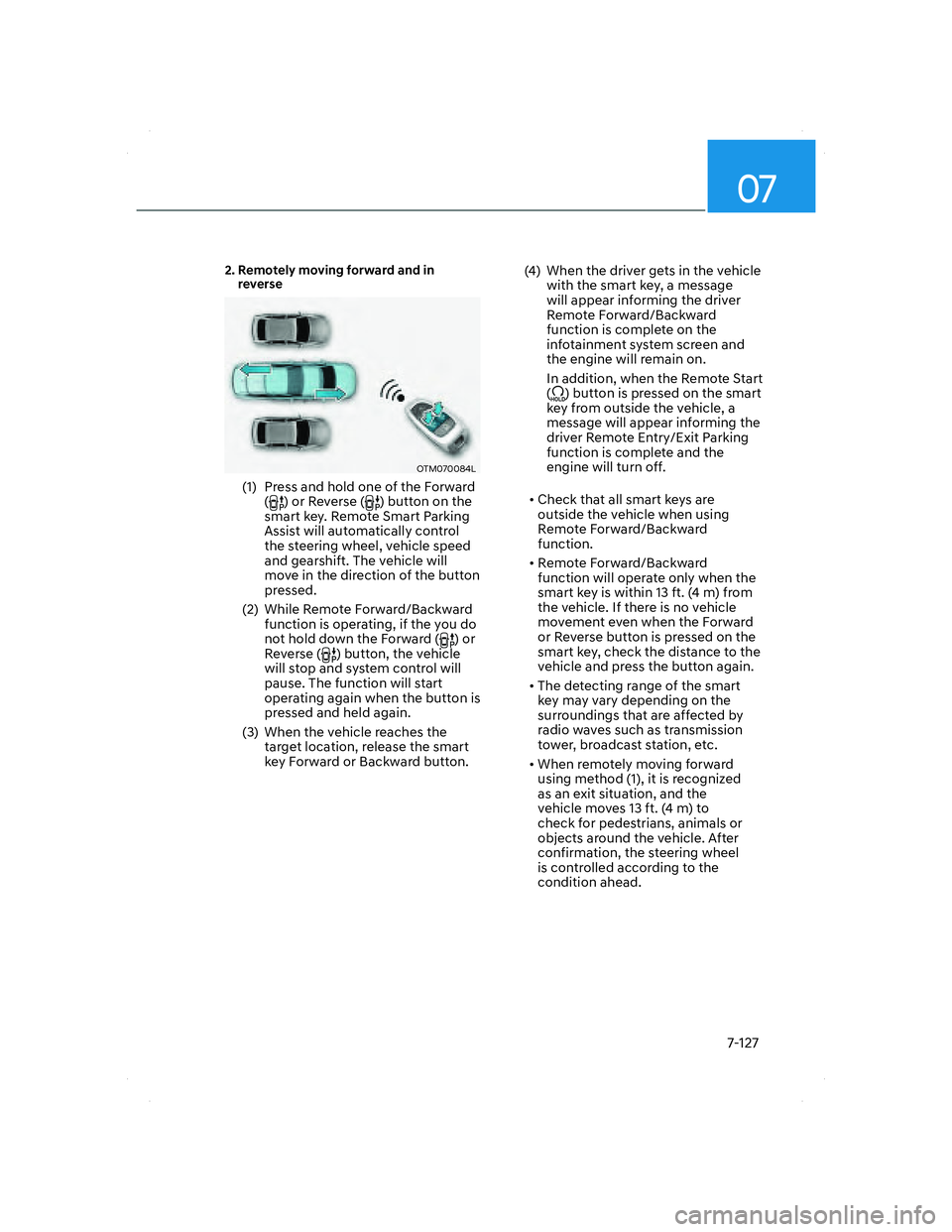
2. Remotely moving forward and in
reverse
OTM070084LOTM070084L
(1) Press and hold one of the Forward
() or Reverse () button on the
smart key. Remote Smart Parking
Assist will automatically control
the steering wheel, vehicle speed
and gearshift. The vehicle will
move in the direction of the button
pressed.
(2) While Remote Forward/Backward
function is operating, if the you do
not hold down the Forward (
) or
Reverse () button, the vehicle
will stop and system control will
pause. The function will start
operating again when the button is
pressed and held again.
(3) When the vehicle reaches the
target location, release the smart
key Forward or Backward button.(4) When the driver gets in the vehicle
with the smart key, a message
will appear informing the driver
Remote Forward/Backward
function is complete on the
infotainment system screen and
the engine will remain on.
In addition, when the Remote Start
(
) button is pressed on the smart
key from outside the vehicle, a
message will appear informing the
driver Remote Entry/Exit Parking
function is complete and the
engine will turn off.
• Check that all smart keys are
outside the vehicle when using
Remote Forward/Backward
function.
• Remote Forward/Backward
function will operate only when the
smart key is within 13 ft. (4 m) from
the vehicle. If there is no vehicle
movement even when the Forward
or Reverse button is pressed on the
smart key, check the distance to the
vehicle and press the button again.
• The detecting range of the smart
key may vary depending on the
surroundings that are affected by
radio waves such as transmission
tower, broadcast station, etc.
• When remotely moving forward
using method (1), it is recognized
as an exit situation, and the
vehicle moves 13 ft. (4 m) to
check for pedestrians, animals or
objects around the vehicle. After
confirmation, the steering wheel
is controlled according to the
condition ahead.
007_TMa_HMA.indd 7-1272021-08-26 9:27:01
Page 514 of 637

Driver assistance system
7-136
DECLARATION OF CONFORMITY
The radio frequency components complies:
Front radar
- For USA
OANATEL125OANATEL125
- For Canada
OANATEL126OANATEL126
007_TMa_HMA.indd 7-1362021-08-26 9:27:04
Page 520 of 637
08
8-5
Jump starting procedure
1. Position the vehicles close enough
that the jumper cables will reach, but
do not allow the vehicles to touch.
2. Avoid fans or any moving parts in the
engine compartment at all times, even
when the vehicles are turned off.
3. Turn off all electrical devices such as
radios, lights, air conditioning, etc.
Put the vehicles in P (Park) and set the
parking brake. Turn both vehicles OFF.
4. Open the engine hood.
CAUTION
Before jump starting, make sure to
correctly identify the positive (+) and
negative (-) terminals to avoid reverse
polarity connections.
OTM080021OTM080021
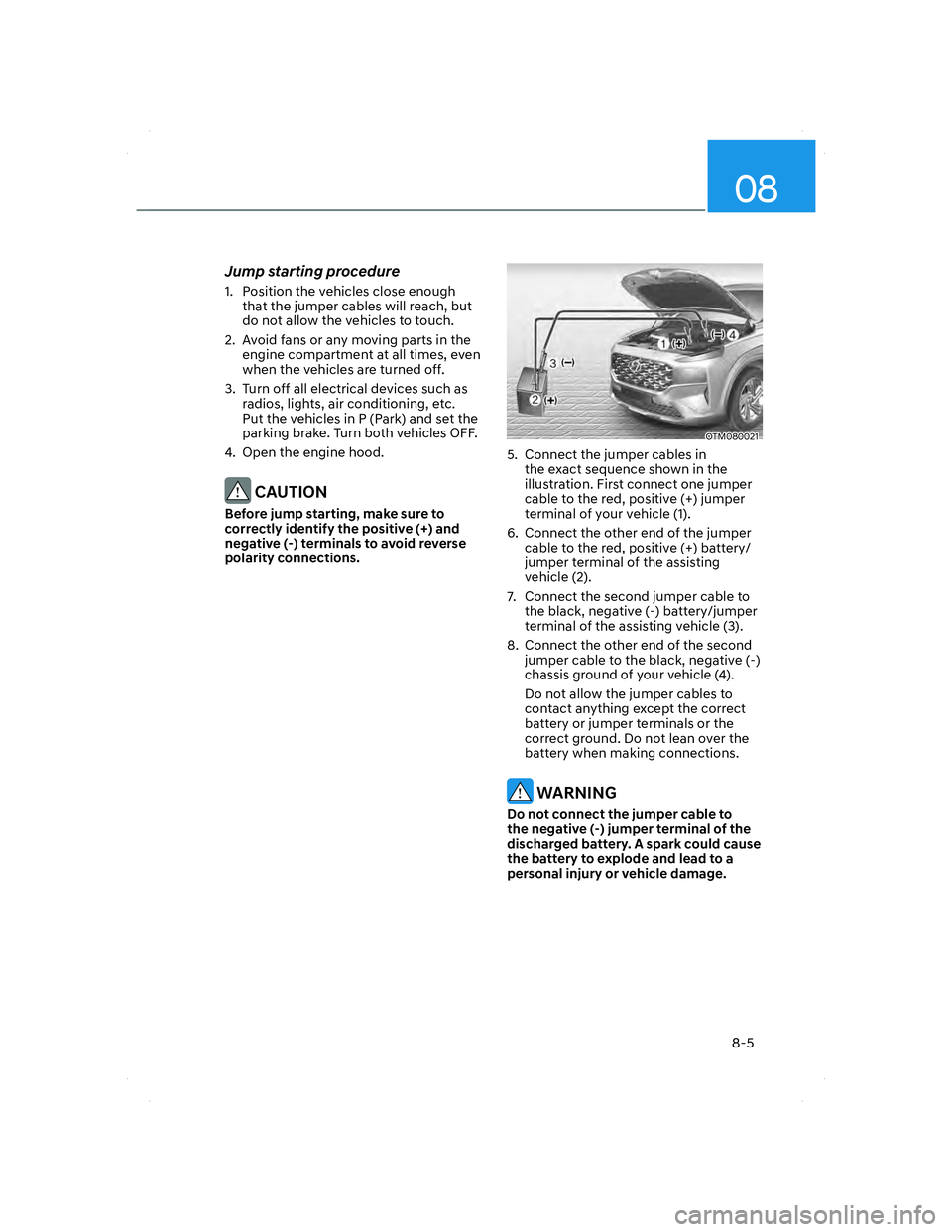
5. Connect the jumper cables in
the exact sequence shown in the
illustration. First connect one jumper
cable to the red, positive (+) jumper
terminal of your vehicle (1).
6. Connect the other end of the jumper
cable to the red, positive (+) battery/
jumper terminal of the assisting
vehicle (2).
7. Connect the second jumper cable to
the black, negative (-) battery/jumper
terminal of the assisting vehicle (3).
8. Connect the other end of the second
jumper cable to the black, negative (-)
chassis ground of your vehicle (4).
Do not allow the jumper cables to
contact anything except the correct
battery or jumper terminals or the
correct ground. Do not lean over the
battery when making connections.
WARNING
Do not connect the jumper cable to
the negative (-) jumper terminal of the
discharged battery. A spark could cause
the battery to explode and lead to a
personal injury or vehicle damage.
008_TMa_HMA.indd 8-52021-08-27 1:44:00
Page 527 of 637
Emergency situations
8-12
TPMS malfunction
indicator
The TPMS Malfunction Indicator
will illuminate after it blinks for
approximately one minute when there
is a problem with the Tire Pressure
Monitoring System.
Have the system checked by an
authorized HYUNDAI dealer as soon as
possible.
NOTICE
If there is a malfunction with the
TPMS, the individual tire pressures
in the cluster LCD display will not be
available. Have the system checked by
an authorized HYUNDAI dealer as soon
as possible.
NOTICE
The TPMS Malfunction Indicator may
illuminate after blinking for one minute
if the vehicle is near electric power
supply cables or radio transmitters
such as police stations, government
and public offices, broadcasting
stations, military installations, airports,
transmitting towers, etc.
Additionally, the TPMS Malfunction
Indicator may illuminate if snow chains
are used or electronic devices such as
computers, chargers, remote starters,
navigation, etc. This may interfere with
normal operation of the TPMS.
Changing a tire with TPMS
If you have a flat tire, the Low Tire
Pressure and Position telltales will come
on. Have the flat tire repaired by an
authorized HYUNDAI dealer as soon as
possible or replace the flat tire with the
spare tire.
NOTICE
It is recommended that you do not
use a puncture-repairing agent not
approved by HYUNDAI dealer or the
equivalent specified for your vehicle to
repair and/or inflate a low pressure tire.
Tire sealant not approved by HYUNDAI
dealer or the equivalent specified for
your vehicle may damage the tire
pressure sensor.
The spare tire (if equipped) does not
come with a tire pressure monitoring
sensor. When the low pressure tire or
the flat tire is replaced with the spare
tire, the Low Tire Pressure Telltale will
remain on. Also, the TPMS Malfunction
Indicator will illuminate after blinking
for one minute if the vehicle is driven
at speed above 15.5 mph (25 km/h) for
approximately 10 minutes.
Once the original wheel equipped with
a tire pressure monitoring sensor is
reinflated to the recommended pressure
and reinstalled on the vehicle, the
Low Tire Pressure Telltale and TPMS
Malfunction Indicator will go off within a
few minutes of driving.
008_TMa_HMA.indd 8-122021-08-27 1:44:03
Page 631 of 637
Index
I-8
Infotainment system........................................................................................... 5-137
Antenna .......................................................................................................... 5-137
Bluetooth
® Wireless Technology .................................................................... 5-139
How vehicle radio works ................................................................................ 5-139
Infotainment system ....................................................................................... 5-138
Steering wheel remote controls ...................................................................... 5-137
USB Port ........................................................................................................ 5-137
Voice recognition ............................................................................................ 5-138
Infotainment System specifications .................................................................. 5-143
Bluetooth ........................................................................................................ 5-144
USB ................................................................................................................ 5-143
Instrument cluster .................................................................................................. 4-4
Gauges and meters ............................................................................................. 4-5
Instrument cluster control ................................................................................... 4-5
LCD display messages ..................................................................................... 4-23
Transmission shift indicator ............................................................................... 4-9
Warning and indicator lights ............................................................................ 4-10
Instrument panel overview (I) ............................................................................... 2-5
Instrument panel overview (II) .............................................................................. 2-6
Integrated memory system ................................................................................... 5-39
Easy access function ......................................................................................... 5-41
Recalling memory positions ............................................................................. 5-40
Resetting the system ......................................................................................... 5-40
Storing memory positions ................................................................................ 5-39
Interior features .................................................................................................. 5-124
AC Inverter ..................................................................................................... 5-127
Ashtray ........................................................................................................... 5-125
Cargo security screen ..................................................................................... 5-134
Clock .............................................................................................................. 5-131
Coat hook ....................................................................................................... 5-131
Cup holder ...................................................................................................... 5-124
Floor mat anchor(s) ........................................................................................ 5-132
Luggage net holder ......................................................................................... 5-133
Power outlet .................................................................................................... 5-126
Side curtain ..................................................................................................... 5-133
Sunvisor .......................................................................................................... 5-125
USB charger ................................................................................................... 5-127
Wireless smart phone charging system .......................................................... 5-129
010_TMa_INDEX_HMA.indd I-82021-08-27 1:58:39