brake HYUNDAI SANTA FE HYBRID 2021 Owner's Guide
[x] Cancel search | Manufacturer: HYUNDAI, Model Year: 2021, Model line: SANTA FE HYBRID, Model: HYUNDAI SANTA FE HYBRID 2021Pages: 598, PDF Size: 66.6 MB
Page 211 of 598
05
5-53
Auto reverse user settings
If you cannot secure enough visibility
with the angles provided as factory
default conditions, you can readjust and
store the angles of outside rear view
mirrors.
The factory default angles of the right
and left rear view mirrors might be set
differently to improve visibility.
1. Set the shift button to P (Parking).
Make sure that the vehicle is stopped
and the mirrors are not working.
2. Position the lever to L (left) or R (right)
depending on the mirror that you
want adjust.
3. Step on the break pedal and shift the
shift button to R (Reverse).
4. When the downward movement of
the rear view mirror is finished, adjust
the mirror to the desired angle by
pressing the switches, ▼, ▲, t, u.
5. If you shift the shift button to a
position other than R (Reverse), or
change the rear view mirror selector
lever to the neutral position, and
the automatic return of the mirror is
finished, the adjusted angle will be
automatically saved.
6. You can adjust the rear view mirror on
the other side by following the same
procedures (1-5).
How to reset auto reverse user
settings
If you want to change the automatic
control function of rear view mirrors to
factory-default conditions, follow the
steps below.
1. Shift the shift button to P (Park). Make
sure that the vehicle is stopped and
the mirrors is not working.
2. Choose the mirror to be adjusted by
positioning the lever to L (left) or R
(right).
3. Step on the brake pedal and shift the
shift button to R (Reverse).
4. When the downward movement of
the rear view mirror is finished, press
the switch ▲ to locate the mirror in
the position higher than before (P, N
or D).
(Adjust the mirror in the higher
position compared to its position in
the driving mode.)
5. It is initialized when the shift button
is shifted to a position other than
R (Reverse), or the rear view mirror
selector lever is changed to the
neutral position. (Initialized position
will be applied from next operation.)
6. You can initialize settings for the
mirror on the other side by following
the same procedures (1-5).
CAUTION
We recommend following the
procedures in an orderly manner to
change or initialize the auto reversing
user settings.
If you move to the next step before
completing the previous one, the
changed angle may not be changed or
initialization may not work properly.
Page 221 of 598
05
5-63
EXTERIOR FEATURES
Hood
Opening the hood
OTM050032
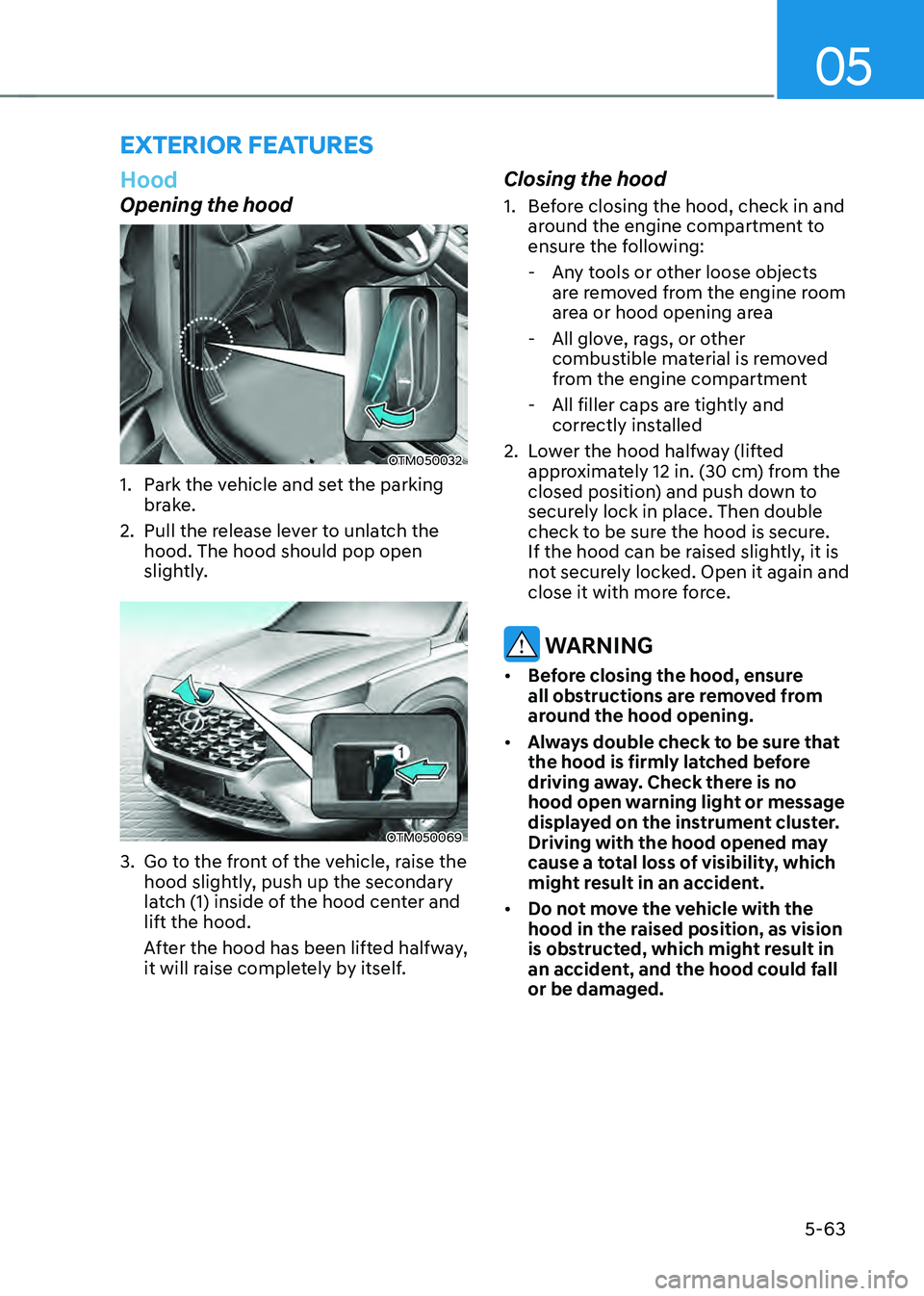
1. Park the vehicle and set the parking
brake.
2. Pull the release lever to unlatch the
hood. The hood should pop open
slightly.
OTM050069
3. Go to the front of the vehicle, raise the
hood slightly, push up the secondary
latch (1) inside of the hood center and
lift the hood.
After the hood has been lifted halfway,
it will raise completely by itself.
Closing the hood
1. Before closing the hood, check in and
around the engine compartment to
ensure the following:
-Any tools or other loose objects
are removed from the engine room
area or hood opening area
-All glove, rags, or other
combustible material is removed
from the engine compartment
-All filler caps are tightly and
correctly installed
2. Lower the hood halfway (lifted
approximately 12 in. (30 cm) from the
closed position) and push down to
securely lock in place. Then double
check to be sure the hood is secure.
If the hood can be raised slightly, it is
not securely locked. Open it again and
close it with more force.
WARNING
• Before closing the hood, ensure
all obstructions are removed from
around the hood opening.
• Always double check to be sure that
the hood is firmly latched before
driving away. Check there is no
hood open warning light or message
displayed on the instrument cluster.
Driving with the hood opened may
cause a total loss of visibility, which
might result in an accident.
• Do not move the vehicle with the
hood in the raised position, as vision
is obstructed, which might result in
an accident, and the hood could fall
or be damaged.
Page 222 of 598
Convenient features
5-64
Liftgate
Opening the liftgate
OTM050047
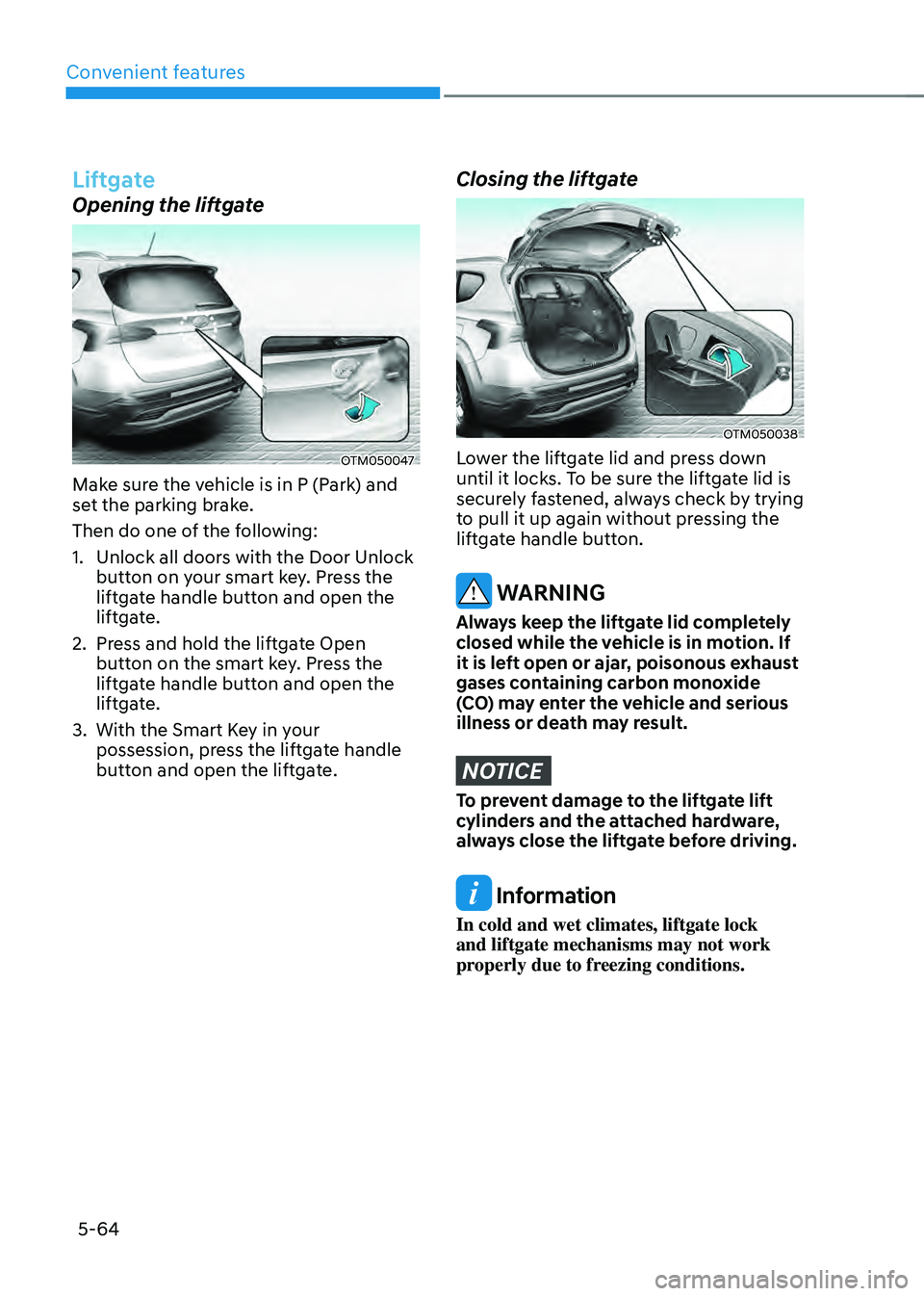
Make sure the vehicle is in P (Park) and
set the parking brake.
Then do one of the following:
1. Unlock all doors with the Door Unlock
button on your smart key. Press the
liftgate handle button and open the
liftgate.
2. Press and hold the liftgate Open
button on the smart key. Press the
liftgate handle button and open the
liftgate.
3. With the Smart Key in your
possession, press the liftgate handle
button and open the liftgate.
Closing the liftgate
OTM050038
Lower the liftgate lid and press down
until it locks. To be sure the liftgate lid is
securely fastened, always check by trying
to pull it up again without pressing the
liftgate handle button.
WARNING
Always keep the liftgate lid completely
closed while the vehicle is in motion. If
it is left open or ajar, poisonous exhaust
gases containing carbon monoxide
(CO) may enter the vehicle and serious
illness or death may result.
NOTICE
To prevent damage to the liftgate lift
cylinders and the attached hardware,
always close the liftgate before driving.
Information
In cold and wet climates, liftgate lock
and liftgate mechanisms may not work
properly due to freezing conditions.
Page 233 of 598
05
5-75
• Do not get back into a vehicle
once you have begun refueling.
You can generate a buildup of
static electricity by touching,
rubbing or sliding against any item
or fabric capable of producing
static electricity. Static electricity
discharge can ignite fuel vapors
causing a fire. If you must re-enter
the vehicle, you should once again
eliminate potentially dangerous
static electricity discharge by
touching a metal part of the vehicle,
away from the fuel filler neck, nozzle
or other fuel source, with your bare
hand.
• When using an approved portable
fuel container, be sure to place the
container on the ground prior to
refueling. Static electricity discharge
from the container can ignite fuel
vapors causing a fire.
Once refueling has begun, contact
between your bare hand and the
vehicle should be maintained until
the filling is complete.
• Use only approved portable plastic
fuel containers designed to carry and
store fuel.
• When refueling, always shift the
gear to the P (Park) position, set
the parking brake, and press the
Engine Start/Stop button to the
OFF position. Sparks produced by
electrical components related to the
engine can ignite fuel vapors causing
a fire.
• Do not use matches or a lighter and
do not smoke or leave a lit cigarette
in your vehicle while at a gas station,
especially during refueling.
• Do not over-fill or top-off your
vehicle tank, which can cause fuel
spillage.
• If a fire breaks out during refueling,
leave the vicinity of the vehicle, and
immediately contact the manager
of the gas station and then contact
the local fire department. Follow any
safety instructions they provide.
• If pressurized fuel sprays out, it can
cover your clothes or skin and thus
subject you to the risk of fire and
burns. Always remove the fuel cap
carefully and slowly. If the cap is
venting fuel or if you hear a hissing
sound, wait until the condition stops
before completely removing the cap.
• Always check that the fuel cap is
installed securely to prevent fuel
spillage in the event of an accident.
Information
Make sure to refuel your vehicle according
to the “Fuel Requirements” section in
suggested in chapter 1.
NOTICE
• Do not spill fuel on the exterior
surfaces of the vehicle. Any type of
fuel spilled on painted surfaces may
damage the paint.
• If the fuel filler cap requires
replacement, use only a genuine
HYUNDAI cap or the equivalent
specified for your vehicle. An
incorrect fuel filler cap can result
in a serious malfunction of the fuel
system or emission control system.
Page 236 of 598
Convenient features
5-78
LIGHTING
Exterior lights
Lighting control
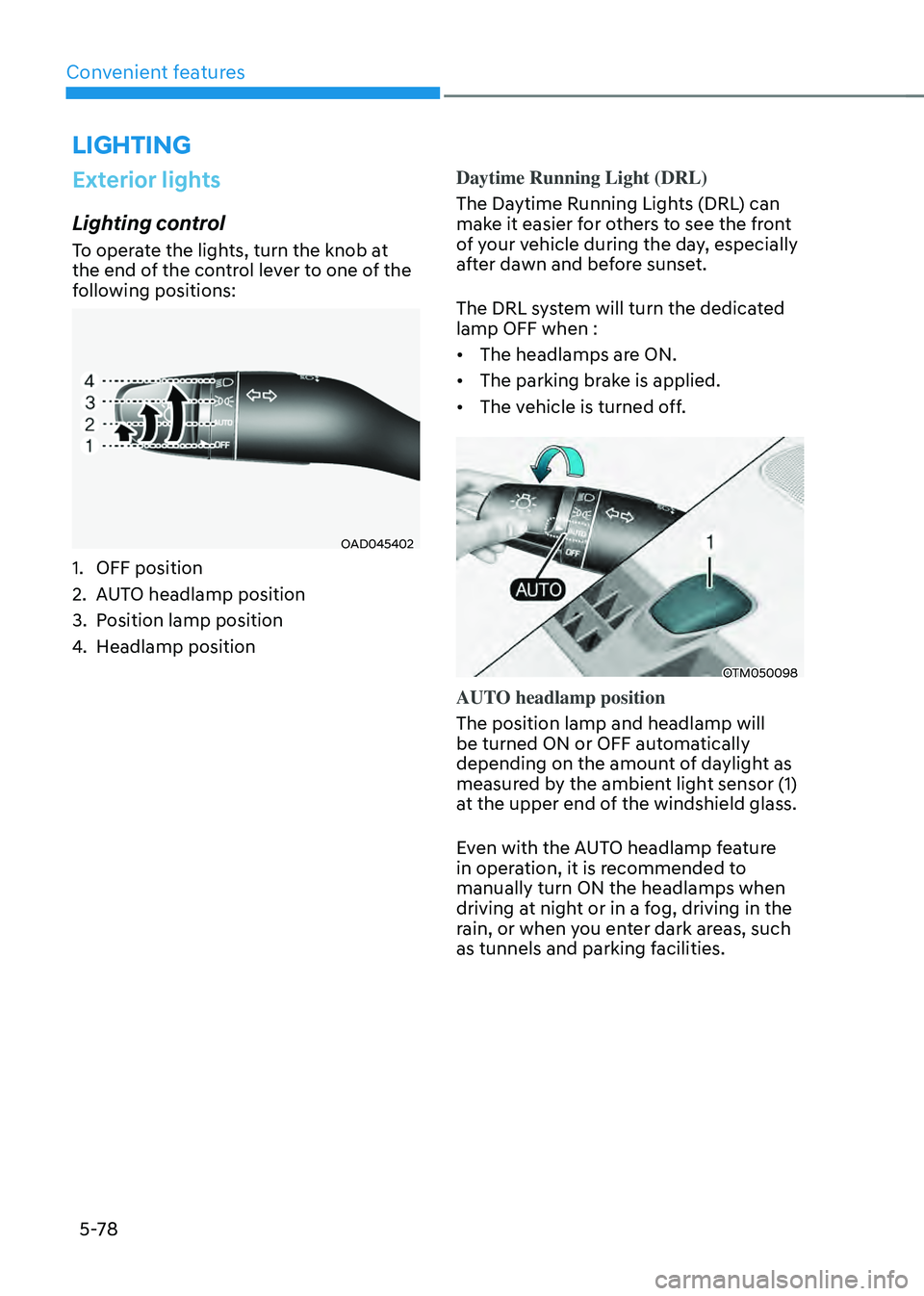
To operate the lights, turn the knob at
the end of the control lever to one of the
following positions:
OAD045402
1. OFF position
2. AUTO headlamp position
3. Position lamp position
4. Headlamp positionDaytime Running Light (DRL)
The Daytime Running Lights (DRL) can
make it easier for others to see the front
of your vehicle during the day, especially
after dawn and before sunset.
The DRL system will turn the dedicated
lamp OFF when :
• The headlamps are ON.
• The parking brake is applied.
• The vehicle is turned off.
OTM050098
AUTO headlamp position
The position lamp and headlamp will
be turned ON or OFF automatically
depending on the amount of daylight as
measured by the ambient light sensor (1)
at the upper end of the windshield glass.
Even with the AUTO headlamp feature
in operation, it is recommended to
manually turn ON the headlamps when
driving at night or in a fog, driving in the
rain, or when you enter dark areas, such
as tunnels and parking facilities.
Page 285 of 598

6. Driving your vehicle
Driving your vehicle
Before driving ........................................................................\
............................6-4Before entering the vehicle ........................................................................\
................6-4
Before starting ........................................................................\
.....................................6-4
Ignition switch ........................................................................\
...........................6-5Engine Start/Stop button ........................................................................\
.....................6-5
Remote start ........................................................................\
........................................6-9
Automatic transmission ........................................................................\
..........6-10Automatic transmission operation ........................................................................\
....6-10
Parking ........................................................................\
................................................6-13
LCD display message ........................................................................\
.........................6-14
Paddle shifter ........................................................................\
......................................6-15
Good driving practices ........................................................................\
.......................6-15
Coasting guide ........................................................................\
.........................6-17
Braking system
........................................................................\
.........................6-18Power brakes ........................................................................\
......................................6-18
Disc brakes wear indicator ........................................................................\
................6-19
Electronic Parking Brake (EPB) ........................................................................\
..........6-19
Auto Hold ........................................................................\
............................................6-23
Anti-lock Brake System (ABS) ........................................................................\
............6-27
Electronic Stability Control (ESC) ........................................................................\
.....6-28
Vehicle Stability Management (VSM) ......................................................................6-31
Hill-Start Assist Control (HAC) ........................................................................\
...........6-32
Trailer stability assist (TSA) ........................................................................\
...............6-33
Downhill Brake Control (DBC) ........................................................................\
..........6-33
Good braking practices ........................................................................\
.....................6-36
Four wheel drive (4WD) ........................................................................\
.........6-37Four Wheel Drive (4WD) operation ........................................................................\
..6-38
Emergency precautions ........................................................................\
....................6-42
Reducing the risk of a rollover ........................................................................\
..........6-44
Drive mode integrated control system (4WD) ..............................................6-45Drive mode ........................................................................\
........................................6-45
6
Page 289 of 598
06
6-5
IGNITION SWITCH
WARNING
To reduce the risk of SERIOUS INJURY or
DEATH, take the following precautions:
• NEVER allow children or any person
who is unfamiliar with the vehicle to
touch the ignition switch or related
parts. Unexpected and sudden
vehicle movement can occur.
• NEVER reach through the steering
wheel for the ignition switch, or any
other control, while the vehicle is in
motion. The presence of your hand
or arm in this area may cause a loss
of vehicle control resulting in an
accident.
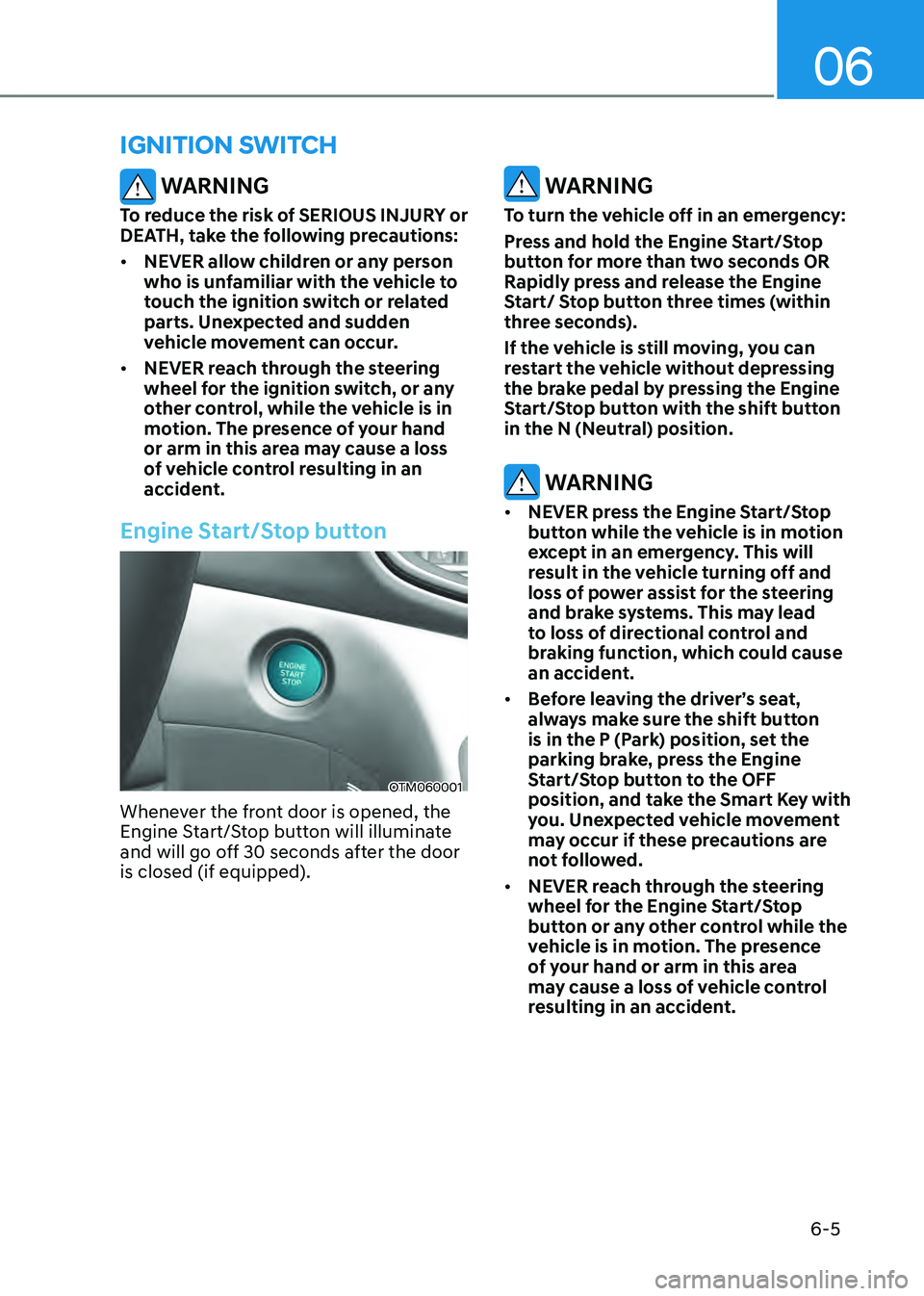
Engine Start/Stop button
OTM060001
Whenever the front door is opened, the
Engine Start/Stop button will illuminate
and will go off 30 seconds after the door
is closed (if equipped).
WARNING
To turn the vehicle off in an emergency:
Press and hold the Engine Start/Stop
button for more than two seconds OR
Rapidly press and release the Engine
Start/ Stop button three times (within
three seconds).
If the vehicle is still moving, you can
restart the vehicle without depressing
the brake pedal by pressing the Engine
Start/Stop button with the shift button
in the N (Neutral) position.
WARNING
• NEVER press the Engine Start/Stop
button while the vehicle is in motion
except in an emergency. This will
result in the vehicle turning off and
loss of power assist for the steering
and brake systems. This may lead
to loss of directional control and
braking function, which could cause
an accident.
• Before leaving the driver’s seat,
always make sure the shift button
is in the P (Park) position, set the
parking brake, press the Engine
Start/Stop button to the OFF
position, and take the Smart Key with
you. Unexpected vehicle movement
may occur if these precautions are
not followed.
• NEVER reach through the steering
wheel for the Engine Start/Stop
button or any other control while the
vehicle is in motion. The presence
of your hand or arm in this area
may cause a loss of vehicle control
resulting in an accident.
Page 290 of 598
Driving your vehicle
6-6
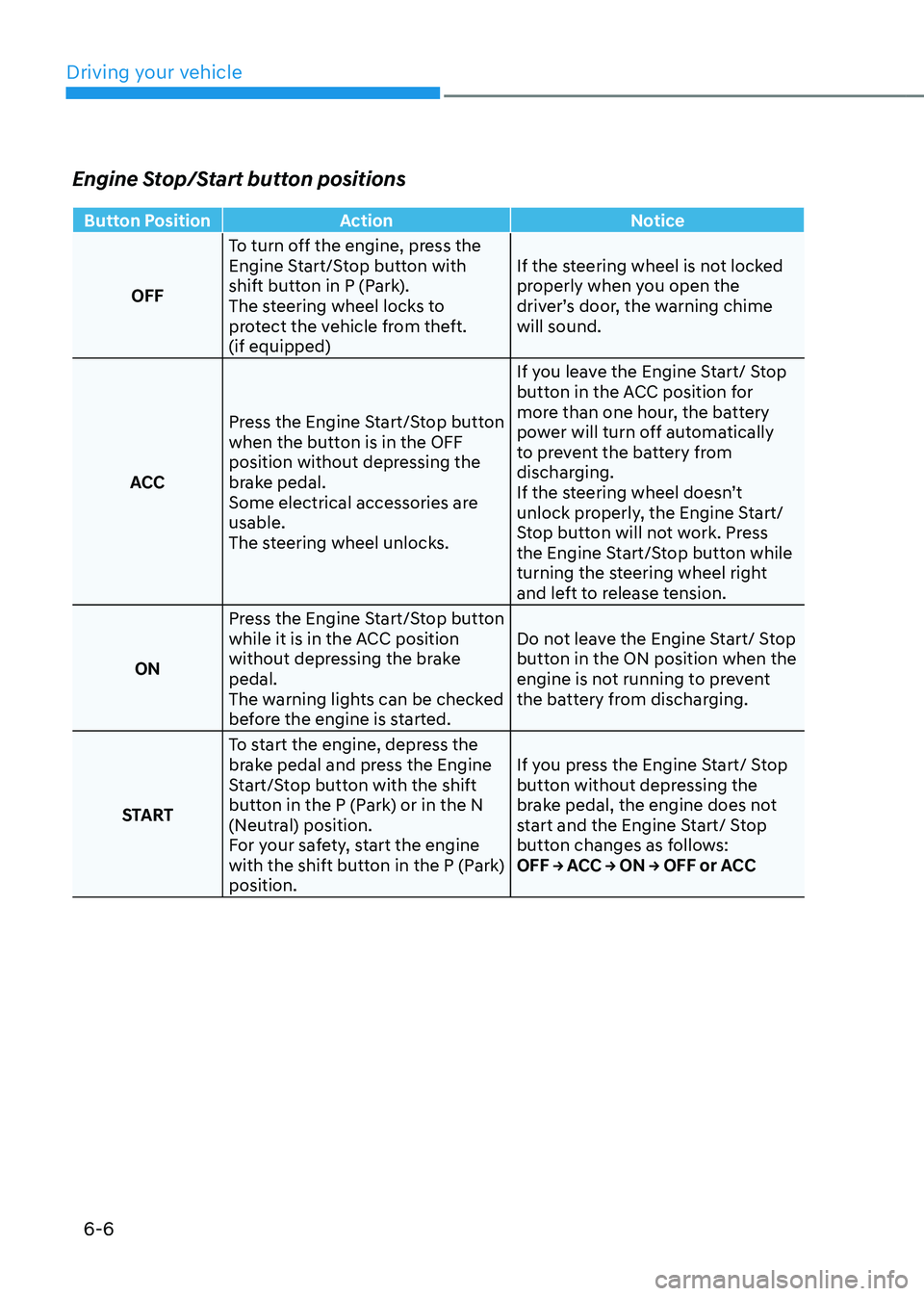
Engine Stop/Start button positions
Button PositionAction Notice
OFF To turn off the engine, press the
Engine Start/Stop button with
shift button in P (Park).
The steering wheel locks to
protect the vehicle from theft.
(if equipped) If the steering wheel is not locked
properly when you open the
driver’s door, the warning chime
will sound.
ACC Press the Engine Start/Stop button
when the button is in the OFF
position without depressing the
brake pedal.
Some electrical accessories are
usable.
The steering wheel unlocks. If you leave the Engine Start/ Stop
button in the ACC position for
more than one hour, the battery
power will turn off automatically
to prevent the battery from
discharging.
If the steering wheel doesn’t
unlock properly, the Engine Start/
Stop button will not work. Press
the Engine Start/Stop button while
turning the steering wheel right
and left to release tension.
ON Press the Engine Start/Stop button
while it is in the ACC position
without depressing the brake
pedal.
The warning lights can be checked
before the engine is started. Do not leave the Engine Start/ Stop
button in the ON position when the
engine is not running to prevent
the battery from discharging.
START To start the engine, depress the
brake pedal and press the Engine
Start/Stop button with the shift
button in the P (Park) or in the N
(Neutral) position.
For your safety, start the engine
with the shift button in the P (Park)
position. If you press the Engine Start/ Stop
button without depressing the
brake pedal, the engine does not
start and the Engine Start/ Stop
button changes as follows:
OFF → ACC → ON → OFF or ACC
Page 291 of 598
06
6 -7
Starting the engine
WARNING
• Always wear appropriate shoes when
operating your vehicle. Unsuitable
shoes, such as high heels, ski boots,
sandals, flipflops, etc., may interfere
with your ability to use the brake and
accelerator pedals.
• Do not start the vehicle with the
accelerator pedal depressed.
The vehicle can move which can lead
to an accident.
Information
• The vehicle will start by pressing the
Engine Start/Stop button, only when
the smart key is in the vehicle.
• Even if the smart key is in the vehicle,
and when it is far away from the driver,
the hybrid system may not start.
• When the Engine Start/Stop button is
in the ACC or ON position, any door
is open, the system checks for the
smart key. When the smart key is not
in the vehicle, the “
” indicator
will blink and the warning “Key not in
vehicle” will come on. When all doors
are closed, the chime will also sound for
about 5 seconds. Keep the smart key in
the vehicle when in the ACC position or
if the hybrid system is ON.
1. Always carry the smart key with you.
2. Make sure the parking brake is
applied.
3. Make sure the shift button is in P
(Park).
4. Depress the brake pedal.
5. Press the Engine Start/Stop button. If
the vehicle starts, the “” indicator
will come on.
Information
• Do not wait for the engine to warm up
while the vehicle remains stationary.
Start driving at moderate engine
speeds. Steep accelerating and
decelerating should be avoided.
• Always start the vehicle with your foot
on the brake pedal. Do not depress the
accelerator while starting the vehicle.
Do not race the engine while warming
it up.
• If ambient temperature is low,
the “
” indicator may remain
illuminated longer than the normal
amount of time.
Page 292 of 598
Driving your vehicle
6-8
NOTICE
To prevent damage to the vehicle:
• If the “
” indicator turns off while
you are in motion, do not attempt to
move the shift button to the P (Park)
position.
• Do not push or tow your vehicle to
start the vehicle.
NOTICE
To prevent damage to the vehicle:
Do not press the Engine Start/Stop
button for more than 10 seconds except
when the stop lamp fuse is blown.
When the stop lamp fuse is blown,
you cannot normally start the hybrid
system. Replace the fuse with a new
one. If you are not able to replace
the fuse, you can start the vehicle by
pressing and holding the Engine Start/
Stop button for 10 seconds with the
Engine Start/Stop button in the ACC
position.
For your safety always depress the
brake pedal before starting the vehicle.OTM060002
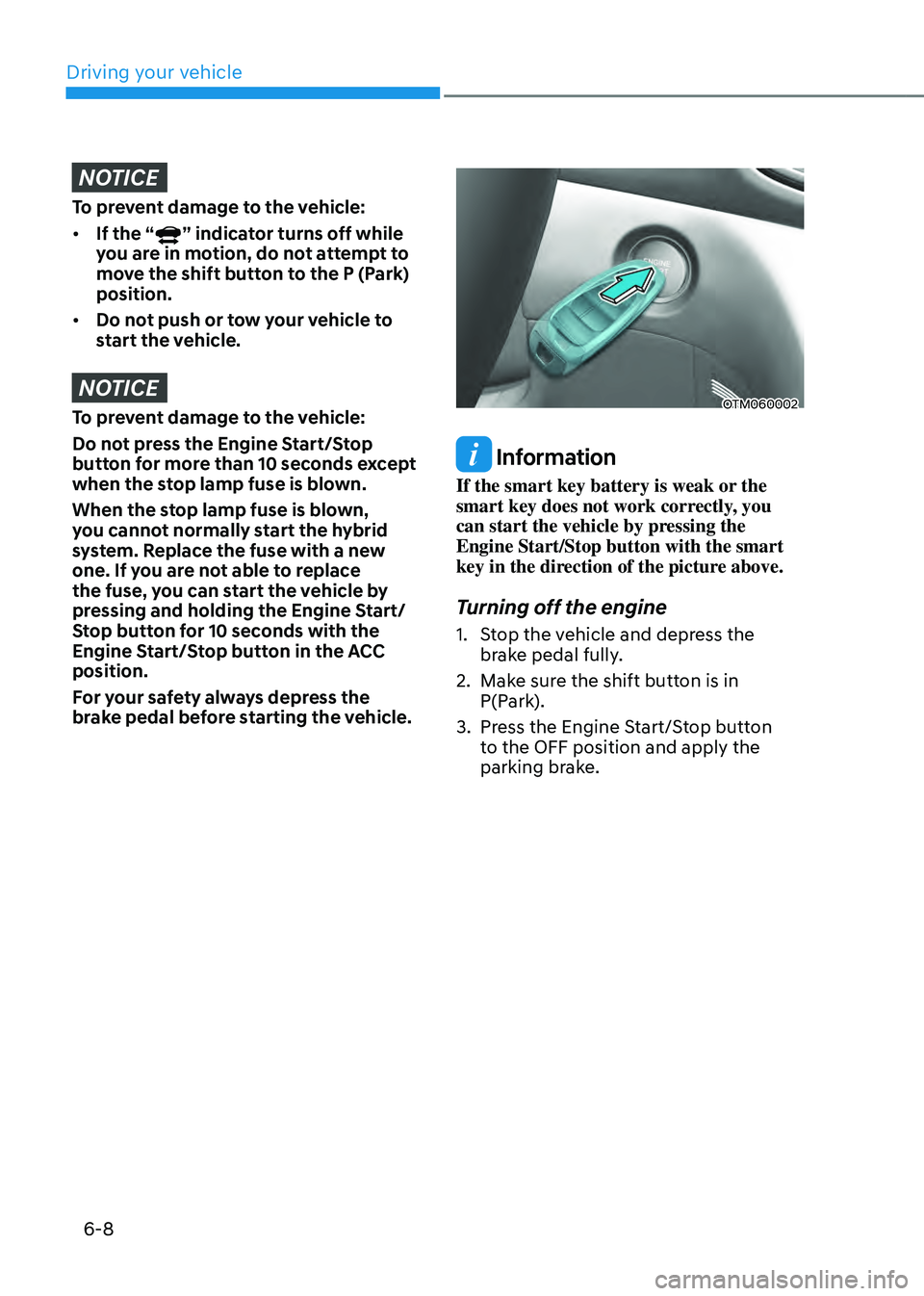
Information
If the smart key battery is weak or the
smart key does not work correctly, you
can start the vehicle by pressing the
Engine Start/Stop button with the smart
key in the direction of the picture above.
Turning off the engine
1. Stop the vehicle and depress the
brake pedal fully.
2. Make sure the shift button is in
P(Park).
3. Press the Engine Start/Stop button
to the OFF position and apply the
parking brake.