maintenance HYUNDAI SANTA FE LIMITED 2021 User Guide
[x] Cancel search | Manufacturer: HYUNDAI, Model Year: 2021, Model line: SANTA FE LIMITED, Model: HYUNDAI SANTA FE LIMITED 2021Pages: 636, PDF Size: 81.2 MB
Page 106 of 636
Instrument cluster
4-8
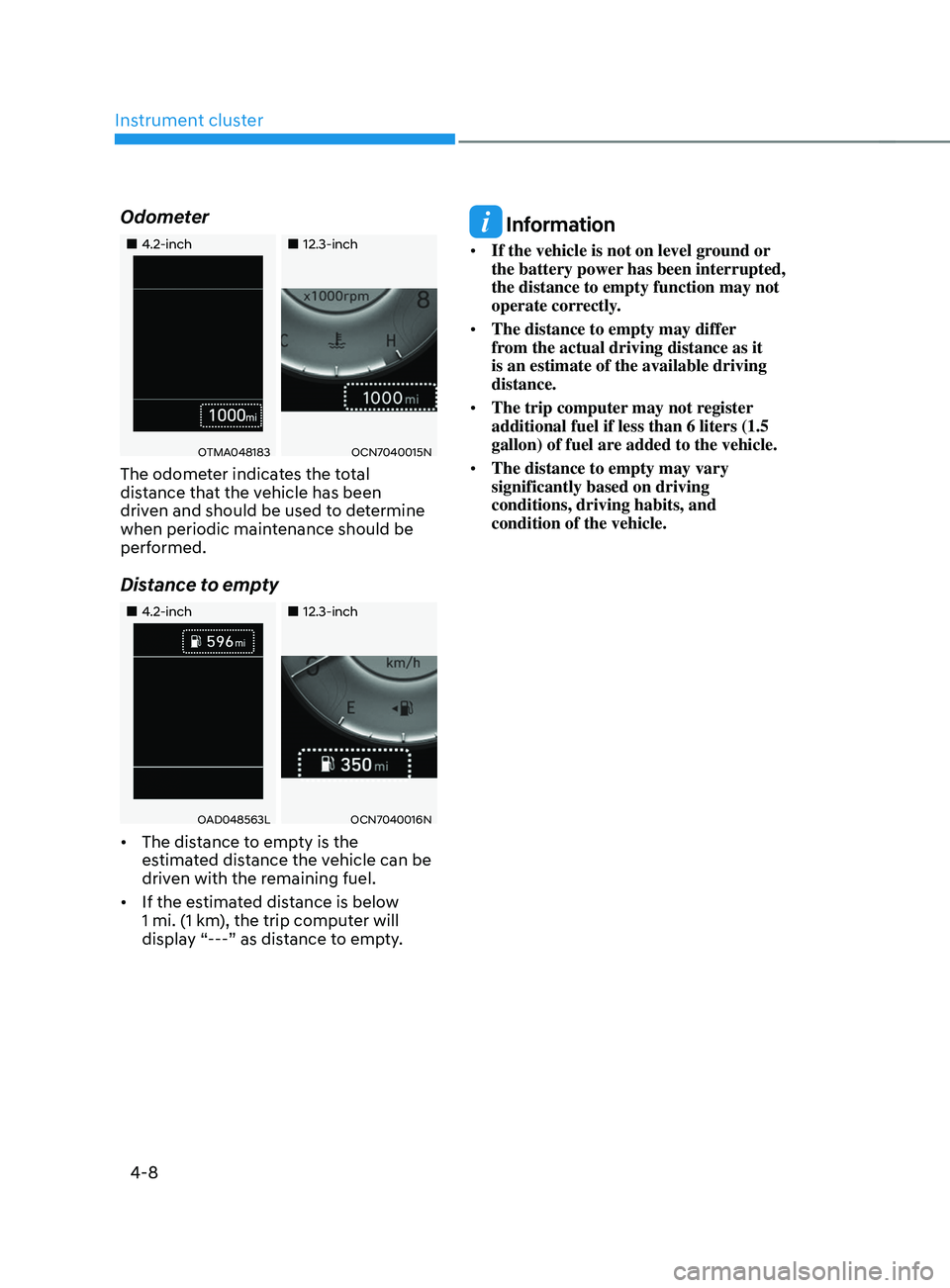
Odometer
„„4.2-inch„„12.3-inch
OTMA048183OCN7040015N
The odometer indicates the total
distance that the vehicle has been
driven and should be used to determine
when periodic maintenance should be
performed.
Distance to empty
„„4.2-inch„„12.3-inch
OAD048563LOCN7040016N
• The distance to empty is the
estimated distance the vehicle can be
driven with the remaining fuel.
• If the estimated distance is below
1 mi. (1 km), the trip computer will
display “---” as distance to empty.
Information
• If the vehicle is not on level ground or
the battery power has been interrupted,
the distance to empty function may not
operate correctly.
• The distance to empty may differ
from the actual driving distance as it
is an estimate of the available driving
distance.
• The trip computer may not register
additional fuel if less than 6 liters (1.5
gallon) of fuel are added to the vehicle.
• The distance to empty may vary
significantly based on driving
conditions, driving habits, and
condition of the vehicle.
Page 146 of 636

Exterior features ........................................................................\
......................5-67Hood ........................................................................\
.................................................... 5-67
Liftga te ........................................................................\
............................................... 5-68
P
ower liftgate
........................................................................\
..................................... 5-
70
Smart liftgate
........................................................................\
.....................................
.5-75
Fuel filler door........................................................................\
..................................... 5-77
Head-Up Display (HUD) ........................................................................\
......... 5-80Head-up display settings ........................................................................\
.................. 5-80
Head-up displa y information ........................................................................\
........... 5-80
Pr
ecautions while using the head-up display
.......................................................... 5-81
Lighting ........................................................................\
.................................... 5-82Exterior lights........................................................................\
......................................5-82
High Beam Assist (HBA) ........................................................................\
........5-86System settings ........................................................................\
................................. 5-86
Sy stem operation ........................................................................\
............................... 5-87
S
ystem malfunction and limitations
........................................................................\
. 5-87
Interior lights ........................................................................\
........................... 5-89Interior lamp AUTO cut ........................................................................\
.....................5-89
Fr ont lamps ........................................................................\
..................................... ...5-89
Rear lamps
........................................................................\
......................................... 5-90
V
anity mirror lamp
........................................................................\
............................. 5-90
L
uggage compartment lamp
........................................................................\
............ 5-91
Puddle lamp ........................................................................\
.....................................
...5-91
Welcome system
........................................................................\
................................ 5-92
Wipers and washers ........................................................................\
................5-93Windshield wipers ........................................................................\
.............................. 5-93
Fr ont windshield washers ........................................................................\
.................. 5-95
R
ear window wiper and washer
........................................................................\
....... 5-96
Manual climate control system ......................................................................5-97Heating and air conditioning ........................................................................\
............ 5-98
Sy stem operation ........................................................................\
.............................. 5-
101
System maintenance
........................................................................\
....................... 5-
103
Automatic climate control system ................................................................5-105Automatic heating and air conditioning ................................................................. 5-106
Manual hea ting and air conditioning ...................................................................... 5-106
S
ystem operation
........................................................................\
............................... 5-
111
System maintenance
........................................................................\
........................ 5-
113
5
Page 159 of 636
05
5-15
Hyundai Digital Key
Digital Key Application
To use Hyundai Digital Key mobile app,
you should install Hyundai digital key
application. Search ‘Hyundai digital key’
in the Google Play Store and download
the app. Please refer to the detailed
manual of the digital key app. The option
can be found under the following app
menu:
Menu → Application Info → Tutorial
Please note the manual before using the
app.
ÃThis service is only av
ailable for
Android smartphones. Please confirm
supported/compatible devices on our
website.
WARNING
For used vehicle
If any of the digital key (smartphone key
or card key) is already registered when
you press ON button after unlocking the
doors, the message ‘Digital key(s) active’
appears on the instrument cluster once.
If you buy a used vehicle, you should
confirm the message and delete the
registered smartphone key and card key.
In addition, please notify the Hyundai
Customer Care Center.
If the card key does not work properly,
please delete the card key and register
the smartphone key and re-register the
card key.
For vehicle maintenance
If you need to have your Digital Key
System repaired or replaced please
ensure you Smartphone Key is still active.
You may have to pair your phone again.
In the case, re-initialize your Digital Keys
using the Hyundai Digital Key mobile app.
Digital key (smartphone) NFC
function
You can use the Digital Key NFC (Near
Field Communication) function after turn
your smartphone NFC settings on. And
you should unlock & turn on smartphone
screen to use it.
à To change the NF
C mode of the
smartphone, please refer to the
smartphone manual or contact
to the customer service center of
smartphone manufacturers.
Page 161 of 636
05
5-17
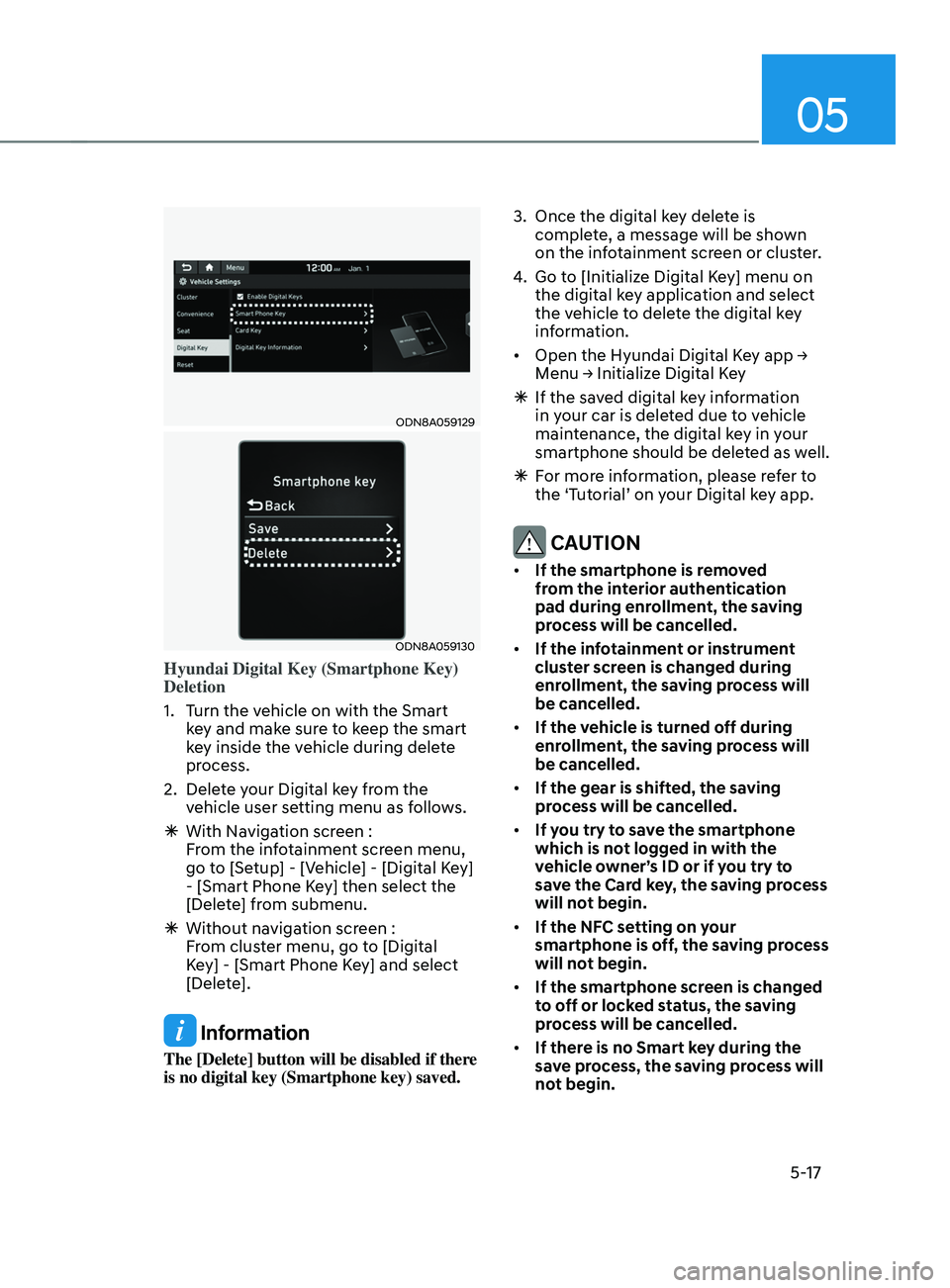
ODN8A059129
ODN8A059130
Hyundai Digital Key (Smartphone Key)
Deletion
1.
Turn the v
ehicle on with the Smart
key and make sure to keep the smart
key inside the vehicle during delete
process.
2.
Delet
e your Digital key from the
vehicle user setting menu as follows.
à With Naviga
tion screen :
From the infotainment screen menu,
go to [Setup] - [Vehicle] - [Digital Key]
- [Smart Phone Key] then select the
[Delete] from submenu.
à Without naviga
tion screen :
From cluster menu, go to [Digital
Key] - [Smart Phone Key] and select
[Delete].
Information
The [Delete] button will be disabled if there
is no digital key (Smartphone key) saved. 3.
Once the digital ke
y delete is
complete, a message will be shown
on the infotainment screen or cluster.
4.
Go to [Initializ
e Digital Key] menu on
the digital key application and select
the vehicle to delete the digital key
information.
• Open
the Hyundai Digital K
ey
app → Menu → Initializ
e
Digital K
ey
Ã
If the sav
ed digital key information
in your car is deleted due to vehicle
maintenance, the digital key in your
smartphone should be deleted as well.
à For mor
e information, please refer to
the ‘Tutorial’ on your Digital key app.
CAUTION
• If the smartphone is removed
from the interior authentication
pad during enrollment, the saving
process will be cancelled.
• If the infotainment or instrument
cluster screen is changed during
enrollment, the saving process will
be cancelled.
• If the vehicle is turned off during
enrollment, the saving process will
be cancelled.
• If the gear is shifted, the saving
process will be cancelled.
• If you try to save the smartphone
which is not logged in with the
vehicle owner’s ID or if you try to
save the Card key, the saving process
will not begin.
• If the NFC setting on your
smartphone is off, the saving process
will not begin.
• If the smartphone screen is changed
to off or locked status, the saving
process will be cancelled.
• If there is no Smart key during the
save process, the saving process will
not begin.
Page 247 of 636
05
5-103
Air conditioning system operation tips
• If the vehicle has been parked in
direct sunlight during hot weather,
open the windows for a short time
to let the hot air inside the vehicle
escape.
• After sufficient cooling has been
achieved, switch back from the
recirculated air to the fresh outside air
position.
• To help reduce moisture inside of
the windows on rainy or humid
days, decrease the humidity inside
the vehicle by operating the air
conditioning system with the windows
and sunroof closed.
• Use the air conditioning system every
month for a few minutes to ensure
maximum system performance.
• If you operate the air conditioner
excessively, the difference between
the temperature of the outside air and
that of the windshield could cause
the outer surface of the windshield to
fog up, causing loss of visibility. In this
case, set the mode selection knob to
the
position and set the fan speed
control knob to the lowest speed
setting.
System maintenance
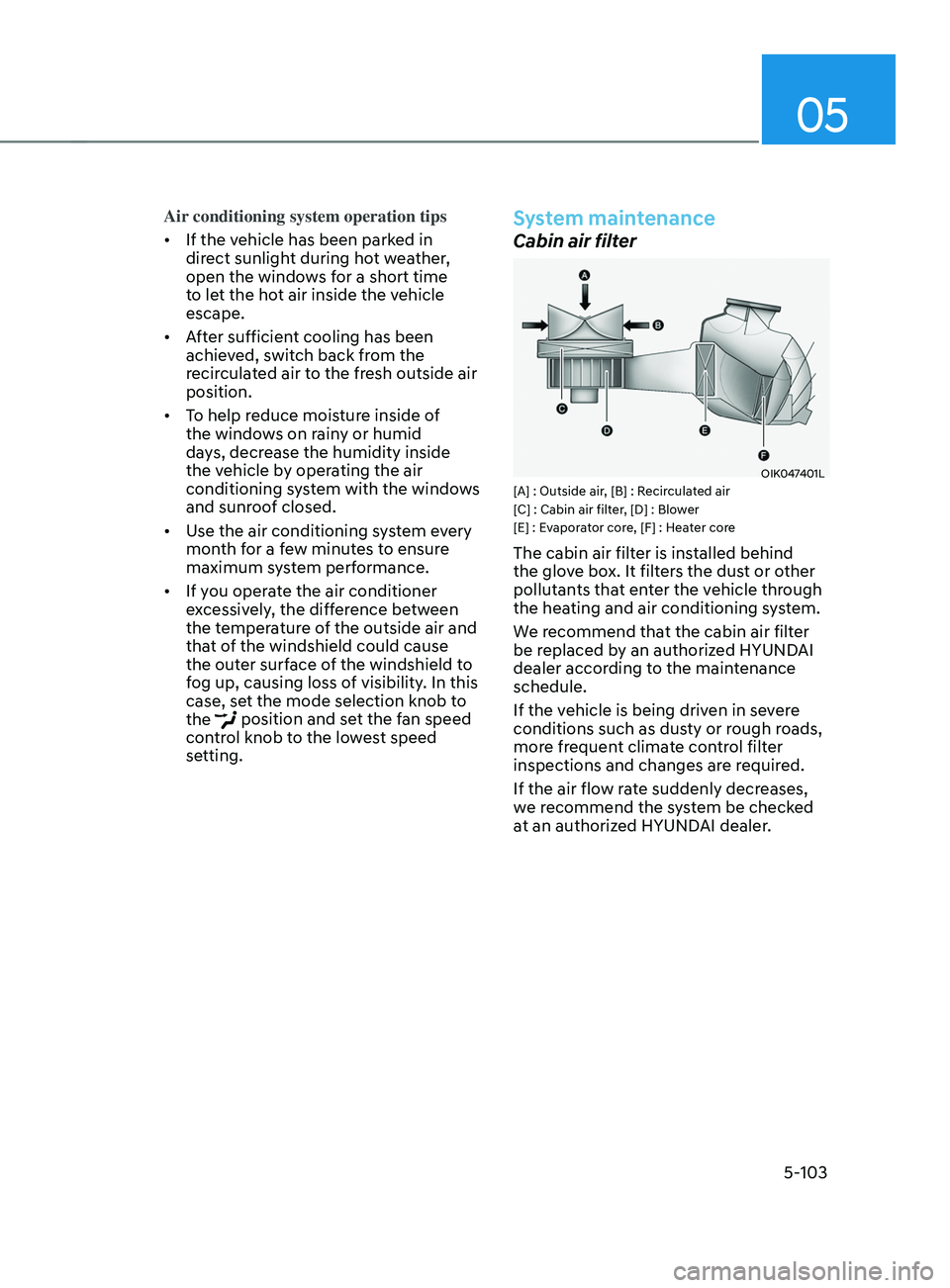
Cabin air filter
OIK047401L[A] : Outside air, [B] : Recirculated air
[C] : Cabin air filter, [D] : Blower
[E] : Evaporator core, [F] : Heater core
The cabin air filter is installed behind
the glove box. It filters the dust or other
pollutants that enter the vehicle through
the heating and air conditioning system.
We recommend that the cabin air filter
be replaced by an authorized HYUNDAI
dealer according to the maintenance
schedule.
If the vehicle is being driven in severe
conditions such as dusty or rough roads,
more frequent climate control filter
inspections and changes are required.
If the air flow rate suddenly decreases,
we recommend the system be checked
at an authorized HYUNDAI dealer.
Page 257 of 636
05
5-113
Air conditioning system operation tips
• If the vehicle has been parked in
direct sunlight during hot weather,
open the windows for a short time
to let the hot air inside the vehicle
escape.
• After sufficient cooling has been
achieved, switch back from the
recirculated air to the fresh outside air
position.
• To help reduce moisture inside of
the windows on rainy or humid
days, decrease the humidity inside
the vehicle by operating the air
conditioning system with the windows
and sunroof closed.
• Use the air conditioning system every
month for a few minutes to ensure
maximum system performance.
• If you operate the air conditioner
excessively, the difference between
the temperature of the outside air and
that of the windshield could cause
the outer surface of the windshield to
fog up, causing loss of visibility. In this
case, set the mode selection button to
the
position and set the fan speed
control knob to the lowest speed
setting.
System maintenance
Cabin air filter
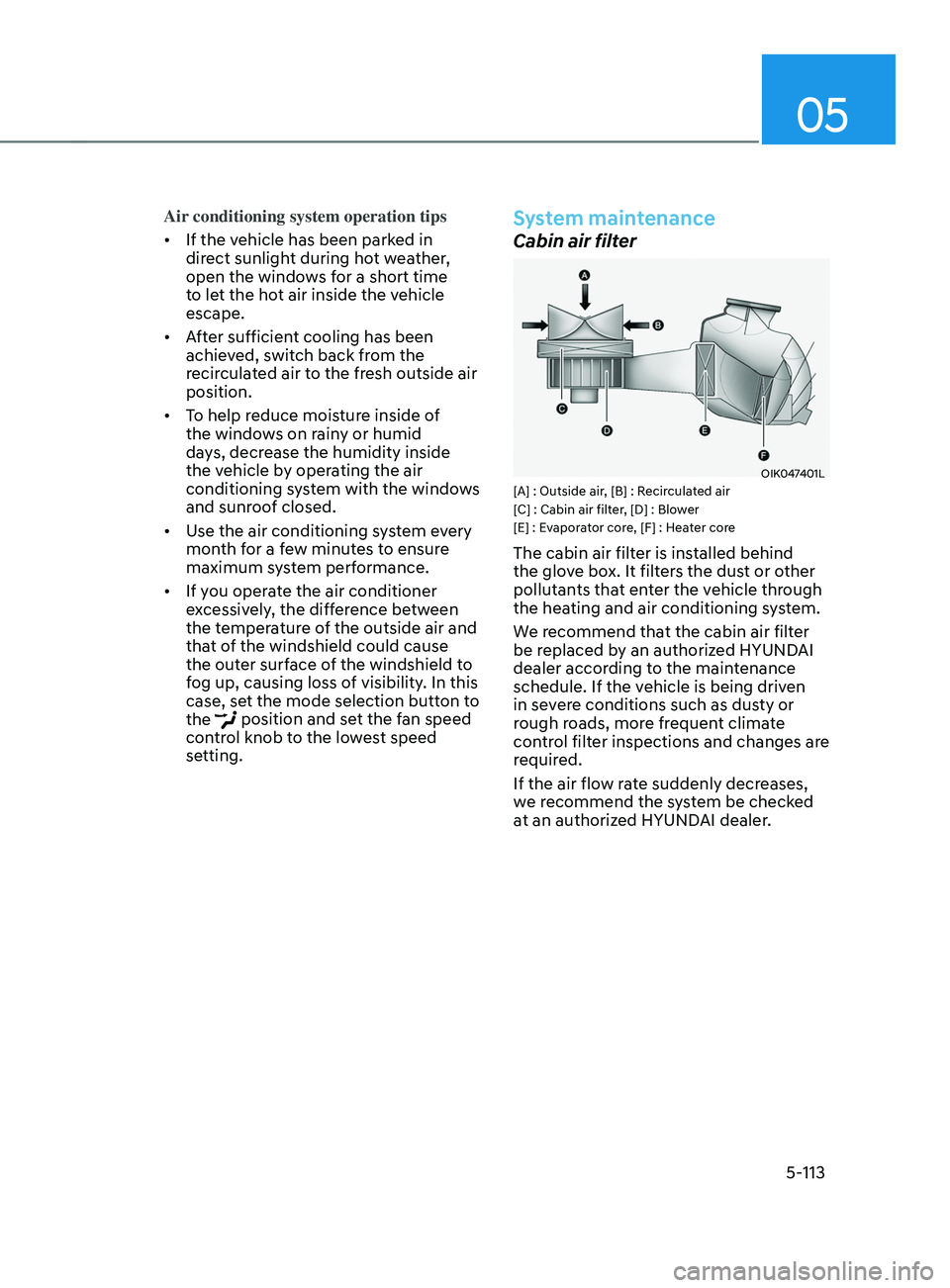
OIK047401L[A] : Outside air, [B] : Recirculated air
[C] : Cabin air filter, [D] : Blower
[E] : Evaporator core, [F] : Heater core
The cabin air filter is installed behind
the glove box. It filters the dust or other
pollutants that enter the vehicle through
the heating and air conditioning system.
We recommend that the cabin air filter
be replaced by an authorized HYUNDAI
dealer according to the maintenance
schedule. If the vehicle is being driven
in severe conditions such as dusty or
rough roads, more frequent climate
control filter inspections and changes are
required.
If the air flow rate suddenly decreases,
we recommend the system be checked
at an authorized HYUNDAI dealer.
Page 340 of 636
Driving your vehicle
6-52
Four Wheel Drive (4WD) delivers engine
power to front and rear wheels for
maximum traction. 4WD is useful when
extra traction is required, such as when
driving on, muddy, wet, or snow-covered
roads.
WARNING
To reduce the risk of SERIOUS INJURY
or DEATH:
• Do not drive in conditions that
exceed the vehicles intended
design such as challenging off-road
conditions.
• Avoid high speeds when cornering or
turning.
• Do not make quick steering wheel
movements, such as sharp lane
changes or fast, sharp turns.
• The risk of a rollover is greatly
increased if you lose control of your
vehicle at highway speeds.
• Loss of control often occurs if two or
more wheels drop off the roadway
and the driver over steers to reenter
the roadway.
• In the event your vehicle leaves
the roadway, do not steer sharply.
Instead, slow down before pulling
back into the travel lanes.
NOTICE
• Do not drive in water if the level
is higher than the bottom of the
vehicle.
• Check your brake condition once
you are out of mud or water. Depress
the brake pedal several times as you
move slowly until you feel normal
braking return.
• Shorten your scheduled
maintenance interval if you drive in
off-road conditions such as sand,
mud or water (see "Maintenance
Under Severe Usage Conditions"
section in chapter 9).
• Always wash your vehicle thoroughly
after off road use, especially the
bottom of the vehicle.
• Be sure to equip the vehicle with four
tires of the same size and type.
• Make sure that a full time 4WD
vehicle is towed by a flat bed tow
truck.
FOUR WhEEL DRIVE (4 WD) (IF E QUIppED)
Page 365 of 636
06
6-77
Chain Installation
When installing tire chains, follow the
manufacturer’s instructions and mount
them as tightly possible. Drive slowly
(less than 20 mph (30 km/h)) with
chains installed. If you hear the chains
contacting the body or chassis, stop and
tighten them. If they still make contact,
slow down until the noise stops. Remove
the tire chains as soon as you begin
driving on cleared roads.
When mounting snow chains, park the
vehicle on level ground away from traffic.
Turn on the vehicle Hazard Warning
Flasher and place a triangular emergency
warning device behind the vehicle (if
available). Always place the vehicle in P
(Park), apply the parking brake and turn
off the engine before installing snow
chains.
NOTICE
When using tire chains:
• Wrong size chains or improperly
installed chains can damage your
vehicle’s brake lines, suspension,
body and wheels.
• Use SAE “S” class or wire chains.
• If you hear noise caused by chains
contacting the body, retighten the
chain to prevent contact with the
vehicle body.
• To prevent body damage, retighten
the chains after driving 0.3~0.6 miles
(0.5~1.0 km).
• Do not use tire chains on vehicles
equipped with aluminum wheels. If
unavoidable, use a wire type chain.
• Use wire chains less than 0.47 in.
(12mm) thick to prevent damage to
the chain’s connection.
Winter precautions
Use high quality ethylene glycol coolant
Your vehicle is delivered with high
quality ethylene glycol coolant in the
cooling system. It is the only type of
coolant that should be used because it
helps prevent corrosion in the cooling
system, lubricates the water pump and
prevents freezing. Be sure to replace or
replenish your coolant in accordance
with the maintenance schedule in
chapter 9. Before winter, have your
coolant tested to assure that its freezing
point is sufficient for the temperatures
anticipated during the winter.
Check battery and cables
Winter temperatures affect battery
performance. Inspect the battery and
cables, as specified in chapter 9. The
battery charging level can be checked
by an authorized HYUNDAI dealer or in a
service station.
Change to “winter weight” oil if
necessary
In some regions during winter, it is
recommended to use the “winter
weight” oil with lower viscosity In
addition, replace the engine oil and filter
if it is close to the next maintenance
interval. Fresh engine oil ensures
optimum engine operation during the
winter months. For further information,
refer to chapter 2. When you are not
sure about a type of winter weight oil,
we recommend that you consult an
authorized HYUNDAI dealer.
Page 375 of 636
06
6-87
Driving the vehicle after it has been
parked on a hill
1. With the gear in P (Park), apply your
brakes and hold the brake pedal down
while you:
• Start your engine;
• Shift into gear; and
• Release the parking brake.
2.
Slowly r
emove your foot from the
brake pedal.
3.
Drive slo
wly until the trailer is clear of
the chocks.
4.
St
op and have someone pick up and
store the chocks.
Maintenance when towing a
trailer
Your vehicle will need service more
often when you regularly pull a trailer.
Important items to pay particular
attention to include engine oil,
transmission fluid, axle lubricant and
cooling system fluid. Brake condition
is another important item to frequently
check. If you’re trailering, it’s a good
idea to review these items before
you start your trip. Don’t forget to
also maintain your trailer and hitch.
Follow the maintenance schedule that
accompanied your trailer and check it
periodically. Preferably, conduct the
check at the start of each day’s driving.
Most importantly, all hitch nuts and bolts
should be tight.
NOTICE
To prevent vehicle damage:
• Due to higher load during trailer
usage, overheating might occur on
hot days or during uphill driving.
If the coolant gauge indicates
over-heating, switch off the air
conditioner and stop the vehicle in a
safe area to cool down the engine.
• Do not switch off the engine while
the coolant gauge indicates over-
heating.
(Keep the engine idle to cool down
the engine)
• When towing check transmission
fluid more frequently.
• If your vehicle is not equipped with
an air conditioner, you should install
a condenser fan to improve engine
performance when towing a trailer.
Page 528 of 636

Emergency situations
8-10
Tire pressure monitoring system
WARNING
Over-inflation or under-inflation can
reduce tire life, adversely affect vehicle
handling, and lead to sudden tire failure
that may cause loss of vehicle control
resulting in an accident.
Each tire, including the spare (if
provided), should be checked monthly
when cold and inflated to the inflation
pressure recommended by the vehicle
manufacturer on the vehicle placard
or tire inflation pressure label. (If your
vehicle has tires of a different size than
the size indicated on the vehicle placard
or tire inflation pressure label, you should
determine the proper tire inflation
pressure for those tires.)
As an added safety feature, your
vehicle has been equipped with a tire
pressure monitoring system (TPMS)
that illuminates a low tire pressure
telltale when one or more of your tires is
significantly under-inflated. Accordingly,
when the low tire pressure telltale
illuminates, you should stop and check
your tires as soon as possible, and inflate
them to the proper pressure. Driving on
a significantly under-inflated tire causes
the tire to overheat and can lead to tire
failure.
Under-inflation also reduces fuel
efficiency and tire tread life, and may
affect the vehicle’s handling and
stopping ability.
Please note that the TPMS is not a
substitute for proper tire maintenance,
and it is the driver’s responsibility to
maintain correct tire pressure, even if
under-inflation has not reached the level
to trigger illumination of the TPMS low
tire pressure telltale.
Your vehicle has also been equipped with
a TPMS malfunction indicator to indicate
when the system is not operating
properly. The TPMS malfunction
indicator is combined with the low
tire pressure telltale. When the system
detects a malfunction, the telltale will
flash for approximately one minute and
then remain continuously illuminated.
This sequence will continue upon
subsequent vehicle start-ups as long as
the malfunction exists.
When the malfunction indicator is
illuminated, the system may not be able
to detect or signal low tire pressure as
intended. TPMS malfunctions may occur
for a variety of reasons, including the
installation of replacement or alternate
tires or wheels on the vehicle that
prevent the TPMS from functioning
properly.
Always check the TPMS malfunction
telltale after replacing one or more tires
or wheels on your vehicle to ensure that
the replacement or alternate tires and
wheels allow the TPMS to continue to
function properly.
NOTICE
If any of the below happens, we
recommend that you have the system
checked by an authorized HYUNDAI
dealer.
1.
The Lo
w Tire Pressure Telltale/ TPMS
Malfunction Indicator does not
illuminate for 3 seconds when the
Engine Start/Stop button is pressed
to the ON position or when the
engine is running.
2.
The TPMS Malfunction Indica
tor
remains illuminated after blinking for
approximately 1 minute.
3.
The Lo
w Tire Pressure Position
Telltale remains illuminated.