audio Hyundai Sonata
[x] Cancel search | Manufacturer: HYUNDAI, Model Year: , Model line: , Model:Pages: 286, PDF Size: 9.58 MB
Page 137 of 286
1FEATURES OF YOUR HYUNDAI
124
o BALANCE Control
Rotate the knob clockwise to emphasize
right speaker sound (left speaker sound
will be attenuated). When the control knob
is turned counter clockwise, left speaker
sound will be emphasized (right speaker
sound will be attenuated).6. RANDOM Playback ButtonPress the button for less than 0.8 seconds
to start or stop the random playback of the
songs in the current folder.
Press the button for more than 0.8 seconds
to randomly play the entire songs in the
USB device.
Press the button again to cancel the mode.7. REPEAT ButtonPress the button for less than 0.8 seconds
to repeat the song currently played.
Press the button for more than 0.8 seconds
to repeat the entire songs in the USB
device.8. SCAN ButtonPlays 10 seconds of each song in the USB
device.
Press the button once again to cancel
scanning.
NOTE FOR USING AN i-Pod DEVICE:o Some i-Pod models might not support
the communication protocol and the
files will not be played. (i-Pod models
supported: Mini, 4G, Photo, Nano, 5G)
o The order of search or playback of
songs in the i-Pod can be different
from the order searched in the audio
system.
o If the i-Pod crashes due to its own
trouble, reset i-Pod. (Reset: Refer to
i-Pod manual)
o An i-Pod may not operate normally on
low battery charge.
!
CAUTION IN USING i-Pod
DEVICE:
o You need the power cable exclusive
for an i-Pod in order to operate i-Pod
with the buttons on the audio system.
The PC cable provided by Apple may
cause a malfunction. Do not use it for
vehicle use.
o When connecting the device with an i-
Pod cable, push in the jack fully to not
interfere with communication.
o When adjusting the sound of an i-Pod
and the audio system, the sound ef-
fects of both devices will overlap each
and might reduce or distort the quality
of the sound.
o Deactivate (turn off) the equalizer
function of an i-Pod when adjusting
the audio system’s volume, and turn
off the equalizer of the audio system
when using the equalizer of an i-Pod.
o When the i-Pod cable is connected,
the system can be switched to the
AUX mode even without the i-Pod
device and can cause noise. Discon-
nect i-Pod cable when you are not
using the i-Pod device.
Page 146 of 286
1
FEATURES OF YOUR HYUNDAI
133
o MIDDLE Control
To increase the MIDDLE, rotate the knob
clockwise, while to decrease the MIDDLE,
rotate the knob counterclockwise.
o TREBLE Control
To increase the TREBLE, rotate the knob
clockwise, while to decrease the TREBLE,
rotate the knob counterclockwise.
o FADER Control
Turn the control knob clockwise to empha-
size rear speaker sound (front speaker
sound will be attenuated). When the con-
trol knob is turned counterclockwise, front
speaker sound will be emphasized (rear
speaker sound will be attenuated).
o BALANCE Control
Rotate the knob clockwise to emphasize
right speaker sound (left speaker sound
will be attenuated). When the control knob
is turned counter clockwise, left speaker
sound will be emphasized (right speaker
sound will be attenuated).
9. REPEAT ButtonRepeats current song when the button is
pressed for less than 0.8 seconds.
Repeats the entire DISC when the button
is pressed for 0.8 seconds or longer.10. RANDOM Play ButtonTurns on/off the randomization of the play
list of files in the currently played DISC.
To cancel the mode, press the key once
again.11. DISC Selection Buttono [DISC
] Change Button
Changes disc to the previous disc.
o [DISC ] Change Button
Changes disc to the next disc.
12. SCAN Play ButtonPlays first 10 seconds of each song in the
DISC.
To cancel the mode, press the key once
again.13. MUTE ButtonPress this button to temporarily cut off the
Sound. "Audio Mute" is displayed on the
LCD. Press the button once again to can-
cel MUTE mode.
!
CAUTION IN USING
USB DEVICE:
o To use the external USB device, make
sure the device is not connected when
starting up the vehicle and connect
the device after starting up.
o If you start the vehicle when the USB
device is connected, it may damage
the USB device. (USB is not ESA)
o If the vehicle is started up or turned off
while the external USB device is con-
nected, the external USB device may
not work.
o It may not play all MP3 or WMA files.
1) It can only play MP3 files with the
compression rate between
8Kbps~320Kbps.
2) It can only play WMA music files
with the compression rate between
8Kbps~320Kbps.
o Take cautions for static electricity
when connecting or disconnecting the
external USB device.
o Encoded MP3 PLAYER'S are not rec-
ognizable.
o Depending on the condition of the ex-
ternal USB device, the connected
external USB device can be unrecog-
nizable.
Page 147 of 286
1FEATURES OF YOUR HYUNDAI
134
o When the formatted byte/sector set-
ting of External USB devices is not
either 512BYTE or 2048BYTE, then
the device will not be recognized.
o Only the USB device formatted to FAT
12/16/32 can be used.
o USB device without USB IF
(Implementers-Forum) authentica-
tion may not be recognizable.
o Make sure the USB connection termi-
nal does not come in contact with a
human body or any other object.
o If you repeat connecting or discon-
necting USB device in a short period
of time, it may damage the device.
o You might hear unusual noise when
connecting or disconnecting a USB
device.
o If you disconnect the external USB
device during playback in USB mode,
the external USB device can be dam-
aged. Therefore, connect the exter-
nal USB device when the engine is
turned off or in another mode.
o Depending on the type and capacity
of the external USB device or the type
of the files stored in the device, there
is a difference in the time taken for
recognition of the device, but this does
not indicate a problem.o Do not use the USB device for other
purposes than playing music files.
o Use of USB accessories such as a
recharger or heater using the USB I/
F may lower the performance or cause
trouble.
o If you use devices such as a USB hub
you purchased separately, the
vehicle’s audio system may not rec-
ognize the USB device. Connect the
USB device directly to the multimedia
terminal of the vehicle.
Page 150 of 286
1
FEATURES OF YOUR HYUNDAI
137
o BALANCE Control
Rotate the knob clockwise to emphasize
right speaker sound (left speaker sound
will be attenuated). When the control knob
is turned counter clockwise, left speaker
sound will be emphasized (right speaker
sound will be attenuated).6. RANDOM Playback ButtonPress the button for less than 0.8 seconds
to start or stop the random playback of the
songs in the current folder.
Press the button for more than 0.8 seconds
to randomly play the entire songs in the
USB device.
Press the button again to cancel the mode.7. REPEAT ButtonPress the button for less than 0.8 seconds
to repeat the song currently played.
Press the button for more than 0.8 seconds
to repeat the entire songs in the USB
device.8. SCAN ButtonPlays 10 seconds of each song in the USB
device.
Press the button once again to cancel
scanning.
NOTE FOR USING i-Pod DEVICE:o Some i-Pod models might not support
the communication protocol and the
files will not be played. (i-Pod models
supported: Mini, 4G, Photo, Nano, 5G)
o The order of search or playback of
songs in the i-Pod can be different
from the order searched in the audio
system.
o If the i-Pod crashes due to its own
trouble, reset i-Pod. (Reset: Refer to
i-Pod manual)
o i-Pod may not operate normally on
low battery.
!
CAUTION IN USING i-Pod
DEVICE:
o You need the power cable exclusive
for an i-Pod in order to operate i-Pod
with the buttons on the audio system.
The PC cable provided by Apple may
cause a malfunction. Do not use it for
vehicle use.
o When connecting the device with an i-
Pod cable, push in the jack fully to not
interfere with communication.
o When adjusting the sound of an i-Pod
and the audio system, the sound ef-
fects of both devices will overlap each
and might reduce or distort the quality
of the sound.
o Deactivate (turn off) the equalizer
function of an i-Pod when adjusting
the audio system’s volume, and turn
off the equalizer of the audio system
when using the equalizer of an i-Pod.
o When the i-Pod cable is connected,
the system can be switched to the
AUX mode even without the i-Pod
device and can cause noise. Discon-
nect i-Pod cable when you are not
using the i-Pod device.
Page 254 of 286
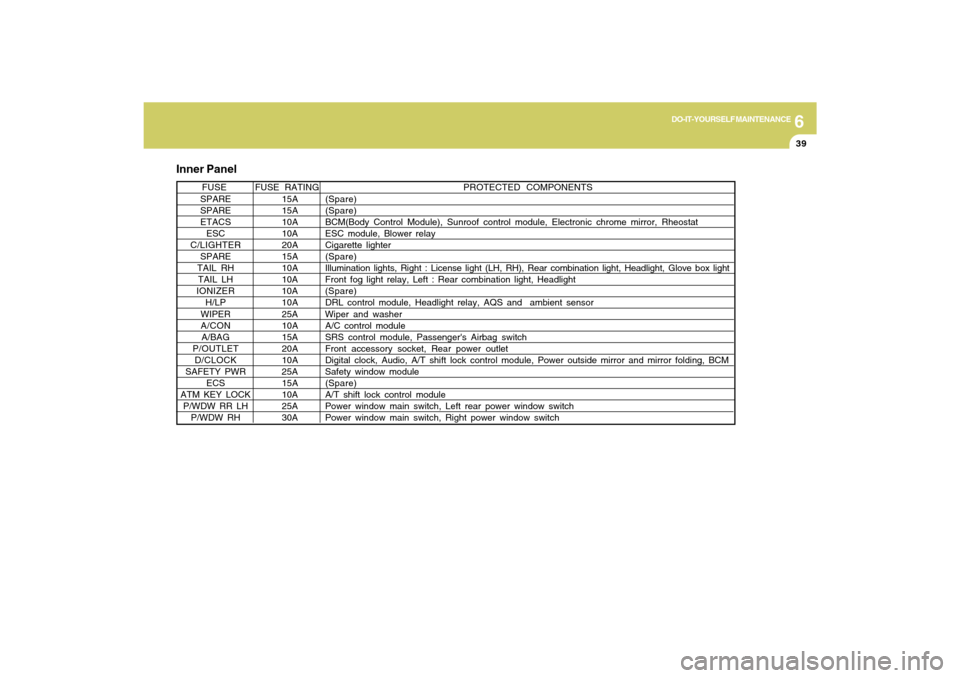
6
DO-IT-YOURSELF MAINTENANCE
39
PROTECTED COMPONENTS
FUSE RATING FUSE
SPARE 15A(Spare)
SPARE 15A(Spare)
ETACS 10ABCM(Body Control Module), Sunroof control module, Electronic chrome mirror, Rheostat
ESC 10A ESC module, Blower relay
C/LIGHTER 20ACigarette lighter
SPARE 15A(Spare)
TAIL RH 10AIllumination lights, Right : License light (LH, RH), Rear combination light, Headlight, Glove box light
TAIL LH 10A Front fog light relay, Left : Rear combination light, Headlight
IONIZER 10A (Spare)
H/LP 10ADRL control module, Headlight relay, AQS and ambient sensor
WIPER 25A Wiper and washer
A/CON 10AA/C control module
A/BAG 15A SRS control module, Passenger's Airbag switch
P/OUTLET 20AFront accessory socket, Rear power outlet
D/CLOCK 10ADigital clock, Audio, A/T shift lock control module, Power outside mirror and mirror folding, BCM
SAFETY PWR 25A Safety window module
ECS 15A (Spare)
ATM KEY LOCK 10A A/T shift lock control module
P/WDW RR LH 25A Power window main switch, Left rear power window switch
P/WDW RH 30A Power window main switch, Right power window switch
Inner Panel
Page 255 of 286
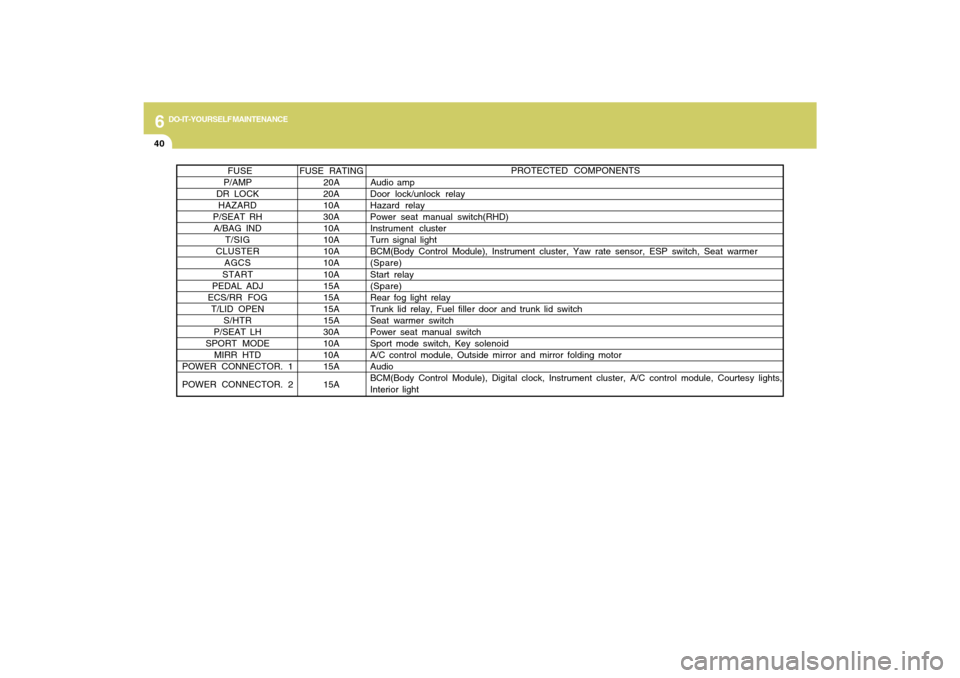
6
DO-IT-YOURSELF MAINTENANCE
40
PROTECTED COMPONENTS
FUSE RATING FUSE
P/AMP 20A Audio amp
DR LOCK 20A Door lock/unlock relay
HAZARD 10AHazard relay
P/SEAT RH 30A Power seat manual switch(RHD)
A/BAG IND 10A Instrument cluster
T/SIG 10A Turn signal light
CLUSTER 10ABCM(Body Control Module), Instrument cluster, Yaw rate sensor, ESP switch, Seat warmer
AGCS 10A (Spare)
START 10A Start relay
PEDAL ADJ 15A(Spare)
ECS/RR FOG 15A Rear fog light relay
T/LID OPEN 15A Trunk lid relay, Fuel filler door and trunk lid switch
S/HTR 15A Seat warmer switch
P/SEAT LH 30A Power seat manual switch
SPORT MODE 10A Sport mode switch, Key solenoid
MIRR HTD 10A A/C control module, Outside mirror and mirror folding motor
POWER CONNECTOR. 115A Audio
POWER CONNECTOR. 2 15ABCM(Body Control Module), Digital clock, Instrument cluster, A/C control module, Courtesy lights,
Interior light
Page 281 of 286

10
INDEX
2
A
Advanced Supplemental Restraint (AIRBAG) System
(SRS)..................................................................................1-34
Curtain airbag .................................................................1-45
Driver's and passenger's front airbag ............................1-35
Occupant classification system ......................................1-40
Side impact airbag .........................................................1-44
Air Cleaner Filter ................................................................6-11
Air Conditioning
Care.................................................................................6-18
Operation............................................................ 1-101, 6-18
Switch............................................................................1-101
Antenna ............................................................................1-110
Audio System
Audio remote control switch ...........................................1-94
CD (PA710S) ................................................................1-119
CDC (PA760S) .............................................................1-131
Radio, Set up, Volume control (PA710S, PA760S)
........................................................................... 1-115, 1-128
Running i-Pod (PA710S, PA760S) .................. 1-125, 1-139
Using USB (PA710S, PA760S) ........................ 1-123, 1-135
Automatic Heating and Cooling Control System ............1-104
Automatic-Dimming Mirror with Z-Nav™ Electronic Compass
Display and HomeLink
®
......................................................................................
1-77B
Battery .................................................................................6-24
Binding Arbitration .............................................................8-17
Brake
Anti-lock brake system (ABS) .........................................2-12
Checking the brakes ......................................................6-17
Fluid.................................................................................6-17
Pedal clearance ..............................................................6-21
Pedal free-play ...............................................................6-20
Practices..........................................................................2-15
Breaking-In your New Hyundai ........................................... 1-3
C
California Perchlorate Notice ............................................5-10
Care of Discs ....................................................................1-114
Catalytic Converter ............................................................... 7-3
Center Console Compartment ...........................................1-74
Child Restraint System ......................................................1-26
Installing a child restraint system with
"Tether Anchorage" system ...........................................1-28
Securing a child restraint system with
"ISOFIX" system .............................................................1-29
Child-Protector Rear Door Lock .......................................... 1-6
Cigarette Lighter ................................................................1-66
Climate Control Air Fiter ........................................ 1-109, 6-19
Clock...................................................................................1-66
Clutch
Pedal free-play ...............................................................6-21