audio Hyundai Sonata
[x] Cancel search | Manufacturer: HYUNDAI, Model Year: , Model line: , Model:Pages: 340, PDF Size: 18.45 MB
Page 170 of 340
Features of your vehicle
112
4
(Continued)
Depending on the condition of the external USB device, the con-nected external USB device can
be unrecognizable.
When the formatted byte/sector setting of External USB devices isnot either 512BYTE or 2048BYTE,
then the device will not be recog-nized.
Only the USB device formatted to FAT 12/16/32.
USB device without USB IF (Implementers-Forum) authentica-tion may not be recognizable.
Make sure the USB connection terminal does not come in contactwith human body or any object.
If you repeat mounting or dis- mounting USB device in a shortperiod of time, it may break thedevice.
You might hear strange noise when mounting or dismounting aUSB device.
(Continued)(Continued) If you dismount the external USB device during playback in USBmode, the external USB device can
be damaged or malfunction. Therefore, mount the external USBdevice when the engine is turned
off or in another mode.
Depending on the type and capac- ity of the external USB device orthe type of the files stored in the
device, there is a difference in thetime taken for recognition of the device, but this is not a troubleand you only have to wait.
Do not use the USB device for other purposes than playing music files.
Use of USB accessories such as the recharger or heater usingUSB I/F may lower the perform-ance or cause trouble.
If you use devices such as the USB hub you purchased sepa-rately, the vehicle’s audio systemmay not recognize the USB
device. Connect the USB devicedirectly to the multimedia termi- nal of the vehicle.
Page 172 of 340
Features of your vehicle
114
4
In case USB is connected to the multiple
terminal inside the console on the left
hand side of the driver’s seat. When USB
is connected, the ‘USB’ icon will be dis-
played on the top right corner of the dis-
play screen.
1.AUX Selection Button Once the USB is connected, the audio
unit switches to USB mode to play song
files stored in the USB. If AUX jack is not
connected, the AUX selection button will
not operate.
2. Track Moving Button
Press the [SEEK ] button for less
than 0.8 second to play from the begin-
ning of the song currently played.
Press the button for less than 0.8 sec- ond and press it again within 1 second
to move and play the previous track.
Press the button for 0.8 second or
longer to play the song in reverse
direction in fast speed.
Press the [SEEK ] button but ton for
less than 0.8 second to move to the
next track. Press the button for 0.8 sec-
ond or longer to play the song in for-
ward direction in fast speed. 3. INFO Button
Displays the information of the file cur-
rently played in the order of FILE NAME➟
TITLE ➟ARTIST ➟ALBUM ➟FOLDER ➟
TOTAL FILE ➟normal display ➟FILE
NAME ➟… (Displays no information if
the file has no song information.)
4. Folder moving Button
Moves [FLDR ] button child folder of
the current folder and displays the first
song in the folder. Press TUNE/ENTER
button to move to the folder displayed.
It will play the first song in the folder.
Moves [FLDR ] button parent folder and displays the first song in the folder.
Press TUNE/ENTER button to move to
the folder displayed. It will play the first
song in the folder.
5. TUNE/ENTER Button
Turn this button clockwise to display the
songs next to the currently played song.
Turn the button counterclockwise to dis-
play the songs before the currently
played song.
Press the button to skip and play the selected song. Pressing this button changes the BASS,
MIDDLE, TREBLE, FADER and BAL-
ANCE TUNE mode.
The mode selected is shown on the dis-
play.
After selecting each mode, rotate the
Audio control knob clockwise or counter-
clockwise.
To increase the BASS, rotate the knob
clockwise, while to decrease the BASS,
rotate the knob counterclockwise.
To increase the MIDDLE, rotate the knob
clockwise, while to decrease the MID-
DLE, rotate the knob counterclockwise.
Control
To increase the TREBLE, rotate the knob
clockwise, while to decrease the TRE-
BLE, rotate the knob counterclockwise.
Page 174 of 340
Features of your vehicle
116
4
CAUTION IN USING
i-Pod DEVICE
You need the power cable exclu- sive for i-Pod in order to operate i-Pod with the buttons on the audio
system. The PC cable provided by Apple may cause malfunction anddo not use it for vehicle use.
When connecting the device with i-Pod cable, push in the jack fully
not to interfere with communica- tion.
When adjusting the sound effects of i-Pod and the audio system, the
sound effects of both devices willoverlap each and might cause reduce or distort the quality of thesound.
Deactivate (turn off) the equalizer function of i-Pod when adjustingthe audio system’s volume, and turn off the equalizer of the audio system when using the equalizer
of i-Pod.
(Continued)
(Continued) When the i-Pod cable is connected, the system can be switched to theAUX mode even without the i-Pod
device and can cause noise. Disconnect i-Pod cable when youare not using the i-Pod device.
Page 176 of 340
Features of your vehicle
118
4
In case the i-Pod exclusive cable is con-
nected to the multiple terminal inside the
console on the left hand side of the dri-
ver’s seat. When the i-Pod is connected,
the ‘i-Pod’ icon will be displayed on the
top right corner of the display screen.
1. i-Pod Selection Button
If an i-Pod is connected, the audio
switches to the i-Pod mode to play the
song files stored in the i-Pod. If there are
no CD and AUX input when the AUX but-
ton is pressed, the audio unit will display'NO MEDIA'.
2. Track Moving Button
Press the [SEEK ] button for less
than 0.8 second to play from the begin-
ning of the song currently played.
Press the button for less than 0.8 sec- ond and press it again within 1 second
to move and play the previous track.
Press the button for 0.8 second or
longer to play the song in reverse
direction in fast speed.
Press the [SEEK ] button for less
than 0.8 second to move to the next
track. Press the button for 0.8 second
or longer to play the song in forward
direction in fast speed. 3. INFO Button
Displays the information of the file cur-
rently played in the order ofTITLE
➟ARTIST ➟ALBUM ➟normal
display ➟TITLE ➟…
(Displays no information if the file has no
song information.)
4. Category Selection Button
Moves to the upper category from cur-
rently played category of the i-Pod.
To move to (play) the category (song)
displayed, press MENU(Preset6).
You will be able to search through the
lower category of the selected category.
The order of i-Pod’s category is SONG,
ALBUMES, ARTISTS, GENRES, and i-
Pod.
5. TUNE/ENTER Button
When you turn the button clockwise, it
will display the songs (category) next to
the song currently played (category in
the same level).
Also, when you turn the button counter-
clockwise, it will display the songs (cate-
gory) before the song currently played
(category in the same level). If you want to listen to the song displayed
in the song category, press the button,then it will skip to the selected song and
play.
Pressing this button changes the BASS,
MIDDLE, TREBLE, FADER and BAL-
ANCE TUNE mode.
The mode selected is shown on the dis-
play.
After selecting each mode, rotate the
Audio control knob clockwise or counter-
clockwise.
To increase the BASS, rotate the knob
clockwise, while to decrease the BASS,
rotate the knob counterclockwise.
To increase the MIDDLE, rotate the knob
clockwise, while to decrease the MID-
DLE, rotate the knob counterclockwise.
Control
To increase the TREBLE, rotate the knob
clockwise, while to decrease the TRE-
BLE, rotate the knob counterclockwise.
Page 285 of 340
Maintenance
42
7
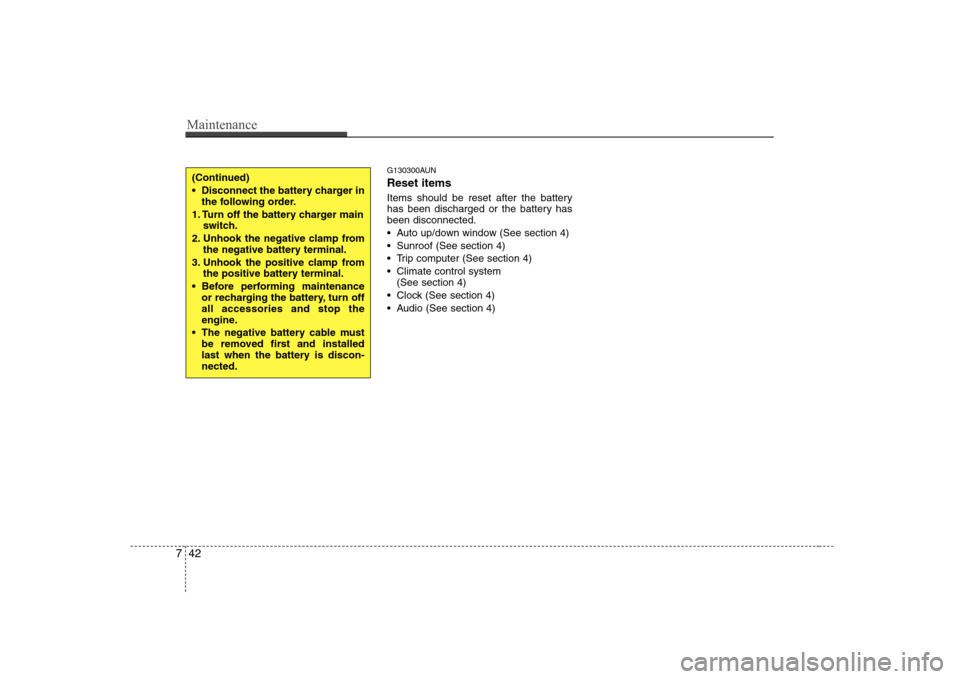
G130300AUN Reset items
Items should be reset after the battery
has been discharged or the battery hasbeen disconnected.
Auto up/down window (See section 4)
Sunroof (See section 4)
Trip computer (See section 4)
Climate control system
(See section 4)
Clock (See section 4)
Audio (See section 4)(Continued)
Disconnect the battery charger in the following order.
1. Turn off the battery charger main switch.
2. Unhook the negative clamp from the negative battery terminal.
3. Unhook the positive clamp from the positive battery terminal.
Before performing maintenance or recharging the battery, turn off all accessories and stop the
engine.
The negative battery cable must be removed first and installed
last when the battery is discon-nected.
Page 301 of 340
Maintenance
58
7
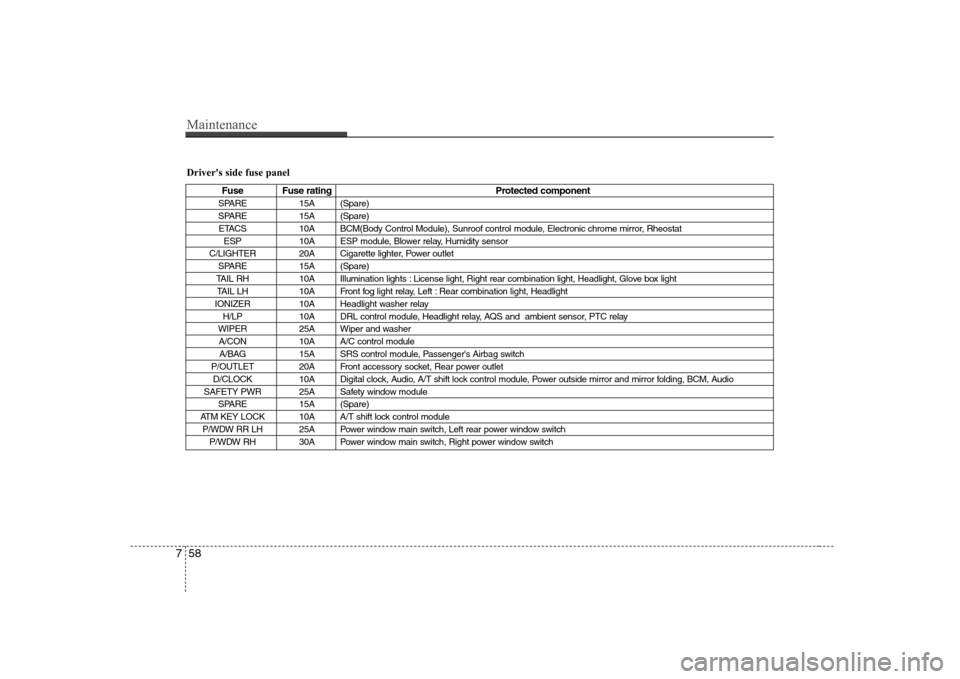
Driver's side fuse panel
Fuse Fuse rating Protected component
SPARE 15A (Spare)
SPARE 15A (Spare) ETACS 10A BCM(Body Control Module), Sunroof control module, Electronic chrome mirror, Rheostat ESP 10A ESP module, Blower relay, Humidity sensor
C/LIGHTER 20A Cigarette lighter, Power outlet SPARE 15A (Spare)
TAIL RH 10A Illumination lights : License light, Right rear combination light, Headlight, Glove box light TAIL LH 10A Front fog light relay, Left : Rear combination light, Headlight
IONIZER 10A Headlight washer relay H/LP 10A DRL control module, Headlight relay, AQS and ambient sensor, PTC relay
WIPER 25A Wiper and washer A/CON 10A A/C control module A/BAG 15A SRS control module, Passenger's Airbag switch
P/OUTLET 20A Front accessory socket, Rear power outlet D/CLOCK 10A Digital clock, Audio, A/T shift lock control module, Power outside mirror and mirror folding, BCM, Audio
SAFETY PWR 25A Safety window module SPARE 15A (Spare)
ATM KEY LOCK 10A A/T shift lock control module P/WDW RR LH 25A Power window main switch, Left rear power window switch P/WDW RH 30A Power window main switch, Right power window switch
Page 302 of 340
759
Maintenance
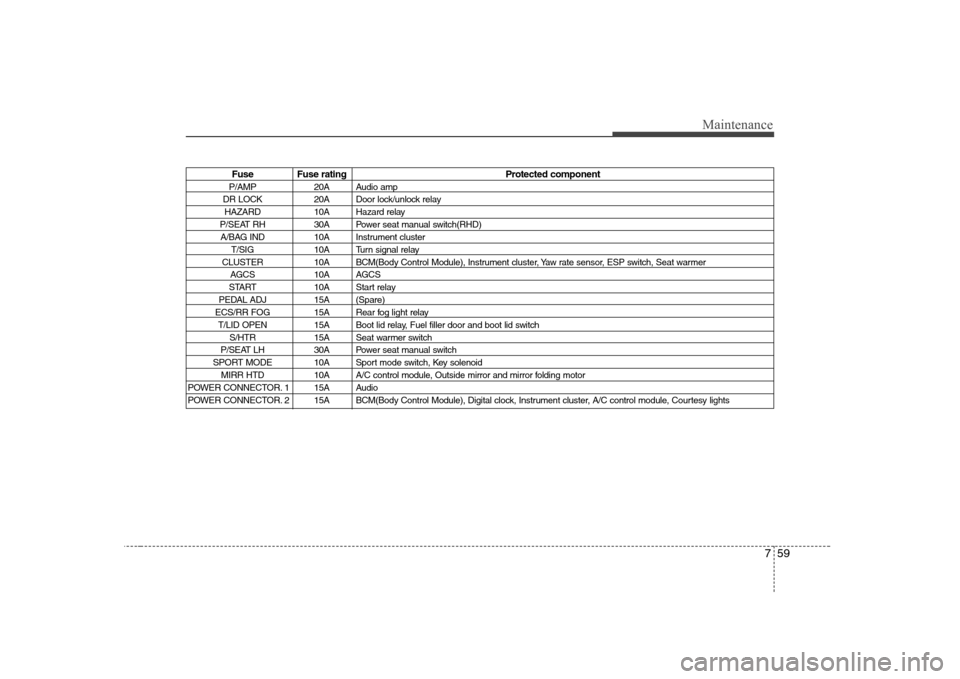
Fuse Fuse ratingProtected component
P/AMP 20A Audio amp
DR LOCK 20A Door lock/unlock relay HAZARD 10A Hazard relay
P/SEAT RH 30A Power seat manual switch(RHD) A/BAG IND 10A Instrument cluster T/SIG 10A Turn signal relay
CLUSTER 10A BCM(Body Control Module), Instrument cluster, Yaw rate sensor, ESP switch, Seat warmer AGCS 10A AGCS
START 10A Start relay
PEDAL ADJ 15A (Spare)
ECS/RR FOG 15A Rear fog light relay T/LID OPEN 15A Boot lid relay, Fuel filler door and boot lid switch S/HTR 15A Seat warmer switch
P/SEAT LH 30A Power seat manual switch
SPORT MODE 10A Sport mode switch, Key solenoid MIRR HTD 10A A/C control module, Outside mirror and mirror folding motor
POWER CONNECTOR. 1 15A Audio
POWER CONNECTOR. 2 15A BCM(Body Control Module), Digital clock, Instrument cluster, A/C control module, Courtesy lights
Page 338 of 340
Index
2
I
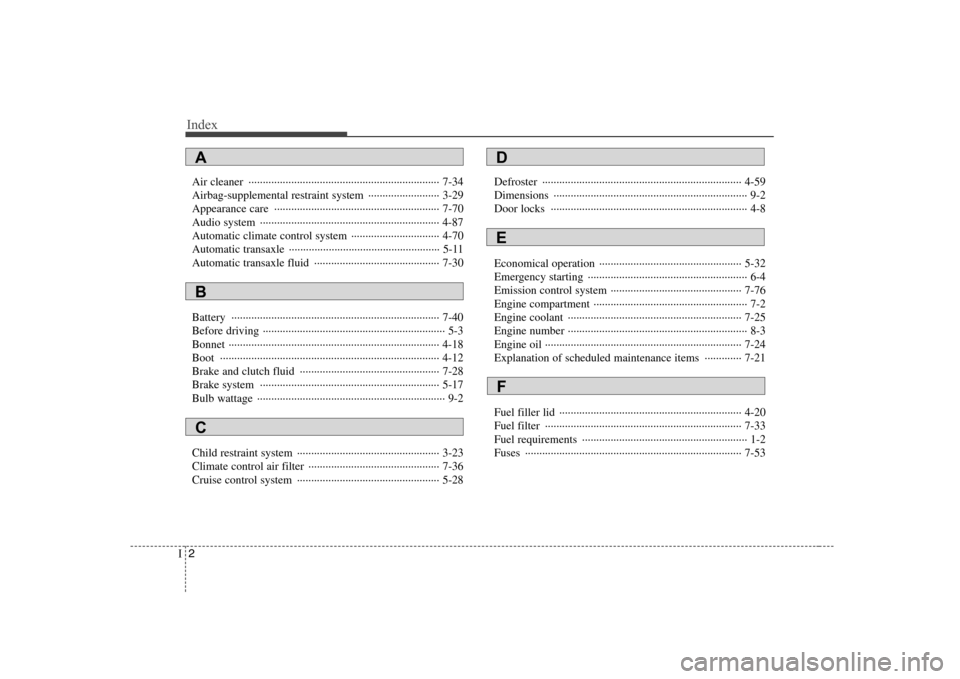
Air cleaner ··································································· 7-34
Airbag-supplemental restraint system ························· 3-29
Appearance care ·························································· 7-70
Audio system ······························································· 4-87
Automatic climate control system ······························· 4-70
Automatic transaxle ····················································· 5-11
Automatic transaxle fluid ············································ 7-30
Battery ········································································· 7-40
Before driving ································································ 5-3
Bonnet ·········································································· 4-18
Boot ············································································· 4-12
Brake and clutch fluid ················································· 7-28
Brake system ······························································· 5-17
Bulb wattage ·································································· 9-2
Child restraint system ·················································· 3-23
Climate control air filter ·············································· 7-36
Cruise control system ·················································· 5-28 Defroster ······································································ 4-59
Dimensions ···································································· 9-2
Door locks ····································································· 4-8
Economical operation ·················································· 5-32
Emergency starting ························································ 6-4
Emission control system ·············································· 7-76
Engine compartment ······················································ 7-2
Engine coolant ····························································· 7-25
Engine number ······························································· 8-3
Engine oil ····································································· 7-24
Explanation of scheduled maintenance items ············· 7-21
Fuel filler lid ································································ 4-20
Fuel filter ····································································· 7-33
Fuel requirements ·························································· 1-2
Fuses ············································································ 7-53
A
B
C
D
E
F