air condition Hyundai Sonata
[x] Cancel search | Manufacturer: HYUNDAI, Model Year: , Model line: , Model:Pages: 283, PDF Size: 13.5 MB
Page 96 of 283
1FEATURES OF YOUR HYUNDAI82
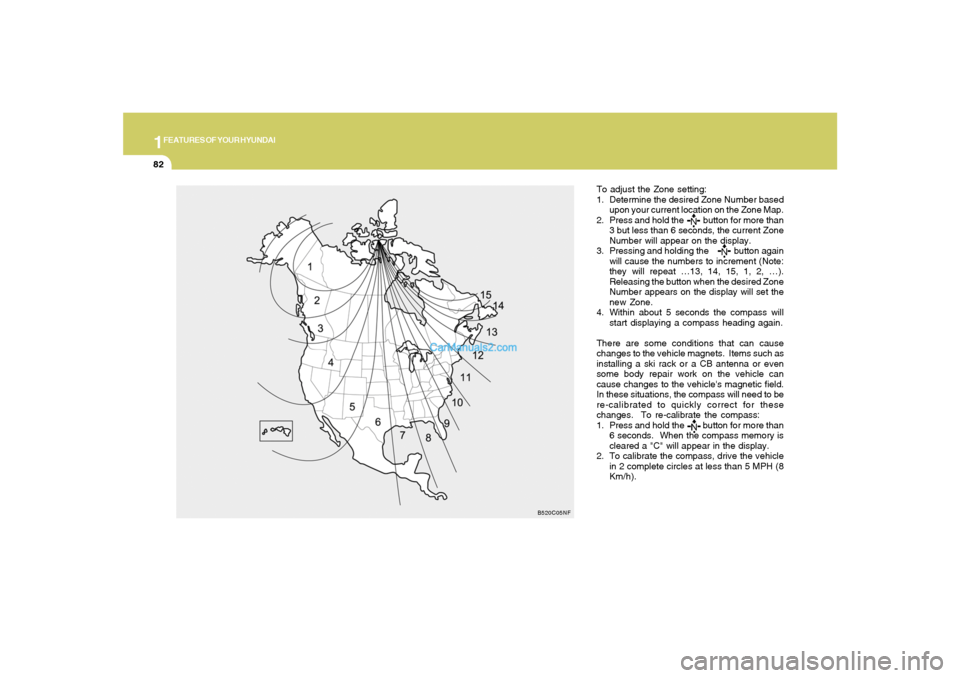
To adjust the Zone setting:
1. Determine the desired Zone Number based
upon your current location on the Zone Map.
2. Press and hold the button for more than
3 but less than 6 seconds, the current Zone
Number will appear on the display.
3. Pressing and holding the button again
will cause the numbers to increment (Note:
they will repeat …13, 14, 15, 1, 2, …).
Releasing the button when the desired Zone
Number appears on the display will set the
new Zone.
4. Within about 5 seconds the compass will
start displaying a compass heading again.
There are some conditions that can cause
changes to the vehicle magnets. Items such as
installing a ski rack or a CB antenna or even
some body repair work on the vehicle can
cause changes to the vehicle's magnetic field.
In these situations, the compass will need to be
re-calibrated to quickly correct for these
changes. To re-calibrate the compass:
1. Press and hold the button for more than
6 seconds. When the compass memory is
cleared a "C" will appear in the display.
2. To calibrate the compass, drive the vehicle
in 2 complete circles at less than 5 MPH (8
Km/h).
B520C05NF
Page 113 of 283
1
FEATURES OF YOUR HYUNDAI
9999
B670B02O-AATFan Speed Control (Blower Control)
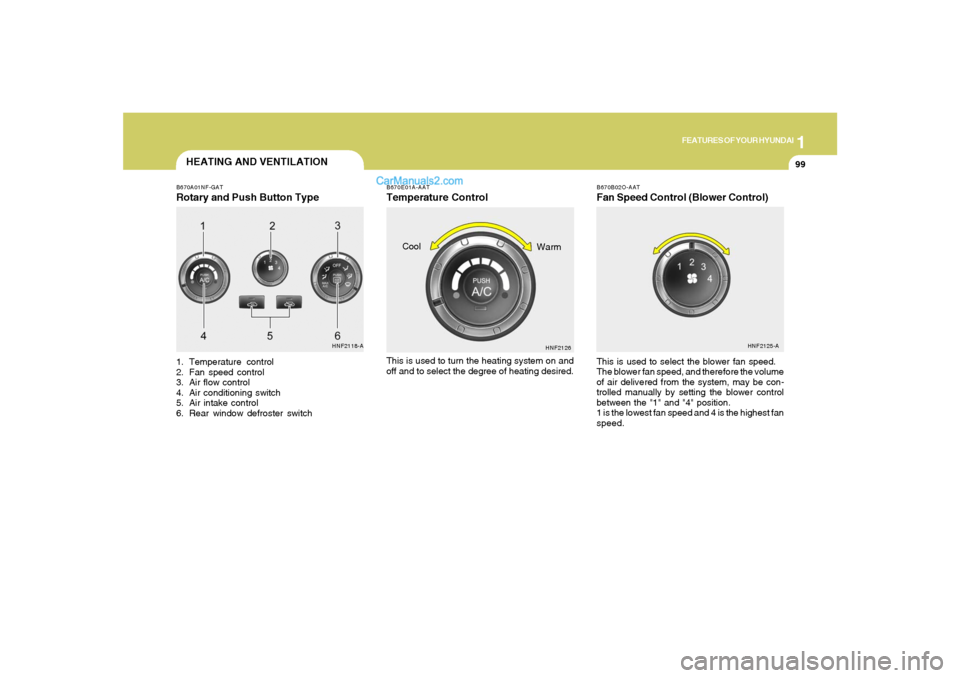
HEATING AND VENTILATIONB670A01NF-GATRotary and Push Button Type1. Temperature control
2. Fan speed control
3. Air flow control
4. Air conditioning switch
5. Air intake control
6. Rear window defroster switchThis is used to select the blower fan speed.
The blower fan speed, and therefore the volume
of air delivered from the system, may be con-
trolled manually by setting the blower control
between the "1" and "4" position.
1 is the lowest fan speed and 4 is the highest fan
speed.
HNF2118-AHNF2125-A
B670E01A-AATTemperature ControlThis is used to turn the heating system on and
off and to select the degree of heating desired.
HNF2126
Cool
Warm
Page 118 of 283
1FEATURES OF YOUR HYUNDAI
104
VENTILATION
B700A02A-AATBI-LEVEL HEATING
B710A01A-AAT
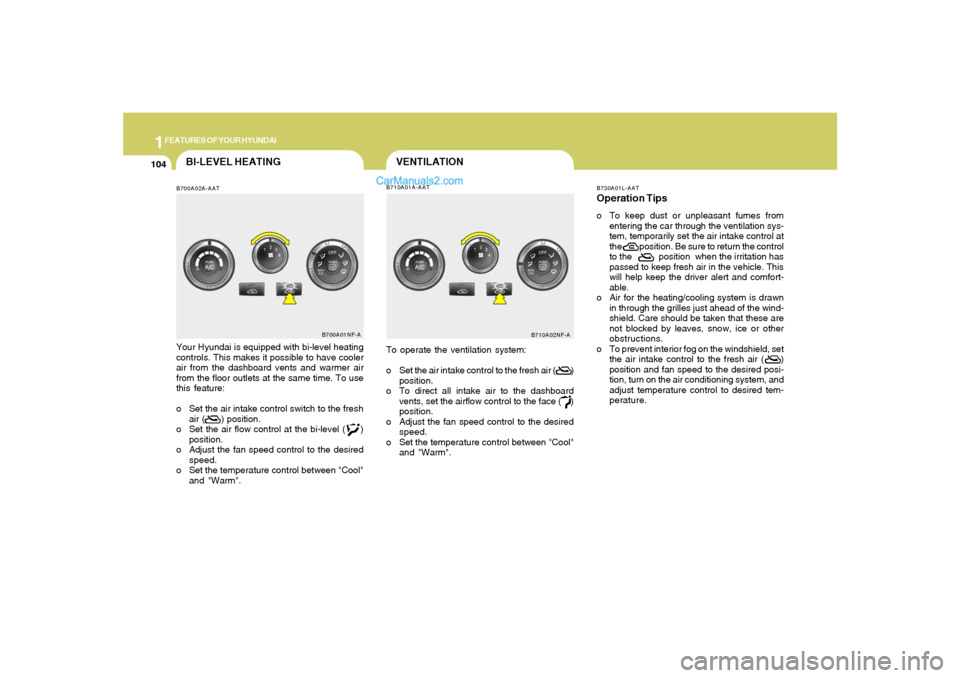
Your Hyundai is equipped with bi-level heating
controls. This makes it possible to have cooler
air from the dashboard vents and warmer air
from the floor outlets at the same time. To use
this feature:
o Set the air intake control switch to the fresh
air ( ) position.
o Set the air flow control at the bi-level ( )
position.
o Adjust the fan speed control to the desired
speed.
o Set the temperature control between "Cool"
and "Warm".
B700A01NF-A
To operate the ventilation system:
o Set the air intake control to the fresh air ( )
position.
o To direct all intake air to the dashboard
vents, set the airflow control to the face ( )
position.
o Adjust the fan speed control to the desired
speed.
o Set the temperature control between "Cool"
and "Warm".
B710A02NF-AB730A01L-AAT
Operation Tipso To keep dust or unpleasant fumes from
entering the car through the ventilation sys-
tem, temporarily set the air intake control at
the position. Be sure to return the control
to the position when the irritation has
passed to keep fresh air in the vehicle. This
will help keep the driver alert and comfort-
able.
o Air for the heating/cooling system is drawn
in through the grilles just ahead of the wind-
shield. Care should be taken that these are
not blocked by leaves, snow, ice or other
obstructions.
o To prevent interior fog on the windshield, set
the air intake control to the fresh air ( )
position and fan speed to the desired posi-
tion, turn on the air conditioning system, and
adjust temperature control to desired tem-
perature.
Page 119 of 283
1
FEATURES OF YOUR HYUNDAI
105105
AIR CONDITIONING SYSTEM
B740B03O-AATAir Conditioning Operation
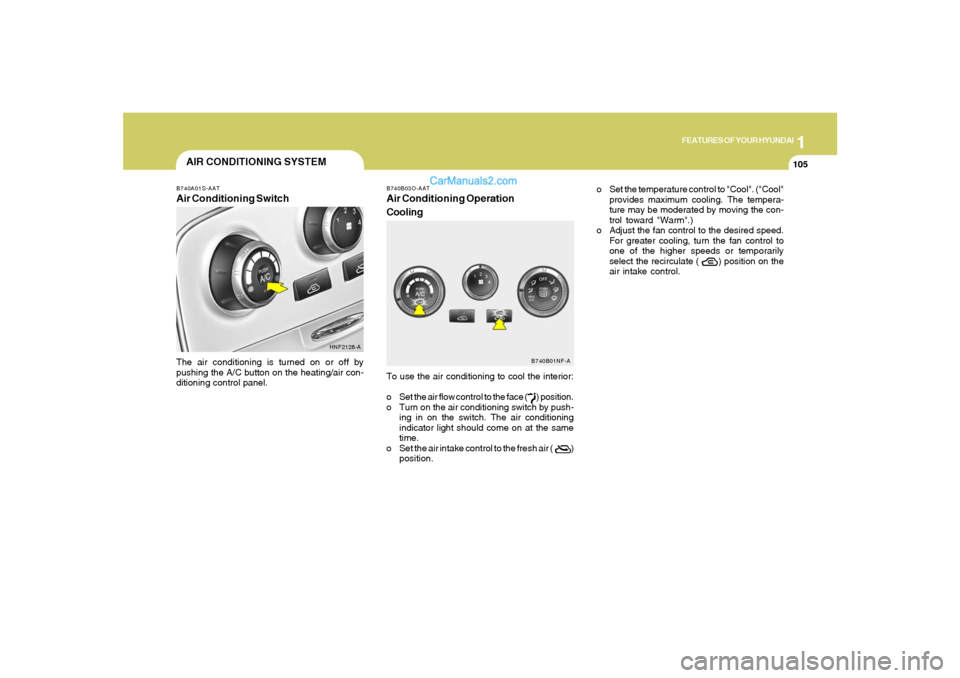
CoolingTo use the air conditioning to cool the interior:
o Set the air flow control to the face ( ) position.
o Turn on the air conditioning switch by push-
ing in on the switch. The air conditioning
indicator light should come on at the same
time.
o Set the air intake control to the fresh air ( )
position.
B740A01S-AATAir Conditioning SwitchThe air conditioning is turned on or off by
pushing the A/C button on the heating/air con-
ditioning control panel.
HNF2128-A
B740B01NF-A
o Set the temperature control to "Cool". ("Cool"
provides maximum cooling. The tempera-
ture may be moderated by moving the con-
trol toward "Warm".)
o Adjust the fan control to the desired speed.
For greater cooling, turn the fan control to
one of the higher speeds or temporarily
select the recirculate ( ) position on the
air intake control.
Page 120 of 283
1FEATURES OF YOUR HYUNDAI
106
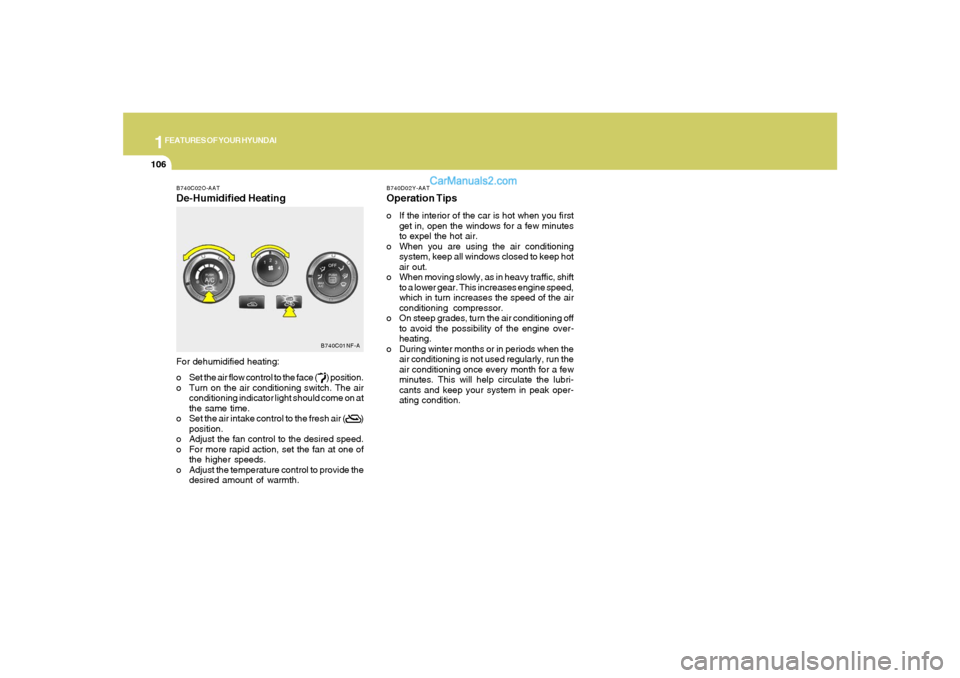
B740C02O-AATDe-Humidified HeatingFor dehumidified heating:
o Set the air flow control to the face ( ) position.
o Turn on the air conditioning switch. The air
conditioning indicator light should come on at
the same time.
o Set the air intake control to the fresh air ( )
position.
o Adjust the fan control to the desired speed.
o For more rapid action, set the fan at one of
the higher speeds.
o Adjust the temperature control to provide the
desired amount of warmth.
B740C01NF-A
B740D02Y-AATOperation Tipso If the interior of the car is hot when you first
get in, open the windows for a few minutes
to expel the hot air.
o When you are using the air conditioning
system, keep all windows closed to keep hot
air out.
o When moving slowly, as in heavy traffic, shift
to a lower gear. This increases engine speed,
which in turn increases the speed of the air
conditioning compressor.
o On steep grades, turn the air conditioning off
to avoid the possibility of the engine over-
heating.
o During winter months or in periods when the
air conditioning is not used regularly, run the
air conditioning once every month for a few
minutes. This will help circulate the lubri-
cants and keep your system in peak oper-
ating condition.
Page 122 of 283
1FEATURES OF YOUR HYUNDAI
108
AUTOMATIC HEATING AND COOLING CONTROL SYSTEMB970A01Y-AAT(If lnstalled)Your Hyundai is equipped with an automatic
heating and cooling control system controlled
by simply setting the desired temperature.
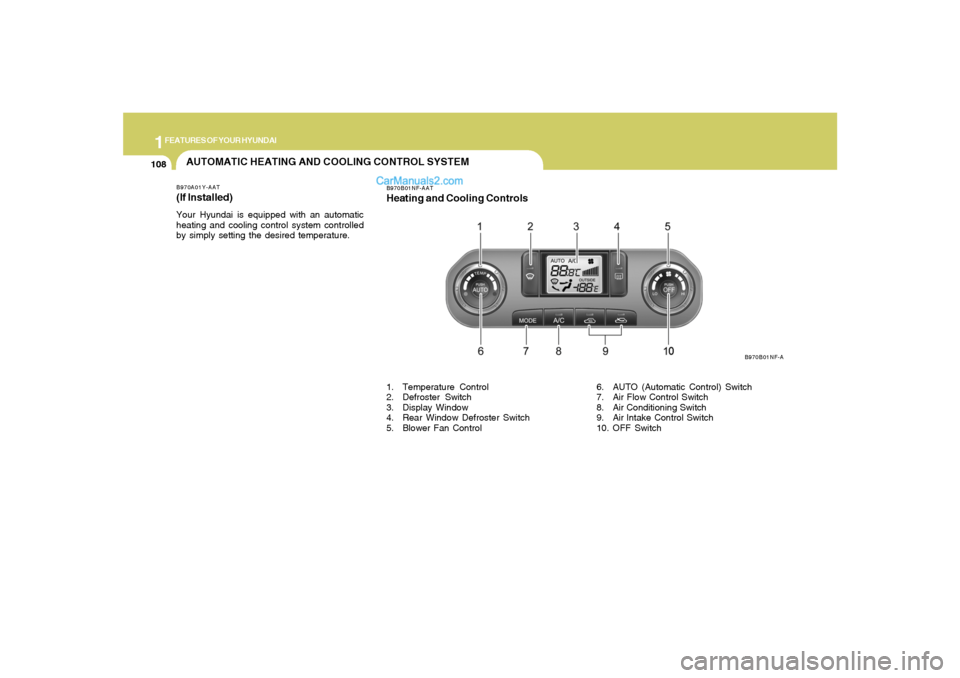
B970B01NF-AATHeating and Cooling Controls
B970B01NF-A
1. Temperature Control
2. Defroster Switch
3. Display Window
4. Rear Window Defroster Switch
5. Blower Fan Control6. AUTO (Automatic Control) Switch
7. Air Flow Control Switch
8. Air Conditioning Switch
9. Air lntake Control Switch
10. OFF Switch
Page 123 of 283
1
FEATURES OF YOUR HYUNDAI
109109
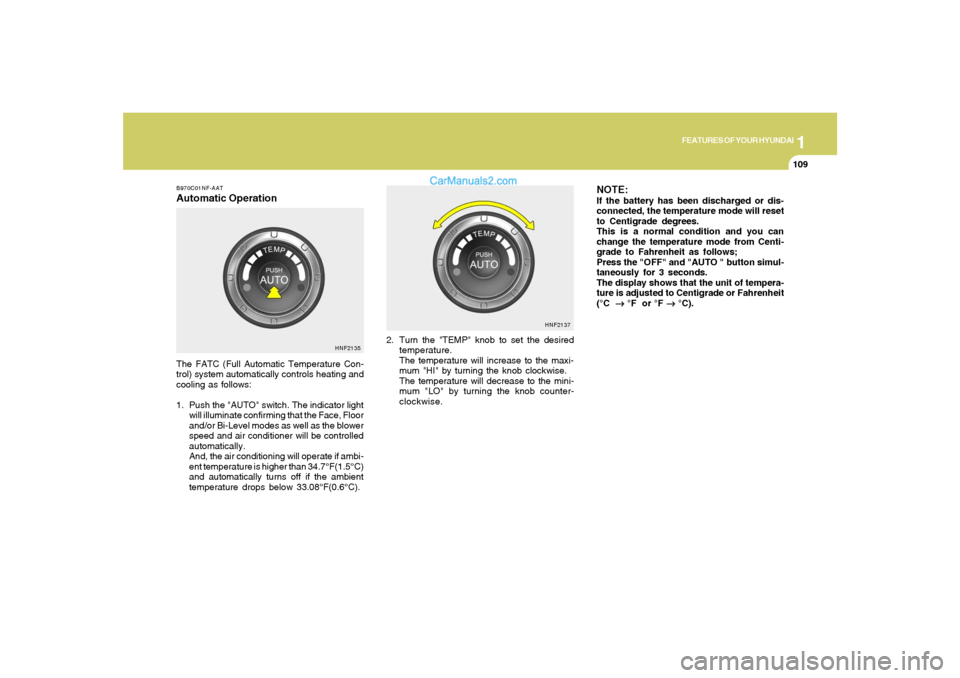
B970C01NF-AATAutomatic OperationThe FATC (Full Automatic Temperature Con-
trol) system automatically controls heating and
cooling as follows:
1. Push the "AUTO" switch. The indicator light
will illuminate confirming that the Face, Floor
and/or Bi-Level modes as well as the blower
speed and air conditioner will be controlled
automatically.
And, the air conditioning will operate if ambi-
ent temperature is higher than 34.7°F(1.5°C)
and automatically turns off if the ambient
temperature drops below 33.08°F(0.6°C).2. Turn the "TEMP" knob to set the desired
temperature.
The temperature will increase to the maxi-
mum "HI" by turning the knob clockwise.
The temperature will decrease to the mini-
mum "LO" by turning the knob counter-
clockwise.
NOTE:If the battery has been discharged or dis-
connected, the temperature mode will reset
to Centigrade degrees.
This is a normal condition and you can
change the temperature mode from Centi-
grade to Fahrenheit as follows;
Press the "OFF" and "AUTO " button simul-
taneously for 3 seconds.
The display shows that the unit of tempera-
ture is adjusted to Centigrade or Fahrenheit
(°C
→ →→ →
→ °F or °F
→ →→ →
→ °C).
HNF2135HNF2137
Page 125 of 283
1
FEATURES OF YOUR HYUNDAI
111111
FRESH MODE ( ) : The indicator light on
the button goes on when the air intake control
is in fresh mode.
RECIRCULATION MODE ( ) : The indicator
light on the button is illuminated when the air
intake control is in recirculation mode.
With the "Fresh" mode selected, air enters the
vehicle from the outside and is heated or cooled
according to the function selected.
With the "Recirculation" mode selected, air from
within the passenger compartment will be drawn
through the heating system and heated or
cooled according to the function selected.
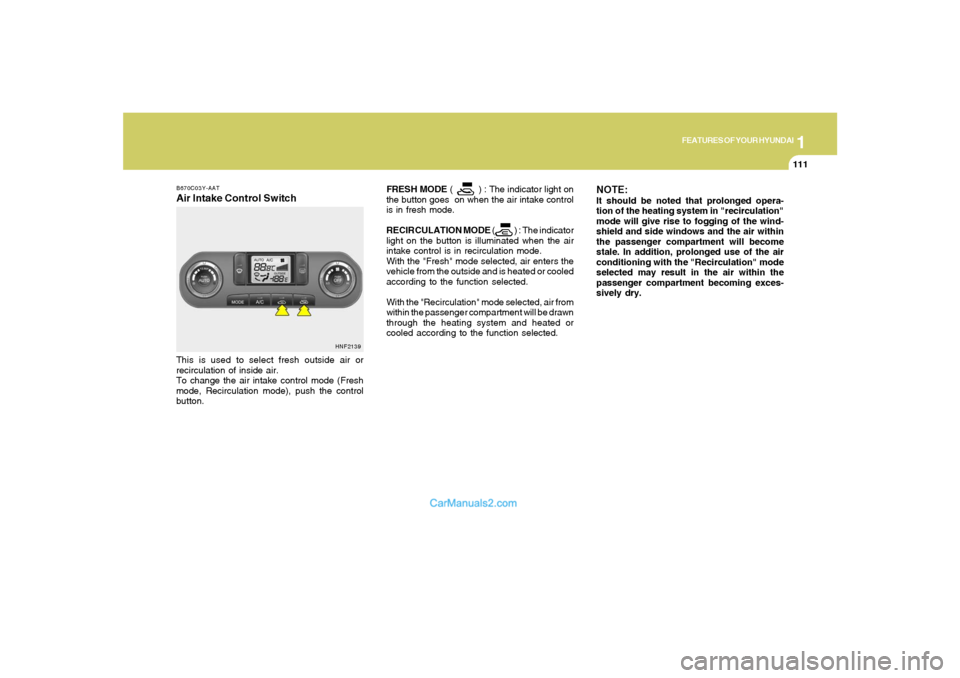
B670C03Y-AATAir Intake Control SwitchThis is used to select fresh outside air or
recirculation of inside air.
To change the air intake control mode (Fresh
mode, Recirculation mode), push the control
button.
HNF2139
NOTE:It should be noted that prolonged opera-
tion of the heating system in "recirculation"
mode will give rise to fogging of the wind-
shield and side windows and the air within
the passenger compartment will become
stale. In addition, prolonged use of the air
conditioning with the "Recirculation" mode
selected may result in the air within the
passenger compartment becoming exces-
sively dry.
Page 130 of 283
1FEATURES OF YOUR HYUNDAI
116
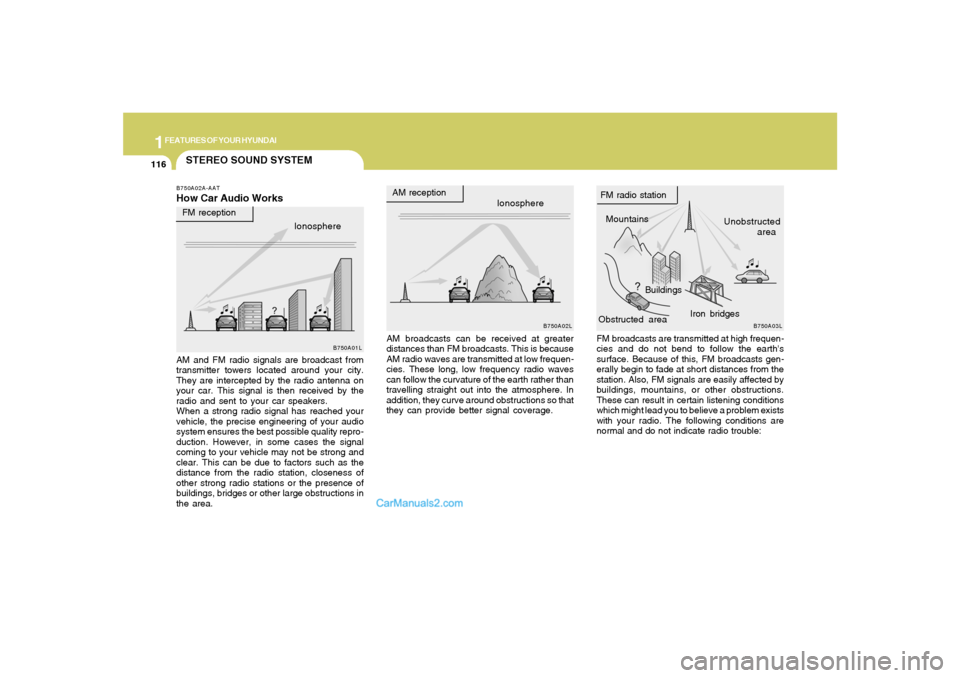
STEREO SOUND SYSTEMB750A02A-AATHow Car Audio Works
AM broadcasts can be received at greater
distances than FM broadcasts. This is because
AM radio waves are transmitted at low frequen-
cies. These long, low frequency radio waves
can follow the curvature of the earth rather than
travelling straight out into the atmosphere. In
addition, they curve around obstructions so that
they can provide better signal coverage. AM and FM radio signals are broadcast from
transmitter towers located around your city.
They are intercepted by the radio antenna on
your car. This signal is then received by the
radio and sent to your car speakers.
When a strong radio signal has reached your
vehicle, the precise engineering of your audio
system ensures the best possible quality repro-
duction. However, in some cases the signal
coming to your vehicle may not be strong and
clear. This can be due to factors such as the
distance from the radio station, closeness of
other strong radio stations or the presence of
buildings, bridges or other large obstructions in
the area.FM broadcasts are transmitted at high frequen-
cies and do not bend to follow the earth's
surface. Because of this, FM broadcasts gen-
erally begin to fade at short distances from the
station. Also, FM signals are easily affected by
buildings, mountains, or other obstructions.
These can result in certain listening conditions
which might lead you to believe a problem exists
with your radio. The following conditions are
normal and do not indicate radio trouble: Ionosphere
B750A02L
AM reception
Mountains
BuildingsUnobstructed
area FM radio station
B750A03L
Ionosphere FM reception
B750A01L
Obstructed areaIron bridges
Page 138 of 283
1FEATURES OF YOUR HYUNDAI
124
RANDOM(RND)When engaged, the random feature has three
different modes: Random Disc, Random Direc-
tory (MP3 only), and Random Off.
RANDOM DISC randomly plays tracks from the
disc presently in the audio system. RANDOM
DIRECTORY plays all the tracks in the current
MP3 directory in random order.
o Press the RND button until the desired shuffle
mode is displayed. The audio system will
then engage the desired random mode.6. CHANGE DIRECTORY(DIR)Press DIR control to change MP3 directories.7. MP3 TEXT modeEach press of the TEXT button will advance
through the following MP3 track information:
1) Filename
2) Song Title
3) Artist Name
4) Album Name
5) Directory Name
6) Number of tracks on the current disc
Rotate the AUDIO-SEL knob to view additional
characters.
8. Adjustment Mode Select KnobPressing the AUDIO SEL knob will initiate Audio
Mode. Each subsequent press will select the
next adjustment in the following order:
1) EQ select
The EQ select control allows you to select
one of the five EQ modes: OFF, CLASSICAL,
POP, ROCK, and JAZZ by rotating the AUDIO
SEL knob. Radio and CD have independent
EQ settings.
2) Bass adjust
The bass adjust control allows you to in-
crease or decrease the audio system's
bass output. Rotate the AUDIO SEL knob to
change the bass setting.
3) Midrange adjust
The midrange adjust control allows you to
increase or decrease the audio system's
midrange output. Rotate the AUDIO SEL
knob to change the midrange setting.
4) Treble adjust
The treble adjust control allows you to in-
crease or decrease the audio system's
treble output. Rotate the AUDIO SEL knob to
change the treble setting.
5) Speaker balance adjust
Speaker sound distribution can be adjusted
between the right and left speakers by rotat-
ing the AUDIO SEL knob.6) Speaker fade adjust
Speaker sound can be adjusted between
the front and rear speakers by rotating the
AUDIO SEL knob.
9. CD EJECTo Press the EJ button to stop and eject a CD.
If a CD is ejected and not removed, the player
will automatically reload the CD. The CD-IN
LED will blink while the disc is ejecting. This
feature may be used when the radio is ON
or OFF.NOTE:o To assure proper operation of the unit,
keep the vehicle interior temperature
within a normal range by using the
vehicle's air conditioning or heating
system.
o When replacing the fuse, replace it with
a fuse having the correct capacity.
o This equipment is designed to be used
only in a 12 volt DC battery system with
negative ground.
o This unit is made of precision parts. Do
not attempt to disassemble or adjust
any parts.