radio Hyundai Sonata
[x] Cancel search | Manufacturer: HYUNDAI, Model Year: , Model line: , Model:Pages: 283, PDF Size: 13.5 MB
Page 138 of 283
1FEATURES OF YOUR HYUNDAI
124
RANDOM(RND)When engaged, the random feature has three
different modes: Random Disc, Random Direc-
tory (MP3 only), and Random Off.
RANDOM DISC randomly plays tracks from the
disc presently in the audio system. RANDOM
DIRECTORY plays all the tracks in the current
MP3 directory in random order.
o Press the RND button until the desired shuffle
mode is displayed. The audio system will
then engage the desired random mode.6. CHANGE DIRECTORY(DIR)Press DIR control to change MP3 directories.7. MP3 TEXT modeEach press of the TEXT button will advance
through the following MP3 track information:
1) Filename
2) Song Title
3) Artist Name
4) Album Name
5) Directory Name
6) Number of tracks on the current disc
Rotate the AUDIO-SEL knob to view additional
characters.
8. Adjustment Mode Select KnobPressing the AUDIO SEL knob will initiate Audio
Mode. Each subsequent press will select the
next adjustment in the following order:
1) EQ select
The EQ select control allows you to select
one of the five EQ modes: OFF, CLASSICAL,
POP, ROCK, and JAZZ by rotating the AUDIO
SEL knob. Radio and CD have independent
EQ settings.
2) Bass adjust
The bass adjust control allows you to in-
crease or decrease the audio system's
bass output. Rotate the AUDIO SEL knob to
change the bass setting.
3) Midrange adjust
The midrange adjust control allows you to
increase or decrease the audio system's
midrange output. Rotate the AUDIO SEL
knob to change the midrange setting.
4) Treble adjust
The treble adjust control allows you to in-
crease or decrease the audio system's
treble output. Rotate the AUDIO SEL knob to
change the treble setting.
5) Speaker balance adjust
Speaker sound distribution can be adjusted
between the right and left speakers by rotat-
ing the AUDIO SEL knob.6) Speaker fade adjust
Speaker sound can be adjusted between
the front and rear speakers by rotating the
AUDIO SEL knob.
9. CD EJECTo Press the EJ button to stop and eject a CD.
If a CD is ejected and not removed, the player
will automatically reload the CD. The CD-IN
LED will blink while the disc is ejecting. This
feature may be used when the radio is ON
or OFF.NOTE:o To assure proper operation of the unit,
keep the vehicle interior temperature
within a normal range by using the
vehicle's air conditioning or heating
system.
o When replacing the fuse, replace it with
a fuse having the correct capacity.
o This equipment is designed to be used
only in a 12 volt DC battery system with
negative ground.
o This unit is made of precision parts. Do
not attempt to disassemble or adjust
any parts.
Page 140 of 283
1FEATURES OF YOUR HYUNDAI
126
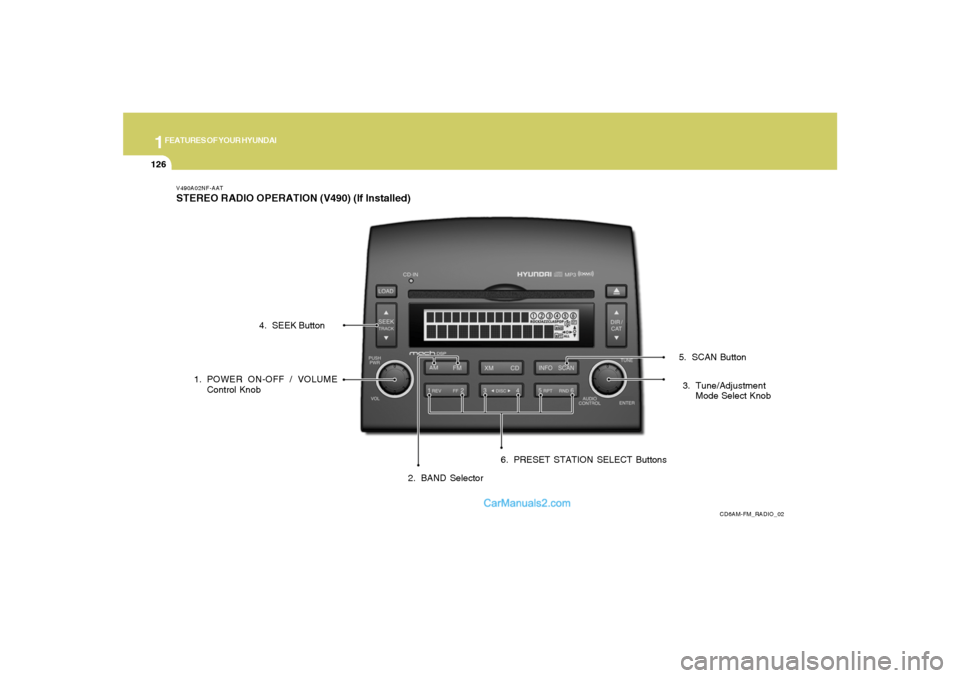
V490A02NF-AATSTEREO RADIO OPERATION (V490) (If Installed)
CD6AM-FM_RADIO_02
1. POWER ON-OFF / VOLUME
Control Knob
2. BAND Selector3. Tune/Adjustment
Mode Select Knob 4. SEEK Button
5. SCAN Button
6. PRESET STATION SELECT Buttons
Page 141 of 283
1
FEATURES OF YOUR HYUNDAI
127
V490B03NF-AAT1. POWER ON-OFF / VOLUME Control
KnobPress the PUSH PWR Control Knob to turn the
audio system on or off.
Rotate the knob clockwise to increase the
volume and turn the knob counterclockwise to
decrease the volume.
If the volume is set above a certain level and the
ignition is turned off for greater than 15 s, the
volume will come back on at a "nominal" listening
level when the ignition switch is turned back on.2. BAND SelectorThe AM/FM select control works in radio and
CD modes.o AM/FM select in radio modeThis control allows you to select AM or FM
frequency bands. Press the AM button to select
AM or the FM button to switch between FM1and
FM2 memory preset stations.o AM/FM select in CD modePress these buttons to stop CD play and begin
radio play.
3. Tune(manual) / Adjustment Mode Se-
lect Knobo Rotate counterclockwise to the next fre-
quency down the band (whether or not a
listenable station is located there).
o Rotate clockwise to move to the next fre-
quency up the band (whether or not a listen-
able station is located there).Adjustment Mode SelectPressing the AUDIO SEL knob will initiate Audio
Mode. Each subsequent press will select the
next adjustment in the following order:
1) EQ select
The EQ select control allows you to select
one of the five EQ modes: OFF, CLASSICAL,
POP, ROCK, and JAZZ by rotating the AUDIO
SEL knob. Radio and CD have independent
EQ settings.
2) Bass adjust
The bass adjust control allows you to in-
crease or decrease the audio system's
bass output. Rotate the AUDIO SEL knob to
change the bass setting.
3) Midrange adjust
The midrange adjust control allows you to
increase or decrease the audio system's
midrange output. Rotate the AUDIO SEL
knob to change the midrange setting.4) Treble adjust
The treble adjust control allows you to in-
crease or decrease the audio system's
treble output. Rotate the AUDIO SEL knob to
change the treble setting.
5) Speaker balance adjust
Speaker sound distribution can be adjusted
between the right and left speakers by rotat-
ing the AUDIO SEL knob.
6) Speaker fade adjust
Speaker sound can be adjusted between
the front and rear speakers by rotating the
AUDIO SEL knob.
4. SEEK Operation
(Automatic Channel Selection)o Press (down arrow) to find the next
listenable station down the frequency band.
SEEK DOWN will display.
o Press (up arrow) to find the next listenable
station up the frequency band. SEEK UP will
display.5. SCAN ButtonPress the SCAN button to hear a brief sampling
of all listenable stations on the frequency band.
Press the SCAN button again to stop the scan
mode.
Page 142 of 283
1FEATURES OF YOUR HYUNDAI
128
6. PRESET STATION SELECT ButtonsThe radio is equipped with six preset station
memory controls. These buttons can be used
to select up to 6 preset AM stations and 12
preset FM stations (six in AM, six in FM1, six in
FM2). There are a total possible of 18 preset
stations.Setting memory preset stationso Select the AM or FM band with the BAND
selector. Press AM control to select AM or
the FM control to toggle between FM1and
FM2.
o Press the SEEK control to access the next
listenable station up or down the frequency
band. Rotate the TUNE control to go up or
down the listening band in individual incre-
ments.
o Select a station.
o Press and hold a memory preset control. You
will hear a beep and the station is held in
memory on the control you selected.
CAUTION:
o Do not place beverages close to the
audio system. The playback mecha-
nism may be damaged if you spill them.
o Do not impact or strike the audio sys-
tem, or the playback mechanism could
be damaged.
!
Page 146 of 283
1FEATURES OF YOUR HYUNDAI
132
RANDOM(RND)When engaged, the random feature has three
different modes: Random Disc, Random Di-
rectory (MP3 only), and Random Off.
RANDOM DISC randomly plays tracks from
the disc presently in the audio system. RAN-
DOM DIRECTORY plays all the tracks on the
current MP3 directory in random order.
o Press the RND control until the desired
shuffle mode is displayed. The audio sys-
tem will then engage the desired random
mode.9. CHANGE DIRECTORY(DIR)Press DIR control to change MP3 directories.10. MP3 TEXT modeEach press of the TEXT button will advance
through the following MP3 track information:
1) Song Title
2) Artist Name
3) Album Name
4) Filename
5) Directory Name
6) Number of tracks on the current disc
Rotate the AUDIO-SEL knob to view additional
characters.
11. Adjustment Mode Select KnobPressing the AUDIO SEL knob will initiate Audio
Mode. Each subsequent press will select the
next adjustment in the following order.
1) EQ select
The EQ select control allows you to select
one of the five EQ modes: OFF, CLASSICAL,
POP, ROCK, and JAZZ by rotating the AUDIO
SEL knob. Radio and CD have independent
EQ settings.
2) Bass adjust
The bass adjust control allows you to in-
crease or decrease the audio system's bass
output. Rotate the AUDIO SEL knob to change
the bass setting.
3) Midrange adjust
The midrange adjust control allows you to
increase or decrease the audio system's
midrange output. Rotate the AUDIO SEL
knob to change the midrange setting.
4) Treble adjust
The treble adjust control allows you to in-
crease or decrease the audio system's
treble output. Rotate the AUDIO SEL knob to
change the treble setting.
5) Speaker balance adjust
Speaker sound distribution can be adjusted
between the right and left speakers by
rotating the AUDIO SEL knob.6) Speaker fade adjust
Speaker sound can be adjusted between
the front and rear speakers by rotating the
AUDIO SEL knob.
NOTE:o To assure proper operation of the unit,
keep the vehicle interior temperature
within a normal range by using the
vehicle's air conditioning or heating
system.
o When replacing the fuse, replace it
with a fuse having the correct capacity.
o This equipment is designed to be used
only in a 12 volt DC battery system with
negative ground.
o This unit is made of precision parts. Do
not attempt to disassemble or adjust
any parts.
o When driving your vehicle, be sure to
keep the volume of the unit set low
enough to allow you to hear sounds
coming from the outside.
o Do not expose this equipment (includ-
ing the speakers) to water or exces-
sive moisture.
Page 148 of 283
1FEATURES OF YOUR HYUNDAI
134
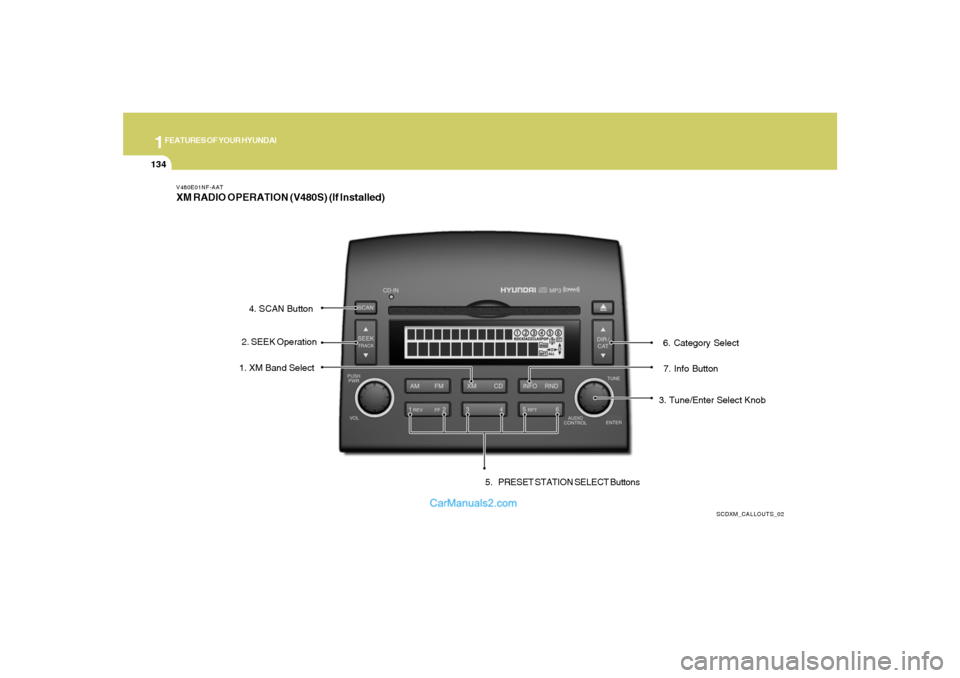
V480E01NF-AATXM RADIO OPERATION (V480S) (If Installed)
SCDXM_CALLOUTS_02
7. Info Button 1. XM Band Select
3. Tune/Enter Select Knob 2. SEEK Operation4. SCAN Button
5. PRESET STATION SELECT Buttons6. Category Select
Page 149 of 283
1
FEATURES OF YOUR HYUNDAI
135
V480F01NF-AAT1. XM Band SelectThis control allows you to select XM bands.
Press the button to enter XM from any other
mode. Press the button to select between XM1,
XM2 and XM3.2. Seek Operationo Press ( down arrow) to find the next
valid station down the XM band. The display
will cycle once through the Channel, Title,
Name and Category for the selected channel
o Press ( up arrow) to find the next
valid station up the XM band. The display will
cycle once through the Channel, Title, Name
and Category for the selected channel.
o Press and hold either the down arrow or up
arrow to tune down or up at a fast rate. The
display will show the Channel Name and Num-
ber while tuning at the fast rate.3. Tune/Enter-Select KnobRotate clockwise or counterclockwise to pre-
view the channel names and numbers above or
below the currently tuned station. Press the
knob to select the currently previewed channel.
4. Scan Button1) Channel Scan
Press the SCAN button to hear a brief sampling
of all valid stations on the XM band. Press the
SCAN button again to stop the scan mode.
2) Preset Scan
Press and hold the SCAN button to hear a brief
sampling of the stations stored in the current XM
band presets. Press the SCAN button again to
stop the scan mode.5. Preset Station Select ButtonsThe radio is equipped with six preset station
memory controls. These buttons can be used to
select up to 18 preset XM stations (six in XM1,
six in XM2, six in XM3).Setting memory preset stationso Select the XM band with the XM selector.
Press the XM selector to toggle between
XM1, XM2, or XM3.
o Select a station using the seek or tune
operations.
o Press and hold a memory preset control. You
will hear a beep and the station is held in
memory on the control you selected.
6. Category SelectPress the Category Select Buttons to select
stations based on Categories.
Press the CAT (up arow) or CAT (down
arrow) to scroll through the list of categories.
Use the Select Knob, Seek Up/Down arrows, or
SCAN button while the category name is dis-
played to select, seek, or scan within that
category.7. Info ButtonThe Info Button is used to temporarily display
information associated with the current station.
Press the Info to select between the Title, Name
and Category information for the current sta-
tion.8. Radio IDSeek or Tune to XM channel 0 to display the
Radio ID.
Page 153 of 283
2
DRIVING YOUR HYUNDAI
4
NOTE:Do not hold the key in the "START" position
for more than 15 seconds.o "ON"When the key is in the "ON" position, the ignition
is on and all accessories may be turned on. If
the engine is not running, the key should not be
left in the "ON" position. This will discharge the
battery and may also damage the ignition sys-
tem.o "ACC"With the key in the "ACC" position, some elec-
trical accessories (radio, etc.) may be oper-
ated.o "LOCK"The key can be removed or inserted in this
position.
To protect against theft, the steering wheel
locks by removing the key.NOTE:If difficulty is experienced in turning the
ignition key to the START position, turn the
steering wheel right and left to release the
tension and then turn the key.
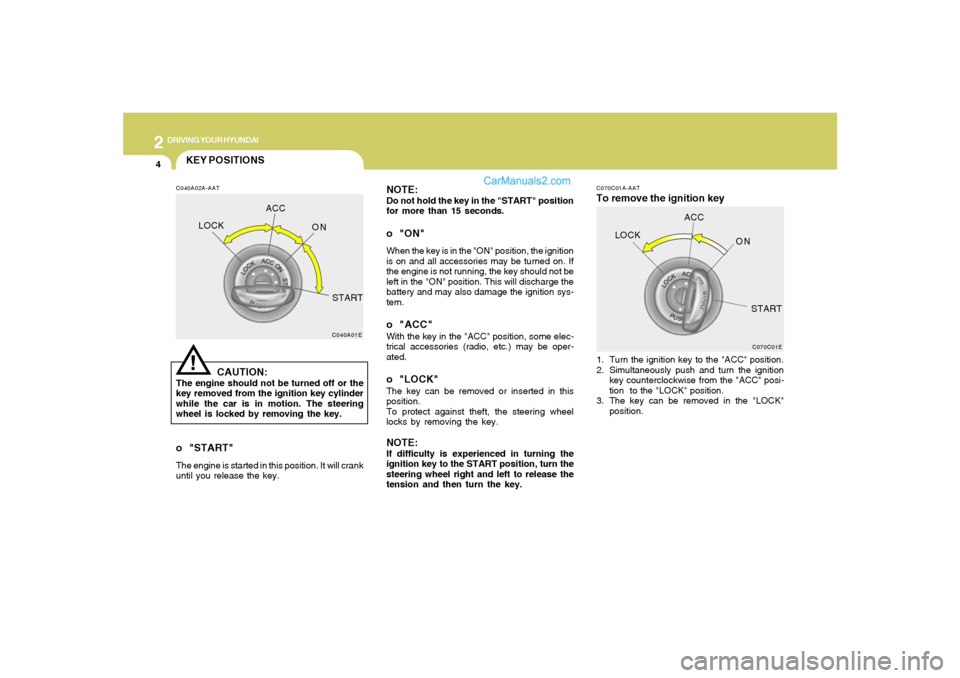
C070C01A-AATTo remove the ignition key1. Turn the ignition key to the "ACC" position.
2. Simultaneously push and turn the ignition
key counterclockwise from the "ACC" posi-
tion to the "LOCK" position.
3. The key can be removed in the "LOCK"
position.
C070C01E
LOCKACC
ON
START
KEY POSITIONSC040A02A-AAT
CAUTION:
The engine should not be turned off or the
key removed from the ignition key cylinder
while the car is in motion. The steering
wheel is locked by removing the key.
C040A01E
LOCKACC
ON
START!
o "START"The engine is started in this position. It will crank
until you release the key.
Page 184 of 283
3
WHAT TO DO IN AN EMERGENCY
7
tale may turn on at the same time as the
TPMS malfunction indicator.
Have the system checked by an autho-
rized Hyundai dealer as soon as pos-
sible to determine the cause of the
problem.
NOTE:
o The TPMS malfunction indicator
may be illuminated if the vehicle
is operated in areas close to elec-
tric power supply cables or radio
transmitters such as near police
stations, government and public
offices, broadcasting stations,
military installations, airports, or
transmitting towers, etc. which can
interfere with normal operation of
the Tire Pressure Monitoring Sys-
tem (TPMS).
o The TPMS malfunction indicator
may be illuminated if snow chains
or some electronic devices, such
as notebook computers, are used
in the vehicle. This can interfere
with normal operation of the Tire
Pressure Monitoring System
(TPMS).Changing a tire with TPMS
If you have a flat tire, the Low Tire
Pressure telltale will turn on. Have the
flat tire repaired by an authorized Hyundai
dealer as soon as possible or replace
the flat tire with the temporary spare
tire. NEVER use a puncture-repairing
agent to repair and/or inflate a low
pressure tire. If used, you will have to
replace the tire pressure sensor.
Each wheel is equipped with a tire
pressure sensor mounted inside the tire
behind the valve stem. You must use
TPMS specific wheels. It is recom-
mended that you always have your tires
serviced by an authorized Hyundai dealer
as soon as possible.
After you replace the low pressure tire
with the temporary spare tire, the TPMS
malfunction indicator may illuminate
and the low pressure tire telltale still
illuminate after restarting and about 20
minutes of continuous driving.Once the low pressure tire is re-inflated
to the recommended pressure and in-
stalled on the vehicle, the TPMS mal-
function indicator and the low tire pres-
sure telltale will extinguish. If the low
pressure and TPMS malfunction indi-
cators are not extinguished after about
20 minutes of continuous driving, please
visit an authorized Hyundai dealer.
You may not be able to identify a low tire
by simply looking at it. Always use a
good quality tire pressure gauge to
measure the tire's inflation pressure.
Please note that a tire that is hot (from
being driven) will have a higher pres-
sure measurement than a tire that is
cold (from sitting stationary for at least
3 hours and driven less than 1 mile
during that 3 hour period). Allow the tire
to cool before measuring the inflation
pressure.
Page 234 of 283
6
DO-IT-YOURSELF MAINTENANCE
23
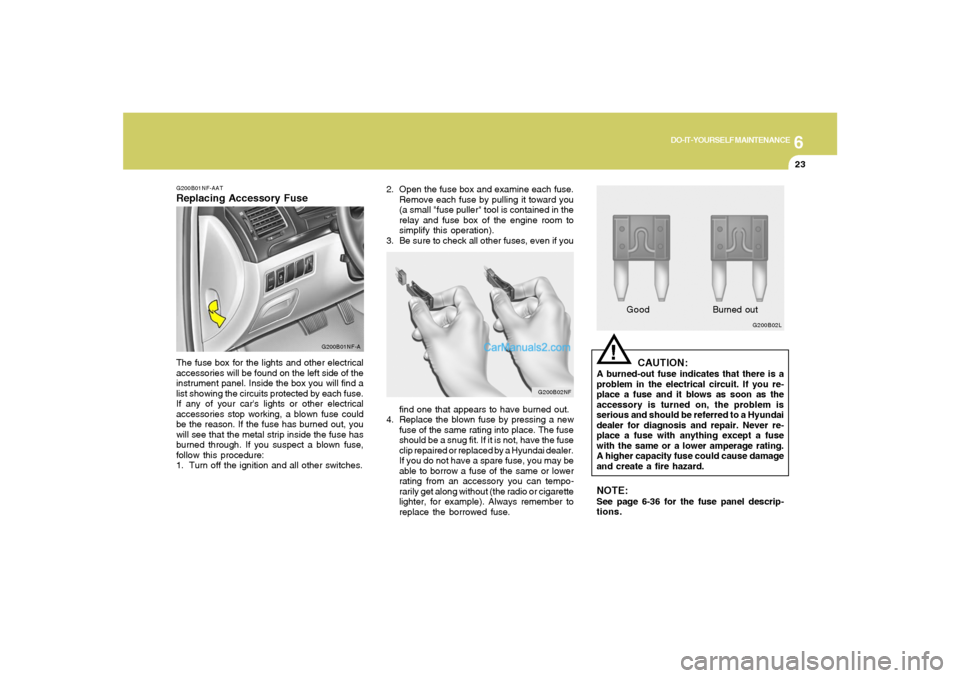
2. Open the fuse box and examine each fuse.
Remove each fuse by pulling it toward you
(a small "fuse puller" tool is contained in the
relay and fuse box of the engine room to
simplify this operation).
3. Be sure to check all other fuses, even if you
G200B02NF
find one that appears to have burned out.
4. Replace the blown fuse by pressing a new
fuse of the same rating into place. The fuse
should be a snug fit. If it is not, have the fuse
clip repaired or replaced by a Hyundai dealer.
If you do not have a spare fuse, you may be
able to borrow a fuse of the same or lower
rating from an accessory you can tempo-
rarily get along without (the radio or cigarette
lighter, for example). Always remember to
replace the borrowed fuse.
!
G200B02L
GoodBurned outCAUTION:
A burned-out fuse indicates that there is a
problem in the electrical circuit. If you re-
place a fuse and it blows as soon as the
accessory is turned on, the problem is
serious and should be referred to a Hyundai
dealer for diagnosis and repair. Never re-
place a fuse with anything except a fuse
with the same or a lower amperage rating.
A higher capacity fuse could cause damage
and create a fire hazard.NOTE:See page 6-36 for the fuse panel descrip-
tions.
G200B01NF-AATReplacing Accessory Fuse
G200B01NF-A
The fuse box for the lights and other electrical
accessories will be found on the left side of the
instrument panel. Inside the box you will find a
list showing the circuits protected by each fuse.
If any of your car's lights or other electrical
accessories stop working, a blown fuse could
be the reason. If the fuse has burned out, you
will see that the metal strip inside the fuse has
burned through. If you suspect a blown fuse,
follow this procedure:
1. Turn off the ignition and all other switches.