display Hyundai Sonata
[x] Cancel search | Manufacturer: HYUNDAI, Model Year: , Model line: , Model:Pages: 363, PDF Size: 30.3 MB
Page 189 of 363
4117
Features of your vehicle
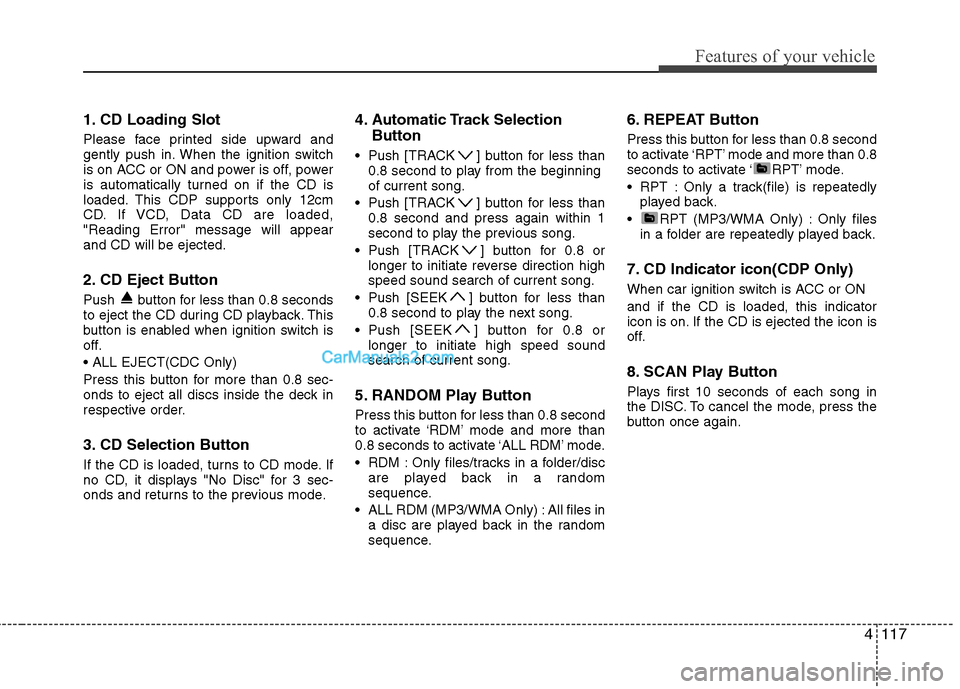
1. CD Loading Slot
Please face printed side upward and
gently push in. When the ignition switch
is on ACC or ON and power is off, power
is automatically turned on if the CD is
loaded. This CDP supports only 12cm
CD. If VCD, Data CD are loaded,"Reading Error" message will appearand CD will be ejected.
2. CD Eject Button
Push button for less than 0.8 seconds
to eject the CD during CD playback. This
button is enabled when ignition switch is
off.
Press this button for more than 0.8 sec-
onds to eject all discs inside the deck in
respective order.
3. CD Selection Button
If the CD is loaded, turns to CD mode. If
no CD, it displays "No Disc" for 3 sec-
onds and returns to the previous mode.4. Automatic Track Selection
Button
Push [TRACK ] button for less than 0.8 second to play from the beginningof current song.
Push [TRACK ] button for less than 0.8 second and press again within 1
second to play the previous song.
Push [TRACK ] button for 0.8 or longer to initiate reverse direction highspeed sound search of current song.
Push [SEEK ] button for less than 0.8 second to play the next song.
Push [SEEK ] button for 0.8 or longer to initiate high speed soundsearch of current song.
5. RANDOM Play Button
Press this button for less than 0.8 second
to activate ‘RDM’ mode and more than
0.8 seconds to activate ‘ALL RDM’ mode.
RDM : Only files/tracks in a folder/disc are played back in a random
sequence.
ALL RDM (MP3/WMA Only) : All files in a disc are played back in the random
sequence. 6. REPEAT Button
Press this button for less than 0.8 second
to activate ‘RPT’ mode and more than 0.8
seconds to activate ‘ RPT’ mode.
RPT : Only a track(file) is repeatedly
played back.
RPT (MP3/WMA Only) : Only files in a folder are repeatedly played back.
7. CD Indicator icon(CDP Only)
When car ignition switch is ACC or ON and if the CD is loaded, this indicator
icon is on. If the CD is ejected the icon is
off.
8. SCAN Play Button
Plays first 10 seconds of each song in
the DISC. To cancel the mode, press the
button once again.
Page 190 of 363
Features of your vehicle
118
4
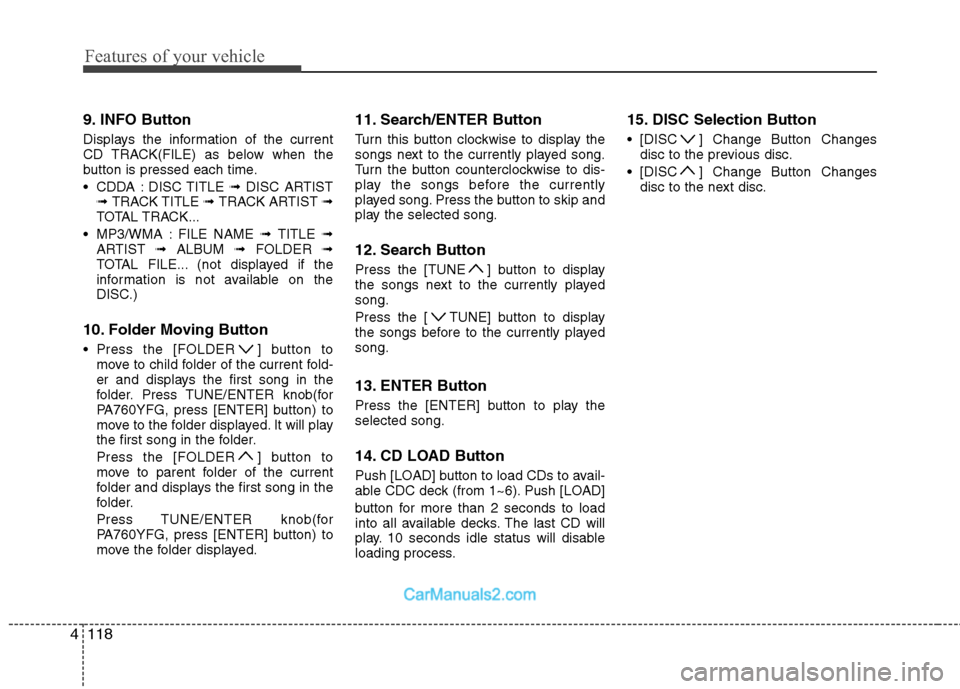
9. INFO Button
Displays the information of the current
CD TRACK(FILE) as below when the
button is pressed each time.
CDDA : DISC TITLE ➟ DISC ARTIST
➟ TRACK TITLE ➟ TRACK ARTIST ➟
TOTAL TRACK...
MP3/WMA : FILE NAME ➟ TITLE ➟
ARTIST ➟ ALBUM ➟ FOLDER ➟
TOTAL FILE... (not displayed if the
information is not available on the
DISC.)
10. Folder Moving Button
Press the [FOLDER ] button to move to child folder of the current fold-
er and displays the first song in the
folder. Press TUNE/ENTER knob(for
PA760YFG, press [ENTER] button) to
move to the folder displayed. It will play
the first song in the folder.
Press the [FOLDER ] button to
move to parent folder of the current
folder and displays the first song in the
folder.
Press TUNE/ENTER knob(for
PA760YFG, press [ENTER] button) to
move the folder displayed. 11. Search/ENTER Button
Turn this button clockwise to display the
songs next to the currently played song.
Turn the button counterclockwise to dis-
play the songs before the currently
played song. Press the button to skip and
play the selected song.
12. Search Button
Press the [TUNE ] button to display
the songs next to the currently playedsong.
Press the [ TUNE] button to display
the songs before to the currently playedsong.
13. ENTER Button
Press the [ENTER] button to play the selected song.
14. CD LOAD Button
Push [LOAD] button to load CDs to avail-
able CDC deck (from 1~6). Push [LOAD]
button for more than 2 seconds to load
into all available decks. The last CD will
play. 10 seconds idle status will disable
loading process. 15. DISC Selection Button
[DISC ] Change Button Changes
disc to the previous disc.
[DISC ] Change Button Changes disc to the next disc.
Page 194 of 363
Features of your vehicle
122
4
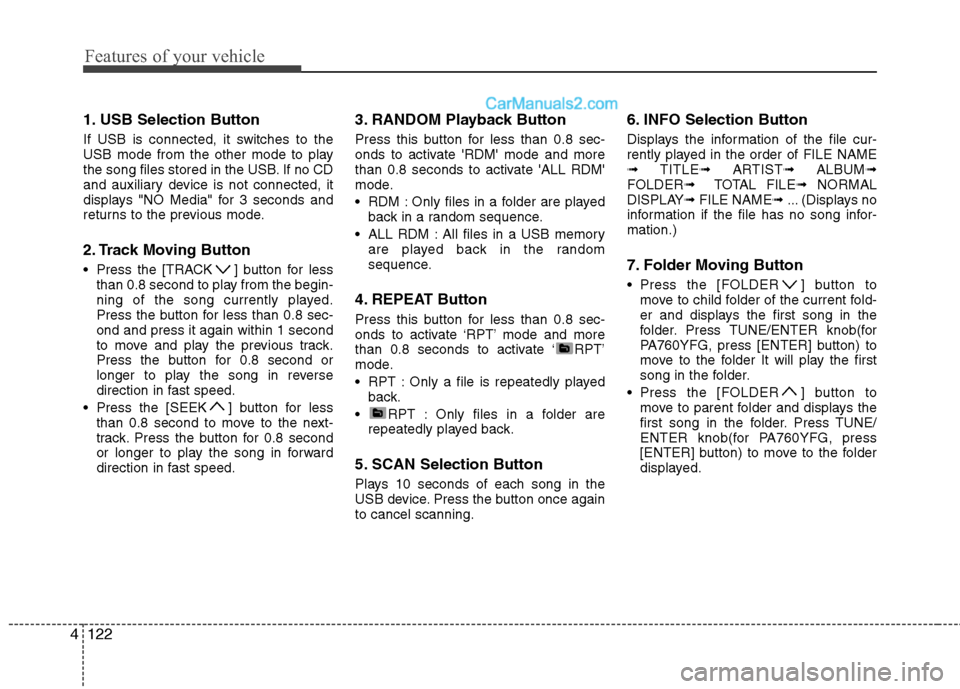
1. USB Selection Button
If USB is connected, it switches to the
USB mode from the other mode to play
the song files stored in the USB. If no CD
and auxiliary device is not connected, it
displays "NO Media" for 3 seconds and
returns to the previous mode.
2. Track Moving Button
Press the [TRACK ] button for less
than 0.8 second to play from the begin-
ning of the song currently played.
Press the button for less than 0.8 sec-ond and press it again within 1 second
to move and play the previous track.
Press the button for 0.8 second or
longer to play the song in reverse
direction in fast speed.
Press the [SEEK ] button for less than 0.8 second to move to the next-
track. Press the button for 0.8 second
or longer to play the song in forward
direction in fast speed. 3. RANDOM Playback Button
Press this button for less than 0.8 sec-
onds to activate 'RDM' mode and more
than 0.8 seconds to activate 'ALL RDM'
mode.
RDM : Only files in a folder are played
back in a random sequence.
ALL RDM : All files in a USB memory are played back in the random
sequence.
4. REPEAT Button
Press this button for less than 0.8 sec-
onds to activate ‘RPT’ mode and more
than 0.8 seconds to activate ‘ RPT’
mode.
RPT : Only a file is repeatedly played back.
RPT : Only files in a folder are repeatedly played back.
5. SCAN Selection Button
Plays 10 seconds of each song in the
USB device. Press the button once againto cancel scanning. 6. INFO Selection Button
Displays the information of the file cur-
rently played in the order of FILE NAME➟
TITLE ➟ ARTIST ➟ ALBUM ➟
FOLDER ➟ TOTAL FILE ➟ NORMAL
DISPLAY ➟ FILE NAME ➟ ... (Displays no
information if the file has no song infor-mation.)
7. Folder Moving Button
Press the [FOLDER ] button to move to child folder of the current fold-
er and displays the first song in the
folder. Press TUNE/ENTER knob(for
PA760YFG, press [ENTER] button) to
move to the folder It will play the first
song in the folder.
Press the [FOLDER ] button to move to parent folder and displays the
first song in the folder. Press TUNE/
ENTER knob(for PA760YFG, press
[ENTER] button) to move to the folder
displayed.
Page 195 of 363
4123
Features of your vehicle
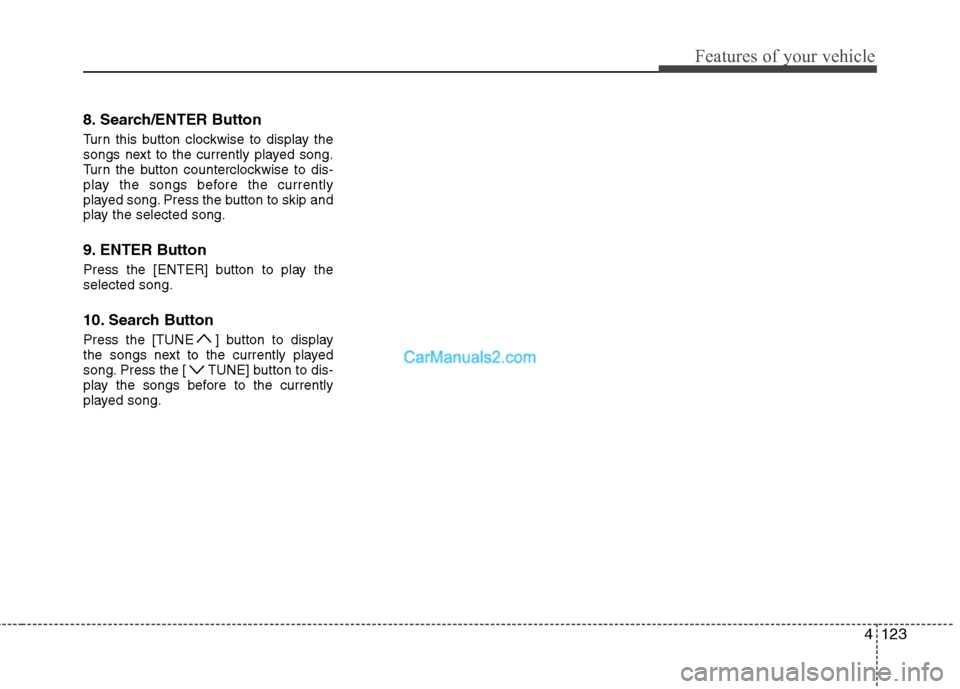
8. Search/ENTER Button
Turn this button clockwise to display the
songs next to the currently played song.
Turn the button counterclockwise to dis-
play the songs before the currently
played song. Press the button to skip and
play the selected song.
9. ENTER Button
Press the [ENTER] button to play the selected song.
10. Search Button
Press the [TUNE ] button to display
the songs next to the currently played
song. Press the [ TUNE] button to dis-
play the songs before to the currently
played song.
Page 197 of 363
4125
Features of your vehicle
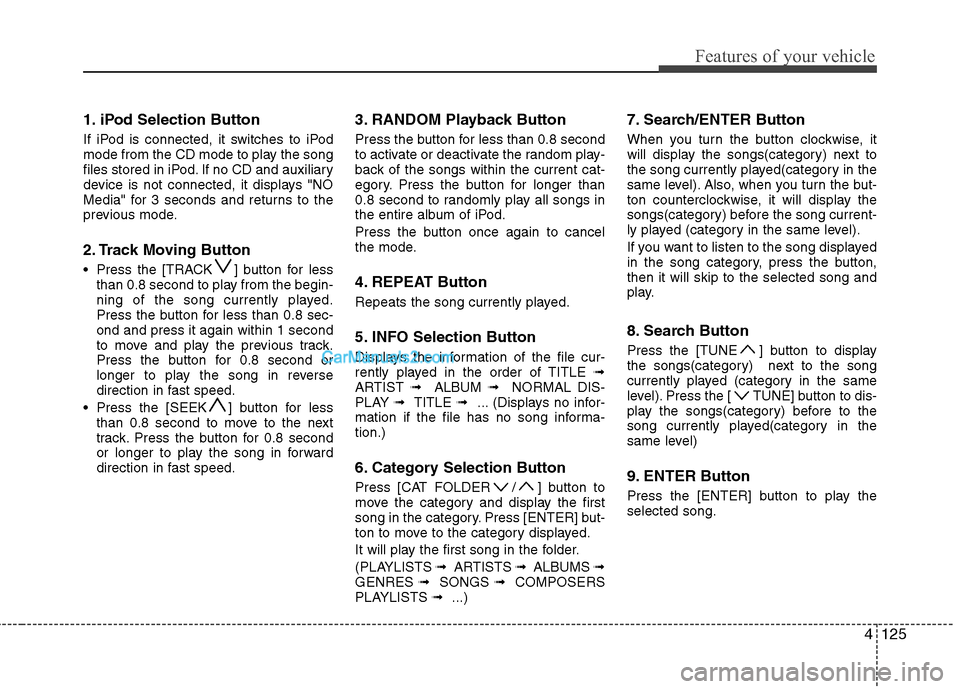
1. iPod Selection Button
If iPod is connected, it switches to iPod
mode from the CD mode to play the song
files stored in iPod. If no CD and auxiliary
device is not connected, it displays "NO
Media" for 3 seconds and returns to the
previous mode.
2. Track Moving Button
Press the [TRACK ] button for lessthan 0.8 second to play from the begin-
ning of the song currently played.
Press the button for less than 0.8 sec-ond and press it again within 1 second
to move and play the previous track.
Press the button for 0.8 second or
longer to play the song in reverse
direction in fast speed.
Press the [SEEK ] button for less than 0.8 second to move to the next
track. Press the button for 0.8 second
or longer to play the song in forward
direction in fast speed. 3. RANDOM Playback Button
Press the button for less than 0.8 second
to activate or deactivate the random play-
back of the songs within the current cat-
egory. Press the button for longer than
0.8 second to randomly play all songs in
the entire album of iPod.
Press the button once again to cancel
the mode.
4. REPEAT Button
Repeats the song currently played.
5. INFO Selection Button
Displays the information of the file cur-
rently played in the order of TITLE
➟
ARTIST ➟ ALBUM ➟ NORMAL DIS-
PLAY ➟ TITLE ➟ ... (Displays no infor-
mation if the file has no song informa-tion.)
6. Category Selection Button
Press [CAT FOLDER / ] button to
move the category and display the first
song in the category. Press [ENTER] but-
ton to move to the category displayed.
It will play the first song in the folder.
(PLAYLISTS ➟ ARTISTS ➟ ALBUMS ➟
GENRES ➟ SONGS ➟ COMPOSERS
PLAYLISTS ➟ ...) 7. Search/ENTER Button
When you turn the button clockwise, it
will display the songs(category) next to
the song currently played(category in the
same level). Also, when you turn the but-
ton counterclockwise, it will display the
songs(category) before the song current-
ly played (category in the same level).
If you want to listen to the song displayed
in the song category, press the button,then it will skip to the selected song and
play.
8. Search Button
Press the [TUNE ] button to display
the songs(category) next to the song
currently played (category in the same
level). Press the [ TUNE] button to dis-
play the songs(category) before to the
song currently played(category in the
same level)
9. ENTER Button
Press the [ENTER] button to play the selected song.
Page 208 of 363
Driving your vehicle
10
5
Starting the engine 1. Carry the smart key or leave it inside
the vehicle.
2. Make sure the parking brake is firmly applied.
3. Place the shift lever in the P(Park) position.
4. Depress the brake pedal.
5. Press the engine start/stop button.
6. In extremely cold weather (below - 18°C / 0°F) or after the vehicle has not
been operated for several days, let the
engine warm up without depressing
the accelerator.
Whether the engine is cold or warm, itshould be started without depressing
the accelerator.
Even if the smart key is in the vehicle,
if it is far away from you, the engine
may not start.
When the engine start/stop button is in
the ACC or ON position, if any door is
open, the system checks for the smart
key. If the smart key is not in the vehi-
cle, the warning, "Key is not in vehicle"
will appear in the dashboard display,and if all doors are closed, the chime
will also sound for about 5 seconds.
The indicator will turn off whilst the
vehicle is moving. Keep the smart key
in the vehicle, when using the ACC
position or if the vehicle engine is on.
WARNING
Always wear appropriate shoes
when operating your vehicle.
Unsuitable shoes (high heels, ski
boots, etc.) may interfere with yourability to use the brake and acceler-ator pedal.
WARNING
The engine will start by pressing
the engine start/stop button, only
when the smart key is in the vehi-
cle. Never allow children or any per-son who is unfamiliar with the vehi-
cle to touch the engine start/stop
button or related parts.
CAUTION
If the engine stalls whilst you are in motion, do not attempt to move theshift lever to the P (Park) position. Iftraffic and road conditions permit,
you may put the shift lever in the N(Neutral) position whilst the vehi-cle is still moving and press theengine start/stop button in an
attempt to restart the engine.
WARNING
People with medical devices such
as implanted pacemakers or car-
diac defibrillators should not carry
the smart key near the heart. The
smart key system may affect the
operation of such implanted med-
ical devices. Failure to do so may
result in interference with the med-
ical device, which could result in
serious injury.
Page 214 of 363
Driving your vehicle
16
5
For smooth operation, depress the brake
pedal when shifting from N (Neutral) to aforward or reverse gear.Transaxle ranges
The indicator in the instrument cluster
displays the shift lever position when the
ignition switch is in the ON position.
P (Park)
Always come to a complete stop before
shifting into P (Park). This position locks
the transaxle and prevents the drivewheels from rotating.
WARNING - Automatic
transaxle
Always check the surrounding areas near your vehicle for peo-
ple, especially children, beforeshifting a car into D (Drive) or R
(Reverse).
Before leaving the driver’s seat, always make sure the shift lever
is in the P (Park) position; then
set the parking brake fully and
shut the engine off. Unexpected
and sudden vehicle movementcan occur if these precautions
are not followed in the order iden-tified.
CAUTION
To avoid damage to your
transaxle, do not accelerate the
engine in R (Reverse) or any for-ward gear position with thebrakes on.
When stopped on an incline, do not hold the vehicle stationarywith engine power. Use the serv-ice brake or the parking brake.
Do not shift from N (Neutral) or P (Park) into D (Drive), or R
(Reverse) when the engine isabove idle speed.
WARNING
Shifting into P (Park) whilst the vehicle is in motion will cause the
drive wheels to lock which will
cause you to lose control of the
vehicle.
Do not use the P (Park) position in place of the parking brake.
Always make sure the shift lever
is latched in the P (Park) position
and set the parking brake fully.
Never leave a child unattended in a vehicle.
Page 317 of 363
741
Maintenance
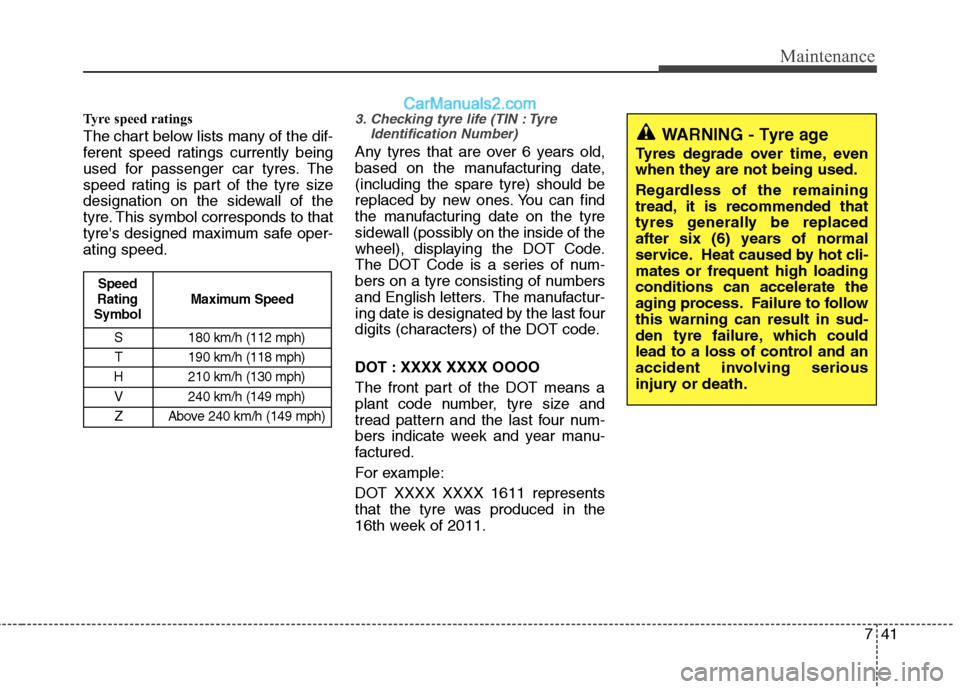
Tyre speed ratings
The chart below lists many of the dif-
ferent speed ratings currently being
used for passenger car tyres. The
speed rating is part of the tyre size
designation on the sidewall of the
tyre. This symbol corresponds to that
tyre's designed maximum safe oper-ating speed.3. Checking tyre life (TIN : TyreIdentification Number)
Any tyres that are over 6 years old,
based on the manufacturing date,(including the spare tyre) should be
replaced by new ones. You can find
the manufacturing date on the tyre
sidewall (possibly on the inside of the
wheel), displaying the DOT Code.
The DOT Code is a series of num-
bers on a tyre consisting of numbers
and English letters. The manufactur-
ing date is designated by the last four
digits (characters) of the DOT code.
DOT : XXXX XXXX OOOO
The front part of the DOT means a
plant code number, tyre size and
tread pattern and the last four num-
bers indicate week and year manu-
factured.
For example:
DOT XXXX XXXX 1611 represents
that the tyre was produced in the
16th week of 2011.
S 180 km/h (112 mph)
T 190 km/h (118 mph)
H 210 km/h (130 mph) V 240 km/h (149 mph)
Z Above 240 km/h (149 mph)
Maximum Speed
Speed
Rating
Symbol
WARNING - Tyre age
Tyres degrade over time, even
when they are not being used.
Regardless of the remaining
tread, it is recommended that
tyres generally be replaced
after six (6) years of normal
service. Heat caused by hot cli-mates or frequent high loadingconditions can accelerate the
aging process. Failure to followthis warning can result in sud-
den tyre failure, which could
lead to a loss of control and an
accident involving serious
injury or death.
Page 356 of 363
I3
Index
Capacities (Lubricants) ....................................................8-4 Care
Exterior care ..............................................................7-62
Interior care ..............................................................7-67
Tyre care ....................................................................7-34
Cargo weight ..................................................................5-58
Central door lock switch ................................................4-17
Centre console storage ..................................................4-100
Changing tyres ..................................................................6-9Chains Tyre chains ................................................................5-47
Checking tyre inflation pressure ....................................7-35
Child restraint system ....................................................3-30 Lap belt......................................................................3-33
Lap/shoulder belt ......................................................3-33
Child-protector rear door lock ........................................4-19
Climate control system (Automatic) ..............................4-90 Air conditioning ........................................................4-95
Automatic heating and air conditioning....................4-91
Manual heating and air conditioning ........................4-92
Climate control system (Manual) ..................................4-81 Air conditioning ........................................................4-86
Climate control air filter............................................4-88
Heating and air conditioning ....................................4-82
Cigarette lighter ............................................................4-102
Climate control air filter ................................................4-88 Climate control air filter ................................................7-27
Clock (Digital) ..............................................................4-105
Clothes hanger ..............................................................4-106
Combined instrument, see instrument cluster ................4-43
Compact spare tyre ........................................................6-14
Compact spare tyre replacement ....................................7-39
Coolant ............................................................................7-18
Cooling fluid, see engine coolant ..................................7-18
Crankcase emission control system ................................7-68
Cruise control system ....................................................5-36
Cup holder ....................................................................4-103
Curtain air bag ................................................................3-46
Dashboard, see instrument cluster ..................................4-43
Dashboard illumination, see instrument panel
illumination..................................................................4-44
Defogging (Windscreen) ................................................4-97
Defogging logic (Windscreen)........................................4-99
Defroster (Rear window) ................................................4-80
Defrosting (Windscreen) ................................................4-97
Digital clock..................................................................4-105
Dimensions ......................................................................8-2
Displays, see instrument cluster ....................................4-43
Display illumination, see instrument panel illumination..................................................................4-44
Door locks ......................................................................4-16
C
D