display Hyundai Sonata 2005 Owner's Manual
[x] Cancel search | Manufacturer: HYUNDAI, Model Year: 2005, Model line: Sonata, Model: Hyundai Sonata 2005Pages: 271, PDF Size: 12.44 MB
Page 70 of 271
1
FEATURES OF YOUR HYUNDAI
57
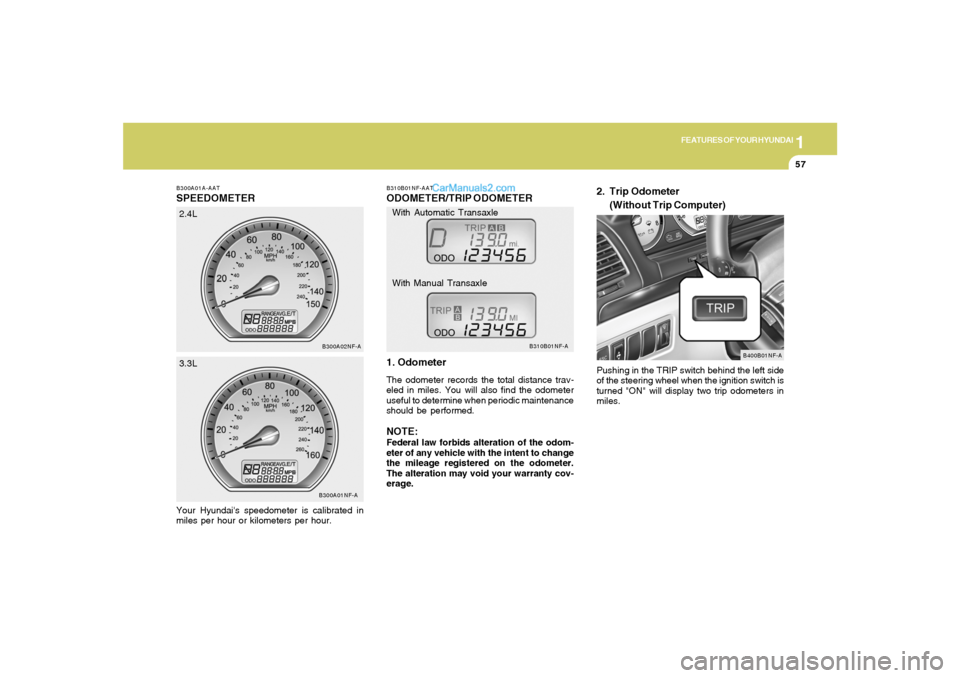
B300A01A-AATSPEEDOMETERYour Hyundai's speedometer is calibrated in
miles per hour or kilometers per hour.
B300A01NF-AB300A02NF-A
2.4L
3.3L
B310B01NF-AATODOMETER/TRIP ODOMETER
1. OdometerThe odometer records the total distance trav-
eled in miles. You will also find the odometer
useful to determine when periodic maintenance
should be performed.NOTE:Federal law forbids alteration of the odom-
eter of any vehicle with the intent to change
the mileage registered on the odometer.
The alteration may void your warranty cov-
erage.Pushing in the TRIP switch behind the left side
of the steering wheel when the ignition switch is
turned "ON" will display two trip odometers in
miles.
B310B01NF-A
B400B01NF-A
With Automatic Transaxle
With Manual Transaxle
2. Trip Odometer
(Without Trip Computer)
Page 71 of 271
1FEATURES OF YOUR HYUNDAI58
With Automatic Transaxle
With Manual Transaxle
B310B03NF-A
B310B04NF-A
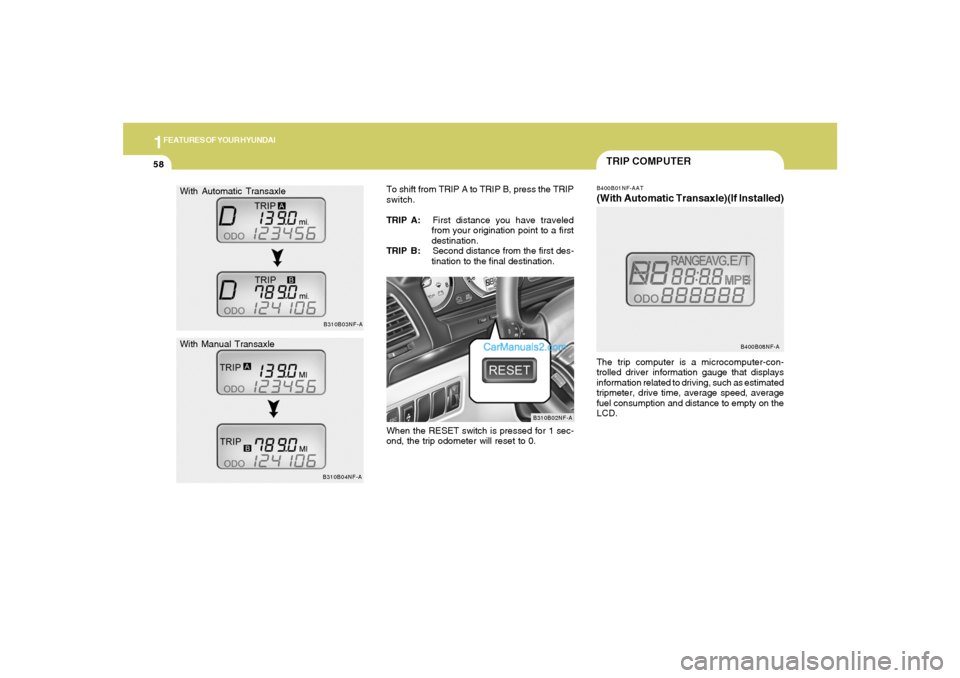
TRIP COMPUTERB400B01NF-AAT(With Automatic Transaxle)(If Installed)The trip computer is a microcomputer-con-
trolled driver information gauge that displays
information related to driving, such as estimated
tripmeter, drive time, average speed, average
fuel consumption and distance to empty on the
LCD.
B400B08NF-A
B310B02NF-A
To shift from TRIP A to TRIP B, press the TRIP
switch.
TRIP A:First distance you have traveled
from your origination point to a first
destination.
TRIP B:Second distance from the first des-
tination to the final destination.
When the RESET switch is pressed for 1 sec-
ond, the trip odometer will reset to 0.
Page 72 of 271
1
FEATURES OF YOUR HYUNDAI
59
TRIPMETER
DRIVE TIME
AVERAGE SPEED
AVERAGE FUEL CONSUMPTION
DISTANCE TO EMPTY
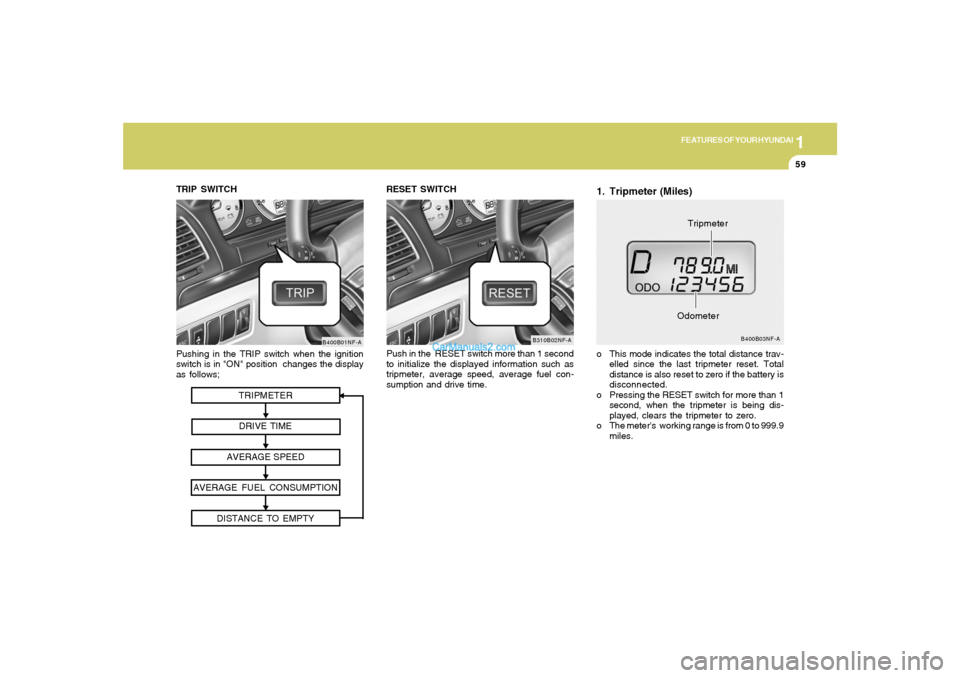
Pushing in the TRIP switch when the ignition
switch is in "ON" position changes the display
as follows;
B400B01NF-A
TRIP SWITCH
1. Tripmeter (Miles)o This mode indicates the total distance trav-
elled since the last tripmeter reset. Total
distance is also reset to zero if the battery is
disconnected.
o Pressing the RESET switch for more than 1
second, when the tripmeter is being dis-
played, clears the tripmeter to zero.
o The meter's working range is from 0 to 999.9
miles.
B400B03NF-A
OdometerTripmeter RESET SWITCH
Push in the RESET switch more than 1 second
to initialize the displayed information such as
tripmeter, average speed, average fuel con-
sumption and drive time.
B310B02NF-A
Page 73 of 271
1FEATURES OF YOUR HYUNDAI60
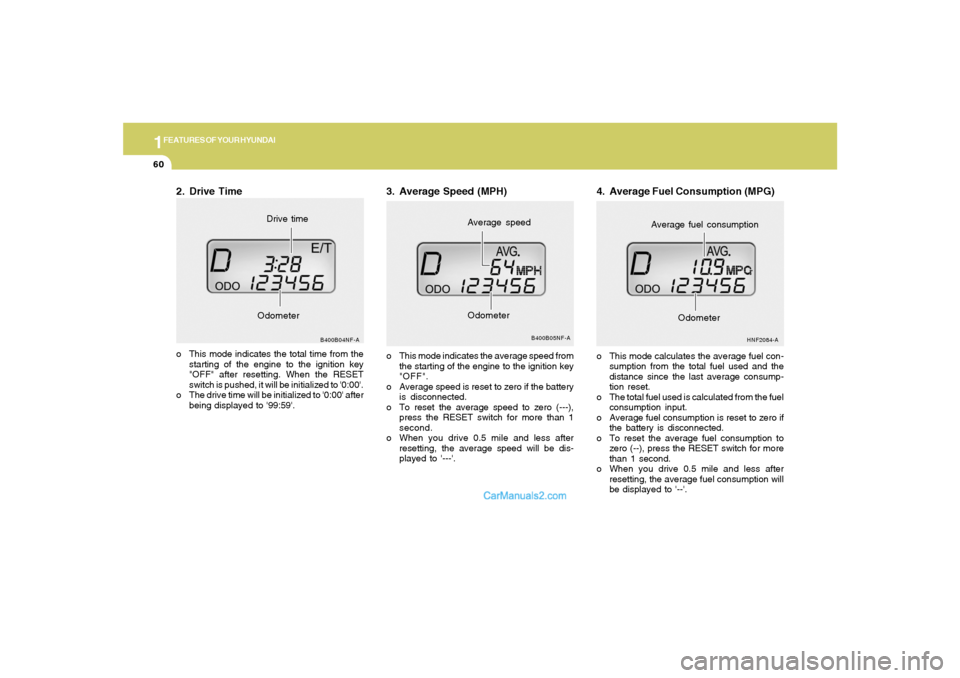
2. Drive Timeo This mode indicates the total time from the
starting of the engine to the ignition key
"OFF" after resetting. When the RESET
switch is pushed, it will be initialized to '0:00'.
o The drive time will be initialized to '0:00' after
being displayed to '99:59'.
B400B04NF-A
OdometerDrive time
3. Average Speed (MPH)o This mode indicates the average speed from
the starting of the engine to the ignition key
"OFF".
o Average speed is reset to zero if the battery
is disconnected.
o To reset the average speed to zero (---),
press the RESET switch for more than 1
second.
o When you drive 0.5 mile and less after
resetting, the average speed will be dis-
played to '---'.
B400B05NF-A
Average speed
Odometer
4. Average Fuel Consumption (MPG)o This mode calculates the average fuel con-
sumption from the total fuel used and the
distance since the last average consump-
tion reset.
o The total fuel used is calculated from the fuel
consumption input.
o Average fuel consumption is reset to zero if
the battery is disconnected.
o To reset the average fuel consumption to
zero (--), press the RESET switch for more
than 1 second.
o When you drive 0.5 mile and less after
resetting, the average fuel consumption will
be displayed to '--'.
HNF2084-A
Average fuel consumption
Odometer
Page 79 of 271
1FEATURES OF YOUR HYUNDAI66
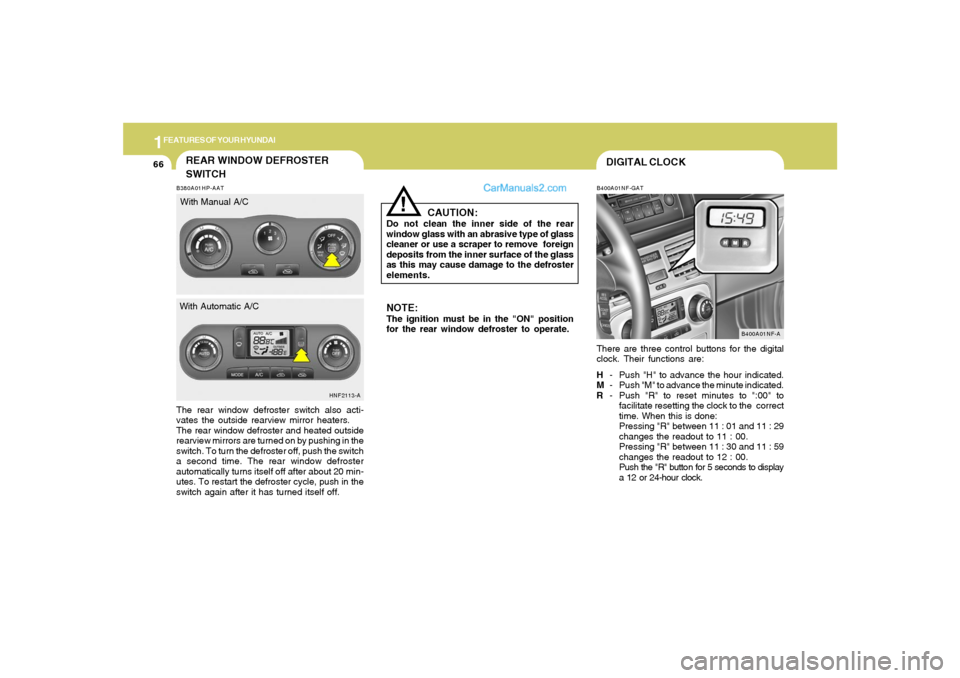
DIGITAL CLOCKB400A01NF-GATThere are three control buttons for the digital
clock. Their functions are:
H- Push "H" to advance the hour indicated.
M- Push "M" to advance the minute indicated.
R- Push "R" to reset minutes to ":00" to
facilitate resetting the clock to the correct
time. When this is done:
Pressing "R" between 11 : 01 and 11 : 29
changes the readout to 11 : 00.
Pressing "R" between 11 : 30 and 11 : 59
changes the readout to 12 : 00.
Push the "R" button for 5 seconds to display
a 12 or 24-hour clock.
B400A01NF-A
NOTE:The ignition must be in the "ON" position
for the rear window defroster to operate.
CAUTION:
Do not clean the inner side of the rear
window glass with an abrasive type of glass
cleaner or use a scraper to remove foreign
deposits from the inner surface of the glass
as this may cause damage to the defroster
elements.
!
B380A01HP-AATThe rear window defroster switch also acti-
vates the outside rearview mirror heaters.
The rear window defroster and heated outside
rearview mirrors are turned on by pushing in the
switch. To turn the defroster off, push the switch
a second time. The rear window defroster
automatically turns itself off after about 20 min-
utes. To restart the defroster cycle, push in the
switch again after it has turned itself off.
HNF2113-A
REAR WINDOW DEFROSTER
SWITCHWith Manual A/C
With Automatic A/C
Page 92 of 271
1
FEATURES OF YOUR HYUNDAI
79
HOMELINK MIRRORB520C01NF-AATAutomatic-Dimming Mirror
with Z-Nav™ Electronic Compass Dis-
play and HomeLink
® (If Installed)
Your vehicle comes with a Gentex Automatic-
Dimming Mirror with a Z-Nav™ Electronic Com-
pass Display and an Integrated HomeLink
®
Wireless Control System. During nighttime driv-
ing, this safety feature will automatically detect
and eliminate dangerous rearview mirror glare
while the compass indicates the direction the
vehicle is pointed. The HomeLink
® Universal
Transceiver allows you to activate your garage
door(s), estate gate, home lighting, etc.
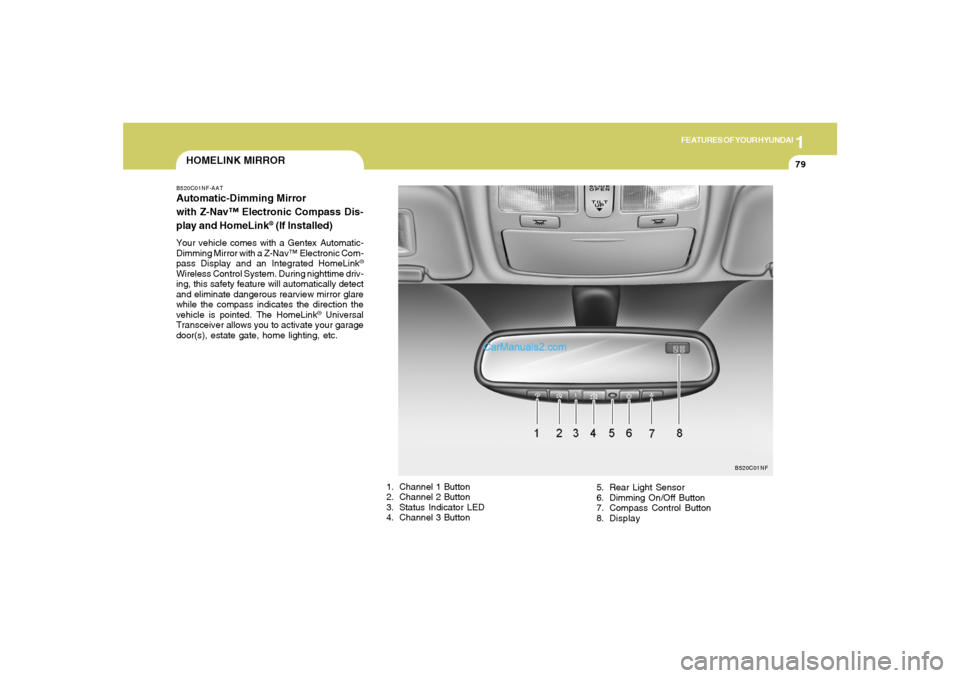
1. Channel 1 Button
2. Channel 2 Button
3. Status Indicator LED
4. Channel 3 Button5. Rear Light Sensor
6. Dimming On/Off Button
7. Compass Control Button
8. Display
B520C01NF
Page 93 of 271
1FEATURES OF YOUR HYUNDAI80
Automatic-Dimming Night Vision
Safety™ (NVS
®) Mirror
The NVS
® Mirror in your vehicle is the most
advanced way to eliminate dangerous and an-
noying glare in the rearview mirror during any
driving situation. For more information regard-
ing NVS® mirrors and other applications, please
refer to the Gentex website:
www.gentex.com.CAUTION:
The NVS
® Mirror automatically reduces glare
during driving conditions based upon light
levels monitored in front of the vehicle and
from the rear of the vehicle. These light
sensors are visible through openings in the
front and rear of the mirror case. Any object
that would obstruct either light sensor will
degrade the automatic dimming control
feature.
!
Automatic-Dimming Function
To protect your vision during nighttime driving,
your mirror will automatically dim upon detecting
glare from the vehicles traveling behind you.
The auto-dimming function can be controlled by
the Dimming ON/OFF Button:
1. Pressing the button turns the auto-
dimming function OFF which is indicated by
the green Status Indicator LED turning off.
2. Pressing the button again turns the auto-
dimming function ON which is indicated by
the green Status Indicator LED turning on.NOTE:The mirror defaults to the "ON" position
each time the vehicle is started.Compass Function
The Compass can be turned ON and OFF and
will remember the last state when the ignition is
cycled. To turn the display feature ON/OFF:
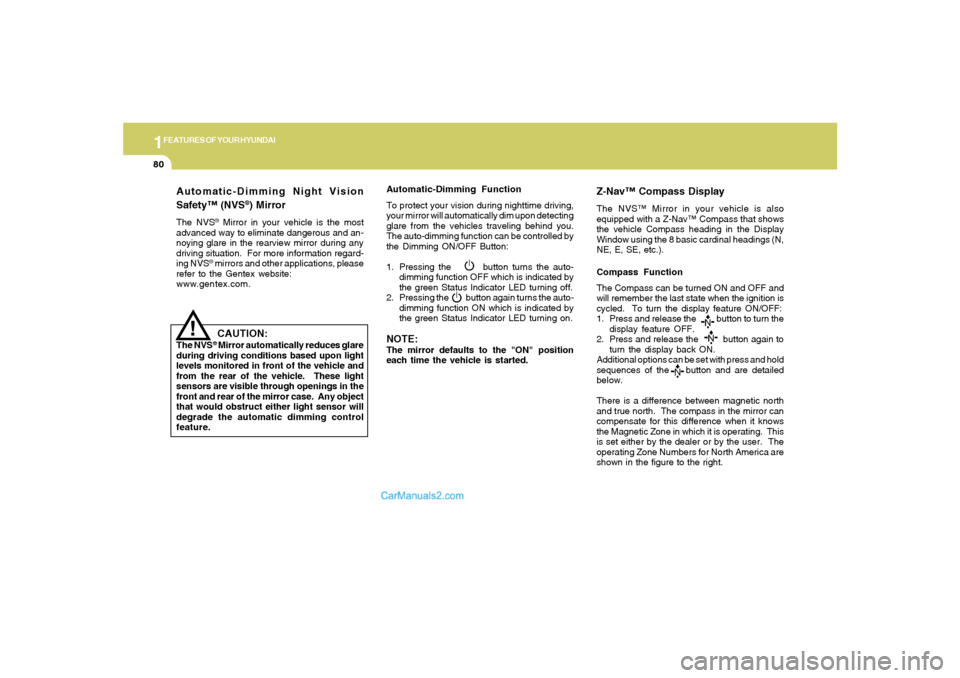
1. Press and release the button to turn the
display feature OFF.
2. Press and release the button again to
turn the display back ON.
Additional options can be set with press and hold
sequences of the button and are detailed
below.
There is a difference between magnetic north
and true north. The compass in the mirror can
compensate for this difference when it knows
the Magnetic Zone in which it is operating. This
is set either by the dealer or by the user. The
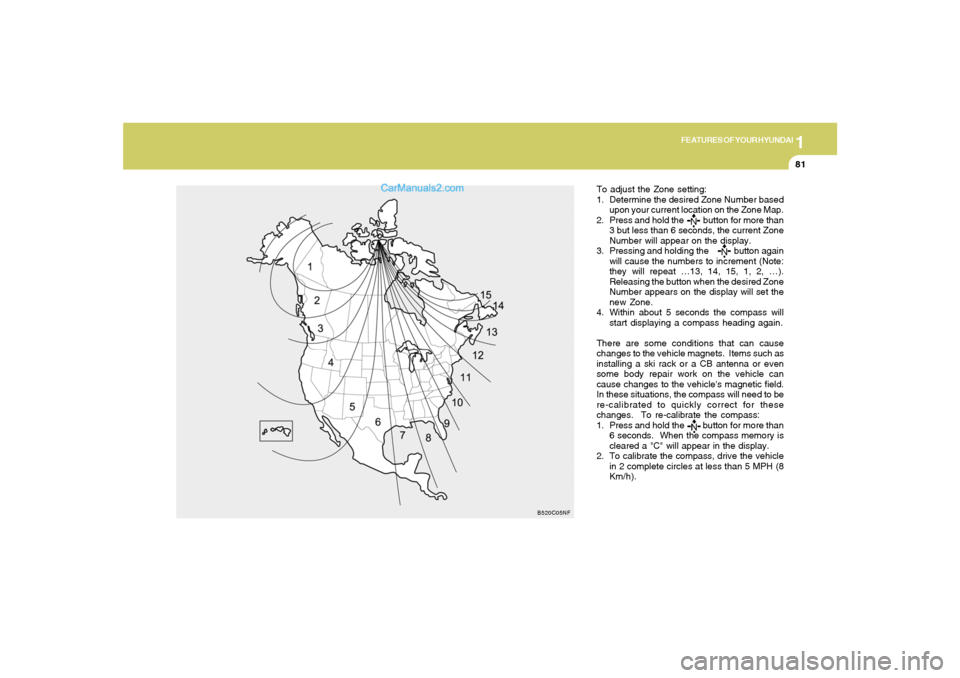
operating Zone Numbers for North America are
shown in the figure to the right.
Z-Nav™ Compass DisplayThe NVS™ Mirror in your vehicle is also
equipped with a Z-Nav™ Compass that shows
the vehicle Compass heading in the Display
Window using the 8 basic cardinal headings (N,
NE, E, SE, etc.).
Page 94 of 271
1
FEATURES OF YOUR HYUNDAI
81
To adjust the Zone setting:
1. Determine the desired Zone Number based
upon your current location on the Zone Map.
2. Press and hold the button for more than
3 but less than 6 seconds, the current Zone
Number will appear on the display.
3. Pressing and holding the button again
will cause the numbers to increment (Note:
they will repeat …13, 14, 15, 1, 2, …).
Releasing the button when the desired Zone
Number appears on the display will set the
new Zone.
4. Within about 5 seconds the compass will
start displaying a compass heading again.
There are some conditions that can cause
changes to the vehicle magnets. Items such as
installing a ski rack or a CB antenna or even
some body repair work on the vehicle can
cause changes to the vehicle's magnetic field.
In these situations, the compass will need to be
re-calibrated to quickly correct for these
changes. To re-calibrate the compass:
1. Press and hold the button for more than
6 seconds. When the compass memory is
cleared a "C" will appear in the display.
2. To calibrate the compass, drive the vehicle
in 2 complete circles at less than 5 MPH (8
Km/h).
B520C05NF
Page 108 of 271
1
FEATURES OF YOUR HYUNDAI
95
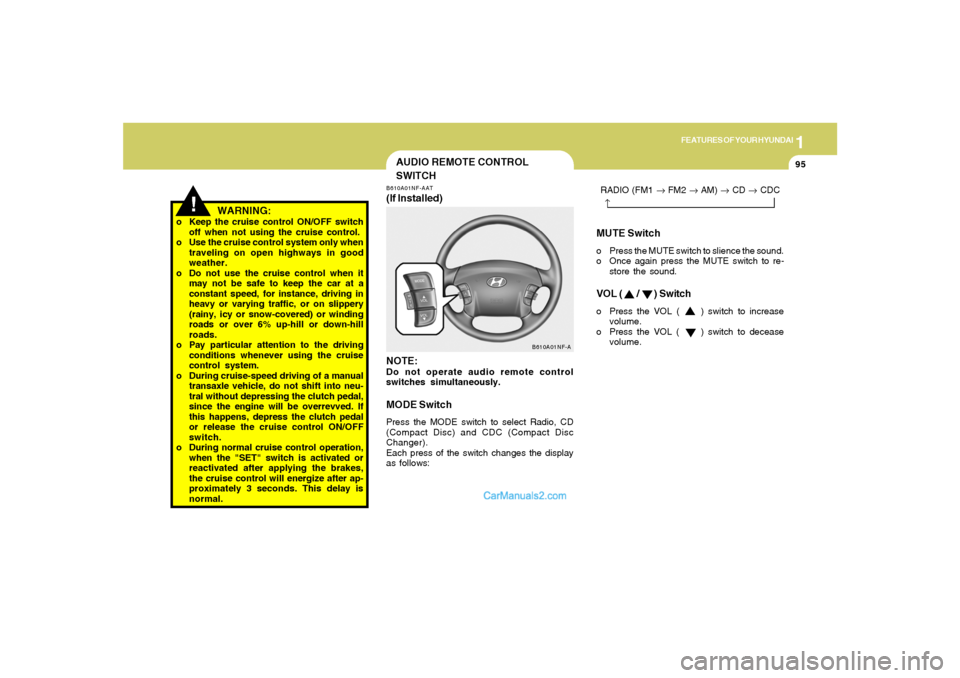
MUTE Switcho Press the MUTE switch to slience the sound.
o Once again press the MUTE switch to re-
store the sound.VOL ( / ) Switcho Press the VOL ( ) switch to increase
volume.
o Press the VOL ( ) switch to decease
volume. RADIO (FM1 → FM2 → AM) → CD → CDC
→
!
AUDIO REMOTE CONTROL
SWITCHB610A01NF-AAT(If Installed)
NOTE:Do not operate audio remote control
switches simultaneously.MODE SwitchPress the MODE switch to select Radio, CD
(Compact Disc) and CDC (Compact Disc
Changer).
Each press of the switch changes the display
as follows:
B610A01NF-A
WARNING:
o Keep the cruise control ON/OFF switch
off when not using the cruise control.
o Use the cruise control system only when
traveling on open highways in good
weather.
o Do not use the cruise control when it
may not be safe to keep the car at a
constant speed, for instance, driving in
heavy or varying traffic, or on slippery
(rainy, icy or snow-covered) or winding
roads or over 6% up-hill or down-hill
roads.
o Pay particular attention to the driving
conditions whenever using the cruise
control system.
o During cruise-speed driving of a manual
transaxle vehicle, do not shift into neu-
tral without depressing the clutch pedal,
since the engine will be overrevved. If
this happens, depress the clutch pedal
or release the cruise control ON/OFF
switch.
o During normal cruise control operation,
when the "SET" switch is activated or
reactivated after applying the brakes,
the cruise control will energize after ap-
proximately 3 seconds. This delay is
normal.
Page 119 of 271
1FEATURES OF YOUR HYUNDAI
106
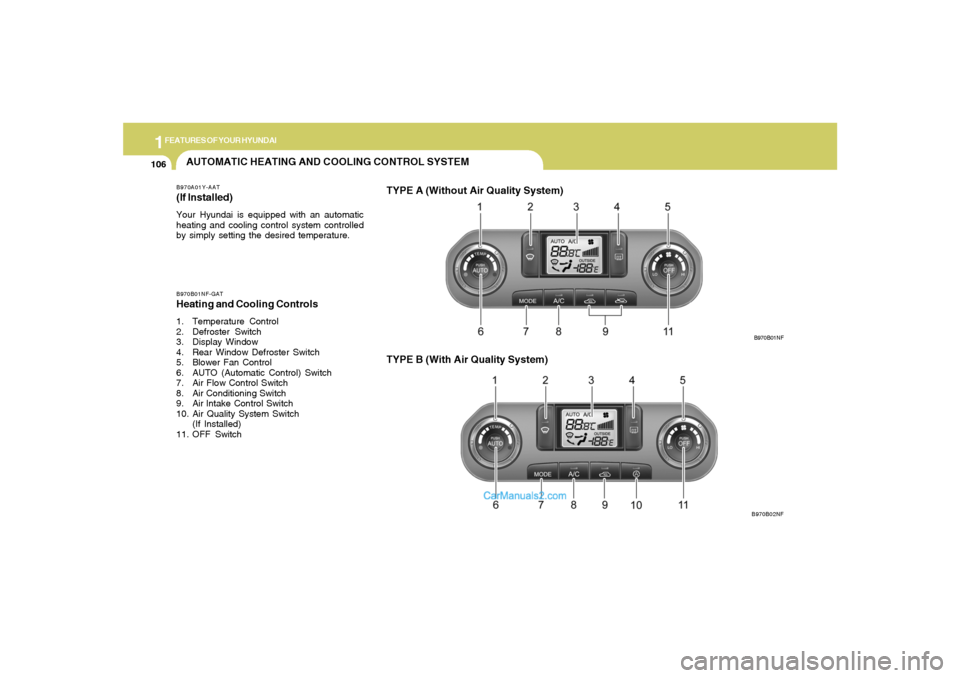
AUTOMATIC HEATING AND COOLING CONTROL SYSTEMB970A01Y-AAT(If lnstalled)Your Hyundai is equipped with an automatic
heating and cooling control system controlled
by simply setting the desired temperature.B970B01NF-GATHeating and Cooling Controls1. Temperature Control
2. Defroster Switch
3. Display Window
4. Rear Window Defroster Switch
5. Blower Fan Control
6. AUTO (Automatic Control) Switch
7. Air Flow Control Switch
8. Air Conditioning Switch
9. Air lntake Control Switch
10. Air Quality System Switch
(If Installed)
11. OFF Switch
TYPE B (With Air Quality System)
B970B01NF
B970B02NF
TYPE A (Without Air Quality System)