jack Hyundai Sonata 2012 Owner's Manual
[x] Cancel search | Manufacturer: HYUNDAI, Model Year: 2012, Model line: Sonata, Model: Hyundai Sonata 2012Pages: 411, PDF Size: 8.68 MB
Page 217 of 411
4 135
Features of your vehicle
(Continued) If the USB device is divided by logical drives, only the music fileson the highest-priority drive arerecognized by car audio.
Devices such as MP3 Player/ Cellular phone/Digital camera canbe unrecognizable by standardUSB I/F can be unrecognizable.
Charging through the USB may not be supported in some mobiledevices.
USB HDD or USB types liable to connection failures due to vehiclevibrations are not supported.(i-stick type)
Some non-standard USB devices (METAL COVER TYPE USB) canbe unrecognizable.
Some USB flash memory readers (such as CF, SD, micro SD, etc.) orexternal-HDD type devices can be unrecognizable.
Music files protected by DRM (DIGITAL RIGHTS MANAGEMENT)are not recognizable.
(Continued)
(Continued) The data in the USB memory may be lost while using this audio.Always back up important data on a personal storage device.
Please avoid using USB memory products which can be used askey chains or cellular phoneaccessories as they could cause damage to the USB jack. Pleasemake certain only to use plug type connector products as shownbelow.
Page 279 of 411
Driving your vehicle36
5Your vehicle's fuel economy depends
mainly on your style of driving, where you
drive and when you drive.
Each of these factors affects how many
miles (kilometers) you can get from a gal-
lon (liter) of fuel. To operate your vehicle
as economically as possible, use the fol-
lowing driving suggestions to help save
money in both fuel and repairs:
Drive smoothly. Accelerate at a moder-
ate rate. Don't make "jack-rabbit" starts
or full-throttle shifts and maintain a
steady cruising speed. Don't race
between stoplights. Try to adjust your
speed to that of the other traffic so you
don't have to change speeds unneces-
sarily. Avoid heavy traffic whenever
possible. Always maintain a safe dis-
tance from other vehicles so you can
avoid unnecessary braking. This also
reduces brake wear.
Drive at a moderate speed. The faster you drive, the more fuel your car uses.
Driving at a moderate speed, especial-
ly on the highway, is one of the most
effective ways to reduce fuel consump-
tion. Don't "ride" the brake pedal. This can
increase fuel consumption and also
increase wear on these components.
In addition, driving with your foot rest-
ing on the brake pedal may cause the
brakes to overheat, which reduces
their effectiveness and may lead to
more serious consequences.
Take care of your tires. Keep them inflated to the recommended pressure.
Incorrect inflation, either too much or
too little, results in unnecessary tire
wear. Check the tire pressures at least
once a month.
Be sure that the wheels are aligned correctly. Improper alignment can
result from hitting curbs or driving too
fast over irregular surfaces. Poor align-
ment causes faster tire wear and may
also result in other problems as well as
greater fuel consumption. Keep your car in good condition. For
better fuel economy and reduced
maintenance costs, maintain your car
in accordance with the maintenance
schedule in section 7. If you drive your
car in severe conditions, more frequent
maintenance is required (see section 7
for details).
Keep your car clean. For maximum service, your vehicle should be kept
clean and free of corrosive materials. It
is especially important that mud, dirt,
ice, etc. not be allowed to accumulate
on the underside of the car. This extra
weight can result in increased fuel con-
sumption and also contribute to corro-
sion.
Travel lightly. Don't carry unnecessary weight in your car. Weight reduces fuel
economy.
Don't let the engine idle longer than necessary. If you are waiting (and not
in traffic), turn off your engine and
restart only when you're ready to go.ECONOMICAL OPERATION
Page 307 of 411
What to do in an emergency12
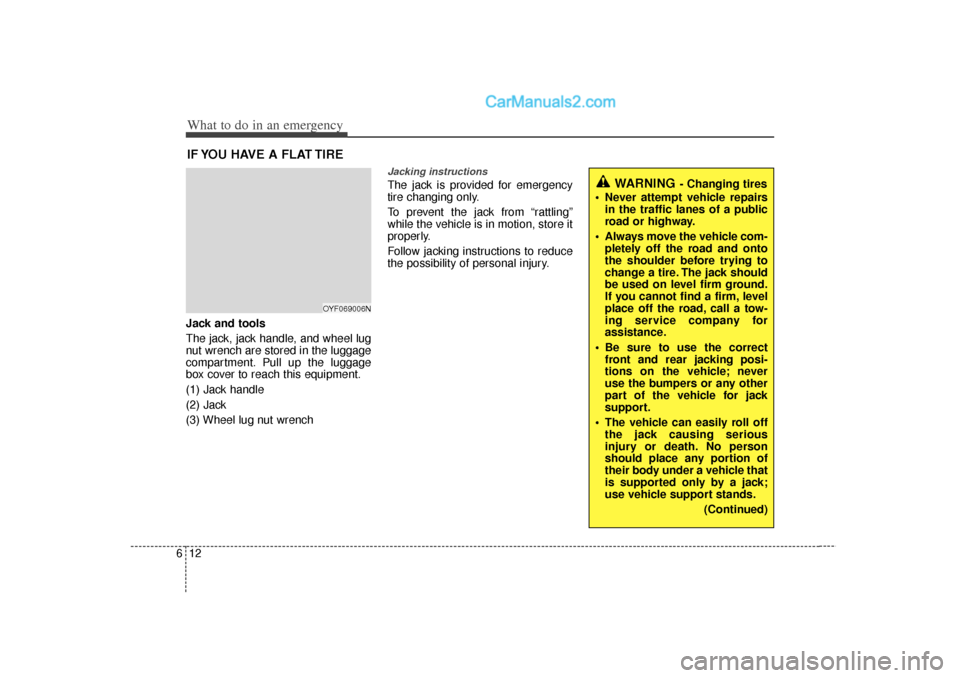
6IF YOU HAVE A FLAT TIREJack and tools
The jack, jack handle, and wheel lug
nut wrench are stored in the luggage
compartment. Pull up the luggage
box cover to reach this equipment.
(1) Jack handle
(2) Jack
(3) Wheel lug nut wrench
Jacking instructions The jack is provided for emergency
tire changing only.
To prevent the jack from “rattling”
while the vehicle is in motion, store it
properly.
Follow jacking instructions to reduce
the possibility of personal injury.
WARNING
- Changing tires
Never attempt vehicle repairs in the traffic lanes of a public
road or highway.
Always move the vehicle com- pletely off the road and onto
the shoulder before trying to
change a tire. The jack should
be used on level firm ground.
If you cannot find a firm, level
place off the road, call a tow-
ing service company for
assistance.
Be sure to use the correct front and rear jacking posi-
tions on the vehicle; never
use the bumpers or any other
part of the vehicle for jack
support.
The vehicle can easily roll off the jack causing serious
injury or death. No person
should place any portion of
their body under a vehicle that
is supported only by a jack;
use vehicle support stands.
(Continued)
OYF069006N
Page 308 of 411
613
What to do in an emergency
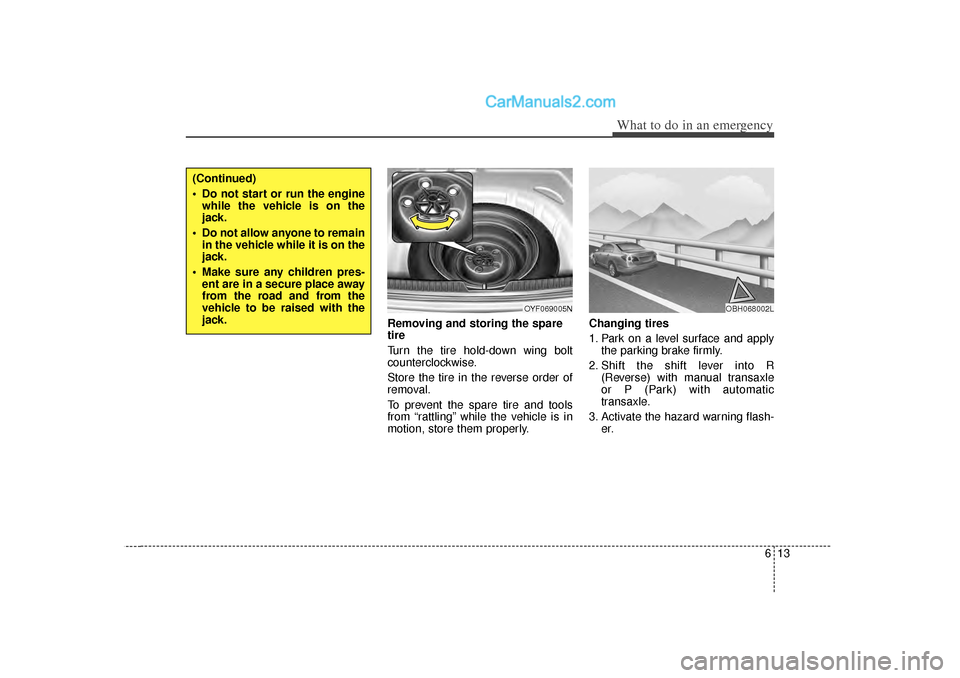
Removing and storing the spare
tire
Turn the tire hold-down wing bolt
counterclockwise.
Store the tire in the reverse order of
removal.
To prevent the spare tire and tools
from “rattling” while the vehicle is in
motion, store them properly.Changing tires
1. Park on a level surface and apply
the parking brake firmly.
2. Shift the shift lever into R (Reverse) with manual transaxle
or P (Park) with automatic
transaxle.
3. Activate the hazard warning flash- er.
OYF069005N
(Continued)
Do not start or run the enginewhile the vehicle is on the
jack.
Do not allow anyone to remain in the vehicle while it is on the
jack.
Make sure any children pres- ent are in a secure place away
from the road and from the
vehicle to be raised with the
jack.
OBH068002L
Page 309 of 411
What to do in an emergency14
64. Remove the wheel lug nut wrench,
jack, jack handle, and spare tire
from the vehicle.
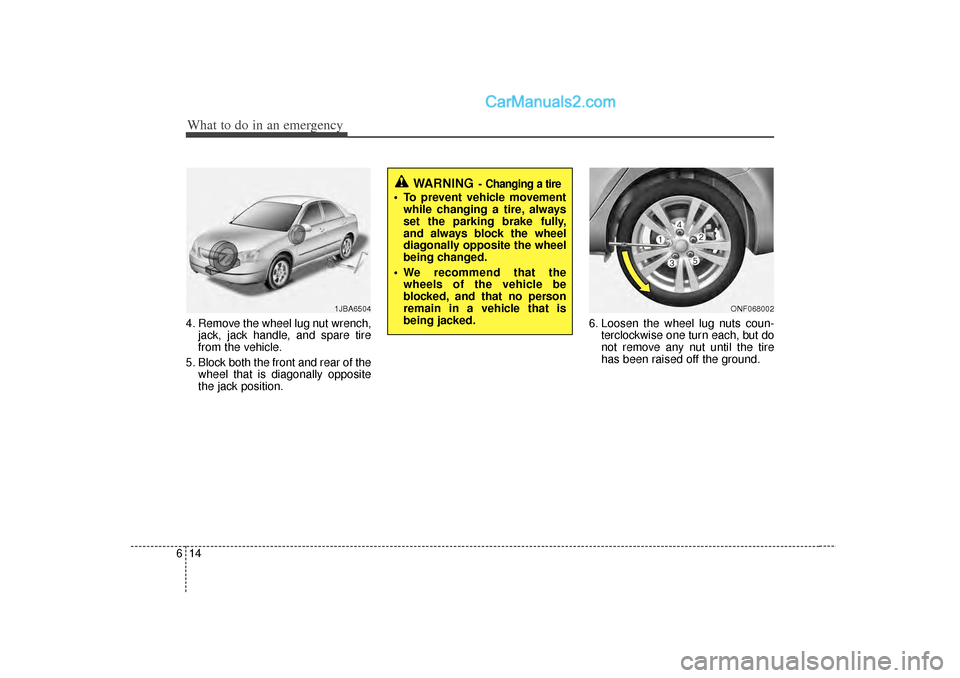
5. Block both the front and rear of the wheel that is diagonally opposite
the jack position. 6. Loosen the wheel lug nuts coun-
terclockwise one turn each, but do
not remove any nut until the tire
has been raised off the ground.
1JBA6504
WARNING
- Changing a tire
To prevent vehicle movementwhile changing a tire, always
set the parking brake fully,
and always block the wheel
diagonally opposite the wheel
being changed.
We recommend that the wheels of the vehicle be
blocked, and that no person
remain in a vehicle that is
being jacked.
ONF068002
Page 310 of 411
615
What to do in an emergency
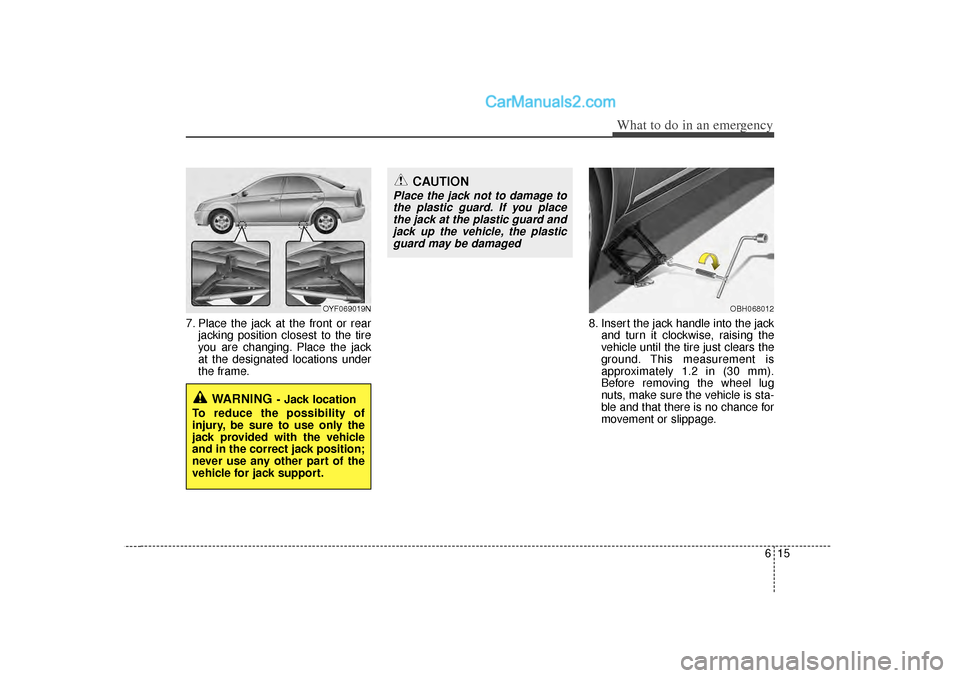
7. Place the jack at the front or rearjacking position closest to the tire
you are changing. Place the jack
at the designated locations under
the frame. 8. Insert the jack handle into the jack
and turn it clockwise, raising the
vehicle until the tire just clears the
ground. This measurement is
approximately 1.2 in (30 mm).
Before removing the wheel lug
nuts, make sure the vehicle is sta-
ble and that there is no chance for
movement or slippage.
WARNING
- Jack location
To reduce the possibility of
injury, be sure to use only the
jack provided with the vehicle
and in the correct jack position;
never use any other part of the
vehicle for jack support.
OYF069019N
OBH068012
CAUTION
Place the jack not to damage to the plastic guard. If you placethe jack at the plastic guard andjack up the vehicle, the plasticguard may be damaged
Page 312 of 411
617
What to do in an emergency
If you have a tire gauge, remove the
valve cap and check the air pressure.
If the pressure is lower than recom-
mended, drive slowly to the nearest
service station and inflate to the cor-
rect pressure. If it is too high, adjust
it until it is correct. Always reinstall
the valve cap after checking or
adjusting tire pressure. If the cap is
not replaced, air may leak from the
tire. If you lose a valve cap, buy
another and install it as soon as pos-
sible.
After you have changed wheels,
always secure the flat tire in its place
and return the jack and tools to their
proper storage locations.To prevent the jack, jack handle,
wheel lug nut wrench and spare tire
from rattling while the vehicle is in
motion, store them properly.
CAUTION
Your vehicle has metric threads
on the wheel studs and nuts.Make certain during wheelremoval that the same nuts thatwere removed are reinstalled -or, if replaced, that nuts withmetric threads and the samechamfer configuration are used.Installation of a non-metricthread nut on a metric stud orvice-versa will not secure thewheel to the hub properly andwill damage the stud so that itmust be replaced.
Note that most lug nuts do nothave metric threads. Be sure touse extreme care in checkingfor thread style before installingaftermarket lug nuts or wheels.If in doubt, consult an author-ized HYUNDAI dealer.
WARNING
- Wheel studs
If the studs are damaged, they
may lose their ability to retain
the wheel. This could lead to the
loss of the wheel and a collision
resulting in serious injuries.
WARNING -
Inadequate
spare tire pressure
Check the inflation pressures as
soon as possible after installing
the spare tire. Adjust it to the
specified pressure, if necessary.
Refer to “Tires and wheels” sec-
tion 8.
Page 405 of 411

Index4I
Displays, see instrument cluster ··················\
··················\
4-50
Display illumination, see instrument panelillumination ··················\
··················\
··················\
·········4-51
Door locks··················\
··················\
··················\
················4-18 Central door lock switch ··················\
··················\
·······4-19
Child-protector rear door lock ··················\
················4-21
Drink holders, see cup holders ··················\
··················\
4-107
Driver's 3-point system with emergency locking retractor ··················\
··················\
··················\
···············3-19
Driver's air bag··············\
··················\
··················\
·············3-49
Driving at night··················\
··················\
··················\
········5-39
Driving in flooded areas ··················\
··················\
············5-40
Driving in the rain ··················\
··················\
··················\
···5-40
Economical operation ··················\
··················\
················5-36
EDR, see Vehicle data collection and event data recorders ··················\
··················\
··················\
················1-6
Electronic stability control (ESC) ··················\
···············5-26
Electric chromic mirror (ECM) with HomeLink system and compass ··················\
··················\
··················\
········4-41
Electric power steering ··················\
··················\
··············4-39
Emergency starting ··················\
··················\
··················\
····6-4 Jump starting ··················\
··················\
··················\
·········6-4
Push starting ··················\
··················\
··················\
··········6-5
Emergency while driving··················\
··················\
·············6-2 Emission control system ··················\
··················\
············7-73
Crankcase emission control system ··················\
········7-73
Evaporative emission control System ··················\
·····7-73
Exhaust emission control system ··················\
············7-74
Engine compartment ··················\
··················\
············2-4, 7-2
Engine coolant ··················\
··················\
··················\
·········7-24
Engine number ··················\
··················\
··················\
···········8-7
Engine oil ··················\
··················\
··················\
·················7-22\
Engine overheats··················\
··················\
··················\
········6-6
Engine start/stop button ··················\
··················\
···············5-7
Engine temperature gauge ··················\
··················\
·········4-52
Engine will not start··················\
··················\
··················\
···6-3
Evaporative emission control System ··················\
·········7-73
Exhaust emission control system··················\
·················7-74\
Explanation of scheduled maintenance items ···············7-19
Exterior care··················\
··················\
··················\
·············7-67
Flat tire ··················\
··················\
··················\
··················\
···6-12 Changing tires ··················\
··················\
··················\
·····6-13
Compact spare tire ··················\
··················\
················6-18
Jack and tools ··················\
··················\
··················\
······6-12
Removing and storing the spare tire ··················\
·······6-13
Floor mat anchor(s)··················\
··················\
··················\
4-110
Fluid Washer fluid ··················\
··················\
··················\
········7-27
Brakes/clutch fluid ··················\
··················\
················7-26E
F
Page 407 of 411

Index6I
Instrument cluster ··················\
··················\
··················\
····4-50Engine temperature gauge··················\
··················\
·····4-52
Fuel gauge ··················\
··················\
··················\
···········4-53
Instrument panel illumination ··················\
·················4-51\
Odometer ··················\
··················\
··················\
·············4-54
Speedometer ··················\
··················\
··················\
········4-51
Tachometer ··················\
··················\
··················\
··········4-51
Trip computer ··················\
··················\
··················\
······4-53
Vehicle setting ··················\
··················\
··················\
·····4-57
Warning and indicators ··················\
··················\
·········4-59
Instrument panel illumination··················\
··················\
····4-51
Instrument panel overview ··················\
··················\
··········2-3
Interior care··················\
··················\
··················\
··············7-71
Interior features··················\
··················\
··················\
······4-107 Clothes hanger··················\
··················\
··················\
···4-109
Cup holder ··················\
··················\
··················\
·········4-107
Digital clock ··················\
··················\
··················\
······4-109
Aux, USB and iPod ··················\
··················\
·············4-110
Floor mat anchor(s) ··················\
··················\
·············4-110
Power outlet ··················\
··················\
··················\
······4-108
Sunvisor··················\
··················\
··················\
·············4-107
Interior light ··················\
··················\
··················\
·············4-79
Interior overview ··················\
··················\
··················\
·······2-2
Interlock system ··················\
··················\
··················\
·······5-19 Jack and tools··················\
··················\
··················\
···········6-12
Jump starting··················\
··················\
··················\
··············6-4
Key positions ··················\
··················\
··················\
·············5-5
Keys ··················\
··················\
··················\
··················\
·········4-3
Label
Air bag warning label··················\
··················\
············3-63
Tire sidewall labeling ··················\
··················\
············7-43
Tire specification and pressure label··················\
·········8-7
Vehicle certification label ··················\
················5-49, 8-\
6
Latch system, see lower anchor system ··················\
······3-35
Light bulbs ··················\
··················\
··················\
···············7-59
Lighting··················\
··················\
··················\
··················\
··4-72 Battery saver function ··················\
··················\
···········4-72
Daytime running light ··················\
··················\
···········4-73
Headlamp delay··················\
··················\
··················\
···4-72
Headlamp welcome function ··················\
··················\
4-72
Lower anchor system ··················\
··················\
·················3-35\
Lubricants and capacities··················\
··················\
·············8-4
Lumbar support··················\
··················\
··················\
··········3-7
JKL