service Hyundai Sonata 2014 User Guide
[x] Cancel search | Manufacturer: HYUNDAI, Model Year: 2014, Model line: Sonata, Model: Hyundai Sonata 2014Pages: 665, PDF Size: 17.43 MB
Page 162 of 665
3-66
Convenient features of your vehicle
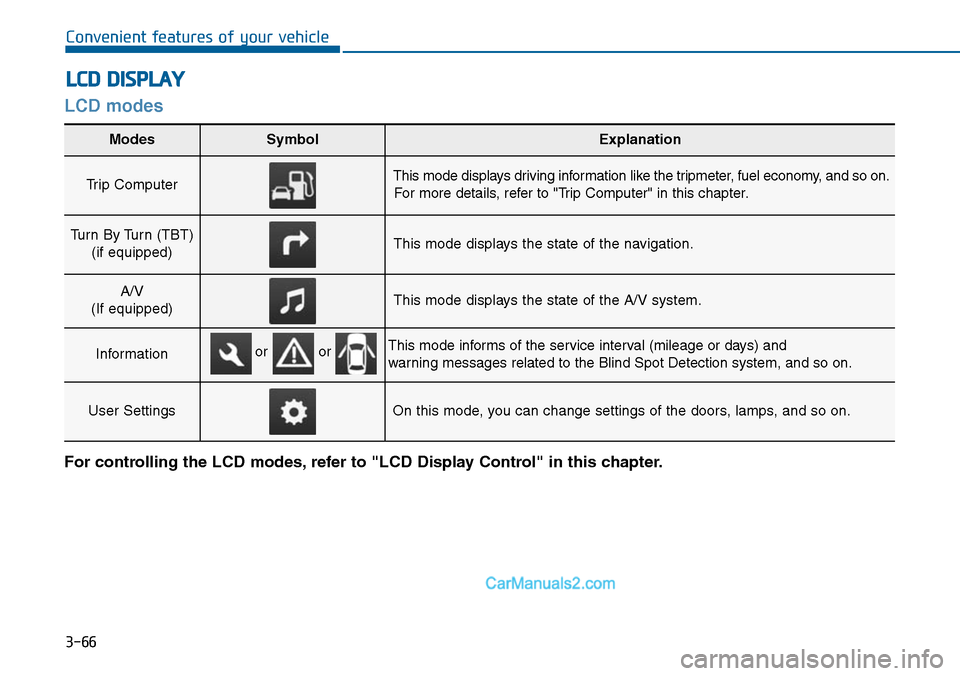
LCD modes
LCD DISPLAY
For controlling the LCD modes, refer to "LCD Display Control" in this chapter.
Modes SymbolExplanation
Trip Computer This mode displays driving information like the tripmeter, fuel economy, and so on.
For more details, refer to "Trip Computer" in this chapter.
Turn By Turn (TBT)
(if equipped)This mode displays the state of the navigation.
A/V
(If equipped)This mode displays the state of the A/V system.
InformationThis mode informs of the service interval (mileage or days) and
warning messages related to the Blind Spot Detection system, and so on.
User SettingsOn this mode, you can change settings of the doors, lamps, and so on.
or or
Page 164 of 665
3-68
Convenient features of your vehicle
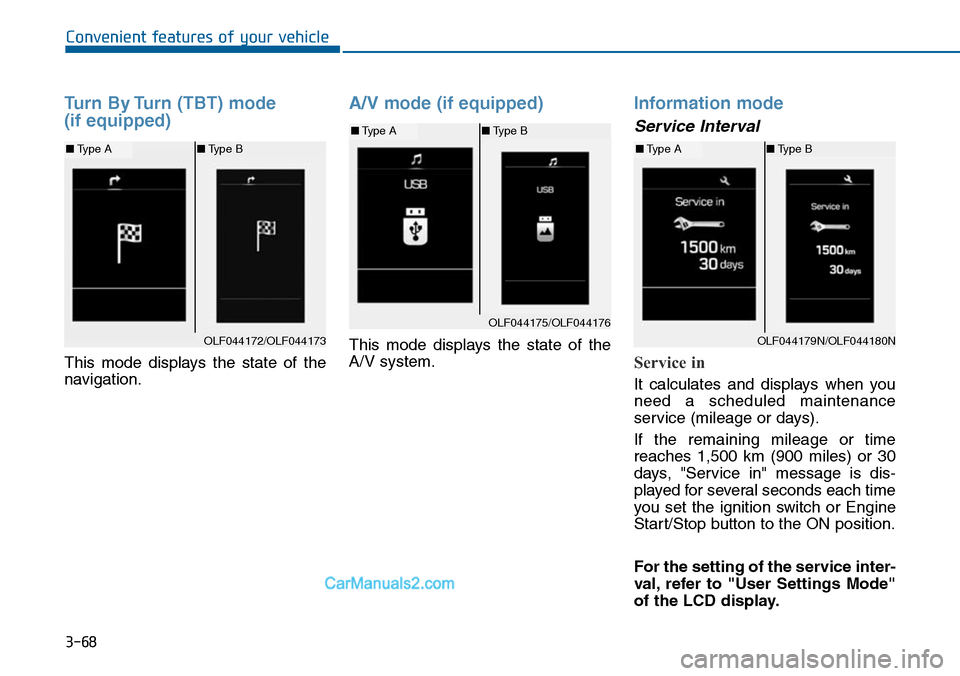
Turn By Turn (TBT) mode
(if equipped)
This mode displays the state of the
navigation.
A/V mode (if equipped)
This mode displays the state of the
A/V system.
Information mode
Service Interval
Service in
It calculates and displays when you
need a scheduled maintenance
service (mileage or days).
If the remaining mileage or time
reaches 1,500 km (900 miles) or 30
days, "Service in" message is dis-
played for several seconds each time
you set the ignition switch or Engine
Start/Stop button to the ON position.
For the setting of the service inter-
val, refer to "User Settings Mode"
of the LCD display.
OLF044172/OLF044173
■Type A■Type B
OLF044175/OLF044176
■Type A■Type B
OLF044179N/OLF044180N
■Type A■Type B
Page 165 of 665
3-69
Convenient features of your vehicle
3
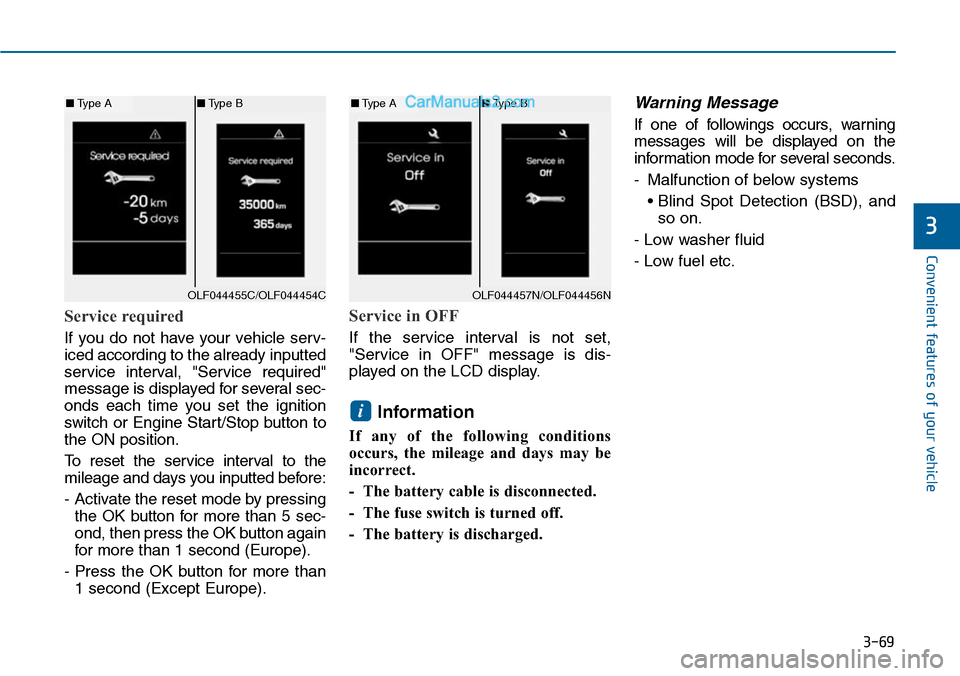
Service required
If you do not have your vehicle serv-
iced according to the already inputted
service interval, "Service required"
message is displayed for several sec-
onds each time you set the ignition
switch or Engine Star t/Stop button to
the ON position.
To r e s e t t h e s e r v i c e i n t e r v a l t o t h e
mileage and days you inputted before:
- Activate the reset mode by pressing
the OK button for more than 5 sec-
ond, then press the OK button again
for more than 1 second (Europe).
- Press the OK button for more than
1 second (Except Europe).
Service in OFF
If the service interval is not set,
"Service in OFF" message is dis-
played on the LCD display.
Information
If any of the following conditions
occurs, the mileage and days may be
incorrect.
- The battery cable is disconnected.
- The fuse switch is turned off.
- The battery is discharged.
Warning Message
If one of followings occurs, warning
messages will be displayed on the
information mode for several seconds.
-Malfunction of below systems
• Blind Spot Detection (BSD), and
so on.
- Low washer fluid
- Low fuel etc.
i
OLF044455C/OLF044454C
■Type A■Type B
OLF044457N/OLF044456N
■Type A■Type B
Page 169 of 665
3-73
Convenient features of your vehicle
3
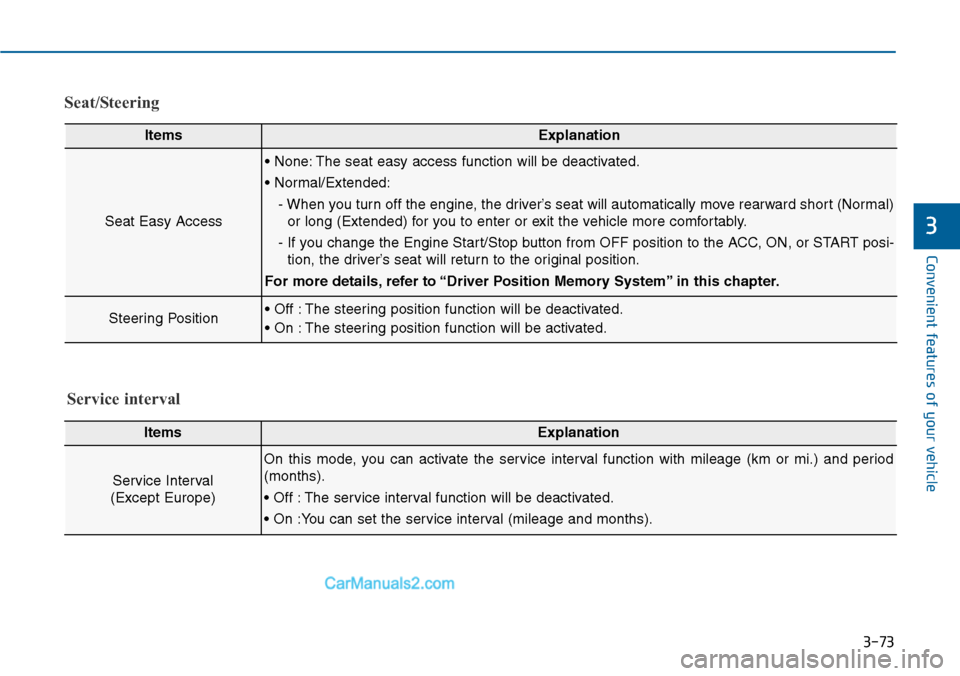
Seat/Steering
ItemsExplanation
Seat Easy Access
• None: The seat easy access function will be deactivated.
• Normal/Extended:
- When you turn off the engine, the driver’s seat will automatically move rearward short (Normal)
or long (Extended) for you to enter or exit the vehicle more comfortably.
- If you change the Engine Start/Stop button from OFF position to the ACC, ON, or START posi-
tion, the driver’s seat will return to the original position.
For more details, refer to “Driver Position Memory System” in this chapter.
Steering Position• Off : The steering position function will be deactivated.
• On : The steering position function will be activated.
ItemsExplanation
Service Interval
(Except Europe)
On this mode, you can activate the service interval function with mileage (km or mi.) and period
(months).
• Off : The service interval function will be deactivated.
• On :You can set the service interval (mileage and months).
Service interval
Page 177 of 665
3-81
Convenient features of your vehicle
3
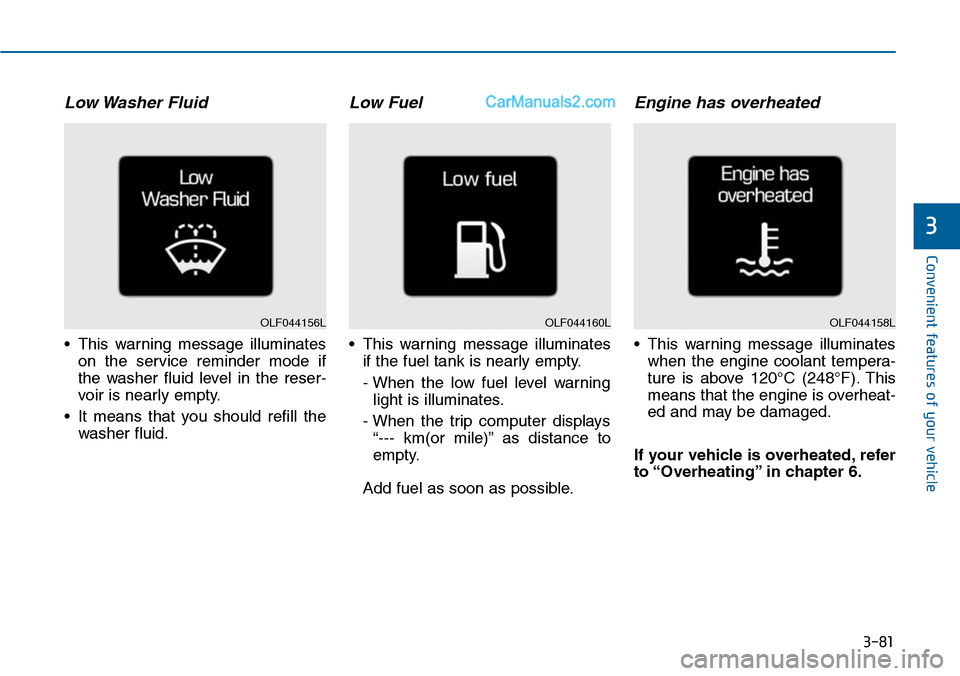
Low Washer Fluid
•This warning message illuminates
on the service reminder mode if
the washer fluid level in the reser-
voir is nearly empty.
•It means that you should refill the
washer fluid.
Low Fuel
•This warning message illuminates
if the fuel tank is nearly empty.
- When the low fuel level warning
light is illuminates.
- When the trip computer displays
“--- km(or mile)” as distance to
empty.
Add fuel as soon as possible.
Engine has overheated
•This warning message illuminates
when the engine coolant tempera-
ture is above 120°C (248°F). This
means that the engine is overheat-
ed and may be damaged.
If your vehicle is overheated, refer
to “Overheating” in chapter 6.
OLF044160LOLF044158LOLF044156L
Page 228 of 665
3-132
Convenient features of your vehicle
•Operating the air conditioning sys-
tem in the recirculated air position
provides maximum cooling, how-
ever, continual operation in this
mode may cause the air inside the
vehicle to become stale.
•During cooling operation, you may
occasionally notice a misty air flow
because of rapid cooling and
humid air intake. This is a normal
system operation characteristics.
System maintenance
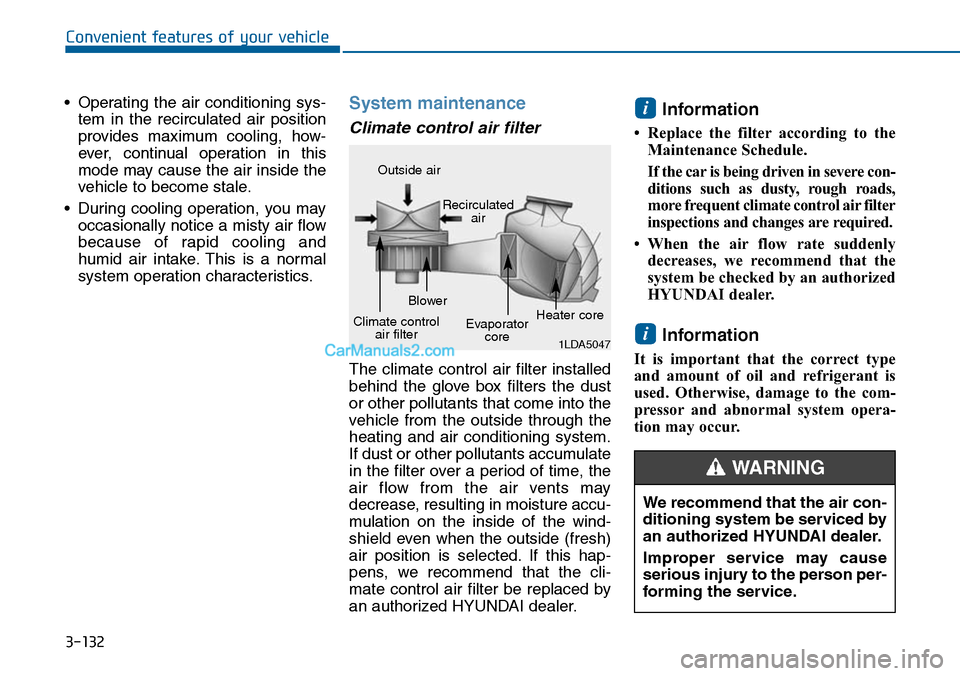
Climate control air filter
The climate control air filter installed
behind the glove box filters the dust
or other pollutants that come into the
vehicle from the outside through the
heating and air conditioning system.
If dust or other pollutants accumulate
in the filter over a period of time, the
air flow from the air vents may
decrease, resulting in moisture accu-
mulation on the inside of the wind-
shield even when the outside (fresh)
air position is selected. If this hap-
pens, we recommend that the cli-
mate control air filter be replaced by
an authorized HYUNDAI dealer.
Information
• Replace the filter according to the
Maintenance Schedule.
If the car is being driven in severe con-
ditions such as dusty, rough roads,
more frequent climate control air filter
inspections and changes are required.
• When the air flow rate suddenly
decreases, we recommend that the
system be checked by an authorized
HYUNDAI dealer.
Information
It is important that the correct type
and amount of oil and refrigerant is
used. Otherwise, damage to the com-
pressor and abnormal system opera-
tion may occur.
i
i
1LDA5047
Outside air
Recirculatedair
Climate controlair filter
Blower
Evaporatorcore
Heater core
We recommend that the air con-
ditioning system be serviced by
an authorized HYUNDAI dealer.
Improper service may cause
serious injury to the person per-
forming the service.
WARNING
Page 239 of 665
3-143
Convenient features of your vehicle
3
Operation Tips
•To keep dust or unpleasant fumes
from entering the vehicle through
the ventilation system, temporarily
set the air intake control to the
recirculated air position. Be sure to
return the control to the fresh air
position when the irritation has
passed to keep fresh air in the
vehicle. This will help keep the driv-
er alert and comfortable.
•Air for the heating/cooling system
is drawn in through the grilles just
ahead of the windshield. Care
should be taken that these are not
blocked by leaves, snow, ice or
other obstructions.
•To prevent interior fog on the wind-
shield, set the air intake control to
the fresh air position and fan speed
to the desired position, turn on the
air conditioning system, and adjust
the temperature control to desired
temperature.
Air conditioning
HYUNDAI Air Conditioning Systems
are filled with R-134a refrigerant.
1. Start the engine. Push the air con-
ditioning button.
2. Set the mode to the position.
3. Set the air intake control to the out-
side air or recirculated air position.
4. Adjust the fan speed control and
temperature control to maintain
maximum comfort.
•The refrigerant system should
only be serviced by trained and
certified technicians to insure
proper and safe operation.
•The refrigerant system should
be serviced in a well-ventilated
place.
•The air conditioning evaporator
(cooling coil) shall never be
repaired or replaced with one
removed from a used or sal-
vaged vehicle and new replace-
ment MAC evaporators shall be
certified (and labeled) as meet-
ing SAE Standard J2842.
NOTICE
Page 270 of 665
Multimedia System
4-12
•Do not stare at the screen while
driving. Staring at the screen
for prolonged periods of time
could lead to traffic accidents.
•Do not disassemble, assemble,
or modify the audio system.
Such acts could result in acci-
dents, fire, or electric shock.
•Using the phone while driving
may lead to a lack of attention
of traffic conditions and
increase the likelihood of acci-
dents. Use the phone feature
after parking the vehicle.
•Heed caution not to spill water
or introduce foreign objects
into the device. Such acts
could lead to smoke, fire, or
product malfunction.
WARNING
Operating the device while driving
could lead to accidents due to a
lack of attention to external sur-
roundings. First park the vehicle
before operating the device.
•Adjust the volume to levels that
allow the driver to hear sounds
from outside of the vehicle.
Driving in a state where external
sounds cannot be heard may lead
to accidents.
•Pay attention to the volume set-
ting when turning the device on.
A sudden output of extreme vol-
ume upon turning the device on
could lead to hearing impairment.
(Adjust the volume to a suitable
levels before turning off the
device.)
(Continued)
(Continued)
•Do not place beverages close to
the audio system. Spilling bever-
ages may lead to system mal-
function.
•In case of product malfunction,
please contact your place of pur-
chase or After Service center.
•Placing the audio system within
an electromagnetic environment
may result in noise interference.
•Prevent caustic solutions such
as perfume and cosmetic oil
from contacting the dashboard
because they may cause dam-
age or discoloration.
NOTICE
Page 308 of 665
Information
- Using the Bluetooth®
Wireless Technology cellular
phone
•Do not use a cellularphone orper-
form Bluetooth®Wireless Technology
settings (e.g. pairing a phone) while
driving.
•Some Bluetooth® Wireless Technology
-enabled phones may not be recog-
nized by the system or fully compati-
ble with the system.
•Before using Bluetooth®Wireless
Technology related features of the
audio system, refer your phone’s
User’s Manual for phone-side
Bluetooth®Wireless Technology
operations.
• The phone must be paired to the
audio system to use Bluetooth®
Wireless Technology related fea-
tures.
(Continued)
(Continued)
•You will not be able to use the
hands-free feature when your phone
(in the car) is outside of the cellular
service area (e.g. in a tunnel, in a
underground, in a mountainous
area, etc.).
• If the cellular phone signal is poor
or the vehicles interior noise is too
loud, it may be difficult to hear the
other person’s voice during a call.
• Do not place the phone near or
inside metallic objects, otherwise
communications with Bluetooth®
Wireless Technology system or cel-
lular service stations can be dis-
turbed.
• While a phone is connected through
Bluetooth®Wireless Technology your
phone may discharge quicker than
usual for additional Bluetooth®
Wireless Technology-related opera-
tions.
(Continued)
(Continued)
•Some cellular phones or other
devices may cause interference noise
or malfunction to audio system. In
this case, store the device in a differ-
ent location may resolve the condi-
tion.
•Phone contact names should be
saved in English or they may not be
displayed correctly.
• If Priority is set upon vehicle igni-
tion(IGN/ACC ON), the Bluetooth®
Wireless Technology phone will be
automatically connected.
Even if you are outside, the
Bluetooth®Wireless Technology
phone will be automatically con-
nected once you are in the vicinity of
the vehicle.
If you do not want automatic
Bluetooth®Wireless Technology con-
nection, turn the Bluetooth®Wireless
Technology feature off.
(Continued)
i
4-50
Multimedia System
Page 538 of 665
6-4
IF THE ENGINE WILL NOT START
What to do in an emergency
If the engine doesn't turn over
or turns over slowly
•Be sure the shift lever is in N
(Neutral) or P (Park) if it is an auto-
matic transaxle vehicle. The engine
starts only when the shift lever is in
N (Neutral) or P (Park).
•Check the battery connections to
be sure they are clean and tight.
•Turn on the interior light.If the light
dims or goes out when you operate
the starter, the battery is drained.
Do not push or pull the vehicle to
start it. This could cause damage to
your vehicle. See instructions for
"Jump Starting" provided in this
chapter.
If the engine turns over nor-
mally but doesn’t start
•Check the fuel level and add fuel if
necessary.
If the engine still does not start, we
recommend that you call an author-
ized HYUNDAI dealer for assistance.
Jump star ting can be dangerous if
done incorrectly. Follow the jump
starting procedure in this section to
avoid serious injury or damage to
your vehicle. If in doubt about how to
properly jump start your vehicle, we
strongly recommend that you have a
service technician or towing service
do it for you.
Push or pull starting the vehicle
may cause the catalytic con-
verter to overload which can
lead to damage to the emission
control system.
CAUTION
JUMP STARTING