Door Hyundai Sonata 2014 Owner's Guide
[x] Cancel search | Manufacturer: HYUNDAI, Model Year: 2014, Model line: Sonata, Model: Hyundai Sonata 2014Pages: 665, PDF Size: 17.43 MB
Page 110 of 665
3-14
Convenient features of your vehicle
Operating door locks from
outside the vehicle
Mechanical key
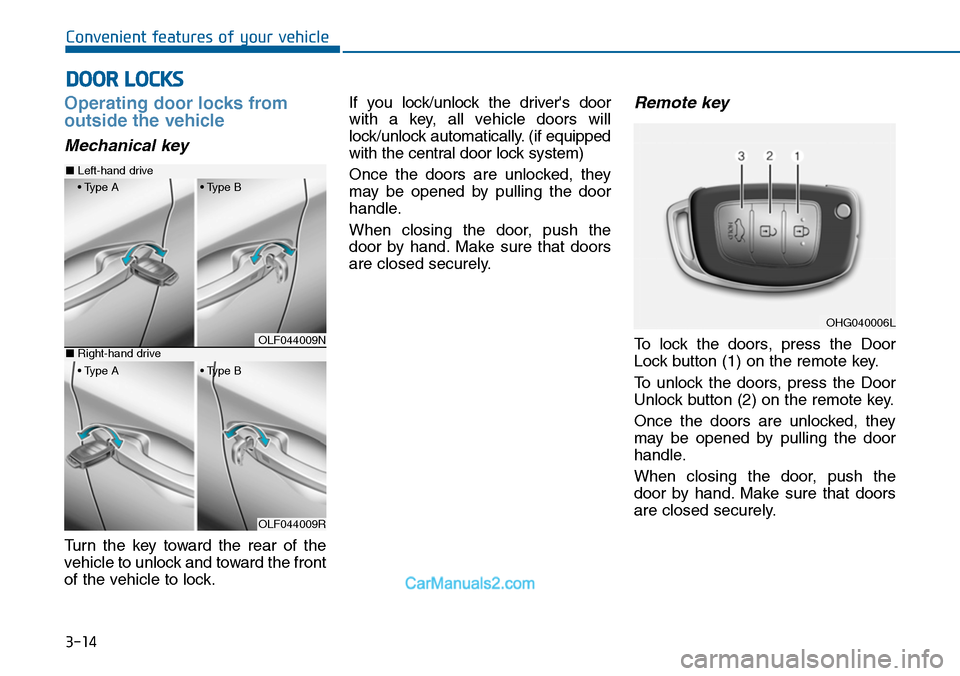
Turn the key toward the rear of the
vehicle to unlock and toward the front
of the vehicle to lock.
If you lock/unlock the driver's door
with a key, all vehicle doors will
lock/unlock automatically. (if equipped
with the central door lock system)
Once the doors are unlocked, they
may be opened by pulling the door
handle.
When closing the door, push the
door by hand. Make sure that doors
are closed securely.
Remote key
To lock the doors, press the Door
Lock button (1) on the remote key.
To unlock the doors, press the Door
Unlock button (2) on the remote key.
Once the doors are unlocked, they
may be opened by pulling the door
handle.
When closing the door, push the
door by hand. Make sure that doors
are closed securely.
DOOR LOCKS
OLF044009N
OLF044009R
■Left-hand drive
• Type A • Type B
■Right-hand drive
• Type A • Type B
OHG040006L
Page 111 of 665
3-15
Convenient features of your vehicle
3
Information
• In cold and wet climates, door lock
and door mechanisms may not work
properly due to freezing conditions.
• If the door is locked/unlocked multi-
ple times in rapid succession with
either the vehicle key or door lock
switch, the system may stop operat-
ing temporarily in order to protect
the circuit and prevent damage to
system components.
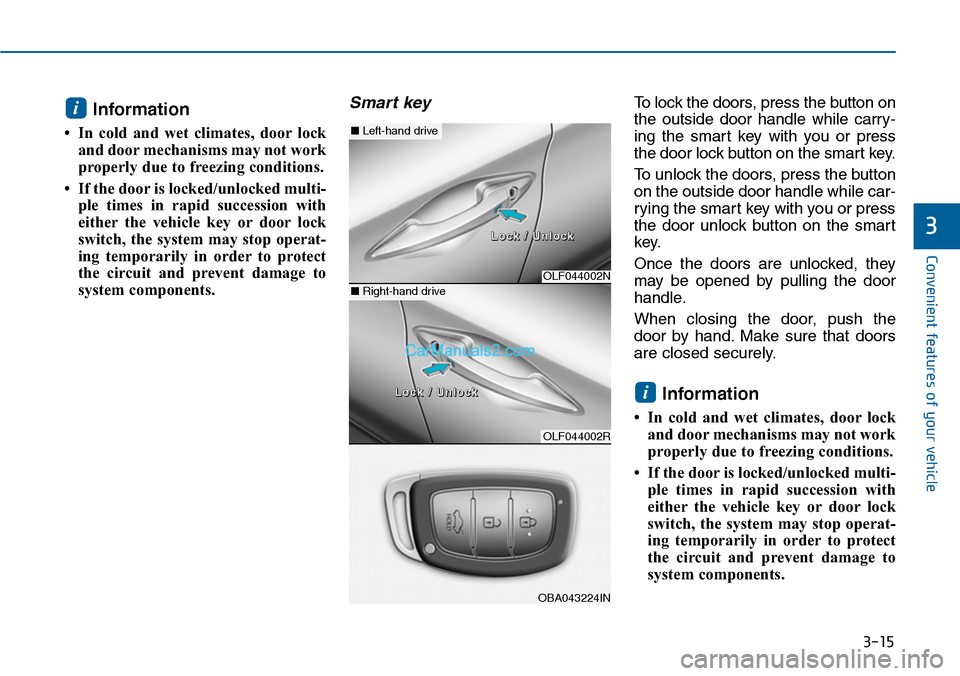
Smart key To l o c k t h e d o o r s , p r e s s t h e b u t t o n o n
the outside door handle while carry-
ing the smart key with you or press
the door lock button on the smart key.
To unlock the doors, press the button
on the outside door handle while car-
rying the smart key with you or press
the door unlock button on the smart
key.
Once the doors are unlocked, they
may be opened by pulling the door
handle.
When closing the door, push the
door by hand. Make sure that doors
are closed securely.
Information
• In cold and wet climates, door lock
and door mechanisms may not work
properly due to freezing conditions.
• If the door is locked/unlocked multi-
ple times in rapid succession with
either the vehicle key or door lock
switch, the system may stop operat-
ing temporarily in order to protect
the circuit and prevent damage to
system components.
i
i
OLF044002N
OLF044002R
■Left-hand drive
■Right-hand drive
LLoocckk // UUnnlloocckk
LLoocckk // UUnnlloocckk
OBA043224IN
Page 112 of 665
3-16
Convenient features of your vehicle
Operating door locks from
inside the vehicle
With the door lock button
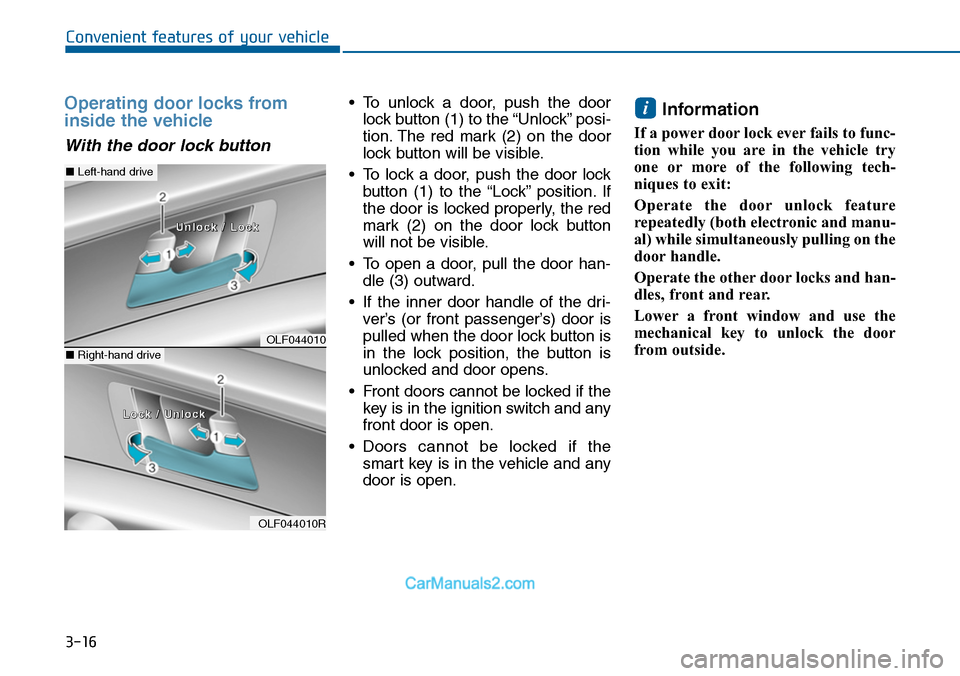
•To unlock a door, push the door
lock button (1) to the “Unlock” posi-
tion. The red mark (2) on the door
lock button will be visible.
•To lock a door, push the door lock
button (1) to the “Lock” position. If
the door is locked properly, the red
mark (2) on the door lock button
will not be visible.
•To open a door, pull the door han-
dle (3) outward.
•If the inner door handle of the dri-
ver’s (or front passenger’s) door is
pulled when the door lock button is
in the lock position, the button is
unlocked and door opens.
•Front doors cannot be locked if the
key is in the ignition switch and any
front door is open.
•Doors cannot be locked if the
smart key is in the vehicle and any
door is open.
Information
If a power door lock ever fails to func-
tion while you are in the vehicle try
one or more of the following tech-
niques to exit:
Operate the door unlock feature
repeatedly (both electronic and manu-
al) while simultaneously pulling on the
door handle.
Operate the other door locks and han-
dles, front and rear.
Lower a front window and use the
mechanical key to unlock the door
from outside.
i
OLF044010
OLF044010R
■Left-hand drive
■Right-hand drive
UUnnlloocckk // LLoocckk
LLoocckk // UUnnlloocckk
Page 113 of 665
3-17
Convenient features of your vehicle
3
With the central door lock
switch (if equipped)
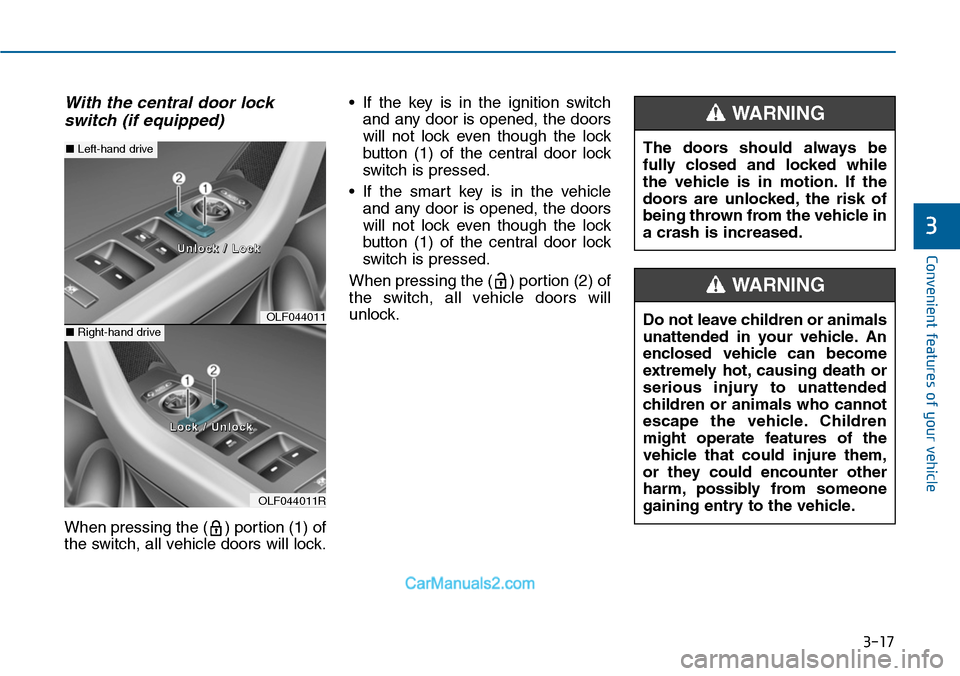
When pressing the ( ) portion (1) of
the switch, all vehicle doors will lock.
•If the key is in the ignition switch
and any door is opened, the doors
will not lock even though the lock
button (1) of the central door lock
switch is pressed.
•If the smart key is in the vehicle
and any door is opened, the doors
will not lock even though the lock
button (1) of the central door lock
switch is pressed.
When pressing the ( ) portion (2) of
the switch, all vehicle doors will
unlock.OLF044011
OLF044011R
■Left-hand drive
■Right-hand drive
UUnnlloocckk // LLoocckk
LLoocckk // UUnnlloocckk
The doors should always be
fully closed and locked while
the vehicle is in motion. If the
doors are unlocked, the risk of
being thrown from the vehicle in
a crash is increased.
WARNING
Do not leave children or animals
unattended in your vehicle. An
enclosed vehicle can become
extremely hot, causing death or
serious injury to unattended
children or animals who cannot
escape the vehicle. Children
might operate features of the
vehicle that could injure them,
or they could encounter other
harm, possibly from someone
gaining entry to the vehicle.
WARNING
Page 114 of 665
3-18
Convenient features of your vehicle
Auto door lock/unlock features
Impact sensing door unlock
system (if equipped)
All doors will be automatically
unlocked when an impact causes the
air bags to deploy.
Speed sensing door lock system
(if equipped)
All doors will be automatically locked
when vehicle speed exceeds 15
km/h (9 mph).
Yo u c a n a c t i v a t e o r d e a c t i v a t e t h e
Auto Door Lock/Unlock features from
the User Settings Mode on the LCD
display.For more details, refer to
"LCD Display" in this chapter.
Always secure your vehicle
Leaving your vehicle unlocked
increases the potential risk to
you or others from someone
hiding in your vehicle.
To secure your vehicle, while
depressing the brake, move the
shift lever to the P (Park) posi-
tion (for automatic transaxle) or
first gear or R (Reverse, for
manual transaxle), engage the
parking brake, and place the
ignition switch in the LOCK/OFF
position, close all windows,
lock all doors, and always take
the key with you.
WARNING
Opening a door when something
is approaching may cause dam-
age or injury. Be careful when
opening doors and watch for
vehicles, motorcycles, bicycles
or pedestrians approaching the
vehicle in the path of the door.
WARNING
Page 115 of 665
3-19
Convenient features of your vehicle
3
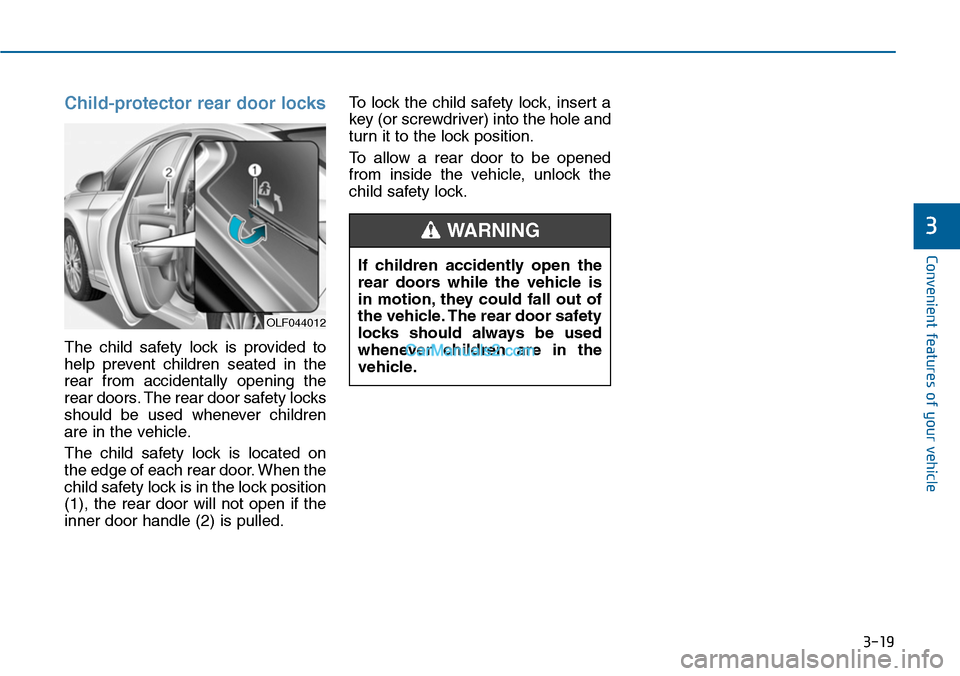
Child-protector rear door locks
The child safety lock is provided to
help prevent children seated in the
rear from accidentally opening the
rear doors. The rear door safety locks
should be used whenever children
are in the vehicle.
The child safety lock is located on
the edge of each rear door. When the
child safety lock is in the lock position
(1), the rear door will not open if the
inner door handle (2) is pulled.
To lock the child safety lock, insert a
key (or screwdriver) into the hole and
turn it to the lock position.
To allow a rear door to be opened
from inside the vehicle, unlock the
child safety lock.
OLF044012
If children accidently open the
rear doors while the vehicle is
in motion, they could fall out of
the vehicle. The rear door safety
locks should always be used
whenever children are in the
vehicle.
WARNING
Page 116 of 665
3-20
Convenient features of your vehicle
This system helps to protect your
vehicle and valuables. The horn will
sound and the hazard warning lights
will blink continuously if any of the
following occurs:
-A door is opened without using the
remote key or smart key.
-The trunk is opened without using
the remote key or smart key.
-The engine hood is opened.
The alarm continues for 30 seconds,
then the system resets. To turn off
the alarm, unlock the doors with the
remote key or smart key.
The Theft Alarm System automati-
cally sets 30 seconds after you lock
the doors and the trunk. For the sys-
tem to activate, you must lock the
doors and the trunk from outside the
vehicle with the remote key or smar t
key or by pressing the button on the
outside of the door handles with the
smart key in your possession.
The hazard warning lights will blink
and the chime will sound once to
indicate the system is armed.
Once the security system is set, open-
ing any door, the trunk, or the hood
without using the remote key or smart
key will cause the alarm to activate.
The Theft Alarm System will not set if
the hood, the trunk, or any door is
not fully closed. If the system will not
set, check the hood, the trunk, or the
doors are fully closed.
Do not attempt to alter this system or
add other devices to it.
Information
• Do not lock the doors until all pas-
sengers have left the vehicle. If the
remaining passenger leaves the
vehicle when the system is armed,
the alarm will be activated.
• If the vehicle is not disarmed with
the remote key or smart key, open
the doors by using the mechanical
key and place the ignition switch in
the ON position (for remote key) or
start the engine (for smart key) and
wait for 30 seconds.
•When the system is disarmed but a
door or trunk is not opened within 30
seconds, the system will be rearmed.
Information
Vehicles equipped with a theft alarm
system will have a label attached to
the vehicle with the following words:
1. WARNING
2. SECURITY SYSTEM
ii
THEFT-ALARM SYSTEM
OJC040170
Page 118 of 665
3-22
Convenient features of your vehicle
Theft-alarm stage
The alarm will be activated if any of
the following occurs while the system
is armed.
Without the intrusion/tilt sensor
(or intrusion/tilt sensor off con-
dition (if equipped))
•A front or rear door is opened without
using the transmitter (or smart key).
•The trunk is opened without using
the transmitter (or smart key).
•The engine hood is opened.
The horn will sound and the hazard
warning lights will blink continuously
for 30 seconds, unless the system is
disarmed. To turn off the system,
unlock the doors with the transmitter
(or smart key).
Intrusion/tilt sensor on position
(if equipped)
•Someone or something moves in
the vehicle.
•The inclination of the vehicle is
changed to the certain degree.
•A front or rear door is opened with-
out using the transmitter (or smart
key).
•The trunk is opened without using
the transmitter (or smart key).
•The engine hood is opened.
The horn will sound and the hazard
warning lights will blink continuously
for 30 seconds, unless the system is
disarmed. To turn off the system,
unlock the doors with the transmitter
(or smart key).
Disarmed stage
The system will be disarmed when
the door unlock button is pressed.
After the doors are unlocked, the haz-
ard warning lights will blink twice to
indicate that the system is disarmed.
After pressing the unlock button, if
any door (or trunk) is not opened
within 30 seconds, the system will be
rearmed
-If the vehicle is equipped with the
remote window up/down system;
the windows are also closed.
Information
• If the system is not disarmed with
the transmitter, open the door with
the key and insert the key into the
ignition switch, turn the ignition
switch to the ON position and wait
for 30 seconds. Then the system will
be disarmed.
• If you lose your keys, we recom-
mend that you consult with an
authorized HYUNDAI dealer.
i
Page 119 of 665
3-23
Convenient features of your vehicle
3
Do not change, alter or adjust the
theft-alarm system because it
could cause the theft-alarm sys-
tem to malfunction and we recom-
mend that the system be serviced
by an authorized HYUNDAI dealer.
Malfunctions caused by improper
alterations, adjustments or modifi-
cations to the theft-alarm system
are not covered by your vehicle
manufacturer’s warranty.
Self-diagnosis (if equipped)
If the hazard warning light blink once
when you lock the doors by using the
transmitter, it means the intrusion/tilt
sensor is working normally.
If the hazard warning light blink and
the horn sounds 3 times when you
lock the doors by using the transmit-
ter, it means the intrusion/tilt sensor
is not working normally. We recom-
mend that you contact an authorized
HYUNDAI dealer.
NOTICE
Page 129 of 665
3-33
Convenient features of your vehicle
3
Center (AUTO):
The mirror will fold or unfold auto-
matically as follows:
•Without smart key system
- The mirror will fold or unfold when
the door is locked or unlocked by
the transmitter.
•With smart key system
- The mirror will fold or unfold when
the door is locked or unlocked by
the smart key.
- The mirror will fold or unfold when
the door is locked or unlocked by
the button on the outside door
handle.
- The mirror will unfold when you
approach the vehicle (all doors
closed and locked) with a smart
key in possession. (if equipped)
The electric type outside rearview
mirror operates even though the
ignition switch is in the OFF posi-
tion. However, to prevent unnec-
essary battery discharge, do not
adjust the mirrors longer than
necessary while the engine is not
running.
Do not fold the electric type out-
side rearview mirror by hand. It
could cause motor failure.
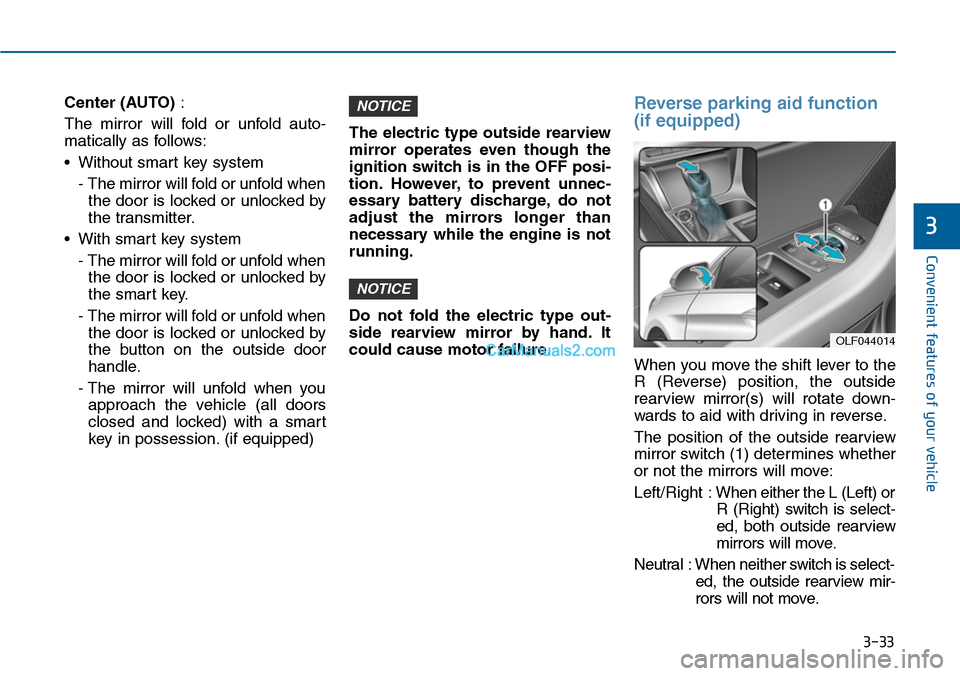
Reverse parking aid function
(if equipped)
When you move the shift lever to the
R (Reverse) position, the outside
rearview mirror(s) will rotate down-
wards to aid with driving in reverse.
The position of the outside rearview
mirror switch (1) determines whether
or not the mirrors will move:
Left/Right :When either the L (Left) or
R (Right) switch is select-
ed, both outside rearview
mirrors will move.
Neutral : When neither switch is select-
ed, the outside rearview mir-
rors will not move.
NOTICE
NOTICE
OLF044014