check engine Hyundai Sonata 2014 Owner's Guide
[x] Cancel search | Manufacturer: HYUNDAI, Model Year: 2014, Model line: Sonata, Model: Hyundai Sonata 2014Pages: 665, PDF Size: 17.43 MB
Page 460 of 665
5-11
Driving your vehicle
5
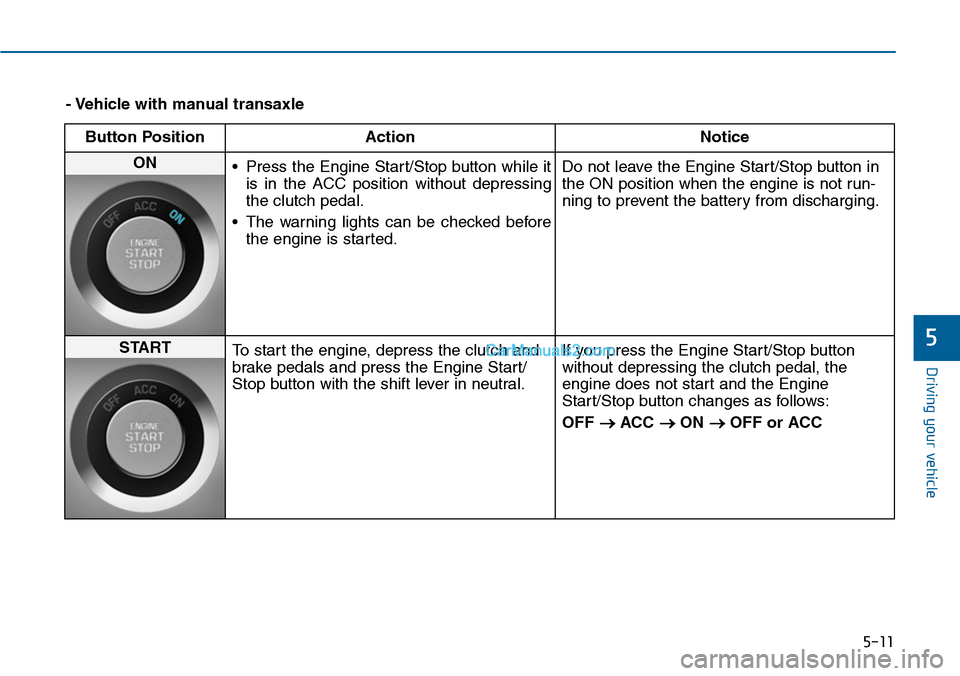
- Vehicle with manual transaxle
Button Position Action Notice
ON •Press the Engine Start/Stop button while it
is in the ACC position without depressing
the clutch pedal.
•The warning lights can be checked before
the engine is started.
Do not leave the Engine Start/Stop button in
the ON position when the engine is not run-
ning to prevent the battery from discharging.
STARTTo start the engine, depress the clutch and
brake pedals and press the Engine Start/
Stop button with the shift lever in neutral.
If you press the Engine Start/Stop button
without depressing the clutch pedal, the
engine does not start and the Engine
Start/Stop button changes as follows:
OFF →ACC →ON →OFF or ACC
Page 462 of 665
5-13
Driving your vehicle
5
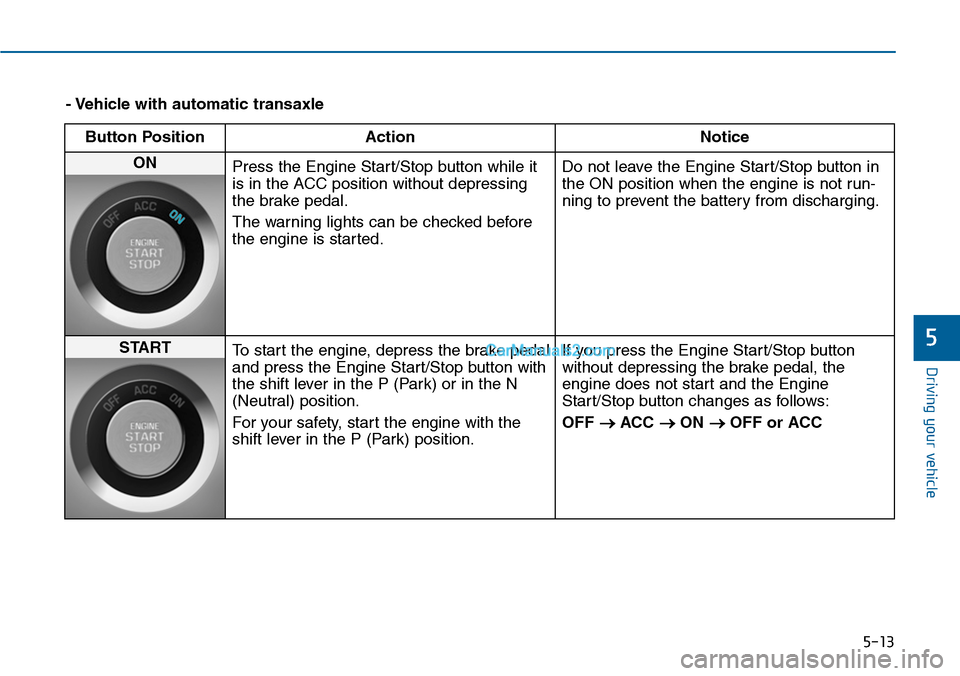
- Vehicle with automatic transaxle
Button Position Action Notice
ON Press the Engine Start/Stop button while it
is in the ACC position without depressing
the brake pedal.
The warning lights can be checked before
the engine is started.
Do not leave the Engine Start/Stop button in
the ON position when the engine is not run-
ning to prevent the battery from discharging.
STARTTo start the engine, depress the brake pedal
and press the Engine Start/Stop button with
the shift lever in the P (Park) or in the N
(Neutral) position.
For your safety, star t the engine with the
shift lever in the P (Park) position.
If you press the Engine Start/Stop button
without depressing the brake pedal, the
engine does not start and the Engine
Start/Stop button changes as follows:
OFF →ACC →ON →OFF or ACC
Page 463 of 665
5-14
Driving your vehicle
Starting the engine Information
• The engine will start by pressing the
Engine Start/Stop button, only when
the smart key is in the vehicle.
• Even if the smart key is in the vehi-
cle, if it is far away from the driver,
the engine may not start.
• When the Engine Start/Stop button
is in the ACC or ON position, if any
door is open, the system checks for
the smart key. If the smart key is not
in the vehicle, the " " indicator
will blink and the warning "Key not
in vehicle" will come on, and if all
doors are closed, the chime will also
sound for about 5 seconds. The indi-
cator will turn off while the vehicle
is moving. Keep the smart key in the
vehicle when using the ACC position
or if the vehicle engine is ON.
Ve h i c l e w i t h m a n u a l t r a n s a x l e :
1. Always carry the smart key with
you.
2. Make sure the parking brake is
applied.
3. Make sure the shift lever is in neu-
tral.
4. Depress the clutch and brake ped-
als.
5. Press the Engine Start/Stop but-
ton.
Ve h i c l e w i t h a u t o m a t i c t r a n s a x l e :
1. Always carry the smart key with
you.
2. Make sure the parking brake is
applied.
3. Make sure the shift lever is in P
(Park).
4. Depress the brake pedal.
5 Press the Engine Start/Stop but-
ton.
i
•Always wear appropriate
shoes when operating your
vehicle. Unsuitable shoes,
such as high heels, ski boots,
sandals, flip-flops, etc., may
interfere with your ability to
use the brake, accelerator and
clutch pedals.
•Do not start the vehicle with the
accelerator pedal depressed.
The vehicle can move and lead
to an accident.
•Wait until the engine rpm is
normal. The vehicle may sud-
denly move if the brake pedal
is released when the rpm is
high.
WARNING
Page 471 of 665
5-22
Driving your vehicle
Automatic transaxle operation
The automatic transaxle has six for-
ward speeds and one reverse speed.
The individual speeds are selected
automatically in the D (Drive) posi-
tion.
The indicator in the instrument clus-
ter displays the shift lever position
when the ignition switch is in the ON
position.
P (Park)
Always come to a complete stop
before shifting into P (Park).
To shift from P (Park), you must
depress firmly on the brake pedal
and make sure your foot is off the
accelerator pedal.
If you have done all of the above
and still cannot shift the lever out
of P (Park), see “Shift-Lock
Release” in this chapter.
The shift lever must be in P (Park)
before turning the engine off.
To reduce the risk of serious
injury or death:
•ALWAYS check the surround-
ing areas near your vehicle for
people, especially children,
before shifting a vehicle into
D (Drive) or R (Reverse).
•Before leaving the driver’s
seat, always make sure the
shift lever is in the P (Park)
position, then set the parking
brake, and place the ignition
switch in the LOCK/OFF posi-
tion. Unexpected and sudden
vehicle movement can occur
if these precautions are not
followed.
(Continued)
(Continued)
•Do not use the engine brake
(shifting from a high gear to
lower gear) rapidly on slip-
pery roads. The vehicle may
slip causing an accident.
WARNING
•Shifting into P (Park) while the
vehicle is in motion may
cause you to lose control of
the vehicle.
•After the vehicle has stopped,
always make sure the shift
lever is in P (Park), apply the
parking brake, and turn the
engine off.
•Do not use the P (Park) posi-
tion in place of the parking
brake.
WARNING
Page 480 of 665
5-31
Driving your vehicle
5
•Do not apply the accelerator
pedal while the parking brake is
engaged. If you depress the
accelerator pedal with the park-
ing brake engaged, warning will
sound. Damage to the parking
brake may occur.
•Driving with the parking brake
on can overheat the braking sys-
tem and cause premature wear
or damage to brake parts. Make
sure the parking brake is
released and the Brake Warning
Light is off before driving.
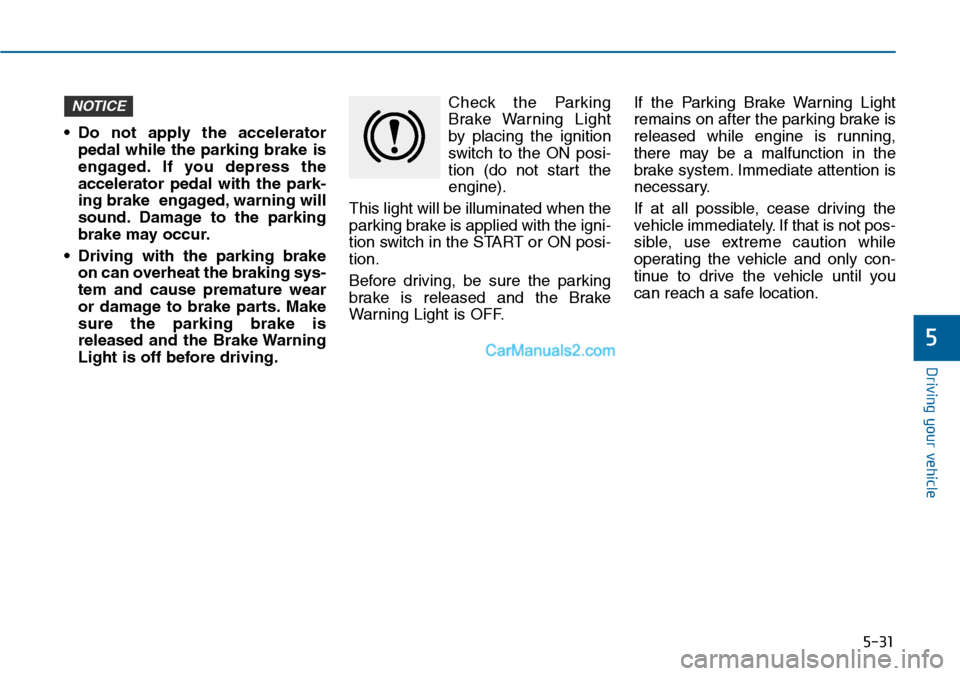
Check the Parking
Brake Warning Light
by placing the ignition
switch to the ON posi-
tion (do not start the
engine).
This light will be illuminated when the
parking brake is applied with the igni-
tion switch in the START or ON posi-
tion.
Before driving, be sure the parking
brake is released and the Brake
War ning Light is OFF.
If the Parking Brake Warning Light
remains on after the parking brake is
released while engine is running,
there may be a malfunction in the
brake system. Immediate attention is
necessary.
If at all possible, cease driving the
vehicle immediately. If that is not pos-
sible, use extreme caution while
operating the vehicle and only con-
tinue to drive the vehicle until you
can reach a safe location.
NOTICE
Page 483 of 665
5-34
Driving your vehicle
•If the parking brake warning
light is still on even though the
EPB has been released, we rec-
ommend that the system be
checked by an authorized
HYUNDAI dealer.
•Do not drive your vehicle with
the EPB applied. It may cause
excessive brake pad and brake
rotor wear.
When the EPB (Electric Parking
Brake) does not release:
We recommend that you contact an
authorized HYUNDAI dealer by load-
ing the vehicle on a flatbed tow truck
and have the system checked.
EPB (Electric Parking Brake) may
be automatically applied when:
•The EPB is overheated
•Requested by other systems
•The engine is turned off with the
EPB applied
Information
If the driver turns the engine off while
Auto Hold is operating, EPB will be
automatically applied. However, if
you press the EPB switch within one
second after the engine is turned off,
the EPB will not be applied.
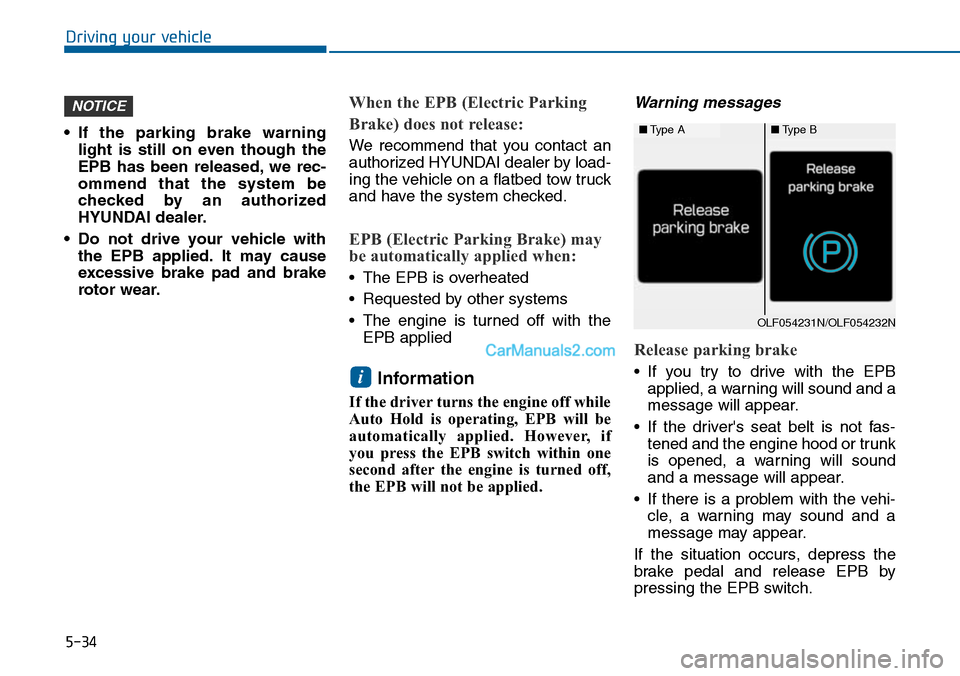
Warning messages
Release parking brake
•If you try to drive with the EPB
applied, a warning will sound and a
message will appear.
•If the driver's seat belt is not fas-
tened and the engine hood or trunk
is opened, a warning will sound
and a message will appear.
•If there is a problem with the vehi-
cle, a warning may sound and a
message may appear.
If the situation occurs, depress the
brake pedal and release EPB by
pressing the EPB switch.
i
NOTICE
■Type A■Type B
OLF054231N/OLF054232N
Page 487 of 665
5-38
Driving your vehicle
If you continuously notice a noise
or burning smell when the EPB is
used for emergency braking, we
recommend that the system be
checked by an authorized
HYUNDAI dealer.
When the EPB (Electric Parking
Brake) does not release
If the EPB does not release normal-
ly, we recommend that you contact
an authorized HYUNDAI dealer by
loading the vehicle on a flatbed tow
truck and have the system checked.
AUTO HOLD (if equipped)
This feature keeps the brake applied
when the shift lever is in D (Drive), R
(Reverse), N (Neutral) or Sports
Mode with the feature enabled and
when the brake pedal has been
depressed to stop the vehicle.
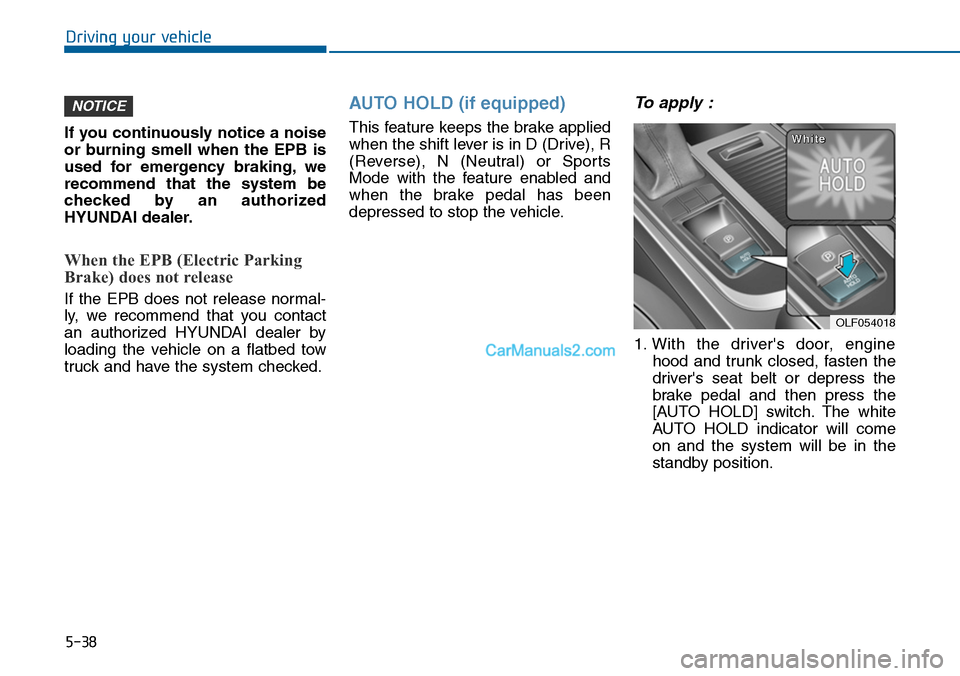
To apply :
1. With the driver's door, engine
hood and trunk closed, fasten the
driver's seat belt or depress the
brake pedal and then press the
[AUTO HOLD] switch. The white
AUTO HOLD indicator will come
on and the system will be in the
standby position.
NOTICE
OLF054018
WWhhiittee
Page 489 of 665
5-40
Driving your vehicle
Information
• The Auto Hold does not operate
when:
- The driver's seat belt is unbuckled
and driver's door is opened
- The engine hood is opened
- The trunk is opened
- The shift lever is in P (Park)
- The EPB is applied
• For your safety, the Auto Hold auto-
matically switches to EPB in such
cases:
- The driver's seat belt is unbuckled
and driver's door is opened
- The engine hood is opened while
the shift lever is in D (Drive)
- The trunk is opened while the shift
lever is in R (Reverse)
- The vehicle is in a standstill for
more than 10 minutes
- The vehicle is standing on a steep
slope
- The vehicle moved several times
(Continued)
(Continued)
In these cases, the brake warning
light comes on, the AUTO HOLD
indicator changes from green to
white, and a warning sounds and a
message will appear to inform you
that EPB has been automatically
engaged. Before driving off again,
press foot brake pedal, check the
surrounding area near your vehicle
and release parking brake manually
with the EPB switch.
•If the AUTO HOLD indicator
changes to yellow, the Auto Hold is
not working properly. We recom-
mend that you contact an author-
ized HYUNDAI dealer.
•While operating Auto Hold, you may
hear mechanical noise. However, it is
normal operating noise.
i
To p r e v e n t , u n e x p e c t e d a n d
sudden vehicle movement,
ALWAYS press your foot on the
brake pedal to cancel the Auto
Hold before you:
- Drive downhill.
- Drive the vehicle in R (Reverse).
- Park the vehicle.
WARNING
Page 494 of 665
5-45
Driving your vehicle
5
ESC checks where you are steering
and where the vehicle is actually
going. ESC applies braking pressure
to any one of the vehicle’s brakes
and intervenes in the engine man-
agement system to assist the driver
with keeping the vehicle on the
intended path. It is not a substitute
for safe driving practices. Always
adjust your speed and driving to the
road conditions.
ESC operation
ESC ON condition
When the ignition switch is in the ON
position, the ESC and the ESC OFF
indicator lights illuminate for approxi-
mately three seconds and goes off,
then the ESC is turned on.
When operating
When the ESC is in opera-
tion, the ESC indicator light
blinks:
• When you apply your brakes under
conditions which may lock the
wheels, you may hear sounds from
the brakes, or feel a corresponding
sensation in the brake pedal. This is
normal and it means your ESC is
active.
• When the ESC activates, the
engine may not respond to the
accelerator as it does under routine
conditions.
• If the Cruise Control was in use
when the ESC activates, the Cruise
Control automatically disengages.
The Cruise Control can be reen-
gaged when the road conditions
allow.See “Cruise Control System”
later in this chapter.(if equipped)
Never drive too fast for the road
conditions or too quickly when
cornering. The ESC system will
not prevent accidents.
Excessive speed in turns, abrupt
maneuvers, and hydroplaning
on wet surfaces can result in
severe accidents.
WARNING
Page 497 of 665
5-48
Driving your vehicle
To p r e v e n t d a m a g e t o t h e
transaxle:
•Do not allow wheel(s) of one
axle to spin excessively while
the ESC, ABS, and brake warn-
ing lights are displayed. The
repairs would not be covered by
the vehicle warranty. Reduce
engine power and do not spin
the wheel(s) excessively while
these lights are displayed.
•When operating the vehicle on a
dynamometer, ensure the ESC is
turned off (ESC OFF light illumi-
nated).
Information
Turning the ESC off does not affect
ABS or standard brake system opera-
tion.
Vehicle Stability Manag ement
(if equipped)
Ve h i c l e S t a b i l i t y M a n a g e m e n t ( V S M )
helps ensure the vehicle stays stable
when accelerating or braking sud-
denly on wet, slippery and rough
roads where traction over the four
tires can suddenly become uneven.
VSM operation
VSM ON condition
The VSM operates when:
•The Electronic Stability Control
(ESC) is on.
•Vehicle speed is approximately
above 15 km/h (9mph) on curve
roads.
•Vehicle speed is approximately
above 20 km/h (12mph) when the
vehicle is braking on rough roads.
When operating
When you apply your brakes under
conditions which may activate the
ESC, you may hear sounds from the
brakes, or feel a corresponding sen-
sation in the brake pedal. This is nor-
mal and it means your VSM is active.
i
NOTICE
Take the following precautions
when using the Vehicle Stability
Management (VSM):
•ALWAYS check the speed and
the distance to the vehicle
ahead. The VSM is not a sub-
stitute for safe driving prac-
tices.
•Never drive too fast for the
road conditions. The VSM sys-
tem will not prevent acci-
dents. Excessive speed in bad
weather, slippery and uneven
roads can result in severe
accidents.
WARNING