key Hyundai Sonata 2014 Workshop Manual
[x] Cancel search | Manufacturer: HYUNDAI, Model Year: 2014, Model line: Sonata, Model: Hyundai Sonata 2014Pages: 665, PDF Size: 17.43 MB
Page 274 of 665
4-16
Multimedia System
Information
-Using the iPod®device
•iPod®is a registered trademark of
Apple Inc.
• In order to use the iPod®while oper-
ating the keys, you must use a dedi-
cated iPod®cable. (the cable that is
supplied when purchasing iPod®
/iPhone®products)
• If the iPod®is connected to the vehi-
cle while it is playing, a high pitch
sound could occur for approximate-
ly 1-2 seconds immediately after
connecting. If possible, connect the
iPod to the vehicle with the iPod®
stopped/ paused.
• During ACC ON state, connecting
the iPod®through the iPod®cable
will charge the iPod®through the
car audio system.
•When connecting with the iPod®
cable, make sure to fully insert the
jack to prevent communication
interference.
(Continued)
(Continued)
• When the EQ features of an exter-
nal device, such as the iPod®, and
the audio system are both active, EQ
effects could overlap and cause
sound deterioration and distortion.
Whenever possible, turn off the EQ
feature within the external device
upon use by connecting with the
audio system.
•Noise may occurwhen an iPod®or
AUX device is connected. When
such devices are not being used, dis-
connect the device for storage.
•When the iPod®or AUX device
power is connected to the power
jack, playing the external device
may result in noise. In such cases,
disconnect the power connection
before use.
•Skipping or improper operation
may occur depending on the charac-
teristics of your iPod®/Phone®device.
(Continued)
(Continued)
•If youriPhone®is connected to both
the Bluetooth®Wireless Technology
and USB, the sound may not be
properly played. In your iPhone®,
select the Dock connector or
Bluetooth®Wireless Technology to
change the sound output (source).
• iPod mode cannot be operated when
the iPod®cannot be recognized due
to versions that do not support com-
munication protocols.
•For fifth generation iPod®Nano
devices, the iPod®may not be recog-
nized when the battery level is low.
Please charge the iPod®for use.
•Search/play orders shown within
the iPod®device may differ with the
orders shown within the audio sys-
tem.
•If the iPod®malfunctions due to an
iPod®device defect, reset the iPod®
and try again. (To learn more, refer to
your iPod®manual)
(Continued)
i
Page 278 of 665
❈Display and settings may differ depending on the
selected audio.
Audio Head Unit
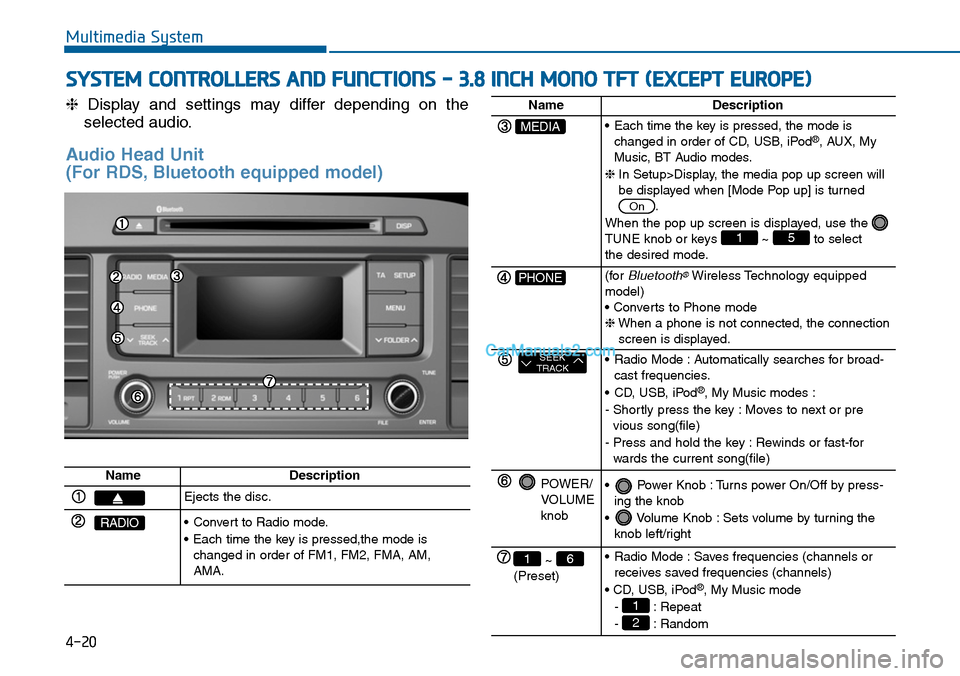
(For RDS, Bluetooth equipped model)
Multimedia System
SYSTEM CONTROLLERS AND FUNCTIONS - 3.8 INCH MONO TFT (EXCEPT EUROPE)
4-20
NameDescription
Ejects the disc.
RADIO•Convert to Radio mode.
•Each time the key is pressed,the mode ischanged in order of FM1, FM2, FMA, AM,AMA.
NameDescription
MEDIA•Each time the key is pressed, the mode ischanged in order of CD, USB, iPod®, AUX, MyMusic, BT Audio modes.
❈In Setup>Display, the media pop up screen willbe displayed when [Mode Pop up] is turned.
When the pop up screen is displayed, use the TUNE knob or keys ~ to selectthe desired mode.
51
On
PHONE(forBluetooth®Wireless Technology equippedmodel)• Converts to Phone mode❈When a phone is not connected, the connectionscreen is displayed.
SEEKTRACK•Radio Mode :Automatically searches for broad-cast frequencies.
•CD, USB, iPod®, My Music modes :
- Shortly press the key : Moves to next or previous song(file)
- Press and hold the key : Rewinds or fast-forwards the current song(file)
POWER/VOLUMEknob
•Power Knob :Turns power On/Off by press-ing the knob
•Volume Knob :Sets volume by turning theknob left/right
~ (Preset)
61•Radio Mode :Saves frequencies (channels orreceives saved frequencies (channels)
• CD, USB, iPod®, My Music mode
- : Repeat
- : Random2
1
Page 279 of 665
Multimedia System
4-21
4
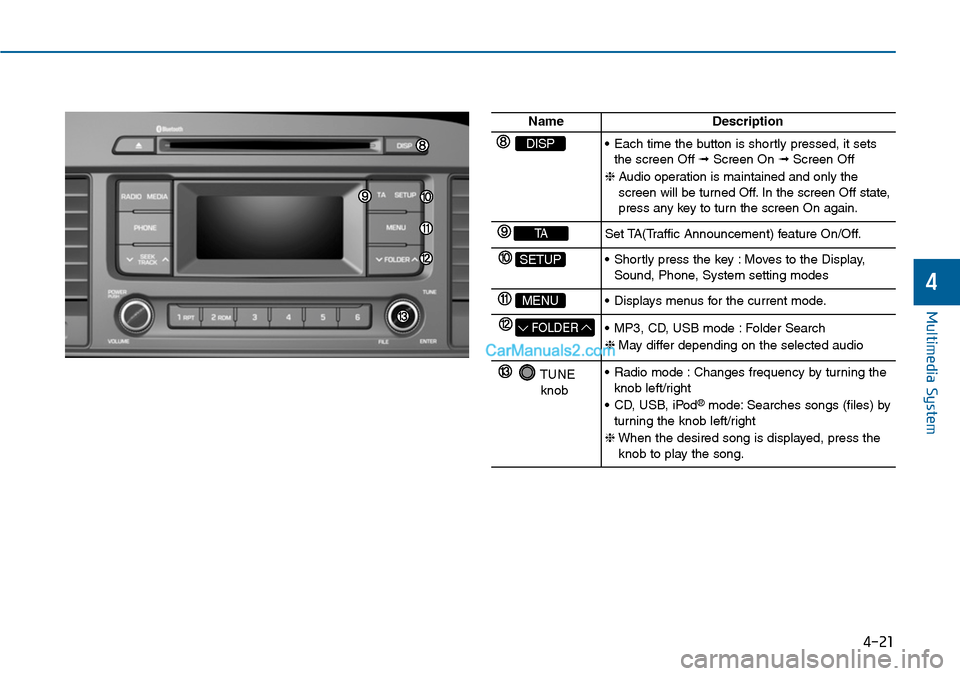
NameDescription
DISP•Each time the button is shortly pressed, it setsthe screen Off ➟Screen On ➟Screen Off
❈Audio operation is maintained and only thescreen will be turned Off. In the screen Off state,press any key to turn the screen On again.
TASet TA(Traffic Announcement) feature On/Off.
SETUP•Shortly press the key :Moves to the Display,Sound, Phone, System setting modes
MENU•Displays menus for the current mode.
FOLDER•MP3, CD, USB mode :Folder Search
❈May differ depending on the selected audio
TUNEknob
•Radio mode :Changes frequency by turning theknob left/right
•CD, USB, iPod®mode: Searches songs (files) byturning the knob left/right
❈When the desired song is displayed, press theknob to play the song.
Page 280 of 665
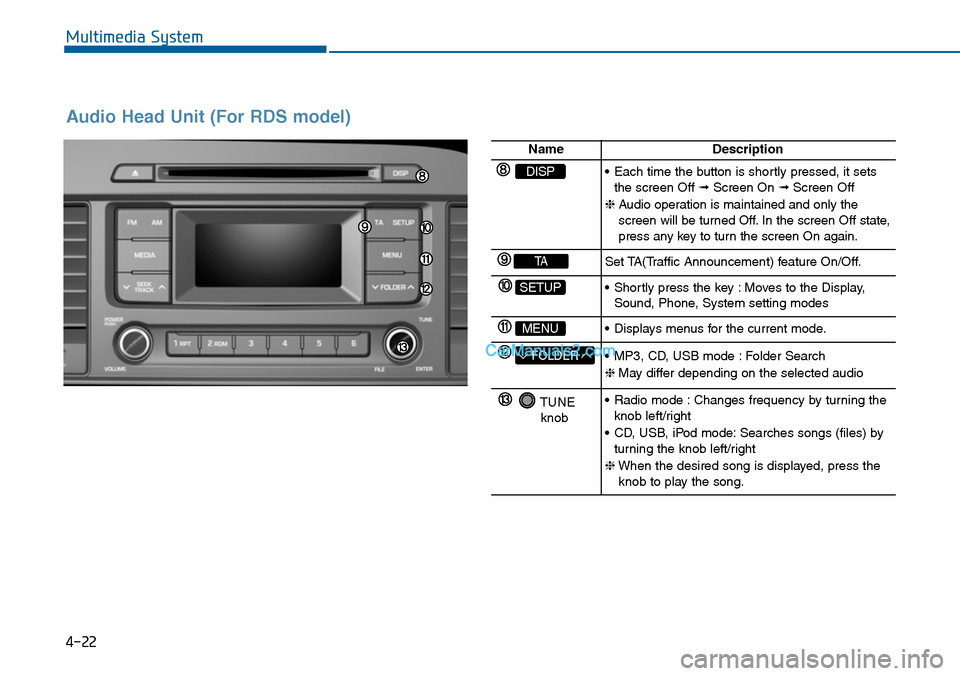
Audio Head Unit (For RDS model)
4-22
Multimedia System
NameDescription
DISP•Each time the button is shortly pressed, it setsthe screen Off ➟Screen On ➟Screen Off
❈Audio operation is maintained and only thescreen will be turned Off. In the screen Off state,press any key to turn the screen On again.
TASet TA(Traffic Announcement) feature On/Off.
SETUP•Shortly press the key :Moves to the Display,Sound, Phone, System setting modes
MENU•Displays menus for the current mode.
FOLDER•MP3, CD, USB mode :Folder Search
❈May differ depending on the selected audio
TUNEknob
•Radio mode :Changes frequency by turning theknob left/right
•CD, USB, iPod mode:Searches songs (files) byturning the knob left/right
❈When the desired song is displayed, press theknob to play the song.
Page 281 of 665
4-23
Multimedia System
4
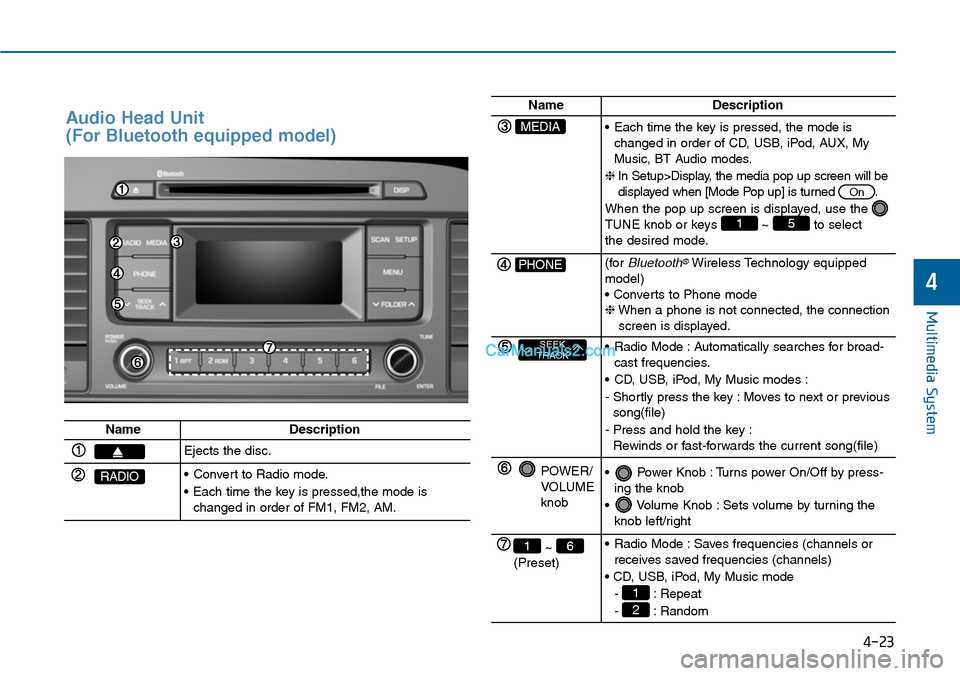
Audio Head Unit
(For Bluetooth equipped model)
NameDescription
Ejects the disc.
RADIO•Convert to Radio mode.
•Each time the key is pressed,the mode ischanged in order of FM1, FM2, AM.
NameDescription
MEDIA•Each time the key is pressed, the mode ischanged in order of CD, USB, iPod, AUX, MyMusic, BT Audio modes.
❈In Setup>Display, the media pop up screen will bedisplayed when [Mode Pop up] is turned .
When the pop up screen is displayed, use the TUNE knob or keys ~ to selectthe desired mode.
51
On
PHONE(forBluetooth®Wireless Technology equippedmodel)• Converts to Phone mode❈When a phone is not connected, the connectionscreen is displayed.
SEEKTRACK•Radio Mode :Automatically searches for broad-cast frequencies.
•CD, USB, iPod, My Music modes :
- Shortly press the key : Moves to next or previoussong(file)
- Press and hold the key :Rewinds or fast-forwards the current song(file)
POWER/VOLUMEknob
•Power Knob :Turns power On/Off by press-ing the knob
•Volume Knob :Sets volume by turning theknob left/right
~ (Preset)
61•Radio Mode :Saves frequencies (channels orreceives saved frequencies (channels)
• CD, USB, iPod, My Music mode
- : Repeat
- : Random2
1
Page 282 of 665
Multimedia System
4-24
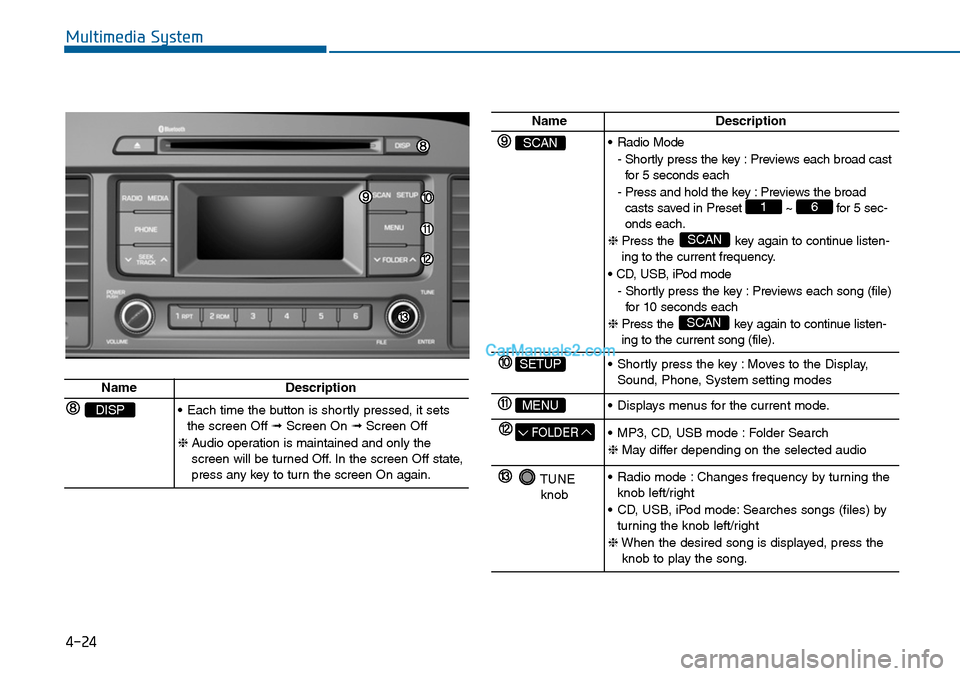
NameDescription
SCAN•Radio Mode
- Shortly press the key : Previews each broad castfor 5 seconds each
- Press and hold the key : Previews the broadcasts saved in Preset ~ for 5 sec-onds each.
❈ Press the key again to continue listen-ing to the current frequency.
• CD, USB, iPod mode
- Shortly press the key : Previews each song (file)for 10 seconds each
❈ Press the key again to continue listen-ing to the current song (file).
SCAN
SCAN
61
SETUP•Shortly press the key :Moves to the Display,Sound, Phone, System setting modes
MENU•Displays menus for the current mode.
FOLDER•MP3, CD, USB mode :Folder Search
❈May differ depending on the selected audio
TUNEknob
•Radio mode :Changes frequency by turning theknob left/right
•CD, USB, iPod mode:Searches songs (files) byturning the knob left/right
❈When the desired song is displayed, press theknob to play the song.
NameDescription
DISP•Each time the button is shortly pressed, it setsthe screen Off ➟Screen On ➟Screen Off
❈Audio operation is maintained and only thescreen will be turned Off. In the screen Off state,press any key to turn the screen On again.
Page 283 of 665
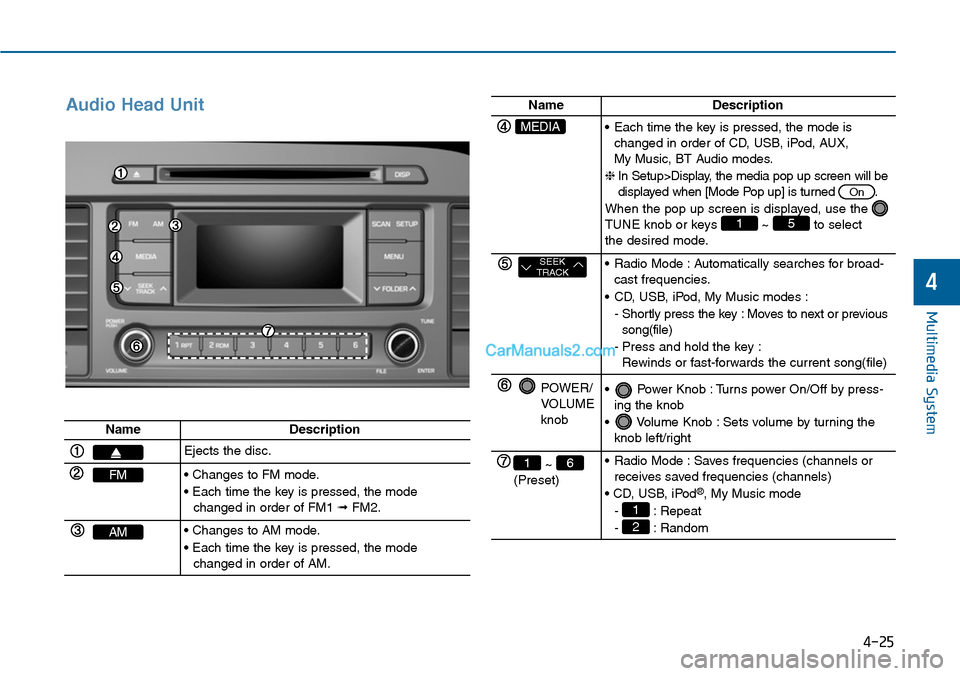
Audio Head Unit
Multimedia System
4-25
4
NameDescription
Ejects the disc.
FM• Changes to FM mode.
• Each time the key is pressed, the modechanged in order of FM1 ➟FM2.
AM• Changes to AM mode.
• Each time the key is pressed, the modechanged in order of AM.
NameDescription
MEDIA•Each time the key is pressed, the mode ischanged in order of CD, USB, iPod, AUX, My Music, BT Audio modes.
❈In Setup>Display, the media pop up screen will bedisplayed when [Mode Pop up] is turned .
When the pop up screen is displayed, use the TUNE knob or keys ~ to selectthe desired mode.
51
On
SEEKTRACK•Radio Mode :Automatically searches for broad-cast frequencies.
•CD, USB, iPod, My Music modes :
- Shortly press the key : Moves to next or previoussong(file)
-Press and hold the key :Rewinds or fast-forwards the current song(file)
POWER/VOLUMEknob
•Power Knob :Turns power On/Off by press-ing the knob
•Volume Knob :Sets volume by turning theknob left/right
~ (Preset)
61•Radio Mode :Saves frequencies (channels orreceives saved frequencies (channels)
• CD, USB, iPod®, My Music mode
- : Repeat
- : Random2
1
Page 284 of 665
![Hyundai Sonata 2014 Workshop Manual SETUP (for RDS model)
Display Settings
Press the key Select [Display]
through TUNE knob or key
Select menu through TUNE knob
Mode Pop up
[Mode Pop up] Changes .
selection mode
•During On st](/img/35/16805/w960_16805-283.png "Hyundai Sonata 2014 Workshop Manual SETUP (for RDS model)
Display Settings
Press the key Select [Display]
through TUNE knob or key
Select menu through TUNE knob
Mode Pop up
[Mode Pop up] Changes .
selection mode
•During On st")
SETUP (for RDS model)
Display Settings
Press the key Select [Display]
through TUNE knob or key
Select menu through TUNE knob
Mode Pop up
[Mode Pop up] Changes .
selection mode
•During On state, press the
or key to display the mode
change pop up screen.
Scroll text
[Scroll text] Set /
• : Maintains scroll
• : Scrolls only one (1) time.
Song Info
When playing an MP3 file, select the
desired display info from ‘Folder/File’
or ‘Album/Artist/Song’.
Sound Settings
Press the key Select [Sound]
through TUNE knob or key
Select menu through TUNE knob
2 RDM
SETUP
Off
On
OffOn
MEDIA
RADIO
On
1 RPT
SETUP
4-26
Multimedia System
Page 286 of 665
![Hyundai Sonata 2014 Workshop Manual Phone Setup
(for RDS, Bluetooth®Wireless
Technologyequipped model)
Press the key Select [Phone]
through TUNE knob or key
Select menu through TUNE knob
Pair Phone
To p a i r a Bluetooth](/img/35/16805/w960_16805-285.png "Hyundai Sonata 2014 Workshop Manual Phone Setup
(for RDS, Bluetooth®Wireless
Technologyequipped model)
Press the key Select [Phone]
through TUNE knob or key
Select menu through TUNE knob
Pair Phone
To p a i r a Bluetooth")
Phone Setup
(for RDS, Bluetooth®Wireless
Technologyequipped model)
Press the key Select [Phone]
through TUNE knob or key
Select menu through TUNE knob
Pair Phone
To p a i r a Bluetooth®Wireless
Te ch n o l o g y e n a bl e d m o b i l e
phone, authentication and con-
nection processes are first
required. As a result, you cannot
pair your mobile phone while driv-
ing the vehicle. First park your
vehicle before use.
Select [Pair Phone] Set through
TUNE knob
➀ Search for device names as dis-
played on your mobile phone and
connect.
➁ Input the passkey displayed on the
screen. (Passkey : 0000)
❈The device name and passkey will
be displayed on the screen for up
to 3 minutes. If pairing is not com-
pleted within the 3 minutes, the
mobile phone pairing process will
automatically be canceled.
➂ Pair ing completion is displayed.
❈In some mobile phones, pairing
will automatically be followed by
connection.
❈It is possible to pair up to five
Bluetooth®Wireless Technology
enabled mobile phones.
NOTICE
4
SETUP
4-28
Multimedia System
Page 289 of 665
![Hyundai Sonata 2014 Workshop Manual Outgoing Volume
This is used to set the volume of your
voice as heard by the other par ty
while on a Bluetooth®Wireless
Technology enabled handsfree call.
Select [Outgoing Volume] Set vol-](/img/35/16805/w960_16805-288.png "Hyundai Sonata 2014 Workshop Manual Outgoing Volume
This is used to set the volume of your
voice as heard by the other par ty
while on a Bluetooth®Wireless
Technology enabled handsfree call.
Select [Outgoing Volume] Set vol-")
Outgoing Volume
This is used to set the volume of your
voice as heard by the other par ty
while on a Bluetooth®Wireless
Technology enabled handsfree call.
Select [Outgoing Volume] Set vol-
ume through TUNE knob
❈ Even while on a call, the volume
can be changed by using the
key.
Bluetooth®Wireless
Technology System Off
This feature is used when you do not
wish to use the Bluetooth®Wireless
Technologysystem.
Select [Bluetooth System Off] Set
through TUNE knob
❈ If a phone is already connected,
disconnect the currently connected
phone and turn the Bluetooth®
Wireless Technologysystem off.
Using the Bluetooth®Wireless
Technology System
To u s e Bluetooth®Wireless Technology
when the system is currently off, fol-
low these next steps.
•Turning On Bluetooth®Wireless
Te c h n o l o g y t h r o u g h t h e
Key
Press the key Screen
Guidance
❈ Moves to the screen where
Bluetooth®Wireless Technology
functions can be used and displays
guidance.
• Turning On Bluetooth®Wireless
Te c h n o l o g y t h r o u g h t h e
Key
Press the key Select [Phone]
through TUNE knob or key
➀ A screen asking whether to turn
on Bluetooth®Wireless Technology
will be displayed.
➁ On the screen, select to turn
on Bluetooth®Wireless Technology
and display guidance.
❈ If the Bluetooth®Wireless Technologysystem is turned on, the system willautomatically try to connect themost recently connected Bluetooth®
Wireless Technologymobile phone.
•Bluetooth®Wireless Technology
connection may become inter-
mittently disconnected in some
mobile phones. Follow these
next steps to try again.
1) Turn the Bluetooth®Wireless
Technology function within the
mobile phone ON/OFF and try
to connect again.
2) Turn the mobile phone power
ON/OFF and try to connect
again.
3) Completely remove the mobile
phone battery, reboot, and then
try to connect again.
4) Reboot the audio system and
try to connect again
5) Delete all paired devices in your
mobile phone and the audio
system and pair again for use.
NOTICE
YES
3
SETUP
SETUP
PHONE
PHONE
SEEKTRACK
4-31
Multimedia System
4