brake light Hyundai Sonata 2014 Owner's Manual
[x] Cancel search | Manufacturer: HYUNDAI, Model Year: 2014, Model line: Sonata, Model: Hyundai Sonata 2014Pages: 665, PDF Size: 17.43 MB
Page 20 of 665
F20F20
Washer fluid .........................................................7-35
Checking the washer fluid level ...............................7-35
Parking brake .......................................................7-36
Checking the parking brake .........................................7-36
Air cleaner ............................................................7-37
Filter replacement ...........................................................7-37
Climate control air filter .....................................7-39
Filter inspection ...............................................................7-39
Filter replacement ...........................................................7-39
Wiper blades .........................................................7-40
Blade inspection ..............................................................7-40
Blade replacement ..........................................................7-40
Battery...................................................................7-42
For best battery service................................................7-42
Battery capacity label ...................................................7-44
Battery recharging .......................................................7-44
Reset items .......................................................................7-45
Tires and wheels ..................................................7-46
Tire care ............................................................................7-46
Recommended cold tire inflation pressures.............7-46
Checking tire inflation pressure ..................................7-48
Tire rotation ....................................................................7-49
Wheel alignment and tire balance ..............................7-50
Tire replacement .............................................................7-50
Wheel replacement ........................................................7-52
Tire traction ......................................................................7-52
Tire maintenance ...........................................................7-52
Tire sidewall labeling ......................................................7-52
Low aspect ratio tire ......................................................7-57
Fuses ......................................................................7-58
Fuse/Relay panel description ......................................7-64
Light bulbs.............................................................7-72
Headlamp, position lamp, turn signal lamp and
side marker light bulb replacement ............................7-73
Side repeater lamp replacement .................................7-75
Headlamp and front fog lamp aiming (for Europe) ...7-76
Rear combination light bulb replacement .................7-81
High mounted stop lamp replacement .......................7-85
License plate light bulb replacement ........................7-85
Interior light bulb replacement ....................................7-85
Appearance care ..................................................7-87
Exterior care ....................................................................7-87
Interior care......................................................................7-93
Emission control system .....................................7-95
Crankcase emission control system ...........................7-95
Evaporative emission control system.........................7-95
Exhaust emission control system ...............................7-96
Page 25 of 665
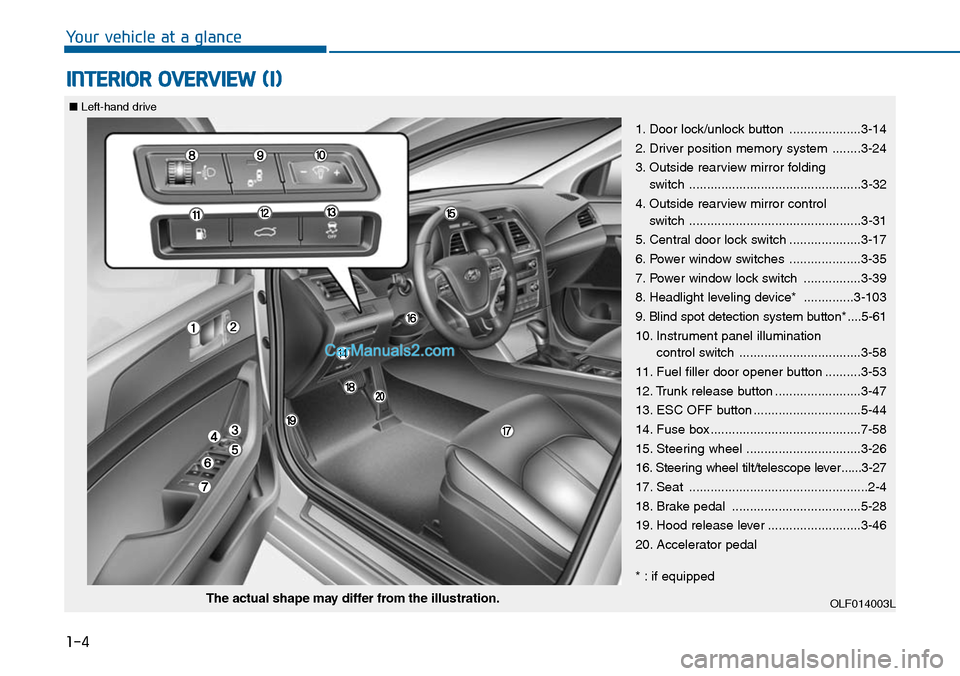
1-4
Yo u r v e h i c l e a t a g l a n c e
INTERIOR OVERVIEW (I)
1. Door lock/unlock button ....................3-14
2. Driver position memory system ........3-24
3. Outside rearview mirror folding
switch ................................................3-32
4. Outside rearview mirror control
switch ................................................3-31
5. Central door lock switch ....................3-17
6. Power window switches ....................3-35
7. Power window lock switch ................3-39
8. Headlight leveling device* ..............3-103
9. Blind spot detection system button* ....5-61
10. Instrument panel illumination
control switch ..................................3-58
11. Fuel filler door opener button ..........3-53
12. Trunk release button ........................3-47
13. ESC OFF button ..............................5-44
14. Fuse box ..........................................7-58
15. Steering wheel ................................3-26
16. Steering wheel tilt/telescope lever ......3-27
17. Seat ..................................................2-4
18. Brake pedal ....................................5-28
19. Hood release lever ..........................3-46
20. Accelerator pedal
* : if equipped
OLF014003LThe actual shape may differ from the illustration.
■Left-hand drive
Page 26 of 665
1-5
Yo u r v e h i c l e a t a g l a n c e
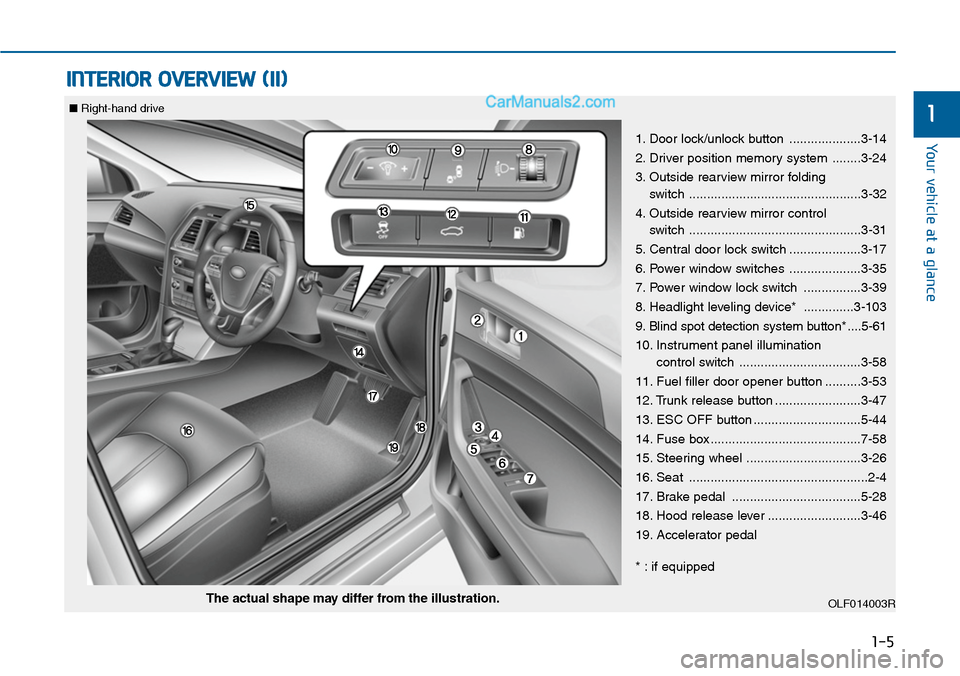
INTERIOR OVERVIEW (II)
1
1. Door lock/unlock button ....................3-14
2. Driver position memory system ........3-24
3. Outside rearview mirror folding
switch ................................................3-32
4. Outside rearview mirror control
switch ................................................3-31
5. Central door lock switch ....................3-17
6. Power window switches ....................3-35
7. Power window lock switch ................3-39
8. Headlight leveling device* ..............3-103
9. Blind spot detection system button* ....5-61
10. Instrument panel illumination
control switch ..................................3-58
11. Fuel filler door opener button ..........3-53
12. Trunk release button ........................3-47
13. ESC OFF button ..............................5-44
14. Fuse box ..........................................7-58
15. Steering wheel ................................3-26
16. Seat ..................................................2-4
17. Brake pedal ....................................5-28
18. Hood release lever ..........................3-46
19. Accelerator pedal
* : if equipped
OLF014003RThe actual shape may differ from the illustration.
■Right-hand drive
Page 27 of 665
1-6
Yo u r v e h i c l e a t a g l a n c e
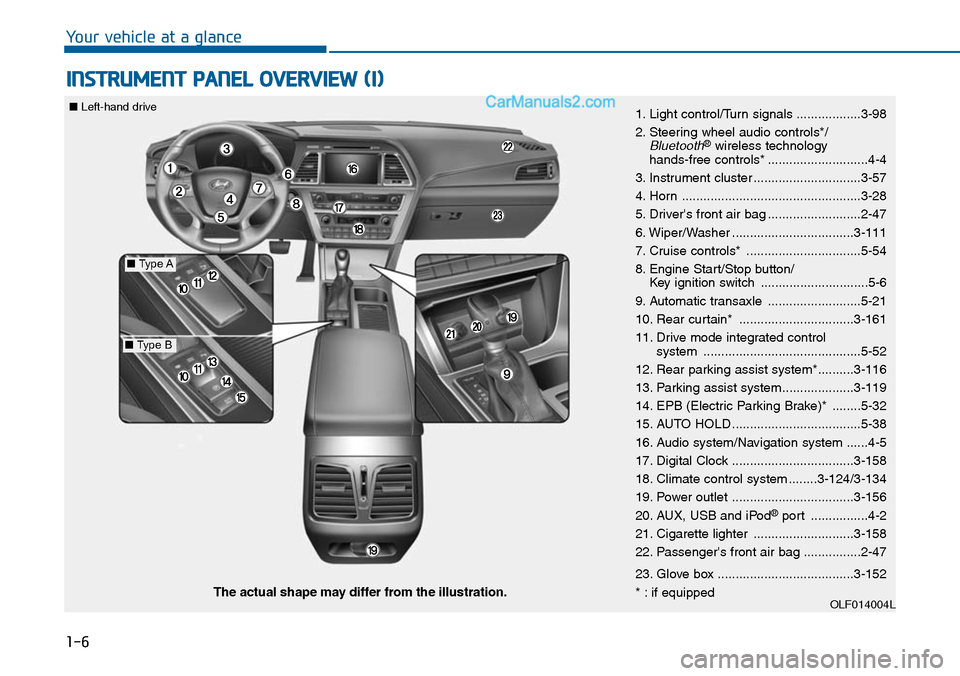
INSTRUMENT PANEL OVERVIEW (I)
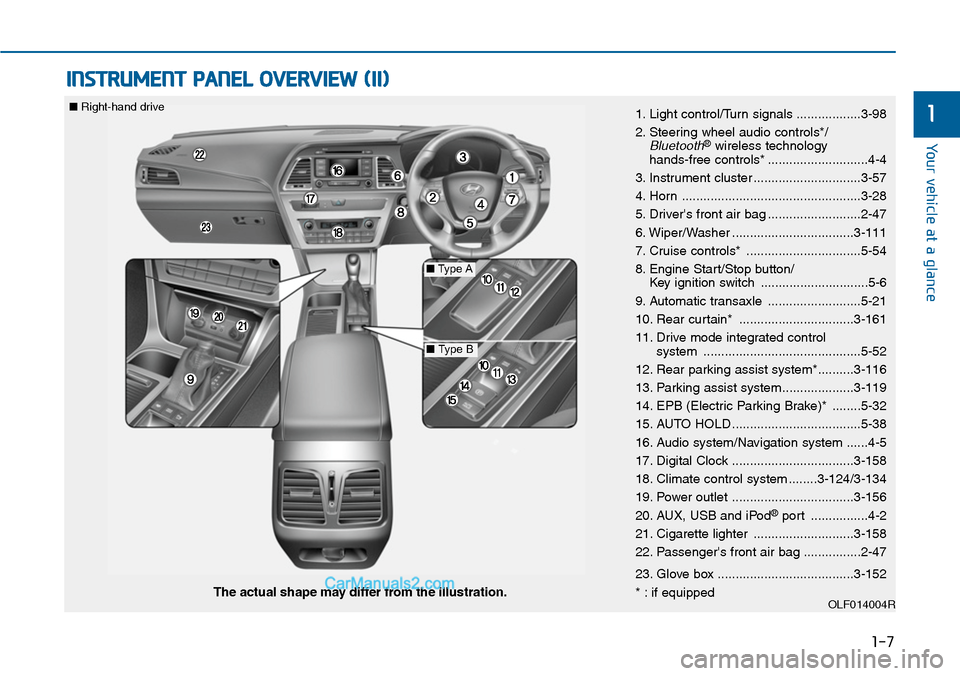
1. Light control/Turn signals ..................3-98
2. Steering wheel audio controls*/Bluetooth®wireless technology hands-free controls* ............................4-4
3. Instrument cluster ..............................3-57
4. Horn ..................................................3-28
5. Driver's front air bag ..........................2-47
6. Wiper/Washer ..................................3-111
7. Cruise controls* ................................5-54
8. Engine Start/Stop button/Key ignition switch ..............................5-6
9. Automatic transaxle ..........................5-21
10. Rear curtain* ................................3-161
11. Drive mode integrated control system ............................................5-52
12. Rear parking assist system*..........3-116
13. Parking assist system....................3-119
14. EPB (Electric Parking Brake)* ........5-32
15. AUTO HOLD ....................................5-38
16. Audio system/Navigation system ......4-5
17. Digital Clock ..................................3-158
18. Climate control system ........3-124/3-134
19. Power outlet ..................................3-156
20. AUX, USB and iPod®port ................4-2
21. Cigarette lighter ............................3-158
22. Passenger's front air bag ................2-47
23. Glove box ......................................3-152
* : if equippedOLF014004LThe actual shape may differ from the illustration.
■Type A
■Type B
■Left-hand drive
Page 28 of 665
1-7
Yo u r v e h i c l e a t a g l a n c e
INSTRUMENT PANEL OVERVIEW (II)
11. Light control/Turn signals ..................3-98
2. Steering wheel audio controls*/Bluetooth®wireless technology hands-free controls* ............................4-4
3. Instrument cluster ..............................3-57
4. Horn ..................................................3-28
5. Driver's front air bag ..........................2-47
6. Wiper/Washer ..................................3-111
7. Cruise controls* ................................5-54
8. Engine Start/Stop button/Key ignition switch ..............................5-6
9. Automatic transaxle ..........................5-21
10. Rear curtain* ................................3-161
11. Drive mode integrated control system ............................................5-52
12. Rear parking assist system*..........3-116
13. Parking assist system....................3-119
14. EPB (Electric Parking Brake)* ........5-32
15. AUTO HOLD ....................................5-38
16. Audio system/Navigation system ......4-5
17. Digital Clock ..................................3-158
18. Climate control system ........3-124/3-134
19. Power outlet ..................................3-156
20. AUX, USB and iPod®port ................4-2
21. Cigarette lighter ............................3-158
22. Passenger's front air bag ................2-47
23. Glove box ......................................3-152
* : if equippedOLF014004RThe actual shape may differ from the illustration.
■Type A
■Type B
■Right-hand drive
Page 142 of 665
3-46
Convenient features of your vehicle
Hood
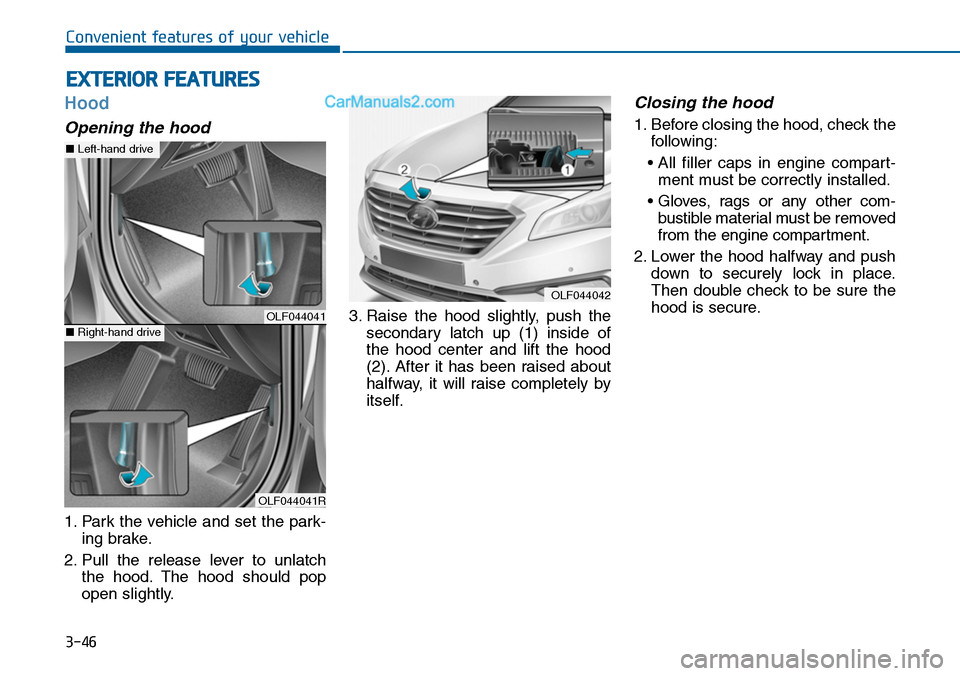
Opening the hood
1. Park the vehicle and set the park-
ing brake.
2. Pull the release lever to unlatch
the hood. The hood should pop
open slightly.
3. Raise the hood slightly, push the
secondary latch up (1) inside of
the hood center and lift the hood
(2). After it has been raised about
halfway, it will raise completely by
itself.
Closing the hood
1. Before closing the hood, check the
following:
• All filler caps in engine compart-
ment must be correctly installed.
• Gloves, rags or any other com-
bustible material must be removed
from the engine compartment.
2. Lower the hood halfway and push
down to securely lock in place.
Then double check to be sure the
hood is secure.
EXTERIOR FEATURES
OLF044042
OLF044041
OLF044041R
■Left-hand drive
■Right-hand drive
Page 151 of 665
3-55
Convenient features of your vehicle
3
(Continued)
•When refueling, always move
the shift lever to the P (Park)
position (for automatic
transaxle) or first gear or R
(Reverse, for manual
transaxle), set the parking
brake, and place the ignition
switch to the LOCK/OFF posi-
tion. Sparks produced by
electrical components related
to the engine can ignite fuel
vapors causing a fire.
•When using an approved
portable fuel container, be sure
to place the container on the
ground prior to refueling. Static
electricity discharge from the
container can ignite fuel vapors
causing a fire. Once refueling
has begun, contact between
your bare hand and the vehicle
should be maintained until the
filling is complete.
(Continued)
(Continued)
•If pressurized fuel sprays out,
it can cover your clothes or
skin and thus subject you to
the risk of fire and burns.
Always remove the fuel cap
carefully and slowly. If the cap
is venting fuel or if you hear a
hissing sound, wait until the
condition stops before com-
pletely removing the cap.
•Always check that the fuel cap
is installed securely to pre-
vent fuel spillage in the event
of an accident.
(Continued)
•Use only approved portable
plastic fuel containers designed
to carry and store gasoline.
•Do not use matches or a
lighter and do not smoke or
leave a lit cigarette in your
vehicle while at a gas station,
especially during refueling.
•Do not over-fill or top-off your
vehicle tank, which can cause
gasoline spillage.
•If a fire breaks out during refu-
eling, leave the vicinity of the
vehicle, and immediately con-
tact the manager of the gas
station and then contact the
local fire department. Follow
any safety instructions they
provide.
(Continued)
Page 174 of 665
3-78
Convenient features of your vehicle
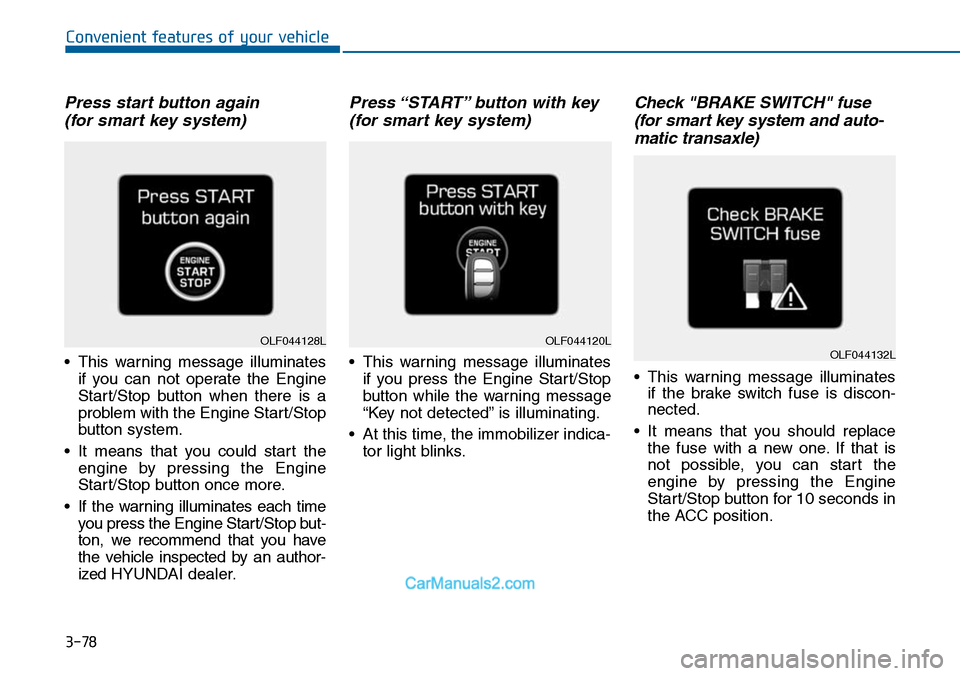
Press start button again
(for smart key system)
•This warning message illuminates
if you can not operate the Engine
Start/Stop button when there is a
problem with the Engine Start/Stop
button system.
•It means that you could start the
engine by pressing the Engine
Start/Stop button once more.
•If the warning illuminates each time
you press the Engine Star t/Stop but-
ton, we recommend that you have
the vehicle inspected by an author-
ized HYUNDAI dealer.
Press “START” button with key
(for smart key system)
•This warning message illuminates
if you press the Engine Start/Stop
button while the warning message
“Key not detected” is illuminating.
•At this time, the immobilizer indica-
tor light blinks.
Check "BRAKE SWITCH" fuse
(for smart key system and auto-
matic transaxle)
•This warning message illuminates
if the brake switch fuse is discon-
nected.
•It means that you should replace
the fuse with a new one. If that is
not possible, you can start the
engine by pressing the Engine
Start/Stop button for 10 seconds in
the ACC position.
OLF044120LOLF044132LOLF044128L
Page 184 of 665
3-88
Convenient features of your vehicle
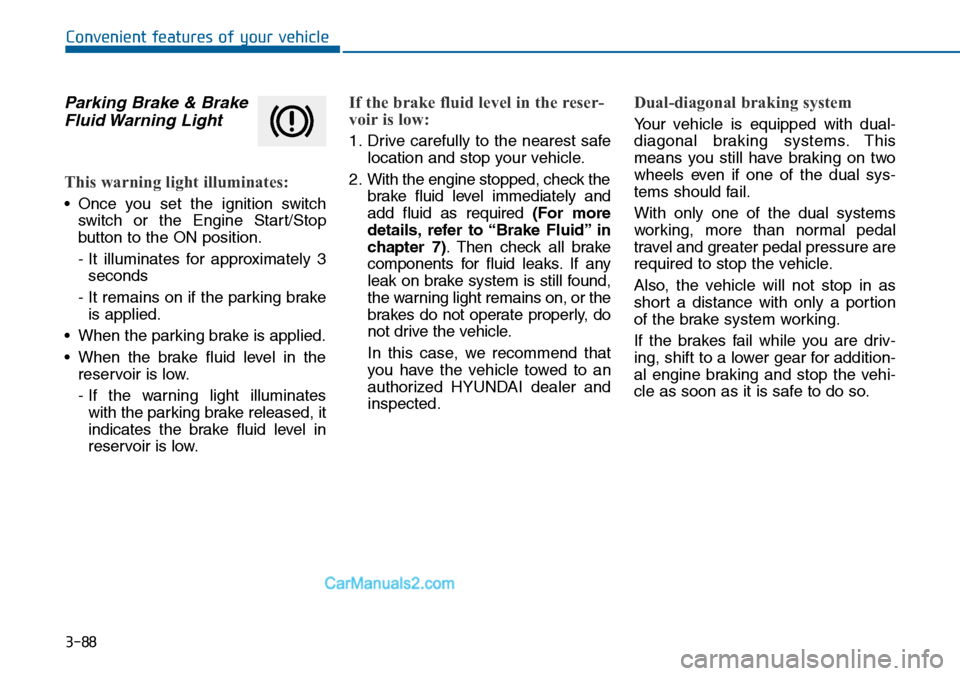
Parking Brake & Brake
Fluid Warning Light
This warning light illuminates:
•Once you set the ignition switch
switch or the Engine Star t/Stop
button to the ON position.
- It illuminates for approximately 3
seconds
- It remains on if the parking brake
is applied.
•When the parking brake is applied.
•When the brake fluid level in the
reservoir is low.
- If the warning light illuminates
with the parking brake released, it
indicates the brake fluid level in
reservoir is low.
If the brake fluid level in the reser-
voir is low:
1. Drive carefully to the nearest safe
location and stop your vehicle.
2. With the engine stopped, check the
brake fluid level immediately and
add fluid as required (For more
details, refer to “Brake Fluid” in
chapter 7).Then check all brake
components for fluid leaks. If any
leak on brake system is still found,
the warning light remains on, or the
brakes do not operate properly, do
not drive the vehicle.
In this case, we recommend that
you have the vehicle towed to an
authorized HYUNDAI dealer and
inspected.
Dual-diagonal braking system
Yo u r v e h i c l e i s e q u i p p e d w i t h d u a l -
diagonal braking systems. This
means you still have braking on two
wheels even if one of the dual sys-
tems should fail.
With only one of the dual systems
working, more than normal pedal
travel and greater pedal pressure are
required to stop the vehicle.
Also, the vehicle will not stop in as
short a distance with only a portion
of the brake system working.
If the brakes fail while you are driv-
ing, shift to a lower gear for addition-
al engine braking and stop the vehi-
cle as soon as it is safe to do so.
Page 185 of 665
3-89
Convenient features of your vehicle
3
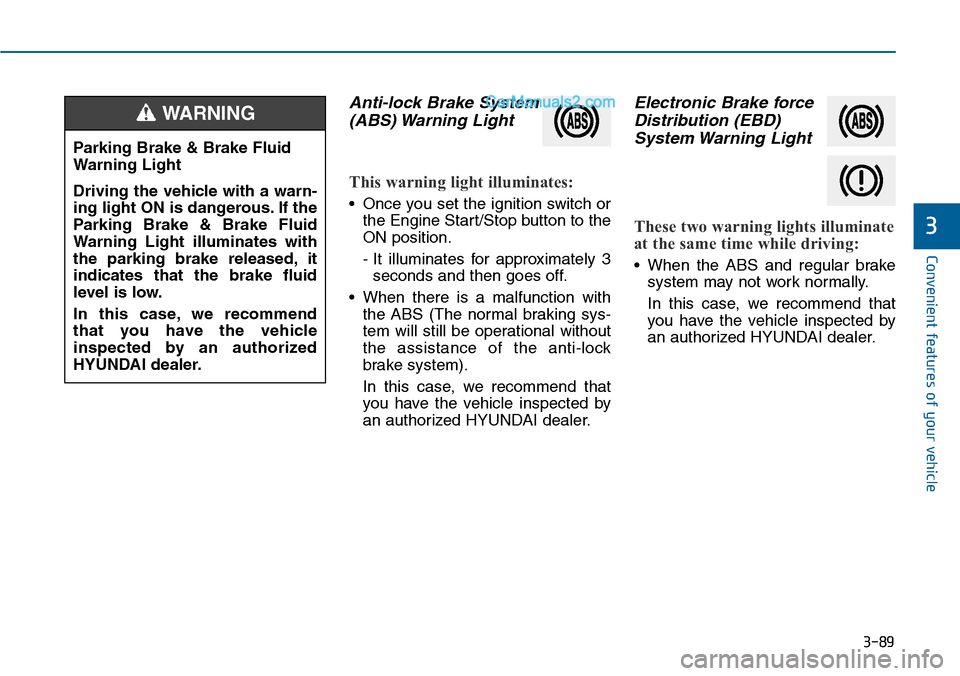
Anti-lock Brake System
(ABS) Warning Light
This warning light illuminates:
•Once you set the ignition switch or
the Engine Start/Stop button to the
ON position.
- It illuminates for approximately 3
seconds and then goes off.
•When there is a malfunction with
the ABS (The normal braking sys-
tem will still be operational without
the assistance of the anti-lock
brake system).
In this case, we recommend that
you have the vehicle inspected by
an authorized HYUNDAI dealer.
Electronic Brake force
Distribution (EBD)
System Warning Light
These two warning lights illuminate
at the same time while driving:
•When the ABS and regular brake
system may not work normally.
In this case, we recommend that
you have the vehicle inspected by
an authorized HYUNDAI dealer.
Parking Brake & Brake Fluid
Warning Light
Driving the vehicle with a warn-
ing light ON is dangerous. If the
Parking Brake & Brake Fluid
Warning Light illuminates with
the parking brake released, it
indicates that the brake fluid
level is low.
In this case, we recommend
that you have the vehicle
inspected by an authorized
HYUNDAI dealer.
WARNING