headlight Hyundai Sonata 2014 Owner's Manual
[x] Cancel search | Manufacturer: HYUNDAI, Model Year: 2014, Model line: Sonata, Model: Hyundai Sonata 2014Pages: 665, PDF Size: 17.43 MB
Page 25 of 665
1-4
Yo u r v e h i c l e a t a g l a n c e
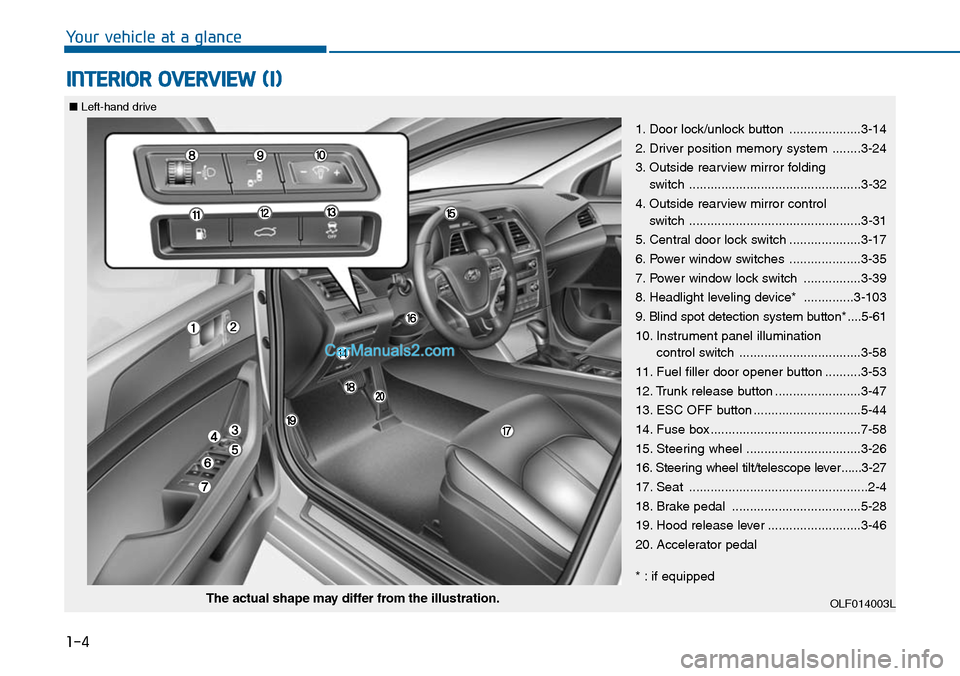
INTERIOR OVERVIEW (I)
1. Door lock/unlock button ....................3-14
2. Driver position memory system ........3-24
3. Outside rearview mirror folding
switch ................................................3-32
4. Outside rearview mirror control
switch ................................................3-31
5. Central door lock switch ....................3-17
6. Power window switches ....................3-35
7. Power window lock switch ................3-39
8. Headlight leveling device* ..............3-103
9. Blind spot detection system button* ....5-61
10. Instrument panel illumination
control switch ..................................3-58
11. Fuel filler door opener button ..........3-53
12. Trunk release button ........................3-47
13. ESC OFF button ..............................5-44
14. Fuse box ..........................................7-58
15. Steering wheel ................................3-26
16. Steering wheel tilt/telescope lever ......3-27
17. Seat ..................................................2-4
18. Brake pedal ....................................5-28
19. Hood release lever ..........................3-46
20. Accelerator pedal
* : if equipped
OLF014003LThe actual shape may differ from the illustration.
■Left-hand drive
Page 26 of 665
1-5
Yo u r v e h i c l e a t a g l a n c e
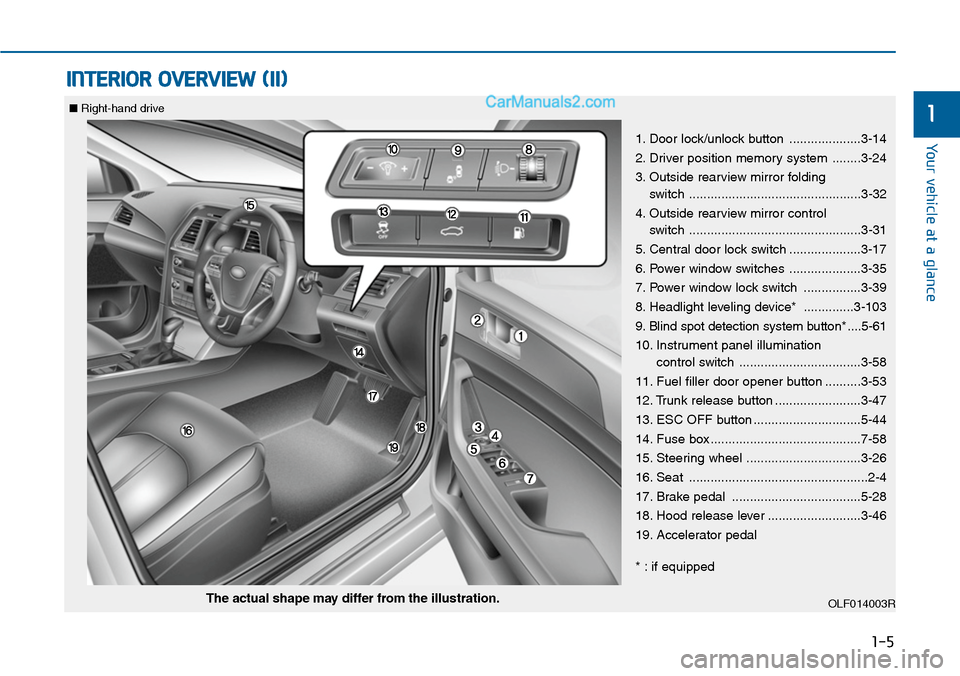
INTERIOR OVERVIEW (II)
1
1. Door lock/unlock button ....................3-14
2. Driver position memory system ........3-24
3. Outside rearview mirror folding
switch ................................................3-32
4. Outside rearview mirror control
switch ................................................3-31
5. Central door lock switch ....................3-17
6. Power window switches ....................3-35
7. Power window lock switch ................3-39
8. Headlight leveling device* ..............3-103
9. Blind spot detection system button* ....5-61
10. Instrument panel illumination
control switch ..................................3-58
11. Fuel filler door opener button ..........3-53
12. Trunk release button ........................3-47
13. ESC OFF button ..............................5-44
14. Fuse box ..........................................7-58
15. Steering wheel ................................3-26
16. Seat ..................................................2-4
17. Brake pedal ....................................5-28
18. Hood release lever ..........................3-46
19. Accelerator pedal
* : if equipped
OLF014003RThe actual shape may differ from the illustration.
■Right-hand drive
Page 125 of 665
3-29
Convenient features of your vehicle
3
MIRRORS
Inside rearview mirror
Before you start driving, adjust the
rearview mirror to the center on the
view through the rear window.
When cleaning the mirror, use a
paper towel or similar material
dampened with glass cleaner. Do
not spray glass cleaner directly on
the mirror as that may cause the
liquid cleaner to enter the mirror
housing.
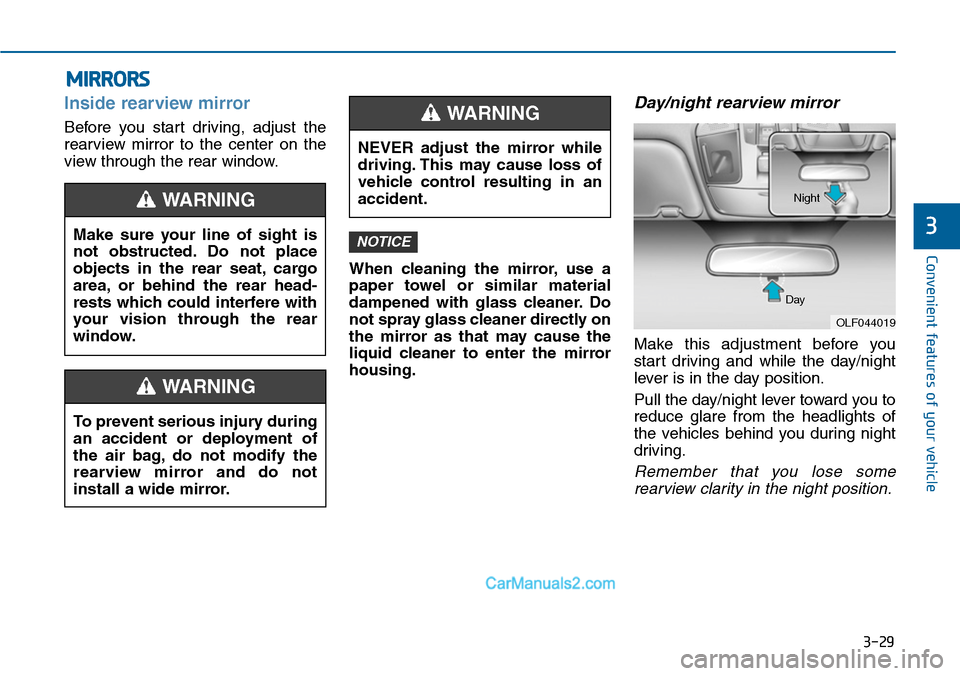
Day/night rearview mirror
Make this adjustment before you
start driving and while the day/night
lever is in the day position.
Pull the day/night lever toward you to
reduce glare from the headlights of
the vehicles behind you during night
driving.
Remember that you lose some
rearview clarity in the night position.
NOTICEMake sure your line of sight is
not obstructed. Do not place
objects in the rear seat, cargo
area, or behind the rear head-
rests which could interfere with
your vision through the rear
window.
WARNING
To prevent serious injury during
an accident or deployment of
the air bag, do not modify the
rearview mirror and do not
install a wide mirror.
WARNING
NEVER adjust the mirror while
driving. This may cause loss of
vehicle control resulting in an
accident.
WARNING
OLF044019
Day
Night
Page 154 of 665
3-58
Convenient features of your vehicle
Instrument cluster control
Instrument panel illumination
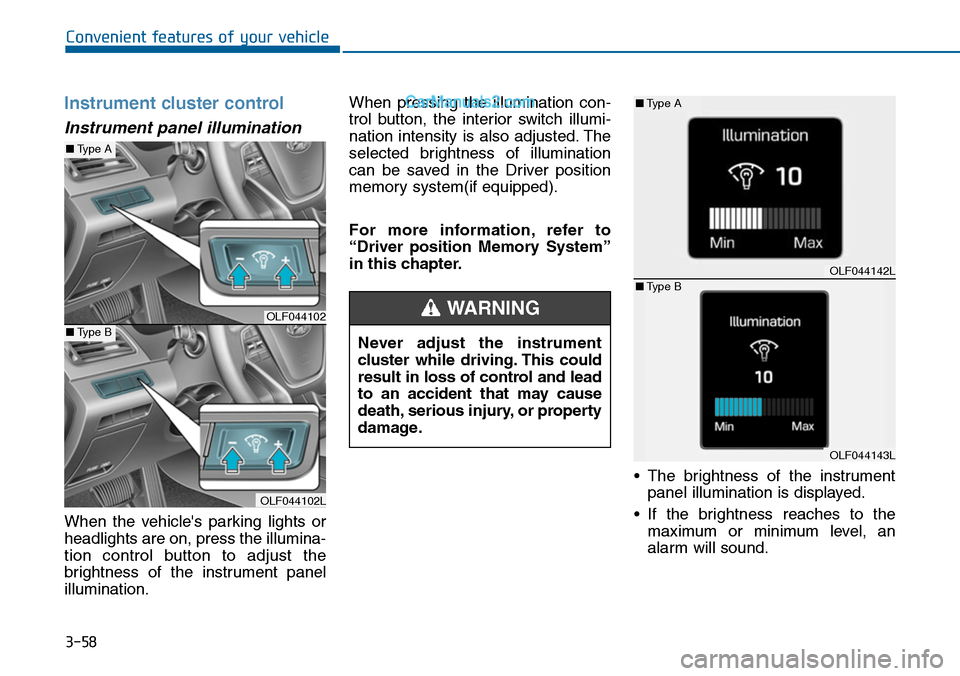
When the vehicle's parking lights or
headlights are on, press the illumina-
tion control button to adjust the
brightness of the instrument panel
illumination.
When pressing the illumination con-
trol button, the interior switch illumi-
nation intensity is also adjusted. The
selected brightness of illumination
can be saved in the Driver position
memory system(if equipped).
For more information, refer to
“Driver position Memory System”
in this chapter.
•The brightness of the instrument
panel illumination is displayed.
•If the brightness reaches to the
maximum or minimum level, an
alarm will sound.
Never adjust the instrument
cluster while driving. This could
result in loss of control and lead
to an accident that may cause
death, serious injury, or property
damage.
WARNINGOLF044102
OLF044102L
■Type A
■Type B
OLF044142L
OLF044143L
■Type A
■Type B
Page 178 of 665
3-82
Convenient features of your vehicle
Check headlight (if equipped)
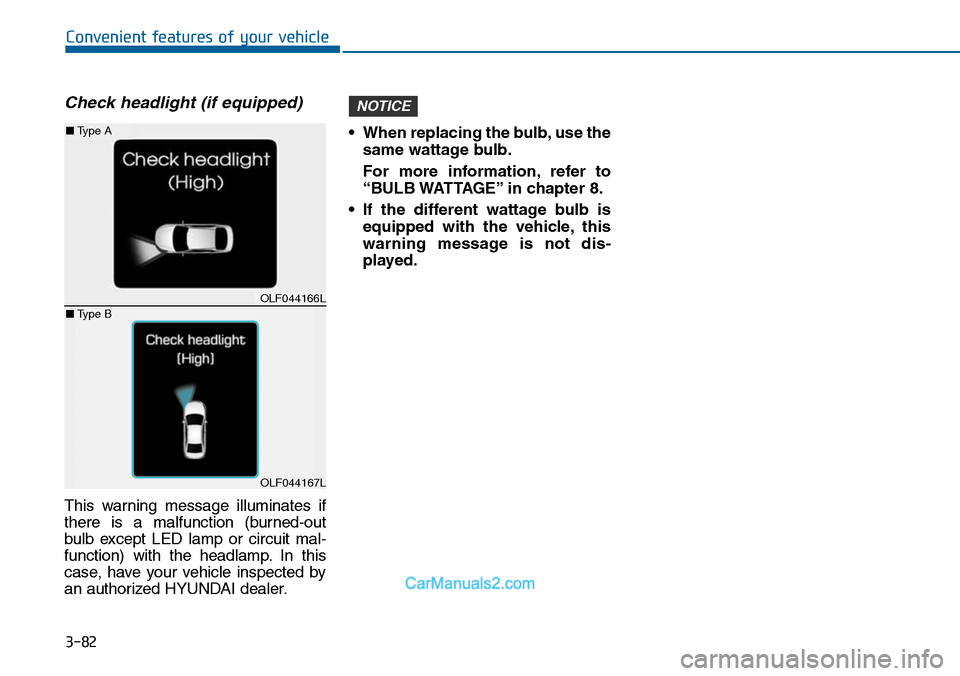
This warning message illuminates if
there is a malfunction (burned-out
bulb except LED lamp or circuit mal-
function) with the headlamp. In this
case, have your vehicle inspected by
an authorized HYUNDAI dealer.
•When replacing the bulb,use the
same wattage bulb.
For more information, refer to
“BULB WATTAGE” in chapter 8.
•If the different wattage bulb is
equipped with the vehicle, this
warning message is not dis-
played.
NOTICE
OLF044166L
OLF044167L
■Type A
■Type B
Page 192 of 665
3-96
Convenient features of your vehicle
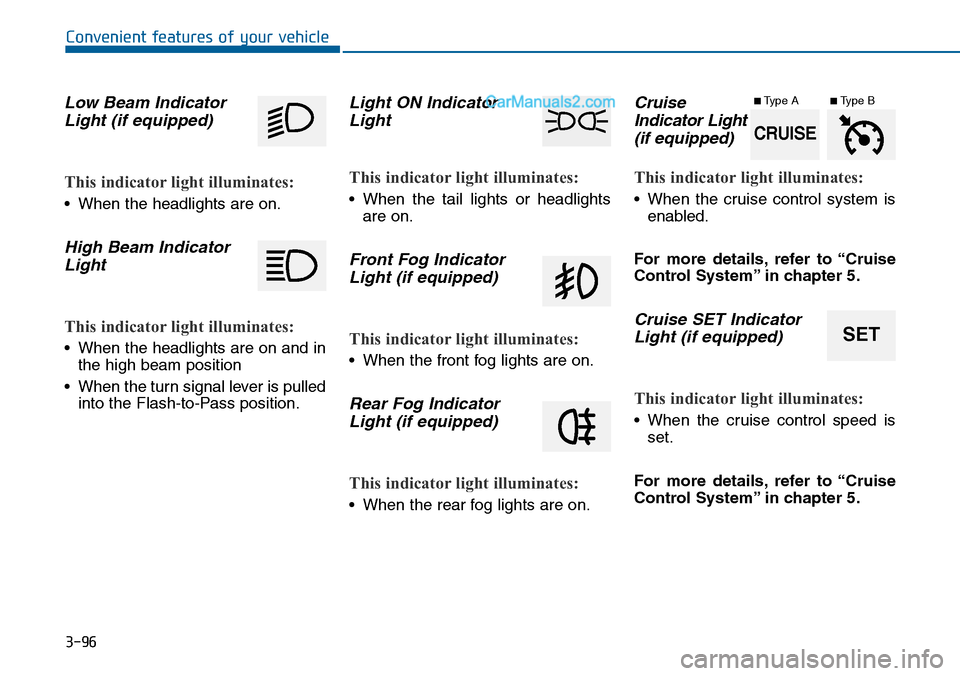
Low Beam Indicator
Light (if equipped)
This indicator light illuminates:
•When the headlights are on.
High Beam Indicator
Light
This indicator light illuminates:
•When the headlights are on and in
the high beam position
•When the turn signal lever is pulled
into the Flash-to-Pass position.
Light ON Indicator
Light
This indicator light illuminates:
•When the tail lights or headlights
are on.
Front Fog Indicator
Light (if equipped)
This indicator light illuminates:
•When the front fog lights are on.
Rear Fog Indicator
Light (if equipped)
This indicator light illuminates:
•When the rear fog lights are on.
Cruise
Indicator Light
(if equipped)
This indicator light illuminates:
•When the cruise control system is
enabled.
For more details, refer to “Cruise
Control System” in chapter 5.
Cruise SET Indicator
Light (if equipped)
This indicator light illuminates:
•When the cruise control speed is
set.
For more details, refer to “Cruise
Control System” in chapter 5.
SET
CRUISE
■Type A■Type B
Page 199 of 665
3-103
Convenient features of your vehicle
3
If the driver gets out of the vehicle
through other doors (except dri-
ver's door), the battery saver func-
tion does not operate and the
headlamp delay function does not
turn off automatically. Therefore, It
causes the battery to be dis-
charged. In this case, make sure to
turn off the lamp before getting out
of the vehicle.
Daytime running light (DRL)
(if equipped)
The Daytime Running Lights (DRL)
can make it easier for others to see
the front of your vehicle during the
day, especially after dawn and before
sunset.
The DRL system will turn the dedi-
cated lamp OFF when:
1. The headlights or front fog lights
are in the ON position.
2. The parking switch is in the ON
position.
3. The engine is turned off.
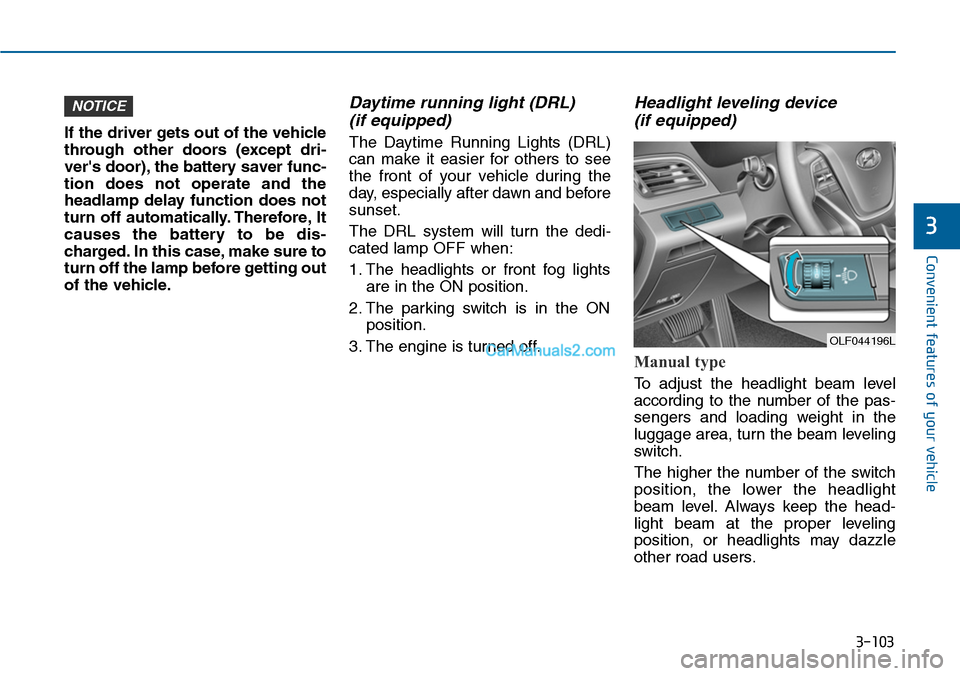
Headlight leveling device
(if equipped)
Manual type
To adjust the headlight beam level
according to the number of the pas-
sengers and loading weight in the
luggage area, turn the beam leveling
switch.
The higher the number of the switch
position, the lower the headlight
beam level. Always keep the head-
light beam at the proper leveling
position, or headlights may dazzle
other road users.
NOTICE
OLF044196L
Page 200 of 665
3-104
Convenient features of your vehicle
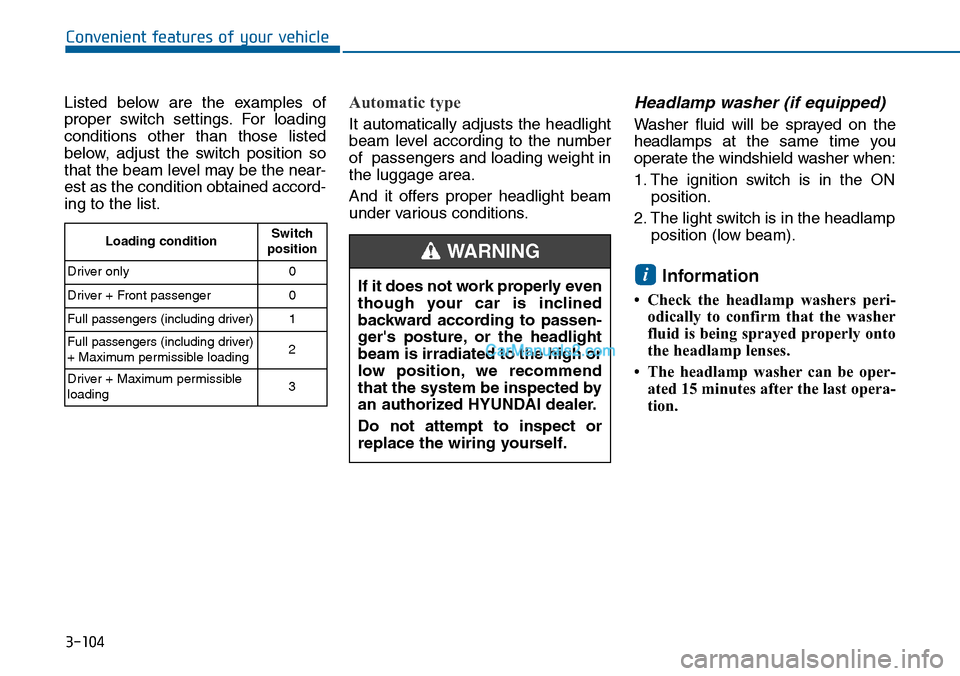
Listed below are the examples of
proper switch settings. For loading
conditions other than those listed
below, adjust the switch position so
that the beam level may be the near-
est as the condition obtained accord-
ing to the list.
Automatic type
It automatically adjusts the headlight
beam level according to the number
of passengers and loading weight in
the luggage area.
And it offers proper headlight beam
under various conditions.
Headlamp washer (if equipped)
Washer fluid will be sprayed on the
headlamps at the same time you
operate the windshield washer when:
1. The ignition switch is in the ON
position.
2. The light switch is in the headlamp
position (low beam).
Information
• Check the headlamp washers peri-
odically to confirm that the washer
fluid is being sprayed properly onto
the headlamp lenses.
• The headlamp washer can be oper-
ated 15 minutes after the last opera-
tion.
i
Loading conditionSwitchposition
Driver only 0
Driver + Front passenger 0
Full passengers (including driver) 1
Full passengers (including driver)+ Maximum permissible loading2
Driver + Maximum permissibleloading 3
If it does not work properly even
though your car is inclined
backward according to passen-
ger's posture, or the headlight
beam is irradiated to the high or
low position, we recommend
that the system be inspected by
an authorized HYUNDAI dealer.
Do not attempt to inspect or
replace the wiring yourself.
WARNING
Page 601 of 665
7-44
Maintenance
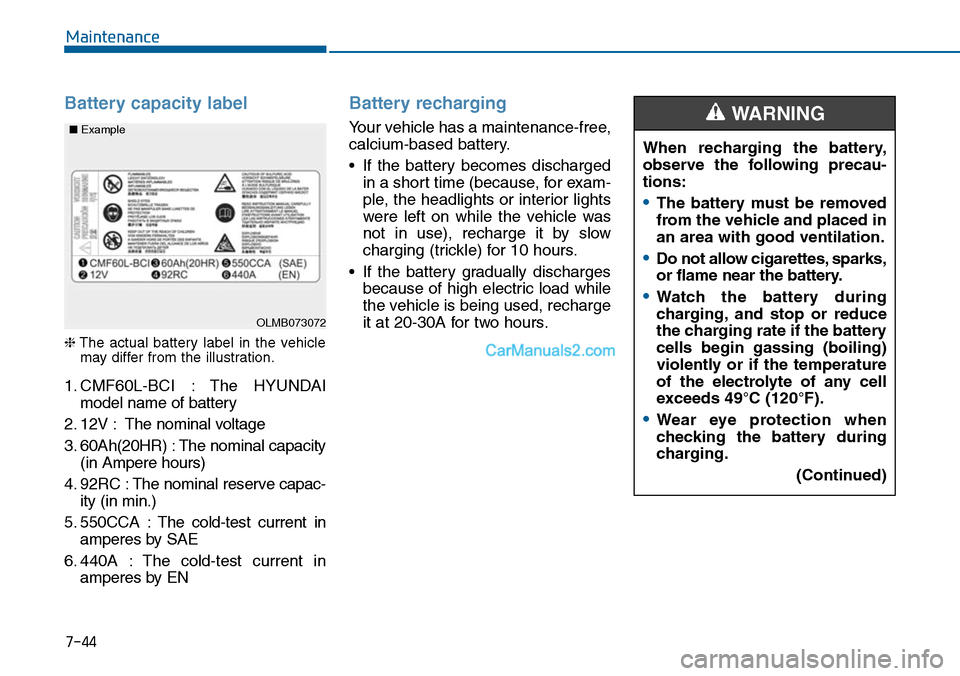
Battery capacity label
❈The actual battery label in the vehiclemay differ from the illustration.
1. CMF60L-BCI : The HYUNDAI
model name of battery
2. 12V : The nominal voltage
3. 60Ah(20HR) : The nominal capacity
(in Ampere hours)
4. 92RC : The nominal reserve capac-
ity (in min.)
5. 550CCA : The cold-test current in
amperes by SAE
6. 440A : The cold-test current in
amperes by EN
Battery recharging
Yo u r v e h i c l e h a s a m a i n t e n a n c e - f r e e ,
calcium-based battery.
•If the battery becomes discharged
in a short time (because, for exam-
ple, the headlights or interior lights
were left on while the vehicle was
not in use), recharge it by slow
charging (trickle) for 10 hours.
•If the battery gradually discharges
because of high electric load while
the vehicle is being used, recharge
it at 20-30A for two hours.OLMB073072
■Example
When recharging the battery,
observe the following precau-
tions:
•The battery must be removed
from the vehicle and placed in
an area with good ventilation.
•Do not allow cigarettes, sparks,
or flame near the battery.
•Watch the battery during
charging, and stop or reduce
the charging rate if the battery
cells begin gassing (boiling)
violently or if the temperature
of the electrolyte of any cell
exceeds 49°C (120°F).
•Wear eye protection when
checking the battery during
charging.
(Continued)
WARNING
Page 617 of 665
7-60
Maintenance
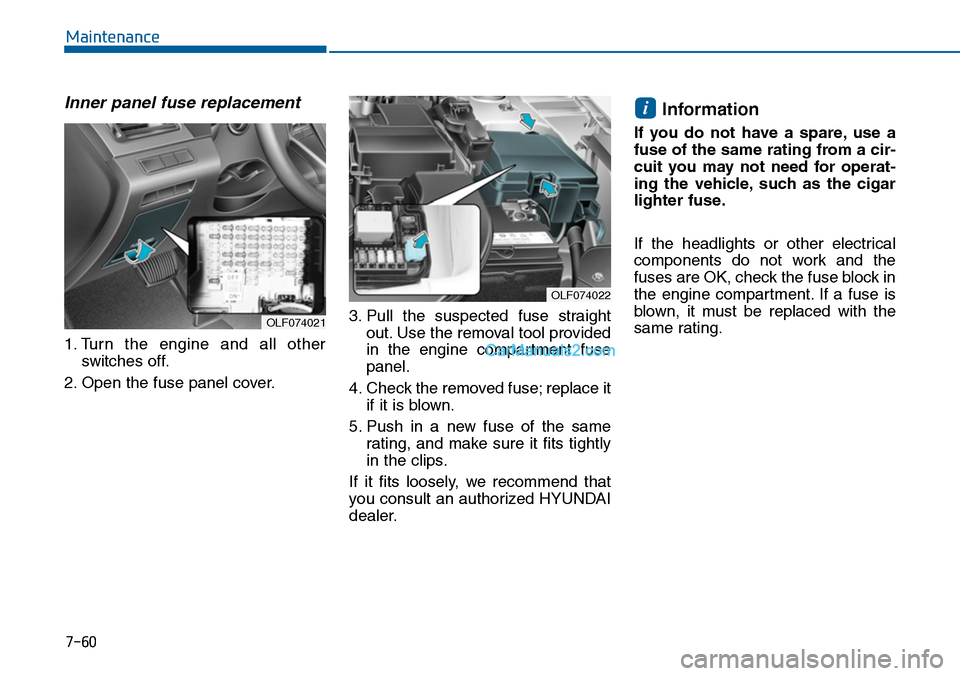
Inner panel fuse replacement
1. Turn the engine and all other
switches off.
2. Open the fuse panel cover.
3. Pull the suspected fuse straight
out. Use the removal tool provided
in the engine compartment fuse
panel.
4. Check the removed fuse; replace it
if it is blown.
5. Push in a new fuse of the same
rating, and make sure it fits tightly
in the clips.
If it fits loosely, we recommend that
you consult an authorized HYUNDAI
dealer.
Information
If you do not have a spare, use a
fuse of the same rating from a cir-
cuit you may not need for operat-
ing the vehicle, such as the cigar
lighter fuse.
If the headlights or other electrical
components do not work and the
fuses are OK, check the fuse block in
the engine compartment. If a fuse is
blown, it must be replaced with the
same rating.
i
OLF074022
OLF074021