pairing phone Hyundai Sonata 2014 Owner's Manual
[x] Cancel search | Manufacturer: HYUNDAI, Model Year: 2014, Model line: Sonata, Model: Hyundai Sonata 2014Pages: 665, PDF Size: 17.43 MB
Page 286 of 665
![Hyundai Sonata 2014 Owners Manual Phone Setup
(for RDS, Bluetooth®Wireless
Technologyequipped model)
Press the key Select [Phone]
through TUNE knob or key
Select menu through TUNE knob
Pair Phone
To p a i r a Bluetooth](/img/35/16805/w960_16805-285.png "Hyundai Sonata 2014 Owners Manual Phone Setup
(for RDS, Bluetooth®Wireless
Technologyequipped model)
Press the key Select [Phone]
through TUNE knob or key
Select menu through TUNE knob
Pair Phone
To p a i r a Bluetooth")
Phone Setup
(for RDS, Bluetooth®Wireless
Technologyequipped model)
Press the key Select [Phone]
through TUNE knob or key
Select menu through TUNE knob
Pair Phone
To p a i r a Bluetooth®Wireless
Te ch n o l o g y e n a bl e d m o b i l e
phone, authentication and con-
nection processes are first
required. As a result, you cannot
pair your mobile phone while driv-
ing the vehicle. First park your
vehicle before use.
Select [Pair Phone] Set through
TUNE knob
➀ Search for device names as dis-
played on your mobile phone and
connect.
➁ Input the passkey displayed on the
screen. (Passkey : 0000)
❈The device name and passkey will
be displayed on the screen for up
to 3 minutes. If pairing is not com-
pleted within the 3 minutes, the
mobile phone pairing process will
automatically be canceled.
➂ Pair ing completion is displayed.
❈In some mobile phones, pairing
will automatically be followed by
connection.
❈It is possible to pair up to five
Bluetooth®Wireless Technology
enabled mobile phones.
NOTICE
4
SETUP
4-28
Multimedia System
Page 293 of 665
![Hyundai Sonata 2014 Owners Manual Phone Setup
(for Bluetooth®Wireless
Technology equipped model)
Press the key Select
[Phone] through TUNE knob or
key Select menu through
TUNE knob
Pair Phone
To p a i r a Bluetooth®W](/img/35/16805/w960_16805-292.png "Hyundai Sonata 2014 Owners Manual Phone Setup
(for Bluetooth®Wireless
Technology equipped model)
Press the key Select
[Phone] through TUNE knob or
key Select menu through
TUNE knob
Pair Phone
To p a i r a Bluetooth®W")
Phone Setup
(for Bluetooth®Wireless
Technology equipped model)
Press the key Select
[Phone] through TUNE knob or
key Select menu through
TUNE knob
Pair Phone
To p a i r a Bluetooth®Wireless
Te ch n o l o g y e n a bl e d m o b i l e p h o n e ,
authentication and connection
processes are first required. As a
result, you cannot pair your mobile
phone while driving the vehicle.
First park your vehicle before use.
Select [Pair Phone] Set through
TUNE knob
➀Search for device names as dis-
played on your mobile phone and
connect.
➁ Input the passkey displayed on the
screen. (Passkey : 0000)
❈ The device name and passkey will
be displayed on the screen for up
to 3 minutes. If pairing is not com-
pleted within the 3 minutes, the
mobile phone pairing process will
automatically be canceled.
➂ Pair ing completion is displayed.
❈ In some mobile phones, pairing
will automatically be followed by
connection.
❈ It is possible to pair up to five
Bluetooth®Wireless Technology
enabled mobile phones.
NOTICE
4
SETUP
4-35
Multimedia System
4
Page 308 of 665
Information
- Using the Bluetooth®
Wireless Technology cellular
phone
•Do not use a cellularphone orper-
form Bluetooth®Wireless Technology
settings (e.g. pairing a phone) while
driving.
•Some Bluetooth® Wireless Technology
-enabled phones may not be recog-
nized by the system or fully compati-
ble with the system.
•Before using Bluetooth®Wireless
Technology related features of the
audio system, refer your phone’s
User’s Manual for phone-side
Bluetooth®Wireless Technology
operations.
• The phone must be paired to the
audio system to use Bluetooth®
Wireless Technology related fea-
tures.
(Continued)
(Continued)
•You will not be able to use the
hands-free feature when your phone
(in the car) is outside of the cellular
service area (e.g. in a tunnel, in a
underground, in a mountainous
area, etc.).
• If the cellular phone signal is poor
or the vehicles interior noise is too
loud, it may be difficult to hear the
other person’s voice during a call.
• Do not place the phone near or
inside metallic objects, otherwise
communications with Bluetooth®
Wireless Technology system or cel-
lular service stations can be dis-
turbed.
• While a phone is connected through
Bluetooth®Wireless Technology your
phone may discharge quicker than
usual for additional Bluetooth®
Wireless Technology-related opera-
tions.
(Continued)
(Continued)
•Some cellular phones or other
devices may cause interference noise
or malfunction to audio system. In
this case, store the device in a differ-
ent location may resolve the condi-
tion.
•Phone contact names should be
saved in English or they may not be
displayed correctly.
• If Priority is set upon vehicle igni-
tion(IGN/ACC ON), the Bluetooth®
Wireless Technology phone will be
automatically connected.
Even if you are outside, the
Bluetooth®Wireless Technology
phone will be automatically con-
nected once you are in the vicinity of
the vehicle.
If you do not want automatic
Bluetooth®Wireless Technology con-
nection, turn the Bluetooth®Wireless
Technology feature off.
(Continued)
i
4-50
Multimedia System
Page 309 of 665
(Continued)
•The hands-free call volume and
quality may differ depending on the
mobile phone type.
•Bluetooth®Wireless Technology fea-
tures can be used only when the
mobile phone has been paired and
connected with the device. For more
information on pairing and connect-
ing Bluetooth®Wireless Technology
enabled mobile phones, refer to the
“Phone Setup” section.
•When a Bluetooth®Wireless
Te c h n o l o g y m o b i l e p h o n e i s c o n -
nected, a ( ) icon will appear at the
top of the screen. If a ( ) icon is not
displayed, this indicates that a
Bluetooth®Wireless Technology
enabled device has not been con-
nected. You must connect the device
before use. For more information on
Bluetooth®Wireless Technology
mobile phones, refer to the “Phone
Setup” section.
(Continued)
(Continued)
• Pairing and connecting a Bluetooth®
Wireless Technology enabled mobile
phone will work only when the
Bluetooth®Wireless Technology
option within your mobile phone
has been turned on. (Methods of
turning on the Bluetooth®Wireless
Te c h n o l o g y e n a b l e d f e a t u r e m a y
differ depending on the mobile
phone.)
• In some mobile phones, starting the
ignition while talking through
Bluetooth®Wireless Technology
enabled handsfree call will result in
the call becoming disconnected.
(Switch the call back to your mobile
phone when starting the ignition.)
• Some features may not be supported
in some Bluetooth®Wireless
Te c h n o l o g y m o b i l e p h o n e a n d
devices.
(Continued)
(Continued)
•Bluetooth®Wireless Technology
enabled operation may be unstable
depending on the communication
state.
• Placing the audio system within an
electromagnetic environment may
result in noise interference.
4-51
Multimedia System
4
Page 341 of 665
Pairing a Bluetooth®Wireless
Technology wireless technolo-
gy Device
What is Bluetooth®Wireless
Technology Pairing?
Pair ing refers to the process of syn-
chronizing your Bluetooth®Wireless
Technology phone or device with the
car audio system for connection.
Pair ing is necessar y to connect and
use the Bluetooth®Wireless
Technology feature.
Pairing Key / Key
on the Steering Remote
Controller
When No Devices have been Paired
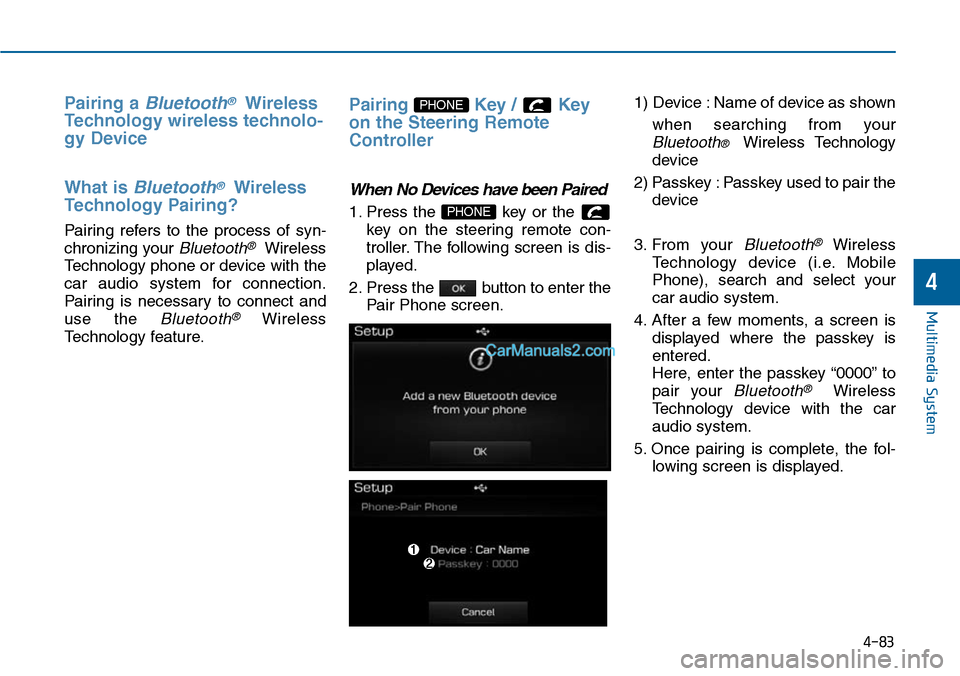
1. Press the key or the
key on the steering remote con-
troller. The following screen is dis-
played.
2. Press the button to enter the
Pair Phone screen.
1) Device : Name of device as shown
when searching from your
Bluetooth® Wireless Technology
device
2) Passkey : Passkey used to pair the
device
3. From your Bluetooth®Wireless
Te c h n o l o g y d e v i c e ( i . e . M o b i l e
Phone), search and select your
car audio system.
4. After a few moments, a screen is
displayed where the passkey is
entered.
Here, enter the passkey “0000” to
pair your Bluetooth®Wireless
Technology device with the car
audio system.
5. Once pairing is complete, the fol-
lowing screen is displayed.
PHONE
PHONE
4-83
Multimedia System
4
Page 342 of 665
4-84
Multimedia System
Information
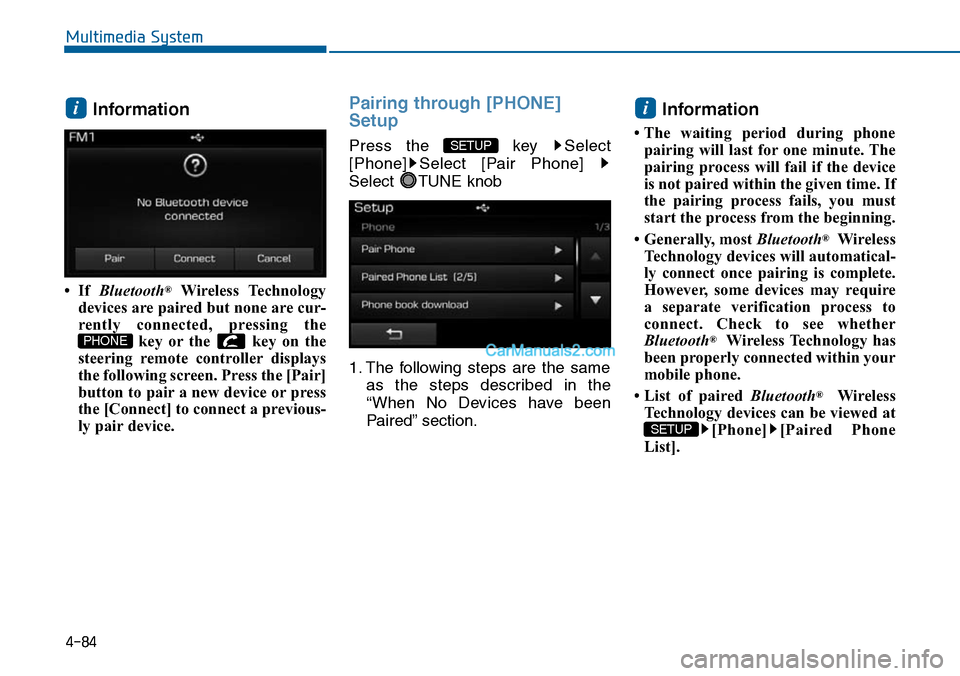
• If Bluetooth®Wireless Technology
devices are paired but none are cur-
rently connected, pressing the
key or the key on the
steering remote controller displays
the following screen. Press the [Pair]
button to pair a new device or press
the [Connect] to connect a previous-
ly pair device.
Pairing through [PHONE]
Setup
Press the key Select
[Phone] Select [Pair Phone]
Select TUNE knob
1. The following steps are the same
as the steps described in the
“When No Devices have been
Paired” section.
Information
• The waiting period during phone
pairing will last for one minute. The
pairing process will fail if the device
is not paired within the given time. If
the pairing process fails, you must
start the process from the beginning.
• Generally, most Bluetooth®Wireless
Technology devices will automatical-
ly connect once pairing is complete.
However, some devices may require
a separate verification process to
connect. Check to see whether
Bluetooth®Wireless Technology has
been properly connected within your
mobile phone.
• List of paired Bluetooth®Wireless
Technology devices can be viewed at
[Phone] [Paired Phone
List].
SETUP
i
SETUP
PHONE
i
Page 349 of 665
Bluetooth® Wireless Technology
(for Bluetooth®Wireless
Te ch n o l o g yequipped model)
Pairing a Bluetooth®Wireless
Technology wireless technolo-
gy Device
What is Bluetooth®Wireless
Technology Pairing?
Pair ing refers to the process of syn-
chronizing your Bluetooth®Wireless
Technology phone or device with the
car audio system for connection.
Pair ing is necessar y to connect and
use the Bluetooth®Wireless
Technology feature.
Pairing Key / Key on
the Steering Remote Controller
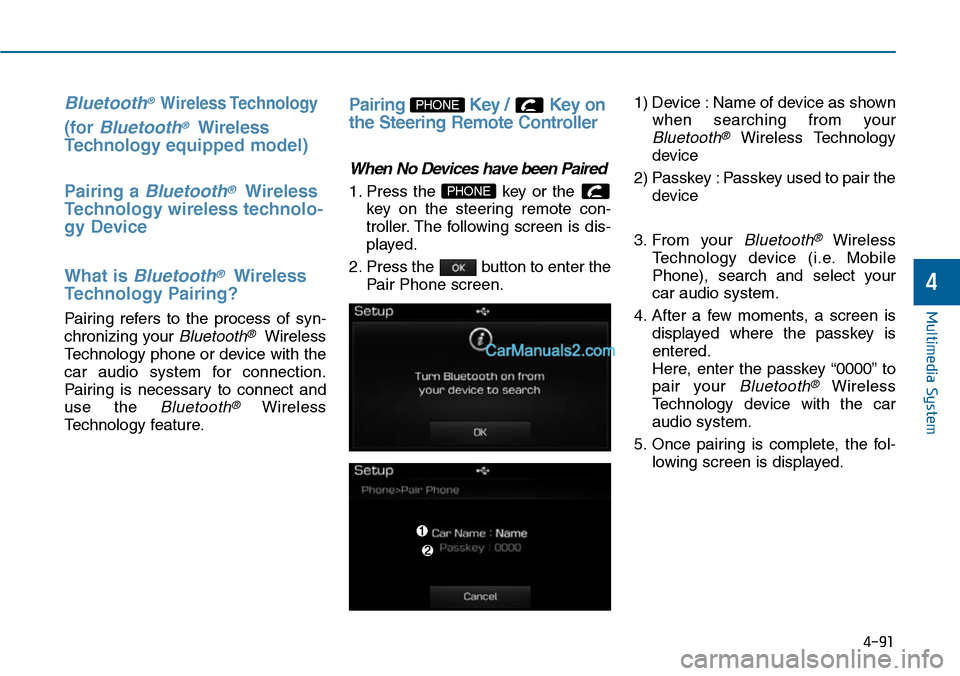
When No Devices have been Paired
1. Press the key or the
key on the steering remote con-
troller. The following screen is dis-
played.
2. Press the button to enter the
Pair Phone screen.
1) Device : Name of device as shown
when searching from your
Bluetooth®Wireless Technology
device
2) Passkey : Passkey used to pair the
device
3. From your Bluetooth®Wireless
Te c h n o l o g y d e v i c e ( i . e . M o b i l e
Phone), search and select your
car audio system.
4. After a few moments, a screen is
displayed where the passkey is
entered.
Here, enter the passkey “0000” to
pair your Bluetooth®Wireless
Technology device with the car
audio system.
5. Once pairing is complete, the fol-
lowing screen is displayed.
PHONE
PHONE
4-91
Multimedia System
4
Page 350 of 665
Information
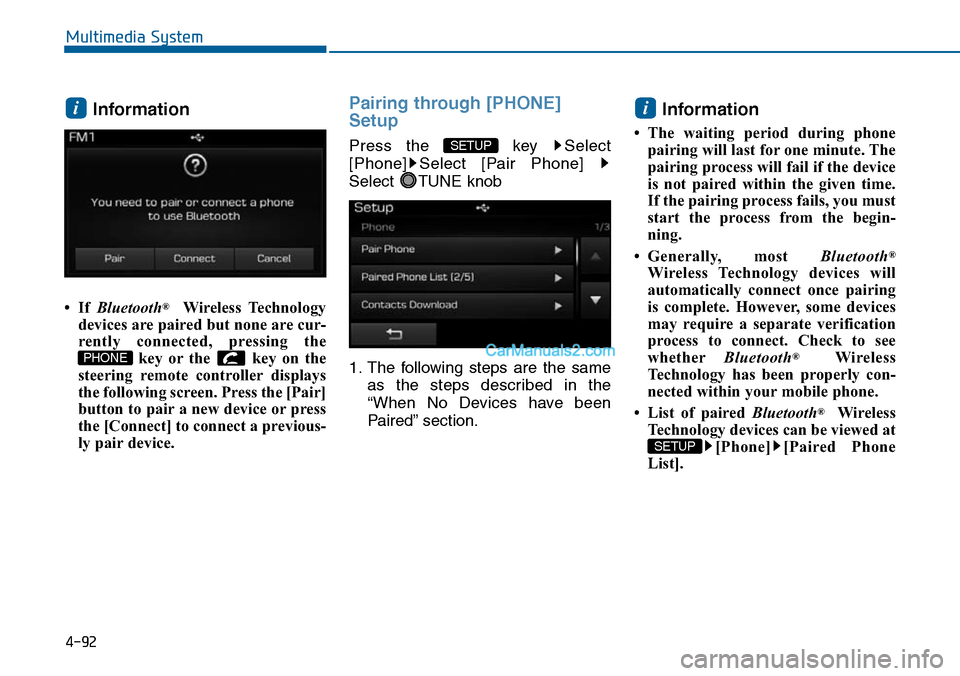
• If Bluetooth®Wireless Technology
devices are paired but none are cur-
rently connected, pressing the
key or the key on the
steering remote controller displays
the following screen. Press the [Pair]
button to pair a new device or press
the [Connect] to connect a previous-
ly pair device.
Pairing through [PHONE]
Setup
Press the key Select
[Phone] Select [Pair Phone]
Select TUNE knob
1. The following steps are the same
as the steps described in the
“When No Devices have been
Paired” section.
Information
• The waiting period during phone
pairing will last for one minute. The
pairing process will fail if the device
is not paired within the given time.
If the pairing process fails, you must
start the process from the begin-
ning.
•Generally, most Bluetooth®
Wireless Technology devices will
automatically connect once pairing
is complete. However, some devices
may require a separate verification
process to connect. Check to see
whetherBluetooth®Wireless
Technology has been properly con-
nected within your mobile phone.
• List of paired Bluetooth®Wireless
Technology devices can be viewed at
[Phone] [Paired Phone
List].
SETUP
i
SETUP
PHONE
i
4-92
Multimedia System
Page 367 of 665
![Hyundai Sonata 2014 Owners Manual 4-109
Multimedia System
4
SDVC (Speed Dependent Volume
Control)
Press the key Select
[Sound] Select [Speed Dependent
Vo l . ]
The volume level is controlled auto-
matically according to th](/img/35/16805/w960_16805-366.png "Hyundai Sonata 2014 Owners Manual 4-109
Multimedia System
4
SDVC (Speed Dependent Volume
Control)
Press the key Select
[Sound] Select [Speed Dependent
Vo l . ]
The volume level is controlled auto-
matically according to th")
4-109
Multimedia System
4
SDVC (Speed Dependent Volume
Control)
Press the key Select
[Sound] Select [Speed Dependent
Vo l . ]
The volume level is controlled auto-
matically according to the vehicle
speed. SDVC can be set by selecting
from On / Off.
Touch Screen Beep
Press the key Select
[Sound] Select [Touch Screen
Beep]
This feature is used to turn the touch
screen beep on/off.
Bluetooth®Wireless Technology
Setting
Pairing a New Device
Press the key Select
[Phone] Select [Pair Phone]
Bluetooth®Wireless Technology
devices can be paired with the audio
system.
For more infor mation, refer to the
“Pairing through Phone Setup” sec-
tion within Bluetooth®Wireless
Technology.
SETUP
SETUP
SETUP
Page 375 of 665
![Hyundai Sonata 2014 Owners Manual 4-117
Multimedia System
4
Bluetooth®Wireless
Technology Setting
Pairing a New Device
Press the key Select
[Phone] Select [Pair Phone]
Bluetooth®Wireless Technology
devices can be paired with t](/img/35/16805/w960_16805-374.png "Hyundai Sonata 2014 Owners Manual 4-117
Multimedia System
4
Bluetooth®Wireless
Technology Setting
Pairing a New Device
Press the key Select
[Phone] Select [Pair Phone]
Bluetooth®Wireless Technology
devices can be paired with t")
4-117
Multimedia System
4
Bluetooth®Wireless
Technology Setting
Pairing a New Device
Press the key Select
[Phone] Select [Pair Phone]
Bluetooth®Wireless Technology
devices can be paired with the audio
system.
For more infor mation, refer to the
“Pairing through Phone Setup” sec-
tion within Bluetooth®Wireless
Technology.
Viewing Paired Phone List
Press the key Select
[Phone] Select [Paired Phone List]
This feature is used to view mobile
phones that have been paired with
the audio system. Upon selecting a
paired phone, the setup menu is dis-
played.
For more information, refer to the
“Setting Bluetooth®Wireless
Te c h n o l o g y C o n n e c t i o n ” s e c t i o n w i t h -
in Bluetooth®Wireless Technology.
1) : Moves to the previous
screen
2) Connect/Disconnect Phone :
Connect/disconnects currently
selected phone
3) Delete : Deletes the currently
selected phone
4) Change Priority : Sets currently
selected phone to highest connec-
tion priority
Information
- BEFORE DOWNLOADING
Contacts
• Only contacts within connected
phones can be downloaded. Also
check to see that your mobile phone
supports the download feature.
• To learn more about whether your
mobile phone supports contacts
downloads, refer to your mobile
phone user’s manual.
• The contacts for only the connected
phone can be downloaded. Before
downloading, check to see whether
your phone supports the download
feature.
i
SETUP
SETUP