sunroof Hyundai Sonata 2018 User Guide
[x] Cancel search | Manufacturer: HYUNDAI, Model Year: 2018, Model line: Sonata, Model: Hyundai Sonata 2018Pages: 522, PDF Size: 14.52 MB
Page 226 of 522
3-141
Convenient features of your vehicle
3
Air conditioning
All HYUNDAI Air Conditioning
Systems are filled with environmen-
tally friendly R-1234yf refrigerant.
1. Start the engine.
2. Push the air conditioning button.
3. Set the mode to the Face Levelmode.
4. Set the air intake control to the recirculated air position. However,
prolonged operation of the recircu-
lated air position will excessively
dry the air. In this case, change the
air position.
5. Adjust the fan speed control and temperature control to maintain
maximum comfort.
When maximum cooling is desired,
set the temperature control to the
extreme left position then set the fan
speed control to the highest speed. When using the air conditioning
system, monitor the engine tem-
perature gauge closely while driv-
ing up hills or in heavy traffic
when outside temperatures are
high. Air conditioning system
operation can cause engine over-
heating. Continue to use the blow-
er fan, but turn the air condition-
ing system off if the engine tem-
perature gauge indicates engine
overheating.
Air conditioning system operation
tips
If the vehicle has been parked in
direct sunlight during hot weather,
open the windows for a short time
to let the hot air inside the vehicle
escape.
After sufficient cooling has been achieved, switch back from the
recirculated air to the fresh outside
air position.
To help reduce moisture inside of the windows on rainy or humid
days, decrease the humidity inside
the vehicle by operating the air
conditioning system with the win-
dows and sunroof closed.
Use the air conditioning system every month only for a few minutes
to ensure maximum system per-
formance.
NOTICE
Page 232 of 522
3-147
Convenient features of your vehicle
3
C
CL
LI
IM
M A
AT
TE
E
C
C O
O N
NT
TR
R O
O L
L
A
A D
DD
DI
IT
T I
IO
O N
NA
AL
L
F
F E
E A
A T
TU
U R
RE
ES
S
(
( I
IF
F
E
E Q
Q U
UI
IP
P P
PE
ED
D )
)
Automatic Ventilation
(if equipped)
When the ignition switch is in the ON
position or when the engine is run-
ning and outside temperature is
below 59°F (15°C). At the same time,
when A/C mode is off and mode is
Bi-Level or Floor mode with the recir-
culated air position selected more
than five minutes, the air intake posi-
tion will automatically change to the
outside (fresh) air position.
To cancel or reset the Automatic
Ventilation
When the air conditioning system is
on, select Face Level mode and
while pressing the A/C button, press
the recirculated air position button
five times within three seconds.
Sunroof Inside Air
Recirculation (if equipped)
When the heater or air conditioning
system is on with the sunroof
opened, the outside (fresh) air posi-
tion will be automatically selected. At
this time, if you press the recirculated
air position button, the recirculated
air position will be selected but will
change back to the outside (fresh) air
position after 3 minutes.
When the sunroof is closed, the air
intake position will return to the orig-
inal position that was selected.
Page 449 of 522
7-39
7
Maintenance
By jump starting
After a jump start from a good bat-
tery, idle the vehicle with the head-
lights turned ON for 20-30 minutes
before started driving. The vehicle
may not run properly if you drive it off
before the battery had a chance to
adequately recharge. See "Jump
Starting" in chapter 6 for more infor-
mation on jump starting procedures.
Information
An inappropriately disposedbattery can be harmful to
the environment and human
health.
Dispose the battery according to your
local law(s) or regulation.
Reset features
Some items need to be reset after
the battery has been discharged or
the battery has been disconnected.
See chapter 3 for:
Power Windows
Trip Computer
Climate Control System
Clock
Audio System
Sunroof
i
(Continued)
Watch the battery during
charging, and stop or reduce
the charging rate if the battery
cells begin boiling violently.
The negative battery cable
must be removed first and
installed last when the battery
is disconnected. Disconnect
the battery charger in the fol-
lowing order:
(1) Turn off the battery charger main switch.
(2) Unhook the negative
clamp from the negative
battery terminal.
(3) Unhook the positive clamp from the positive battery
terminal.
Always use a genuine HYUNDAI
approved battery when you
replace the battery.
Page 472 of 522
Maintenance
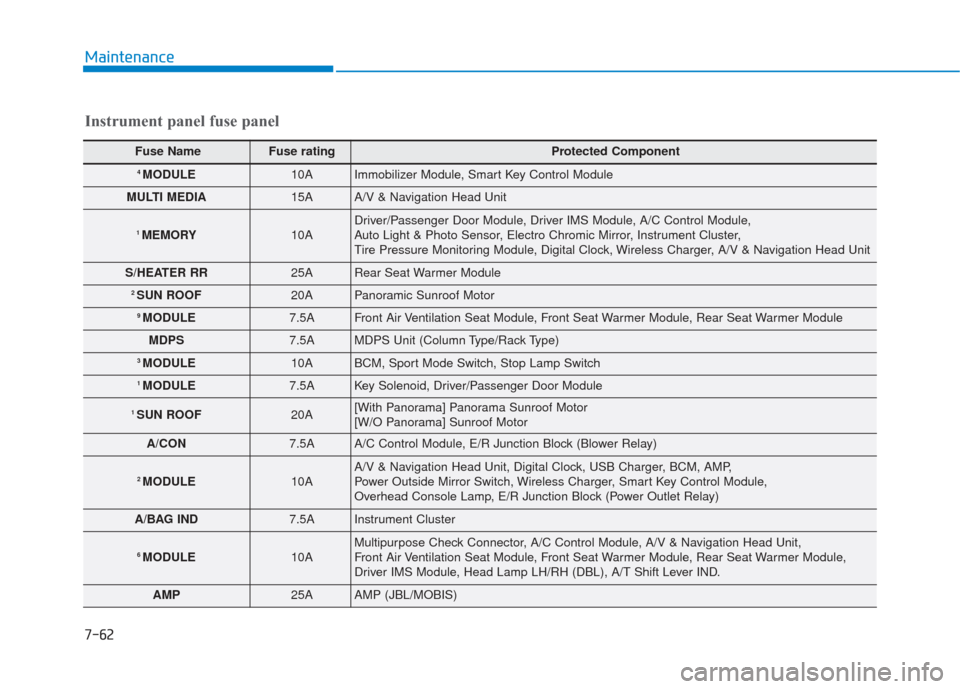
Instrument panel fuse panel
Fuse Name Fuse rating Protected Component
4 MODULE10AImmobilizer Module, Smart Key Control Module
MULTI MEDIA15AA/V & Navigation Head Unit
1 MEMORY10ADriver/Passenger Door Module, Driver IMS Module, A/C Control Module,
Auto Light & Photo Sensor, Electro Chromic Mirror, Instrument Cluster,
Tire Pressure Monitoring Module, Digital Clock, Wireless Charger, A/V & Navigation Head Unit
S/HEATER RR25ARear Seat Warmer Module
2 SUN ROOF20APanoramic Sunroof Motor
9 MODULE7.5AFront Air Ventilation Seat Module, Front Seat Warmer Module, Rear Seat Warmer Module
MDPS7.5AMDPS Unit (Column Type/Rack Type)
3 MODULE10ABCM, Sport Mode Switch, Stop Lamp Switch
1 MODULE7.5AKey Solenoid, Driver/Passenger Door Module
1 SUN ROOF20A[With Panorama] Panorama Sunroof Motor
[W/O Panorama] Sunroof Motor
A/CON7.5AA/C Control Module, E/R Junction Block (Blower Relay)
2 MODULE10AA/V & Navigation Head Unit, Digital Clock, USB Charger, BCM, AMP,
Power Outside Mirror Switch, Wireless Charger, Smart Key Control Module,
Overhead Console Lamp, E/R Junction Block (Power Outlet Relay)
A/BAG IND7.5AInstrument Cluster
6 MODULE10AMultipurpose Check Connector, A/C Control Module, A/V & Navigation Head Unit,
Front Air Ventilation Seat Module, Front Seat Warmer Module, Rear Seat Warmer Module,
Driver IMS Module, Head Lamp LH/RH (DBL), A/T Shift Lever IND.
AMP25AAMP (JBL/MOBIS)
7-62
Page 475 of 522
![Hyundai Sonata 2018 User Guide 7-65
7
Maintenance
Engine compartment main fuse panel
Fuse NameFuse rating Protected Component
MULTIFUSE
(TYPE A)
IG230A[Without Smart Key] (Start Relay), Ignition Switch,
[With Smart Key] (Start Rel](/img/35/16776/w960_16776-474.png "Hyundai Sonata 2018 User Guide 7-65
7
Maintenance
Engine compartment main fuse panel
Fuse NameFuse rating Protected Component
MULTIFUSE
(TYPE A)
IG230A[Without Smart Key] (Start Relay), Ignition Switch,
[With Smart Key] (Start Rel")
7-65
7
Maintenance
Engine compartment main fuse panel
Fuse NameFuse rating Protected Component
MULTIFUSE
(TYPE A)
IG230A[Without Smart Key] (Start Relay), Ignition Switch,
[With Smart Key] (Start Relay), PCB Block (IG2 Relay)
3 TCU40A[G4FJ - DCT] TCM
BLOWER40A(Blower Relay)
1 ABS40AESC Module
REAR HEATED50A(Rear Heated Relay)
1 B+50ASmart Junction Block (IPS2 (4CH), IPS3 (4CH))
1 COOLING FAN50A[G4KH/G4FJ] (Cooling Fan Relay), [G4KJ] (Cooling Fan Relay)
2 COOLING FAN60A[G4KH/G4FJ] (Cooling Fan Relay)
1 MDPS80AMDPS Unit (Column Type)
MULTI FUSE
(TYPE B)
2 ABS30AESC Module, Multipurpose Check Connector
IG140A[Without Smart Key] Ignition Switch, [With Smart Key] PCB Block (IG1/ACC Relay)
4 TCU40A[G4FJ - DCT] TCM
3 POWER OUTLET40A(Power Outlet Relay)
2 B+50ASmart Junction Block (IPS1 (4CH), IPS4 (4CH), IPS5 (4CH), IPS6 (2CH), IPS7 (1CH)\
,
Fuse - AMP)
5 B+60APCB Block (Engine Control Relay, Fuse - TUC1, ECU1, HORN, AMS, WIPER)
1 B+60ASmart Junction Block (Power Window Relay, Fuse - SAFETY POWER WINDOW LH,
P/SEAT PASS,SAFETY POWER WINDOW RH, P/SEAT DRV, MODULE1, P/WDW LH,
P/WDW RH, TRUNK, S/HEATER RR, SUNROOF2, SUNROOF1)
2 MDPS100AMDPS Unit (Rack Type)
Page 485 of 522
7-75
7
Maintenance
7. Remove the rear package traytrim.
8. Remove the high mounted stop lamp after disengaging the mount-
ing clip.
9. Install a new LED lamp.License Plate Light Bulb
Replacement
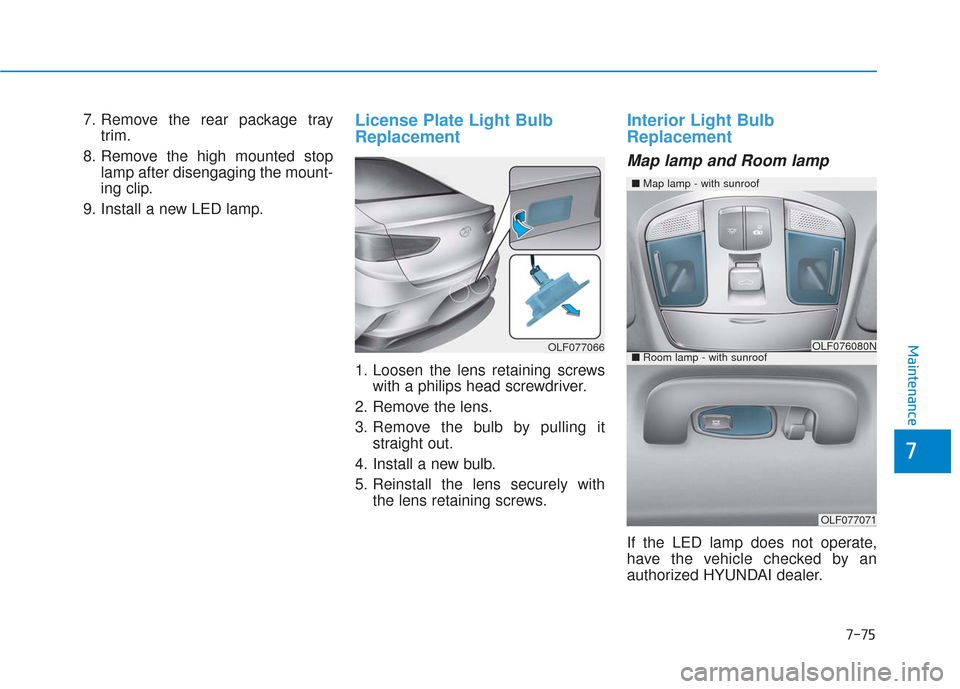
1. Loosen the lens retaining screws with a philips head screwdriver.
2. Remove the lens.
3. Remove the bulb by pulling it straight out.
4. Install a new bulb.
5. Reinstall the lens securely with the lens retaining screws.
Interior Light Bulb
Replacement
Map lamp and Room lamp
If the LED lamp does not operate,
have the vehicle checked by an
authorized HYUNDAI dealer.
■Map lamp - with sunroof
OLF076080N
OLF077071
■Room lamp - with sunroofOLF077066
Page 486 of 522
7-76
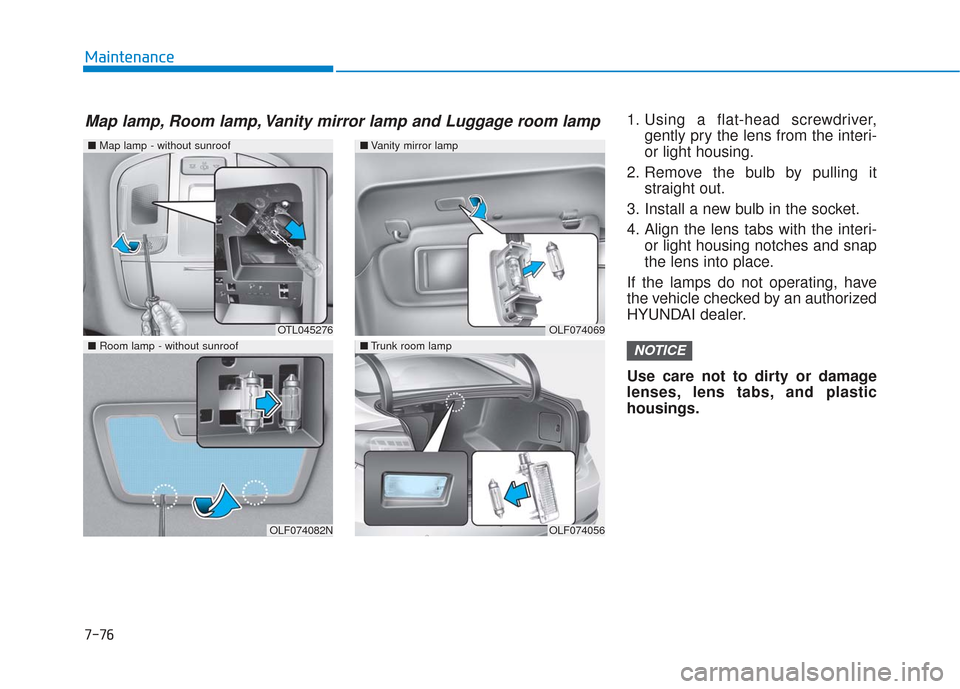
Maintenance1. Using a flat-head screwdriver,gently pry the lens from the interi-
or light housing.
2. Remove the bulb by pulling it straight out.
3. Install a new bulb in the socket.
4. Align the lens tabs with the interi- or light housing notches and snap
the lens into place.
If the lamps do not operating, have
the vehicle checked by an authorized
HYUNDAI dealer.
Use care not to dirty or damage
lenses, lens tabs, and plastic
housings.
NOTICE
■ Map lamp - without sunroof
OTL045276
OLF074082N
■Vanity mirror lamp
■Trunk room lamp
OLF074069
OLF074056
■ Room lamp - without sunroof
Map lamp, Room lamp, Vanity mirror lamp and Luggage room lamp
Page 503 of 522
8-4
Specifications, Consumer information and Reporting safety defects
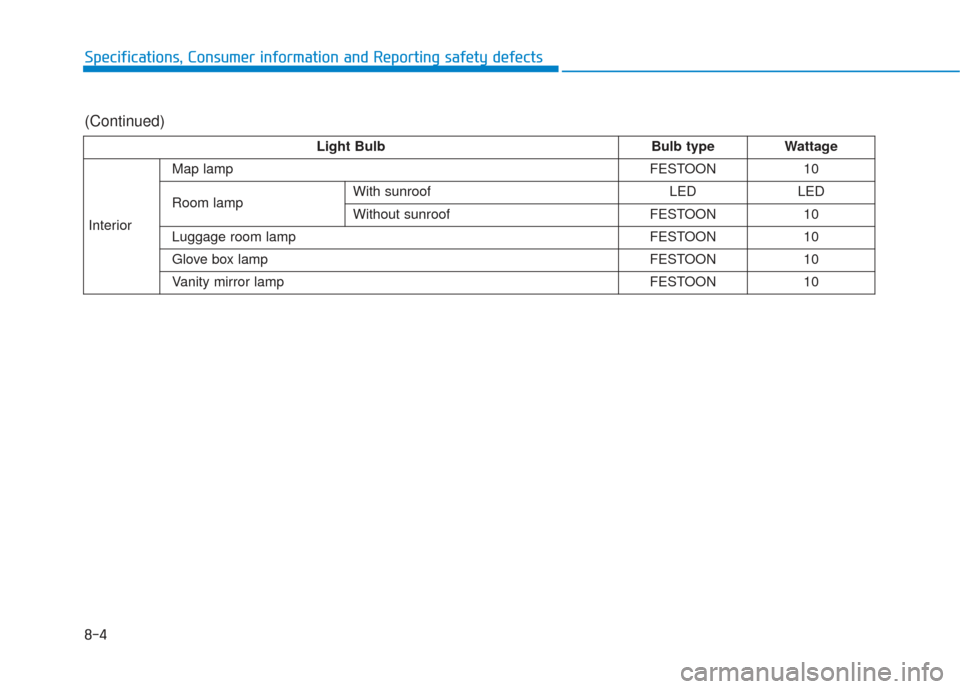
Light BulbBulb typeWattage
Interior
Map lampFESTOON10
Room lampWith sunroofLEDLED
Without sunroofFESTOON10
Luggage room lampFESTOON10
Glove box lampFESTOON10
Vanity mirror lampFESTOON10
(Continued)
Page 515 of 522
I-3
Braking System ...............................................................5-28Anti-lock Brake System (ABS)..................................5-40
AUTO HOLD .............................................................5-37
Disc Brakes Wear Indicator........................................5-29
Electronic Parking Brake (EPB) ................................5-31
Electronic Stability Control (ESC).............................5-43
Foot Parking Brake ....................................................5-29
Good Braking Practices..............................................5-47
Hill-Start Assist Control (HAC)................................5-46
Power Brakes..............................................................5-28
Bulb Wattage .....................................................................8-3\
California Perchlorate Notice .........................................7-89
Child Restraint System (CRS) ........................................2-34 Children Always in the Rear ......................................2-34
Installing a Child Restraint System (CRS) ................2-37
Selecting a Child Restraint System (CRS).................2-35
Climate control additional features...............................3-147 Automatic Ventilation...............................................3-147
Sunroof Inside Air Recirculation .............................3-147
Climate Control Air Filter...............................................7-33 Filter Inspection..........................................................7-33
Consumer Information ....................................................8-12
Cruise Control .................................................................5-54 Cruise Control Operation ...........................................5-54 Defroster .......................................................................3\
-121
Rear Window Defroster............................................3-121
Dimensions .......................................................................8\
-2
Door locks .......................................................................3\
-14 Auto Door Lock/Unlock Features ..............................3-17
Child-Protector Rear Door locks................................3-18
Inside the Vehicle .......................................................3-15
Outside the Vehicle.....................................................3-14
Drive Mode Integrated Control System .........................5-48 ECO mode ..................................................................5-49
SMART mode.............................................................5-50
SPORT mode ..............................................................5-50
Driver assist system ......................................................3-117 Rear Parking Assist System......................................3-118
Rear View Camera....................................................3-117
Driver attention alert system (DAA) ..............................5-84 Resetting the system ...................................................5-86
System malfunction ....................................................5-86
System setting and activation .....................................5-84
System standby...........................................................5-86
Driver position memory system .....................................3-20 Easy Access Function .................................................3-21
Storing Positions into Memory ..................................3-20
I
Index
C
D
Page 520 of 522
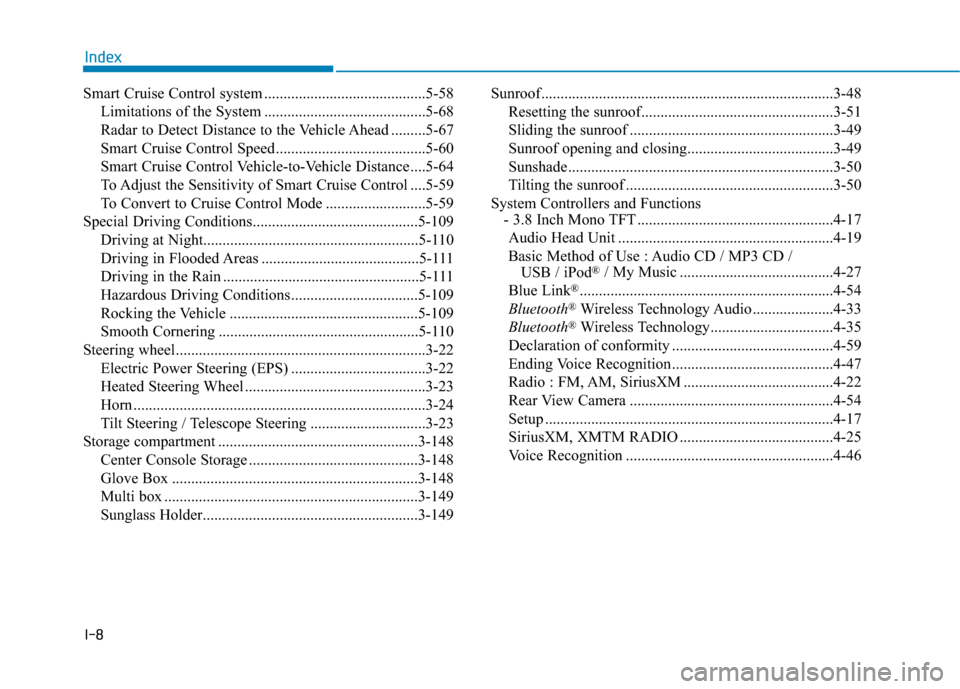
I-8
Smart Cruise Control system ..........................................5-58Limitations of the System ..........................................5-68
Radar to Detect Distance to the Vehicle Ahead .........5-67
Smart Cruise Control Speed .......................................5-60
Smart Cruise Control Vehicle-to-Vehicle Distance ....5-64
To Adjust the Sensitivity of Smart Cruise Control ....5-59
To Convert to Cruise Control Mode ..........................5-59
Special Driving Conditions...........................................5-109 Driving at Night........................................................\
5-110
Driving in Flooded Areas .........................................5-111
Driving in the Rain ...................................................5-111
Hazardous Driving Conditions .................................5-109
Rocking the Vehicle .................................................5-109
Smooth Cornering ....................................................5-110
Steering wheel.................................................................3-22 Electric Power Steering (EPS) ...................................3-22
Heated Steering Wheel ...............................................3-23
Horn ........................................................................\
....3-24
Tilt Steering / Telescope Steering ..............................3-23
Storage compartment ....................................................3-148 Center Console Storage ............................................3-148
Glove Box ................................................................3-148
Multi box ..................................................................3-149
Sunglass Holder........................................................3-149 Sunroof........................................................................\
....3-48
Resetting the sunroof..................................................3-51
Sliding the sunroof .....................................................3-49
Sunroof opening and closing......................................3-49
Sunshade.....................................................................3-5\
0
Tilting the sunroof ......................................................3-50
System Controllers and Functions - 3.8 Inch Mono TFT ...................................................4-17
Audio Head Unit ........................................................4-19
Basic Method of Use : Audio CD / MP3 CD / USB / iPod
®/ My Music ........................................4-27
Blue Link®..................................................................4-54
Bluetooth®Wireless Technology Audio .....................4-33
Bluetooth®Wireless Technology................................4-35
Declaration of conformity ..........................................4-59
Ending Voice Recognition ..........................................4-47
Radio : FM, AM, SiriusXM .......................................4-22
Rear View Camera .....................................................4-54
Setup ........................................................................\
...4-17
SiriusXM, XMTM RADIO ........................................4-25
Voice Recognition ......................................................4-46
Index