trip computer Hyundai Sonata 2018 User Guide
[x] Cancel search | Manufacturer: HYUNDAI, Model Year: 2018, Model line: Sonata, Model: Hyundai Sonata 2018Pages: 522, PDF Size: 14.52 MB
Page 302 of 522
5-52
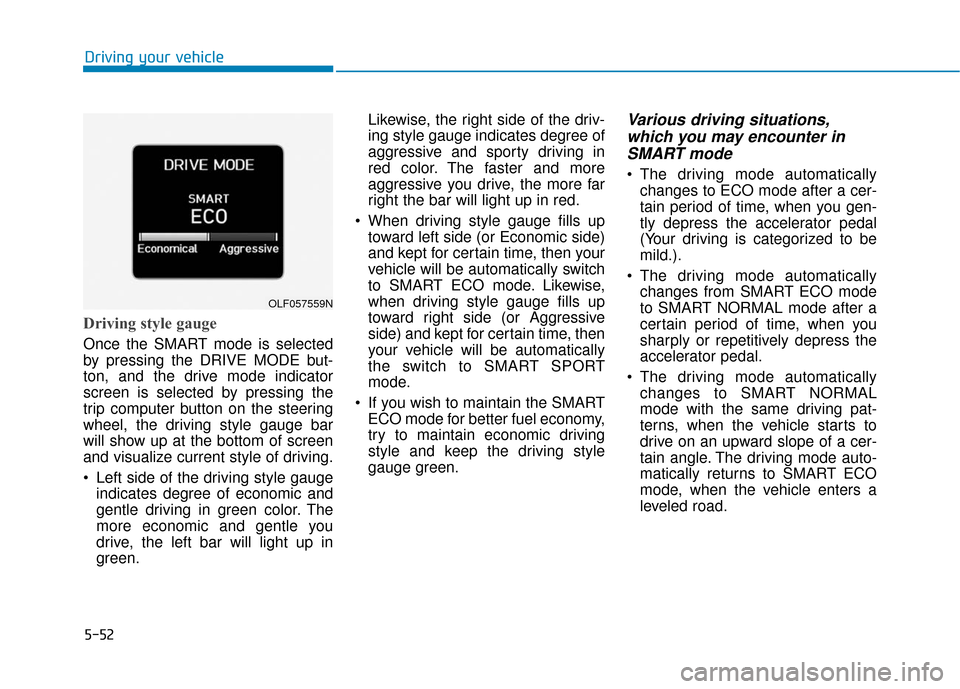
Driving style gauge
Once the SMART mode is selected
by pressing the DRIVE MODE but-
ton, and the drive mode indicator
screen is selected by pressing the
trip computer button on the steering
wheel, the driving style gauge bar
will show up at the bottom of screen
and visualize current style of driving.
Left side of the driving style gaugeindicates degree of economic and
gentle driving in green color. The
more economic and gentle you
drive, the left bar will light up in
green. Likewise, the right side of the driv-
ing style gauge indicates degree of
aggressive and sporty driving in
red color. The faster and more
aggressive you drive, the more far
right the bar will light up in red.
When driving style gauge fills up toward left side (or Economic side)
and kept for certain time, then your
vehicle will be automatically switch
to SMART ECO mode. Likewise,
when driving style gauge fills up
toward right side (or Aggressive
side) and kept for certain time, then
your vehicle will be automatically
the switch to SMART SPORT
mode.
If you wish to maintain the SMART ECO mode for better fuel economy,
try to maintain economic driving
style and keep the driving style
gauge green.
Various driving situations,which you may encounter inSMART mode
The driving mode automatically
changes to ECO mode after a cer-
tain period of time, when you gen-
tly depress the accelerator pedal
(Your driving is categorized to be
mild.).
The driving mode automatically changes from SMART ECO mode
to SMART NORMAL mode after a
certain period of time, when you
sharply or repetitively depress the
accelerator pedal.
The driving mode automatically changes to SMART NORMAL
mode with the same driving pat-
terns, when the vehicle starts to
drive on an upward slope of a cer-
tain angle. The driving mode auto-
matically returns to SMART ECO
mode, when the vehicle enters a
leveled road.
Driving your vehicle
OLF057559N
Page 449 of 522
7-39
7
Maintenance
By jump starting
After a jump start from a good bat-
tery, idle the vehicle with the head-
lights turned ON for 20-30 minutes
before started driving. The vehicle
may not run properly if you drive it off
before the battery had a chance to
adequately recharge. See "Jump
Starting" in chapter 6 for more infor-
mation on jump starting procedures.
Information
An inappropriately disposedbattery can be harmful to
the environment and human
health.
Dispose the battery according to your
local law(s) or regulation.
Reset features
Some items need to be reset after
the battery has been discharged or
the battery has been disconnected.
See chapter 3 for:
Power Windows
Trip Computer
Climate Control System
Clock
Audio System
Sunroof
i
(Continued)
Watch the battery during
charging, and stop or reduce
the charging rate if the battery
cells begin boiling violently.
The negative battery cable
must be removed first and
installed last when the battery
is disconnected. Disconnect
the battery charger in the fol-
lowing order:
(1) Turn off the battery charger main switch.
(2) Unhook the negative
clamp from the negative
battery terminal.
(3) Unhook the positive clamp from the positive battery
terminal.
Always use a genuine HYUNDAI
approved battery when you
replace the battery.
Page 521 of 522
I-9
Theft-alarm system .........................................................3-19
Tire Pressure Monitoring System (TPMS) .......................6-9Changing a Tire with TPMS ......................................6-13
Check Tire Pressure......................................................6-9
Low Tire Pressure Position and Tire Pressure Telltale ...............................................6-11
Low Tire Pressure Telltale..........................................6-11
Tire Pressure Monitoring System...............................6-10
TPMS (Tire Pressure Monitoring System) Malfunction Indicator .............................................6-12
Tire Specification and Pressure Label ............................8-11
Tires and Wheels .....................................................7-40, 8-5 All Season Tires .........................................................7-53
Check Tire Inflation Pressure .....................................7-42
Low Aspect Ratio Tires ..............................................7-54
Radial-Ply Tires ..........................................................7-54
Recommended Cold Tire Inflation Pressures.............7-41
Snow Tires ..................................................................7-53
Summer Tires .............................................................7-53
Tire Care .....................................................................7-4\
0
Tire Maintenance ........................................................7-46
Tire Replacement........................................................7\
-44
Tire Rotation...............................................................7-43
Tire Sidewall Labeling ...............................................7-46 Tire Terminology and Definitions ..............................7-50
Tire Traction ...............................................................7-45
Wheel Alignment and Tire Balance ...........................7-44
Wheel Replacement....................................................7-45
Towing ........................................................................\
....6-30 Emergency Towing.....................................................6-31
Towing Service ...........................................................6-30
Trailer Towing...............................................................5-121
Transmission ...................................................................5-14 Automatic Transmission.............................................5-14
Ecoshift Dual Clutch Transmission............................5-18
Good Driving Practices ..............................................5-26
Paddle Shifter .............................................................5-24
Parking........................................................................\
5-26
Shift-Lock Release .....................................................5-25
Shift-Lock System ......................................................5-25
Trip computer..................................................................3-85 Trip modes ..................................................................3-85
Vehicle Certification Label .............................................8-10
Vehicle Identification Number (VIN) .............................8-10
Vehicle Load Limit .......................................................5-116 Tire Loading Information Label ...............................5-117
Volume and Weight ...........................................................8-6
I
Index
T
V