wire Hyundai Sonata 2018 Owner's Guide
[x] Cancel search | Manufacturer: HYUNDAI, Model Year: 2018, Model line: Sonata, Model: Hyundai Sonata 2018Pages: 522, PDF Size: 14.52 MB
Page 466 of 522
7-56
Maintenance
F
FU
U S
SE
E S
S
A vehicle’s electrical system is pro-
tected from electrical overload dam-
age by fuses.
This vehicle has 2 (or 3) fuse panels,
one located in the driver's side panel
bolster, the other in the engine com-
partment near the battery.
If any of your vehicle's lights, acces-
sories, or controls do not work, check
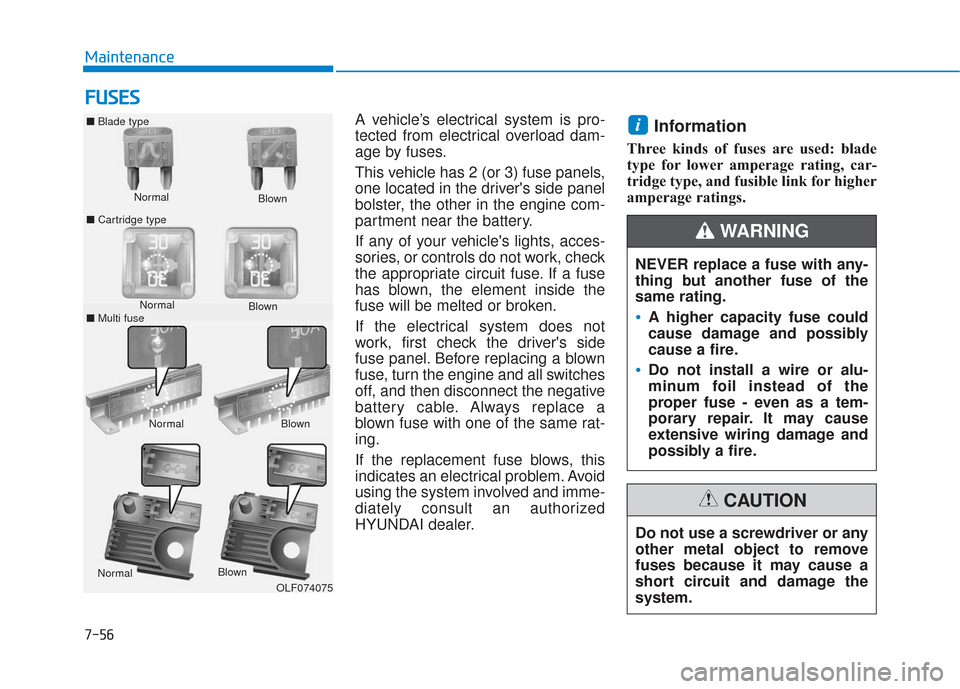
the appropriate circuit fuse. If a fuse
has blown, the element inside the
fuse will be melted or broken.
If the electrical system does not
work, first check the driver's side
fuse panel. Before replacing a blown
fuse, turn the engine and all switches
off, and then disconnect the negative
battery cable. Always replace a
blown fuse with one of the same rat-
ing.
If the replacement fuse blows, this
indicates an electrical problem. Avoid
using the system involved and imme-
diately consult an authorized
HYUNDAI dealer.Information
Three kinds of fuses are used: blade
type for lower amperage rating, car-
tridge type, and fusible link for higher
amperage ratings.
i
Normal
■
Blade type
■ Cartridge type Blown
Normal Blown
Normal Blown
OLF074075
Do not use a screwdriver or any
other metal object to remove
fuses because it may cause a
short circuit and damage the
system.
CAUTION
NEVER replace a fuse with any-
thing but another fuse of the
same rating.
A higher capacity fuse could
cause damage and possibly
cause a fire.
Do not install a wire or alu-
minum foil instead of the
proper fuse - even as a tem-
porary repair. It may cause
extensive wiring damage and
possibly a fire.
WARNING
Normal Blown
■ Multi fuse
Page 472 of 522
Maintenance
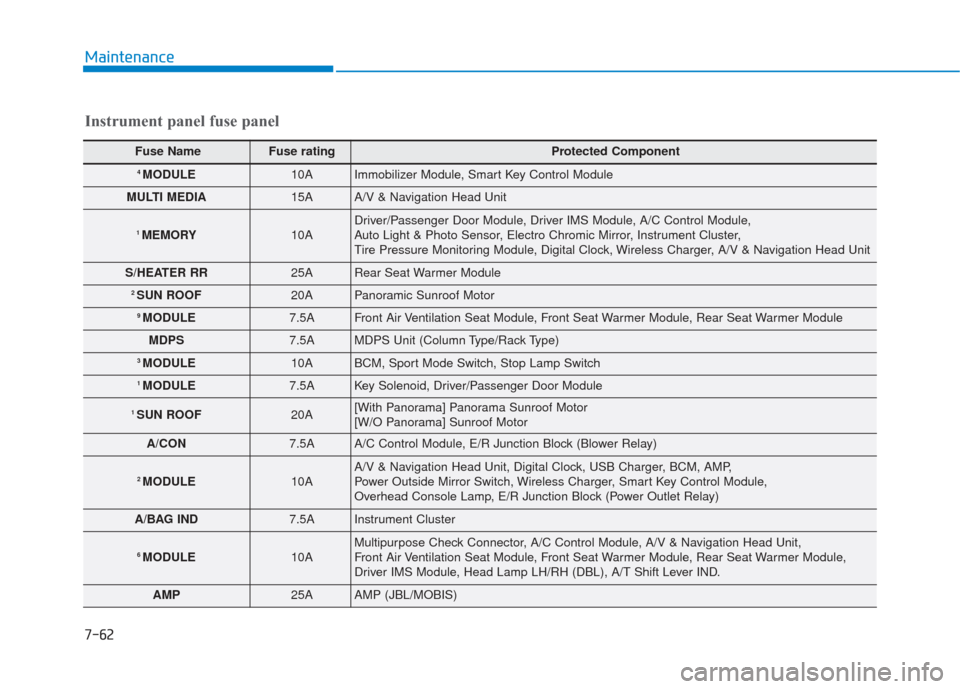
Instrument panel fuse panel
Fuse Name Fuse rating Protected Component
4 MODULE10AImmobilizer Module, Smart Key Control Module
MULTI MEDIA15AA/V & Navigation Head Unit
1 MEMORY10ADriver/Passenger Door Module, Driver IMS Module, A/C Control Module,
Auto Light & Photo Sensor, Electro Chromic Mirror, Instrument Cluster,
Tire Pressure Monitoring Module, Digital Clock, Wireless Charger, A/V & Navigation Head Unit
S/HEATER RR25ARear Seat Warmer Module
2 SUN ROOF20APanoramic Sunroof Motor
9 MODULE7.5AFront Air Ventilation Seat Module, Front Seat Warmer Module, Rear Seat Warmer Module
MDPS7.5AMDPS Unit (Column Type/Rack Type)
3 MODULE10ABCM, Sport Mode Switch, Stop Lamp Switch
1 MODULE7.5AKey Solenoid, Driver/Passenger Door Module
1 SUN ROOF20A[With Panorama] Panorama Sunroof Motor
[W/O Panorama] Sunroof Motor
A/CON7.5AA/C Control Module, E/R Junction Block (Blower Relay)
2 MODULE10AA/V & Navigation Head Unit, Digital Clock, USB Charger, BCM, AMP,
Power Outside Mirror Switch, Wireless Charger, Smart Key Control Module,
Overhead Console Lamp, E/R Junction Block (Power Outlet Relay)
A/BAG IND7.5AInstrument Cluster
6 MODULE10AMultipurpose Check Connector, A/C Control Module, A/V & Navigation Head Unit,
Front Air Ventilation Seat Module, Front Seat Warmer Module, Rear Seat Warmer Module,
Driver IMS Module, Head Lamp LH/RH (DBL), A/T Shift Lever IND.
AMP25AAMP (JBL/MOBIS)
7-62
Page 480 of 522
7-70
Maintenance
Always handle them carefully, and avoid scratches and abrasions. If
the bulbs are lit, avoid contact with
liquids.
Never touch the glass with bare hands. Residual oil may cause the
bulb to overheat and burst when lit.
A bulb should be operated only when installed in a headlamp.
If a bulb becomes damaged or cracked, replace it immediately
and carefully dispose of it.
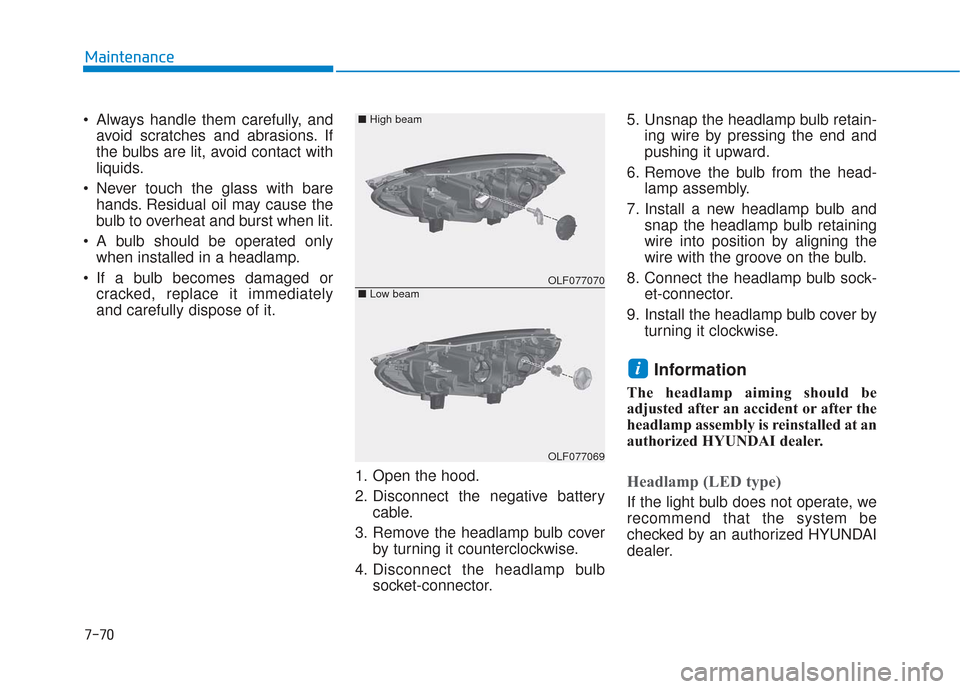
1. Open the hood.
2. Disconnect the negative batterycable.
3. Remove the headlamp bulb cover by turning it counterclockwise.
4. Disconnect the headlamp bulb socket-connector. 5. Unsnap the headlamp bulb retain-
ing wire by pressing the end and
pushing it upward.
6. Remove the bulb from the head- lamp assembly.
7. Install a new headlamp bulb and snap the headlamp bulb retaining
wire into position by aligning the
wire with the groove on the bulb.
8. Connect the headlamp bulb sock- et-connector.
9. Install the headlamp bulb cover by turning it clockwise.
Information
The headlamp aiming should be
adjusted after an accident or after the
headlamp assembly is reinstalled at an
authorized HYUNDAI dealer.
Headlamp (LED type)
If the light bulb does not operate, we
recommend that the system be
checked by an authorized HYUNDAI
dealer.
i
OLF077070
OLF077069
■Low beam
■High beam
Page 490 of 522
7-80
Maintenance
Thoroughly flush the vehicle under-
body and wheel openings with luke-
warm or cold water once a month,
after off-road driving and at the end
of each winter. Pay special attention
to these areas because it is difficult
to see all the mud and dirt. It will do
more harm than good to wet down
the road grime without removing it.
The lower edges of doors, rocker
panels, and frame members have
drain holes that should not be
allowed to clog with dirt; trapped
water in these areas can cause rust-
ing.
Aluminum wheel maintenance
The aluminum wheels are coated with
a clear protective finish.
Corrosion protection
Protecting your vehicle from corro-
sion
By using the most advanced design
and construction practices to combat
corrosion, HYUNDAI produces cars
of the highest quality. However, this is
only part of the job. To achieve the
long-term corrosion resistance your
vehicle can deliver, the owner’s
cooperation and assistance is also
required.
Common causes of corrosion
The most common causes of corro-
sion on your vehicle are:
Road salt, dirt and moisture that is allowed to accumulate underneath
the vehicle.
coatings by stones, gravel, abra-
sion or minor scrapes and dents
which leave unprotected metal
exposed to corrosion.
After washing the vehicle, test
the brakes while driving slowly
to see if they have been affected
by water. If braking performance
is impaired, dry the brakes by
applying them lightly while
maintaining a slow forward
speed.
WARNING
Do not use abrasive cleaner,
polishing compound, solvent,
or wire brushes on aluminum
wheels.
Clean the wheel when it has
cooled.
Use only a mild soap or neu-
tral detergent, and rinse thor-
oughly with water. Also, clean
the wheels after driving on
salted roads.
Do not wash the wheels with
high-speed car wash brushes.
Do not use any cleaners con-
taining acid or alkaline deter-
gents.
CAUTION
Page 496 of 522
7-86
Maintenance
Canister
Fuel vapors generated inside the fuel
tank are absorbed and stored in the
onboard canister. When the engine is
running, the fuel vapors absorbed in
the canister are drawn into the surge
tank through the purge control sole-
noid valve.
Purge Control Solenoid Valve(PCSV)
The purge control solenoid valve is
controlled by the Engine Control
Module (ECM); when the engine
coolant temperature is low during
idling, the PCSV closes so that evap-
orated fuel is not taken into the
engine. After the engine warms-up
during ordinary driving, the PCSV
opens to introduce evaporated fuel to
the engine.
3. Exhaust Emission Control System
The Exhaust Emission Control
System is a highly effective system
which controls exhaust emissions
while maintaining good vehicle per-
formance.
When the engine starts or fails to
start, excessive attempts to restart
the engine may cause damage to the
emission system.
Vehicle modifications
This vehicle should not be modi-
fied. Modification of your vehicle
could affect its performance, safety
or durability and may even violate
governmental safety and emis-
sions regulations.
In addition, damage or performance
problems resulting from any modifi-
cation may not be covered under
warranty.
If you use unauthorized electronic devices, it may cause the vehicle to
operate abnormally, wire damage,
battery discharge and fire. For your
safety, do not use unauthorized
electronic devices.
Engine exhaust (carbon monox-ide) precautions
Carbon monoxide can be present
with other exhaust fumes. If you
smell exhaust fumes of any kind in
your vehicle, drive with all the win-
dows fully open. Have your vehicle
checked and repaired immediately.
Engine exhaust gases contain
carbon monoxide (CO). Though
colorless and odorless, it is
dangerous and could be lethal if
inhaled. Follow the instructions
on this page to avoid CO poi-
soning.
WARNING
Page 517 of 522
I-5
Hazard Warning Flasher ...................................................6-2
If the Engine Overheats ....................................................6-7
If the Engine Will Not Start ..............................................6-3If the Engine Doesn't Turn Over or Turns Over Slowly ....................................................6-3
If the Engine Turns Over Normally but Doesn't Start ..............................................................6-3
If you Have a Flat Tire ...................................................6-15 With Spare Tire ..........................................................6-15
With Tire Mobility Kit (TMK)...................................6-23
Ignition Switch..................................................................5-6 Engine Start/Stop Button ..............................................5-9
Key Ignition Switch .....................................................5-6
Important Safety Precautions............................................2-2 Air Bag Hazards ...........................................................2-2
Always Wear Your Seat Belt ........................................2-2
Control Your Speed ......................................................2-3
Driver Distraction.........................................................2-2
Keep Your Vehicle in Safe Condition ..........................2-3
Restrain All Children....................................................2-2 In Case of an Emergency While Driving .........................6-2
If the Engine Stalls at a Crossroad or Crossing ...........6-2
If the Engine Stalls While Driving...............................6-2
If you Have a Flat Tire While Driving.........................6-3
Instrument cluster ...........................................................3-63 Instrument Cluster Control .........................................3-65
LCD Display Control .................................................3-66
Instrument panel overview ...............................................1-5
Interior features .............................................................3-150 Clock ........................................................................\
3-155
Clothes Hanger .........................................................3-155
Cup Holder ...............................................................3-152
Floor Mat Anchor(s) .................................................3-156
Luggage Net Holder .................................................3-157
Power Outlet.............................................................3-154
Side Curtain ..............................................................3-157
Sunvisor ....................................................................3-15\
3
Wireless Cellular Phone Charging System ..............3-150
Interior overview...............................................................1-4
Jump Starting ....................................................................6-4
I
Index
H
I
J
Page 518 of 522
I-6
Lane keeping Assist System (LKAS) .............................5-74Limitations of the System ..........................................5-82
LKAS function change ...............................................5-81
LKAS malfunction .....................................................5-79
LKAS Operation ........................................................5-75
LCD Display ...................................................................3-72 LCD Modes ................................................................3-72
Warning Messages......................................................3-80
Light ........................................................................\
......3-102 Exterior Lights..........................................................3-102
Interior Lights ...........................................................3-111
Smart High Beam .....................................................3-104
Welcome System ......................................................3-110
Light Bulbs .....................................................................7-6\
8 Headlamp, Position Lamp, Turn Signal Lamp and Side Marker Light Bulb Replacement ....................7-69
High Mounted Stop Lamp..........................................7-74
Interior Light Bulb Replacement ...............................7-75
License Plate Light Bulb Replacement ......................7-75
Rear Combination Light Bulb Replacement ..............7-72
Side Repeater Lamp Replacement .............................7-72 Maintenance Services .......................................................7-6
Owner Maintenance Precautions..................................7-6
Owner's Responsibility.................................................7-6
Manual climate control system .....................................3-122 Heating and Air Conditioning ..................................3-123
System Maintenance ................................................3-130
System Operation .....................................................3-128
Mirrors ........................................................................\
....3-25 Inside Rearview Mirror ..............................................3-25
Reverse Parking Aid Function ...................................3-43
Side view Mirrors .......................................................3-40
Multimedia System ...........................................................4-2 Antenna ........................................................................\
4-2
Audio / Video / Navigation System (AVN) .................4-4
AUX, USB and iPod
®Port ..........................................4-2
Bluetooth®Wireless Technology Hands-Free ..............4-4
Features of Your Vehicle ..............................................4-7
How Vehicle Audio Works ...........................................4-5
Steering Wheel Audio Control .....................................4-3
Index
ML
Page 520 of 522
I-8
Smart Cruise Control system ..........................................5-58Limitations of the System ..........................................5-68
Radar to Detect Distance to the Vehicle Ahead .........5-67
Smart Cruise Control Speed .......................................5-60
Smart Cruise Control Vehicle-to-Vehicle Distance ....5-64
To Adjust the Sensitivity of Smart Cruise Control ....5-59
To Convert to Cruise Control Mode ..........................5-59
Special Driving Conditions...........................................5-109 Driving at Night........................................................\
5-110
Driving in Flooded Areas .........................................5-111
Driving in the Rain ...................................................5-111
Hazardous Driving Conditions .................................5-109
Rocking the Vehicle .................................................5-109
Smooth Cornering ....................................................5-110
Steering wheel.................................................................3-22 Electric Power Steering (EPS) ...................................3-22
Heated Steering Wheel ...............................................3-23
Horn ........................................................................\
....3-24
Tilt Steering / Telescope Steering ..............................3-23
Storage compartment ....................................................3-148 Center Console Storage ............................................3-148
Glove Box ................................................................3-148
Multi box ..................................................................3-149
Sunglass Holder........................................................3-149 Sunroof........................................................................\
....3-48
Resetting the sunroof..................................................3-51
Sliding the sunroof .....................................................3-49
Sunroof opening and closing......................................3-49
Sunshade.....................................................................3-5\
0
Tilting the sunroof ......................................................3-50
System Controllers and Functions - 3.8 Inch Mono TFT ...................................................4-17
Audio Head Unit ........................................................4-19
Basic Method of Use : Audio CD / MP3 CD / USB / iPod
®/ My Music ........................................4-27
Blue Link®..................................................................4-54
Bluetooth®Wireless Technology Audio .....................4-33
Bluetooth®Wireless Technology................................4-35
Declaration of conformity ..........................................4-59
Ending Voice Recognition ..........................................4-47
Radio : FM, AM, SiriusXM .......................................4-22
Rear View Camera .....................................................4-54
Setup ........................................................................\
...4-17
SiriusXM, XMTM RADIO ........................................4-25
Voice Recognition ......................................................4-46
Index