change time Hyundai Sonata 2019 User Guide
[x] Cancel search | Manufacturer: HYUNDAI, Model Year: 2019, Model line: Sonata, Model: Hyundai Sonata 2019Pages: 522, PDF Size: 15.66 MB
Page 165 of 522
3-80
Warning messages
(if equipped)
Shift to P(for smart key system and auto-matic transaxle)
This warning message illuminates
if you try to turn off the engine with-
out the shift lever in P (Park) posi-
tion.
At this time, the Engine Start/Stop button turns to the ACC position (If
you press the Engine Start/Stop
button once more, it will turn to the
ON position).
Low Key Battery (for smart key system)
This warning message illuminates
if the battery of the smart key is
discharged when the Engine
Start/Stop button changes to the
OFF position.
Press START button while turning wheel (for smart key system)
This warning message illuminates
if the steering wheel does not
unlock normally when the Engine
Start/Stop button is pressed.
It means that you should press the Engine Start/Stop button while
turning the steering wheel right
and left.
Steering wheel not locked (for smart key system)
This warning message illuminates
if the steering wheel does not lock
when the Engine Start/Stop button
changes to the OFF position.
Check steering wheel lock system (for smart key system)
This warning message illuminates
if the steering wheel does not lock
normally when the Engine Start/
Stop button changes to the OFF
position.
Press brake pedal to startengine (for smart key systemand automatic transaxle)
This warning message illuminates
if the Engine Start/Stop button
changes to the ACC position twice
by pressing the button repeatedly
without depressing the brake
pedal.
It means that you should depress the brake pedal to start the engine.
Key not in vehicle(for smart key system)
This warning message illuminates
if the smart key is not in the vehicle
when you press the Engine Start/
Stop button.
It means that you always have the smart key with you.
Key not detected (for smart key system)
This warning message illuminates
if the smart key is not detected
when you press the Engine Start/
Stop button.
Convenient features of your vehicle
Page 192 of 522
3-107
Convenient features of your vehicle
3
Turn signals and lane changesignals
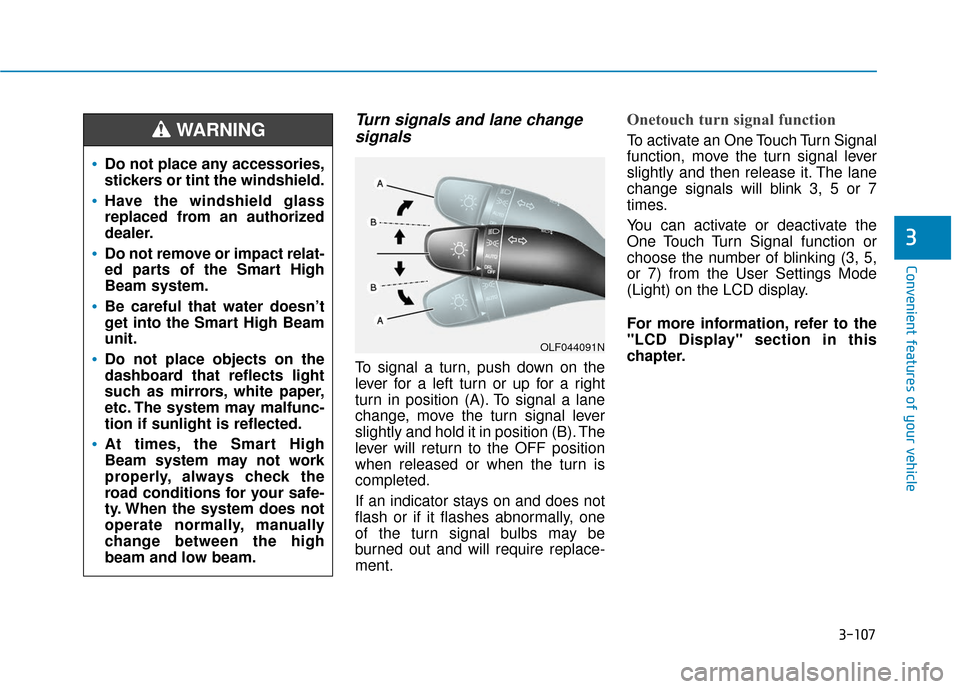
To signal a turn, push down on the
lever for a left turn or up for a right
turn in position (A). To signal a lane
change, move the turn signal lever
slightly and hold it in position (B). The
lever will return to the OFF position
when released or when the turn is
completed.
If an indicator stays on and does not
flash or if it flashes abnormally, one
of the turn signal bulbs may be
burned out and will require replace-
ment.
Onetouch turn signal function
To activate an One Touch Turn Signal
function, move the turn signal lever
slightly and then release it. The lane
change signals will blink 3, 5 or 7
times.
You can activate or deactivate the
One Touch Turn Signal function or
choose the number of blinking (3, 5,
or 7) from the User Settings Mode
(Light) on the LCD display.
For more information, refer to the
"LCD Display" section in this
chapter.
OLF044091N
Do not place any accessories,
stickers or tint the windshield.
Have the windshield glass
replaced from an authorized
dealer.
Do not remove or impact relat-
ed parts of the Smart High
Beam system.
Be careful that water doesn’t
get into the Smart High Beam
unit.
Do not place objects on the
dashboard that reflects light
such as mirrors, white paper,
etc. The system may malfunc-
tion if sunlight is reflected.
At times, the Smart High
Beam system may not work
properly, always check the
road conditions for your safe-
ty. When the system does not
operate normally, manually
change between the high
beam and low beam.
WARNING
Page 194 of 522
3-109
Convenient features of your vehicle
3
AFLS (Adaptive Front LightingSystem) a.k.a. DBL (DynamicBending Light) (if equipped)
Adaptive front lighting system uses
the steering angle and vehicle speed
to help maximize your field of vision
by swiveling and leveling the head-
lamp.
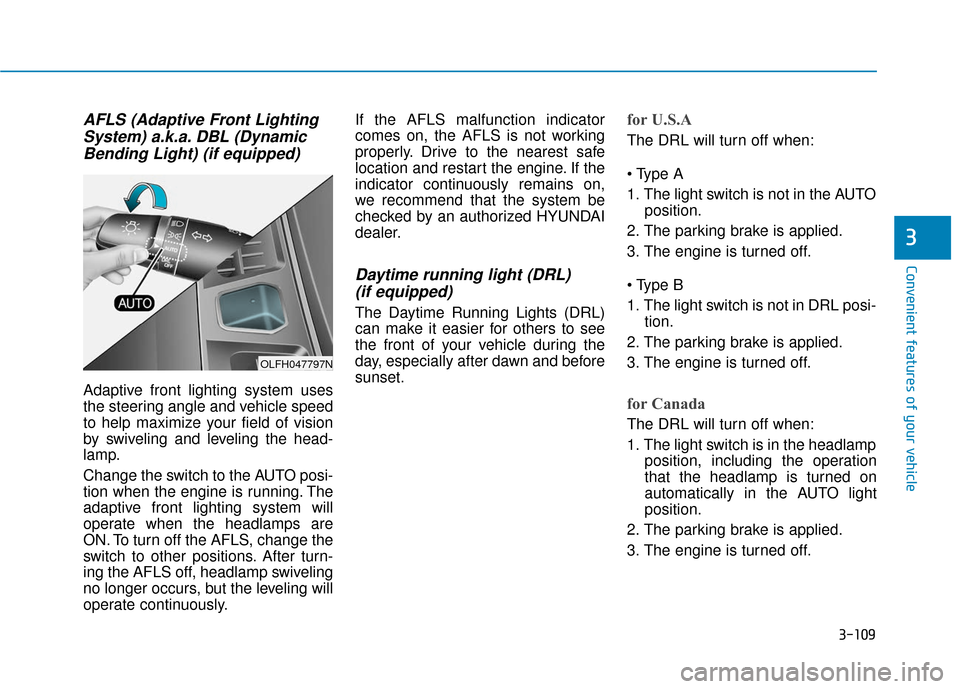
Change the switch to the AUTO posi-
tion when the engine is running. The
adaptive front lighting system will
operate when the headlamps are
ON. To turn off the AFLS, change the
switch to other positions. After turn-
ing the AFLS off, headlamp swiveling
no longer occurs, but the leveling will
operate continuously. If the AFLS malfunction indicator
comes on, the AFLS is not working
properly. Drive to the nearest safe
location and restart the engine. If the
indicator continuously remains on,
we recommend that the system be
checked by an authorized HYUNDAI
dealer.
Daytime running light (DRL)
(if equipped)
The Daytime Running Lights (DRL)
can make it easier for others to see
the front of your vehicle during the
day, especially after dawn and before
sunset.
for U.S.A
The DRL will turn off when:
• Type A
1. The light switch is not in the AUTO
position.
2. The parking brake is applied.
3. The engine is turned off.
1. The light switch is not in DRL posi- tion.
2. The parking brake is applied.
3. The engine is turned off.
for Canada
The DRL will turn off when:
1. The light switch is in the headlamp position, including the operation
that the headlamp is turned on
automatically in the AUTO light
position.
2. The parking brake is applied.
3. The engine is turned off.
OLFH047797N
Page 226 of 522
3-141
Convenient features of your vehicle
3
Air conditioning
All HYUNDAI Air Conditioning
Systems are filled with environmen-
tally friendly R-1234yf refrigerant.
1. Start the engine.
2. Push the air conditioning button.
3. Set the mode to the Face Levelmode.
4. Set the air intake control to the recirculated air position. However,
prolonged operation of the recircu-
lated air position will excessively
dry the air. In this case, change the
air position.
5. Adjust the fan speed control and temperature control to maintain
maximum comfort.
When maximum cooling is desired,
set the temperature control to the
extreme left position then set the fan
speed control to the highest speed. When using the air conditioning
system, monitor the engine tem-
perature gauge closely while driv-
ing up hills or in heavy traffic
when outside temperatures are
high. Air conditioning system
operation can cause engine over-
heating. Continue to use the blow-
er fan, but turn the air condition-
ing system off if the engine tem-
perature gauge indicates engine
overheating.
Air conditioning system operation
tips
If the vehicle has been parked in
direct sunlight during hot weather,
open the windows for a short time
to let the hot air inside the vehicle
escape.
After sufficient cooling has been achieved, switch back from the
recirculated air to the fresh outside
air position.
To help reduce moisture inside of the windows on rainy or humid
days, decrease the humidity inside
the vehicle by operating the air
conditioning system with the win-
dows and sunroof closed.
Use the air conditioning system every month only for a few minutes
to ensure maximum system per-
formance.
NOTICE
Page 232 of 522
3-147
Convenient features of your vehicle
3
C
CL
LI
IM
M A
AT
TE
E
C
C O
O N
NT
TR
R O
O L
L
A
A D
DD
DI
IT
T I
IO
O N
NA
AL
L
F
F E
E A
A T
TU
U R
RE
ES
S
(
( I
IF
F
E
E Q
Q U
UI
IP
P P
PE
ED
D )
)
Automatic Ventilation
(if equipped)
When the ignition switch is in the ON
position or when the engine is run-
ning and outside temperature is
below 59°F (15°C). At the same time,
when A/C mode is off and mode is
Bi-Level or Floor mode with the recir-
culated air position selected more
than five minutes, the air intake posi-
tion will automatically change to the
outside (fresh) air position.
To cancel or reset the Automatic
Ventilation
When the air conditioning system is
on, select Face Level mode and
while pressing the A/C button, press
the recirculated air position button
five times within three seconds.
Sunroof Inside Air
Recirculation (if equipped)
When the heater or air conditioning
system is on with the sunroof
opened, the outside (fresh) air posi-
tion will be automatically selected. At
this time, if you press the recirculated
air position button, the recirculated
air position will be selected but will
change back to the outside (fresh) air
position after 3 minutes.
When the sunroof is closed, the air
intake position will return to the orig-
inal position that was selected.
Page 253 of 522
5-3
Driving your vehicle
5
Carbon monoxide (CO) gas is toxic. Breathing CO can cause unconsciousness and death.
Engine exhaust contains carbon monoxide which cannot be seen or smelled.
Do not inhale engine exhaust.
If at any time you smell engine exhaust inside the vehicle, open the windows immediately. Exposure to CO can cause
unconsciousness and death by asphyxiation.
Be sure the exhaust system does not leak.
The exhaust system should be checked whenever the vehicle is raised to change the oil or for any other purpose. If
you hear a change in the sound of the exhaust or if you drive over something that strikes the underneath side of the
vehicle, have the exhaust system checked as soon as possible by an authorized HYUNDAI dealer.
Do not run the engine in an enclosed area.
Letting the engine idle in your garage, even with the garage door open, is a hazardous practice. Run the engine only
long enough to start the engine and to move the vehicle out of the garage.
Avoid idling the engine for prolonged periods with people inside the vehicle.
If it is necessary to idle the engine for a prolonged period with people inside the vehicle , be sure to do so only in an
open area with the air intake set at "Fresh" and fan control set to high so fresh air is drawn into the interior.
Keep the air intakes clear.
To assure proper operation of the ventilation system, keep the ventilation air intakes located in front of the windshield
clear of snow, ice, leaves, or other obstructions.
If you must drive with the trunk open:
Close all windows.
Open instrument panel air vents.
Set the air intake control at "Fresh", the air flow control at "Floor" or "Face", and the fan control set to high.
WARNING
Page 271 of 522
5-21
Driving your vehicle
(Continued)
Under certain conditions suchas repeated launch on steep
grades, the clutch in the trans-
mission could overheat. When
the clutch is overheated, the
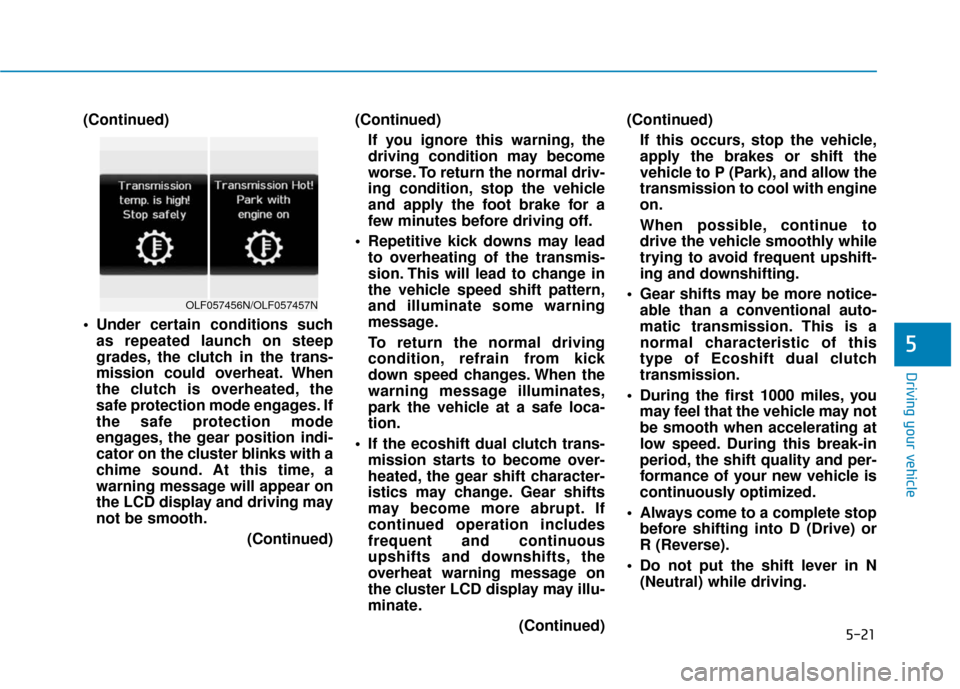
safe protection mode engages. If
the safe protection mode
engages, the gear position indi-
cator on the cluster blinks with a
chime sound. At this time, a
warning message will appear on
the LCD display and driving may
not be smooth.
(Continued)(Continued)
If you ignore this warning, the
driving condition may become
worse. To return the normal driv-
ing condition, stop the vehicle
and apply the foot brake for a
few minutes before driving off.
Repetitive kick downs may lead to overheating of the transmis-
sion. This will lead to change in
the vehicle speed shift pattern,
and illuminate some warning
message.
To return the normal driving
condition, refrain from kick
down speed changes. When the
warning message illuminates,
park the vehicle at a safe loca-
tion.
If the ecoshift dual clutch trans- mission starts to become over-
heated, the gear shift character-
istics may change. Gear shifts
may become more abrupt. If
continued operation includes
frequent and continuous
upshifts and downshifts, the
overheat warning message on
the cluster LCD display may illu-
minate.
(Continued)(Continued)
If this occurs, stop the vehicle,
apply the brakes or shift the
vehicle to P (Park), and allow the
transmission to cool with engine
on.
When possible, continue to
drive the vehicle smoothly while
trying to avoid frequent upshift-
ing and downshifting.
Gear shifts may be more notice- able than a conventional auto-
matic transmission. This is a
normal characteristic of this
type of Ecoshift dual clutch
transmission.
During the first 1000 miles, you may feel that the vehicle may not
be smooth when accelerating at
low speed. During this break-in
period, the shift quality and per-
formance of your new vehicle is
continuously optimized.
Always come to a complete stop before shifting into D (Drive) or
R (Reverse).
Do not put the shift lever in N (Neutral) while driving.
5
OLF057456N/OLF057457N
Page 274 of 522
5-24
Driving your vehicle
(Continued)
• If the driver presses the lever to + (Up) or - (Down) position, the
transmission may not make the
requested gear change if the next
gear is outside of the allowable
engine rpm range. The driver must
execute upshifts in accordance with
road conditions, taking care to keep
the engine rpms below the red zone.
Paddle Shifter (if equipped)
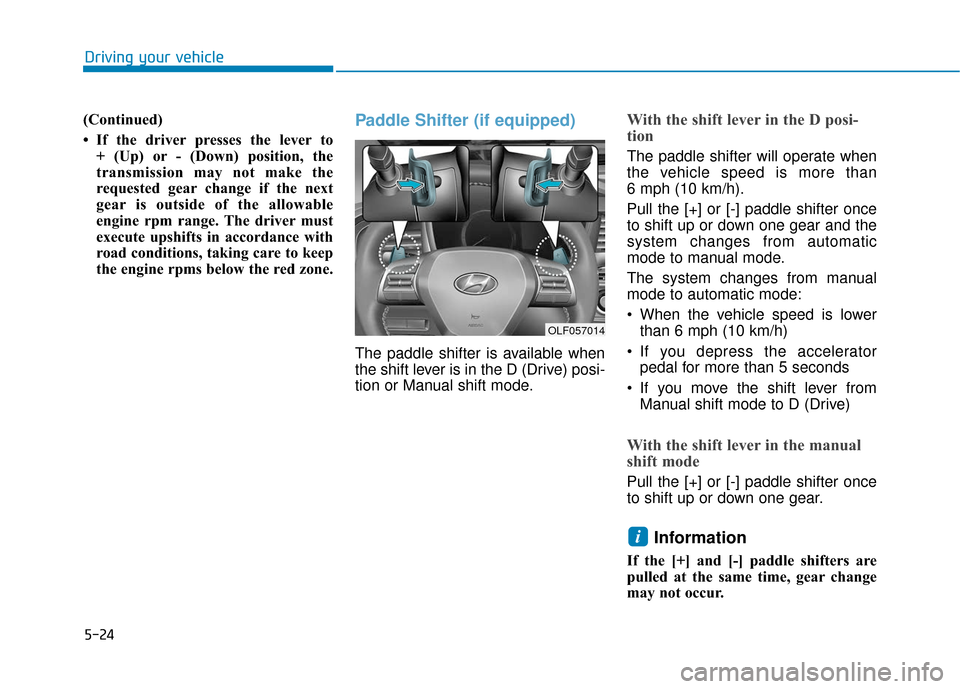
The paddle shifter is available when
the shift lever is in the D (Drive) posi-
tion or Manual shift mode.
With the shift lever in the D posi-
tion
The paddle shifter will operate when
the vehicle speed is more than
6 mph (10 km/h).
Pull the [+] or [-] paddle shifter once
to shift up or down one gear and the
system changes from automatic
mode to manual mode.
The system changes from manual
mode to automatic mode:
When the vehicle speed is lowerthan 6 mph (10 km/h)
If you depress the accelerator pedal for more than 5 seconds
If you move the shift lever from Manual shift mode to D (Drive)
With the shift lever in the manual
shift mode
Pull the [+] or [-] paddle shifter once
to shift up or down one gear.
Information
If the [+] and [-] paddle shifters are
pulled at the same time, gear change
may not occur.
i
OLF057014
Page 276 of 522
5-26
Driving your vehicle
Parking
Always come to a complete stop and
continue to depress the brake pedal.
Move the shift lever into the P (Park)
position, apply the parking brake,
and place the ignition switch in the
LOCK/OFF position. Take the Key
with you when exiting the vehicle.
Good Driving Practices
Never move the shift lever from P(Park) or N (Neutral) to any other
position with the accelerator pedal
depressed.
Never move the shift lever into P (Park) when the vehicle is in
motion.
Be sure the vehicle is completely stopped before you attempt to shift
into R (Reverse) or D (Drive).
Do not move the shift lever to N (Neutral) when driving. Doing so
may result in an accident because
of a loss of engine braking and the
transmission could be damaged.
Do not drive with your foot resting on the brake pedal. Even light, but
consistent pedal pressure can
result in the brakes overheating,
brake wear and possibly even
brake failure.
Depressing both accelerator and brake pedals at the same time can
trigger logic for engine power
reduction to assure vehicle decel-
eration. Vehicle acceleration will
resume after the brake pedal is
released. When driving in Manual shift mode,
slow down before shifting to a
lower gear. Otherwise, the lower
gear may not be engaged if the
engine rpms are outside of the
allowable range.
Always apply the parking brake when leaving the vehicle. Do not
depend on placing the transmis-
sion in P (Park) to keep the vehicle
from moving.
Exercise extreme caution when driving on a slippery surface. Be
especially careful when braking,
accelerating or shifting gears. On a
slippery surface, an abrupt change
in vehicle speed can cause the
drive wheels to lose traction and
may cause loss of vehicle control
resulting in an accident.
Optimum vehicle performance and economy is obtained by smoothly
depressing and releasing the
accelerator.
When you stay in the vehicle
with the engine running, be
careful not to depress the accel-
erator pedal for a long period of
time. The engine or exhaust
system may overheat and start
a fire.
The exhaust gas and the
exhaust system are very hot.
Keep away from the exhaust
system components.
Do not stop or park over flam-
mable materials, such as dry
grass, paper or leaves. They
may ignite and cause a fire.
WARNING
Page 288 of 522
5-38
Driving your vehicle
To release:
Press the accelerator pedal with the
shift lever in D (Drive) or Manual shift
mode, the Auto Hold will be released
automatically and the vehicle will
start to move. The indicator changes
from green to white.
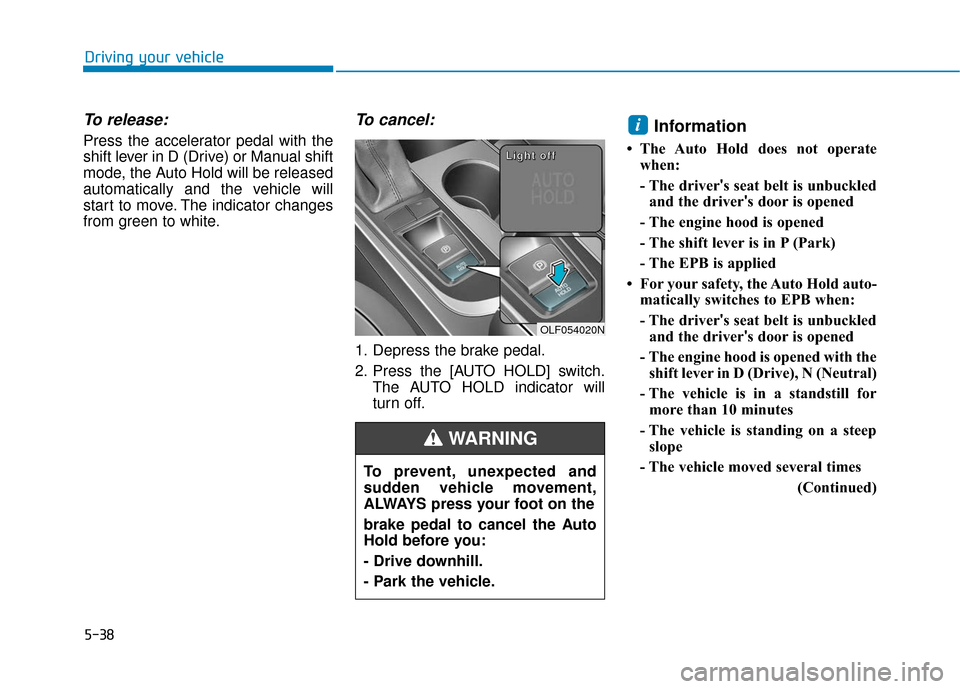
To cancel:
1. Depress the brake pedal.
2. Press the [AUTO HOLD] switch.The AUTO HOLD indicator will
turn off.
Information
• The Auto Hold does not operatewhen:
- The driver 's seat belt is unbuckled
and the driver's door is opened
- The engine hood is opened
- The shift lever is in P (Park)
- The EPB is applied
• For your safety, the Auto Hold auto- matically switches to EPB when:
- The driver 's seat belt is unbuckled
and the driver's door is opened
- The engine hood is opened with the shift lever in D (Drive), N (Neutral)
- The vehicle is in a standstill for more than 10 minutes
- The vehicle is standing on a steep slope
- The vehicle moved several times (Continued)
i
To prevent, unexpected and
sudden vehicle movement,
ALWAYS press your foot on the
brake pedal to cancel the Auto
Hold before you:
- Drive downhill.
- Park the vehicle.
WARNING
OLF054020N
L
L
L
L
i
i
i
i
g
g
g
g
h
h
h
h
t
t
t
t
o
o
o
o
f
f
f
f
f
f
f
f