charging Hyundai Sonata 2019 User Guide
[x] Cancel search | Manufacturer: HYUNDAI, Model Year: 2019, Model line: Sonata, Model: Hyundai Sonata 2019Pages: 522, PDF Size: 15.66 MB
Page 257 of 522
5-7
Driving your vehicle
5
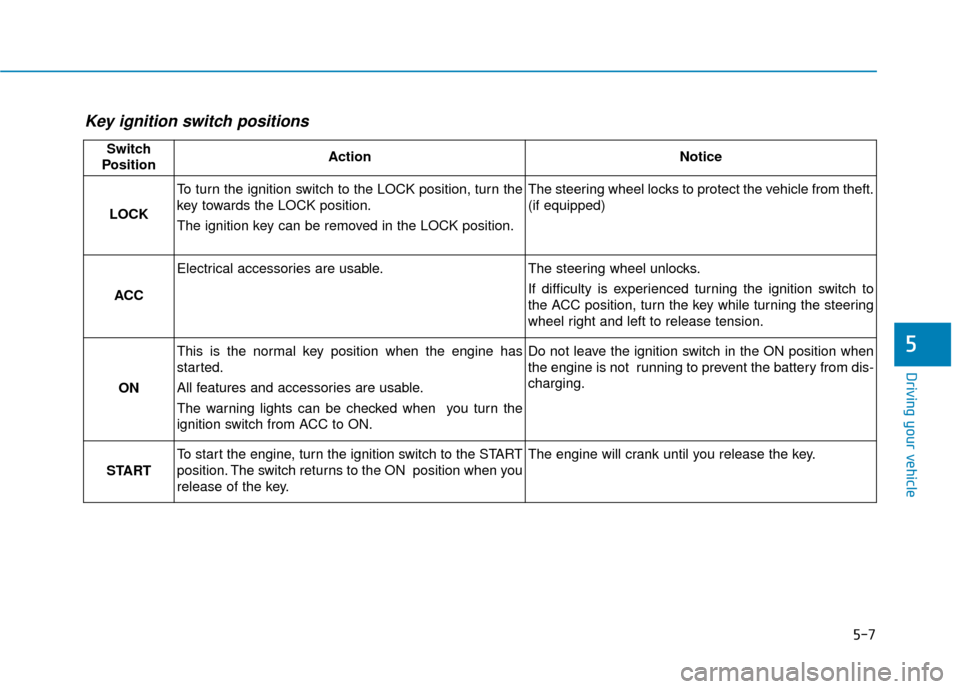
Key ignition switch positions
Switch
PositionActionNotice
LOCK
To turn the ignition switch to the LOCK position, turn the
key towards the LOCK position.
The ignition key can be removed in the LOCK position.The steering wheel locks to protect the vehicle from theft.
(if equipped)
ACC
Electrical accessories are usable.The steering wheel unlocks.
If difficulty is experienced turning the ignition switch to
the ACC position, turn the key while turning the steering
wheel right and left to release tension.
ON
This is the normal key position when the engine has
started.
All features and accessories are usable.
The warning lights can be checked when you turn the
ignition switch from ACC to ON.Do not leave the ignition switch in the ON position when
the engine is not running to prevent the battery from dis-
charging.
START
To start the engine, turn the ignition switch to the START
position. The switch returns to the ON position when you
release of the key.The engine will crank until you release the key.
Page 260 of 522
5-10
Driving your vehicle
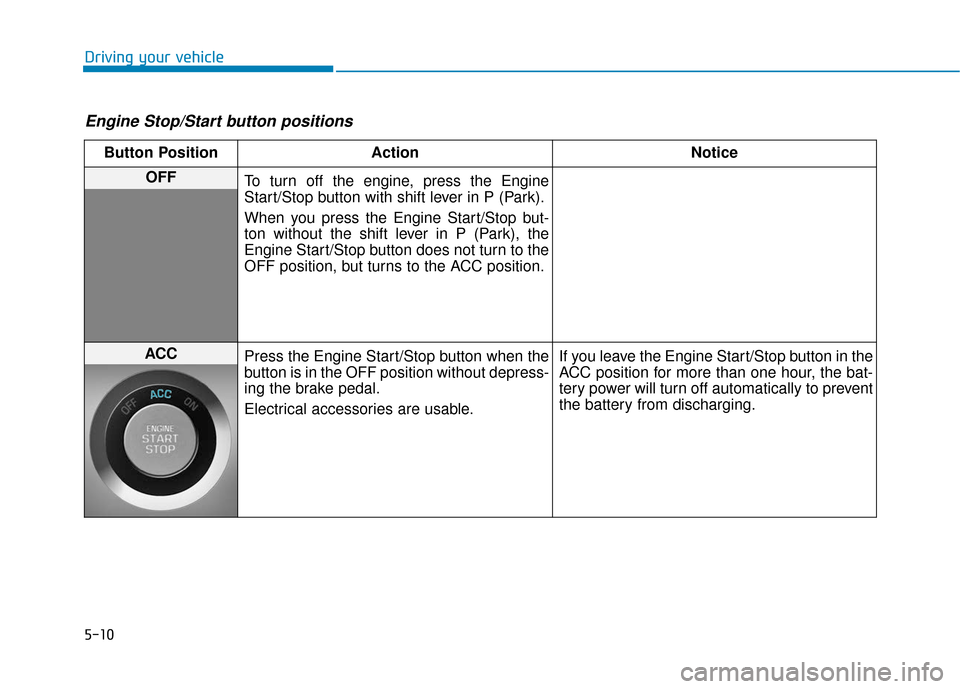
Engine Stop/Start button positions
Button PositionAction Notice
OFF
To turn off the engine, press the Engine
Start/Stop button with shift lever in P (Park).
When you press the Engine Start/Stop but-
ton without the shift lever in P (Park), the
Engine Start/Stop button does not turn to the
OFF position, but turns to the ACC position.
ACC Press the Engine Start/Stop button when the
button is in the OFF position without depress-
ing the brake pedal.
Electrical accessories are usable. If you leave the Engine Start/Stop button in the
ACC position for more than one hour, the bat-
tery power will turn off automatically to prevent
the battery from discharging.
Page 261 of 522
5-11
Driving your vehicle
5
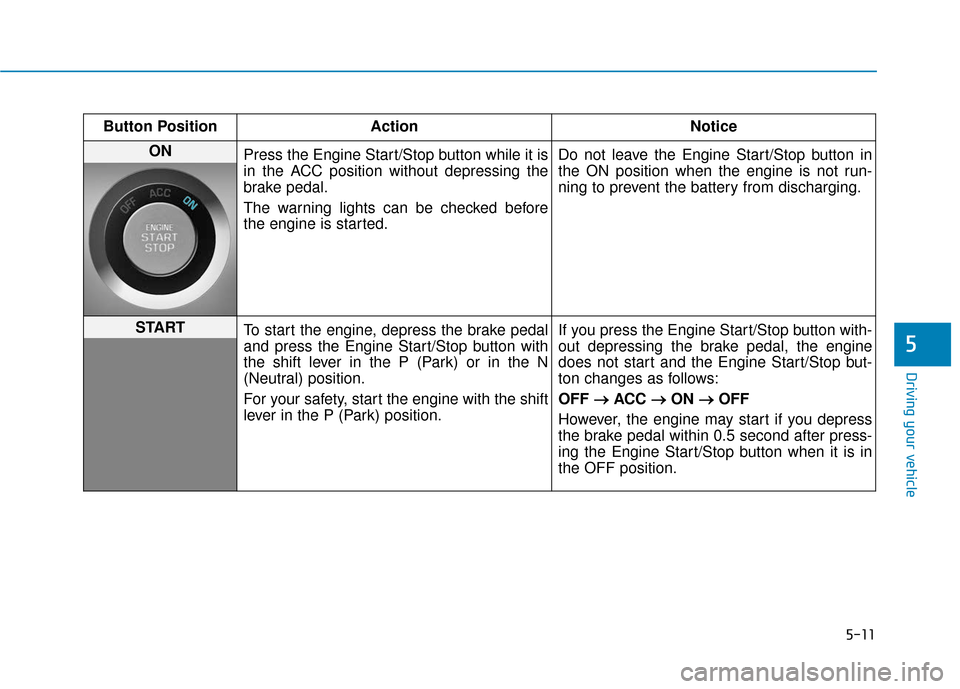
Button PositionAction Notice
ON
Press the Engine Start/Stop button while it is
in the ACC position without depressing the
brake pedal.
The warning lights can be checked before
the engine is started. Do not leave the Engine Start/Stop button in
the ON position when the engine is not run-
ning to prevent the battery from discharging.
START
To start the engine, depress the brake pedal
and press the Engine Start/Stop button with
the shift lever in the P (Park) or in the N
(Neutral) position.
For your safety, start the engine with the shift
lever in the P (Park) position. If you press the Engine Start/Stop button with-
out depressing the brake pedal, the engine
does not start and the Engine Start/Stop but-
ton changes as follows:
OFF
→ →
ACC →
→
ON →
→
OFF
However, the engine may start if you depress
the brake pedal within 0.5 second after press-
ing the Engine Start/Stop button when it is in
the OFF position.
Page 377 of 522
6-6
What to do in an emergency
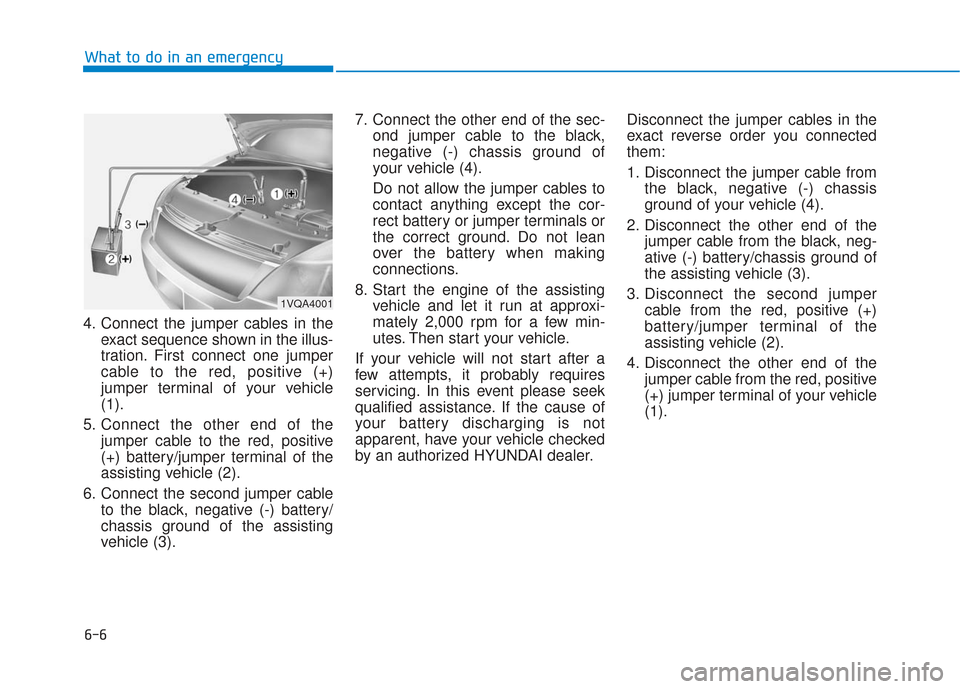
4. Connect the jumper cables in the exact sequence shown in the illus-
tration. First connect one jumper
cable to the red, positive (+)
jumper terminal of your vehicle
(1).
5. Connect the other end of the jumper cable to the red, positive
(+) battery/jumper terminal of the
assisting vehicle (2).
6. Connect the second jumper cable to the black, negative (-) battery/
chassis ground of the assisting
vehicle (3). 7. Connect the other end of the sec-
ond jumper cable to the black,
negative (-) chassis ground of
your vehicle (4).
Do not allow the jumper cables to
contact anything except the cor-
rect battery or jumper terminals or
the correct ground. Do not lean
over the battery when making
connections.
8. Start the engine of the assisting vehicle and let it run at approxi-
mately 2,000 rpm for a few min-
utes. Then start your vehicle.
If your vehicle will not start after a
few attempts, it probably requires
servicing. In this event please seek
qualified assistance. If the cause of
your battery discharging is not
apparent, have your vehicle checked
by an authorized HYUNDAI dealer. Disconnect the jumper cables in the
exact reverse order you connected
them:
1. Disconnect the jumper cable from
the black, negative (-) chassis
ground of your vehicle (4).
2. Disconnect the other end of the jumper cable from the black, neg-
ative (-) battery/chassis ground of
the assisting vehicle (3).
3. Disconnect the second jumper cable from the red, positive (+)
battery/jumper terminal of the
assisting vehicle (2).
4. Disconnect the other end of the jumper cable from the red, positive
(+) jumper terminal of your vehicle
(1).
1VQA4001
Page 412 of 522
7
Air Cleaner ............................................................7-31
Filter Replacement ..........................................................7-31
Climate Control Air Filter ....................................7-33
Filter Inspection ...............................................................7-33
Wiper Blades.........................................................7-35
Blade Inspection ..............................................................7-35
Blade Replacement .........................................................7-35
Battery...................................................................7-37
For Best Battery Service ..............................................7-38
Battery Recharging ........................................................7-38
Reset features .................................................................7-39
Tires and Wheels .................................................7-40
Tire Care ........................................................................\
....7-40
Recommended Cold Tire Inflation Pressures ...........7-41
Check Tire Inflation Pressure ......................................7-42
Tire Rotation...................................................................\
..7-43
Wheel Alignment and Tire Balance ............................7-44
Tire Replacement ............................................................7-44
Wheel Replacement ........................................................7-45
Tire Traction .....................................................................7-4\
5
Tire Maintenance ............................................................7-46
Tire Sidewall Labeling ....................................................7-46
Tire Terminology and Definitions................................7-50
All Season Tires ...............................................................7-53Summer Tires ...................................................................7-53
Snow Tires ........................................................................\
7-53
Radial-Ply Tires ...............................................................7-54
Low Aspect Ratio Tires..................................................7-54
Fuses ......................................................................7-\
56
Instrument Panel Fuse Replacement..........................7-57
Engine Compartment Panel Fuse Replacement.......7-58
Fuse/Relay Panel Description ......................................7-60
Light Bulbs ............................................................7-68
Headlamp, Parking Lamp, Turn Signal Lamp and
Side Marker Light Bulb Replacement ........................7-69
Side Repeater Lamp Replacement ..............................7-72
Rear Combination Light Bulb Replacement ..............7-72
High Mounted Stop Lamp .............................................7-74
License Plate Light Bulb Replacement ......................7-75
Interior Light Bulb Replacement .................................7-75
Appearance Care..................................................7-77
Exterior Care ....................................................................7-77\
Interior Care .....................................................................7-8\
2
Emission Control System ....................................7-85
Crankcase Emission Control System ..........................7-85
Evaporative Emission Control System Including
Onboard Refueling Vapor Recovery (ORVR)............7-85
Exhaust Emission Control System ..............................7-86
California Perchlorate Notice.............................7-89
Page 448 of 522
7-38
Maintenance
When you do not use the vehicle for a long time in a low tempera-
ture area, disconnect the battery
and keep it indoors.
Always charge the battery fully to prevent battery case damage
in low temperature areas.
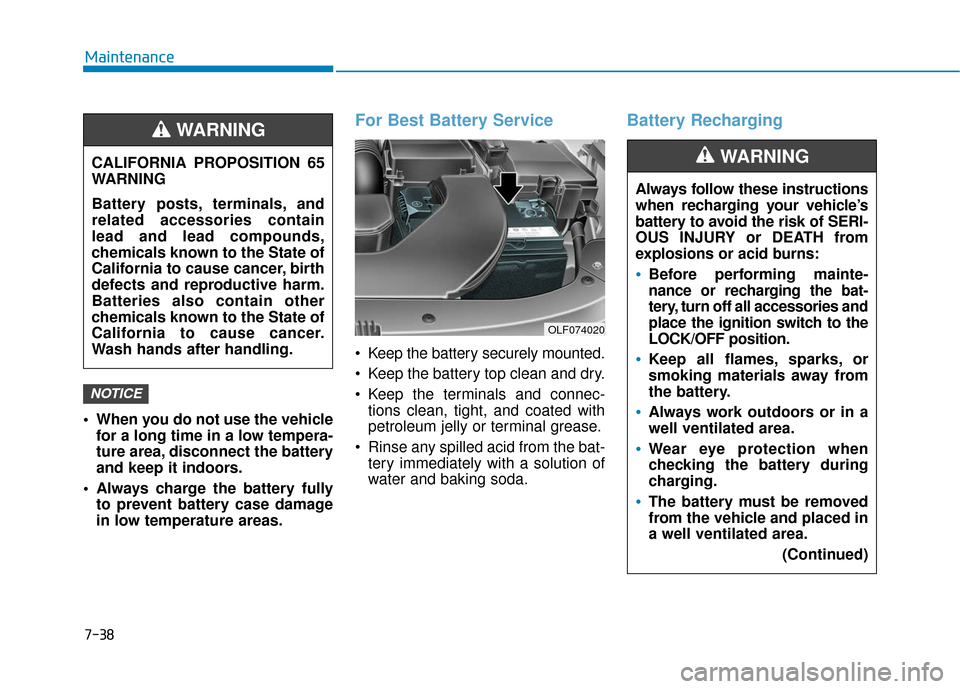
For Best Battery Service
Keep the battery securely mounted.
Keep the battery top clean and dry.
Keep the terminals and connec-tions clean, tight, and coated with
petroleum jelly or terminal grease.
Rinse any spilled acid from the bat- tery immediately with a solution of
water and baking soda.
Battery Recharging
NOTICE
CALIFORNIA PROPOSITION 65
WARNING
Battery posts, terminals, and
related accessories contain
lead and lead compounds,
chemicals known to the State of
California to cause cancer, birth
defects and reproductive harm.
Batteries also contain other
chemicals known to the State of
California to cause cancer.
Wash hands after handling.
WARNING
OLF074020
Always follow these instructions
when recharging your vehicle’s
battery to avoid the risk of SERI-
OUS INJURY or DEATH from
explosions or acid burns:
Before performing mainte-
nance or recharging the bat-
tery, turn off all accessories and
place the ignition switch to the
LOCK/OFF position.
Keep all flames, sparks, or
smoking materials away from
the battery.
Always work outdoors or in a
well ventilated area.
Wear eye protection when
checking the battery during
charging.
The battery must be removed
from the vehicle and placed in
a well ventilated area.
(Continued)
WARNING
Page 449 of 522
7-39
7
Maintenance
By jump starting
After a jump start from a good bat-
tery, idle the vehicle with the head-
lights turned ON for 20-30 minutes
before started driving. The vehicle
may not run properly if you drive it off
before the battery had a chance to
adequately recharge. See "Jump
Starting" in chapter 6 for more infor-
mation on jump starting procedures.
Information
An inappropriately disposedbattery can be harmful to
the environment and human
health.
Dispose the battery according to your
local law(s) or regulation.
Reset features
Some items need to be reset after
the battery has been discharged or
the battery has been disconnected.
See chapter 3 for:
Power Windows
Trip Computer
Climate Control System
Clock
Audio System
Sunroof
i
(Continued)
Watch the battery during
charging, and stop or reduce
the charging rate if the battery
cells begin boiling violently.
The negative battery cable
must be removed first and
installed last when the battery
is disconnected. Disconnect
the battery charger in the fol-
lowing order:
(1) Turn off the battery charger main switch.
(2) Unhook the negative
clamp from the negative
battery terminal.
(3) Unhook the positive clamp from the positive battery
terminal.
Always use a genuine HYUNDAI
approved battery when you
replace the battery.
Page 514 of 522
I-2
Accessing your vehicle .....................................................3-4Immobilizer System ...................................................3-12
Remote Key ..................................................................3-4
Smart Key.....................................................................3-8\
Air Bag - Advanced Supplemental Restraint System.....2-45 Additional Safety Precautions ....................................2-67
Air Bag Warning Labels.............................................2-68
How Does the Air Bag System Operate? ...................2-51
Occupant Classification System (OCS) .....................2-56
SRS Care ....................................................................2-66\
What to Expect After an Air Bag Inflates ..................2-55
Where Are the Air Bags? ...........................................2-47
Why Didn't My Air Bag Go Off in a Collision? (Air bags are not designed to inflate in
every collision.).......................................................2-61
Air Cleaner......................................................................7-\
31 Filter Replacement .....................................................7-31
Air Conditioning System ..................................................8-6
Appearance Care .............................................................7-77 Exterior Care ..............................................................7-77
Interior Care ...............................................................7-82
Automatic climate control system ................................3-132 Automatic Heating and Air Conditioning ................3-133
Manual heating and Air Conditioning......................3-134
System Maintenance ................................................3-142
System Operation .....................................................3-140 Automatic emergency braking (AEB) ............................5-97
AEB warning message and system control................5-99
Limitation of the system ..........................................5-105
Sensor to detect the distance from the vehicle in front (front radar) ..............................................5-102
System malfunction ..................................................5-103
System setting and activation .....................................5-97
Battery ........................................................................\
.....7-37 Battery Recharging .....................................................7-38
For Best Battery Service ............................................7-38
Reset features .............................................................7-39
Before Driving ..................................................................5-4 Before Entering the Vehicle .........................................5-4
Before Starting .............................................................5-4
Blind Spot Detection System (BSD) ..............................5-89 BSD (Blind Spot Detection) / LCA (Lane Change Assist) .....................................5-90
RCTA (Rear Cross Traffic Alert) ...............................5-93
Brake Fluid .....................................................................7-2\
9 Checking the Brake Fluid Level ................................7-29
Index
A
B
Page 517 of 522
I-5
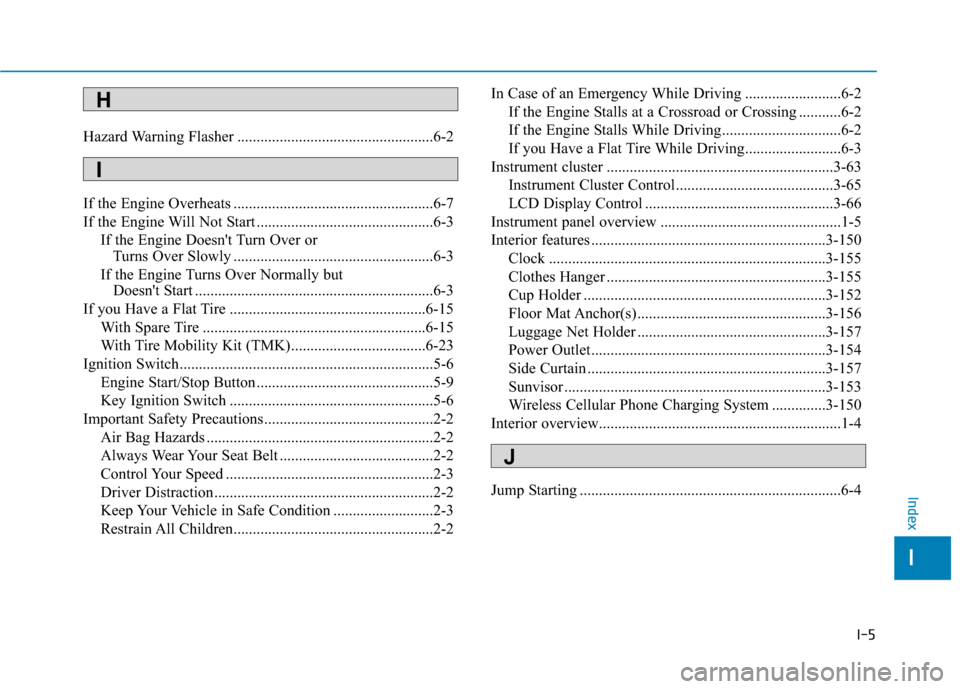
Hazard Warning Flasher ...................................................6-2
If the Engine Overheats ....................................................6-7
If the Engine Will Not Start ..............................................6-3If the Engine Doesn't Turn Over or Turns Over Slowly ....................................................6-3
If the Engine Turns Over Normally but Doesn't Start ..............................................................6-3
If you Have a Flat Tire ...................................................6-15 With Spare Tire ..........................................................6-15
With Tire Mobility Kit (TMK)...................................6-23
Ignition Switch..................................................................5-6 Engine Start/Stop Button ..............................................5-9
Key Ignition Switch .....................................................5-6
Important Safety Precautions............................................2-2 Air Bag Hazards ...........................................................2-2
Always Wear Your Seat Belt ........................................2-2
Control Your Speed ......................................................2-3
Driver Distraction.........................................................2-2
Keep Your Vehicle in Safe Condition ..........................2-3
Restrain All Children....................................................2-2 In Case of an Emergency While Driving .........................6-2
If the Engine Stalls at a Crossroad or Crossing ...........6-2
If the Engine Stalls While Driving...............................6-2
If you Have a Flat Tire While Driving.........................6-3
Instrument cluster ...........................................................3-63 Instrument Cluster Control .........................................3-65
LCD Display Control .................................................3-66
Instrument panel overview ...............................................1-5
Interior features .............................................................3-150 Clock ........................................................................\
3-155
Clothes Hanger .........................................................3-155
Cup Holder ...............................................................3-152
Floor Mat Anchor(s) .................................................3-156
Luggage Net Holder .................................................3-157
Power Outlet.............................................................3-154
Side Curtain ..............................................................3-157
Sunvisor ....................................................................3-15\
3
Wireless Cellular Phone Charging System ..............3-150
Interior overview...............................................................1-4
Jump Starting ....................................................................6-4
I
Index
H
I
J