climate control Hyundai Sonata 2019 Owner's Guide
[x] Cancel search | Manufacturer: HYUNDAI, Model Year: 2019, Model line: Sonata, Model: Hyundai Sonata 2019Pages: 522, PDF Size: 15.66 MB
Page 424 of 522
Maintenance
7-14
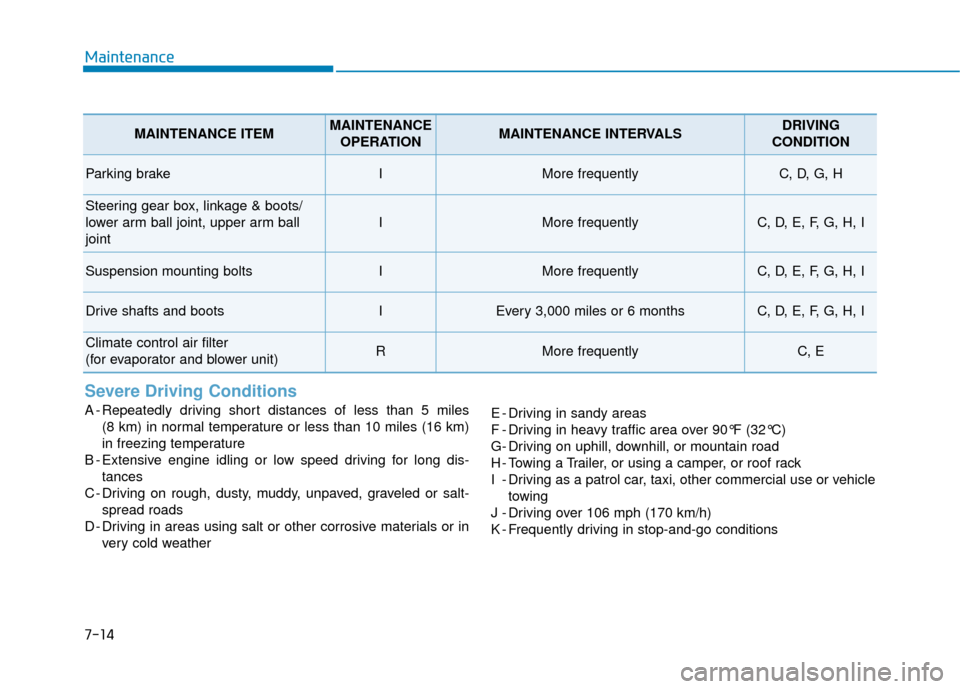
Severe Driving Conditions
A - Repeatedly driving short distances of less than 5 miles (8 km) in normal temperature or less than 10 miles (16 km)
in freezing temperature
B - Extensive engine idling or low speed driving for long dis- tances
C - Driving on rough, dusty, muddy, unpaved, graveled or salt- spread roads
D - Driving in areas using salt or other corrosive materials or in very cold weather E - Driving in sandy areas
F - Driving in heavy traffic area over 90°F (32°C)
G- Driving on uphill, downhill, or mountain road
H - Towing a Trailer, or using a camper, or roof rack
I - Driving as a patrol car, taxi, other commercial use or vehicle
towing
J - Driving over 106 mph (170 km/h)
K - Frequently driving in stop-and-go conditions
MAINTENANCE ITEMMAINTENANCE OPERATIONMAINTENANCE INTERVALSDRIVING
CONDITION
Parking brakeIMore frequentlyC, D, G, H
Steering gear box, linkage & boots/
lower arm ball joint, upper arm ball
joint
IMore frequentlyC, D, E, F, G, H, I
Suspension mounting boltsIMore frequentlyC, D, E, F, G, H, I
Drive shafts and bootsIEvery 3,000 miles or 6 monthsC, D, E, F, G, H, I
Climate control air filter
(for evaporator and blower unit)RMore frequentlyC, E
Page 425 of 522
7
Maintenance
7-15
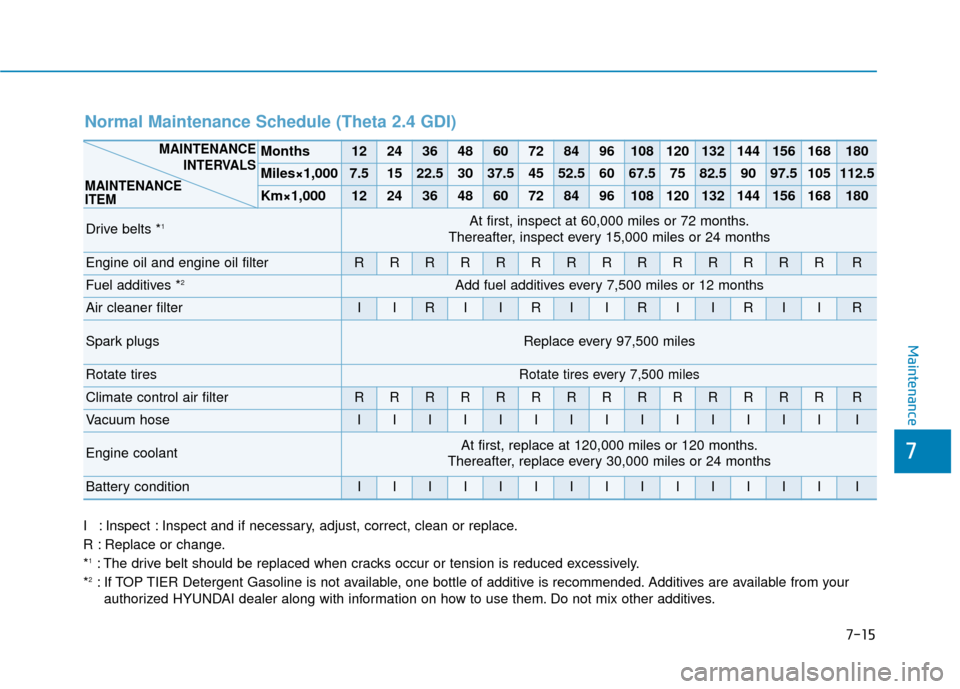
I : Inspect : Inspect and if necessary, adjust, correct, clean or replace.
R : Replace or change.
*
1: The drive belt should be replaced when cracks occur or tension is reduced excessively.
*2: If TOP TIER Detergent Gasoline is not available, one bottle of additive is recommended. Additives are available from your authorized HYUNDAI dealer along with information on how to use them. Do not mix other additives.
Normal Maintenance Schedule (Theta 2.4 GDI)
Months1224364860728496108120132144156168180
Miles×1,0007.51522.53037.54552.56067.57582.59097.5105112.5
Km×1,0001224364860728496108120132144156168180
Drive belts *1At first, inspect at 60,000 miles or 72 months.
Thereafter, inspect every 15,000 miles or 24 months
Engine oil and engine oil filterRRRRRRRRRRRRRRR
Fuel additives *2Add fuel additives every 7,500 miles or 12 months
Air cleaner filterIIRIIRIIRIIRIIR
Spark plugsReplace every 97,500 miles
Rotate tiresRotate tires every 7,500 miles
Climate control air filterRRRRRRRRRRRRRRR
Vacuum hoseIIIIIIIIIIIIIII
Engine coolantAt first, replace at 120,000 miles or 120 months.
Thereafter, replace every 30,000 miles or 24 months
Battery conditionIIIIIIIIIIIIIII
MAINTENANCE
INTERVALS
MAINTENANCE
ITEM
Page 429 of 522
7
Maintenance
7-19
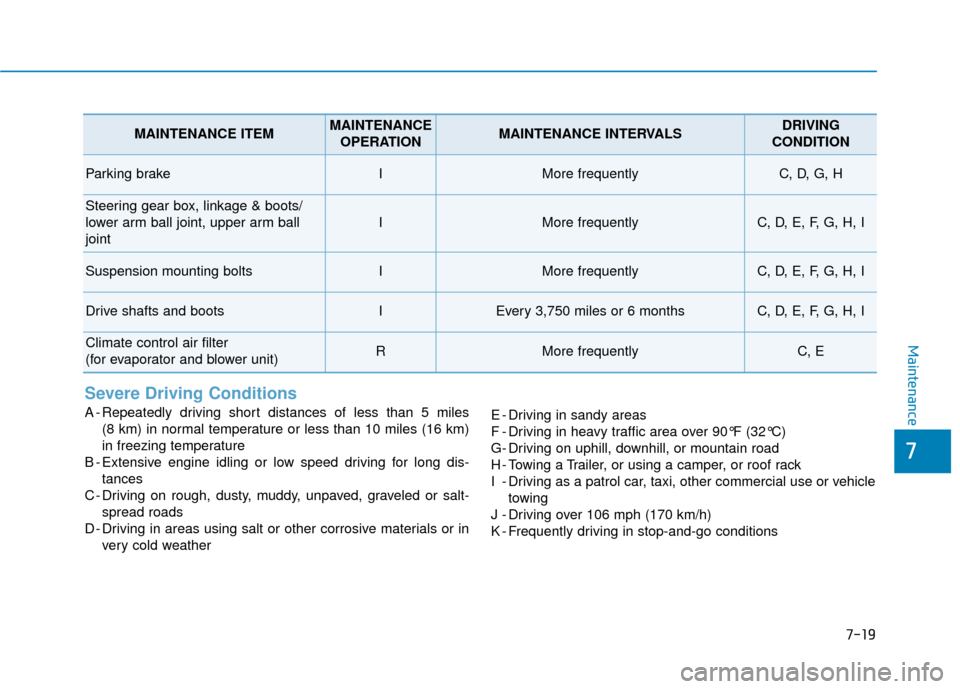
Severe Driving Conditions
A - Repeatedly driving short distances of less than 5 miles (8 km) in normal temperature or less than 10 miles (16 km)
in freezing temperature
B - Extensive engine idling or low speed driving for long dis- tances
C - Driving on rough, dusty, muddy, unpaved, graveled or salt- spread roads
D - Driving in areas using salt or other corrosive materials or in very cold weather E - Driving in sandy areas
F - Driving in heavy traffic area over 90°F (32°C)
G- Driving on uphill, downhill, or mountain road
H - Towing a Trailer, or using a camper, or roof rack
I - Driving as a patrol car, taxi, other commercial use or vehicle
towing
J - Driving over 106 mph (170 km/h)
K - Frequently driving in stop-and-go conditions
MAINTENANCE ITEMMAINTENANCE OPERATIONMAINTENANCE INTERVALSDRIVING
CONDITION
Parking brakeIMore frequentlyC, D, G, H
Steering gear box, linkage & boots/
lower arm ball joint, upper arm ball
joint
IMore frequentlyC, D, E, F, G, H, I
Suspension mounting boltsIMore frequentlyC, D, E, F, G, H, I
Drive shafts and bootsIEvery 3,750 miles or 6 monthsC, D, E, F, G, H, I
Climate control air filter
(for evaporator and blower unit)RMore frequentlyC, E
Page 443 of 522
7-33
7
Maintenance
C
CL
LI
IM
M A
AT
TE
E
C
C O
O N
NT
TR
R O
O L
L
A
A I
IR
R
F
F I
IL
L T
T E
ER
R
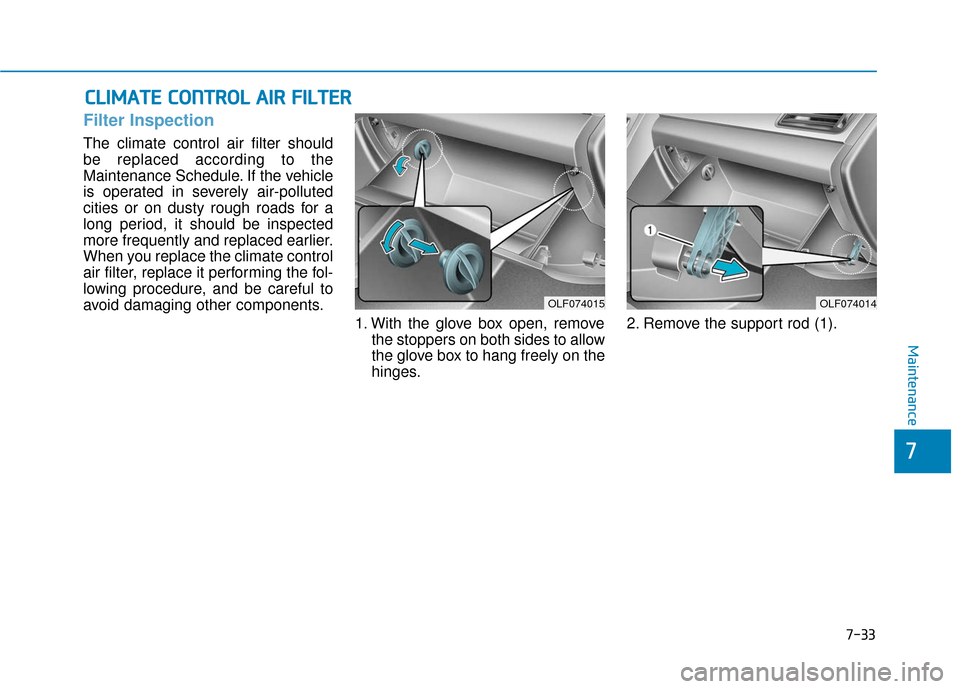
Filter Inspection
The climate control air filter should
be replaced according to the
Maintenance Schedule. If the vehicle
is operated in severely air-polluted
cities or on dusty rough roads for a
long period, it should be inspected
more frequently and replaced earlier.
When you replace the climate control
air filter, replace it performing the fol-
lowing procedure, and be careful to
avoid damaging other components.
1. With the glove box open, removethe stoppers on both sides to allow
the glove box to hang freely on the
hinges. 2. Remove the support rod (1).
OLF074015OLF074014
Page 444 of 522
7-34
Maintenance
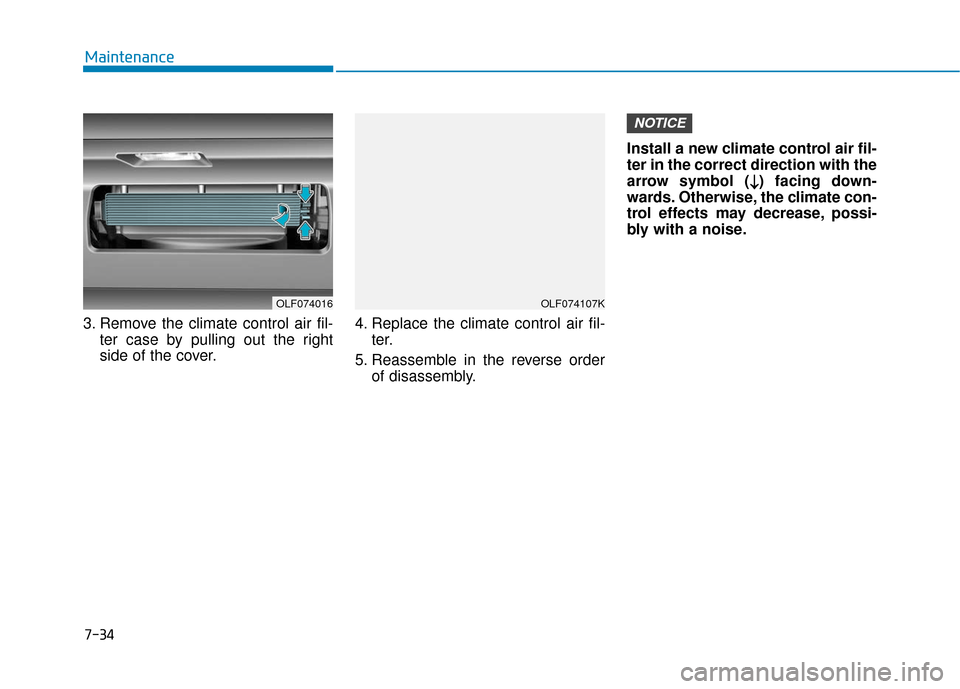
3. Remove the climate control air fil- ter case by pulling out the right
side of the cover. 4. Replace the climate control air fil-
ter.
5. Reassemble in the reverse order of disassembly. Install a new climate control air fil-
ter in the correct direction with the
arrow symbol (
↓ ↓) facing down-
wards. Otherwise, the climate con-
trol effects may decrease, possi-
bly with a noise.
NOTICE
OLF074107KOLF074016
Page 449 of 522
7-39
7
Maintenance
By jump starting
After a jump start from a good bat-
tery, idle the vehicle with the head-
lights turned ON for 20-30 minutes
before started driving. The vehicle
may not run properly if you drive it off
before the battery had a chance to
adequately recharge. See "Jump
Starting" in chapter 6 for more infor-
mation on jump starting procedures.
Information
An inappropriately disposedbattery can be harmful to
the environment and human
health.
Dispose the battery according to your
local law(s) or regulation.
Reset features
Some items need to be reset after
the battery has been discharged or
the battery has been disconnected.
See chapter 3 for:
Power Windows
Trip Computer
Climate Control System
Clock
Audio System
Sunroof
i
(Continued)
Watch the battery during
charging, and stop or reduce
the charging rate if the battery
cells begin boiling violently.
The negative battery cable
must be removed first and
installed last when the battery
is disconnected. Disconnect
the battery charger in the fol-
lowing order:
(1) Turn off the battery charger main switch.
(2) Unhook the negative
clamp from the negative
battery terminal.
(3) Unhook the positive clamp from the positive battery
terminal.
Always use a genuine HYUNDAI
approved battery when you
replace the battery.
Page 455 of 522
7-45
7
Maintenance
Compact spare tire replacement
A compact spare tire has a shorter
tread life than a regular size tire.
Replace it when you can see the
tread wear indicator bars on the tire.
The replacement compact spare tire
should be the same size and design
tire as the one provided with your
new vehicle and should be mounted
on the same compact spare tire
wheel. The compact spare tire is not
designed to be mounted on a regular
size wheel, and the compact spare
tire wheel is not designed for mount-
ing a regular size tire.
Wheel Replacement
When replacing the metal wheels for
any reason, make sure the new
wheels are equivalent to the original
factory units in diameter, rim width
and offset.
Tire Traction
Tire traction can be reduced if you
drive on worn tires, tires that are
improperly inflated or on slippery
road surfaces. Tires should be
replaced when tread wear indicators
appear. To reduce the possibility of
losing control, slow down whenever
there is rain, snow or ice on the road.
(Continued)
When replacing tires (or
wheels), it is recommended to
replace the two front or two
rear tires (or wheels) as a pair.
Replacing just one tire can
seriously affect your vehicle's
handling.
Tires degrade over time, even
when they are not being used.
Regardless of the remaining
tread, HYUNDAI recommends
that tires be replaced after six
(6) years of normal service.
Heat caused by hot climates or
frequent high loading condi-
tions can accelerate the aging
process. Failure to follow this
warning may cause sudden
tire failure, which could lead to
a loss of vehicle control result-
ing in an accident.
The original tire should be
repaired or replaced as soon as
possible to avoid failure of the
spare and loss of vehicle con-
trol resulting in an accident. The
compact spare tire is for emer-
gency use only. Do not operate
your vehicle over 50 mph (80
km/h) when using the compact
spare tire.
WARNING
Page 458 of 522
7-48
Maintenance
4. Tire ply composition andmaterial
The number of layers or plies of rub-
ber-coated fabric in the tire. Tire
manufacturers also must indicate the
materials in the tire, which include
steel, nylon, polyester, and others.
The letter "R" means radial ply con-
struction; the letter "D" means diago-
nal or bias ply construction; and the
letter "B" means belted-bias ply con-
struction.
5. Maximum permissible infla-tion pressure
This number is the greatest amount
of air pressure that should be put in
the tire. Do not exceed the maximum
permissible inflation pressure. Refer
to the Tire and Loading Information
label for recommended inflation
pressure.
6. Maximum load rating
This number indicates the maximum
load in kilograms and pounds that
can be carried by the tire. When
replacing the tires on the vehicle,
always use a tire that has the same
load rating as the factory installed
tire.
7. Uniform tire quality grading
Quality grades can be found where
applicable on the tire sidewall
between tread shoulder and maxi-
mum section width.
For example:
TREAD wear 200
TRACTION AA
TEMPERATURE A
Tread wear
The tread wear grade is a compara-
tive rating based on the wear rate of
the tire when tested under controlled
conditions on a specified govern-
ment test course. For example, a tire
graded 150 would wear one-and-a-
half times (1½) as well on the gov-
ernment course as a tire graded 100.
The relative performance of tires
depends upon the actual conditions
of their use, however, and may
depart significantly from the norm
due to variations in driving habits,
service practices and differences in
road characteristics and climate.
These grades are molded on the
sidewalls of passenger vehicle tires.
The tires available as standard or
optional equipment on your vehicle
may vary with respect to grade.
Page 514 of 522
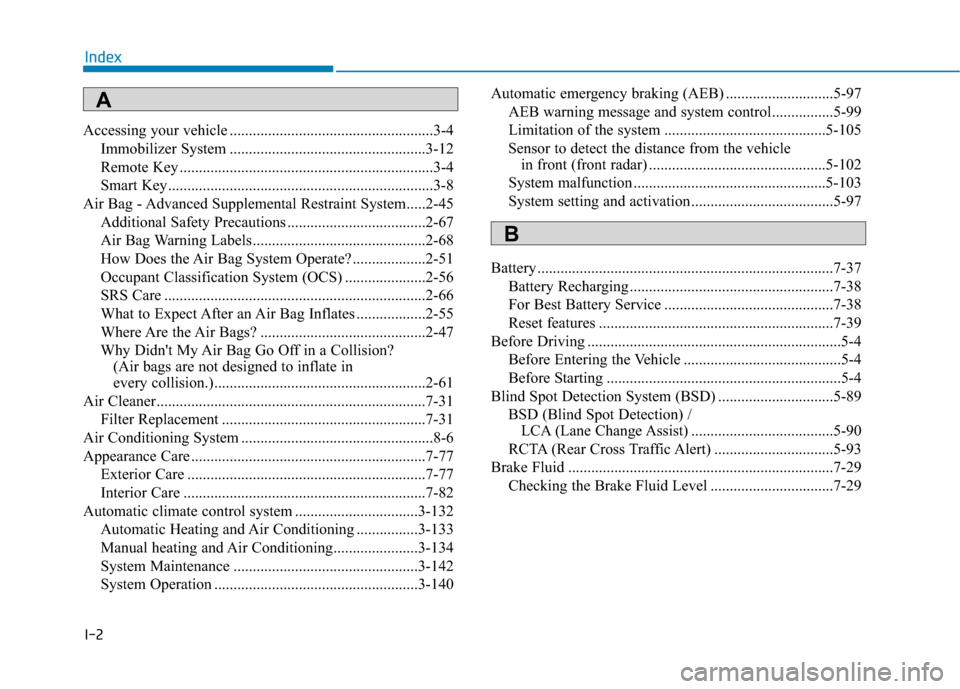
I-2
Accessing your vehicle .....................................................3-4Immobilizer System ...................................................3-12
Remote Key ..................................................................3-4
Smart Key.....................................................................3-8\
Air Bag - Advanced Supplemental Restraint System.....2-45 Additional Safety Precautions ....................................2-67
Air Bag Warning Labels.............................................2-68
How Does the Air Bag System Operate? ...................2-51
Occupant Classification System (OCS) .....................2-56
SRS Care ....................................................................2-66\
What to Expect After an Air Bag Inflates ..................2-55
Where Are the Air Bags? ...........................................2-47
Why Didn't My Air Bag Go Off in a Collision? (Air bags are not designed to inflate in
every collision.).......................................................2-61
Air Cleaner......................................................................7-\
31 Filter Replacement .....................................................7-31
Air Conditioning System ..................................................8-6
Appearance Care .............................................................7-77 Exterior Care ..............................................................7-77
Interior Care ...............................................................7-82
Automatic climate control system ................................3-132 Automatic Heating and Air Conditioning ................3-133
Manual heating and Air Conditioning......................3-134
System Maintenance ................................................3-142
System Operation .....................................................3-140 Automatic emergency braking (AEB) ............................5-97
AEB warning message and system control................5-99
Limitation of the system ..........................................5-105
Sensor to detect the distance from the vehicle in front (front radar) ..............................................5-102
System malfunction ..................................................5-103
System setting and activation .....................................5-97
Battery ........................................................................\
.....7-37 Battery Recharging .....................................................7-38
For Best Battery Service ............................................7-38
Reset features .............................................................7-39
Before Driving ..................................................................5-4 Before Entering the Vehicle .........................................5-4
Before Starting .............................................................5-4
Blind Spot Detection System (BSD) ..............................5-89 BSD (Blind Spot Detection) / LCA (Lane Change Assist) .....................................5-90
RCTA (Rear Cross Traffic Alert) ...............................5-93
Brake Fluid .....................................................................7-2\
9 Checking the Brake Fluid Level ................................7-29
Index
A
B
Page 515 of 522
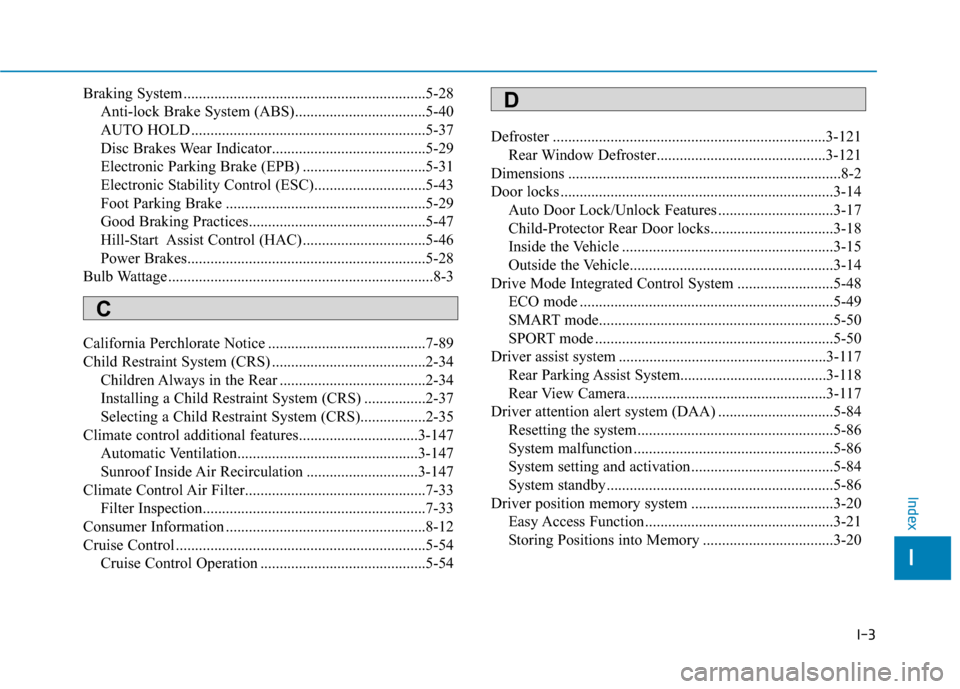
I-3
Braking System ...............................................................5-28Anti-lock Brake System (ABS)..................................5-40
AUTO HOLD .............................................................5-37
Disc Brakes Wear Indicator........................................5-29
Electronic Parking Brake (EPB) ................................5-31
Electronic Stability Control (ESC).............................5-43
Foot Parking Brake ....................................................5-29
Good Braking Practices..............................................5-47
Hill-Start Assist Control (HAC)................................5-46
Power Brakes..............................................................5-28
Bulb Wattage .....................................................................8-3\
California Perchlorate Notice .........................................7-89
Child Restraint System (CRS) ........................................2-34 Children Always in the Rear ......................................2-34
Installing a Child Restraint System (CRS) ................2-37
Selecting a Child Restraint System (CRS).................2-35
Climate control additional features...............................3-147 Automatic Ventilation...............................................3-147
Sunroof Inside Air Recirculation .............................3-147
Climate Control Air Filter...............................................7-33 Filter Inspection..........................................................7-33
Consumer Information ....................................................8-12
Cruise Control .................................................................5-54 Cruise Control Operation ...........................................5-54 Defroster .......................................................................3\
-121
Rear Window Defroster............................................3-121
Dimensions .......................................................................8\
-2
Door locks .......................................................................3\
-14 Auto Door Lock/Unlock Features ..............................3-17
Child-Protector Rear Door locks................................3-18
Inside the Vehicle .......................................................3-15
Outside the Vehicle.....................................................3-14
Drive Mode Integrated Control System .........................5-48 ECO mode ..................................................................5-49
SMART mode.............................................................5-50
SPORT mode ..............................................................5-50
Driver assist system ......................................................3-117 Rear Parking Assist System......................................3-118
Rear View Camera....................................................3-117
Driver attention alert system (DAA) ..............................5-84 Resetting the system ...................................................5-86
System malfunction ....................................................5-86
System setting and activation .....................................5-84
System standby...........................................................5-86
Driver position memory system .....................................3-20 Easy Access Function .................................................3-21
Storing Positions into Memory ..................................3-20
I
Index
C
D