key Hyundai Sonata 2019 Owner's Guide
[x] Cancel search | Manufacturer: HYUNDAI, Model Year: 2019, Model line: Sonata, Model: Hyundai Sonata 2019Pages: 522, PDF Size: 15.66 MB
Page 141 of 522
3-56
Convenient features of your vehicle
Inside the vehicle
When you can not unlock the trunk
due to battery discharge or other
reasons, you can unlock the trunk
inside the vehicle.
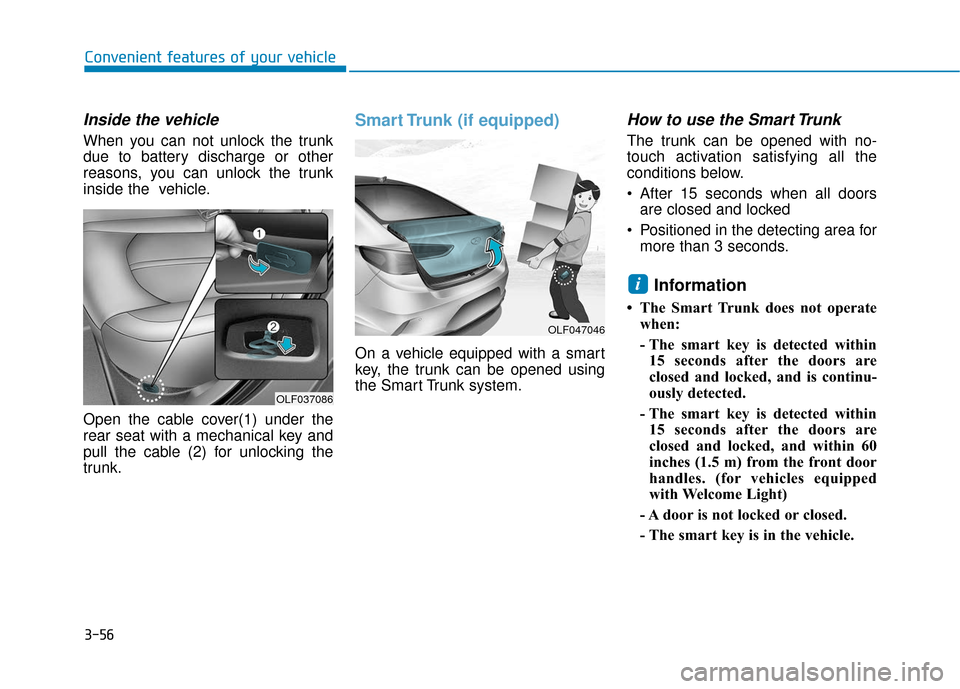
Open the cable cover(1) under the
rear seat with a mechanical key and
pull the cable (2) for unlocking the
trunk.
Smart Trunk (if equipped)
On a vehicle equipped with a smart
key, the trunk can be opened using
the Smart Trunk system.
How to use the Smart Trunk
The trunk can be opened with no-
touch activation satisfying all the
conditions below.
After 15 seconds when all doorsare closed and locked
Positioned in the detecting area for more than 3 seconds.
Information
• The Smart Trunk does not operatewhen:
- The smart key is detected within15 seconds after the doors are
closed and locked, and is continu-
ously detected.
- The smart key is detected within 15 seconds after the doors are
closed and locked, and within 60
inches (1.5 m) from the front door
handles. (for vehicles equipped
with Welcome Light)
- A door is not locked or closed.
- The smart key is in the vehicle.
i
OLF047046
OLF037086
Page 142 of 522
3-57
Convenient features of your vehicle
3
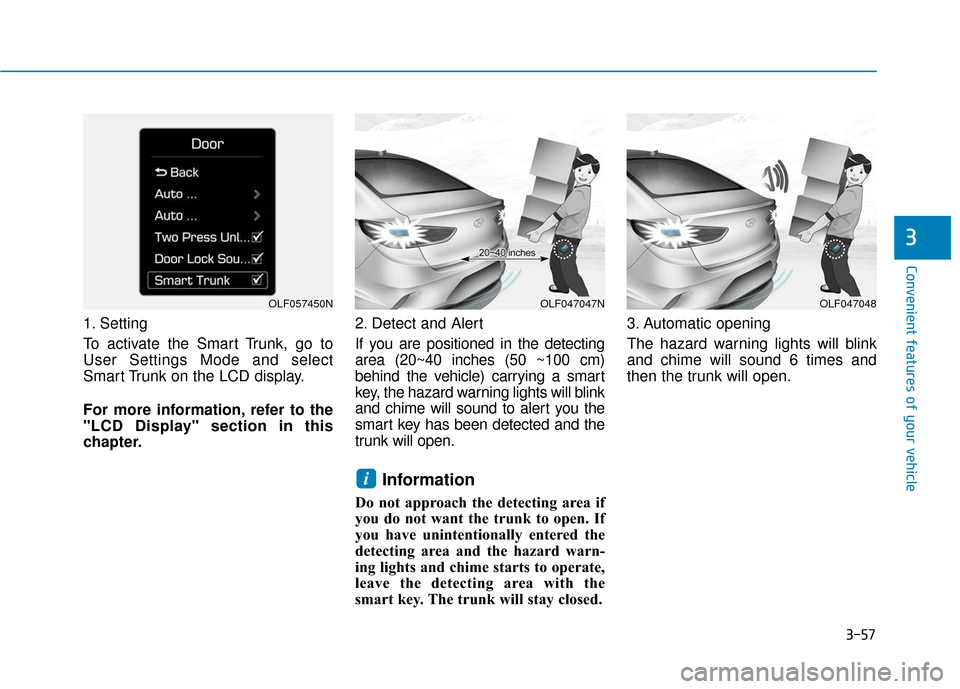
1. Setting
To activate the Smart Trunk, go to
User Settings Mode and select
Smart Trunk on the LCD display.
For more information, refer to the
"LCD Display" section in this
chapter.2. Detect and Alert
If you are positioned in the detecting
area (20~40 inches (50 ~100 cm)
behind the vehicle) carrying a smart
key, the hazard warning lights will blink
and chime will sound to alert you the
smart key has been detected and the
trunk will open.
Information
Do not approach the detecting area if
you do not want the trunk to open. If
you have unintentionally entered the
detecting area and the hazard warn-
ing lights and chime starts to operate,
leave the detecting area with the
smart key. The trunk will stay closed.3. Automatic opening
The hazard warning lights will blink
and chime will sound 6 times and
then the trunk will open.
i
OLF057450NOLF047047NOLF047048
Page 143 of 522
3-58
Convenient features of your vehicle
How to deactivate the SmartTrunk function using the smartkey
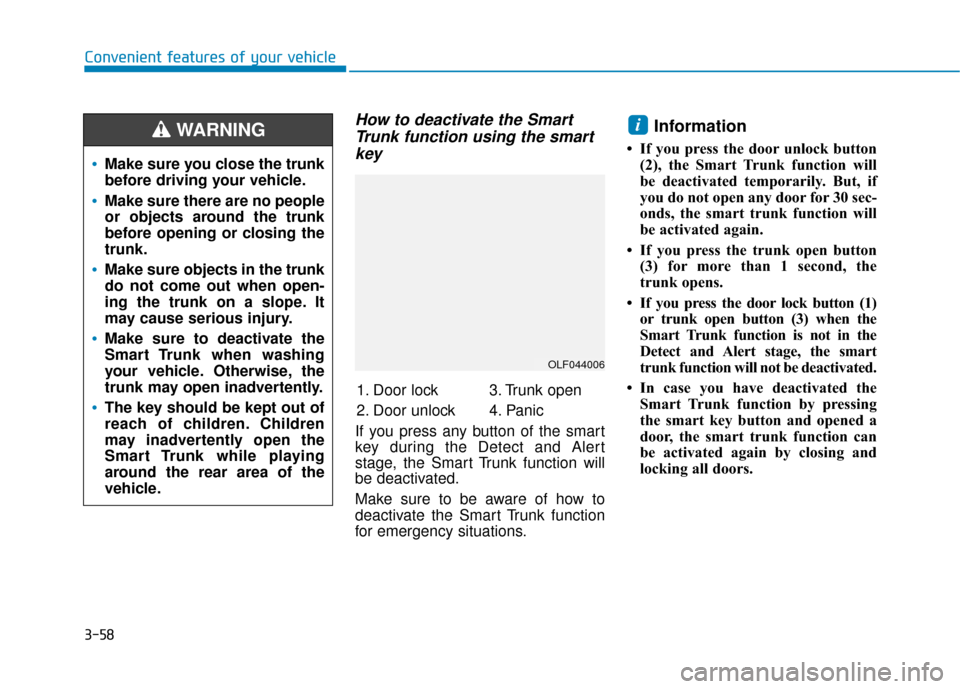
If you press any button of the smart
key during the Detect and Alert
stage, the Smart Trunk function will
be deactivated.
Make sure to be aware of how to
deactivate the Smart Trunk function
for emergency situations.
Information
• If you press the door unlock button
(2), the Smart Trunk function will
be deactivated temporarily. But, if
you do not open any door for 30 sec-
onds, the smart trunk function will
be activated again.
• If you press the trunk open button (3) for more than 1 second, the
trunk opens.
• If you press the door lock button (1) or trunk open button (3) when the
Smart Trunk function is not in the
Detect and Alert stage, the smart
trunk function will not be deactivated.
• In case you have deactivated the Smart Trunk function by pressing
the smart key button and opened a
door, the smart trunk function can
be activated again by closing and
locking all doors.
i
OLF044006
1. Door lock
2. Door unlock 3. Trunk open
4. Panic
Make sure you close the trunk
before driving your vehicle.
Make sure there are no people
or objects around the trunk
before opening or closing the
trunk.
Make sure objects in the trunk
do not come out when open-
ing the trunk on a slope. It
may cause serious injury.
Make sure to deactivate the
Smart Trunk when washing
your vehicle. Otherwise, the
trunk may open inadvertently.
The key should be kept out of
reach of children. Children
may inadvertently open the
Smart Trunk while playing
around the rear area of the
vehicle.
WARNING
Page 144 of 522
3-59
Convenient features of your vehicle
3
Detecting area
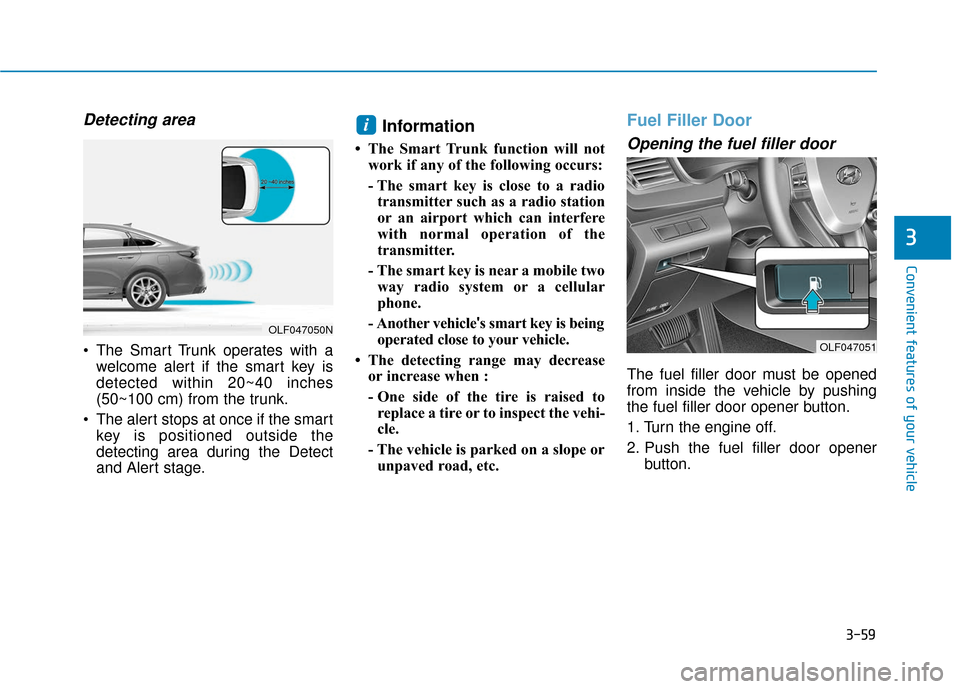
The Smart Trunk operates with awelcome alert if the smart key is
detected within 20~40 inches
(50~100 cm) from the trunk.
The alert stops at once if the smart key is positioned outside the
detecting area during the Detect
and Alert stage.
Information
• The Smart Trunk function will notwork if any of the following occurs:
- The smart key is close to a radiotransmitter such as a radio station
or an airport which can interfere
with normal operation of the
transmitter.
- The smart key is near a mobile two way radio system or a cellular
phone.
- Another vehicle 's smart key is being
operated close to your vehicle.
• The detecting range may decrease or increase when :
- One side of the tire is raised toreplace a tire or to inspect the vehi-
cle.
- The vehicle is parked on a slope or unpaved road, etc.
Fuel Filler Door
Opening the fuel filler door
The fuel filler door must be opened
from inside the vehicle by pushing
the fuel filler door opener button.
1. Turn the engine off.
2. Push the fuel filler door opener button.
i
OLF047050N
OLF047051
Page 162 of 522
3-77
Convenient features of your vehicle
Automatic Unlock
- Disable: The auto door unlockoperation will be canceled.
- Vehicle Off: All doors will be auto- matically unlocked when the
Engine Star/Stop button is set to
the OFF position. (if equipped with
smart key)
- On Key Out: All doors will be auto- matically unlocked when the igni-
tion key is removed from the igni-
tion switch. (if equipped with
remote key)
- Driver Door Unlock: All doors will be automatically unlocked when
the driver’s door is opened.
- On Shift to P: All doors will be auto- matically unlocked if the automatic
transmission shift lever is shifted to
the P (Park) position.
Smart Trunk
To activate or deactivate the Smart
Trunk system.
For more details, refer to "Smart
Trunk" in this chapter. 3. Lights
One Touch Turn Signal
- Off: The one touch turn signal func-
tion will be deactivated.
- 3, 5, 7 Flashes: The turn signal indicator will blink 3, 5, or 7 times
when the turn signal lever is moved
slightly.
For more information, refer to
"Light" in this chapter.
Head Lamp Delay
To activate or deactivate the head-
lamp delay function.
For more information, refer to
"Light" in this chapter
Welcome Light
To activate or deactivate the wel-
come light function.
For more information, refer to
"Light" in this chapter. 4. Sound
Park Assist Volume
- Softer/Louder
To adjust the Park Assist System
volume.
Welcome Sound
To activate or deactivate the wel-
come sound.
3
Page 165 of 522
3-80
Warning messages
(if equipped)
Shift to P(for smart key system and auto-matic transaxle)
This warning message illuminates
if you try to turn off the engine with-
out the shift lever in P (Park) posi-
tion.
At this time, the Engine Start/Stop button turns to the ACC position (If
you press the Engine Start/Stop
button once more, it will turn to the
ON position).
Low Key Battery (for smart key system)
This warning message illuminates
if the battery of the smart key is
discharged when the Engine
Start/Stop button changes to the
OFF position.
Press START button while turning wheel (for smart key system)
This warning message illuminates
if the steering wheel does not
unlock normally when the Engine
Start/Stop button is pressed.
It means that you should press the Engine Start/Stop button while
turning the steering wheel right
and left.
Steering wheel not locked (for smart key system)
This warning message illuminates
if the steering wheel does not lock
when the Engine Start/Stop button
changes to the OFF position.
Check steering wheel lock system (for smart key system)
This warning message illuminates
if the steering wheel does not lock
normally when the Engine Start/
Stop button changes to the OFF
position.
Press brake pedal to startengine (for smart key systemand automatic transaxle)
This warning message illuminates
if the Engine Start/Stop button
changes to the ACC position twice
by pressing the button repeatedly
without depressing the brake
pedal.
It means that you should depress the brake pedal to start the engine.
Key not in vehicle(for smart key system)
This warning message illuminates
if the smart key is not in the vehicle
when you press the Engine Start/
Stop button.
It means that you always have the smart key with you.
Key not detected (for smart key system)
This warning message illuminates
if the smart key is not detected
when you press the Engine Start/
Stop button.
Convenient features of your vehicle
Page 166 of 522
3-81
Convenient features of your vehicle
Press START button again (for smart key system)
This warning message illuminates
if you can not operate the Engine
Start/Stop button when there is a
problem with the Engine Start/Stop
button system.
It means that you could start the engine by pressing the Engine
Start/Stop button once more.
If the warning illuminates each time you press the Engine Start/
Stop button, we recommend that
you have the vehicle inspected by
an authorized HYUNDAI dealer.
Press START button with key(for smart key system)
This warning message illuminates
if you press the Engine Start/Stop
button while the warning message
"Key not detected" is illuminating.
At this time, the immobilizer indica- tor light blinks.
Check BRAKE SWITCH fuse (for smart key system and auto-matic transaxle)
This warning message illuminates
if the brake switch fuse is discon-
nected.
It means that you should replace the fuse with a new one. If that is
not possible, you can start the
engine by pressing the Engine
Start/Stop button for 10 seconds in
the ACC position.
Shift to P or N to start engine(for smart key system and auto-matic transaxle)
This warning message illuminates
if you try to start the engine with
the shift lever not in the P (Park) or
N (Neutral) position.
Information
You can start the engine with the shift
lever in the N (Neutral) position. But,
for your safety, we recommend that
you start the engine with the shift
lever in the P (Park) position.
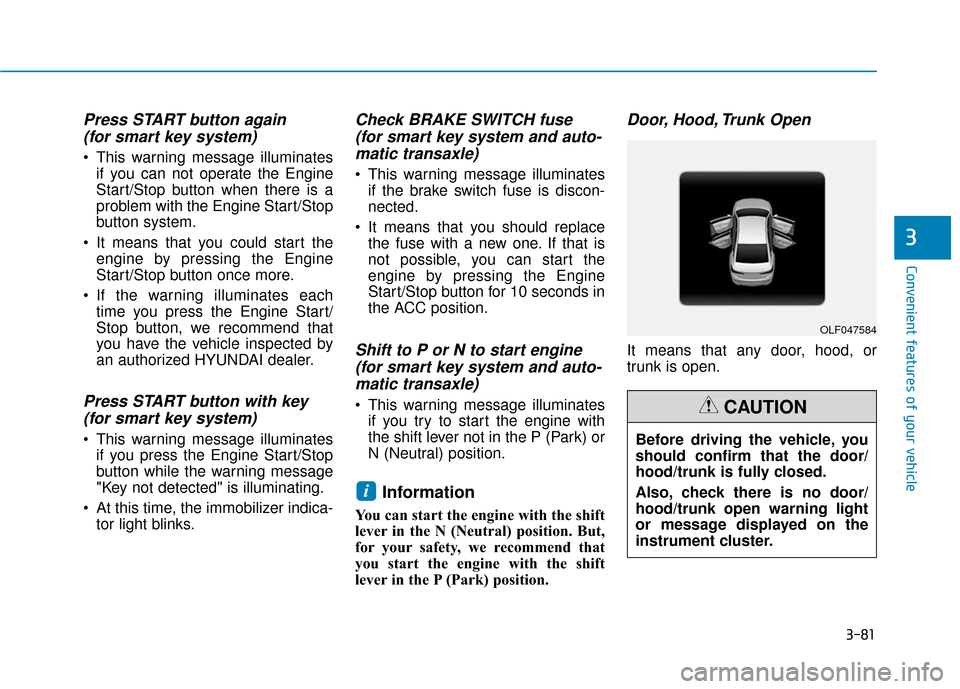
Door, Hood, Trunk Open
It means that any door, hood, or
trunk is open.
i
3
OLF047584
Before driving the vehicle, you
should confirm that the door/
hood/trunk is fully closed.
Also, check there is no door/
hood/trunk open warning light
or message displayed on the
instrument cluster.
CAUTION
Page 172 of 522
3-87
Convenient features of your vehicle
Automatic reset
To automatically reset the average
fuel economy after refueling, select
the "Auto Reset" mode in User
Settings menu on the LCD display.
- After Ignition: The average fueleconomy will reset automatically
whenever it has passed 4 hours
after turning OFF the engine.
- After Refueling: The average fuel economy will reset automatically
when driving speed exceeds 0.6
MPH, after adding 1.6 gallons (6
liters) of fuel or more.
Information
The average fuel economy may be
inaccurate, when the vehicle drives
shorter than 0.19 miles (300 meters)
after turning ON the Engine Start/
Stop button.
Instant Fuel Economy (3)
This mode displays the instant fueleconomy during the last few sec-
onds when the vehicle speed is
more than 6.2 MPH (10 km/h).
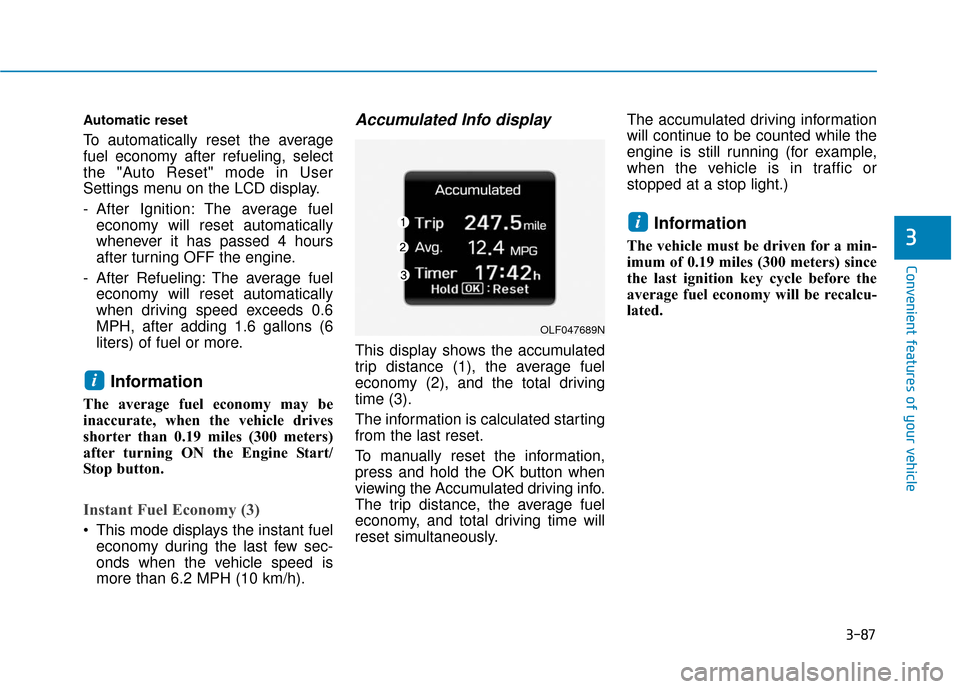
Accumulated Info display
This display shows the accumulated
trip distance (1), the average fuel
economy (2), and the total driving
time (3).
The information is calculated starting
from the last reset.
To manually reset the information,
press and hold the OK button when
viewing the Accumulated driving info.
The trip distance, the average fuel
economy, and total driving time will
reset simultaneously. The accumulated driving information
will continue to be counted while the
engine is still running (for example,
when the vehicle is in traffic or
stopped at a stop light.)
Information
The vehicle must be driven for a min-
imum of 0.19 miles (300 meters) since
the last ignition key cycle before the
average fuel economy will be recalcu-
lated.
i
i
3
OLF047689N
Page 173 of 522
3-88
Convenient features of your vehicle
Driving Info display
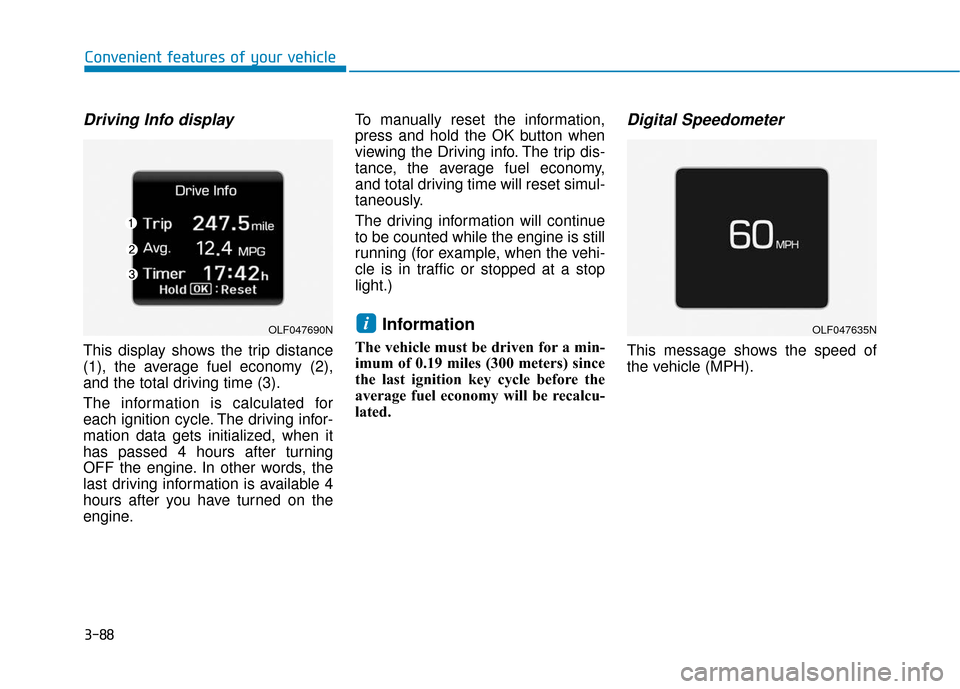
This display shows the trip distance
(1), the average fuel economy (2),
and the total driving time (3).
The information is calculated for
each ignition cycle. The driving infor-
mation data gets initialized, when it
has passed 4 hours after turning
OFF the engine. In other words, the
last driving information is available 4
hours after you have turned on the
engine.To manually reset the information,
press and hold the OK button when
viewing the Driving info. The trip dis-
tance, the average fuel economy,
and total driving time will reset simul-
taneously.
The driving information will continue
to be counted while the engine is still
running (for example, when the vehi-
cle is in traffic or stopped at a stop
light.)
Information
The vehicle must be driven for a min-
imum of 0.19 miles (300 meters) since
the last ignition key cycle before the
average fuel economy will be recalcu-
lated.
Digital Speedometer
This message shows the speed of
the vehicle (MPH).
iOLF047690NOLF047635N
Page 183 of 522
3-98
Convenient features of your vehicle
Electronic StabilityControl (ESC) OFFIndicator Light
This indicator light illuminates:
Once you set the ignition switch or
the Engine Start/Stop button to the
ON position.
- It illuminates for approximately 3seconds and then goes off.
When you deactivate the ESC sys- tem by pressing the ESC OFF but-
ton.
For more information, refer to
"Electronic Stability Control
(ESC)" in chapter 5.
Immobilizer Indicator Light (Without SmartKey)
This indicator light illuminates:
When the vehicle detects the immo-
bilizer in your key properly while the
ignition switch is ON.
- At this time, you can start the
engine.
- The indicator light goes off after starting the engine.
This indicator light blinks:
When there is a malfunction with the
immobilizer system.
In this case, have your vehicle
inspected by an authorized
HYUNDAI dealer.
Immobilizer IndicatorLight (With Smart Key)
This indicator light illuminates for
up to 30 seconds:
When the vehicle detects the smart
key in the vehicle properly while the
ignition switch or the Engine Start/
Stop button is ACC or ON.
- At this time, you can start the
engine.
- The indicator light goes off after starting the engine.
This indicator light blinks for a few
seconds:
When the smart key is not in the
vehicle.
- At this time, you can not start theengine.