steering Hyundai Sonata 2019 Owner's Guide
[x] Cancel search | Manufacturer: HYUNDAI, Model Year: 2019, Model line: Sonata, Model: Hyundai Sonata 2019Pages: 522, PDF Size: 15.66 MB
Page 278 of 522
5-28
Driving your vehicle
Power Brakes
Your vehicle has power-assisted
brakes that adjust automatically
through normal usage.
If the engine is not running or is
turned off while driving, the power
assist for the brakes will not work.
You can still stop your vehicle by
applying greater force to the brake
pedal than typical. The stopping dis-
tance, however, will be longer than
with power brakes.
When the engine is not running, the
reserve brake power is partially
depleted each time the brake pedal
is applied. Do not pump the brake
pedal when the power assist has
been interrupted.
Pump the brake pedal only when
necessary to maintain steering con-
trol on slippery surfaces.
B BR
RA
A K
KI
IN
N G
G
S
S Y
Y S
ST
T E
EM
M
Take the following precautions:
Do not drive with your foot
resting on the brake pedal.
This will create abnormal high
brake temperatures, exces-
sive brake lining and pad
wear, and increased stopping
distances.
When descending a long or
steep hill, shift to a lower gear
and avoid continuous applica-
tion of the brakes. Applying
the brakes continuously can
cause the brakes to overheat
and could result in a tempo-
rary loss of braking perform-
ance.
(Continued)
(Continued)
Wet brakes may impair the
vehicle's ability to safely slow
down; the vehicle may also
pull to one side when the
brakes are applied. Applying
the brakes lightly will indicate
whether they have been
affected in this way. Always
test your brakes in this fash-
ion after driving through deep
water. To dry the brakes, light-
ly tap the brake pedal to heat
up the brakes while maintain-
ing a safe forward speed until
brake performance returns to
normal. Avoid driving at high
speeds until the brakes func-
tion correctly.
WARNING
Page 293 of 522
5-43
Driving your vehicle
5
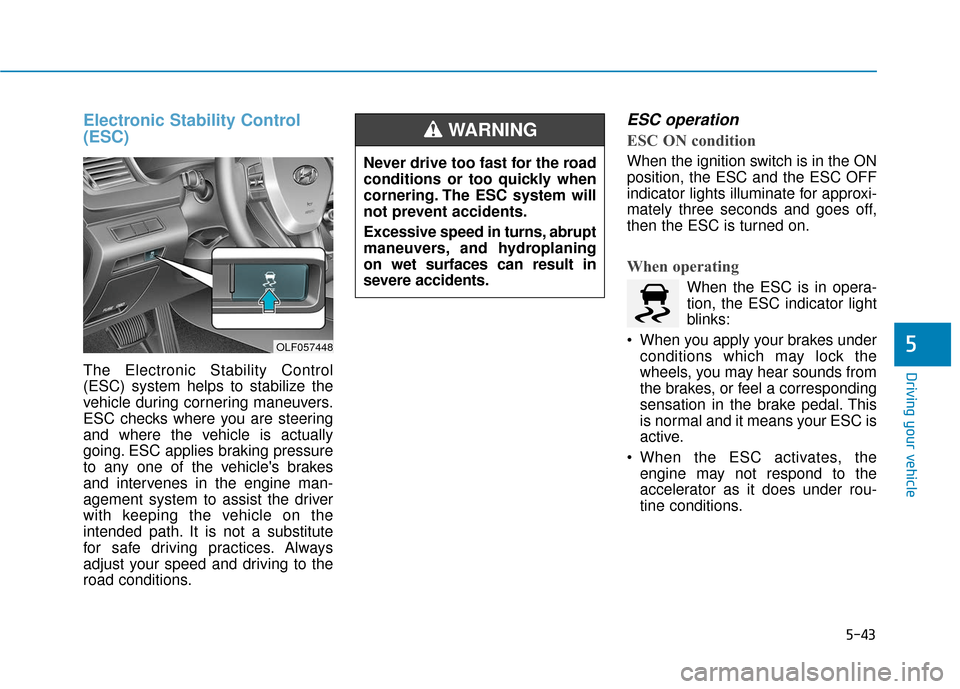
Electronic Stability Control
(ESC)
The Electronic Stability Control
(ESC) system helps to stabilize the
vehicle during cornering maneuvers.
ESC checks where you are steering
and where the vehicle is actually
going. ESC applies braking pressure
to any one of the vehicle's brakes
and intervenes in the engine man-
agement system to assist the driver
with keeping the vehicle on the
intended path. It is not a substitute
for safe driving practices. Always
adjust your speed and driving to the
road conditions.
ESC operation
ESC ON condition
When the ignition switch is in the ON
position, the ESC and the ESC OFF
indicator lights illuminate for approxi-
mately three seconds and goes off,
then the ESC is turned on.
When operating
When the ESC is in opera-
tion, the ESC indicator light
blinks:
When you apply your brakes under conditions which may lock the
wheels, you may hear sounds from
the brakes, or feel a corresponding
sensation in the brake pedal. This
is normal and it means your ESC is
active.
When the ESC activates, the engine may not respond to the
accelerator as it does under rou-
tine conditions.
Never drive too fast for the road
conditions or too quickly when
cornering. The ESC system will
not prevent accidents.
Excessive speed in turns, abrupt
maneuvers, and hydroplaning
on wet surfaces can result in
severe accidents.
WARNING
OLF057448
Page 300 of 522
5-50
SPORT mode
SPORT mode managesthe driving dynamics by
automatically adjusting the
steering effort, the engine
and transmission control
logic for enhanced driver
performance.
When SPORT mode is selected by pressing the DRIVE MODE button,
the SPORT indicator will illuminate.
Whenever the engine is restarted, the Drive Mode will revert back to
COMFORT mode. If SPORT mode
is desired, re-select SPORT mode
from the DRIVE MODE button.
When SPORT mode is activated: - The engine rpm will tend to remainraised over a certain length of time
even after releasing the accelerator
- Upshifts are delayed when accel- erating
Information
In SPORT mode, the fuel efficiency
may decrease.
SMART mode
SMART mode selects the
proper driving mode
among ECO, NORMAL,
and SPORT by judging the
driver's driving habits (i.e. mild or
dynamic) from the brake pedal
depression or the steering wheel
operation.
Press the DRIVE MODE button to activate SMART mode. When
SMART mode is activated, the
indicator illuminates on the instru-
ment cluster.
The indicator illuminates in green, when the driver's driving is catego-
rized to be mild. It illuminates in
white, when the driver's driving is
categorized to be normal. It illumi-
nates in yellow, when the driver's
driving is categorized to be dynam-
ic during abrupt braking or sharp
curving.
The vehicle starts in SMART mode again, when the engine was turned
OFF in SMART mode. SMART mode automatically con-
trols the vehicle driving, such as
gear shifting patterns, engine
torque, and riding quality in accor-
dance with the driver's driving
habits.
Information
• When you mildly drive the vehiclein SMART mode, the driving mode
changes to ECO mode to improve
fuel efficiency. However, the actual
fuel efficiency may differ in accor-
dance with your driving situations
(i.e. upward/downward slope, vehi-
cle deceleration/acceleration).
• When you dynamically drive the vehicle in SMART mode by abrupt-
ly decelerating or sharply turning
the driving mode changes to SPORT
mode. However, it may adversely
affect fuel economy.
i
i
Driving your vehicle
Page 301 of 522
5-51
Driving your vehicle
Drive mode indicator screen
The drive mode indicator screen can
be displayed by using the trip com-
puter button on the steering wheel.
drive mode indicator screen displays
the status of current drive mode.
DRIVE MODE button is located onthe lower part of the transmission
lever for selecting drive mode. If
drive mode is selected manually by
the user, the drive mode indicator
screen will show user-selected
drive mode. (COMFORT, ECO, or
SPORT)
If SMART mode is selected by
DRIVE MODE button, the drive
mode indicator screen will show
current drive mode automatically
selected by SMART mode system.
(SMART COMFORT, SMART
ECO, or SMART SPORT)
When the trip computer mode is selected to show drive mode and
the SMART mode is in operation,
an automatically selected driving
mode SMART ECO, SMART
COMFORT, or SMART SPORT will
be selected on the LCD display. And right below is the horizontal
driving style gauge which reflects
the driving style in real time.
If you drive carefully and slowly in SMART mode, the left side of the
driving style gauge will illuminate,
and automatically shift to the
SMART ECO mode.
When the driver accelerates more
frequently, the right side of the driv-
ing style gauge will fill up, and shift
to SMART COMFORT mode.
In addition, if the rate of accelera-
tion and speed is high, drive mode
will change to SMART SPORT
mode.
If the auto cruise control function is operated or the transmission is
shifted to manual shift mode while
SMART mode is on, the SMART
mode will stop temporarily, and the
drive mode will be displayed as
OFF. The driving style gauge light
will be turned off accordingly. If the trip computer is not set to
show drive mode indicator screen,
and you want to know the on/off
status of the SMART mode, simply
check whether the letters 'SMART'
is lighten up on the screen or not
(green - ECO MODE, white -
COMFORT MODE, red - SPORT
MODE).
5
Page 302 of 522
5-52
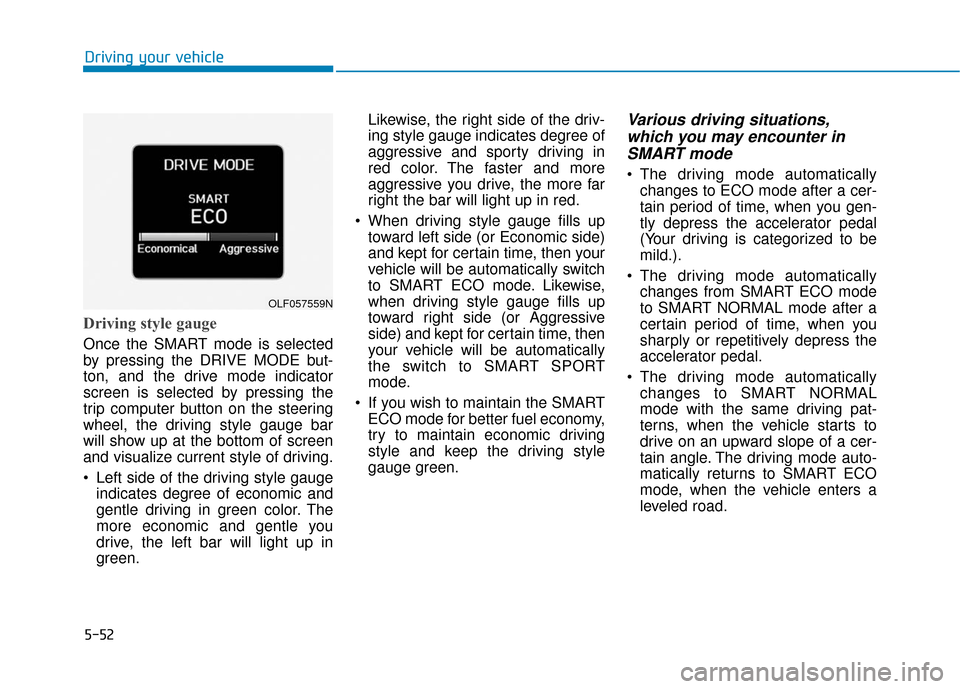
Driving style gauge
Once the SMART mode is selected
by pressing the DRIVE MODE but-
ton, and the drive mode indicator
screen is selected by pressing the
trip computer button on the steering
wheel, the driving style gauge bar
will show up at the bottom of screen
and visualize current style of driving.
Left side of the driving style gaugeindicates degree of economic and
gentle driving in green color. The
more economic and gentle you
drive, the left bar will light up in
green. Likewise, the right side of the driv-
ing style gauge indicates degree of
aggressive and sporty driving in
red color. The faster and more
aggressive you drive, the more far
right the bar will light up in red.
When driving style gauge fills up toward left side (or Economic side)
and kept for certain time, then your
vehicle will be automatically switch
to SMART ECO mode. Likewise,
when driving style gauge fills up
toward right side (or Aggressive
side) and kept for certain time, then
your vehicle will be automatically
the switch to SMART SPORT
mode.
If you wish to maintain the SMART ECO mode for better fuel economy,
try to maintain economic driving
style and keep the driving style
gauge green.
Various driving situations,which you may encounter inSMART mode
The driving mode automatically
changes to ECO mode after a cer-
tain period of time, when you gen-
tly depress the accelerator pedal
(Your driving is categorized to be
mild.).
The driving mode automatically changes from SMART ECO mode
to SMART NORMAL mode after a
certain period of time, when you
sharply or repetitively depress the
accelerator pedal.
The driving mode automatically changes to SMART NORMAL
mode with the same driving pat-
terns, when the vehicle starts to
drive on an upward slope of a cer-
tain angle. The driving mode auto-
matically returns to SMART ECO
mode, when the vehicle enters a
leveled road.
Driving your vehicle
OLF057559N
Page 303 of 522
5-53
Driving your vehicle
The driving mode automaticallychanges to SMART SPORT, when
you abruptly accelerate the vehicle
or repetitively operate the steering
wheel (Your driving is categorized
to be sporty.). In this mode, your
vehicle drives in a lower gear for
abrupt accelerating/decelerating
and increases the engine brake
performance.
You may still sense the engine braking performance, even when
you release the accelerator pedal
in SMART SPORT mode. It is
because your vehicle remains in
lower gear over a certain period of
time for next acceleration. Thus, it
is a normal driving situation, not
indicating any malfunction.
The driving mode automatically changes to SMART SPORT mode
only in harsh driving situations. In
most of the normal driving situa-
tions, the driving mode sets to be
either in SMART ECO mode or in
SMART NORMAL mode.Limitation of SMART mode
The SMART mode may be limited in
following situations. (The OFF indica-
tor illuminates in those situations.)
The driver manually moves theshift lever :
It deactivates SMART mode. The
vehicle drives, as the driver manu-
ally moves the shift lever.
The cruise control is activated : The cruise control system may
deactivate the SMART mode when
the vehicle is controlled by the set
speed of the smart cruise control
system. (SMART mode is not deac-
tivated just by activating the cruise
control system.)
The transmission oil temperature is either extremely low or extremely
high :
The SMART mode can be active in
most of the normal driving situa-
tions. However, an extremely high/
low transmission oil temperature
may temporarily deactivate the
SMART mode, because the trans-
mission condition is out of normal
operation condition.
5
Page 305 of 522
5-55
Driving your vehicle
5
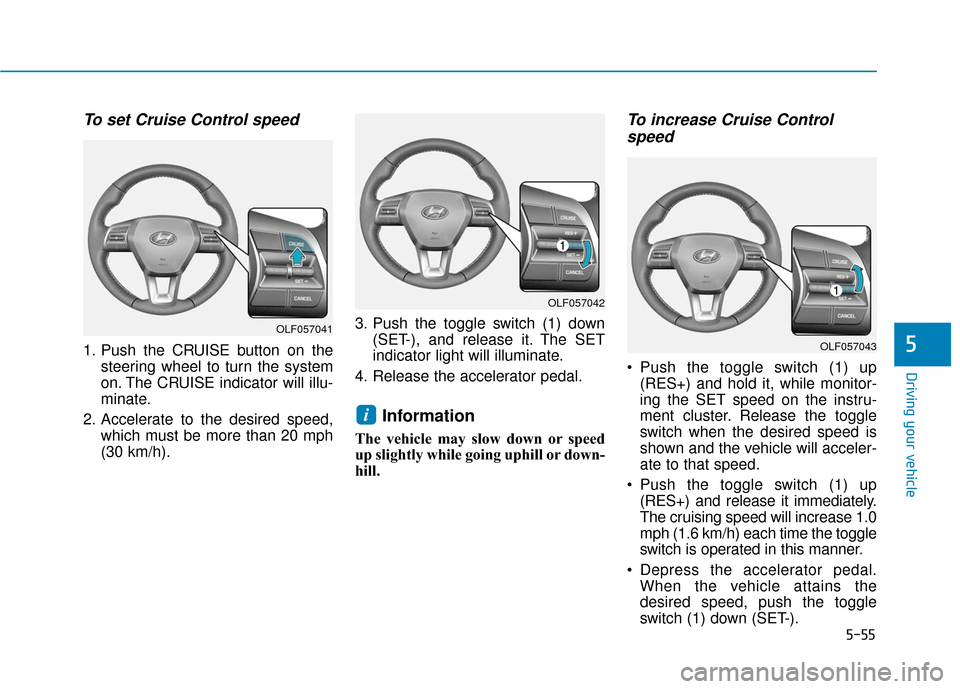
To set Cruise Control speed
1. Push the CRUISE button on thesteering wheel to turn the system
on. The CRUISE indicator will illu-
minate.
2. Accelerate to the desired speed, which must be more than 20 mph
(30 km/h). 3. Push the toggle switch (1) down
(SET-), and release it. The SET
indicator light will illuminate.
4. Release the accelerator pedal.
Information
The vehicle may slow down or speed
up slightly while going uphill or down-
hill.
To increase Cruise Control speed
Push the toggle switch (1) up
(RES+) and hold it, while monitor-
ing the SET speed on the instru-
ment cluster. Release the toggle
switch when the desired speed is
shown and the vehicle will acceler-
ate to that speed.
Push the toggle switch (1) up (RES+) and release it immediately.
The cruising speed will increase 1.0
mph (1.6 km/h) each time the toggle
switch is operated in this manner.
Depress the accelerator pedal. When the vehicle attains the
desired speed, push the toggle
switch (1) down (SET-).
i
OLF057042
OLF057043
OLF057041
Page 306 of 522
5-56
Driving your vehicle
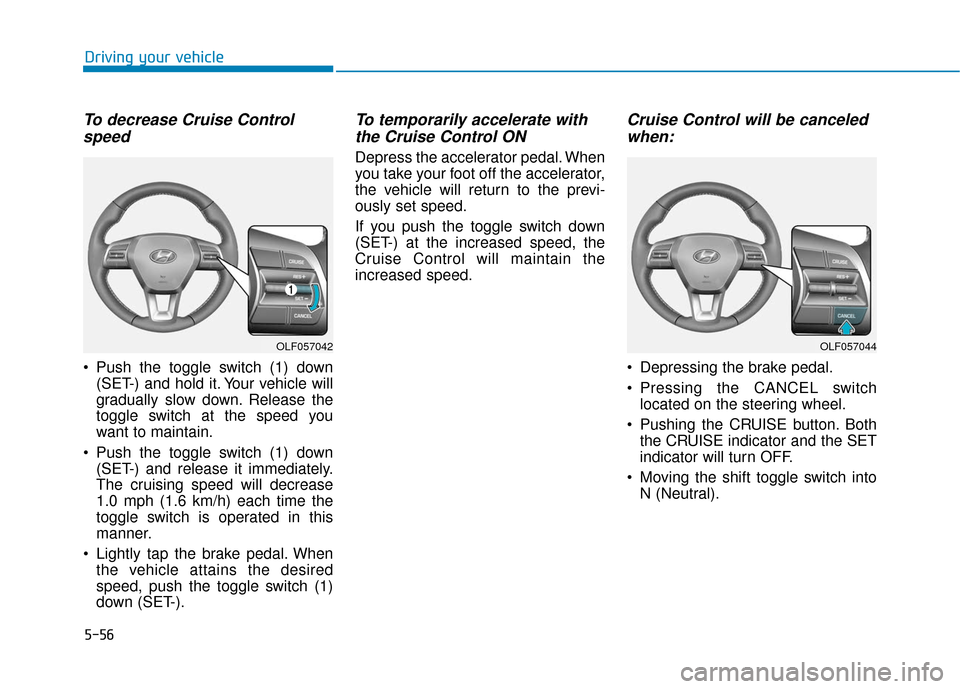
To decrease Cruise Controlspeed
Push the toggle switch (1) down
(SET-) and hold it. Your vehicle will
gradually slow down. Release the
toggle switch at the speed you
want to maintain.
Push the toggle switch (1) down (SET-) and release it immediately.
The cruising speed will decrease
1.0 mph (1.6 km/h) each time the
toggle switch is operated in this
manner.
Lightly tap the brake pedal. When the vehicle attains the desired
speed, push the toggle switch (1)
down (SET-).
To temporarily accelerate withthe Cruise Control ON
Depress the accelerator pedal. When
you take your foot off the accelerator,
the vehicle will return to the previ-
ously set speed.
If you push the toggle switch down
(SET-) at the increased speed, the
Cruise Control will maintain the
increased speed.
Cruise Control will be canceledwhen:
Depressing the brake pedal.
Pressing the CANCEL switch
located on the steering wheel.
Pushing the CRUISE button. Both the CRUISE indicator and the SET
indicator will turn OFF.
Moving the shift toggle switch into N (Neutral).
OLF057042OLF057044
Page 307 of 522
5-57
Driving your vehicle
5
Decreasing the vehicle speedlower than the memory speed by
5 mph (10 km/h).
Decreasing the vehicle speed to less than approximately 20 mph
(30 km/h).
The ESC (Electronic Stability Control) is operating.
Downshifting to the 2nd gear in Manual shift mode.
Information
Each of the above actions will cancel
Cruise Control operation (the SET
indicator light in the instrument clus-
ter will go off), but only pressing the
CRUISE button will turn the system
off. If you wish to resume Cruise
Control operation, push the toggle
switch up (RES+) located on your
steering wheel. You will return to your
previously preset speed, unless the
system was turned off using the
CRUISE button.
To resume preset Cruisingspeed
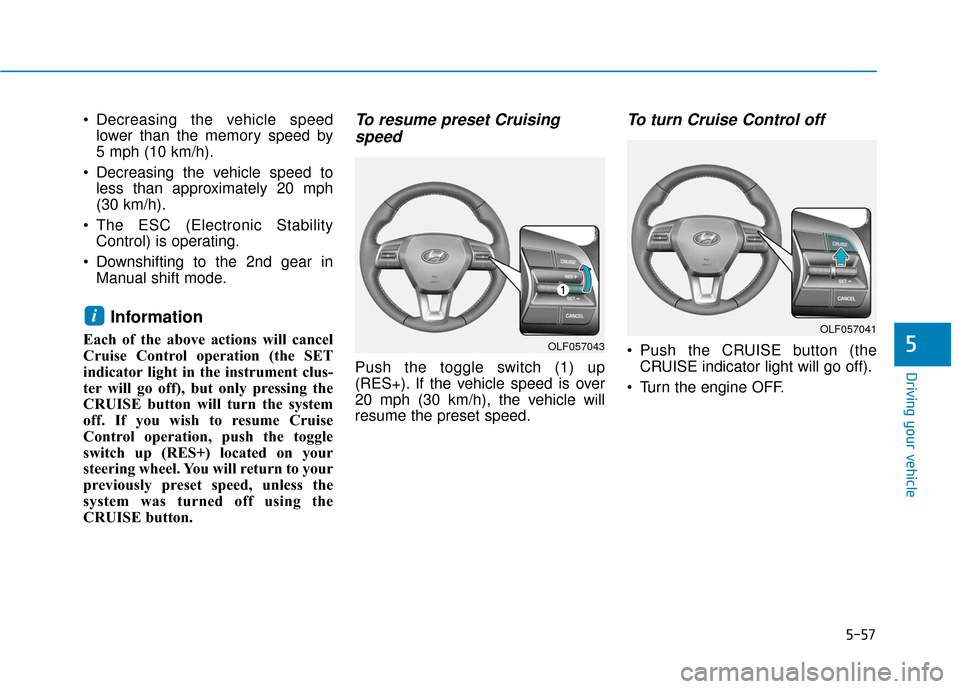
Push the toggle switch (1) up
(RES+). If the vehicle speed is over
20 mph (30 km/h), the vehicle will
resume the preset speed.
To turn Cruise Control off
Push the CRUISE button (the
CRUISE indicator light will go off).
Turn the engine OFF.
i
OLF057043
OLF057041
Page 310 of 522
5-60
Driving your vehicle
To Convert to Cruise Control
Mode
The driver may choose to only use
the Cruise Control Mode (speed con-
trol function) by doing as follows:
1. Turn the Smart Cruise ControlSystem on (the cruise indicator
light will be on but the system will
not be activated).
2. Push and hold the Vehicle-to- Vehicle Distance button for more
than 2 seconds.
3. Choose between "Smart Cruise Control (SCC) Mode" and "Cruise
Control (CC) Mode".
When the system is canceled using
the CRUISE button or the CRUISE
button is used after the engine is
turned on, the SCC Mode will turn
on.
Smart Cruise Control Speed
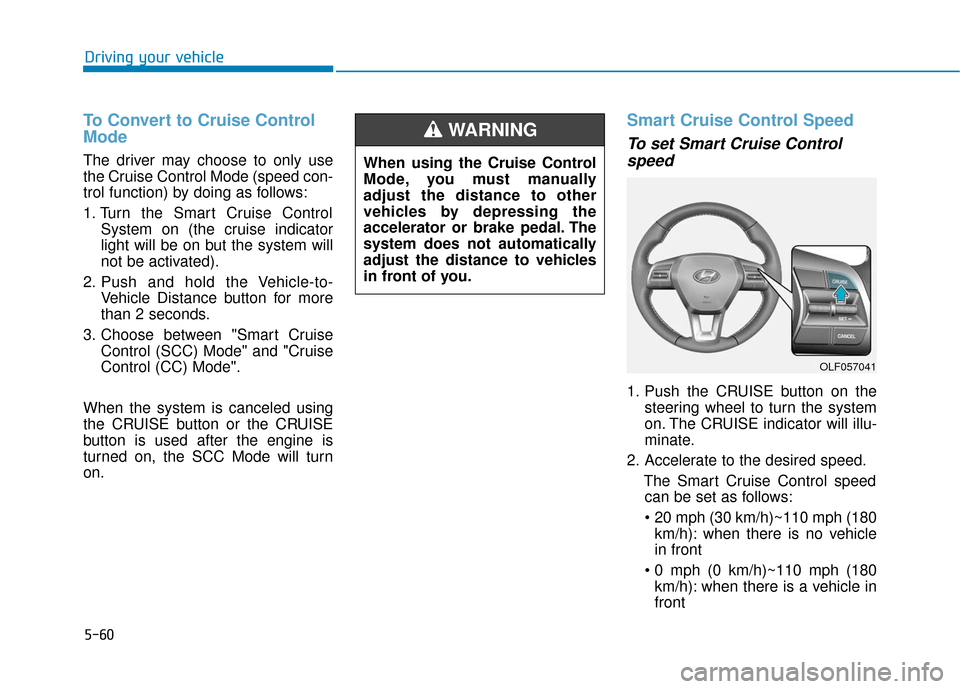
To set Smart Cruise Control speed
1. Push the CRUISE button on the
steering wheel to turn the system
on. The CRUISE indicator will illu-
minate.
2. Accelerate to the desired speed. The Smart Cruise Control speedcan be set as follows:
km/h): when there is no vehicle
in front
km/h): when there is a vehicle in
front
OLF057041
When using the Cruise Control
Mode, you must manually
adjust the distance to other
vehicles by depressing the
accelerator or brake pedal. The
system does not automatically
adjust the distance to vehicles
in front of you.
WARNING