4-2 Hyundai Sonata 2020 User Guide
[x] Cancel search | Manufacturer: HYUNDAI, Model Year: 2020, Model line: Sonata, Model: Hyundai Sonata 2020Pages: 537, PDF Size: 14.54 MB
Page 111 of 537
Instrument Cluster4-26
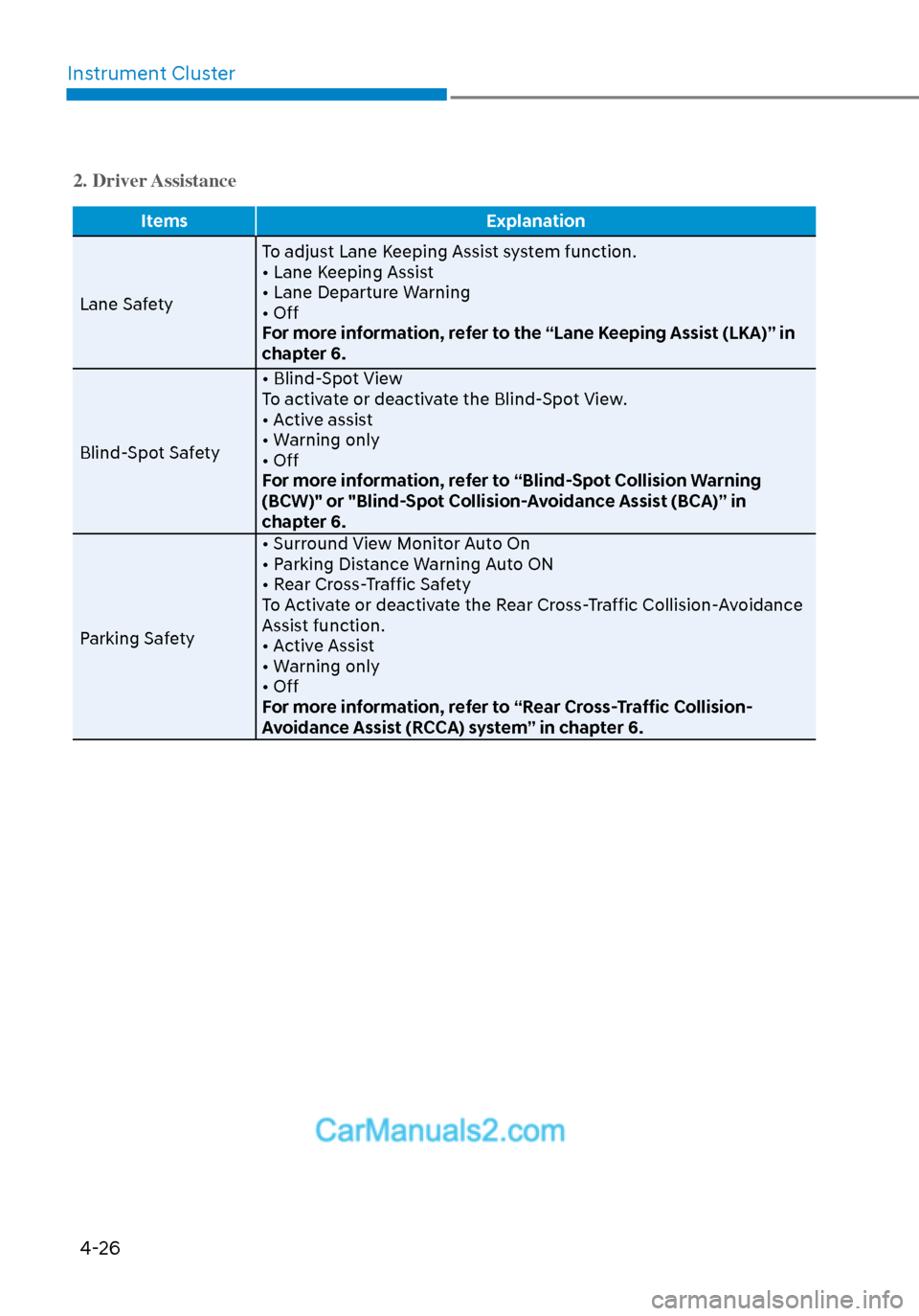
2. Driver Assistance
Items Explanation
Lane Safety T
o adjust Lane Keeping Assist system function.
• Lane Keeping Assist
• Lane Departure Warning
• Off
For more information, refer to the “Lane Keeping Assist (LKA)” in
chapter 6.
Blind-Spot Safety • Blind-Spot View
To activate or deactivate the Blind-Spot View.
• Active assist
• Warning only
• Off
For more information, refer to “Blind-Spot Collision Warning
(BCW)" or "Blind-Spot Collision-Avoidance Assist (BCA)” in
chapter 6.
Parking Safety • Surround View Monitor Auto On
• Parking Distance Warning Auto ON
• Rear Cross-Traffic Safety
To Activate or deactivate the Rear Cross-Traffic Collision-Avoidance
Assist function.
• Active Assist
• Warning only
• Off
For more information, refer to “Rear Cross-Traffic Collision-
Avoidance Assist (RCCA) system” in chapter 6.
Page 112 of 537
04
4-27
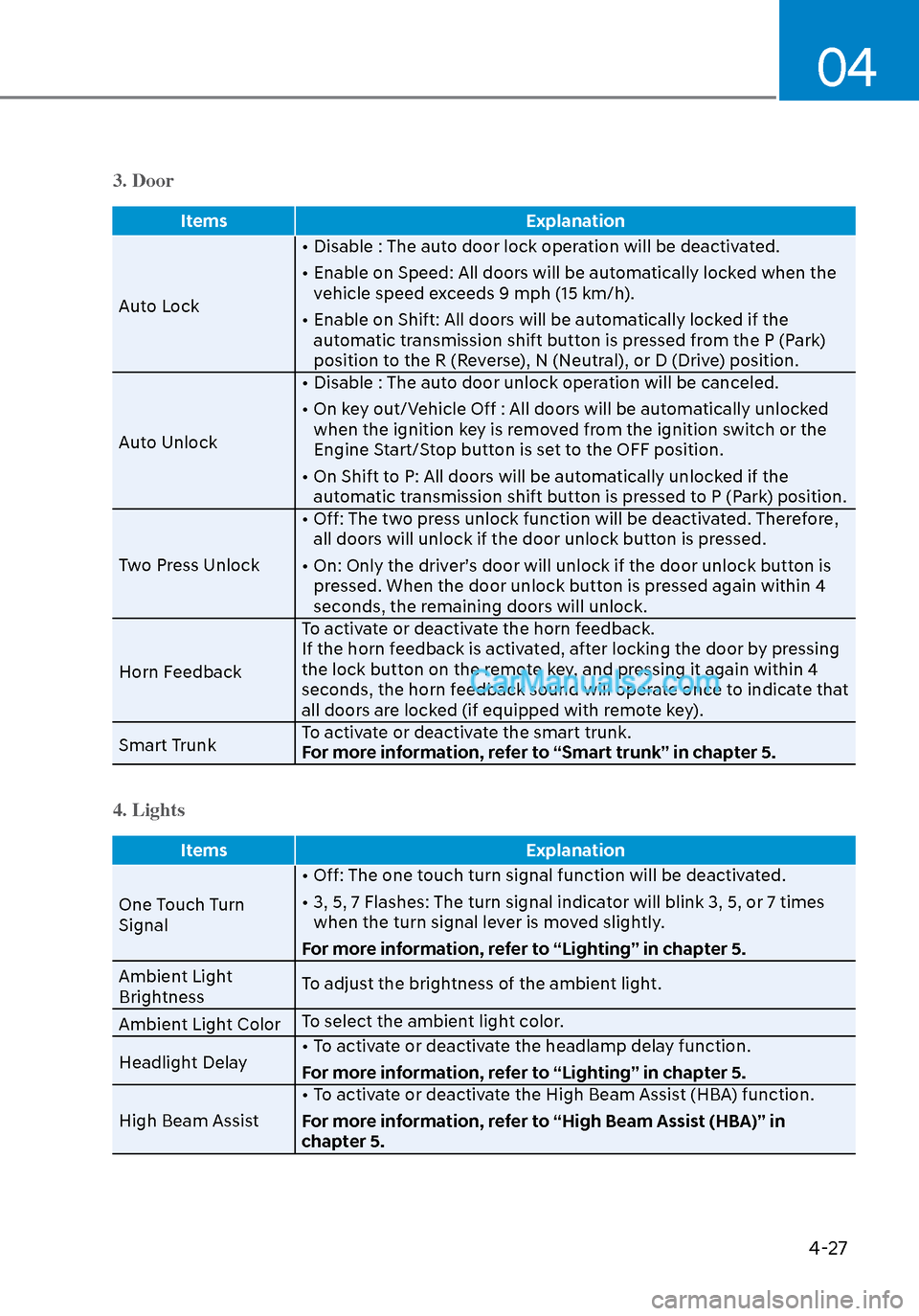
3. Door
ItemsExplanation
Auto Lock •
Disable : The auto door lock operation will be deactivated.
• Enable on Speed: All doors will be automatically locked when the vehicle speed exceeds 9 mph (15 km/h).
• Enable on Shift: All doors will be automatically locked if the automatic transmission shift button is pressed from the P (Park)
position to the R (Reverse), N (Neutral), or D (Drive) position.
Auto Unlock • Disable : The auto door unlock operation will be canceled.
• On key out/Vehicle Off : All doors will be automatically unlocked
when the ignition key is removed from the ignition switch or the
Engine Start/Stop button is set to the OFF position.
• On Shift to P: All doors will be automatically unlocked if the automatic transmission shift button is pressed to P (Park) position.
Two Press Unlock • Off: The two press unlock function will be deactivated. Therefore,
all doors will unlock if the door unlock button is pressed.
• On: Only the driver’s door will unlock if the door unlock button is pressed. When the door unlock button is pressed again within 4
seconds, the remaining doors will unlock.
Horn Feedback To activate or deactivate the horn feedback.
If the horn feedback is activated, after locking the door by pressing
the lock button on the remote key, and pressing it again within 4
seconds, the horn feedback sound will operate once to indicate that
all doors are locked (if equipped with remote key).
Smart Trunk To activate or deactivate the smart trunk.
For more information, refer to “Smart trunk” in chapter 5.
4. Lights
Items
Explanation
One Touch Turn
Signal •
Off: The one touch turn signal function will be deactivated.
• 3, 5, 7 Flashes: The turn signal indicator will blink 3, 5, or 7 times when the turn signal lever is moved slightly.
For more information, refer to “Lighting” in chapter 5.
Ambient Light
Brightness To adjust the brightness of the ambient light.
Ambient Light Color To select the ambient light color.
Headlight Delay • To activate or deactivate the headlamp delay function.
For more information, refer to “Lighting” in chapter 5.
High Beam Assist • To activate or deactivate the High Beam Assist (HBA) function.
For more information, refer to “High Beam Assist (HBA)” in
chapter 5.
Page 113 of 537
Instrument Cluster4-28
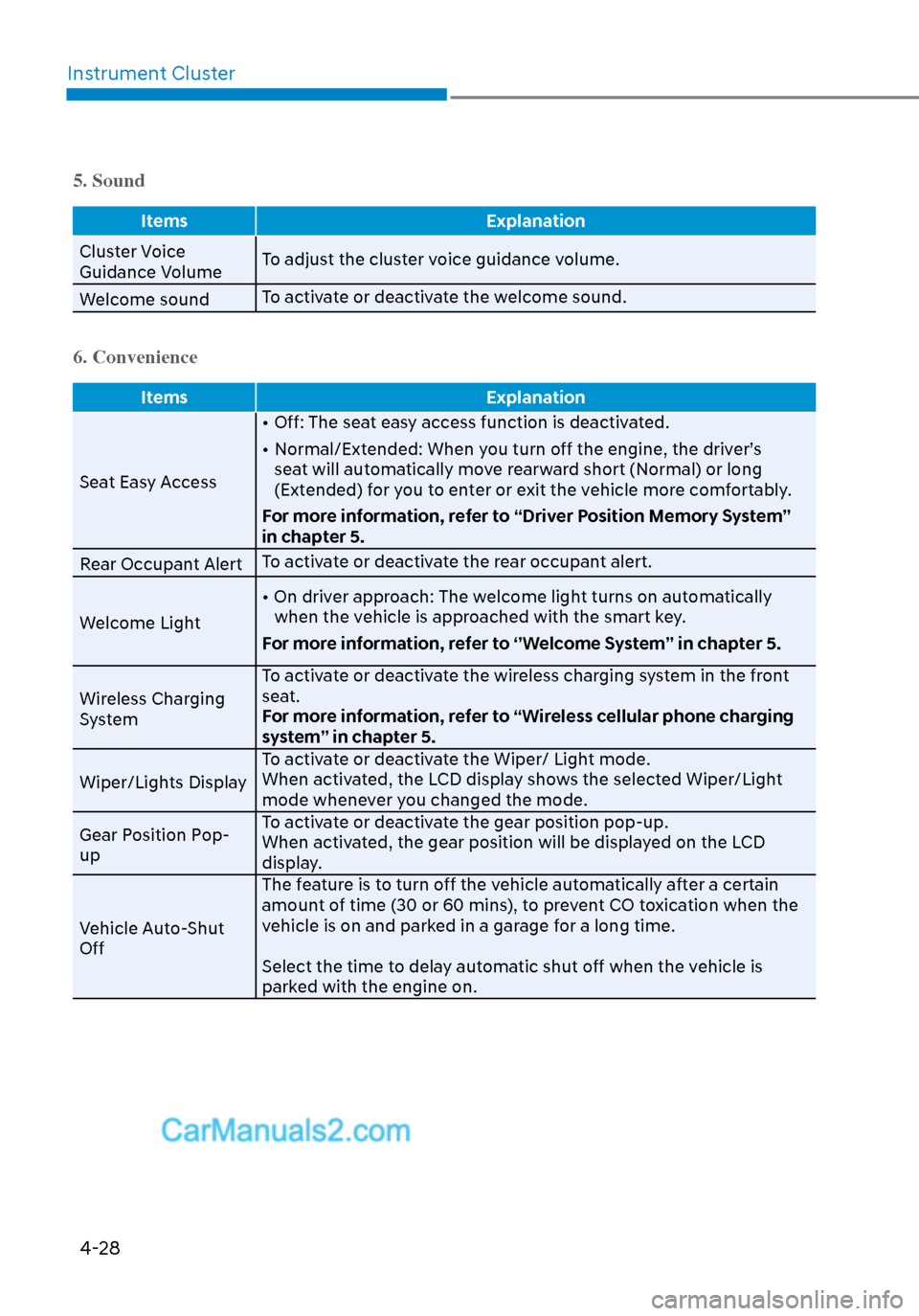
5. Sound
Items Explanation
Cluster Voice
Guidance V
olumeTo adjust the cluster voice guidance volume.
Welcome sound To activate or deactivate the welcome sound.
6. Convenience
Items
Explanation
Seat Easy Access •
Off: The seat easy access function is deactivated.
• Normal/Extended: When you turn off the engine, the driver’s seat will automatically move rearward short (Normal) or long
(Extended) for you to enter or exit the vehicle more comfortably.
For more information, refer to “Driver Position Memory System”
in chapter 5.
Rear Occupant Alert To activate or deactivate the rear occupant alert.
Welcome Light • On driver approach: The welcome light turns on automatically
when the vehicle is approached with the smart key.
For more information, refer to ‘’Welcome System’’ in chapter 5.
Wireless Charging
System To activate or deactivate the wireless charging system in the front
seat.
For more information, refer to “Wireless cellular phone charging
system” in chapter 5.
Wiper/Lights Display To activate or deactivate the Wiper/ Light mode.
When activated, the LCD display shows the selected Wiper/Light
mode whenever you changed the mode.
Gear Position Pop-
up To activate or deactivate the gear position pop-up.
When activated, the gear position will be displayed on the LCD
display.
Vehicle Auto-Shut
Off The feature is to turn off the vehicle automatically after a certain
amount of time (30 or 60 mins), to prevent CO toxication when the
vehicle is on and parked in a garage for a long time.
Select the time to delay automatic shut off when the vehicle is
parked with the engine on.
Page 114 of 537
04
4-29
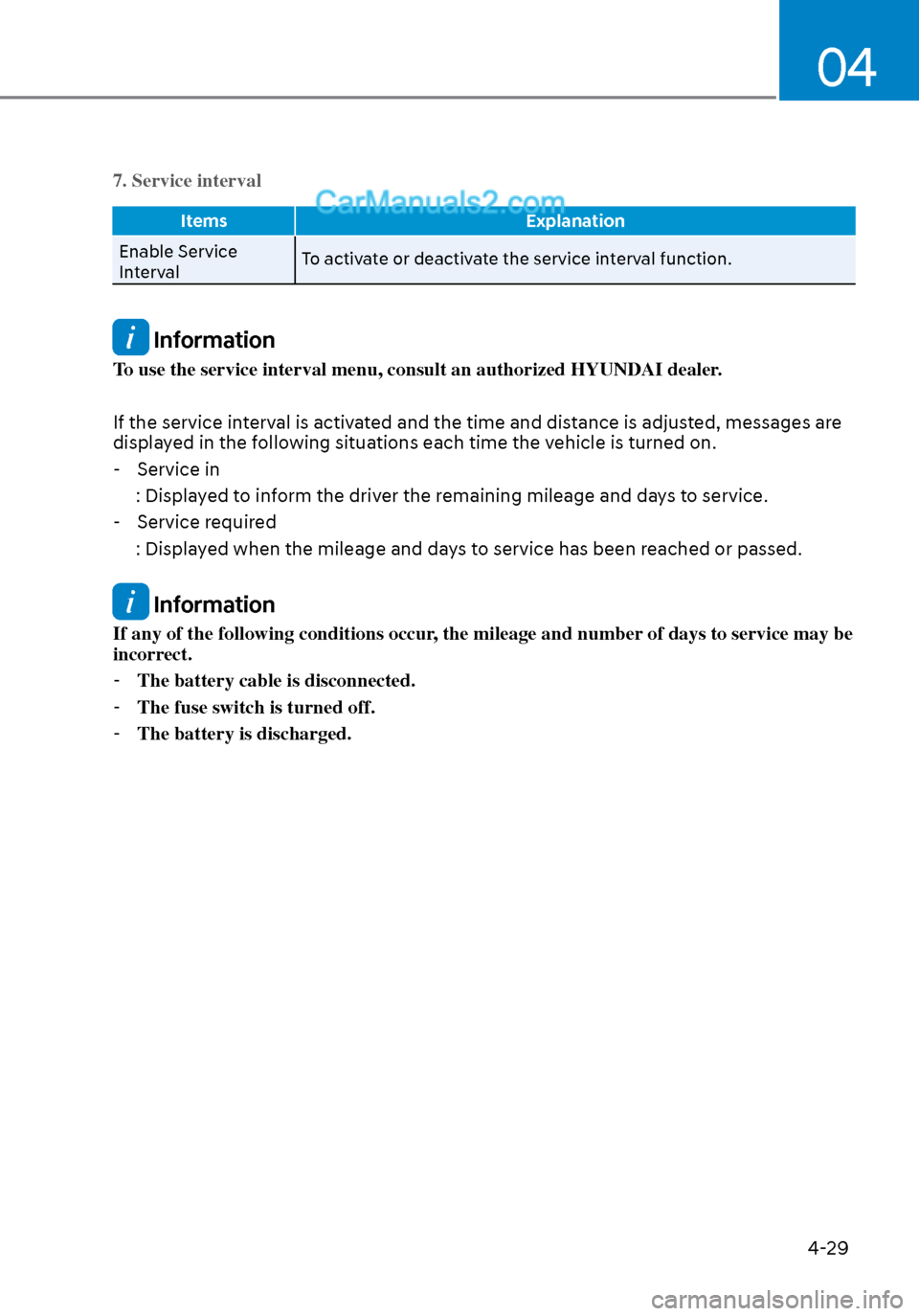
7. Service interval
ItemsExplanation
Enable Service
Int
erval To activate or deactivate the service interval function.
Information
To use the service interval menu, consult an authorized HYUNDAI dealer.
If the service interval is activated and the time and distance is adjusted, messages are
displayed in the following situations each time the vehicle is turned on.
- Service in
: Displayed to inform the driver the remaining mileage and days to service.
- Service required
: Displayed when the mileage and days to service has been reached or passed.
Information
If any of the following conditions occur, the mileage and number of days to service may be
incorrect. - The battery cable is disconnected.
- The fuse switch is turned off.
- The battery is discharged.
Page 528 of 537

I
I-9
Instrument cluster ........................................................................\
.......................... 4-2Instrument cluster illumination ........................................................................\
. 4-3
Gauges and meters ........................................................................\
.................... 4-3
Transmission shift indicator ........................................................................\
...... 4-6
Warning and indicator lights ........................................................................\
..... 4-7
LCD display messages ........................................................................\
............ 4-15
LCD display (Type A, B) ........................................................................\
........ 4-19
LCD display (Type C) ........................................................................\
............. 4-34
Instrument panel fuse replacement ...................................................................... 8-47
Instrument panel overview ........................................................................\
............ 2-5
Interior care ........................................................................\
.................................. 8-65
Interior features ........................................................................\
.......................... 5-145 Cup holder ........................................................................\
............................. 5-145
Sunvisor........................................................................\
................................. 5-146
Power outlet ........................................................................\
.......................... 5-146
USB charger ........................................................................\
.......................... 5-147
Wireless cellular phone charging system ...................................................... 5-148
Clock ..................................................................\
........................................... 5-150
Clothes hanger ........................................................................\
....................... 5-150
Floor mat anchor(s) ........................................................................\
............... 5-151
Interior lights ........................................................................\
............................... 5-80
Front lamps........................................................................\
.............................. 5-81
Rear lamps ........................................................................\
............................... 5-81
Luggage compartment lamp ........................................................................\
.... 5-82
Vanity mirror lamp ........................................................................\
.................. 5-82
Interior overview ........................................................................\
........................... 2-4
ISG (Idle Stop and Go) system ........................................................................\
.... 6-33
J
Jack and tools ........................................................................\
............................... 7-12
Jump starting ........................................................................\
.................................. 7-4
K
Key ignition switch ........................................................................\
........................ 6-6
Page 529 of 537

IndexI-10
L
Label Vehicle certification label ........................................................................\
........ 2-13
Tire specification and pressure label ............................................................... 2-14
Refrigerant label ........................................................................\
...................... 2-15
Lane change signals ........................................................................\
..................... 5-79
Lane Following Assist (LFA) ........................................................................\
.... 6-109
Lane Keeping Assist (LKA) ........................................................................\
........ 6-59
LCD display (Type A, B) ........................................................................\
............. 4-19 LCD display control ........................................................................\
................ 4-19
LCD display modes ........................................................................\
................. 4-20
Trip computer ........................................................................\
.......................... 4-31
LCD display (Type C) ........................................................................\
................. 4-34
LCD display control ........................................................................\
................ 4-34
View modes ........................................................................\
............................. 4-35
Utility view mode ........................................................................\
.................... 4-36
Option menu ........................................................................\
............................ 4-38
User settings mode ........................................................................\
.................. 4-39
LCD display messages ........................................................................\
................. 4-15
Shift to P or N to start engine ........................................................................\
.. 4-15
Shift to P ........................................................................\
.................................. 4-15
Low key battery.........................................................\
...................................... 4-15
Press brake pedal to start engine ..................................................................... 4-15
Key not in vehicle ........................................................................\
................... 4-16
Key not detected ........................................................................\
...................... 4-16
Press START button again ........................................................................\
...... 4-16
Press START button with key ........................................................................\
. 4-16
Battery discharging due to external electrical devices .................................... 4-16
Check BRAKE SWITCH fuse ........................................................................\
4-16
Door, Hood, Trunk open indicator .................................................................. 4-17
Sunroof open indicator ........................................................................\
............ 4-17
Lights mode ........................................................................\
............................. 4-17
Wiper mode ........................................................................\
............................. 4-18
Low pressure ........................................................................\
........................... 4-17
Page 530 of 537

I
I-11
LCD display modes ........................................................................\
..................... 4-20Trip computer mode ........................................................................\
................ 4-21
Turn By Turn (TBT) mode ........................................................................\
...... 4-21
Driving assist mode ........................................................................\
................. 4-21
Master warning mode ........................................................................\
.............. 4-22
User settings mode ........................................................................\
.................. 4-22
Light ..................................................................\
................................................... 5-74
AUTO headlamp position ........................................................................\
....... 5-74
Daytime running light (DRL)...........................................\
............................... 5-74
Parking lamp position ........................................................................\
............. 5-75
Headlamp position ........................................................................\
.................. 5-75
High beam operation ........................................................................\
............... 5-75
High Beam Assist (HBA) ........................................................................\
....... 5-76
Turn signals ........................................................................\
............................. 5-79
Lane change signals ........................................................................\
................ 5-79
Battery saver function ........................................................................\
............. 5-79
Headlamp delay function ........................................................................\
........ 5-79
Headlamp leveling device ........................................................................\
....... 5-80
Light bulbs ........................................................................\
................................... 8-55
Lubricants and capacities ........................................................................\
............. 2-11
Luggage compartment lamp ........................................................................\
........ 5-82
M
Maintenance Maintenance services ........................................................................\
................ 8-4
Owner maintenance ........................................................................\
................... 8-5
Scheduled maintenance services ....................................................................... 8-7
Normal maintenance schedule .................................................................... 8-8,12
Maintenance under severe usage conditions .............................................. 8-11,15
Explanation of scheduled maintenance items ................................................. 8-16
Tire maintenance ........................................................................\
..................... 8-38
Maintenance services ........................................................................\
..................... 8-4