Auto hold Hyundai Sonata 2020 User Guide
[x] Cancel search | Manufacturer: HYUNDAI, Model Year: 2020, Model line: Sonata, Model: Hyundai Sonata 2020Pages: 537, PDF Size: 14.54 MB
Page 149 of 537
05
5-19
After unlock the door or start up the
vehicle with digital key, even though
the driver tries to lock the doors by the
central door lock switch, the door lock
will be once locked and immediately
released at the moment of door closed.
Start-up with Digital Key
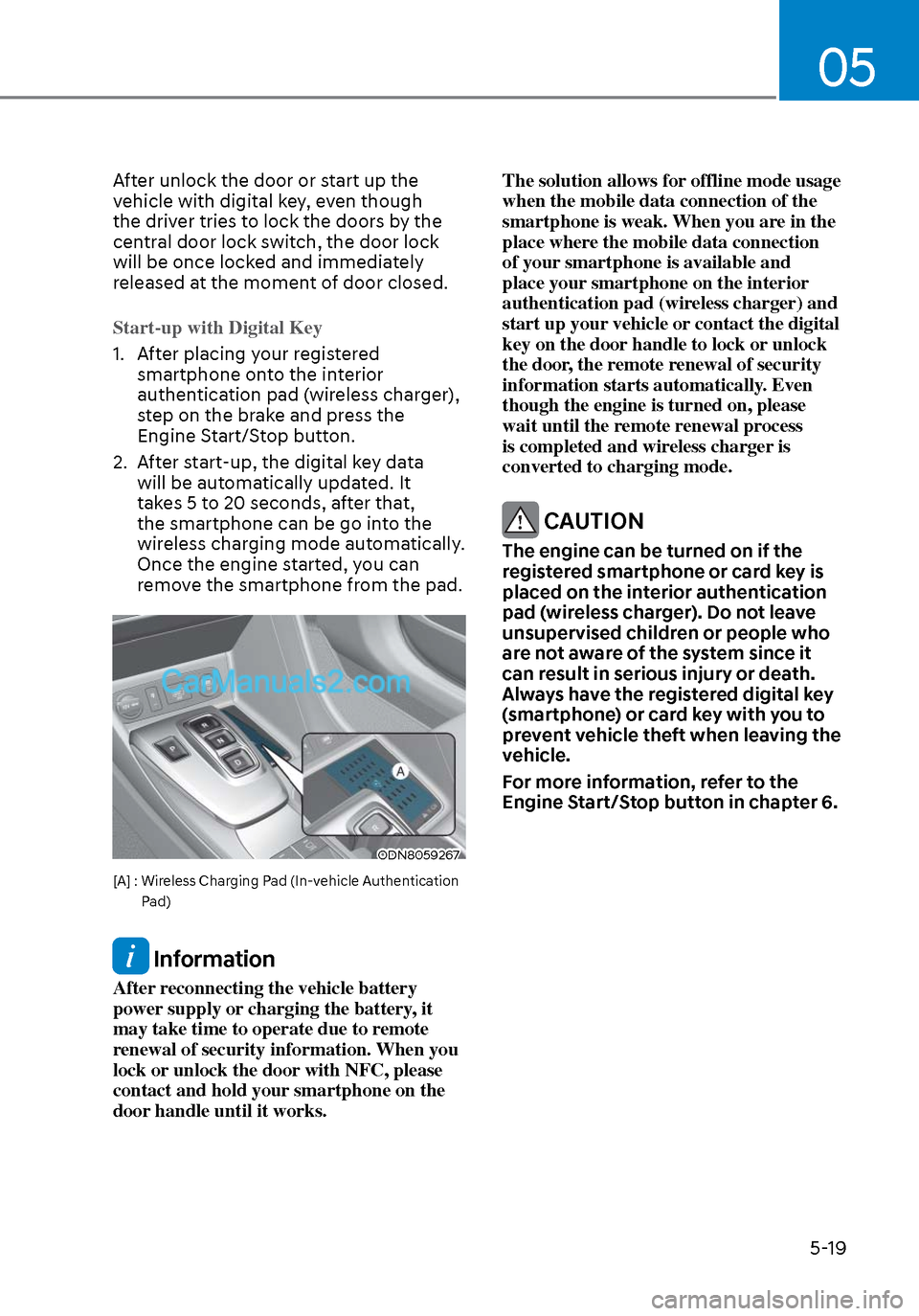
1. After placing your registered smartphone on
to the interior
authentication pad (wireless charger),
step on the brake and press the
Engine Start/Stop button.
2. After start-up, the digital key data will be automatically updated. It
takes 5 to 20 seconds, after that,
the smartphone can be go into the
wireless charging mode automatically.
Once the engine started, you can
remove the smartphone from the pad.
ODN8059267ODN8059267
[A] : Wireless Charging Pad (In-vehicle Authentication
Pad)
Information
After reconnecting the vehicle battery
power supply or charging the battery, it
may take time to operate due to remote
renewal of security information. When you
lock or unlock the door with NFC, please
contact and hold your smartphone on the
door handle until it works. The solution allows for offline mode usage
when the mobile data connection of the
smartphone is weak. When you are in the
place where the mobile data connection
of your smartphone is available and
place your smartphone on the interior
authentication pad (wireless charger) and
start up your vehicle or contact the digital
key on the door handle to lock or unlock
the door, the remote renewal of security
information starts automatically. Even
though the engine is turned on, please
wait until the remote renewal process
is completed and wireless charger is
converted to charging mode.
CAUTION
The engine can be turned on if the
registered smartphone or card key is
placed on the interior authentication
pad (wireless charger). Do not leave
unsupervised children or people who
are not aware of the system since it
can result in serious injury or death.
Always have the registered digital key
(smartphone) or card key with you to
prevent vehicle theft when leaving the
vehicle.
For more information, refer to the
Engine Start/Stop button in chapter 6.
Page 180 of 537
Convenient Features5-50
7. Return to the vehicle and firmly press, hold for two seconds and release the
HomeLink button up to three times.
Do not press the HomeLink button
rapidly. At this point programming
is complete and your device should
operate when the HomeLink button is
pressed and released.
Information
• Some garage door openers require to
press the programmed button on the
mirror up to three times right after
the programming is just completed to
operate the garage door.
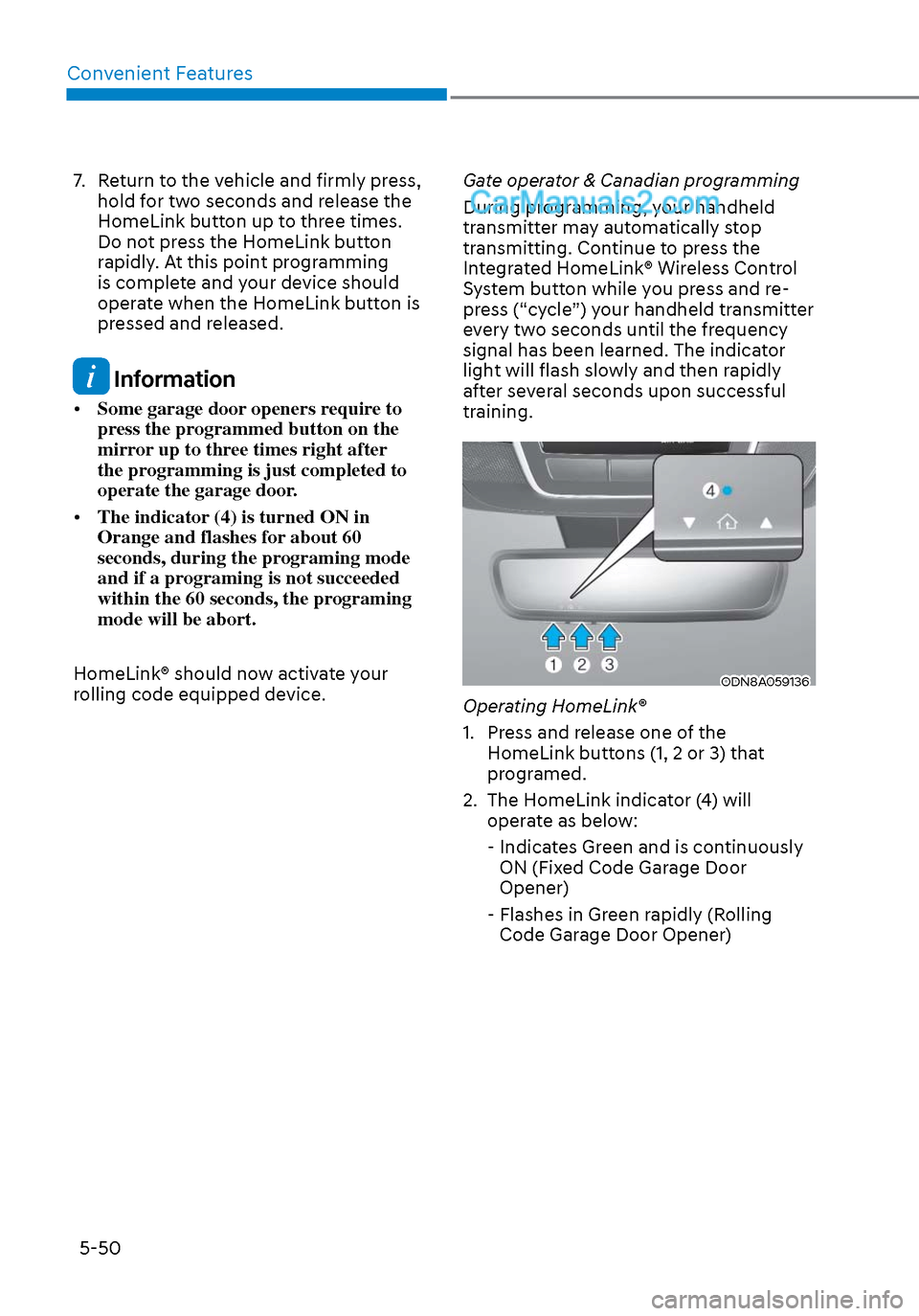
• The indicator (4) is turned ON in
Orange and flashes for about 60
seconds, during the programing mode
and if a programing is not succeeded
within the 60 seconds, the programing
mode will be abort.
HomeLink® should now activate your
rolling code equipped device. Gate operator & Canadian programming
During programming, your handheld
transmitter may automatically stop
transmitting. Continue to press the
Integrated HomeLink® Wireless Control
System button while you press and re-
press (“cycle”) your handheld transmitter
every two seconds until the frequency
signal has been learned. The indicator
light will flash slowly and then rapidly
after several seconds upon successful
training.
ODN8A059136ODN8A059136
Operating HomeLink®
1. Press and release one of the
HomeLink buttons (1, 2 or 3) that
programed.
2. The HomeLink indicator (4) will operate as below:
- Indicates Green and is continuously ON (Fixed Code Garage Door
Opener)
- Flashes in Green rapidly (Rolling Code Garage Door Opener)
Page 206 of 537
Convenient Features5-76
ODN8A059204ODN8A059204
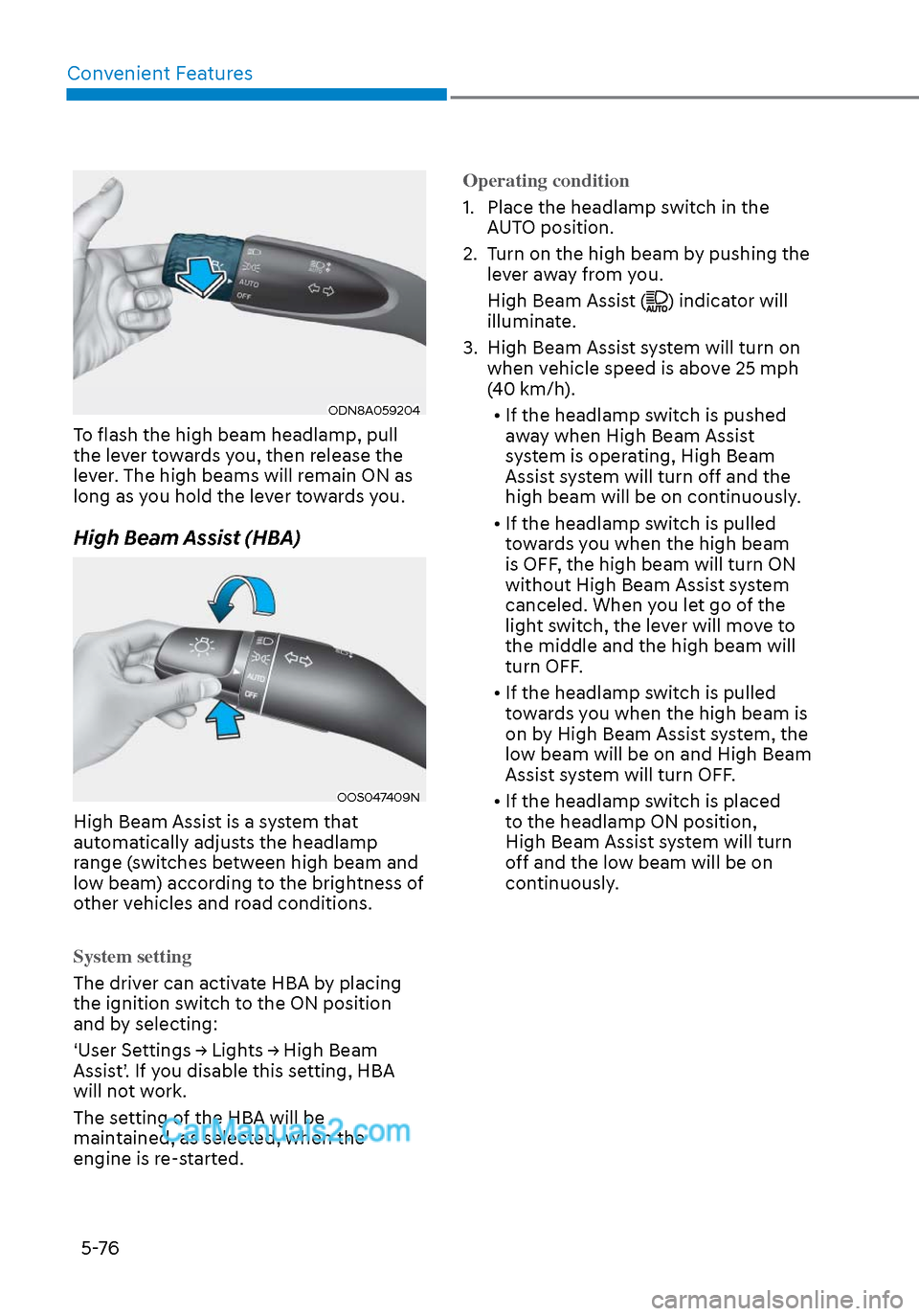
To flash the high beam headlamp, pull
the lever towards you, then release the
lever. The high beams will remain ON as
long as you hold the lever towards you.
High Beam Assist (HBA)
OOS047409NOOS047409N
High Beam Assist is a system that
automatically adjusts the headlamp
range (switches between high beam and
low beam) according to the brightness of
other vehicles and road conditions.
System setting
The driver can activate HBA by placing
the ignition s
witch to the ON position
and by selecting:
‘User Settings → Lights → High Beam
Assist’. If you disable this setting, HBA
will not work.
The setting of the HBA will be
maintained, as selected, when the
engine is re-started. Operating condition
1. Place the headlamp switch in the
A
UTO position.
2. Turn on the high beam by pushing the lever away from you.
High Beam Assist (
) indicator will
illuminate.
3. High Beam Assist system will turn on when vehicle speed is above 25 mph
(40 km/h).
• If the headlamp switch is pushed away when High Beam Assist
system is operating, High Beam
Assist system will turn off and the
high beam will be on continuously.
• If the headlamp switch is pulled towards you when the high beam
is OFF, the high beam will turn ON
without High Beam Assist system
canceled. When you let go of the
light switch, the lever will move to
the middle and the high beam will
turn OFF.
• If the headlamp switch is pulled towards you when the high beam is
on by High Beam Assist system, the
low beam will be on and High Beam
Assist system will turn OFF.
• If the headlamp switch is placed to the headlamp ON position,
High Beam Assist system will turn
off and the low beam will be on
continuously.
Page 239 of 537
05
5-109
ODN8A059248ODN8A059248
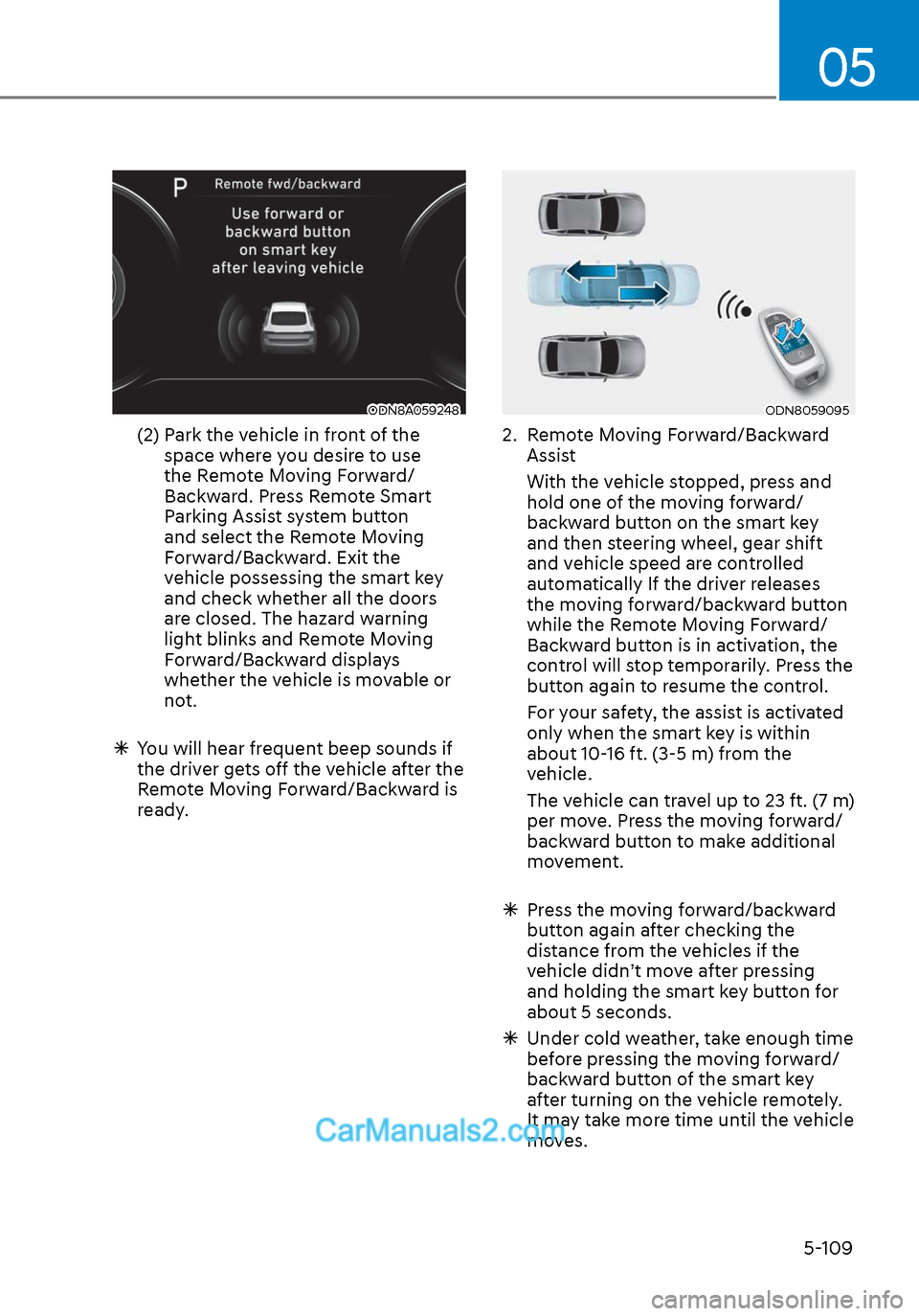
(2) Park the vehicle in front of the space where you desire to use
the Remote Moving Forward/
Backward. Press Remote Smart
Parking Assist system button
and select the Remote Moving
Forward/Backward. Exit the
vehicle possessing the smart key
and check whether all the doors
are closed. The hazard warning
light blinks and Remote Moving
Forward/Backward displays
whether the vehicle is movable or
not.
You will hear frequent beep sounds if
the driver gets off the vehicle after the
Remote Moving Forward/Backward is
ready.
ODN8059095ODN8059095
2. Remote Moving Forward/Backward
Assist
With the vehicle stopped, press and hold one of the moving forward/
backward button on the smart key
and then steering wheel, gear shift
and vehicle speed are controlled
automatically If the driver releases
the moving forward/backward button
while the Remote Moving Forward/
Backward button is in activation, the
control will stop temporarily. Press the
button again to resume the control.
For your safety, the assist is activated only when the smart key is within
about 10-16 ft. (3-5 m) from the
vehicle.
The vehicle can travel up to 23 ft. (7 m) per move. Press the moving forward/
backward button to make additional
movement.
Press the moving forward/backward
button again after checking the
distance from the vehicles if the
vehicle didn’t move after pressing
and holding the smart key button for
about 5 seconds.
Under cold weather, take enough time
before pressing the moving forward/
backward button of the smart key
after turning on the vehicle remotely.
It may take more time until the vehicle
moves.
Page 242 of 537
Convenient Features5-112
The Remote Moving Forward/
Backward assist will stop
temporarily when:
7. An obstacle is detected at the direction the vehicle is heading.
8. The door or trunk is opened.
9. The moving forward/backward button on the smart key is released.
10. Multiple buttons on the smart key are pressed at the same time.
11. The distance between the smart key and vehicle is over 13 ft. (4 m).
12. A button on the other smart key is pressed during operation.
13. Rear Cross-Traffic Collision-Avoidance Assist system is activated while
reserving.
14. The vehicle moves 23 ft. (7 m) with the Remote Moving Forward/Backward
while the smart key is pressed.
(Maximum travel distance per move)
The vehicle stops when the Remote
Smart Parking Assist system will stop
temporarily and the function will
resume when the above condition is
cleared.
The Remote Moving Forward/
Backward assist is cancelled while
in operation when:
1. The driver holds the steering wheel
while the steering wheel is controlled.
2. The gear is shifted or the Electronic Parking Brake (EPB) is activated.
3. The hood opens.
4. The vehicle speed exceeds 3 mph (5km/h).
5. The vehicle accelerates suddenly.
6. The vehicle slips back while controlling the vehicle speed.
7. The wheel is stuck and the vehicle is unable to move.
8. About 3 minutes and 50 seconds have passed after the Remote Moving
Forward/Backward assist starts. 9. The gradient of the road exceeds
the range supported by the Remote
Moving Forward/Backward assist.
10. The steering, shifting gear and drive assist are difficult.
11. The suspended status lasts for over 1 minute.
12. The driver continuously presses and releases the smart key’s moving
forward/backward button over 10
times.
13. The Traction Control System (TCS) is activated while controlling the vehicle
speed.
14. The smart key is damaged.
15. The accelerator/brake pedal is depressed while all the doors are
closed.
16. The brake pedal is depressed while the driver’s door is open and the smart
key is outside the vehicle.
17. The vehicle travels more than 46 ft. (14 m) after the Remote Moving Forward/
Backward assist is activated.
18. The theft alarm system is activated.
When the Remote Moving Forward/
Backward is completed, the gear in
P(Park) and Electronic Parking Brake
(EPB) are engaged automatically and
the vehicle turns off.
The frequent beep sounds are
generated to show the deactivation
status.
Page 245 of 537
05
5-115
Link with other systems
Activation of other systems may
be restricted according to the
circumstances while Remote Smart
Parking Assist system is in activation.
The systems linked to the Remote Smart
Parking Assist system are as follows:
1. Idle Stop & Go
(1) While Remote Smart Parking Assist system is operating, ISG is
deactivated.
(2) If Remote Smart Parking Assist system is completed or cancelled,
ISG can be activated.
2. Auto Hold
(1) The activated Auto Hold is switched to deactivation status
when Remote Smart Parking Assist
system starts.
(2) The Auto Hold button will not respond while Remote Smart
Parking Assist system is in
activation.
(3) After Remote Smart Parking Assist system is completed or
deactivated, the Auto Hold will
return to the status before Remote
Smart Parking Assist system was
activated.
3. Electronic Stability Control (ESC)
(1) Electronic Stability Control (ESC) system switches from OFF to
activation status (ESC OFF button
turns off) when Remote Smart
Parking Assist system is activated.
(2) The ESC OFF button will not respond while Remote Smart
Parking Assist system is in
activation.
(3) The ABS/TCS/ESC system activates while Remote Smart Parking Assist
system is in activation.
(4) After Remote Smart Parking Assist system is completed or
deactivated, the ESC maintains the
ON status.
How the Remote Moving
Forward/Backward System
Works
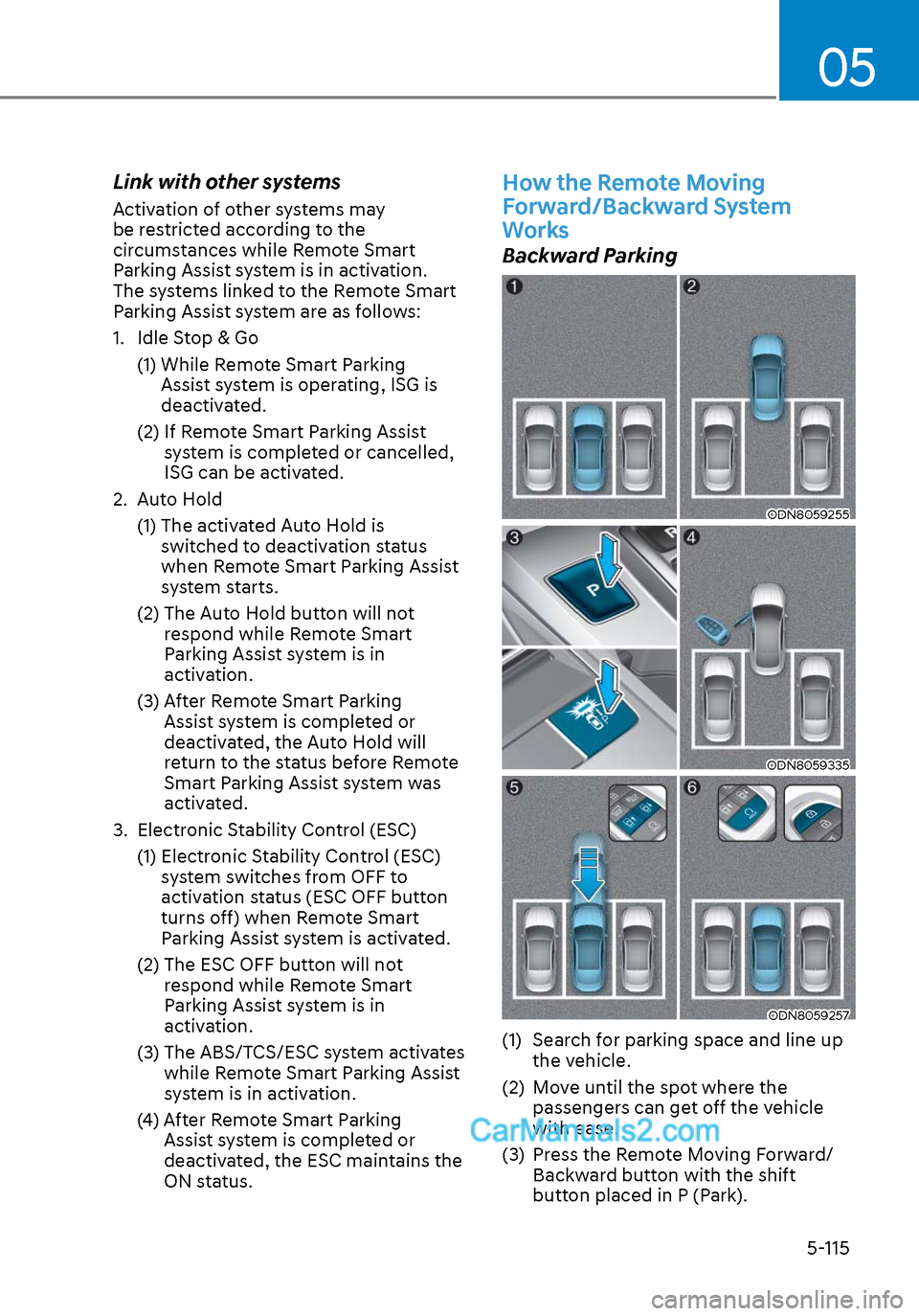
Backward Parking
ODN8059255ODN8059255
ODN8059335ODN8059335
ODN8059257ODN8059257
(1) Search for parking space and line up the vehicle.
(2) Move until the spot where the passengers can get off the vehicle
with ease.
(3) Press the Remote Moving Forward/ Backward button with the shift
button placed in P (Park).
Page 285 of 537

6
6. While Driving
Before Driving ........................................................................\
........................ 6-5Before Entering the Vehicle ........................................................................\
............. 6-5
Before Starting ........................................................................\
................................. 6-5
Ignition Switch ........................................................................\
.......................6-6Key Ignition Switch ........................................................................\
........................... 6-6
Engine Start/Stop Button ........................................................................\
................ 6-9
Remote Start ........................................................................\
.................................... 6-12
Automatic Transmission ........................................................................\
.......6-13Automatic Transmission Operation ........................................................................\
6-13
Parking .................................................................\
....................................................6-16
LCD Display Message ........................................................................\
...................... 6-17
Good Driving Practices ........................................................................\
..................6-18
Paddle Shifter (Manual Shift Mode) ......................................................................6-\
19
Brake System ........................................................................\
........................ 6-20Power Brakes ........................................................................\
.................................. 6-20
Disc Brakes Wear Indicator......................................................................\
.............. 6-20
Electronic Parking Brake (EPB) ........................................................................\
....... 6-21
Auto Hold ........................................................................\
........................................ 6-24
Anti-lock Brake System (ABS) ..................................................................... 6-27Electronic Stability Control (ESC) ........................................................................\
. 6-29
Vehicle Stability Management (VSM) ....................................................................6-31
Hill-Start Assist Control (HAC) ........................................................................\
....... 6-32
Good Braking Practices ................................................................\
......................... 6-32
ISG (Idle Stop and Go) system..................................................................... 6-33To Activate the ISG System ........................................................................\
............ 6-33
To Deactivate the ISG System ........................................................................\
....... 6-35
ISG System Malfunction ........................................................................\
................ 6-35
Battery Sensor Deactivation ........................................................................\
.......... 6-36
Drive Mode Integrated Control System ...................................................... 6-37Drive Mode ........................................................................\
..................................... 6-37
Page 296 of 537
While Driving6-12
NOTICE
To prevent damage to the vehicle:
When the stop lamp switch fuse is
blown, you can't start the engine
normally. Replace the fuse with a new
one. If you are not able to replace
the fuse, you can start the engine by
pressing and holding the Engine Start/
Stop button for 10 seconds with the
Engine Start/Stop button in the ACC
position.
Do not press the Engine Start/Stop
button for more than 10 seconds except
when the stop lamp switch fuse is
blown.
For your safety always depress the
brake pedal before starting the engine.
ODN8069002ODN8069002
Information
If the smart key battery is weak or the
smart key does not work correctly, you
can start the engine by pressing the Engine
Start/Stop button with the smart key in
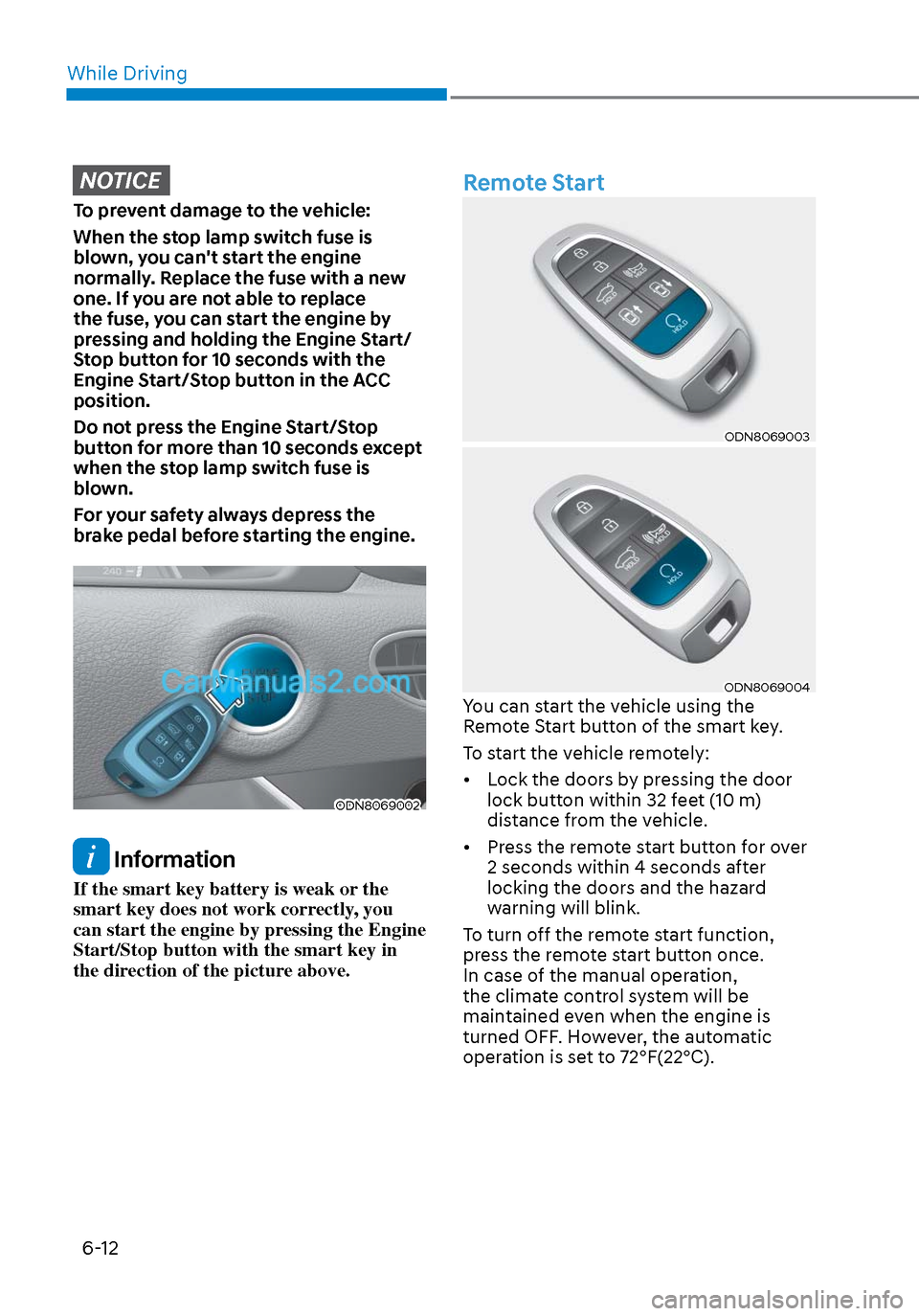
the direction of the picture above.
Remote Start
ODN8069003ODN8069003
ODN8069004ODN8069004You can start the vehicle using the
Remote Start button of the smart key.
To start the vehicle remotely:
• Lock the doors by pressing the door lock button within 32 feet (10 m)
distance from the vehicle.
• Press the remote start button for over 2 seconds within 4 seconds after
locking the doors and the hazard
warning will blink.
To turn off the remote start function,
press the remote start button once.
In case of the manual operation,
the climate control system will be
maintained even when the engine is
turned OFF. However, the automatic
operation is set to 72°F(22°C).
Page 299 of 537
06
6-15
D (Drive)
This is the normal driving position. The
tr
ansmission will automatically shift
through a 8-gear sequence, providing
the best fuel economy and power.
To start the vehicle forward, push the D
(Drive) button by depressing the brake
pedal with the engine ON. Then depress
the accelerator pedal smoothly.
For extra power when passing another
vehicle or driving uphill, depress the
accelerator fully. The transmission will
automatically downshift to the next
lower gear (or gears, as appropriate).
When the vehicle is stopped in D (Drive)
position, if you open the driver's door
with the seat belt unfastened, the gear is
shifted to P (Park) position automatically.
However when the vehicle moves in D
(Drive) position, if you open the driver's
door with the seat belt unfastened, the
gear may not shift to P (Park) position
automatically to protect the automatic
transmission.
Shift-lock system
For your safety, the automatic
transmission has a shift-lock system
which prevents shifting the gear from
P (Park) or N (Neutral) to R (Reverse)
or D (Drive) unless the brake pedal is
depressed.
To shift the gear from P (Park) or N
(Neutral) to R (Reverse) or D (Drive):
1. Depress and hold the brake pedal.
2. Start the engine or place the ignition switch in the ON position.
3. Depress the brake pedal and push the R (Reverse) or D (Drive) button.
Stay in N (Neutral) position when
engine is Off
ODN8069006ODN8069006
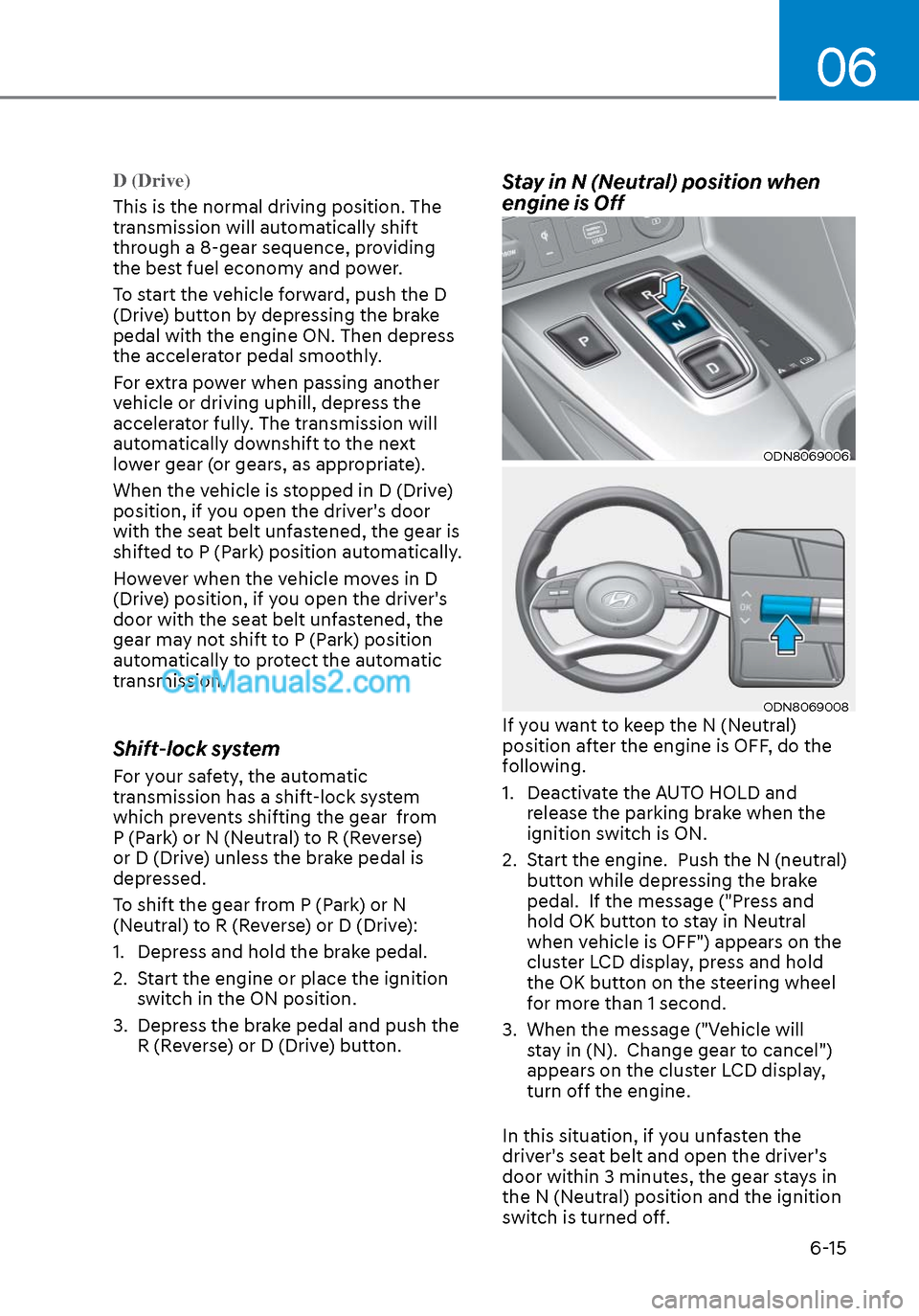
ODN8069008ODN8069008If you want to keep the N (Neutral)
position after the engine is OFF, do the
following.
1. Deactivate the AUTO HOLD and release the parking brake when the
ignition switch is ON.
2. Start the engine. Push the N (neutral) button while depressing the brake
pedal. If the message ("Press and
hold OK button to stay in Neutral
when vehicle is OFF") appears on the
cluster LCD display, press and hold
the OK button on the steering wheel
for more than 1 second.
3. When the message ("Vehicle will stay in (N). Change gear to cancel")
appears on the cluster LCD display,
turn off the engine.
In this situation, if you unfasten the
driver's seat belt and open the driver's
door within 3 minutes, the gear stays in
the N (Neutral) position and the ignition
switch is turned off.
Page 303 of 537
![Hyundai Sonata 2020 User Guide 06
6-19
Paddle Shifter
(Manual Shift Mode)
(if equipped)
ODN8069009ODN8069009
The paddle shifter is available when the
gear is in the D (Drive) position.
Pull the [+] or [-] paddle shifter once to](/img/35/16773/w960_16773-302.png "Hyundai Sonata 2020 User Guide 06
6-19
Paddle Shifter
(Manual Shift Mode)
(if equipped)
ODN8069009ODN8069009
The paddle shifter is available when the
gear is in the D (Drive) position.
Pull the [+] or [-] paddle shifter once to")
06
6-19
Paddle Shifter
(Manual Shift Mode)
(if equipped)
ODN8069009ODN8069009
The paddle shifter is available when the
gear is in the D (Drive) position.
Pull the [+] or [-] paddle shifter once to
shift up or down one gear and the system
changes from automatic shift mode to
manual shift mode.
To change back to the automatic shift
mode from manual shift mode, do one of
the following:
• Gently depress the accelerator pedal for more than 5 seconds.
• Drive the vehicle under 6 mph (10 km/h).
• Pull and hold the right side paddle shifter.
Information
If the [+] and [-] paddle shifters are pulled
at the same time, gear shift may not occur.