Glass Hyundai Sonata 2020 User Guide
[x] Cancel search | Manufacturer: HYUNDAI, Model Year: 2020, Model line: Sonata, Model: Hyundai Sonata 2020Pages: 537, PDF Size: 14.54 MB
Page 214 of 537
Convenient Features5-84
WIPERS AND WASHERS
ODN8059208LODN8059208L
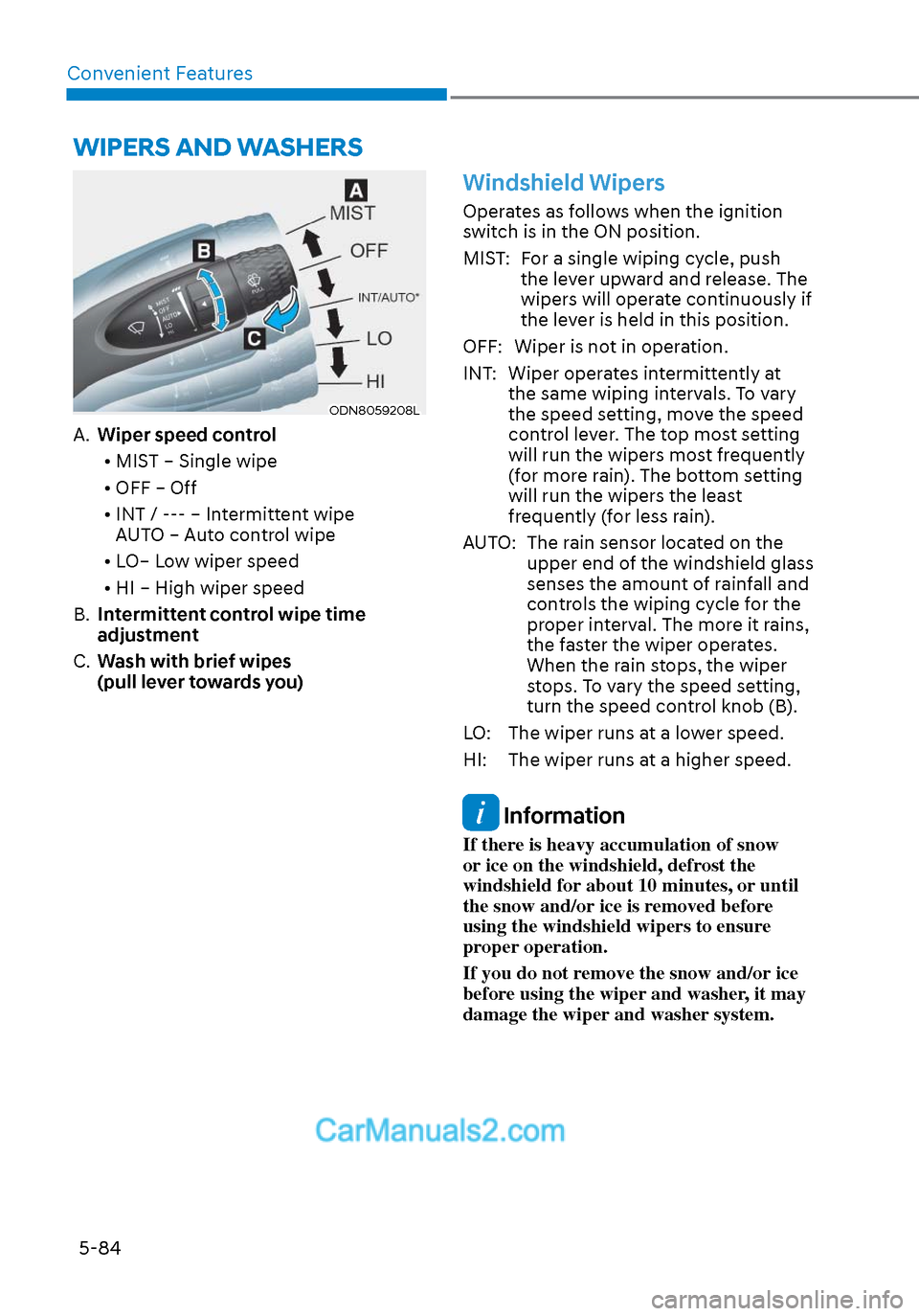
A. Wiper speed control
• MIST – Single wipe
• OFF – Off
• INT / --- – Intermittent wipe AUTO – Auto control wipe
• LO– Low wiper speed
• HI – High wiper speed
B. Intermittent control wipe time
adjustment
C. Wash with brief wipes
(pull lever towards you)
Windshield Wipers
Operates as follows when the ignition
switch is in the ON position.
MIST: For a single wiping cycle, push
the lever upward and release. The
wipers will operate continuously if
the lever is held in this position.
OFF: Wiper is not in operation.
INT: Wiper operates intermittently at the same wiping intervals. To vary
the speed setting, move the speed
control lever. The top most setting
will run the wipers most frequently
(for more rain). The bottom setting
will run the wipers the least
frequently (for less rain).
AUTO: The rain sensor located on the upper end of the windshield glass
senses the amount of rainfall and
controls the wiping cycle for the
proper interval. The more it rains,
the faster the wiper operates.
When the rain stops, the wiper
stops. To vary the speed setting,
turn the speed control knob (B).
LO: The wiper runs at a lower speed.
HI: The wiper runs at a higher speed.
Information
If there is heavy accumulation of snow
or ice on the windshield, defrost the
windshield for about 10 minutes, or until
the snow and/or ice is removed before
using the windshield wipers to ensure
proper operation.
If you do not remove the snow and/or ice
before using the wiper and washer, it may
damage the wiper and washer system.
Page 215 of 537
05
5-85
Information
If the wiper switch is set in AUTO mode
when Engine Start/Stop button is in the
ON position, the wiper will operate once to
perform a self-check of the system. Set the
wiper to the OFF position when the wiper
is not in use.
WARNING
To avoid personal injury from the
windshield wipers, when the engine
is running and the windshield wiper
switch is placed in the AUTO mode:
• Do not touch the upper end of the windshield glass facing the rain
sensor.
• Do not wipe the upper end of the windshield glass with a damp or wet
cloth.
• Do not put pressure on the windshield glass.
Windshield Washers
ODN8059209KODN8059209K
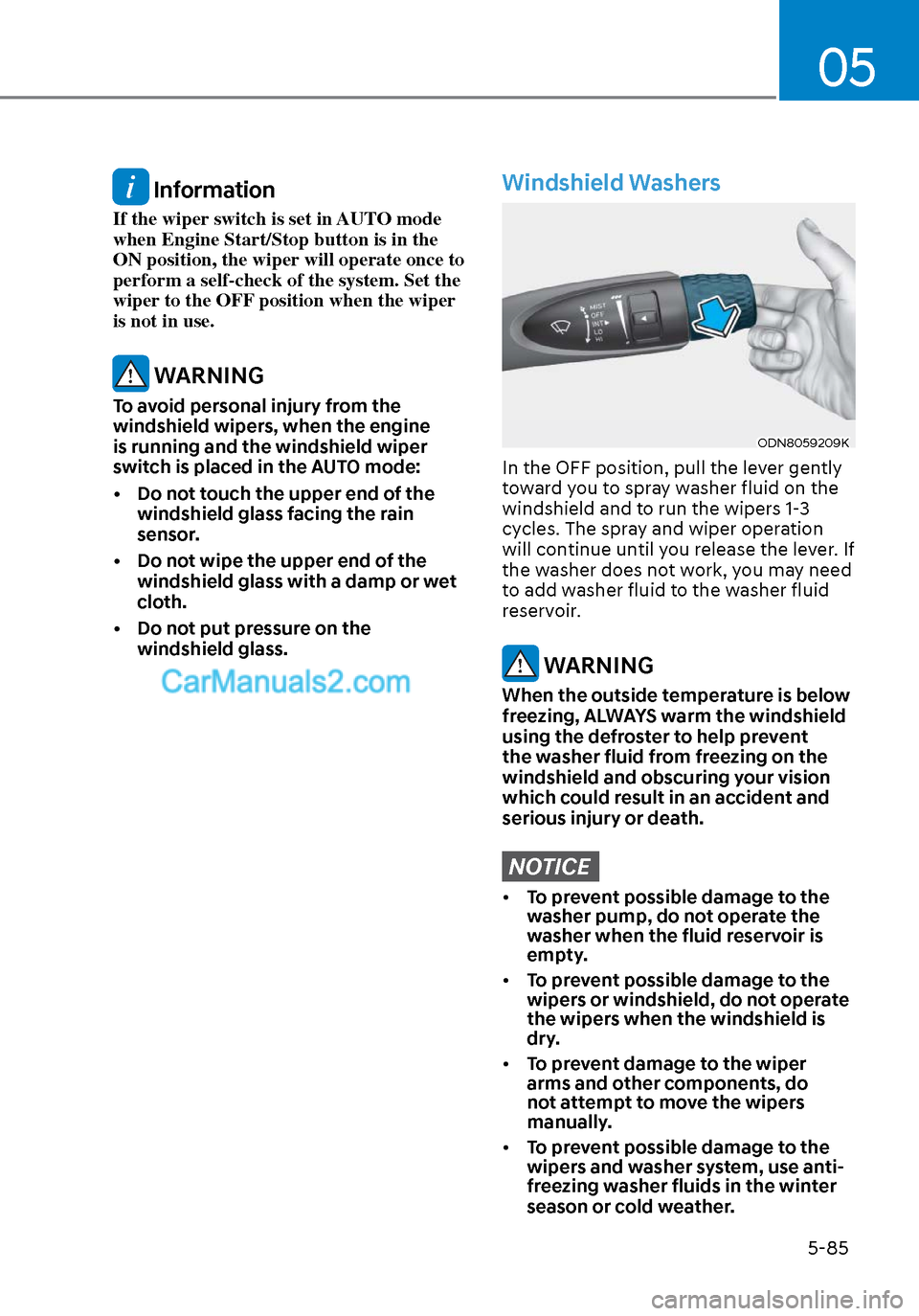
In the OFF position, pull the lever gently
toward you to spray washer fluid on the
windshield and to run the wipers 1-3
cycles. The spray and wiper operation
will continue until you release the lever. If
the washer does not work, you may need
to add washer fluid to the washer fluid
reservoir.
WARNING
When the outside temperature is below
freezing, ALWAYS warm the windshield
using the defroster to help prevent
the washer fluid from freezing on the
windshield and obscuring your vision
which could result in an accident and
serious injury or death.
NOTICE
• To prevent possible damage to the
washer pump, do not operate the
washer when the fluid reservoir is
empty.
• To prevent possible damage to the
wipers or windshield, do not operate
the wipers when the windshield is
dry.
• To prevent damage to the wiper
arms and other components, do
not attempt to move the wipers
manually.
• To prevent possible damage to the
wipers and washer system, use anti-
freezing washer fluids in the winter
season or cold weather.
Page 271 of 537
05
5-141
Auto Defogging System (Only
for Automatic Climate Control
System, if equipped)
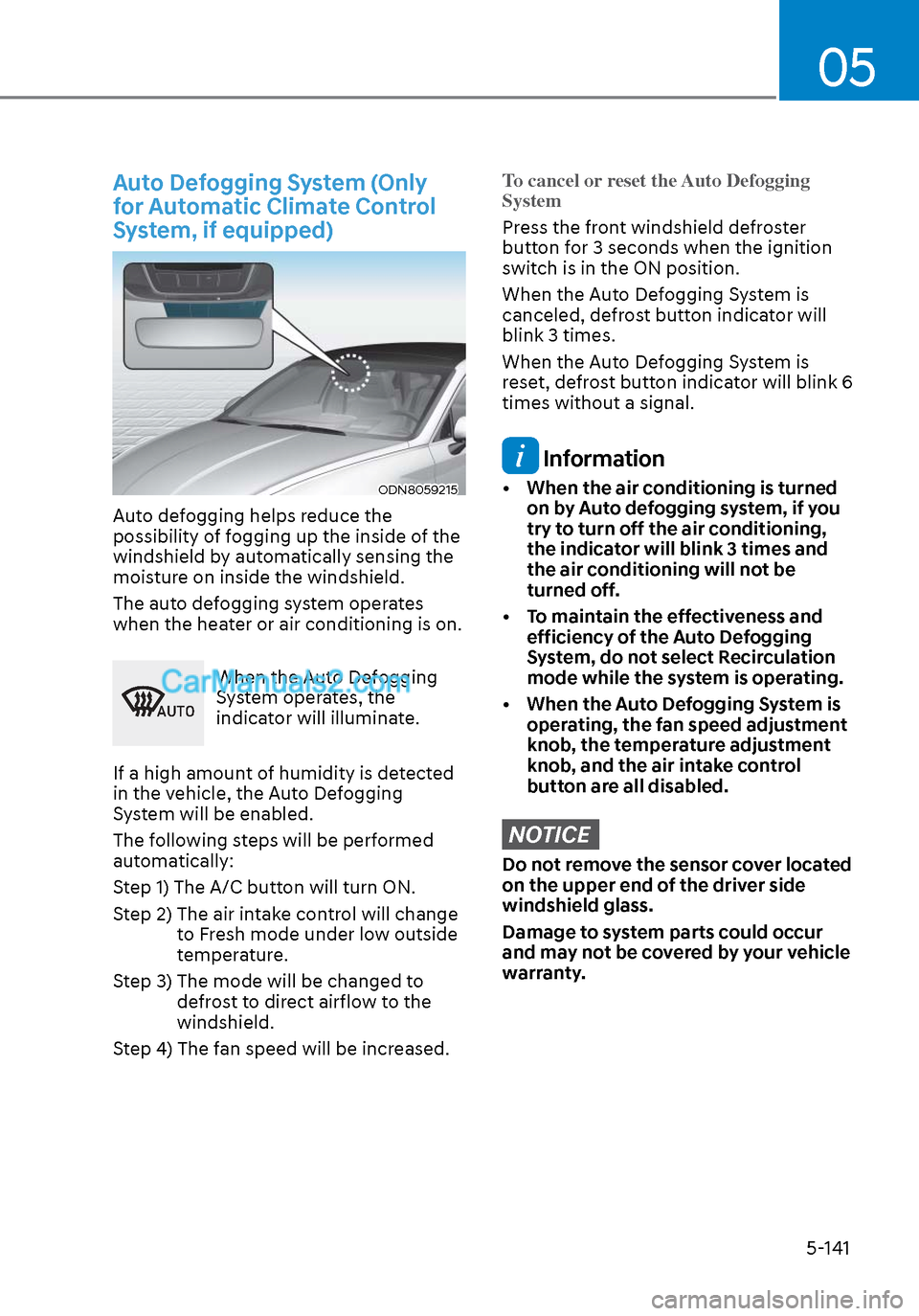
ODN8059215ODN8059215
Auto defogging helps reduce the
possibility of fogging up the inside of the
windshield by automatically sensing the
moisture on inside the windshield.
The auto defogging system operates
when the heater or air conditioning is on.
$872
When the Auto Defogging
System operates, the
indicator will illuminate.
If a high amount of humidity is detected
in the vehicle, the Auto Defogging
System will be enabled.
The following steps will be performed
automatically:
Step 1) The A/C button will turn ON.
Step 2) The air intake control will change to Fresh mode under low outside
temperature.
Step 3) The mode will be changed to defrost to direct airflow to the
windshield.
Step 4) The fan speed will be increased.
To cancel or reset the Auto Defogging
System
Press the front windshield defroster
butt
on for 3 seconds when the ignition
switch is in the ON position.
When the Auto Defogging System is
canceled, defrost button indicator will
blink 3 times.
When the Auto Defogging System is
reset, defrost button indicator will blink 6
times without a signal.
Information
• When the air conditioning is turned on by Auto defogging system, if you
try to turn off the air conditioning,
the indicator will blink 3 times and
the air conditioning will not be
turned off.
• To maintain the effectiveness and efficiency of the Auto Defogging
System, do not select Recirculation
mode while the system is operating.
• When the Auto Defogging System is operating, the fan speed adjustment
knob, the temperature adjustment
knob, and the air intake control
button are all disabled.
NOTICE
Do not remove the sensor cover located
on the upper end of the driver side
windshield glass.
Damage to system parts could occur
and may not be covered by your vehicle
warranty.
Page 282 of 537
Convenient Features5-152
INFOTAINMENT SYSTEM
NOTICE
• If you install an aftermarket HID
head lamp, your vehicle’s audio and
electronic devices may not function
properly.
• Prevent chemicals such as perfume,
cosmetic oil, sunscreen, hand
cleaner, and air freshener from
contacting the interior parts
because they may cause damage or
discoloration.
USB and iPod® Port
ODN8059229ODN8059229
You can use an AUX or USB cable to
connect audio devices to the vehicle AUX
or USB port.
Information
When using a portable audio device
connected to the power outlet, noise may
occur during playback. If this happens,
use the portable audio device’s power
source.
iPod® is a trademark of Apple Inc.
Antenna
ODN8059226ODN8059226
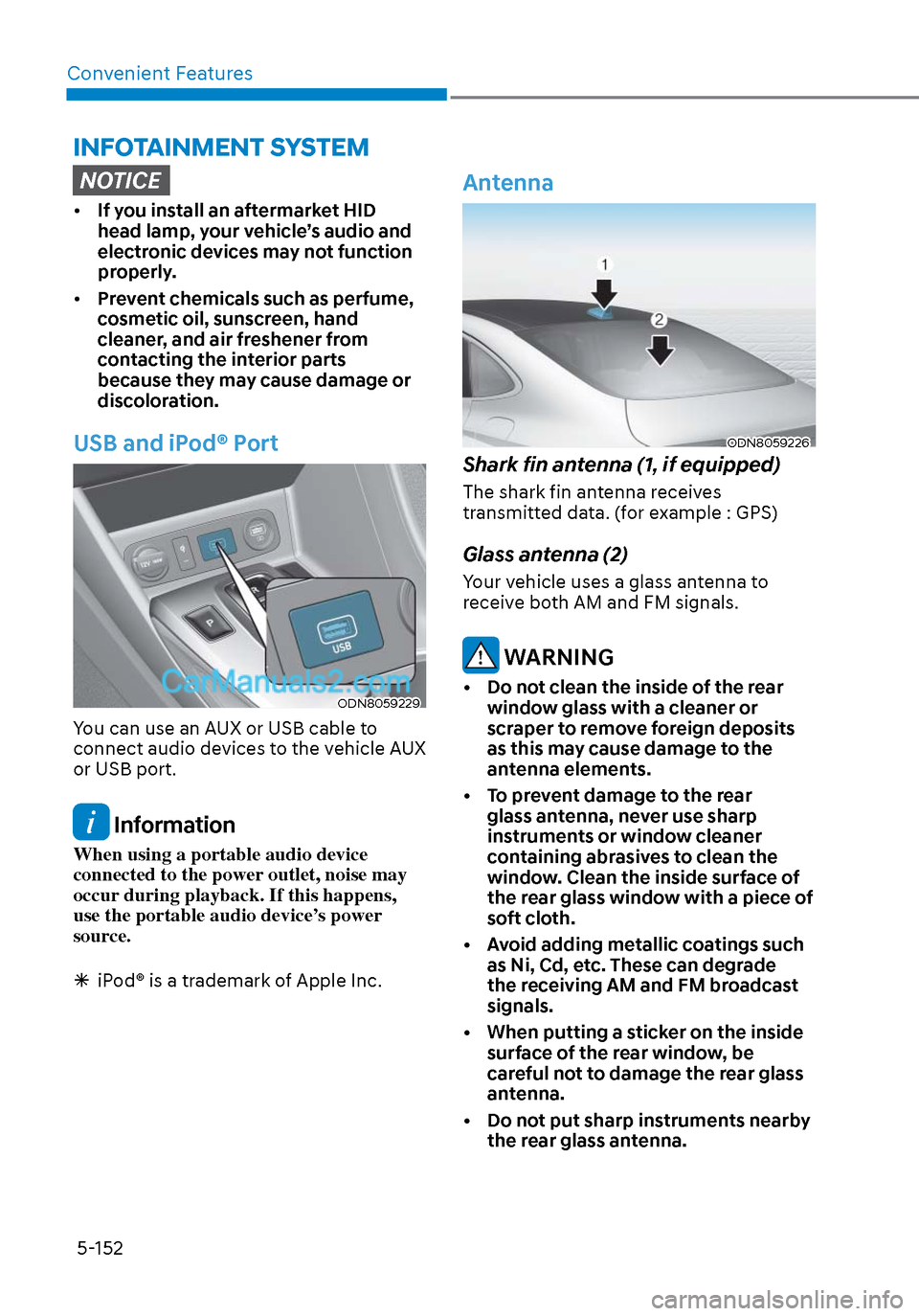
Shark fin antenna (1, if equipped)
The shark fin antenna receives
transmitted data. (for example : GPS)
Glass antenna (2)
Your vehicle uses a glass antenna to
receive both AM and FM signals.
WARNING
• Do not clean the inside of the rear
window glass with a cleaner or
scraper to remove foreign deposits
as this may cause damage to the
antenna elements.
• To prevent damage to the rear glass antenna, never use sharp
instruments or window cleaner
containing abrasives to clean the
window. Clean the inside surface of
the rear glass window with a piece of
soft cloth.
• Avoid adding metallic coatings such as Ni, Cd, etc. These can degrade
the receiving AM and FM broadcast
signals.
• When putting a sticker on the inside surface of the rear window, be
careful not to damage the rear glass
antenna.
• Do not put sharp instruments nearby the rear glass antenna.
Page 320 of 537
![Hyundai Sonata 2020 User Guide While Driving6-36
Battery Sensor Deactivation
ODN8A069204ODN8A069204
[A] : Battery sensor
The battery sensor is deactivated, when
the battery is disconnected from the
negative pole for maintenance p](/img/35/16773/w960_16773-319.png "Hyundai Sonata 2020 User Guide While Driving6-36
Battery Sensor Deactivation
ODN8A069204ODN8A069204
[A] : Battery sensor
The battery sensor is deactivated, when
the battery is disconnected from the
negative pole for maintenance p")
While Driving6-36
Battery Sensor Deactivation
ODN8A069204ODN8A069204
[A] : Battery sensor
The battery sensor is deactivated, when
the battery is disconnected from the
negative pole for maintenance purpose.
In this case, the ISG system is limitedly
operated due to the battery sensor
deactivation. Thus, the driver needs
to take the following procedures to
reactivate the battery sensor after
disconnecting the battery.
Prerequisites to reactivate the
battery sensor
Switch "ON" and "OFF" the ignition one
time. Park the vehicle for a minimum of 4
hours with the hood and all doors closed.
Pay extreme caution not to connect any
accessories (i.e. navigation and black
box) to the vehicle with the engine in the
OFF status. If not, the battery sensor may
not be reactivated.
Information
The ISG system may not operate in the
following situations. - There is a malfunction with the ISG
system.
- The battery is weak.
- The brake vacuum pressure is low.
If this occurs, have the ISG system
checked by an authorized HYUNDAI
dealer.
NOTICE
• Use only a genuine HYUNDAI
Absorbent Glass Mat (AGM) battery
for replacement. If not, the ISG
system may not operate normally.
• Do not recharge the Absorbent Glass
Mat (AGM) battery with a general
battery charger. It may damage or
explode the Absorbent Glass Mat
(AGM) battery.
• Do not remove the battery cap. The
battery electrolyte, which is harmful
to the human body, may leak out.
Page 330 of 537
While Driving6-46
NOTICE
NEVER install any accessories or
stickers on the front windshield, or tint
the front windshield.
NEVER place any reflective objects
(i.e. white paper, mirror) over the
dashboard. Any light reflection may
prevent the system from functioning
properly.
Pay extreme caution to keep the camera
dry.
NEVER disassemble the camera
assembly, or apply any impact on the
camera assembly.
Information
Have the vehicle inspected by an
authorized HYUNDAI dealer when:
• The windshield glass is replaced.
• The radar sensor or cover gets
damaged or replaced.
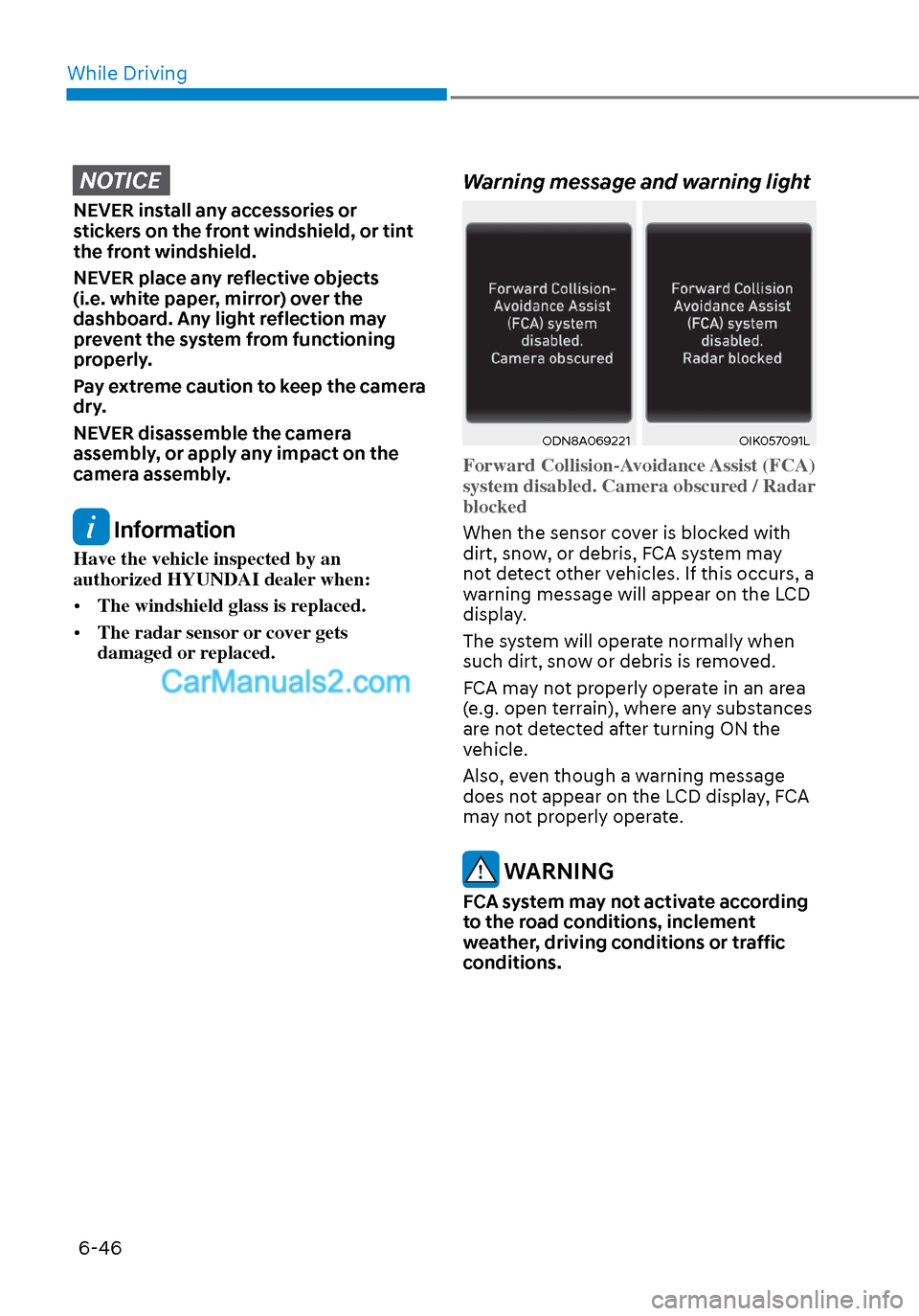
Warning message and warning light
ODN8A069221ODN8A069221OIK057091LOIK057091L
Forward Collision-Avoidance Assist (FCA)
system disabled. Camera obscured / Radar
blocked
When the sensor cover is blocked with
dirt, sno
w, or debris, FCA system may
not detect other vehicles. If this occurs, a
warning message will appear on the LCD
display.
The system will operate normally when
such dirt, snow or debris is removed.
FCA may not properly operate in an area
(e.g. open terrain), where any substances
are not detected after turning ON the
vehicle.
Also, even though a warning message
does not appear on the LCD display, FCA
may not properly operate.
WARNING
FCA system may not activate according
to the road conditions, inclement
weather, driving conditions or traffic
conditions.
Page 333 of 537
06
6-49
Detecting vehicle, pedestrian and
cyclist
The sensor may be limited when:
• The system may not operate for 15 seconds after the vehicle is started or
the camera is initialized
• The radar sensor or camera is covered with a foreign object or debris
• The camera lens is contaminated due to tinted, filmed or coated windshield,
damaged glass, or stuck of foreign
matter (sticker, bug, etc.) on the glass
• Inclement weather such as heavy rain or snow obscures the field of view of
the radar sensor or camera
• There is interference by electromagnetic waves
• There is severe irregular reflection from the radar sensor
• The radar/camera sensor recognition is limited
• The vehicle in front is too small to be detected (for example a motorcycle
etc.)
• The vehicle in front is an oversize vehicle or trailer that is too big to be
detected by the camera recognition
system (for example a tractor trailer,
etc.)
• The camera’s field of view is not well illuminated (either too dark or too
much reflection or too much backlight
that obscures the field of view)
• The vehicle in front does not have their rear lights or their rear lights
does not turned ON or their rear lights
are located unusually
• The outside brightness changes suddenly, for example when entering
or exiting a tunnel
• Light coming from a street light or an oncoming vehicle is reflected on a wet
road surface such as a puddle in the
road • The field of view in front is obstructed
by sun glare or head light of oncoming
vehicle
• The windshield glass is fogged up; a clear view of the road is obstructed
• The vehicle in front is driving erratically
• The vehicle is on unpaved or uneven rough surfaces, or road with sudden
gradient changes
• The vehicle is driven near areas containing metal substances as a
construction zone, railroad, etc.
• The vehicle drives inside a building, such as a basement parking lot
• The camera does not recognize the entire vehicle in front
• The camera is damaged
• The brightness outside is too low such as when the headlamps are not on at
night or the vehicle is going through
a tunnel
• The shadow is on the road by a median strip, trees, etc.
• The vehicle drives through a tollgate
• The windshield glass is fogged up; a clear view of the road is obstructed
• The rear part of the vehicle in front is not normally visible (the vehicle turns
in other direction or the vehicle is
overturned.)
• The adverse road conditions cause excessive vehicle vibrations while
driving
• The sensor recognition changes suddenly when passing over a speed
bump
• The vehicle in front is moving vertically to the driving direction
• The vehicle in front is stopped vertically
• The vehicle in front is driving towards your vehicle or reversing
• You are on a roundabout and the vehicle in front circles
Page 338 of 537
While Driving6-54
• The pedestrian or cyclist is not fully detected by the camera recognition
system, for example, if the pedestrian
is leaning over or is not fully walking
upright
• The pedestrian or cyclist is moving very quickly or appears abruptly in the
camera detection area
• The pedestrian or cyclist is wearing clothing that easily blends into the
background, making it difficult to be
detected by the camera recognition
system
• The outside lighting is too bright (e.g. when driving in bright sunlight or
in sun glare) or too dark (e.g. when
driving on a dark rural road at night)
• It is difficult to detect and distinguish the pedestrian or cyclist from other
objects in the surroundings, for
example, when there is a group of
pedestrians, cyclists or a large crowd
• There is an item similar to a person’s body structure
• The pedestrian or cyclist is small
• The pedestrian has impaired mobility
• The sensor recognition is limited • The radar sensor or camera is blocked
with a foreign object or debris
• Inclement weather such as heavy rain or snow obscures the field of view of
the radar sensor or camera
• When light coming from a street light or an oncoming vehicle is reflected on
a wet road surface such as a puddle in
the road
• The field of view in front is obstructed by sun glare
• The windshield glass is fogged up; a clear view of the road is obstructed
• The adverse road conditions cause excessive vehicle vibrations while
driving
• The sensor recognition changes suddenly when passing over a speed
bump
• You are on a roundabout
• The pedestrian or cyclist suddenly interrupts in front of the vehicle
• The cyclist in front is riding intersected with the driving direction
• There is any other electromagnetic interference
• The construction area, rail or other metal object is near the cyclist
• The bicycle material is not reflected well on the radar
WARNING
Turn off Forward Collision avoidance
Assist system through cluster or
infotainment system before towing
a vehicle. Application of FCA system
while towing may adversely affect the
safety of your vehicle or the towing
vehicle.
Use extreme caution when the vehicle
in front of you has cargo that extends
rearward from the cab, or when the
vehicle in front of you has higher
ground clearance.
Page 339 of 537
06
6-55
FCA system may work when it
recognizes objects similar in shape or
property to a vehicle, pedestrian or
cyclist.
FCA system is designed to help detect
and monitor the vehicle ahead or detect
a pedestrian or cyclist in the roadway
through radar signals and camera
recognition. It is not designed to detect
bicycles, motorcycles, or smaller
wheeled objects such as luggage bags,
shopping carts, or strollers.
Never try to test the operation of FCA
system. Doing so may cause severe
injury or death.
If the front bumper, front glass, radar or
camera have been replaced or repaired,
have the vehicle inspected by an
authorized HYUNDAI dealer.
Information
In some instances, FCA system
may be cancelled when subjected to
electromagnetic interference.
Information
This device complies with Part 15 of the
FCC rules.
Operation is subject to the following two
conditions:
1. This device may not cause harmful
interference.
2. This device must accept any
interference received, including
interference that may cause undesired
operation.
Forward Collision-Avoidance
Assist - Junction Turning (if
equipped)
FCA-Junction Turning function is
designed to reduce the risk of collision
by detecting and monitoring the
oncoming vehicle ahead. When the
vehicle turns to the left at a junction, the
system recognises the oncoming vehicle
ahead in advance with the front view
camera and the front radar. It produces
warning messages or haptic warning
alarms in accordance with the collision
risk levels.
System setting
FCA-Junction Turning function can be
activated from the User Settings menu
by following the procedure below.
1. Set the Engine Start/Stop button to the
ON or START position.
2. Select ‘User settings
Driver
assistance Forward safety’.
For more details, refer to “Forward
Collision-Avoidance Assist (FCA)” in this
chapter.
Page 344 of 537
While Driving6-60
• When you replace the windshield
glass, LKA system camera or related
parts of the steering wheel, have the
vehicle inspected by an authorized
HYUNDAI dealer and have the system
checked for calibration.
• The system detects lane markers
and controls the steering wheel
by a camera, therefore, if the lane
markers are hard to detect, the
system may not work properly.
Please refer to “Limitations of the
System”.
• Do not remove or damage the related
parts of LKA system.
• You may not hear a warning sound
of LKA system if the audio volume is
high.
• Do not place objects on the
dashboard that reflects light such as
mirrors, white paper, etc. This may
prevent LKA system from functioning
properly. •
Always have your hands on the
steering wheel while LKA system is
activated. If you continue to drive
with your hands off the steering
wheel after the “Keep hands on
steering wheel” warning message
appears, the system will stop
controlling the steering wheel.
• The steering wheel is not
continuously controlled so if the
vehicle speed is at a higher rate
when leaving a lane the vehicle may
not be controlled by the system. The
driver must always follow the speed
limit when using the system.
• If you attach objects to the steering
wheel, the system may not assist
steering or the hands off alarm may
not work properly.