automatic transmission Hyundai Sonata 2020 User Guide
[x] Cancel search | Manufacturer: HYUNDAI, Model Year: 2020, Model line: Sonata, Model: Hyundai Sonata 2020Pages: 537, PDF Size: 14.54 MB
Page 299 of 537
06
6-15
D (Drive)
This is the normal driving position. The
tr
ansmission will automatically shift
through a 8-gear sequence, providing
the best fuel economy and power.
To start the vehicle forward, push the D
(Drive) button by depressing the brake
pedal with the engine ON. Then depress
the accelerator pedal smoothly.
For extra power when passing another
vehicle or driving uphill, depress the
accelerator fully. The transmission will
automatically downshift to the next
lower gear (or gears, as appropriate).
When the vehicle is stopped in D (Drive)
position, if you open the driver's door
with the seat belt unfastened, the gear is
shifted to P (Park) position automatically.
However when the vehicle moves in D
(Drive) position, if you open the driver's
door with the seat belt unfastened, the
gear may not shift to P (Park) position
automatically to protect the automatic
transmission.
Shift-lock system
For your safety, the automatic
transmission has a shift-lock system
which prevents shifting the gear from
P (Park) or N (Neutral) to R (Reverse)
or D (Drive) unless the brake pedal is
depressed.
To shift the gear from P (Park) or N
(Neutral) to R (Reverse) or D (Drive):
1. Depress and hold the brake pedal.
2. Start the engine or place the ignition switch in the ON position.
3. Depress the brake pedal and push the R (Reverse) or D (Drive) button.
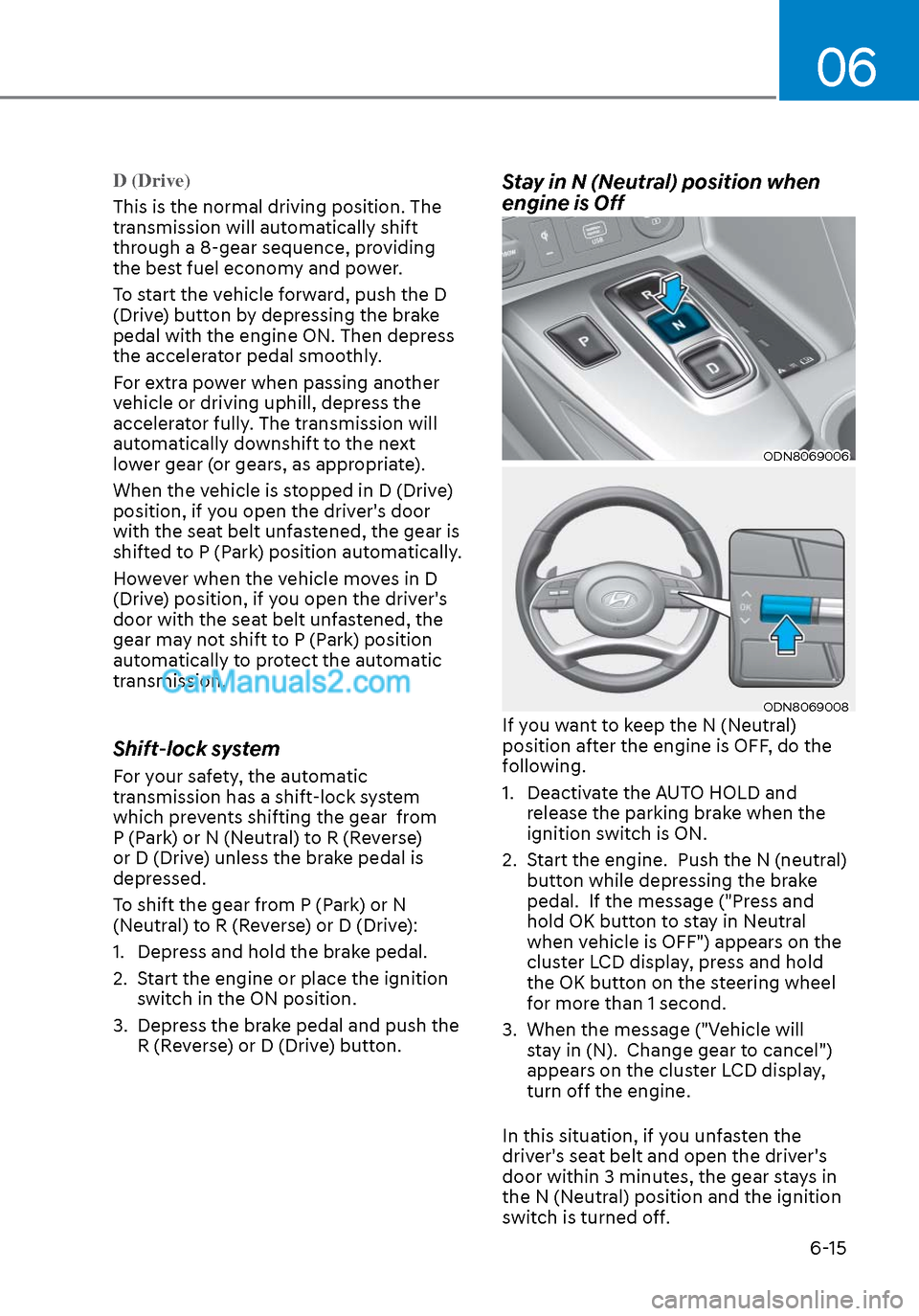
Stay in N (Neutral) position when
engine is Off
ODN8069006ODN8069006
ODN8069008ODN8069008If you want to keep the N (Neutral)
position after the engine is OFF, do the
following.
1. Deactivate the AUTO HOLD and release the parking brake when the
ignition switch is ON.
2. Start the engine. Push the N (neutral) button while depressing the brake
pedal. If the message ("Press and
hold OK button to stay in Neutral
when vehicle is OFF") appears on the
cluster LCD display, press and hold
the OK button on the steering wheel
for more than 1 second.
3. When the message ("Vehicle will stay in (N). Change gear to cancel")
appears on the cluster LCD display,
turn off the engine.
In this situation, if you unfasten the
driver's seat belt and open the driver's
door within 3 minutes, the gear stays in
the N (Neutral) position and the ignition
switch is turned off.
Page 321 of 537
06
6-37
DRIVE MODE INTEGRATED CONTROL SYSTEM (IF EQUIPPED)
Drive Mode
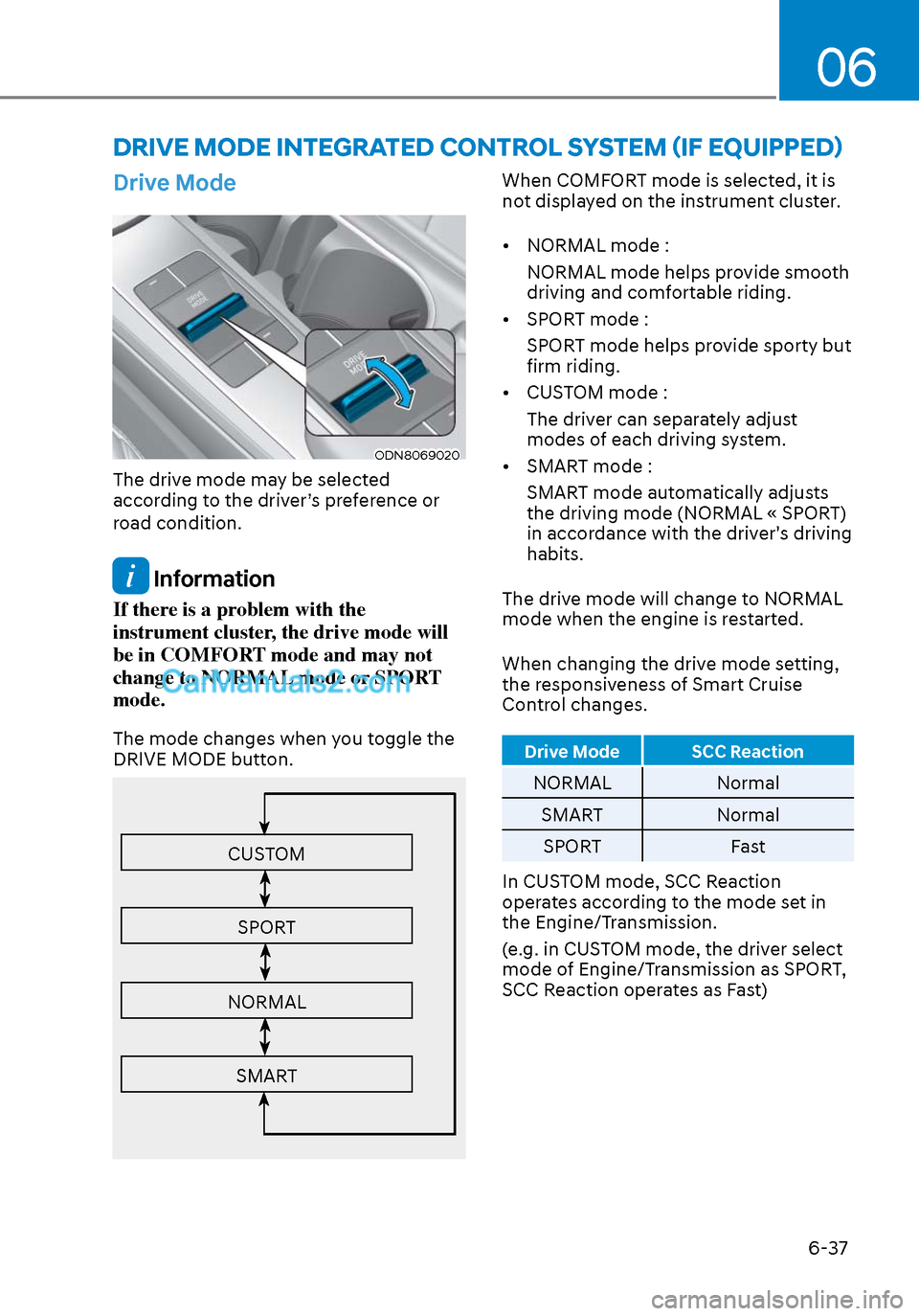
ODN8069020ODN8069020
The drive mode may be selected
according to the driver’s preference or
road condition.
Information
If there is a problem with the
instrument cluster, the drive mode will
be in COMFORT mode and may not
change to NORMAL mode or SPORT
mode.
The mode changes when you toggle the
DRIVE MODE button.
CUSTOM
SPORT
NORMAL
SMART
When COMFORT mode is selected, it is
not displayed on the instrument cluster.
• NORMAL mode :NORMAL mode helps provide smooth
driving and comfortable riding.
• SPORT mode : SPORT mode helps provide sporty but
firm riding.
• CUSTOM mode :
The driver can separately adjust
modes of each driving system.
• SMART mode :
SMART mode automatically adjusts
the driving mode (NORMAL « SPORT)
in accordance with the driver's driving
habits.
The drive mode will change to NORMAL
mode when the engine is restarted.
When changing the drive mode setting,
the responsiveness of Smart Cruise
Control changes.
Drive Mode SCC Reaction
NORMAL Normal
SMART Normal
SPORT Fast
In CUSTOM mode, SCC Reaction
operates according to the mode set in
the Engine/Transmission.
(e.g. in CUSTOM mode, the driver select
mode of Engine/Transmission as SPORT,
SCC Reaction operates as Fast)
Page 322 of 537
While Driving6-38
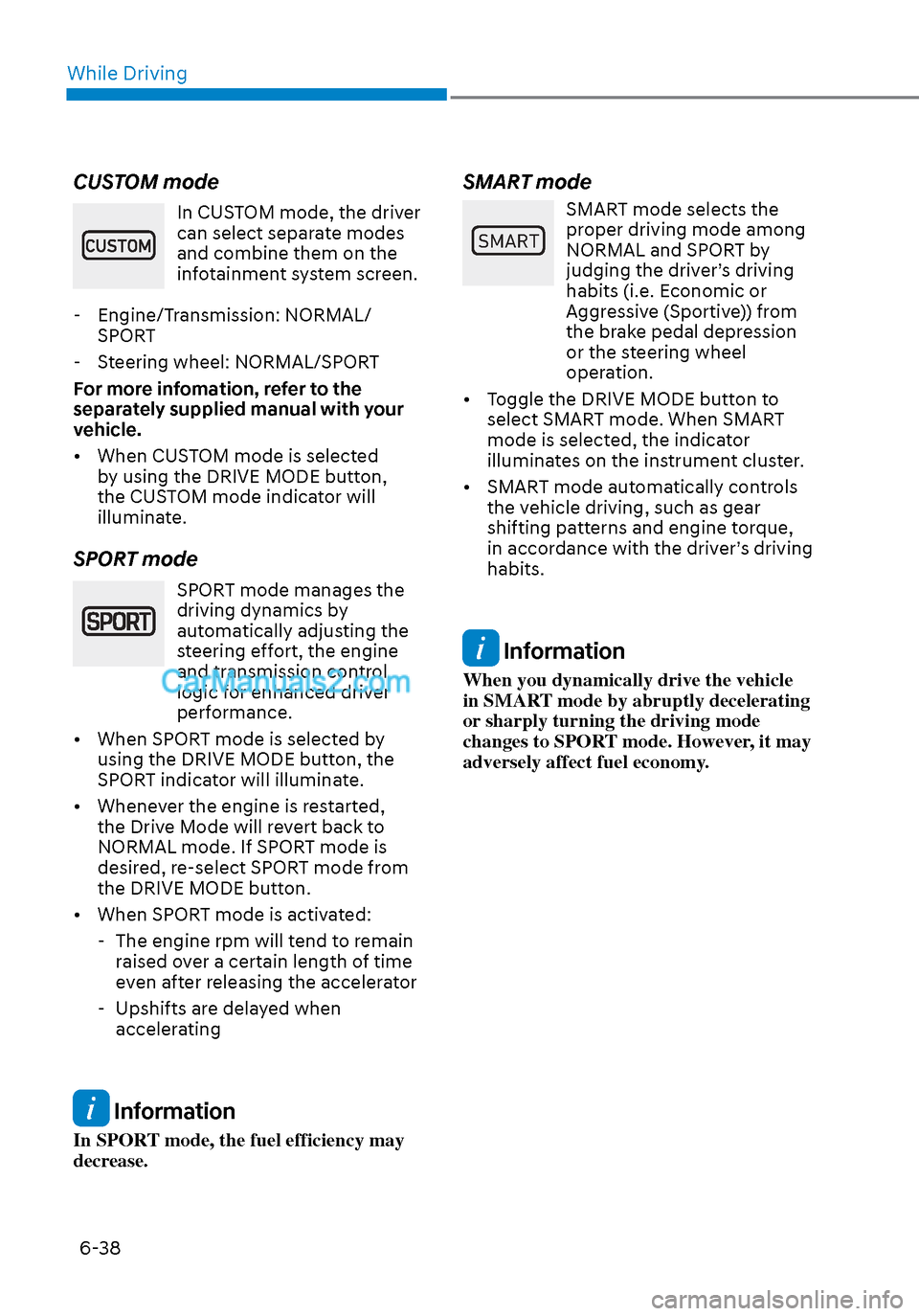
CUSTOM mode
In CUSTOM mode, the driver
can select separate modes
and combine them on the
infotainment system screen.
- Engine/Transmission: NORMAL/ SPORT
- Steering wheel: NORMAL/SPORT
For more infomation, refer to the
separately supplied manual with your
vehicle.
• When CUSTOM mode is selected by using the DRIVE MODE button,
the CUSTOM mode indicator will
illuminate.
SPORT mode
SPORT mode manages the
driving dynamics by
automatically adjusting the
steering effort, the engine
and transmission control
logic for enhanced driver
performance.
• When SPORT mode is selected by using the DRIVE MODE button, the
SPORT indicator will illuminate.
• Whenever the engine is restarted, the Drive Mode will revert back to
NORMAL mode. If SPORT mode is
desired, re-select SPORT mode from
the DRIVE MODE button.
• When SPORT mode is activated: - The engine rpm will tend to remain raised over a certain length of time
even after releasing the accelerator
- Upshifts are delayed when accelerating
Information
In SPORT mode, the fuel efficiency may
decrease.
SMART mode
60$57
SMART mode selects the
proper driving mode among
NORMAL and SPORT by
judging the driver’s driving
habits (i.e. Economic or
Aggressive (Sportive)) from
the brake pedal depression
or the steering wheel
operation.
• Toggle the DRIVE MODE button to select SMART mode. When SMART
mode is selected, the indicator
illuminates on the instrument cluster.
• SMART mode automatically controls the vehicle driving, such as gear
shifting patterns and engine torque,
in accordance with the driver’s driving
habits.
Information
When you dynamically drive the vehicle
in SMART mode by abruptly decelerating
or sharply turning the driving mode
changes to SPORT mode. However, it may
adversely affect fuel economy.
Page 323 of 537
06
6-39
Various driving situations, which you may
encounter in SMART mode
• The driving mode automatically changes t
o SMART SPORT, when
you abruptly accelerate the vehicle
or repetitively operate the steering
wheel (Your driving is categorized
to be sporty.). In this mode, your
vehicle drives in a lower gear for
abrupt accelerating/decelerating
and increases the engine brake
performance.
• You may still sense the engine braking performance, even when
you release the accelerator pedal in
SMART SPORT mode. It is because
your vehicle remains in lower gear
over a certain period of time for next
acceleration. Thus, it is a normal
driving situation, not indicating any
malfunction.
• The driving mode automatically changes to SMART SPORT mode only
in harsh driving situations. In most
of the normal driving situations, the
driving mode sets to be in SMART
NORMAL mode. Limitation of SMART mode
The SMART mode may be limited in
f
ollowing situations. (The OFF indicator
illuminates in those situations.)
• The driver uses the paddle shifter (manual shift mode) :
It deactivates SMART mode. The
vehicle drives, as the driver manually
changes gear with the paddle shifter.
• The cruise control is activated :
The cruise control system may
deactivate the SMART mode when
the vehicle is controlled by the set
speed of Smart Cruise Control system.
(SMART mode is not deactivated
just by activating the cruise control
system.)
• The transmission oil temperature is either extremely low or extremely
high :
The SMART mode can be active in
most of the normal driving situations.
However, an extremely high/ low
transmission oil temperature may
temporarily deactivate the SMART
mode, because the transmission
condition is out of normal operation
condition.
Page 417 of 537
06
6-133
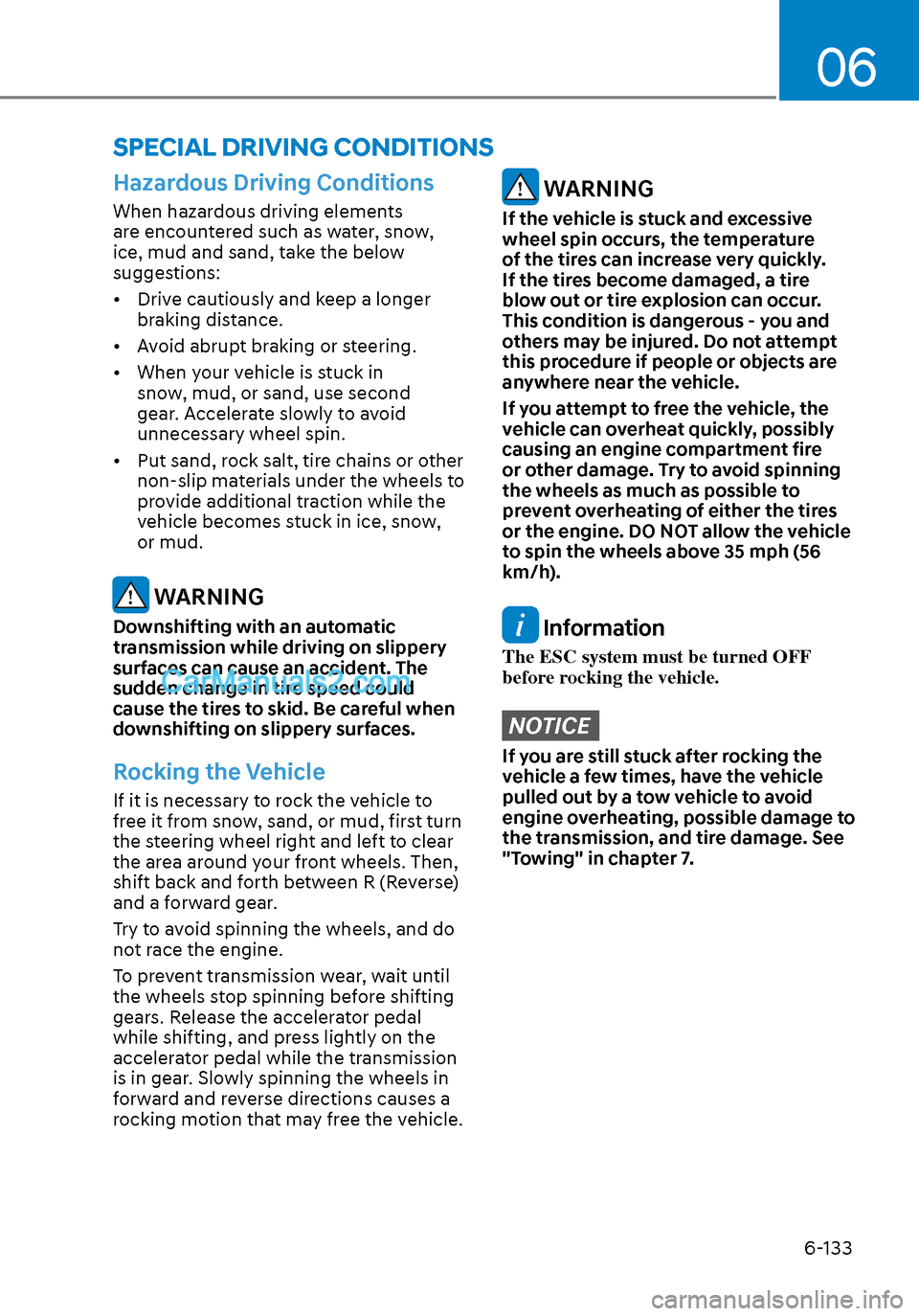
Hazardous Driving Conditions
When hazardous driving elements
are encountered such as water, snow,
ice, mud and sand, take the below
suggestions:
• Drive cautiously and keep a longer braking distance.
• Avoid abrupt braking or steering.
• When your vehicle is stuck in snow, mud, or sand, use second
gear. Accelerate slowly to avoid
unnecessary wheel spin.
• Put sand, rock salt, tire chains or other non-slip materials under the wheels to
provide additional traction while the
vehicle becomes stuck in ice, snow,
or mud.
WARNING
Downshifting with an automatic
transmission while driving on slippery
surfaces can cause an accident. The
sudden change in tire speed could
cause the tires to skid. Be careful when
downshifting on slippery surfaces.
Rocking the Vehicle
If it is necessary to rock the vehicle to
free it from snow, sand, or mud, first turn
the steering wheel right and left to clear
the area around your front wheels. Then,
shift back and forth between R (Reverse)
and a forward gear.
Try to avoid spinning the wheels, and do
not race the engine.
To prevent transmission wear, wait until
the wheels stop spinning before shifting
gears. Release the accelerator pedal
while shifting, and press lightly on the
accelerator pedal while the transmission
is in gear. Slowly spinning the wheels in
forward and reverse directions causes a
rocking motion that may free the vehicle.
WARNING
If the vehicle is stuck and excessive
wheel spin occurs, the temperature
of the tires can increase very quickly.
If the tires become damaged, a tire
blow out or tire explosion can occur.
This condition is dangerous - you and
others may be injured. Do not attempt
this procedure if people or objects are
anywhere near the vehicle.
If you attempt to free the vehicle, the
vehicle can overheat quickly, possibly
causing an engine compartment fire
or other damage. Try to avoid spinning
the wheels as much as possible to
prevent overheating of either the tires
or the engine. DO NOT allow the vehicle
to spin the wheels above 35 mph (56
km/h).
Information
The ESC system must be turned OFF
before rocking the vehicle.
NOTICE
If you are still stuck after rocking the
vehicle a few times, have the vehicle
pulled out by a tow vehicle to avoid
engine overheating, possible damage to
the transmission, and tire damage. See
"Towing" in chapter 7.
SPECIAL DRIVING CONDITIONS
Page 445 of 537
07
7-17
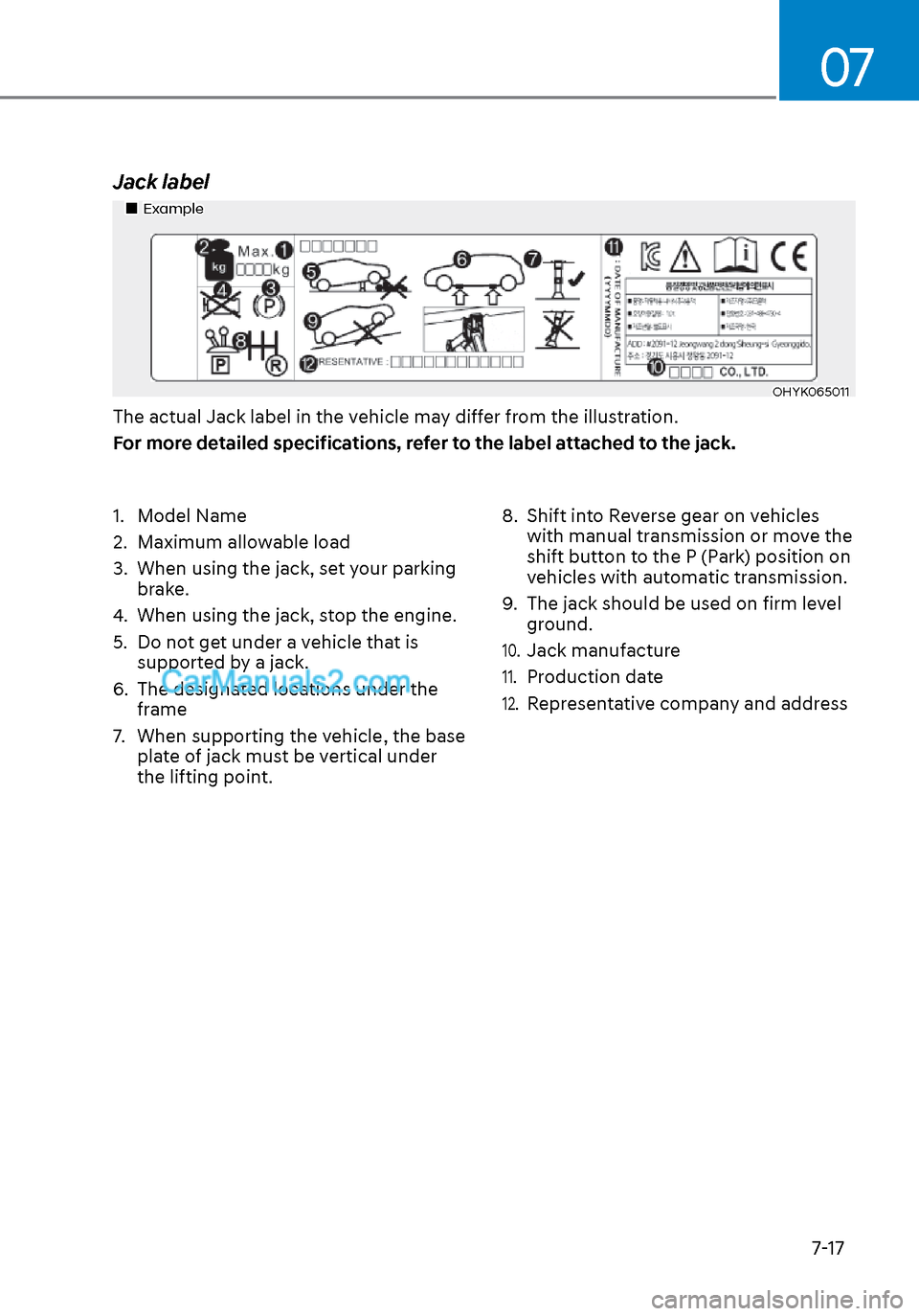
Jack label
ExampleExample
OHYK065011OHYK065011
The actual Jack label in the vehicle may differ from the illustration.
For more detailed specifications, refer to the label attached to the jack.
1. Model Name
2. Maximum allowable load
3. When using the jack, set your parking brake.
4. When using the jack, stop the engine.
5. Do not get under a vehicle that is supported by a jack.
6. The designated locations under the frame
7. When supporting the vehicle, the base plate of jack must be vertical under
the lifting point. 8. Shift into Reverse gear on vehicles
with manual transmission or move the
shift button to the P (Park) position on
vehicles with automatic transmission.
9. The jack should be used on firm level ground.
10. Jack manufacture
11. Production date
12. Representative company and address
Page 453 of 537
Maintenance8-6
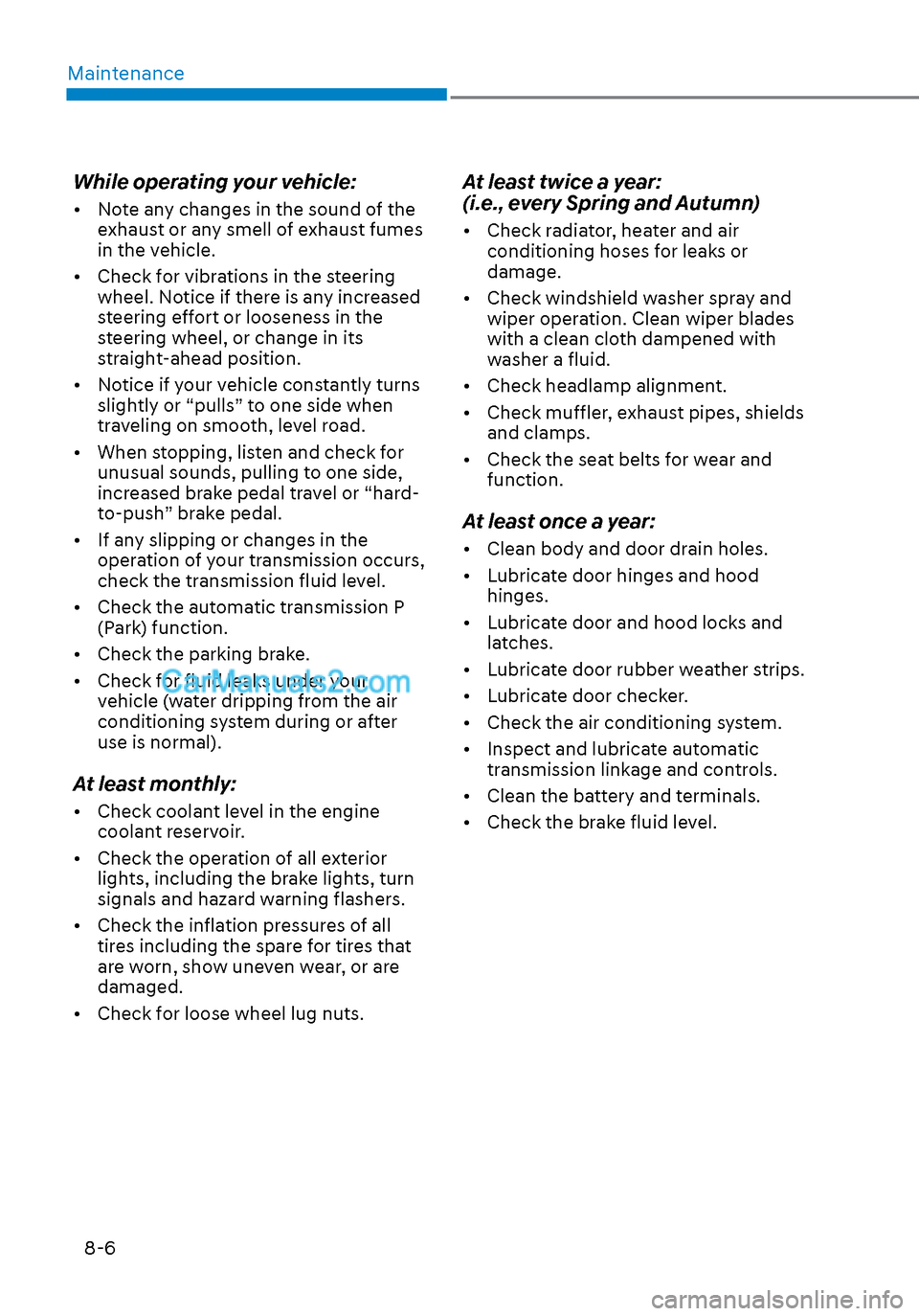
While operating your vehicle:
• Note any changes in the sound of the exhaust or any smell of exhaust fumes
in the vehicle.
• Check for vibrations in the steering wheel. Notice if there is any increased
steering effort or looseness in the
steering wheel, or change in its
straight-ahead position.
• Notice if your vehicle constantly turns slightly or “pulls” to one side when
traveling on smooth, level road.
• When stopping, listen and check for unusual sounds, pulling to one side,
increased brake pedal travel or “hard-
to-push” brake pedal.
• If any slipping or changes in the operation of your transmission occurs,
check the transmission fluid level.
• Check the automatic transmission P (Park) function.
• Check the parking brake.
• Check for fluid leaks under your vehicle (water dripping from the air
conditioning system during or after
use is normal).
At least monthly:
• Check coolant level in the engine coolant reservoir.
• Check the operation of all exterior lights, including the brake lights, turn
signals and hazard warning flashers.
• Check the inflation pressures of all tires including the spare for tires that
are worn, show uneven wear, or are
damaged.
• Check for loose wheel lug nuts.
At least twice a year:
(i.e., every Spring and Autumn)
• Check radiator, heater and air conditioning hoses for leaks or
damage.
• Check windshield washer spray and wiper operation. Clean wiper blades
with a clean cloth dampened with
washer a fluid.
• Check headlamp alignment.
• Check muffler, exhaust pipes, shields and clamps.
• Check the seat belts for wear and function.
At least once a year:
• Clean body and door drain holes.
• Lubricate door hinges and hood hinges.
• Lubricate door and hood locks and latches.
• Lubricate door rubber weather strips.
• Lubricate door checker.
• Check the air conditioning system.
• Inspect and lubricate automatic transmission linkage and controls.
• Clean the battery and terminals.
• Check the brake fluid level.
Page 456 of 537
08
8-9
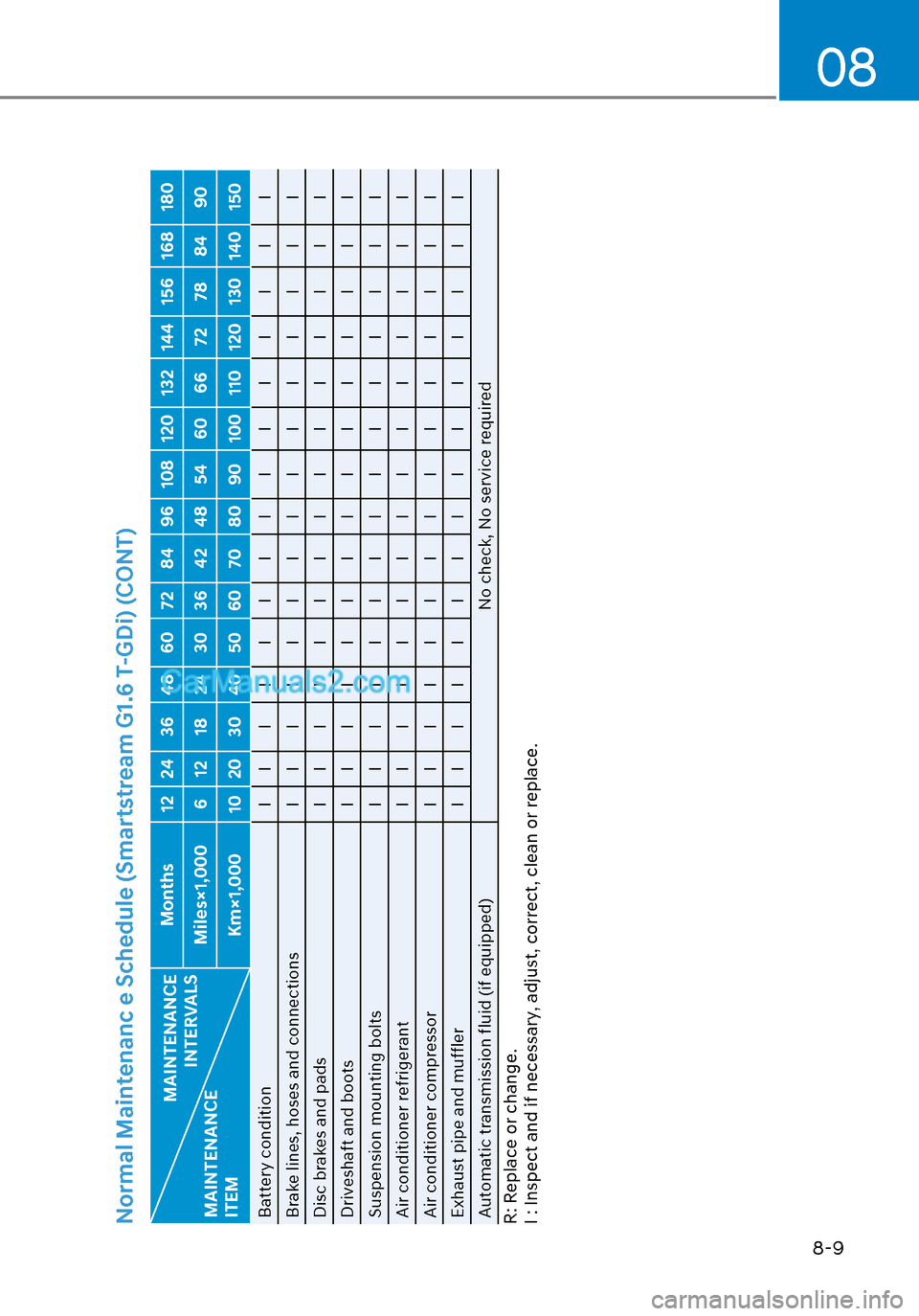
Normal Maintenanc e Schedule (Smartstream G1.6 T-GDi) (CONT)
MAINTENANCE INTERVALS
MAINTENANCE
ITEM Months 12 24 36 48 60 72 84 96 108 120 132 144 156 168 180
Miles×1,000 6 12 18 24 30 36 42 48 54 60 66 72 78 84 90 Km×1,000 10 20 30 40 50 60 70 80 90 100 110 120 130 140 150
Battery condition I I I I I I I I IIIIII I
Brake lines, hoses and connections I I I I I I I I IIIIII I
Disc brakes and pads I I I I I I I I IIIIII I
Driveshaft and boots I I I I I I I I IIIIII I
Suspension mounting bolts I I I I I I I I IIIIII I
Air conditioner refrigerant I I I I I I I I IIIIII I
Air conditioner compressor I I I I I I I I IIIIII I
Exhaust pipe and muffler I I I I I I I I IIIIII I
Automatic transmission fluid (if equipped) No check, No service requiredR: Replace or change.
I : Inspect and if necessary, adjust, correct, clean or replace.
Page 458 of 537
08
8-11
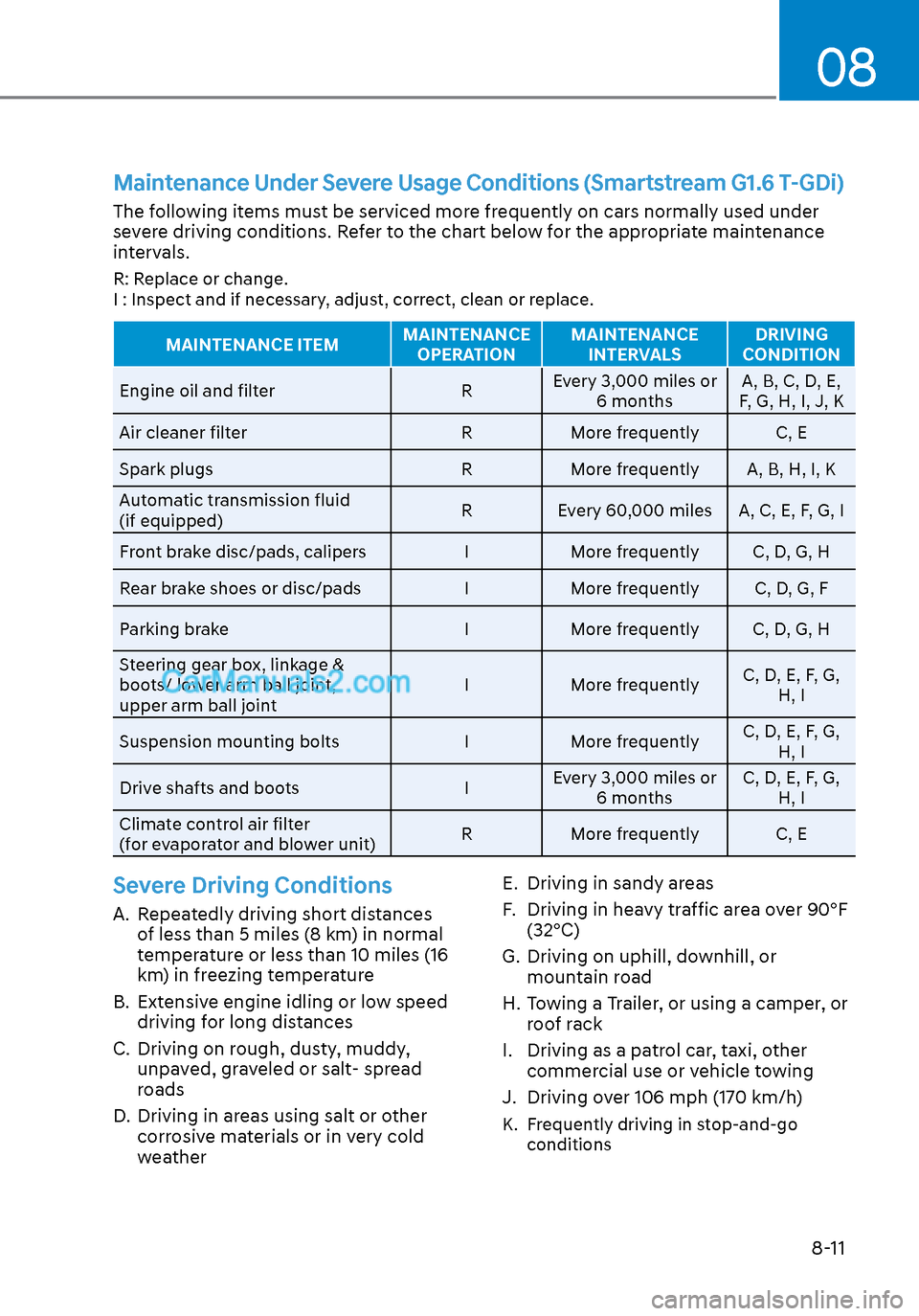
Maintenance Under Severe Usage Conditions (Smartstream G1.6 T-GDi)
The following items must be serviced more frequently on cars normally used under
severe driving conditions. Refer to the chart below for the appropriate maintenance
intervals.
R: Replace or change.
I : Inspect and if necessary, adjust, correct, clean or replace.
MAINTENANCE ITEMMAINTENANCE
OPERATION MAINTENANCE
INTERVALS DRIVING
CONDITION
Engine oil and filter RE
very 3,000 miles or
6 months A, B, C, D, E,
F, G, H, I, J, K
Air cleaner filter RMore frequently C, E
Spark plugs RMore frequently A, B, H, I, K
Automatic transmission fluid
(if equipped) R Every 60,000 miles A, C, E, F, G, I
Front brake disc/pads, calipers IMore frequently C, D, G, H
Rear brake shoes or disc/pads IMore frequently C, D, G, F
Parking brake IMore frequently C, D, G, H
Steering gear box, linkage &
boots/ lower arm ball joint,
upper arm ball joint I
More frequently C, D, E, F, G,
H, I
Suspension mounting bolts IMore frequently C, D, E, F, G,
H, I
Drive shafts and boots IEvery 3,000 miles or
6 months C, D, E, F, G,
H, I
Climate control air filter
(for evaporator and blower unit) R
More frequently C, E
Severe Driving Conditions
A. Repeatedly driving short distances
of less than 5 miles (8 km) in normal
temperature or less than 10 miles (16
km) in freezing temperature
B. Extensive engine idling or low speed driving for long distances
C. Driving on rough, dusty, muddy, unpaved, graveled or salt- spread
roads
D. Driving in areas using salt or other corrosive materials or in very cold
weather E. Driving in sandy areas
F. Driving in heavy traffic area over 90°F
(32°C)
G. Driving on uphill, downhill, or mountain road
H. Towing a Trailer, or using a camper, or roof rack
I. Driving as a patrol car, taxi, other commercial use or vehicle towing
J. Driving over 106 mph (170 km/h)
K. Frequently driving in stop-and-go conditions
Page 460 of 537
08
8-13
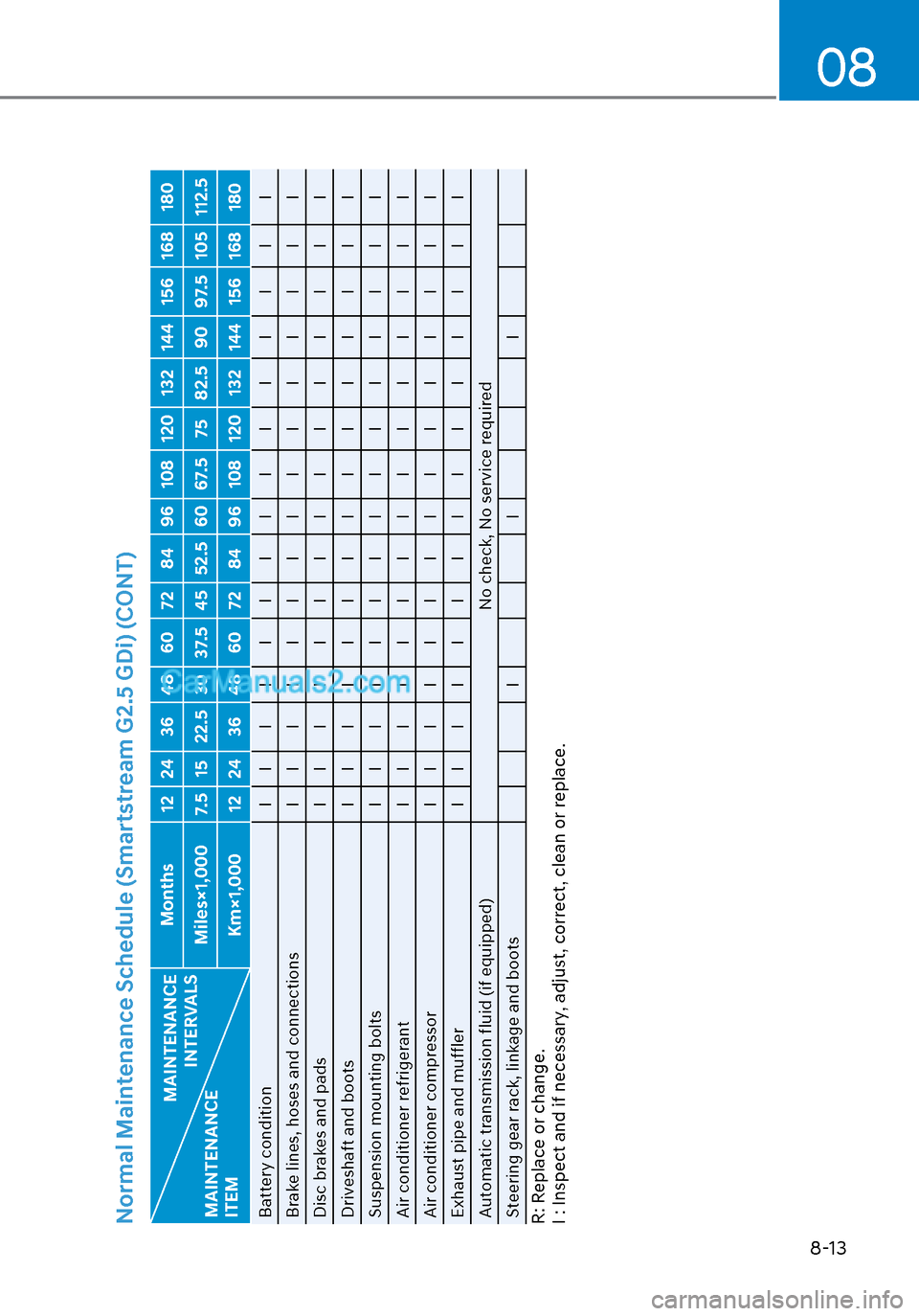
Normal Maintenance Schedule (Smartstream G2.5 GDi) (CONT)
MAINTENANCE INTERVALS
MAINTENANCE
ITEM Months 12 24 36 48 60 72 84 96 108 120 132 144 156 168 180
Miles×1,000 7.5 15 22.5 30 37.5 45 52.5 60 67.5 75 82.5 90 97.5 105 112.5 Km×1,000 12 24 36 48 60 72 84 96 108 120 132 144 156 168 180
Battery condition I I I I I I I I IIIIII I
Brake lines, hoses and connections I I I I I I I I IIIIII I
Disc brakes and pads I I I I I I I I IIIIII I
Driveshaft and boots I I I I I I I I IIIIII I
Suspension mounting bolts I I I I I I I I IIIIII I
Air conditioner refrigerant I I I I I I I I IIIIII I
Air conditioner compressor I I I I I I I I IIIIII I
Exhaust pipe and muffler I I I I I I I I IIIIII I
Automatic transmission fluid (if equipped) No check, No service required
Steering gear rack, linkage and boots II IR: Replace or change.
I : Inspect and if necessary, adjust, correct, clean or replace.