steering Hyundai Sonata 2020 User Guide
[x] Cancel search | Manufacturer: HYUNDAI, Model Year: 2020, Model line: Sonata, Model: Hyundai Sonata 2020Pages: 537, PDF Size: 14.54 MB
Page 94 of 537
04
4-9
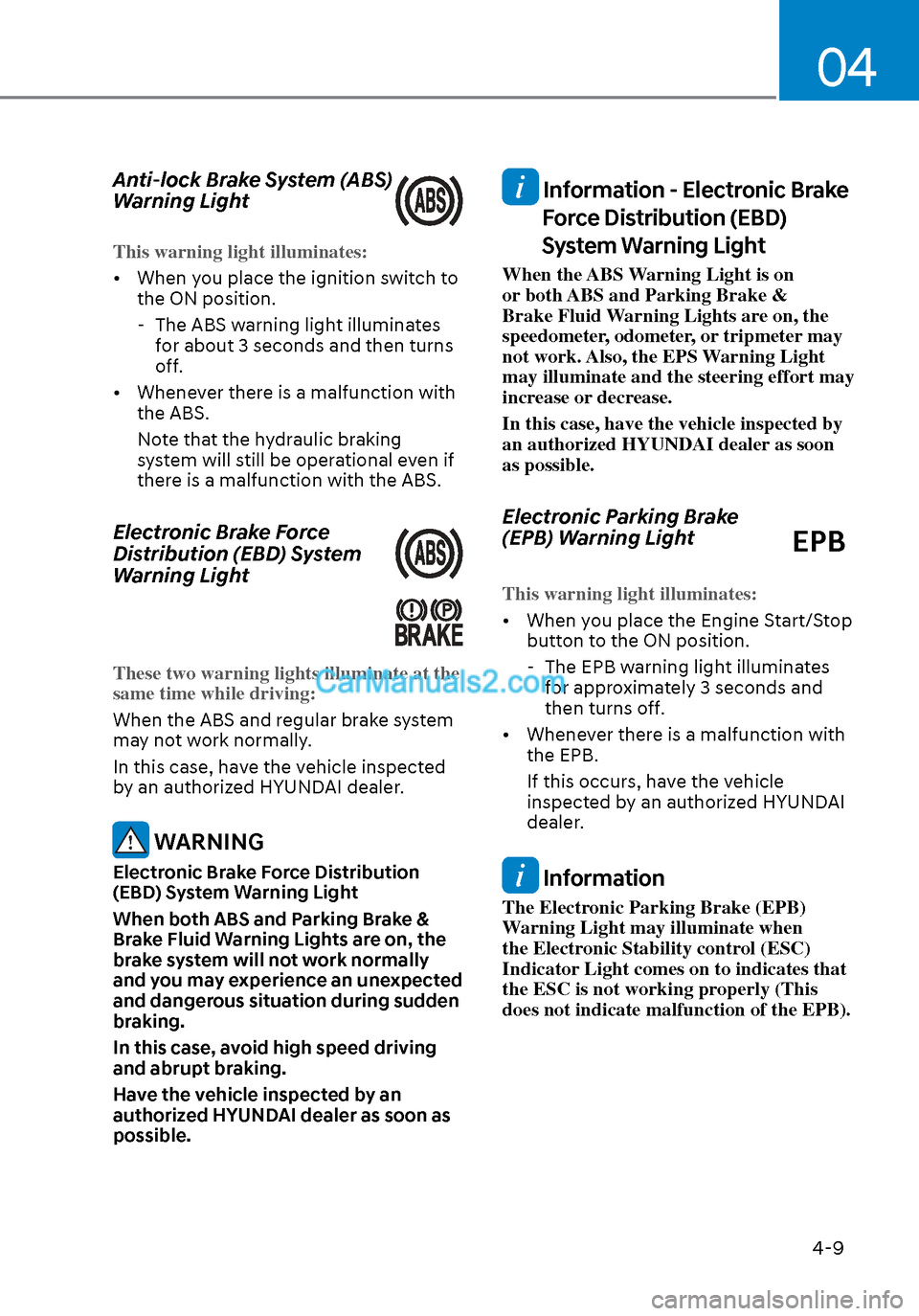
Anti-lock Brake System (ABS)
Warning Light
This warning light illuminates:
• When you place the ignition switch to the ON position.
-
The ABS warning light illuminates
for about 3 seconds and then turns
off.
• Whenever there is a malfunction with the ABS.
Note that the hydraulic braking
system will still be operational even if
there is a malfunction with the ABS.
Electronic Brake Force
Distribution (EBD) System
Warning Light
These two warning lights illuminate at the
same time while driving:
When the ABS and regular brake system
ma
y not work normally.
In this case, have the vehicle inspected
by an authorized HYUNDAI dealer.
WARNING
Electronic Brake Force Distribution
(EBD) System Warning Light
When both ABS and Parking Brake &
Brake Fluid Warning Lights are on, the
brake system will not work normally
and you may experience an unexpected
and dangerous situation during sudden
braking.
In this case, avoid high speed driving
and abrupt braking.
Have the vehicle inspected by an
authorized HYUNDAI dealer as soon as
possible.
Information - Electronic Brake Force Distribution (EBD)
System Warning Light
When the ABS Warning Light is on
or both ABS and Parking Brake &
Brake Fluid Warning Lights are on, the
speedometer, odometer, or tripmeter may
not work. Also, the EPS Warning Light
may illuminate and the steering effort may
increase or decrease.
In this case, have the vehicle inspected by
an authorized HYUNDAI dealer as soon
as possible.
Electronic Parking Brake
(EPB) Warning Light
EPB
This warning light illuminates:
• When you place the Engine Start/Stop butt
on to the ON position.
- The EPB warning light illuminates for approximately 3 seconds and
then turns off.
• Whenever there is a malfunction with the EPB.
If this occurs, have the vehicle
inspected by an authorized HYUNDAI
dealer.
Information
The Electronic Parking Brake (EPB)
Warning Light may illuminate when
the Electronic Stability control (ESC)
Indicator Light comes on to indicates that
the ESC is not working properly (This
does not indicate malfunction of the EPB).
Page 95 of 537
![Hyundai Sonata 2020 User Guide Instrument Cluster4-10
AUTO HOLD Indicator Light
(if equipped)
This indicator light illuminates:
• [White] When you activate the auto hold s
ystem by pressing the AUTO
HOLD button.
• [Green]](/img/35/16773/w960_16773-94.png "Hyundai Sonata 2020 User Guide Instrument Cluster4-10
AUTO HOLD Indicator Light
(if equipped)
This indicator light illuminates:
• [White] When you activate the auto hold s
ystem by pressing the AUTO
HOLD button.
• [Green]")
Instrument Cluster4-10
AUTO HOLD Indicator Light
(if equipped)
This indicator light illuminates:
• [White] When you activate the auto hold s
ystem by pressing the AUTO
HOLD button.
• [Green] When you stop the vehicle completely by depressing the brake
pedal with the auto hold system
activated.
• [Yellow] When there is a malfunction with the auto hold system.
In this case, have the vehicle
inspected by an authorized HYUNDAI
dealer.
For more information, refer to “Auto
Hold” in chapter 6.
Electric Power Steering (EPS)
Warning Light
This warning light illuminates:
• When you place the ignition switch to the ON position.
-
The Electric Power Steering Warning
light illuminates for about 3 seconds
and then goes off.
• Whenever there is a malfunction with the EPS.
If this occurs, have the vehicle
inspected by an authorized HYUNDAI
dealer.
Malfunction Indicator Lamp
(MIL)
This warning light illuminates:
• When you place the ignition switch to the ON position.
-
The malfunction indicator light
illuminates for about 3 seconds and
then goes off.
• Whenever there is a malfunction with either the emission control system or
the engine or the vehicle powertrain.
If this occurs, have the vehicle
inspected by an authorized HYUNDAI
dealer.
NOTICE
Driving with the Malfunction Indicator
Lamp (MIL) on may cause damage to
the emission control system which
could affect drivability and/or fuel
economy.
NOTICE
If the Malfunction Indicator Lamp
(MIL) illuminates, potential catalytic
converter damage is possible which
could result in loss of engine power.
In this case, have the vehicle inspected
by an authorized HYUNDAI dealer as
soon as possible.
Page 116 of 537
04
4-31
Trip Computer
The trip computer is a microcomputer-
controlled driver information system that
displays information related to driving.
Information
Some driving information stored in the
trip computer (for example Average
Vehicle Speed) resets if the battery is
disconnected.
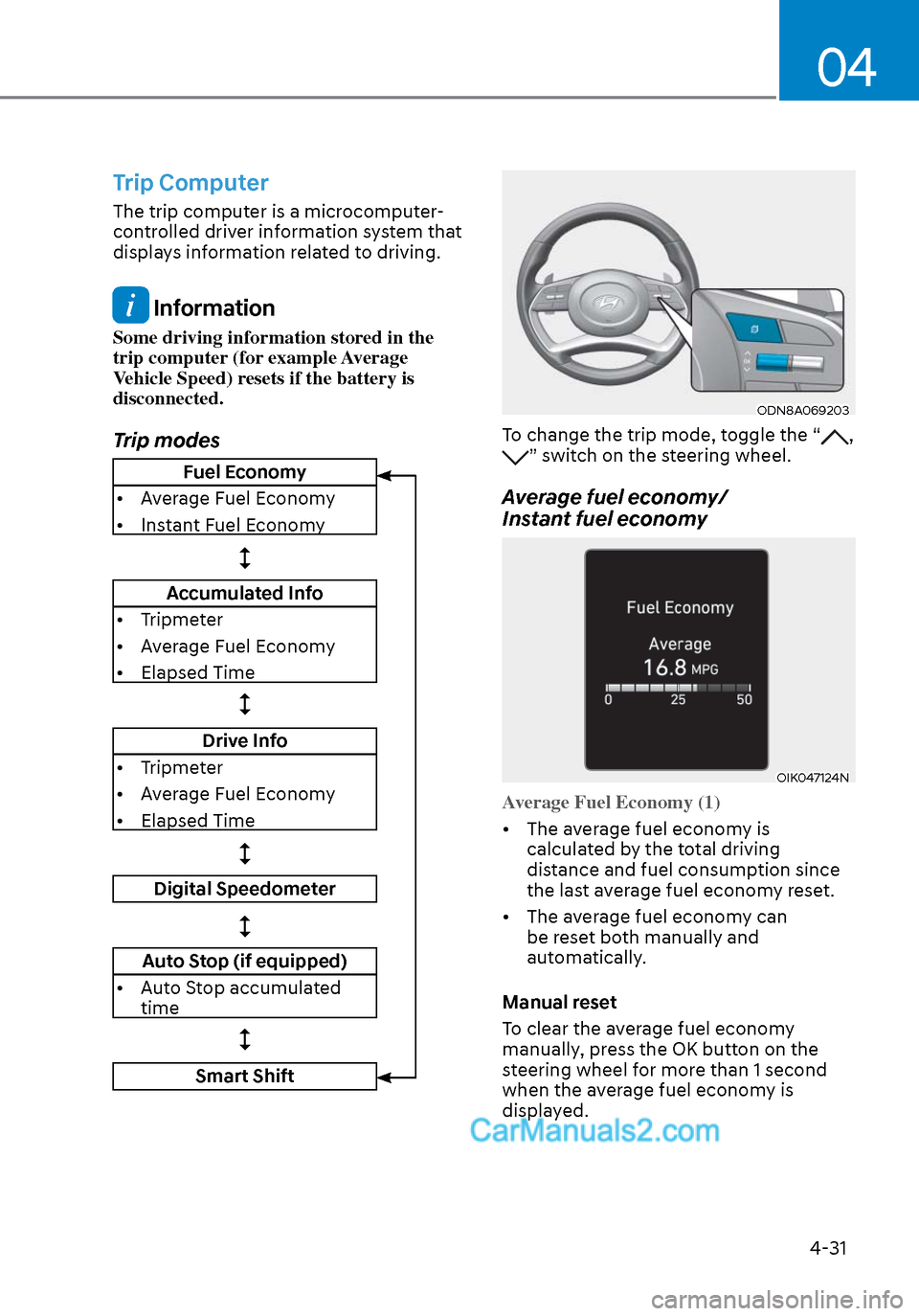
Trip modes
ODN8A069203ODN8A069203
To change the trip mode, toggle the “, ” switch on the steering wheel.
Average fuel economy/
Instant fuel economy
OIK047124NOIK047124N
Average Fuel Economy (1)
• The average fuel economy is calcula
ted by the total driving
distance and fuel consumption since
the last average fuel econ omy reset.
• The average fuel economy can be reset both manually and
automatically.
Manual reset
To clear the average fuel economy
manually, press the OK button on the
steering wheel for more than 1 second
when the average fuel economy is
displayed.
Fuel Economy
• Average Fuel Economy
• Instant Fuel Economy
Accumulated Info
• Tripmeter
• Average Fuel Economy
• Elapsed Time
Drive Info
• Tripmeter
• Average Fuel Economy
• Elapsed Time
Digital Speedometer
Auto Stop (if equipped)
• Auto Stop accumulated time
Smart Shift
Page 131 of 537

5. Convenient Features
Accessing Your Vehicle ........................................................................\
.......... 5-4Remote Key ........................................................................\
...................................... 5-4
Smart Key ........................................................................\
..........................................5-7
Immobilizer System ........................................................................\
........................ 5-14
Hyundai Digital Key ........................................................................\
......................... 5-15
Door Locks ........................................................................\
............................. 5-31Operating Door Locks from Outside the Vehicle .................................................. 5-31
Operating Door Locks from Inside the Vehicle .................................................... 5-32
Automatic Door Lock and Unlock Features .......................................................... 5-34
Child-Protector Rear Door Locks ........................................................................\
.. 5-35
Rear Occupant Alert (ROA) System ....................................................................... 5-36
Theft-Alarm System ........................................................................\
............. 5-38
Driver Position Memory System ................................................................. 5-39
Storing Positions into Memory ........................................................................\
..... 5-39
Recalling Positions from Memory ........................................................................\
.5-40
Resetting the Driver’s Seat Memory System ........................................................5-40
Easy Access Function ........................................................................\
......................5-41
Steering Wheel ........................................................................\
..................... 5-42Electric Power Steering (EPS) ........................................................................\
........ 5-42
Tilt Steering / Telescope Steering ........................................................................\
. 5-43
Heated Steering Wheel ........................................................................\
.................. 5-44
Horn........................................................................\
................................................. 5-45
Mirrors ......................................................................\
....................................5-46Inside Rearview Mirror ........................................................................\
................... 5-46
Side View Mirrors ........................................................................\
........................... 5-53
Reverse Parking Aid Function ........................................................................\
........ 5-55
Windows ......................................................................\
................................. 5-56Power Windows ........................................................................\
.............................. 5-57
Panoramic Sunroof ........................................................................\
..............5-60Sunshade ...............................................................\
..................................................5-61
Sliding the Sunroof ........................................................................\
..........................5-61
Tilting the Sunroof ........................................................................\
..........................5-61
Closing the Sunroof ........................................................................\
....................... 5-62
Resetting the Sunroof ........................................................................\
.................... 5-63
Sunroof Open Warning ........................................................................\
.................. 5-63
Exterior Features ........................................................................\
..................5-64Hood ....................................................................\
.................................................... 5-64
Trunk ...................................................................\
..................................................... 5 -65
Emergency Trunk Safety Release ........................................................................\
.. 5-66
Fuel Filler Door ........................................................................\
............................... 5-70
5
Page 133 of 537
5
Automatic Climate Control System ........................................................... 5-127Automatic Heating and Air Conditioning ............................................................ 5-128
Manual Temperature Control Mode ..................................................................... 5-129
System Operation ........................................................................\
.......................... 5-135
System Maintenance ........................................................................\
....................5-136
Windshield Defrosting and Defogging ......................................................5-138Manual Climate Control System......................................................................\
.....5-138
Automatic Climate Control System......................................................................\
5-139
Defogging Logic ........................................................................\
.......................... 5-140
Auto Defogging System (Only for Automatic Climate Control System) ............ 5-141
Defroster .....................................................................\
........................................... 5-142
Climate Control Additional Features .........................................................5-143Sunroof Inside Air Recirculation ........................................................................\
.. 5-143
Automatic Ventilation ........................................................................\
................... 5-143
Storage Compartment ........................................................................\
........5-144Center Console Storage ........................................................................\
................5-144
Glove Box ........................................................................\
.......................................5-144
Interior Features ........................................................................\
..................5-145Cup Holder ........................................................................\
..................................... 5-145
Sunvisor ..................................................................\
...............................................5-146
Power Outlet ........................................................................\
..................................5-146
USB Charger ........................................................................\
................................. 5-147
Wireless Cellular Phone Charging System ..........................................................5-148
Clock ..................................................................\
....................................................5-150
Clothes Hanger ........................................................................\
..............................5-150
Floor Mat Anchor(S) ........................................................................\
.......................5-151
Infotainment System ........................................................................\
.......... 5-152USB And Ipod® Port ........................................................................\
....................... 5-152
Antenna ...................................................................\
............................................... 5-152
Steering Wheel Audio Control ........................................................................\
...... 5-153
Bluetooth® Wireless Technology Hands-Free ..................................................... 5-154
Audio (Display Audio) / Video / Navigation System (AVN) ................................ 5-154
5. Convenient Features
Page 141 of 537
05
5-11
Start-up
You can start the vehicle without
inserting the key.
For information, refer to the “Engine
Start/Stop Button” section in chapter 6.
NOTICE
To prevent damaging the smart key:
• Keep the smart key in a cool,
dry place to avoid damage or
malfunction. Exposure to moisture
or high temperature may cause
the internal circuit of the smart key
to malfunction which may not be
covered under warranty.
• Avoid dropping or throwing the
smart key.
• Protect the smart key from extreme
temperatures.
Remote start
You can start the vehicle using the
Remote Start button (7) of the smart key.
To start the vehicle remotely:
• Lock the doors by pressing the door
lock button within 32 feet (10 m)
distance from the vehicle.
• Press the remote start button for over 2 seconds within 4 seconds after
locking the doors and the hazard
warning will blink.
To turn off the remote start function, press
the remote start button once. In case of
the manual operation, the climate control
system will be maintained even when
the engine is turned OFF. However, the
automatic operation is set to 72°F (22°C).
Remote smart parking assist (RSPA)
(if equipped)
The Remote smart parking assist (RSPA)
system helps the drivers park their
vehicle by using sensors to measure
parking spaces and control the steering
wheel, gear shift and vehicle speed to
semi-automatically park the vehicle.
With the smart key, the driver can move
the vehicle forward or backward using
the rearward /forward buttons (5, 6) on
the smart key.
For information, refer to “Remote smart
parking assist (RSPA)” in this chapter.
Page 166 of 537
Convenient Features5-36
Rear Occupant Alert (ROA)
System
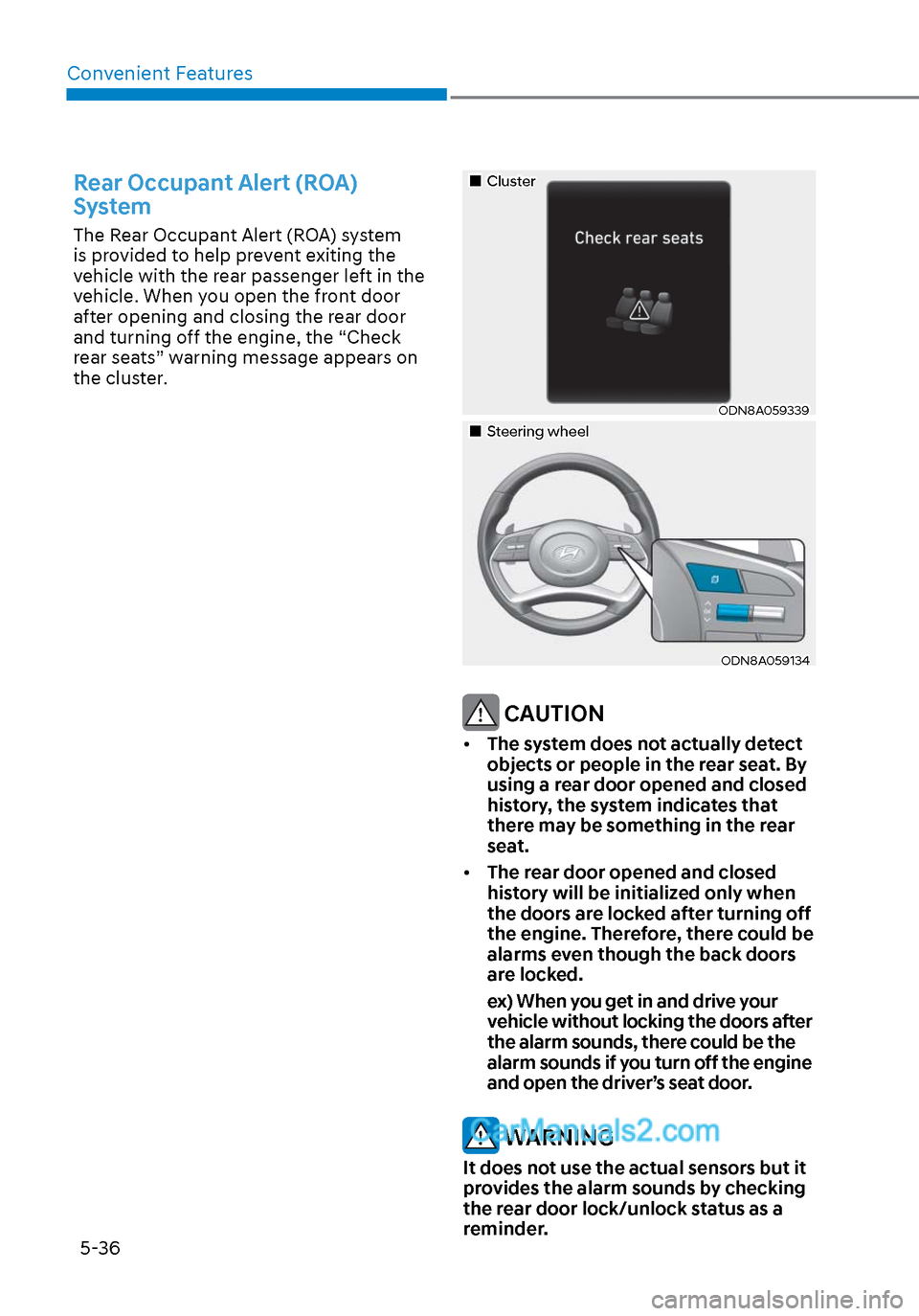
The Rear Occupant Alert (ROA) system
is provided to help prevent exiting the
vehicle with the rear passenger left in the
vehicle. When you open the front door
after opening and closing the rear door
and turning off the engine, the “Check
rear seats” warning message appears on
the cluster.
ClusterCluster
ODN8A059339ODN8A059339
Steering wheelSteering wheel
ODN8A059134ODN8A059134
CAUTION
• The system does not actually detect
objects or people in the rear seat. By
using a rear door opened and closed
history, the system indicates that
there may be something in the rear
seat.
• The rear door opened and closed
history will be initialized only when
the doors are locked after turning off
the engine. Therefore, there could be
alarms even though the back doors
are locked.
ex) When you get in and drive your vehicle without locking the doors after
the alarm sounds, there could be the
alarm sounds if you turn off the engine
and open the driver’s seat door.
WARNING
It does not use the actual sensors but it
provides the alarm sounds by checking
the rear door lock/unlock status as a
reminder.
Page 172 of 537
Convenient Features5-42
STEERING WHEEL
Electric Power Steering (EPS)
The system assists you with steering the
vehicle. If the vehicle is turned off or
if the power steering system becomes
inoperative, you may still steer the
vehicle, but it will require increased
steering effort.
Also, the steering effort becomes heavier
as the vehicle’s speed increases and
becomes lighter as the vehicle’s speed
decreases for better control of the
steering wheel.
Should you notice any change in the
effort required to steer during normal
vehicle operation, have the system
checked by an authorized HYUNDAI
dealer.
CAUTION
• If the Electric Power Steering System
does not operate normally, the
warning light (
) will illuminate
on the instrument cluster. You may
steer the vehicle, but it will require
increased steering efforts. Take your
vehicle to an authorized HYUNDAI
dealer and have the system checked
as soon as possible.
• When an abnormality is detected
in the electric power steering
system, to prevent a an accident, the
steering assist function may become
inoperative. At this time, the warning
light turns on or blinks on the cluster.
The steering wheel may become
difficult to control or operate. Have
your vehicle checked immediately,
after moving the vehicle to a safe
area.
Information
The following symptoms may occur during
normal vehicle operation:
• The steering effort may be high
immediately after placing the ignition
switch in the ON position.
This happens as the system performs
the EPS system diagnostics. When the
diagnostics are completed, the steering
wheel effort will return to its normal
condition.
• When the battery voltage is low, you
might have to put more steering effort.
However, it is a temporary condition so
that it will return to normal condition
after charging the battery.
• A click noise may be heard from the
EPS relay after the ignition switch is in
the ON or LOCK/OFF position.
• Motor noise may be heard when the
vehicle is at a stop or at a low driving
speed.
• When you operate the steering wheel
in low temperatures, abnormal noise
may occur. If the temperature rises, the
noise will disappear. This is a normal
condition.
• When an error is detected from the
EPS, the steering effort assist function
may become inoperative in order to
prevent fatal accidents. Instrument
cluster warning lights may be on or the
steering effort may be high. If these
symptoms occur, drive the vehicle to
a safe area as soon as it is safe to do
so. Have the system checked by an
authorized HYUNDAI dealer as soon
as possible.
Page 173 of 537
05
5-43
Tilt Steering / Telescope Steering
When adjusting the steering wheel to a
comfortable position, adjust the steering
wheel so that it points toward your chest,
not toward your face. Make sure you can
see the instrument cluster warning lights
and gauges. After locking the lever, push
the steering wheel both up and down to
be certain it is locked in position. Always
adjust the position of the steering wheel
before driving.
WARNING
NEVER adjust the steering wheel while
driving. This may cause loss of vehicle
control resulting in an accident.
ODN8059021ODN8059021
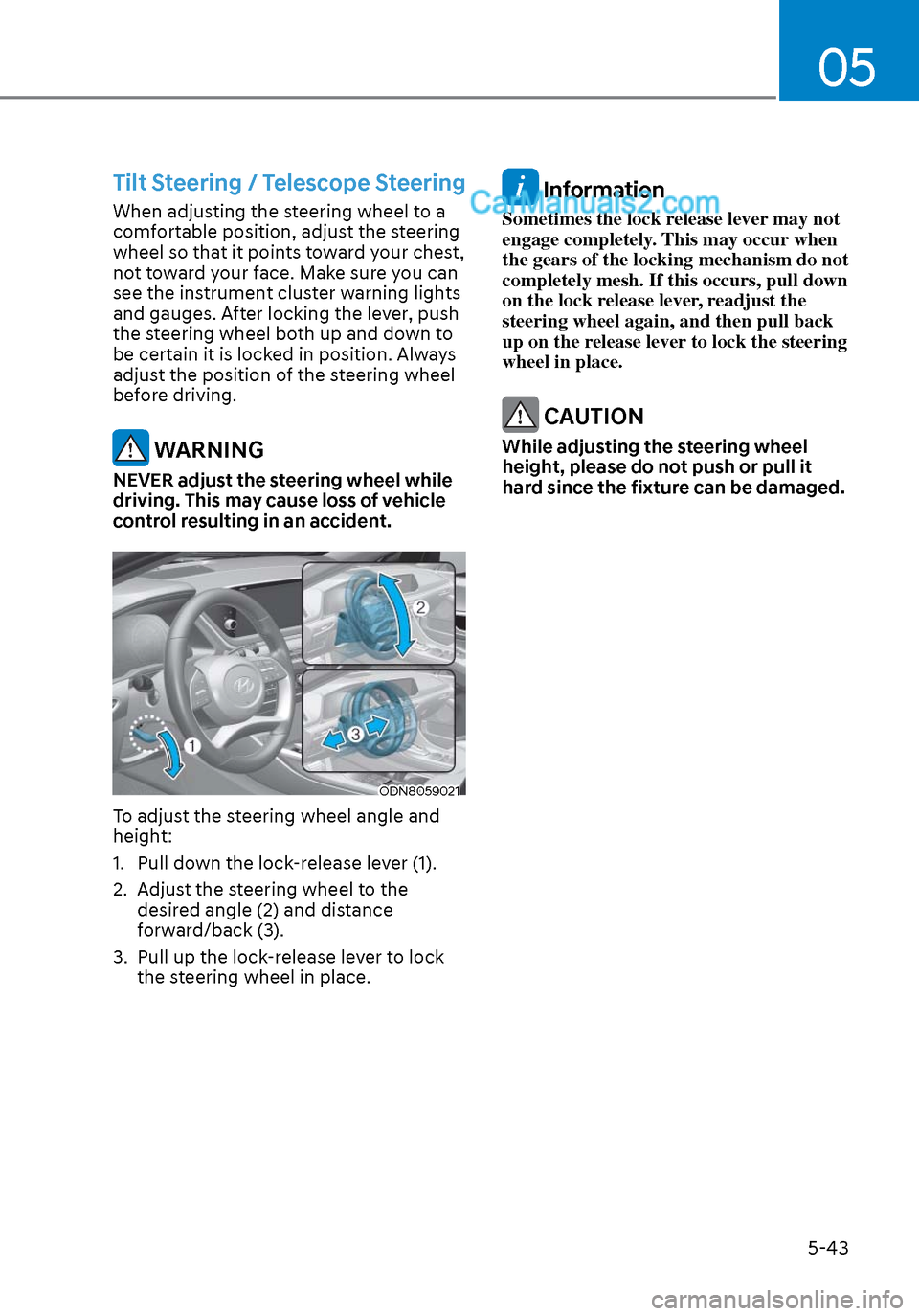
To adjust the steering wheel angle and
height:
1. Pull down the lock-release lever (1).
2. Adjust the steering wheel to the desired angle (2) and distance
forward/back (3).
3. Pull up the lock-release lever to lock the steering wheel in place.
Information
Sometimes the lock release lever may not
engage completely. This may occur when
the gears of the locking mechanism do not
completely mesh. If this occurs, pull down
on the lock release lever, readjust the
steering wheel again, and then pull back
up on the release lever to lock the steering
wheel in place.
CAUTION
While adjusting the steering wheel
height, please do not push or pull it
hard since the fixture can be damaged.
Page 174 of 537
Convenient Features5-44
Heated Steering Wheel
(if equipped)
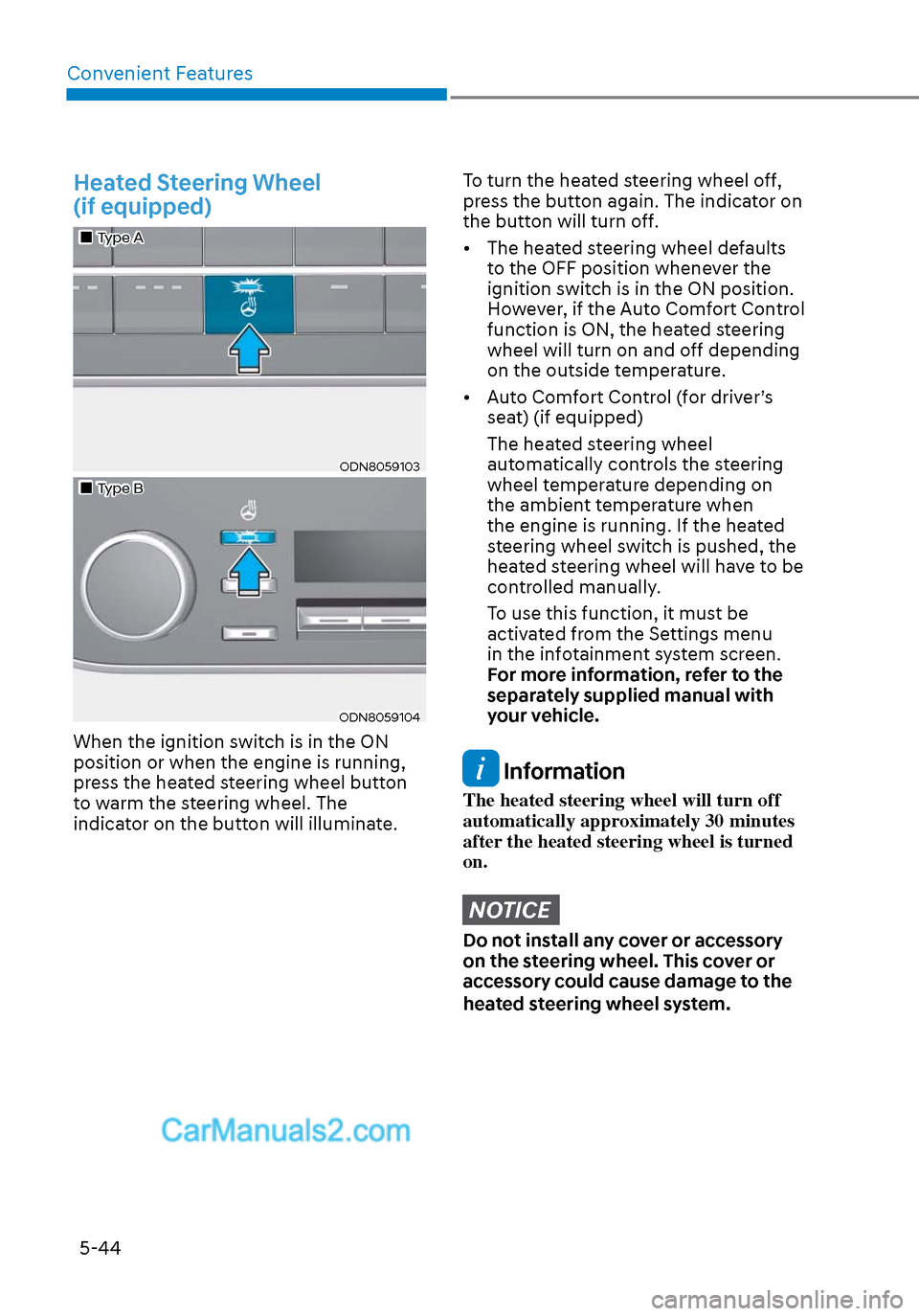
Type AType A
ODN8059103ODN8059103
Type BType B
ODN8059104ODN8059104
When the ignition switch is in the ON
position or when the engine is running,
press the heated steering wheel button
to warm the steering wheel. The
indicator on the button will illuminate.
To turn the heated steering wheel off,
press the button again. The indicator on
the button will turn off.
• The heated steering wheel defaults to the OFF position whenever the
ignition switch is in the ON position.
However, if the Auto Comfort Control
function is ON, the heated steering
wheel will turn on and off depending
on the outside temperature.
• Auto Comfort Control (for driver’s seat) (if equipped)
The heated steering wheel automatically controls the steering
wheel temperature depending on
the ambient temperature when
the engine is running. If the heated
steering wheel switch is pushed, the
heated steering wheel will have to be
controlled manually.
To use this function, it must be activated from the Settings menu
in the infotainment system screen.
For more information, refer to the
separately supplied manual with
your vehicle.
Information
The heated steering wheel will turn off
automatically approximately 30 minutes
after the heated steering wheel is turned
on.
NOTICE
Do not install any cover or accessory
on the steering wheel. This cover or
accessory could cause damage to the
heated steering wheel system.