head cover Hyundai Sonata 2020 Owner's Manual
[x] Cancel search | Manufacturer: HYUNDAI, Model Year: 2020, Model line: Sonata, Model: Hyundai Sonata 2020Pages: 537, PDF Size: 14.54 MB
Page 69 of 537
03
3-41
WARNING
To reduce the risk of serious injury or
death from an inflating side air bag,
take the following precautions:
• Seat belts must be worn at all times
to help keep occupants positioned
properly.
• Do not allow passengers to lean their
heads or bodies onto doors, put their
arms on the doors, stretch their arms
out of the window, or place objects
between the doors and seats.
• Hold the steering wheel at the 9
o’clock and 3 o’clock positions, to
minimize the risk of injuries to your
hands and arms.
• Do not use any accessory seat
covers. This could reduce or prevent
the effectiveness of the system.
• Do not place any objects over the
air bag or between the air bag and
yourself. Also, do not attach any
objects around the area the air bag
inflates such as the door, side door
glass, front and rear pillar.
• Do not place any objects between
the door and the seat. They may
become dangerous projectiles if the
side air bag inflates.
• Do not install any accessories on the
side or near the side air bags.
• Do not put any objects between the
side airbag label and seat cushion. It
could cause harm if the vehicle is in a
crash severe enough to cause the air
bags to deploy.
• Do not cause impact to the doors
when the ignition switch button is in
the ON position as this may cause the
side air bags to inflate.
• If the seat or seat cover is damaged,
have the vehicle checked and
repaired by an authorized HYUNDAI
dealer.
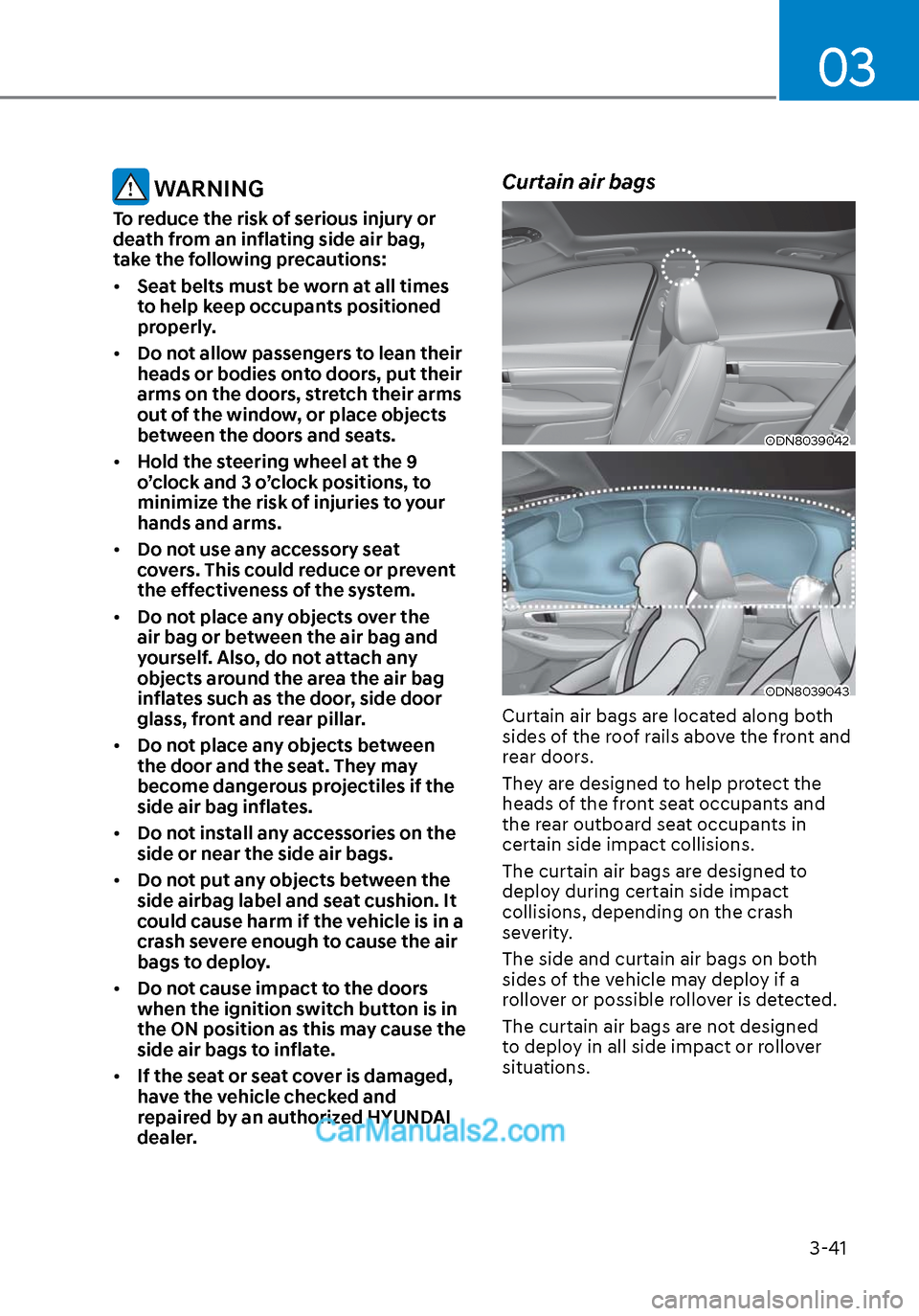
Curtain air bags
ODN8039042ODN8039042
ODN8039043ODN8039043
Curtain air bags are located along both
sides of the roof rails above the front and
rear doors.
They are designed to help protect the
heads of the front seat occupants and
the rear outboard seat occupants in
certain side impact collisions.
The curtain air bags are designed to
deploy during certain side impact
collisions, depending on the crash
severity.
The side and curtain air bags on both
sides of the vehicle may deploy if a
rollover or possible rollover is detected.
The curtain air bags are not designed
to deploy in all side impact or rollover
situations.
Page 73 of 537
03
3-45
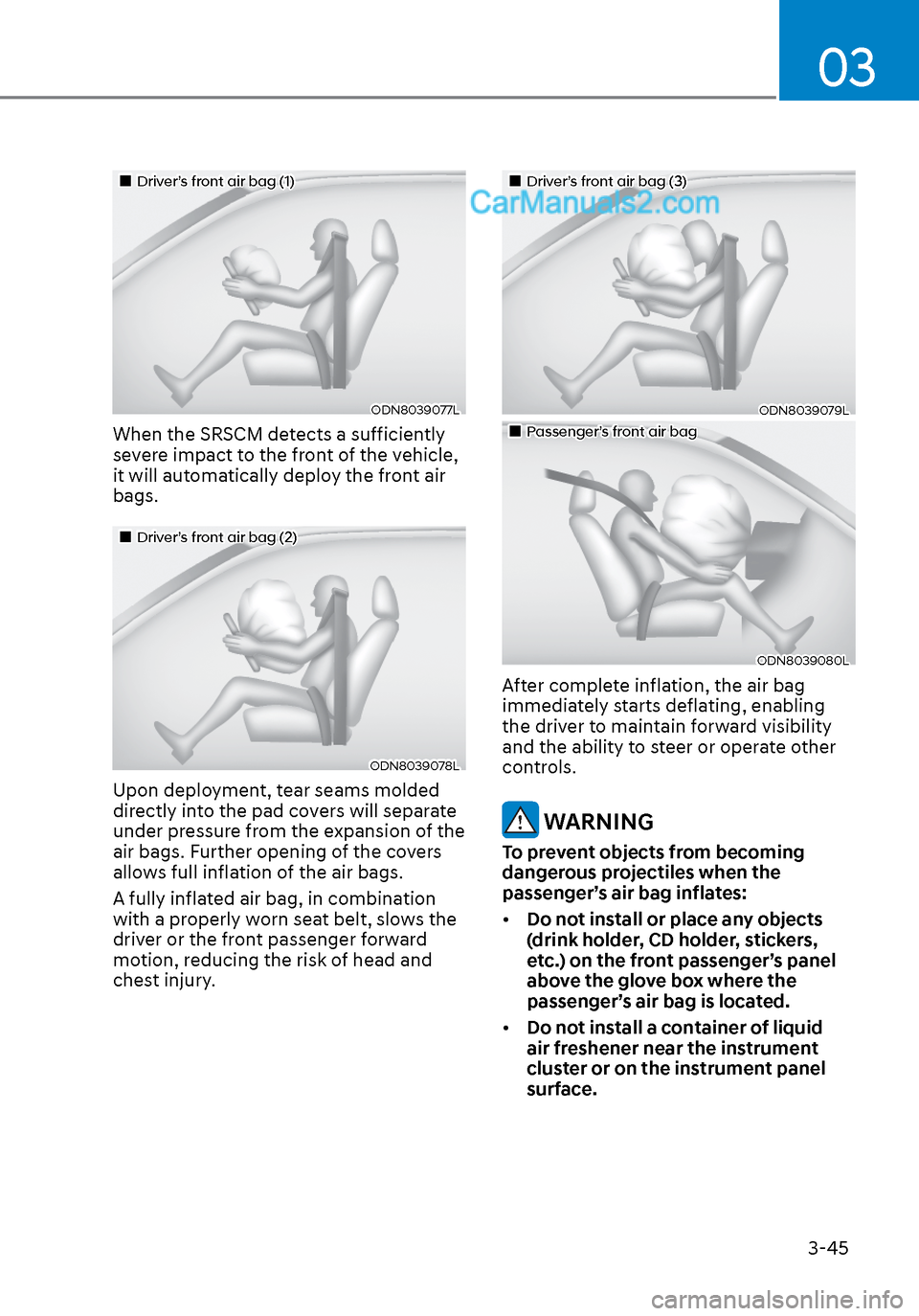
Driver’s front air bag (1)Driver’s front air bag (1)
ODN8039077LODN8039077L
When the SRSCM detects a sufficiently
severe impact to the front of the vehicle,
it will automatically deploy the front air
bags.
Driver’s front air bag (2)Driver’s front air bag (2)
ODN8039078LODN8039078L
Upon deployment, tear seams molded
directly into the pad covers will separate
under pressure from the expansion of the
air bags. Further opening of the covers
allows full inflation of the air bags.
A fully inflated air bag, in combination
with a properly worn seat belt, slows the
driver or the front passenger forward
motion, reducing the risk of head and
chest injury.
Driver’s front air bag (3)Driver’s front air bag (3)
ODN8039079LODN8039079L
Passenger’s front air bagPassenger’s front air bag
ODN8039080LODN8039080L
After complete inflation, the air bag
immediately starts deflating, enabling
the driver to maintain forward visibility
and the ability to steer or operate other
controls.
WARNING
To prevent objects from becoming
dangerous projectiles when the
passenger’s air bag inflates:
• Do not install or place any objects
(drink holder, CD holder, stickers,
etc.) on the front passenger’s panel
above the glove box where the
passenger’s air bag is located.
• Do not install a container of liquid
air freshener near the instrument
cluster or on the instrument panel
surface.
Page 202 of 537
Convenient Features5-72
HEAD UP DISPLAY (HUD) (IF EQUIPPED)
ODN8A059054ODN8A059054
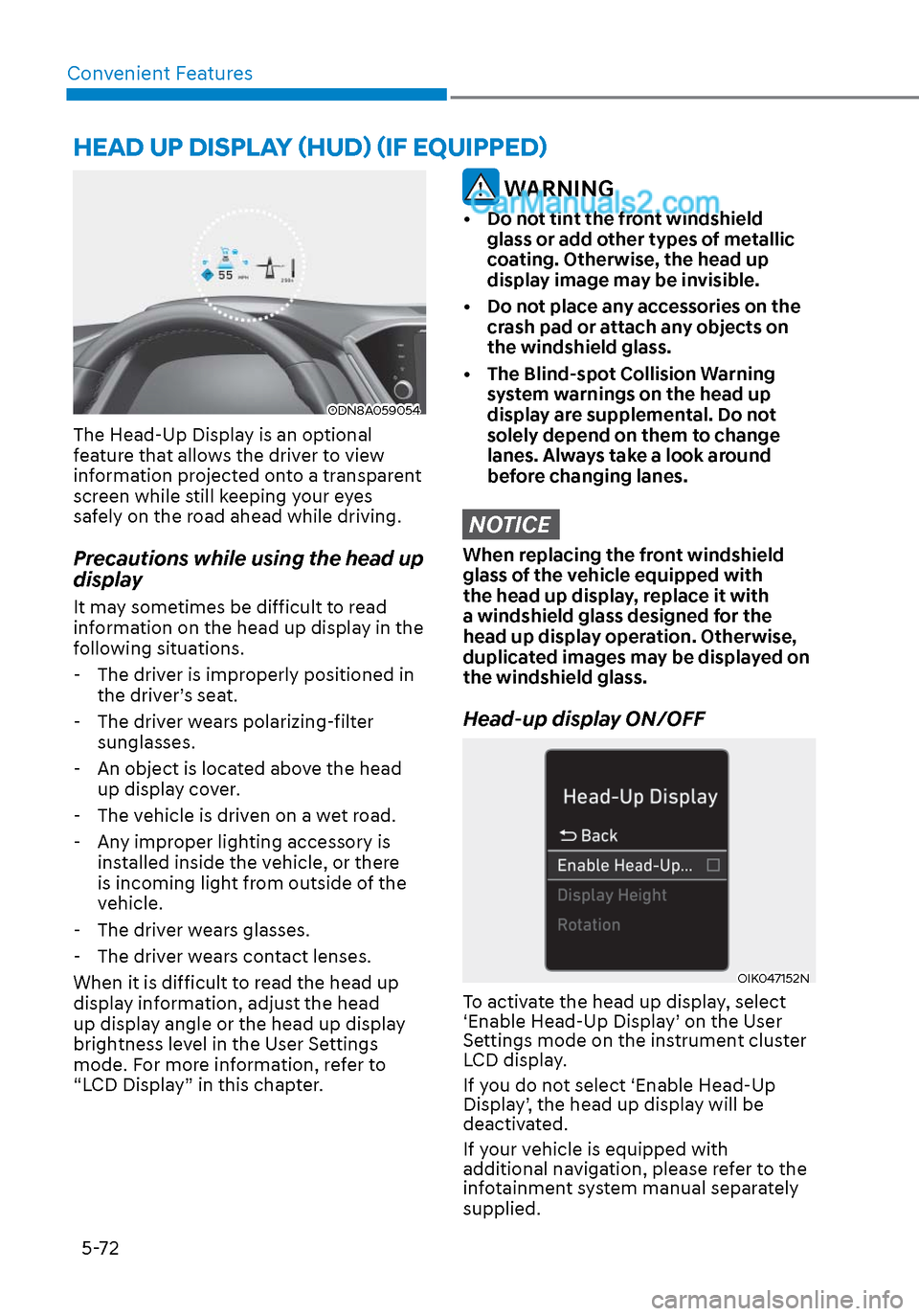
The Head-Up Display is an optional
feature that allows the driver to view
information projected onto a transparent
screen while still keeping your eyes
safely on the road ahead while driving.
Precautions while using the head up
display
It may sometimes be difficult to read
information on the head up display in the
following situations.
- The driver is improperly positioned in the driver’s seat.
- The driver wears polarizing-filter sunglasses.
- An object is located above the head up display cover.
- The vehicle is driven on a wet road.
- Any improper lighting accessory is installed inside the vehicle, or there
is incoming light from outside of the
vehicle.
- The driver wears glasses.
- The driver wears contact lenses.
When it is difficult to read the head up
display information, adjust the head
up display angle or the head up display
brightness level in the User Settings
mode. For more information, refer to
“LCD Display” in this chapter.
WARNING
• Do not tint the front windshield glass or add other types of metallic
coating. Otherwise, the head up
display image may be invisible.
• Do not place any accessories on the crash pad or attach any objects on
the windshield glass.
• The Blind-spot Collision Warning system warnings on the head up
display are supplemental. Do not
solely depend on them to change
lanes. Always take a look around
before changing lanes.
NOTICE
When replacing the front windshield
glass of the vehicle equipped with
the head up display, replace it with
a windshield glass designed for the
head up display operation. Otherwise,
duplicated images may be displayed on
the windshield glass.
Head-up display ON/OFF
OIK047152NOIK047152N
To activate the head up display, select
‘Enable Head-Up Display’ on the User
Settings mode on the instrument cluster
LCD display.
If you do not select ‘Enable Head-Up
Display’, the head up display will be
deactivated.
If your vehicle is equipped with
additional navigation, please refer to the
infotainment system manual separately
supplied.
Page 204 of 537
Convenient Features5-74
LIGHTING
Exterior Lights
Lighting control
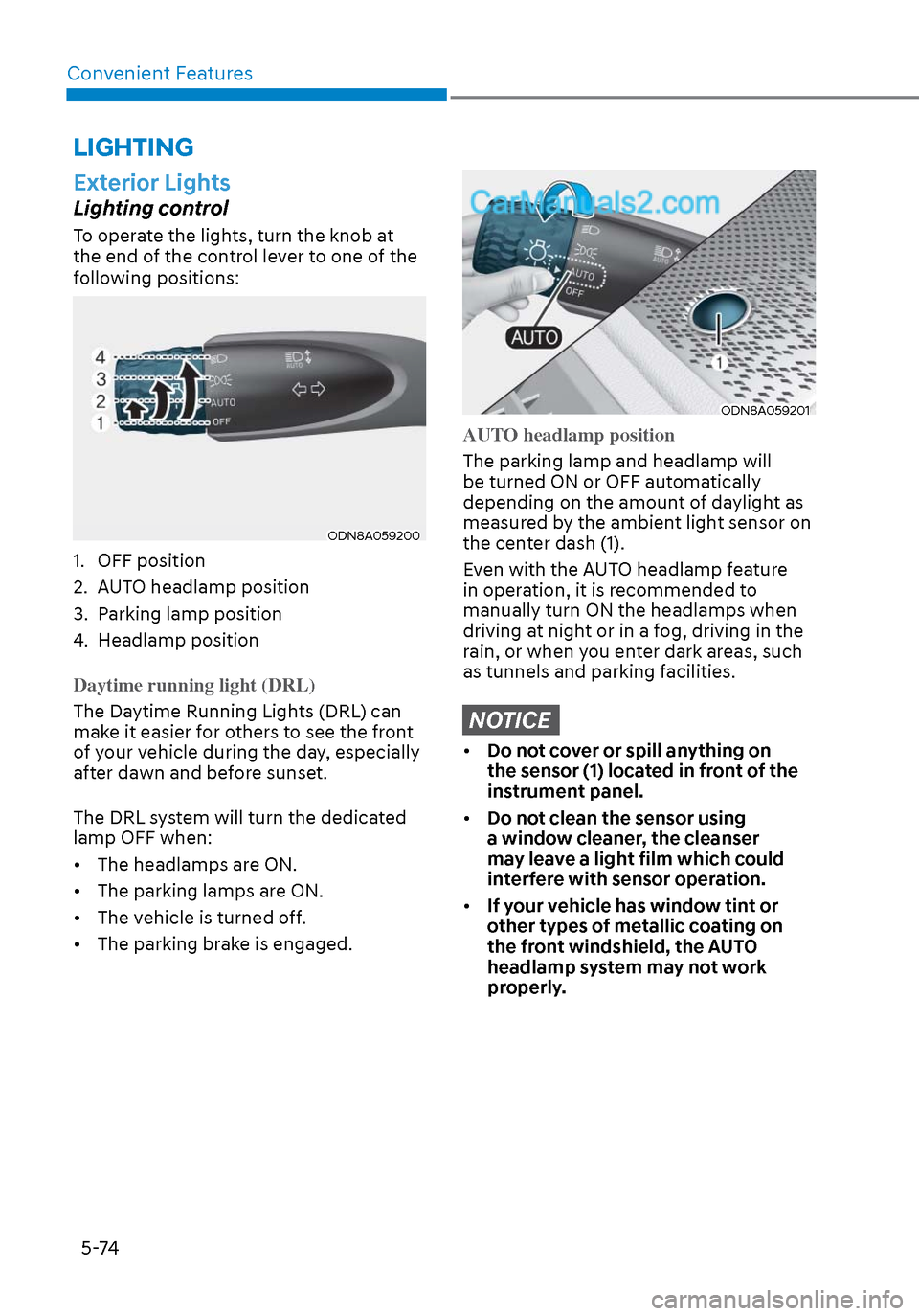
To operate the lights, turn the knob at
the end of the control lever to one of the
following positions:
ODN8A059200ODN8A059200
1. OFF position
2. AUTO headlamp position
3. Parking lamp position
4. Headlamp position
Daytime running light (DRL)
The Daytime Running Lights (DRL) can
mak
e it easier for others to see the front
of your vehicle during the day, especially
after dawn and before sunset.
The DRL system will turn the dedicated
lamp OFF when:
• The headlamps are ON.
• The parking lamps are ON.
• The vehicle is turned off.
• The parking brake is engaged.
ODN8A059201ODN8A059201
AUTO headlamp position
The parking lamp and headlamp will
be turned ON or OFF aut
omatically
depending on the amount of daylight as
measured by the ambient light sensor on
the center dash (1).
Even with the AUTO headlamp feature
in operation, it is recommended to
manually turn ON the headlamps when
driving at night or in a fog, driving in the
rain, or when you enter dark areas, such
as tunnels and parking facilities.
NOTICE
• Do not cover or spill anything on
the sensor (1) located in front of the
instrument panel.
• Do not clean the sensor using
a window cleaner, the cleanser
may leave a light film which could
interfere with sensor operation.
• If your vehicle has window tint or
other types of metallic coating on
the front windshield, the AUTO
headlamp system may not work
properly.
Page 207 of 537
05
5-77
When High Beam Assist system is
operating, the high beam switches to low
beam if any of the following conditions
occur: - When the headlamp of an on-coming vehicle is detected.
- When the tail lamp of a vehicle in front
is detected.
- When the headlamp or tail lamp of a motorcycle or a bicycle is detected.
- When the surrounding ambient light is bright enough that high beams are not
required.
- When streetlights or other lights are
detected.
- When the headlamp switch is not in the AUTO position.
- When High Beam Assist system is off.
- When vehicle speed is below 15 mph (24 km/h).
OIK047132NOIK047132N
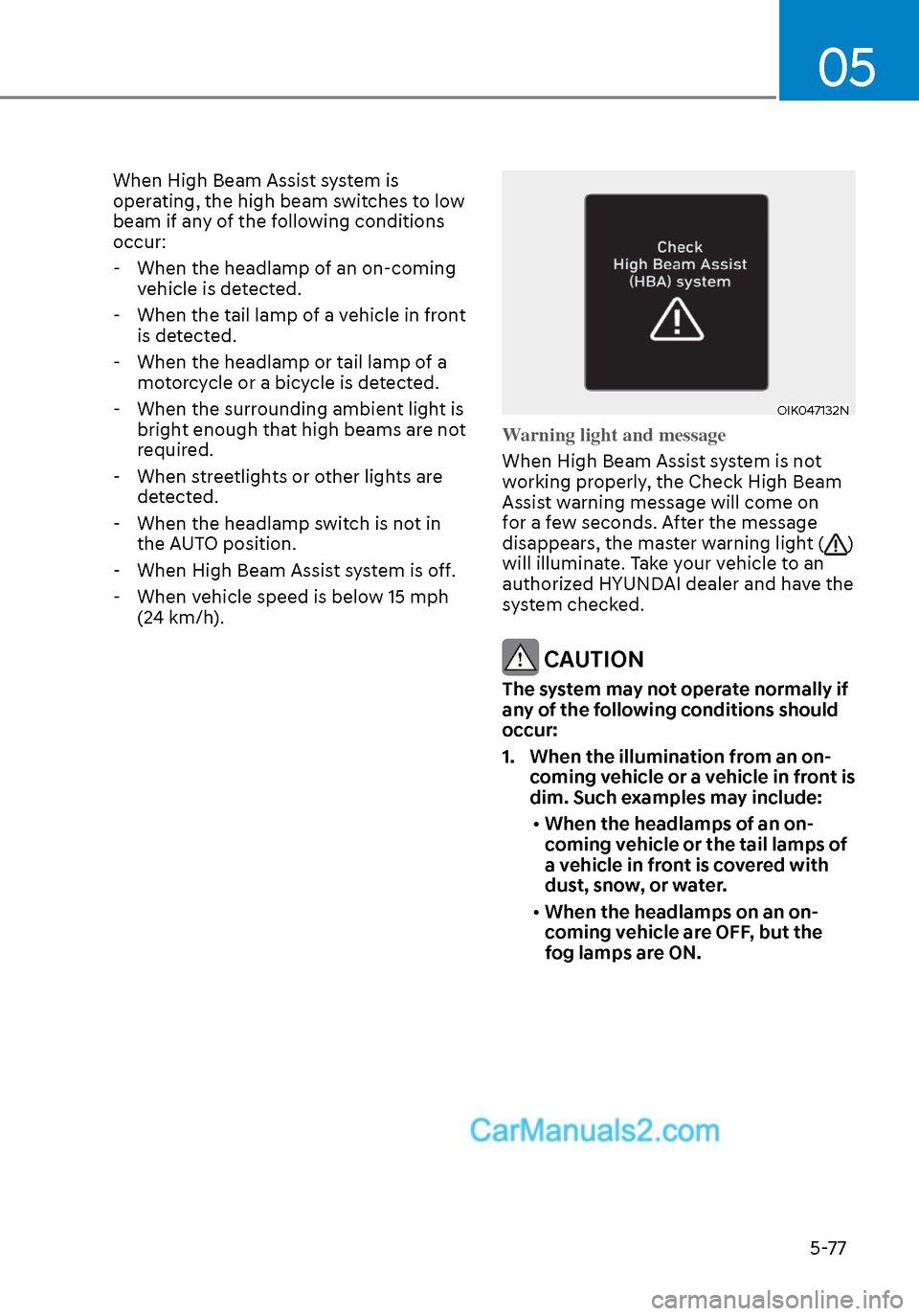
Warning light and message
When High Beam Assist system is not
w
orking properly, the Check High Beam
Assist warning message will come on
for a few seconds. After the message
disappears, the master warning light (
)
will illuminate. Take your vehicle to an
authorized HYUNDAI dealer and have the
system checked.
CAUTION
The system may not operate normally if
any of the following conditions should
occur:
1. When the illumination from an on- coming vehicle or a vehicle in front is
dim. Such examples may include:
• When the headlamps of an on-
coming vehicle or the tail lamps of
a vehicle in front is covered with
dust, snow, or water.
• When the headlamps on an on-
coming vehicle are OFF, but the
fog lamps are ON.
Page 208 of 537
Convenient Features5-78
2. When the High Beam Assist camera is adversely affected by an external
condition. Such examples may
include:
• When the vehicle’s headlamps
have been damaged or not
repaired properly.
• When the vehicle headlamps are
not aimed properly.
• When the vehicle is driven on a
narrow curved road or rough road
• When the vehicle is driven on an
uphill road or downhill road
• When only part of the vehicle in
front is visible on a crossroad or
curved road.
• When there is a traffic light,
reflecting sign, flashing sign or
mirror.
• When the road conditions are bad
such as being wet or covered with
snow.
• When a vehicle suddenly appears
from a curve.
• When the vehicle is tilted from a
flat tire or being towed.
• When Lane Keeping Assist system
warning light illuminates.
• When the light from the on-coming
or front vehicle is not detected
because of exhaust fume, smoke,
fog, snow, etc.
• When the front window is covered
with foreign matters such as ice,
dust, fog, or is damaged.
3. When the forward visibility is poor. Such examples may include:
• When the headlamps of an on-
coming vehicle or a vehicle in front
is not detected due to poor outside
visibility (smog, smoke, dust, fog,
heavy rain, snow, etc.).
• When the windshield visibility is
poor. WARNING
• Do not attempt to disassemble
the front view camera without the
assistance of an authorized HYUNDAI
dealer technician. If the front camera
is removed for any reason, the
system may need to be re-calibrated.
Have the system inspected by an
authorized HYUNDAI dealer.
• If the windshield of your vehicle is
replaced, most likely the front view
camera will need to be re-calibrated.
If this occurs, have your vehicle
inspected and have the system re-
calibrated by an authorized HYUNDAI
dealer.
• Be careful that water doesn’t get into
High Beam Assist unit and do not
remove or damage related parts of
High Beam Assist system.
• Do not place objects on the crash
pad that reflect light such as mirrors,
white paper, etc. The system may
malfunction if sunlight is reflected.
• At times, High Beam Assist system
may not work properly. The system
is for your convenience only. It is the
responsibility of the driver for safe
driving practices and always check
the road conditions for your safety.
• When the system does not operate
normally, change the headlamp
position manually between the high
beam and low beam.
Page 311 of 537
![Hyundai Sonata 2020 Owners Manual 06
6-27
OIK057080LOIK057080L
Press brake pedal to deactivate AUTO
HOLD
If you did not apply the brake pedal when
y
ou release the Auto Hold by pressing
the [AUTO HOLD] switch, a warning will
sound](/img/35/16773/w960_16773-310.png "Hyundai Sonata 2020 Owners Manual 06
6-27
OIK057080LOIK057080L
Press brake pedal to deactivate AUTO
HOLD
If you did not apply the brake pedal when
y
ou release the Auto Hold by pressing
the [AUTO HOLD] switch, a warning will
sound")
06
6-27
OIK057080LOIK057080L
Press brake pedal to deactivate AUTO
HOLD
If you did not apply the brake pedal when
y
ou release the Auto Hold by pressing
the [AUTO HOLD] switch, a warning will
sound and a message will appear.
OTM058159LOTM058159L
AUTO HOLD conditions not met. Close
door and hood.
When you press the [AUTO HOLD]
s
witch, if the driver's door and engine
hood are not closed, a warning will
sound and a message will appear on the
cluster LCD display.
Press the [AUTO HOLD] switch after
closing the driver's door and hood.
Anti-lock Brake System (ABS)
WARNING
An Anti-Lock Braking System (ABS) or
an Electronic Stability Control (ESC)
system will not prevent accidents
due to improper or dangerous driving
maneuvers. Even though vehicle
control is improved during emergency
braking, always maintain a safe
distance between you and objects
ahead of you. Vehicle speeds should
always be reduced during extreme
road conditions. The braking distance
for cars equipped with ABS or ESC
may be longer than for those without
these systems in the following road
conditions.
Drive your vehicle at reduced speeds
during the following conditions:
• Rough, gravel or snow-covered
roads.
• On roads where the road surface is
pitted or has different surface height.
• Tire chains are installed on your
vehicle.
The safety features of an ABS or ESC
equipped vehicle should not be tested
by high speed driving or cornering. This
could endanger the safety of yourself or
others.
ABS is an electronic braking system that
helps prevent a braking skid. ABS allows
the driver to steer and brake at the same
time.
Page 315 of 537
06
6-31
ESC OFF usage
When Driving
The ESC OFF mode should only be used
brie
fly to help free the vehicle if stuck in
snow by temporarily stopping operation
of the ESC to maintain wheel torque.
To turn ESC off while driving, press the
ESC OFF button while driving on a flat
road surface.
NOTICE
To prevent damage to the transmission:
• Do not allow wheel(s) of one axle to
spin excessively while the ESC, ABS,
and parking brake warning lights
are displayed. The repairs would not
be covered by the vehicle warranty.
Reduce engine power and do not
spin the wheel(s) excessively while
these lights are displayed.
• When operating the vehicle on
a dynamometer, make sure the
ESC is turned off (ESC OFF light
illuminated).
Information
Turning the ESC off does not affect ABS
or standard brake system operation.
Vehicle Stability Management
(VSM)
The Vehicle Stability Management (VSM)
is a function of the Electronic Stability
Control (ESC) system. It helps ensure the
vehicle stays stable when accelerating
or braking suddenly on wet, slippery and
rough roads where traction over the four
tires can suddenly become uneven.
WARNING
Take the following precautions when
using the Vehicle Stability Management
(VSM):
• ALWAYS check the speed and the
distance to the vehicle ahead. The
VSM is not a substitute for safe
driving practices.
• Never drive too fast for the road
conditions. The VSM system will not
prevent accidents. Excessive speed
in bad weather, slippery and uneven
roads can result in severe accidents.
VSM operation
VSM ON condition
The VSM operates when:
•
The Electronic Stability Control (ESC)
is on.
• Vehicle speed is approximately above 9 mph (15 km/h) on curve roads.
• Vehicle speed is approximately above 12 mph (20 km/h) when the vehicle is
braking on rough roads.
When operating
When you apply your brakes under
conditions which ma
y activate the ESC,
you may hear sounds from the brakes,
or feel a corresponding sensation in the
brake pedal. This is normal and it means
your VSM is active.
NOTICE
The VSM does not operate when:
• Driving on a banked road such as
gradient or incline.
• Driving rearward.
• ESC OFF indicator light is on.
• EPS (Electric Power Steering)
warning light (
) is on or blinks.
Page 333 of 537
06
6-49
Detecting vehicle, pedestrian and
cyclist
The sensor may be limited when:
• The system may not operate for 15 seconds after the vehicle is started or
the camera is initialized
• The radar sensor or camera is covered with a foreign object or debris
• The camera lens is contaminated due to tinted, filmed or coated windshield,
damaged glass, or stuck of foreign
matter (sticker, bug, etc.) on the glass
• Inclement weather such as heavy rain or snow obscures the field of view of
the radar sensor or camera
• There is interference by electromagnetic waves
• There is severe irregular reflection from the radar sensor
• The radar/camera sensor recognition is limited
• The vehicle in front is too small to be detected (for example a motorcycle
etc.)
• The vehicle in front is an oversize vehicle or trailer that is too big to be
detected by the camera recognition
system (for example a tractor trailer,
etc.)
• The camera’s field of view is not well illuminated (either too dark or too
much reflection or too much backlight
that obscures the field of view)
• The vehicle in front does not have their rear lights or their rear lights
does not turned ON or their rear lights
are located unusually
• The outside brightness changes suddenly, for example when entering
or exiting a tunnel
• Light coming from a street light or an oncoming vehicle is reflected on a wet
road surface such as a puddle in the
road • The field of view in front is obstructed
by sun glare or head light of oncoming
vehicle
• The windshield glass is fogged up; a clear view of the road is obstructed
• The vehicle in front is driving erratically
• The vehicle is on unpaved or uneven rough surfaces, or road with sudden
gradient changes
• The vehicle is driven near areas containing metal substances as a
construction zone, railroad, etc.
• The vehicle drives inside a building, such as a basement parking lot
• The camera does not recognize the entire vehicle in front
• The camera is damaged
• The brightness outside is too low such as when the headlamps are not on at
night or the vehicle is going through
a tunnel
• The shadow is on the road by a median strip, trees, etc.
• The vehicle drives through a tollgate
• The windshield glass is fogged up; a clear view of the road is obstructed
• The rear part of the vehicle in front is not normally visible (the vehicle turns
in other direction or the vehicle is
overturned.)
• The adverse road conditions cause excessive vehicle vibrations while
driving
• The sensor recognition changes suddenly when passing over a speed
bump
• The vehicle in front is moving vertically to the driving direction
• The vehicle in front is stopped vertically
• The vehicle in front is driving towards your vehicle or reversing
• You are on a roundabout and the vehicle in front circles
Page 342 of 537
While Driving6-58
Limitations of the system
FCA-Junction Turning function is only a
supplemental system for driver’s safety
whilst turning left on the crossroads. The
driver should hold the responsibility to
control the vehicle. The system monitors
the oncoming vehicle ahead the road
through the front view camera and
radar. In certain situations, the front view
camera and radar may not be able to
detect the oncoming vehicles properly.
The driver must pay careful attention
in the following situations where the
system operation may be limited or it
may activate unintentionally.
The sensor may be limited when:
• The radar sensor or camera r
ecognizes the approaching vehicle
too late.
• The radar sensor or camera is blocked with a foreign object or debris.
• The driving direction of the approaching vehicle is irregular or
frontal.
• The approaching vehicle changes lanes too late or decelerates suddenly.
• The angle of the approaching vehicle is out of range.
• Whilst circling, the sensor (the front view camera or front radar) does not
detect the approaching vehicle.
• The driving speed of the approaching vehicle is too fast or slow.
• The head lamps of the approaching vehicle are turned off or asymmetrical. • The approaching vehicle stops whilst
turning left.
• The vehicle moves out of its lane or returns to its lane.
• The vehicle changes lanes suddenly at a low speed whilst there is an
approaching vehicle.
• The brightness outside is too so it does not detect the vehicle.
• Inclement weather such as heavy rain or snow obscures the field of view of
the front view camera or front radar.
• The approaching vehicle is covered with snow.
• The field of view in front is obstructed by sun glare.
• The shape of approaching vehicle is unusual.
• Whilst driving upward or downward on a slope.
For more information, refer to “Forward
Collision-Avoidance Assist (FCA)” in this
chapter.