Door HYUNDAI SONATA 2021 User Guide
[x] Cancel search | Manufacturer: HYUNDAI, Model Year: 2021, Model line: SONATA, Model: HYUNDAI SONATA 2021Pages: 546, PDF Size: 51.21 MB
Page 78 of 546
3-50
OLMB033104
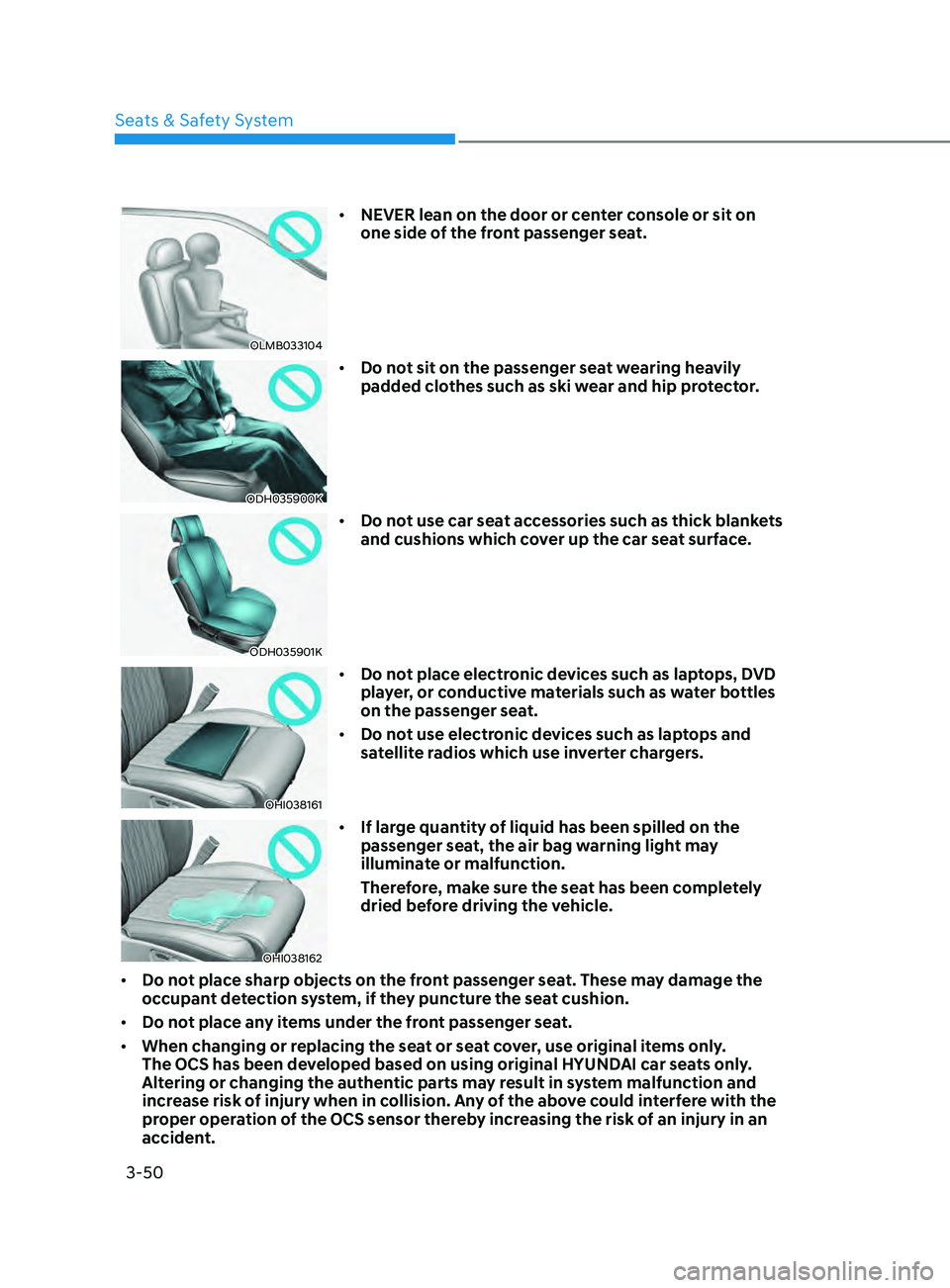
• NEVER lean on the door or center console or sit on
one side of the front passenger seat.
ODH035900K
• Do not sit on the passenger seat wearing heavily
padded clothes such as ski wear and hip protector.
ODH035901K
• Do not use car seat accessories such as thick blankets
and cushions which cover up the car seat surface.
OHI038161
• Do not place electronic devices such as laptops, DVD
player, or conductive materials such as water bottles
on the passenger seat.
• Do not use electronic devices such as laptops and
satellite radios which use inverter chargers.
OHI038162
• If large quantity of liquid has been spilled on the
passenger seat, the air bag warning light may
illuminate or malfunction.
Therefore, make sure the seat has been completely
dried before driving the vehicle.
• Do not place sharp objects on the front passenger seat. These may damage the
occupant detection system, if they puncture the seat cushion.
• Do not place any items under the front passenger seat.
• When changing or replacing the seat or seat cover, use original items only.
The OCS has been developed based on using original HYUNDAI car seats only.
Altering or changing the authentic parts may result in system malfunction and
increase risk of injury when in collision. Any of the above could interfere with the
proper operation of the OCS sensor thereby increasing the risk of an injury in an
accident.
Seats & Safety System
Page 85 of 546
03
3-57
Additional Safety Precautions
Passengers should not move out of
or change seats while the vehicle is
moving. A passenger who is not wearing
a seat belt during a crash or emergency
stop can be thrown against the inside of
the vehicle, against other occupants, or
be ejected from the vehicle.
Do not use any accessories on seat
belts. Devices claiming to improve
occupant comfort or reposition the seat
belt can reduce the protection provided
by the seat belt and increase the chance
of serious injury in a crash.
Do not modify the front seats.
Modification of the front seats could
interfere with the operation of the
supplemental restraint system sensing
components or side air bags.
Do not place items under the front
seats. Placing items under the front seats
could interfere with the operation of the
supplemental restraint system sensing
components and wiring harnesses.
Do not cause impact to the doors.
Impact to the doors when the Engine
Start/Stop button is in the ON position
may cause the air bags to inflate.
Modifications to accommodate
disabilities. If you require modification
to your vehicle to accommodate
a disability, contact the HYUNDAI
Customer Connect Center at 800-633-
5151.
Adding equipment to or modifying
your air bag equipped vehicle
If you modify your vehicle by changing
your vehicle’s frame, bumper system,
front end or side sheet metal or ride
height, this may affect the operation of
your vehicle’s air bag system.
Air Bag Warning Labels
ODN8A039057
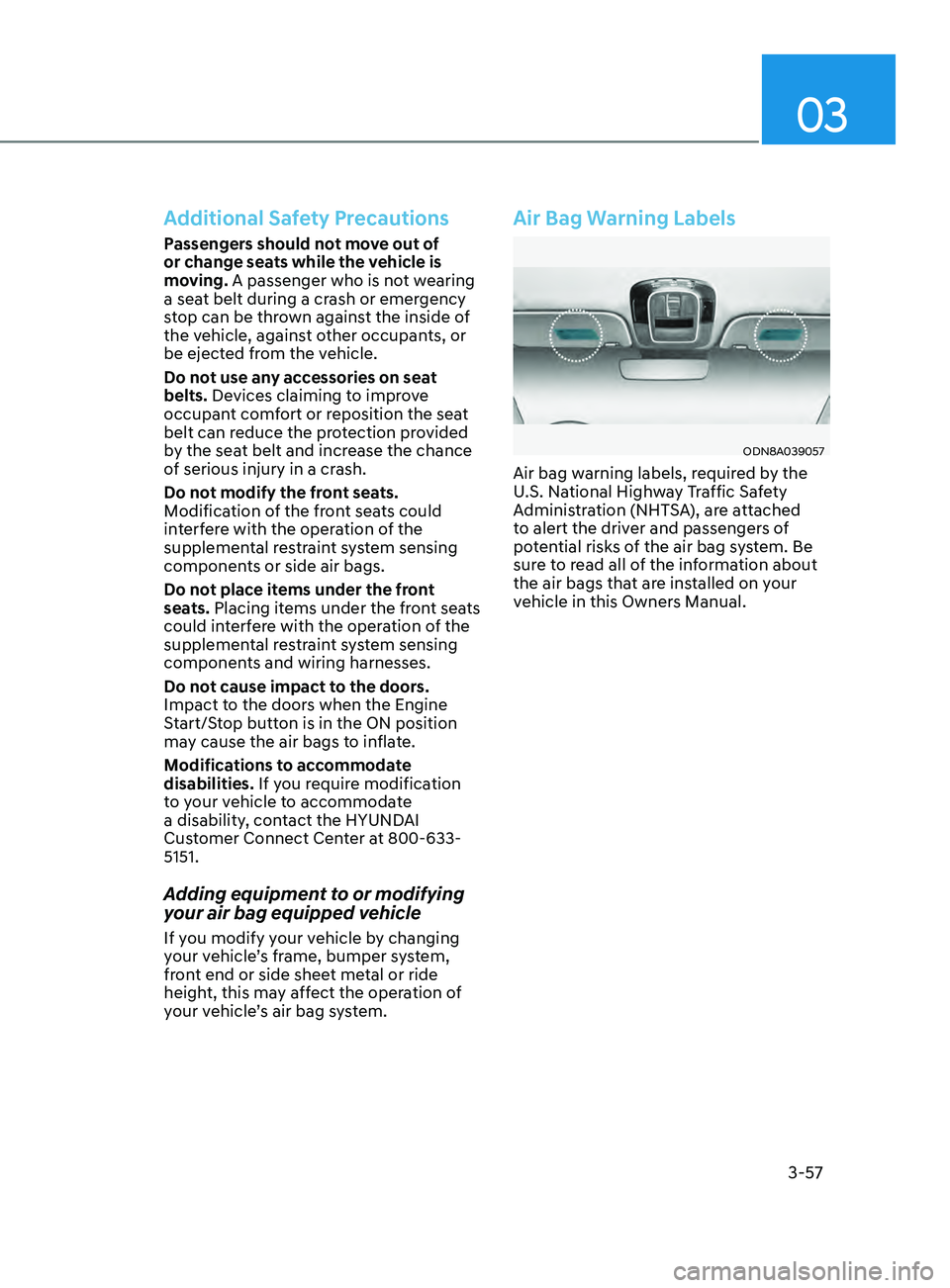
Air bag warning labels, required by the
U.S. National Highway Traffic Safety
Administration (NHTSA), are attached
to alert the driver and passengers of
potential risks of the air bag system. Be
sure to read all of the information about
the air bags that are installed on your
vehicle in this Owners Manual.
Page 102 of 546
04
4-17
Door, Hood, Trunk Open Indicator
ODN8049012
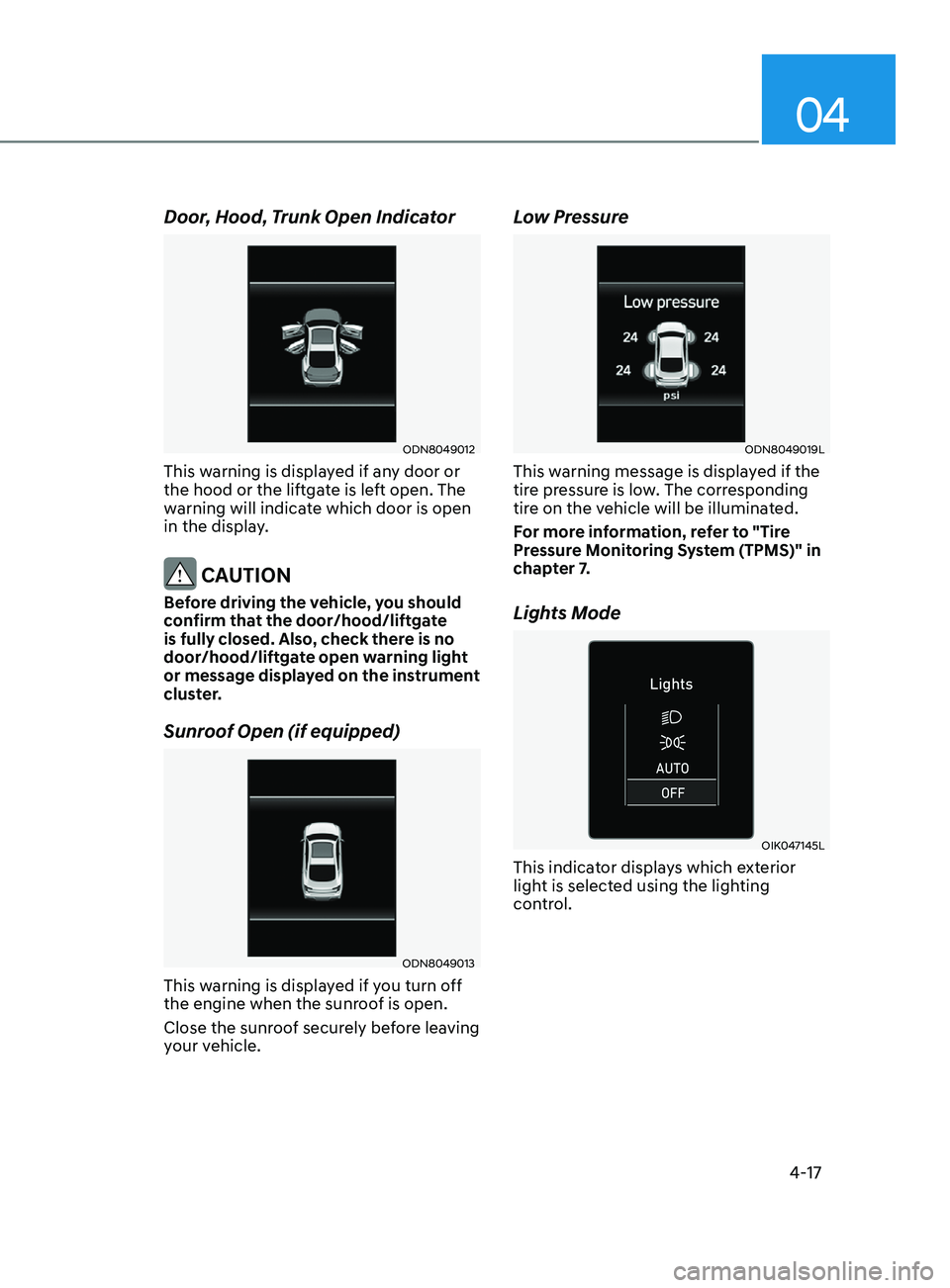
This warning is displayed if any door or
the hood or the liftgate is left open. The
warning will indicate which door is open
in the display.
CAUTION
Before driving the vehicle, you should
confirm that the door/hood/liftgate
is fully closed. Also, check there is no
door/hood/liftgate open warning light
or message displayed on the instrument
cluster.
Sunroof Open (if equipped)
ODN8049013
This warning is displayed if you turn off
the engine when the sunroof is open.
Close the sunroof securely before leaving
your vehicle.
Low Pressure
ODN8049019L
This warning message is displayed if the
tire pressure is low. The corresponding
tire on the vehicle will be illuminated.
For more information, refer to "Tire
Pressure Monitoring System (TPMS)" in
chapter 7.
Lights Mode
OIK047145L
This indicator displays which exterior
light is selected using the lighting
control.
Page 105 of 546
Instrument Cluster
4-20
LCD Display Modes
ModesSymbol Explanation
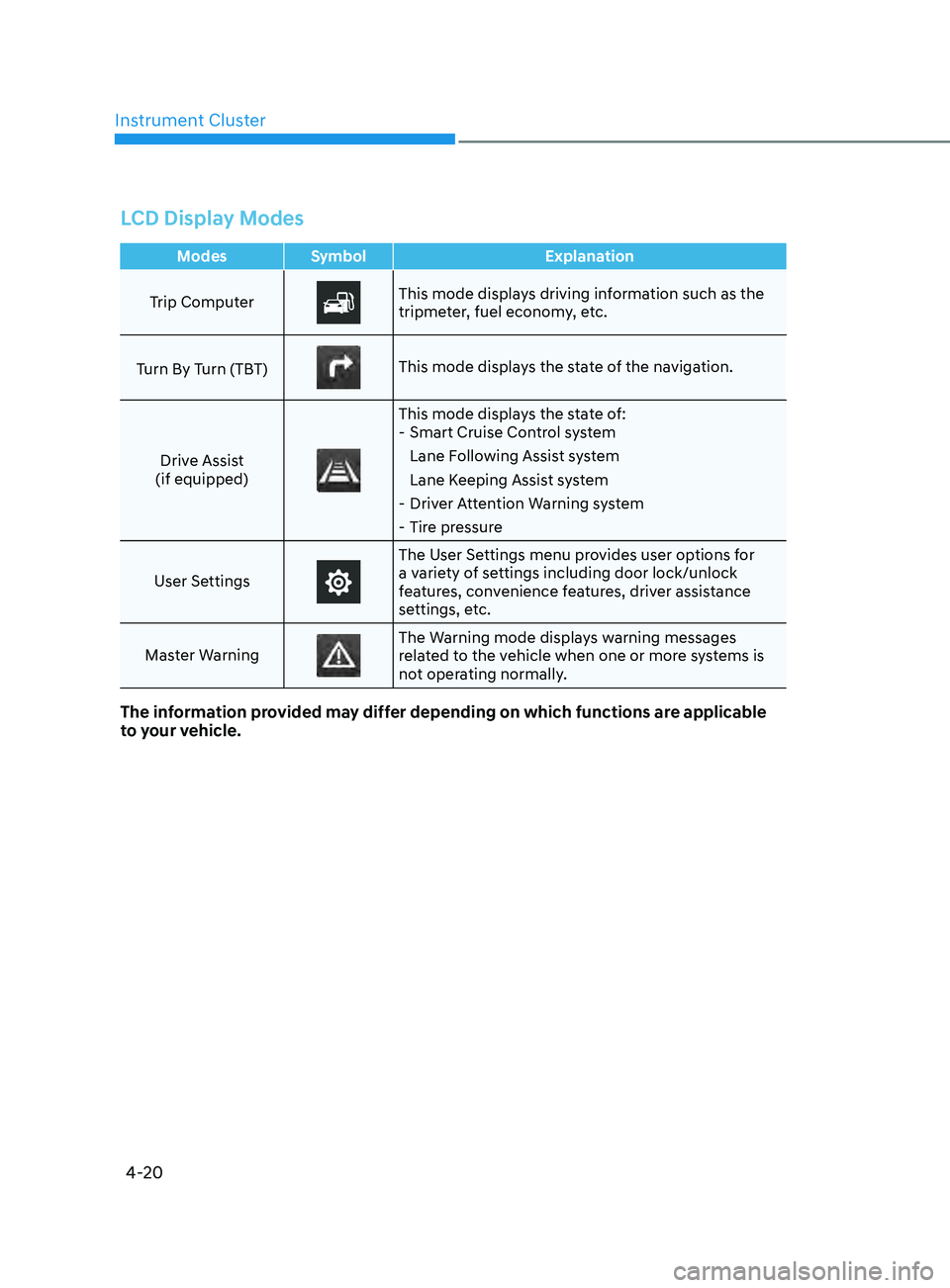
Trip Computer
This mode displays driving information such as the
tripmeter, fuel economy, etc.
Turn By Turn (TBT)
This mode displays the state of the navigation.
Drive Assist
(if equipped)
This mode displays the state of: - Smart Cruise Con trol system
Lane Following Assist system
Lane Keeping Assist system
- Driv
er Attention Warning system
- Tir
e pressure
User Settings
The User Settings menu provides user options for
a variety of settings including door lock/unlock
features, convenience features, driver assistance
settings, etc.
Master Warning
The Warning mode displays warning messages
related to the vehicle when one or more systems is
not operating normally.
The information provided may differ depending on which functions are applicable
to your vehicle.
Page 107 of 546
Instrument Cluster4-22
Master warning mode
OIK047173L
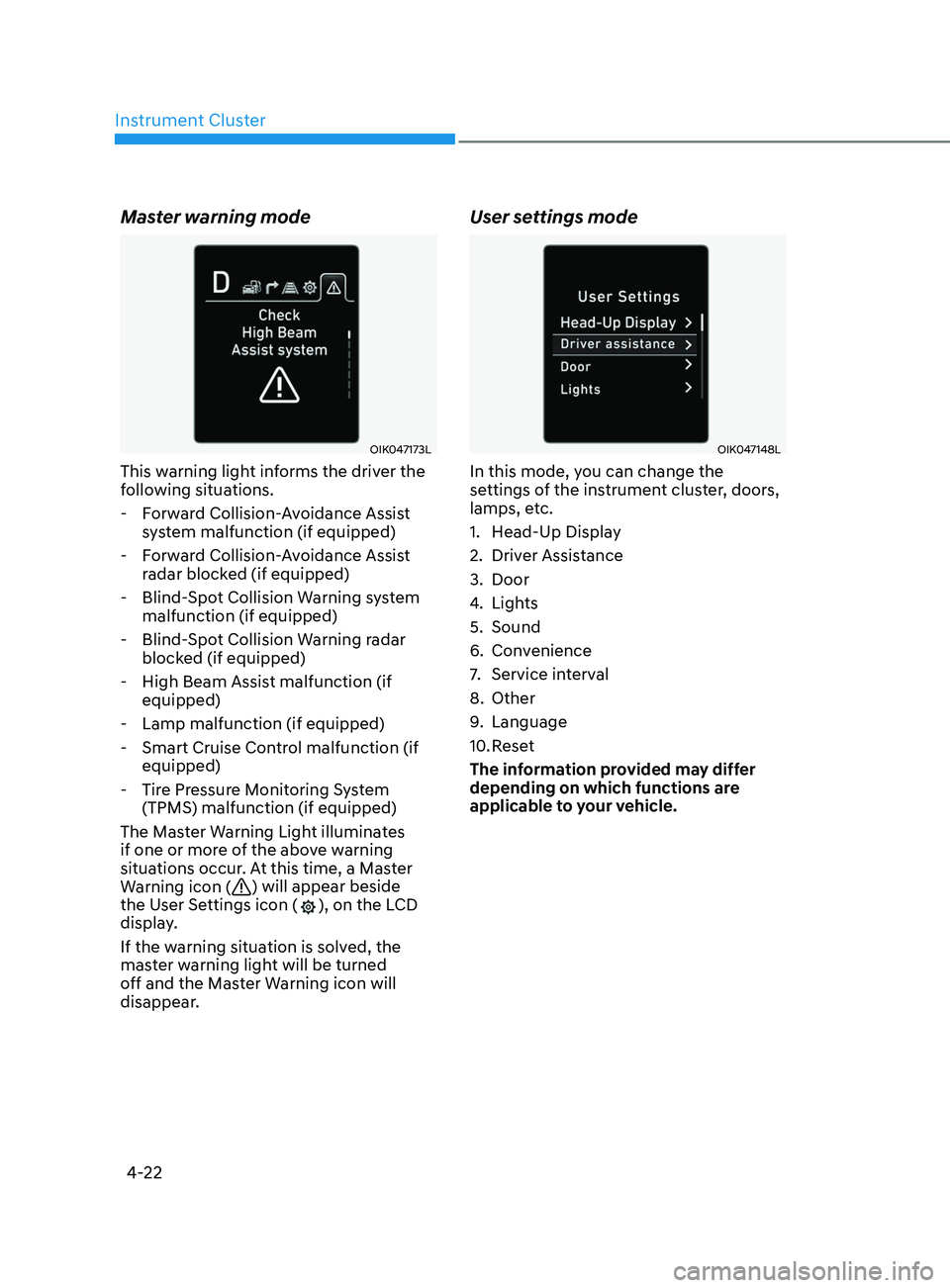
This warning light informs the driver the
following situations. - Forward Collision-Avoidance Assist system malfunction (if equipped)
- Forward Collision-Avoidance Assist radar blocked (if equipped)
- Blind-Spot Collision Warning system malfunction (if equipped)
- Blind-Spot Collision Warning radar blocked (if equipped)
- High Beam Assist malfunction (if equipped)
- Lamp malfunction (if equipped)
- Smart Cruise Control malfunction (if equipped)
- Tire Pressure Monitoring System (TPMS) malfunction (if equipped)
The Master Warning Light illuminates
if one or more of the above warning
situations occur. At this time, a Master
Warning icon (
) will appear beside
the User Settings icon (), on the LCD
display.
If the warning situation is solved, the
master warning light will be turned
off and the Master Warning icon will
disappear.
User settings mode
OIK047148L
In this mode, you can change the
settings of the instrument cluster, doors,
lamps, etc.
1. Head-Up Display
2. Driver Assistance
3. Door
4. Lights
5. Sound
6. Convenience
7. Service interval
8. Other
9. Language
10. Reset
The information provided may differ
depending on which functions are
applicable to your vehicle.
Page 112 of 546
04
4-27
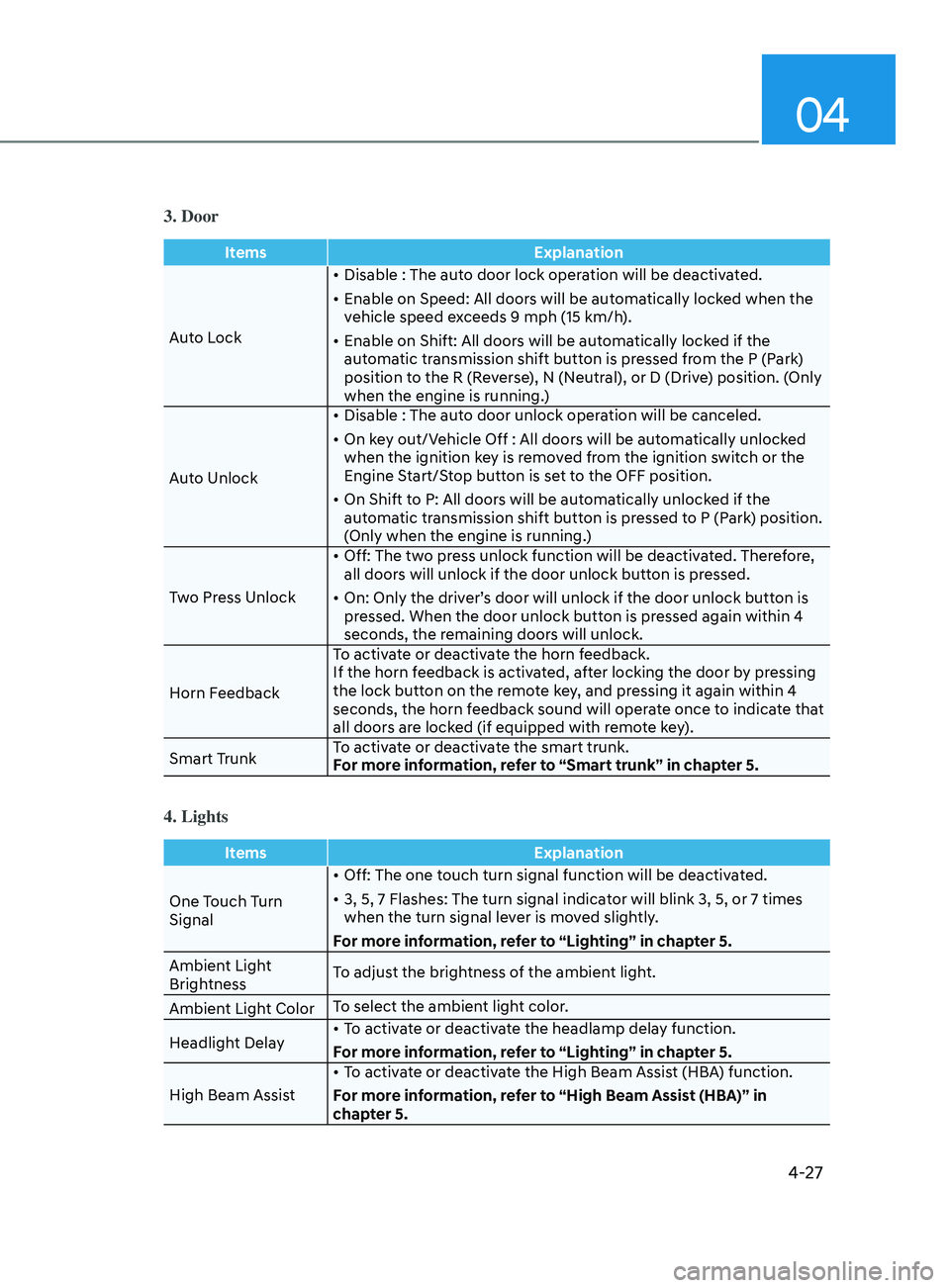
3. Door
ItemsExplanation
Auto Lock •
Disable : The auto door lock operation will be deactivated.
•
E
nable on Speed: All doors will be automatically locked when the
vehicle speed exceeds 9 mph (15 km/h).
•
E
nable on Shift: All doors will be automatically locked if the
automatic transmission shift button is pressed from the P (Park)
position to the R (Reverse), N (Neutral), or D (Drive) position. (Only
when the engine is running.)
Auto Unlock •
Disable : The aut
o door unlock operation will be canceled.
•
On k
ey out/Vehicle Off : All doors will be automatically unlocked
when the ignition key is removed from the ignition switch or the
Engine Start/Stop button is set to the OFF position.
•
On Shift t
o P: All doors will be automatically unlocked if the
automatic transmission shift button is pressed to P (Park) position.
(Only when the engine is running.)
Two Press Unlock •
Off: The tw
o press unlock function will be deactivated. Therefore,
all doors will unlock if the door unlock button is pressed.
•
On: Only the driv
er’s door will unlock if the door unlock button is
pressed. When the door unlock button is pressed again within 4
seconds, the remaining doors will unlock.
Horn Feedback To activate or deactivate the horn feedback.
If the horn feedback is activated, after locking the door by pressing
the lock button on the remote key, and pressing it again within 4
seconds, the horn feedback sound will operate once to indicate that
all doors are locked (if equipped with remote key).
Smart Trunk To activate or deactivate the smart trunk.
For more information, refer to “Smart trunk” in chapter 5.
4. Lights
Items
Explanation
One Touch Turn
Signal •
Off: The one touch turn signal function will be deactivated.
•
3, 5, 7 Flashes: The turn signal indica
tor will blink 3, 5, or 7 times
when the turn signal lever is moved slightly.
For more information, refer to “Lighting” in chapter 5.
Ambient Light
Brightness To adjust the brightness of the ambient light.
Ambient Light Color To select the ambient light color.
Headlight Delay •
To activate or deactivate the headlamp delay function.
For more information, refer to “Lighting” in chapter 5.
High Beam Assist •
To activate or deactivate the High Beam Assist (HBA) function.
For more information, refer to “High Beam Assist (HBA)” in
chapter 5.
Page 124 of 546
04
4-39
Warning message mode
ODN8A059295
When the warning message light appears
in the option menu, press the OK button
and check the detailed information.
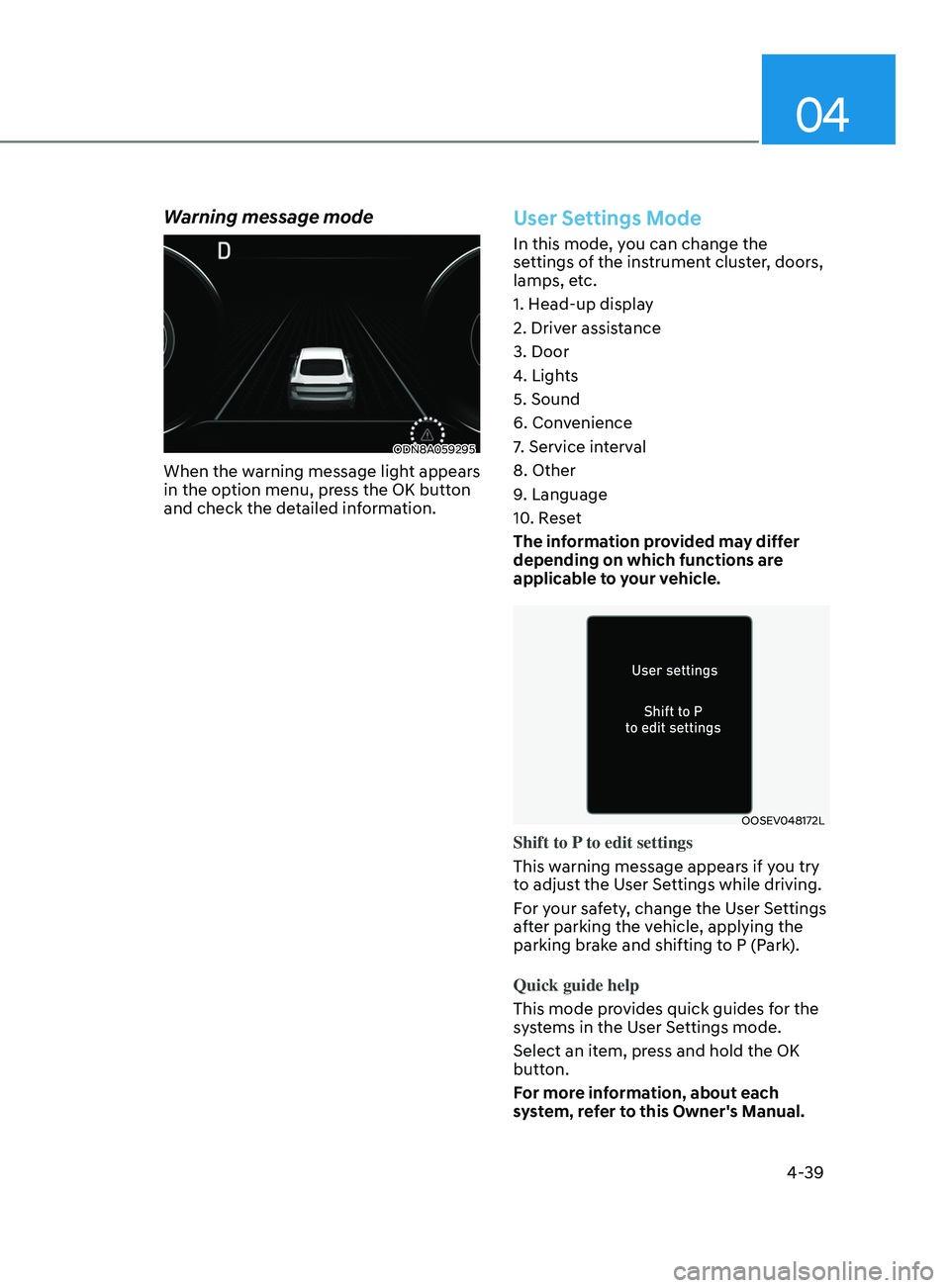
User Settings Mode
In this mode, you can change the
settings of the instrument cluster, doors,
lamps, etc.
1. Head-up display
2. Driver assistance
3. Door
4. Lights
5. Sound
6. Convenience
7. Service interval
8. Other
9. Language
10. Reset
The information provided may differ
depending on which functions are
applicable to your vehicle.
OOSEV048172L
Shift to P to edit settings
This warning message appears if you try
to adjust the User Settings while driving.
For your safety, change the User Settings
after parking the vehicle, applying the
parking brake and shifting to P (Park).
Quick guide help
This mode provides quick guides for the
systems in the User Settings mode.
Select an item, press and hold the OK
button.
For more information, about each
system, refer to this Owner's Manual.
Page 127 of 546
Instrument Cluster
4-42
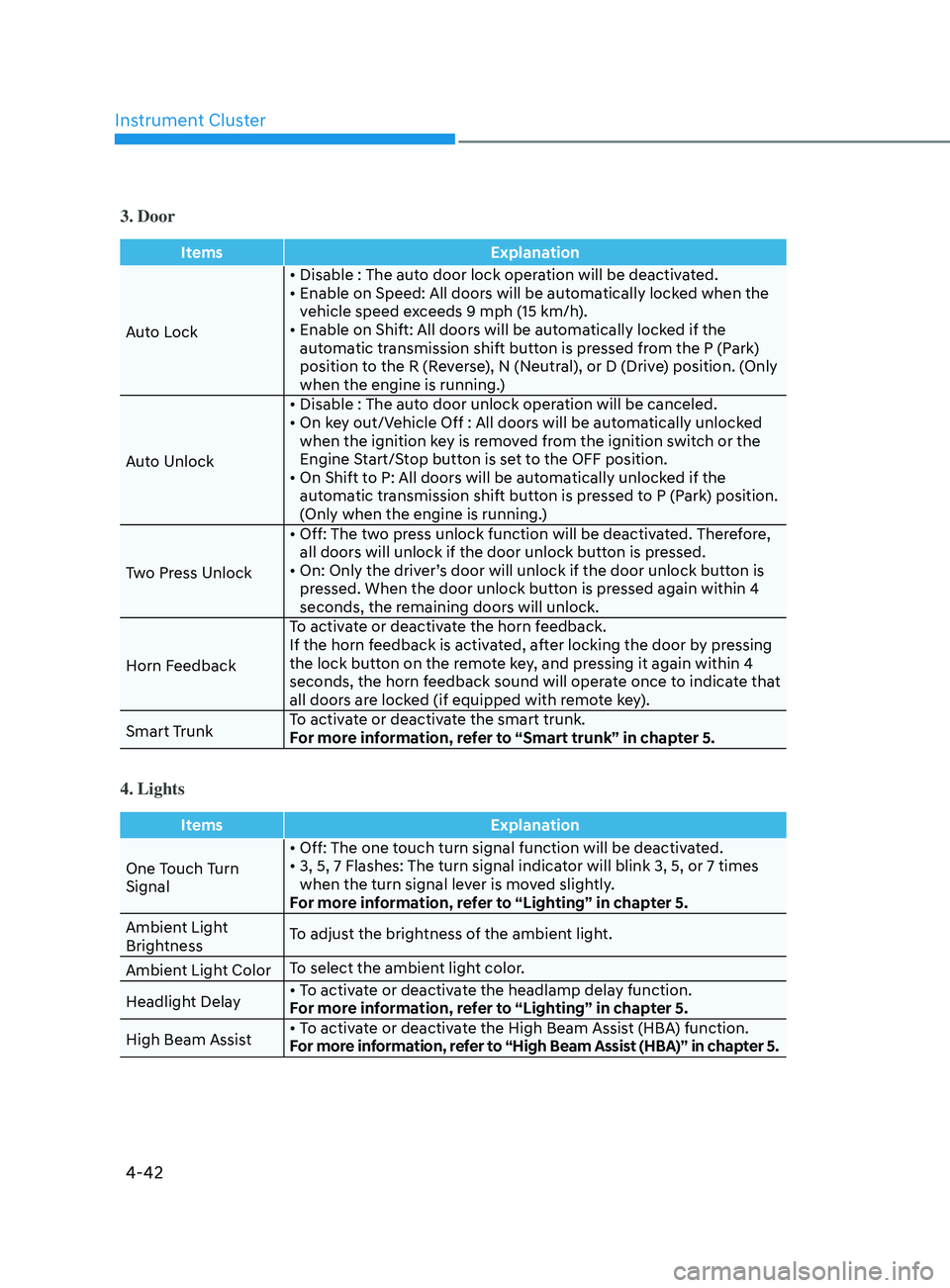
3. Door
ItemsExplanation
Auto Lock •
Disable : The auto door lock operation will be deactivated.
•
E
nable on Speed: All doors will be automatically locked when the
v
ehicle speed exceeds 9 mph (15 km/h).
•
E
nable on Shift: All doors will be automatically locked if the
aut
omatic transmission shift button is pressed from the P (Park)
position to the R (Reverse), N (Neutral), or D (Drive) position. (Only
when the engine is running.)
Auto Unlock •
Disable
: The auto door unlock operation will be canceled.
•
On
key out/Vehicle Off : All doors will be automatically unlocked
when the ignition k
ey is removed from the ignition switch or the
Engine Start/Stop button is set to the OFF position.
•
On
Shift to P: All doors will be automatically unlocked if the
aut
omatic transmission shift button is pressed to P (Park) position.
(Only when the engine is running.)
Two Press Unlock •
Off:
The two press unlock function will be deactivated. Therefore,
all door
s will unlock if the door unlock button is pressed.
•
On:
Only the driver’s door will unlock if the door unlock button is
pr
essed. When the door unlock button is pressed again within 4
seconds, the remaining doors will unlock.
Horn Feedback To activate or deactivate the horn feedback.
If the horn feedback is activated, after locking the door by pressing
the lock button on the remote key, and pressing it again within 4
seconds, the horn feedback sound will operate once to indicate that
all doors are locked (if equipped with remote key).
Smart Trunk To activate or deactivate the smart trunk.
For more information, refer to “Smart trunk” in chapter 5.
4. Lights
Items
Explanation
One Touch Turn
Signal •
Off: The one touch turn signal function will be deactivated.
•
3,
5, 7 Flashes: The turn signal indicator will blink 3, 5, or 7 times
when the turn signal le
ver is moved slightly.
For more information, refer to “Lighting” in chapter 5.
Ambient Light
Brightness To adjust the brightness of the ambient light.
Ambient Light Color To select the ambient light color.
Headlight Delay •
To activate or deactivate the headlamp delay function.
For more information, refer to “Lighting” in chapter 5.
High Beam Assist •
To activate or deactivate the High Beam Assist (HBA) function.
For more information, refer to “High Beam Assist (HBA)” in chapter 5.
Page 131 of 546

5. Convenient Features
Convenient Features
Accessing Your Vehicle ........................................................................\
..........5-4Remote Key ........................................................................\
...................................... 5-4
Smart K ey ........................................................................\
.......................................... 5 -7
Immobilizer System
........................................................................\
........................ 5-14
Hyundai Digital Key
........................................................................\
......................... 5-15
Door Locks ........................................................................\
............................. 5- 31Operating Door Locks from Outside the Vehicle ..................................................5- 31
Operating Door Locks from Inside the Vehicle ....................................................5-32
Automatic Door Lock and Unlock Features
..........................................................5-34
Child-Protector Rear Door Locks
........................................................................\
.. 5-
35
Rear Occupant Alert (ROA) System
....................................................................... 5-36
Vehicle Auto-Shut Off Function
........................................................................\
.... 5-
37
Theft-Alarm System ........................................................................\
.............5- 38
Driver Position Memory System ................................................................. 5-39
Storing Positions into Memory ........................................................................\
..... 5- 39
Recalling Positions from Memory ........................................................................\
. 5-40
R
esetting the Driver’s Seat Memory System ........................................................5-40
Easy Access Function
........................................................................\
...................... 5-41
Steering Wheel ........................................................................\
.....................5-42Electric Power Steering (EPS) ........................................................................\
........5-42
Tilt S teering / Telescope Steering ........................................................................\
. 5-43
H
eated Steering Wheel ........................................................................\
.................. 5-44
Horn........................................................................\
................................................. 5-45
Mirrors ........................................................................\
.................................. 5-46Inside Rearview Mirror ........................................................................\
...................5-46
Side Vie w Mirrors ........................................................................\
........................... 5-53
Reverse Parking Aid Function
........................................................................\
........ 5-55
Windows ........................................................................\
............................... 5-56Power Windows ........................................................................\
..............................5-57
Panoramic Sunroof ........................................................................\
..............5-60Sunshade ........................................................................\
......................................... 5-61
Sliding the Sunr oof ........................................................................\
.......................... 5-61
Tilting the Sunroof
........................................................................\
.......................... 5-61
Closing the Sunroof
........................................................................\
....................... 5-62
Resetting the Sunroof
........................................................................\
.................... 5-63
Sunroof Open Warning
........................................................................\
.................. 5-63
Exterior Features ........................................................................\
..................5-64Hood ........................................................................\
................................................ 5-64
T runk ........................................................................\
................................................ 5-65
Emergency Trunk Safety Release
........................................................................\
.. 5-66
Fuel Filler Door
........................................................................\
............................... 5-70
5
Page 134 of 546
Convenient Features
5-4
Remote Key (if equipped)
OIG046001
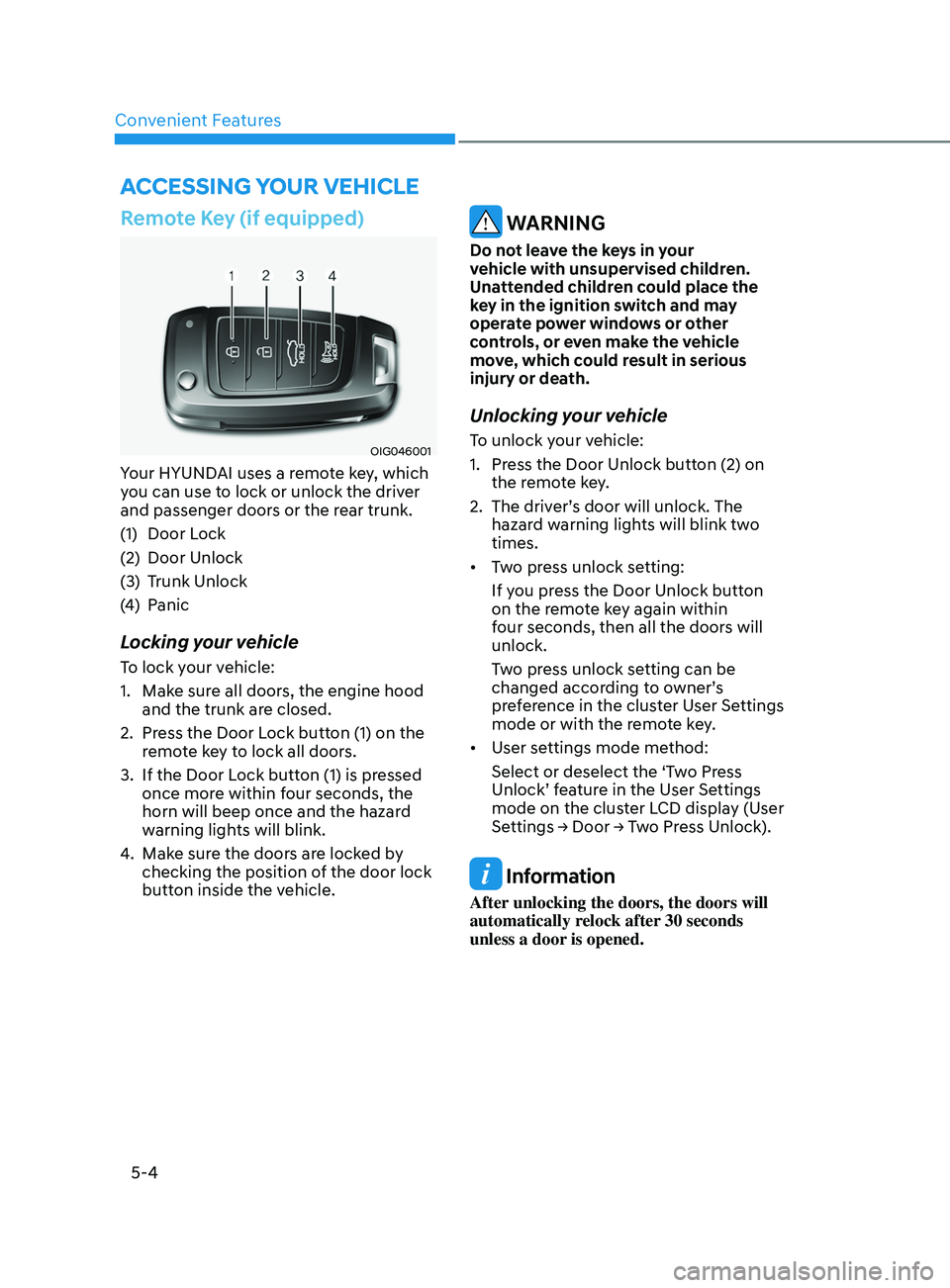
Your HYUNDAI uses a remote key, which
you can use to lock or unlock the driver
and passenger doors or the rear trunk.
(1)
Door L
ock
(2)
Door Unlock
(3
)
T
runk Unlock
(4)
P
anic
Locking your vehicle
To lock your vehicle:
1.
Mak
e sure all doors, the engine hood
and the trunk are closed.
2.
Pr
ess the Door Lock button (1) on the
remote key to lock all doors.
3.
If the Door L
ock button (1) is pressed
once more within four seconds, the
horn will beep once and the hazard
warning lights will blink.
4.
Mak
e sure the doors are locked by
checking the position of the door lock
button inside the vehicle.
WARNING
Do not leave the keys in your
vehicle with unsupervised children.
Unattended children could place the
key in the ignition switch and may
operate power windows or other
controls, or even make the vehicle
move, which could result in serious
injury or death.
Unlocking your vehicle
To unlock your vehicle:
1.
Pr
ess the Door Unlock button (2) on
the remote key.
2.
The driv
er’s door will unlock. The
hazard warning lights will blink two
times.
• Two press unlock setting:
If you press the Door Unlock button
on the remote key again within
four seconds, then all the doors will
unlock.
Two press unlock setting can be
changed according to owner’s
preference in the cluster User Settings
mode or with the remote key.
• User settings mode method:
Select or deselect the ‘Two Press
Unlock’ feature in the User Settings
mode on the cluster LCD display (User
Settings
→ Door → Two Press Unlock).
Information
After unlocking the doors, the doors will
automatically relock after 30 seconds
unless a door is opened.
Accessing Your Vehicle