fog light HYUNDAI SONATA 2021 User Guide
[x] Cancel search | Manufacturer: HYUNDAI, Model Year: 2021, Model line: SONATA, Model: HYUNDAI SONATA 2021Pages: 546, PDF Size: 51.21 MB
Page 348 of 546
6-64
Warning Light and Message
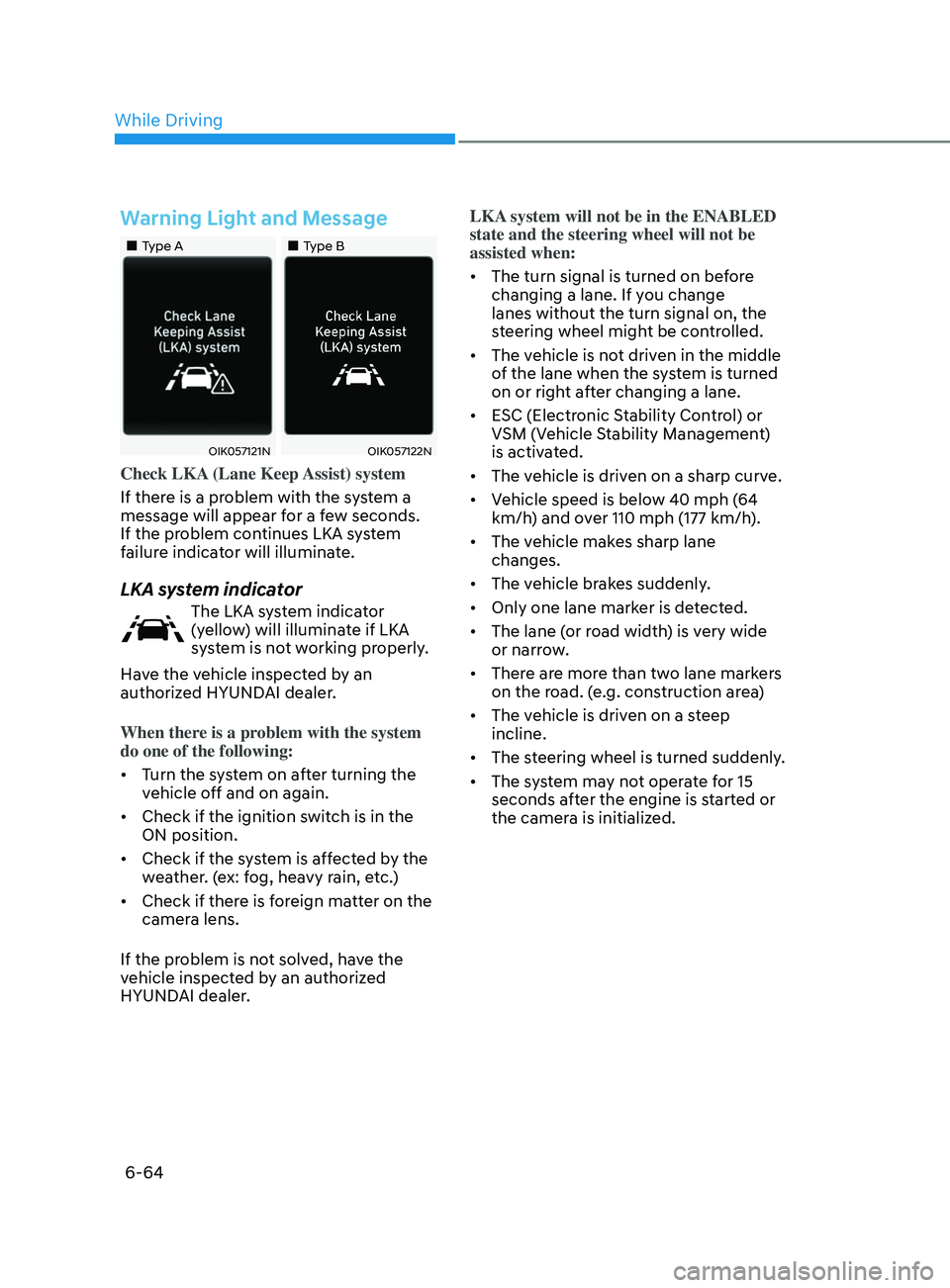
•„Type A•„Type B
OIK057121NOIK057122N
Check LKA (Lane Keep Assist) system
If there is a problem with the system a
message will appear for a few seconds.
If the problem continues LKA system
failure indicator will illuminate.
LKA system indicator
The LKA system indicator
(yellow) will illuminate if LKA
system is not working properly.
Have the vehicle inspected by an
authorized HYUNDAI dealer.
When there is a problem with the system
do one of the following:
• Turn the system on after turning the
vehicle off and on again.
• Check if the ignition switch is in the
ON position.
• Check if the system is affected by the
weather. (ex: fog, heavy rain, etc.)
• Check if there is foreign matter on the
camera lens.
If the problem is not solved, have the
vehicle inspected by an authorized
HYUNDAI dealer. LKA system will not be in the ENABLED
state and the steering wheel will not be
assisted when:
•
The turn signal is turned on before
changing a lane. If you change
lanes without the turn signal on, the
steering wheel might be controlled.
• The vehicle is not driven in the middle
of the lane when the system is turned
on or right after changing a lane.
• ESC (Electronic Stability Control) or
VSM (Vehicle Stability Management)
is activated.
• The vehicle is driven on a sharp curve.
• Vehicle speed is below 40 mph (64
km/h) and over 110 mph (177 km/h).
• The vehicle makes sharp lane
changes.
• The vehicle brakes suddenly.
• Only one lane marker is detected.
• The lane (or road width) is very wide
or narrow.
• There are more than two lane markers
on the road. (e.g. construction area)
• The vehicle is driven on a steep
incline.
• The steering wheel is turned suddenly.
• The system may not operate for 15
seconds after the engine is started or
the camera is initialized.
While Driving
Page 350 of 546
6-66
When external condition is intervened
• The brightness outside changes
suddenly such as when entering or
exiting a tunnel, or when passing
under a bridge.
• The brightness outside is too low such
as when the headlamps are not on at
night or the vehicle is going through
a tunnel.
• There is a boundary structure in the
roadway such as a concrete barrier,
guardrail and reflector post that is
inadvertently being detected by the
camera.
• When light coming from a street light
or an oncoming vehicle is reflected on
a wet road surface such as a puddle in
the road.
• The field of view in front is obstructed
by sun glare.
• There is not enough distance between
you and the vehicle in front to be
able to detect the lane marker or the
vehicle ahead is driving on the lane
marke.
• Driving on a steep grade, over a hill, or
when driving on a curved road.
• The adverse road conditions cause
excessive vehicle vibrations while
driving.
• The surrounding of the inside rear
view mirror temperature is high due to
direct sunlight, etc.
• Road surface is not even. When front visibility is poor
•
The windshield or the camera lens is
blocked with dirt or debris.
• The windshield glass is fogged up; a
clear view of the road is obstructed.
• Placing objects on the dashboard, etc.
• The sensor cannot detect the lane
marker because of fog, heavy rain or
snow.
While Driving
Page 380 of 546
6-96
• Do not use Smart Cruise Control
when it may not be safe to keep the
vehicle at a constant speed:
-When driving in hea
vy traffic or
when traffic conditions make it
difficult to drive at a constant
speed
- When driving on r
ainy, icy, or
snow-covered roads
- When driving on a s
teep downhill
or uphill
- When driving in windy ar
eas
-When driving in parking lo
ts
-When driving near cr
ash barriers
-When driving on a sharp curv
e
-When driving with limit
ed view
(possibly due to bad weather, such
as fog, snow, rain or sandstorm)
- When the v
ehicle sensing
ability decreases due to vehicle
modification resulting level
difference of the vehicle's front
and rear
• Unexpected situations may lead to
possible accidents. Pay attention
continuously to road conditions
and driving even when smart cruise
control system is being operated.Smart Cruise Control Switch
CRUISE/:Turns cruise control system
on or off.
RES+: Resumes or increases cruise control speed.
SET-: Sets or decreases cruise control speed.
:
Sets vehicle-to-vehicle distance.
CANCEL (CNCL): Cancels cruise control operation.
To Convert to Cruise Control
Mode
The driver may choose to only use the
conventional Cruise Control mode
(speed control function) by doing as
follows:
1.
T
urn Smart Cruise Control system on
(the cruise indicator light will be on
but the system will not be activated).
2.
Push and hold the V
ehicle-to-Vehicle
Distance button for more than 2
seconds.
3.
Choose be
tween “Smart Cruise
Control” and “Cruise Control”.
When the system is canceled using the
CRUISE/
button or the CRUISE button
is used after the engine is turned on, the
Smart Cruise Control mode will turn on.
WARNING
When using the Cruise Control mode,
you must manually adjust the distance
to other vehicles by depressing the
brake pedal. The system does not
automatically adjust the distance to
vehicles in front of you.
While Driving
Page 405 of 546
06
6-121
• The shadow is on the lane marker by
a median strip, trees, guardrail, noise
barriers, etc.
• The lane markers are complicated or a
structure substitutes for the lines such
as a construction area.
• There are crosswalk signs or other
symbols on the road.
• The lane marker in a tunnel is stained
with oil, etc.
• The lane suddenly disappears such as
at the intersection.
• Driving the shared lane usage (bicycle
lane, pedestrians lane, etc.)
When external condition is intervened
• The brightness outside changes
suddenly such as when entering or
exiting a tunnel, or when passing
under a bridge.
• The brightness outside is too low such
as when the headlamps are not on at
night or the vehicle is going through
a tunnel.
• There is a boundary structure in the
roadway such as a concrete barrier,
guardrail and reflector post that is
inadvertently being detected by the
camera.
• When light coming from a street light
or an oncoming vehicle is reflected on
a wet road surface such as a puddle in
the road.
• The field of view in front is obstructed
by sun glare. •
There is not enough distance between
you and the vehicle in front to be
able to detect the lane marker or the
vehicle ahead is driving on the lane
marker.
• Driving on a steep grade, over a hill, or
when driving on a curved road.
• The adverse road conditions cause
excessive vehicle vibrations while
driving.
• The surrounding of the inside rear
view mirror temperature is high due to
direct sunlight, etc.
• The sensor recognition changes
suddenly when passing over a speed
bump or driving on a steep up/down
or right/left grade
When front visibility is poor
• The windshield or the camera lens is
blocked with dirt or debris.
• The windshield glass is fogged up; a
clear view of the road is obstructed.
• Placing objects on the dashboard, etc.
• The sensor cannot detect the lane
because of fog, heavy rain or snow.
Page 530 of 546

Index
I-2
A
Air bag warning labels
........................................................................\
................. 3-57
Air bags
........................................................................\
........................................ 3-37
Driver’s air bag
........................................................................\
....................... 3-39
Passenger’s front air bag
........................................................................\
......... 3-39
Side air bags
........................................................................\
............................ 3-40
Curtain air bags
........................................................................\
....................... 3-41
How does the air bags system operate?........................................................... 3-42
SRS components and functions
....................................................................... 3-42
SRS warning light
........................................................................\
................... 3-43
What to expect after an air bag inflates
...........................................................3-46
Occupant Classification System (OCS)
.......................................................... 3-47
Why didn’
t my air bag go off in a collision
....................................................3-52
Air bag collision sensors
........................................................................\
......... 3-53
Air bag inflation conditions
........................................................................\
.... 3-54
Air bag non-inflation conditions
..................................................................... 3-54
SRS Care
........................................................................\
................................. 3-56
Additional safety precautions
........................................................................\
.. 3-57
Air bag warning labels
........................................................................\
............ 3-57
Air cleaner
........................................................................\
................................... 8-26
Air cleaner filter replacement
........................................................................\
...... 8-26
Air conditioning system specification
................................................................. 2-10
Antenna
........................................................................\
...................................... 5-152
Anti-lock Brake System (ABS)
........................................................................\
... 6-27
Appearance care........................................................................\
........................... 8-63 Exterior care
........................................................................\
............................ 8-63
Interior care
........................................................................\
............................. 8-67
Armrest
........................................................................\
........................................ 3-11
Audio / Video / Navigation system
.................................................................... 5-154
Auto defogging system
........................................................................\
.............. 5-141
AUT
O headlamp position
........................................................................\
............ 5-74
Auto LOCK - Enable on shift
........................................................................\
...... 5-34
Auto LOCK - Enable on speed
........................................................................\
.... 5-34
Auto UNLOCK - Enable on shift
........................................................................\
5-34
Auto UNLOCK -Air bag deployment
................................................................. 5-34
Automatic climate control system
..................................................................... 5-127
Automatic heating and air conditioning
........................................................5-128
Manual temperature control mode
................................................................ 5-129
Page 546 of 546

IndexI-18
Welcome system ........................................................................\
.......................... 5-83
Welcome light
........................................................................\
......................... 5-83
Interior lamp
........................................................................\
............................ 5-83
Wheel alignment and tire balance........................................................................\
8-37
Wheel replacement
........................................................................\
...................... 8-39
Windows
........................................................................\
...................................... 5-56
Power windows
........................................................................\
....................... 5-56
Auto up/down window
........................................................................\
............ 5-56
Automatic reverse
........................................................................\
................... 5-58
Power window lock switch
........................................................................\
..... 5-59
Windshield defrosting and defogging
................................................................ 5-138
W
indshield washers ........................................................................\
.................... 5-85
Windshield wipers
........................................................................\
...................... 5-84
Winter driving
........................................................................\
............................ 6-143
Snow tires
........................................................................\
.............................. 6-143
Tire chains
........................................................................\
............................. 6-143
Winter Precautions
........................................................................\
..................... 6-144
Wiper blades replacement
........................................................................\
............ 8-29
Wipers and washers
........................................................................\
..................... 5-84
Windshield wipers
........................................................................\
.................. 5-84
Windshield washers
........................................................................\
................ 5-85
Wireless cellular phone charging system
...........................................................5-148