height HYUNDAI SONATA 2021 User Guide
[x] Cancel search | Manufacturer: HYUNDAI, Model Year: 2021, Model line: SONATA, Model: HYUNDAI SONATA 2021Pages: 546, PDF Size: 51.21 MB
Page 58 of 546
3-30
Selecting a Child Restraint
System (CRS)
When selecting a CRS for your child,
always:
• Make sure the CRS has a label
certifying that it meets applicable
Federal Motor Vehicle Safety
Standards (FMVSS 213).
• Select a child restraint based on
your child’s height and weight. The
required label or the instructions for
use typically provide this information.
• Select a child restraint that fits the
vehicle seating position where it will
be used.
• Read and comply with the warnings
and instructions for installation and
use provided with the child restraint
system.
Child restraint system types
There are three main types of child
restraint systems: rear-facing seats,
forward-facing seats, and booster seats.
They are classified according to the
child’s age, height and weight.
Rear-facing child seats
WARNING
NEVER install a child or infant restraint
in the front passenger’s seat.
Placing a rear-facing child restraint in
the front seat can result in SERIOUS
INJURY or DEATH if the child restraint is
struck by an inflating air bag.
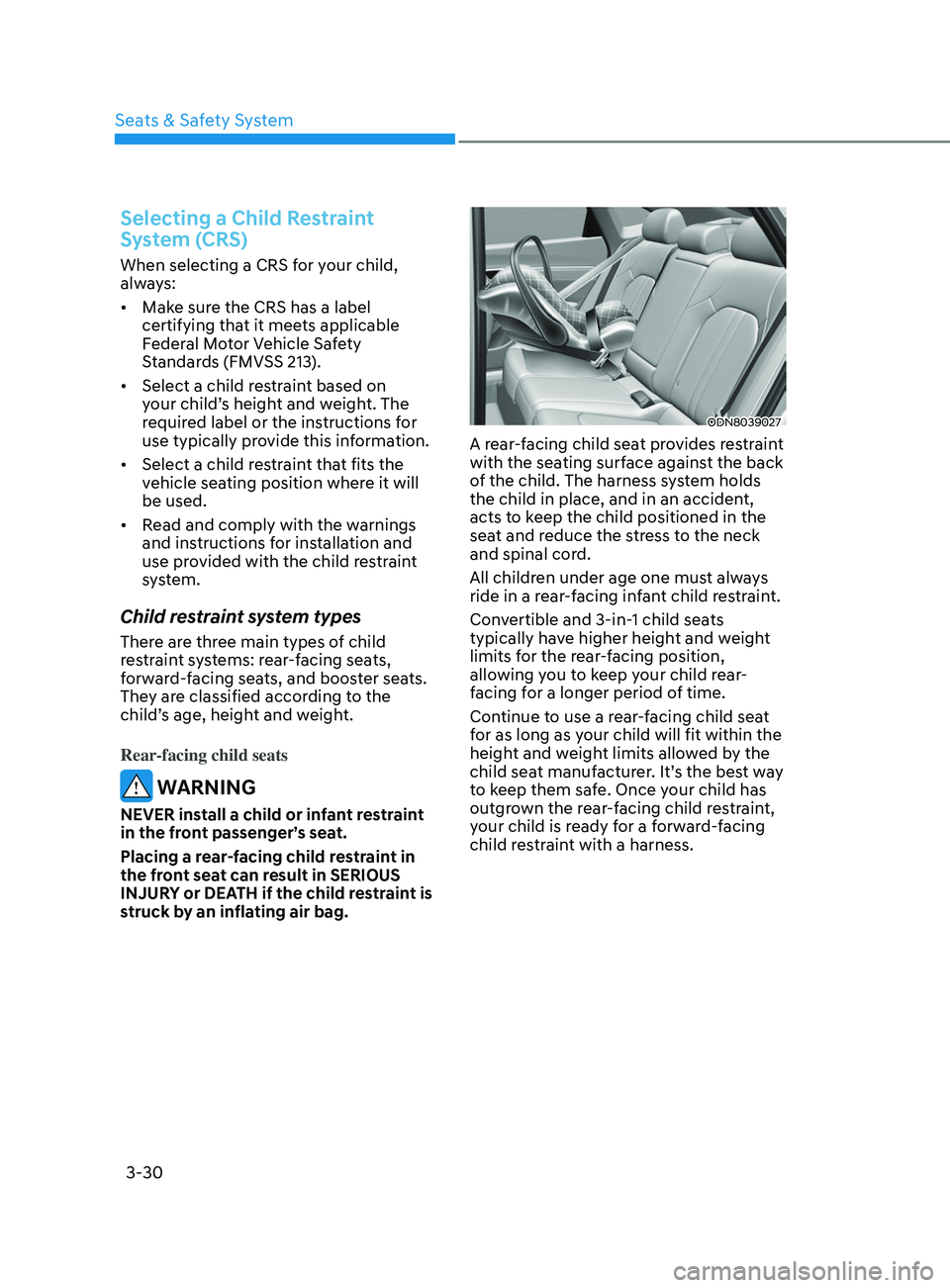
ODN8039027
A rear-facing child seat provides restraint
with the seating surface against the back
of the child. The harness system holds
the child in place, and in an accident,
acts to keep the child positioned in the
seat and reduce the stress to the neck
and spinal cord.
All children under age one must always
ride in a rear-facing infant child restraint.
Convertible and 3-in-1 child seats
typically have higher height and weight
limits for the rear-facing position,
allowing you to keep your child rear-
facing for a longer period of time.
Continue to use a rear-facing child seat
for as long as your child will fit within the
height and weight limits allowed by the
child seat manufacturer. It’s the best way
to keep them safe. Once your child has
outgrown the rear-facing child restraint,
your child is ready for a forward-facing
child restraint with a harness.
Seats & Safety System
Page 59 of 546
03
3-31
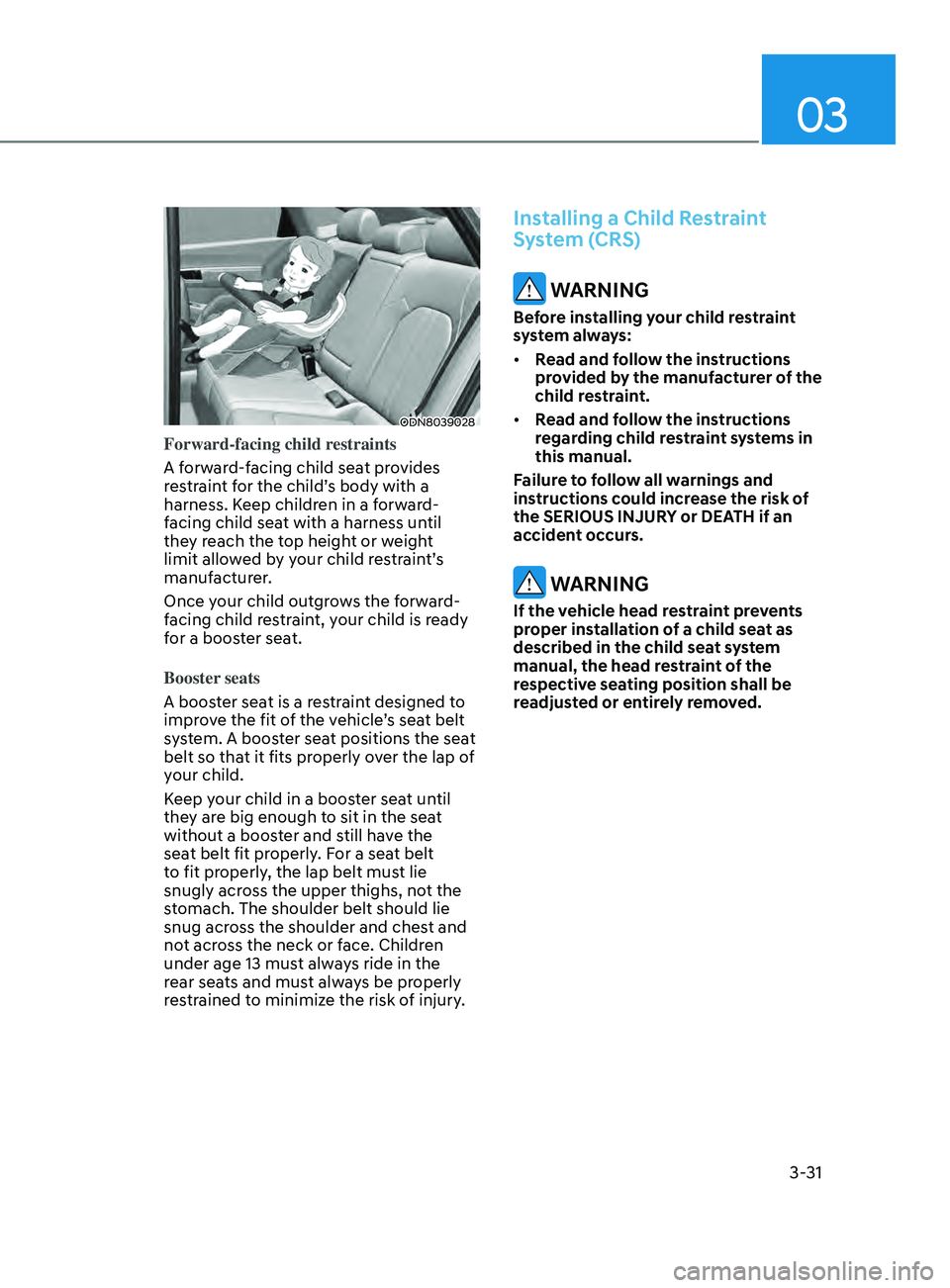
ODN8039028
Forward-facing child restraints
A forward-facing child seat provides
restraint for the child’s body with a
harness. Keep children in a forward-
facing child seat with a harness until
they reach the top height or weight
limit allowed by your child restraint’s
manufacturer.
Once your child outgrows the forward-
facing child restraint, your child is ready
for a booster seat.
Booster seats
A booster seat is a restraint designed to
improve the fit of the vehicle’s seat belt
system. A booster seat positions the seat
belt so that it fits properly over the lap of
your child.
Keep your child in a booster seat until
they are big enough to sit in the seat
without a booster and still have the
seat belt fit properly. For a seat belt
to fit properly, the lap belt must lie
snugly across the upper thighs, not the
stomach. The shoulder belt should lie
snug across the shoulder and chest and
not across the neck or face. Children
under age 13 must always ride in the
rear seats and must always be properly
restrained to minimize the risk of injury.
Installing a Child Restraint
System (CRS)
WARNING
Before installing your child restraint
system always:
• Read and follow the instructions
provided by the manufacturer of the
child restraint.
• Read and follow the instructions
regarding child restraint systems in
this manual.
Failure to follow all warnings and
instructions could increase the risk of
the SERIOUS INJURY or DEATH if an
accident occurs.
WARNING
If the vehicle head restraint prevents
proper installation of a child seat as
described in the child seat system
manual, the head restraint of the
respective seating position shall be
readjusted or entirely removed.
Page 85 of 546
03
3-57
Additional Safety Precautions
Passengers should not move out of
or change seats while the vehicle is
moving. A passenger who is not wearing
a seat belt during a crash or emergency
stop can be thrown against the inside of
the vehicle, against other occupants, or
be ejected from the vehicle.
Do not use any accessories on seat
belts. Devices claiming to improve
occupant comfort or reposition the seat
belt can reduce the protection provided
by the seat belt and increase the chance
of serious injury in a crash.
Do not modify the front seats.
Modification of the front seats could
interfere with the operation of the
supplemental restraint system sensing
components or side air bags.
Do not place items under the front
seats. Placing items under the front seats
could interfere with the operation of the
supplemental restraint system sensing
components and wiring harnesses.
Do not cause impact to the doors.
Impact to the doors when the Engine
Start/Stop button is in the ON position
may cause the air bags to inflate.
Modifications to accommodate
disabilities. If you require modification
to your vehicle to accommodate
a disability, contact the HYUNDAI
Customer Connect Center at 800-633-
5151.
Adding equipment to or modifying
your air bag equipped vehicle
If you modify your vehicle by changing
your vehicle’s frame, bumper system,
front end or side sheet metal or ride
height, this may affect the operation of
your vehicle’s air bag system.
Air Bag Warning Labels
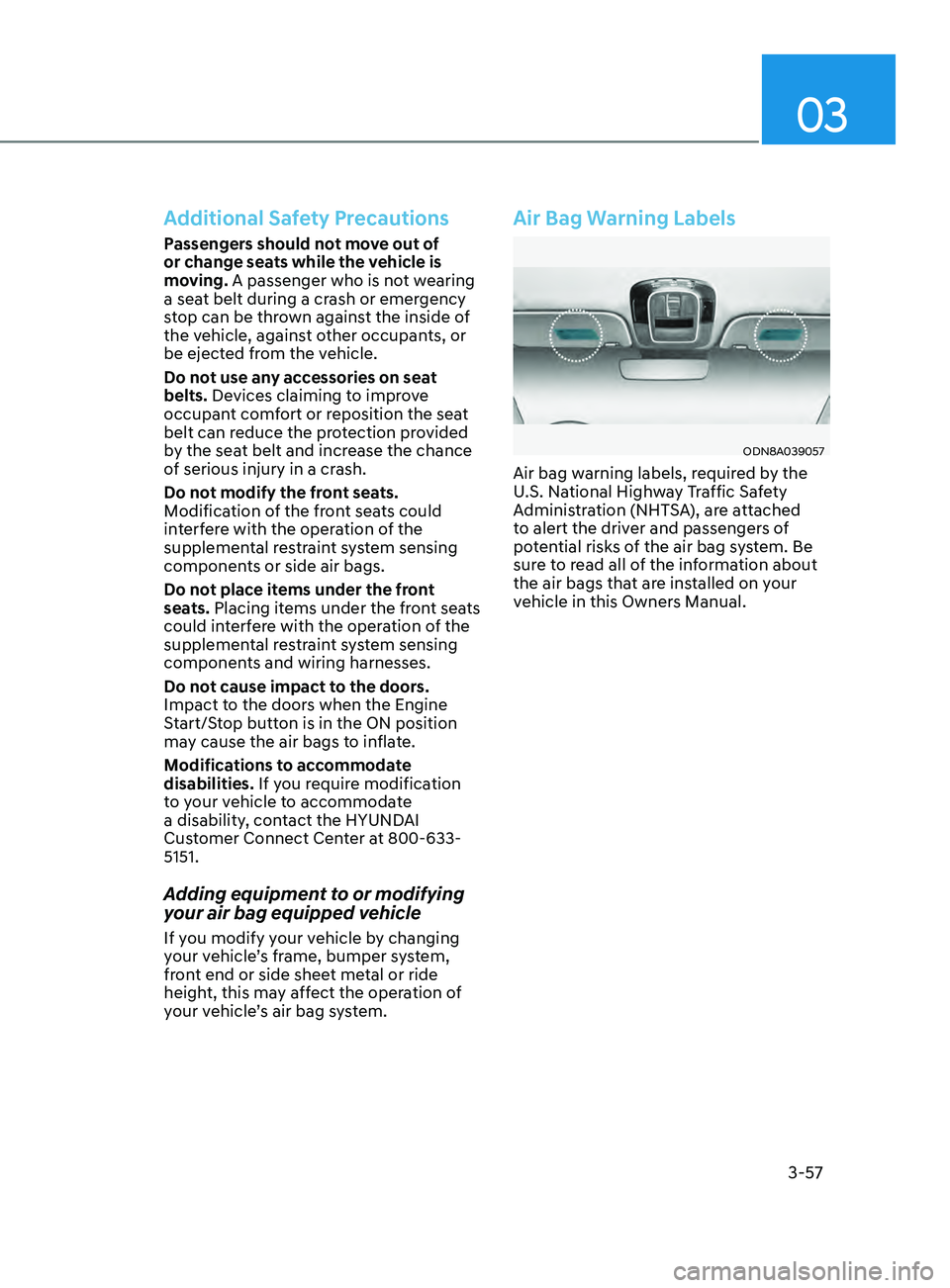
ODN8A039057
Air bag warning labels, required by the
U.S. National Highway Traffic Safety
Administration (NHTSA), are attached
to alert the driver and passengers of
potential risks of the air bag system. Be
sure to read all of the information about
the air bags that are installed on your
vehicle in this Owners Manual.
Page 109 of 546
Instrument Cluster
4-24
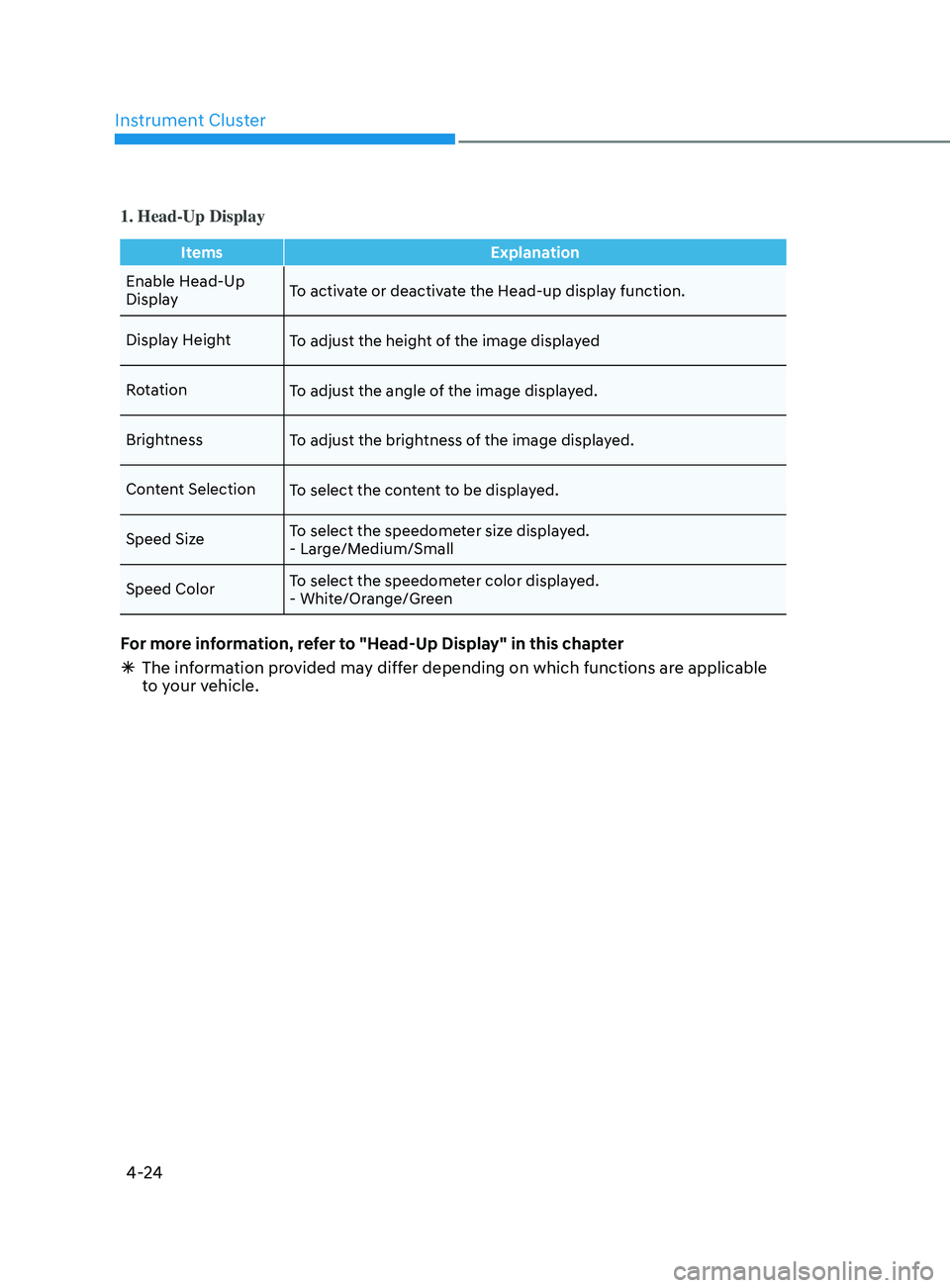
1. Head-Up Display
ItemsExplanation
Enable Head-Up
Display To activate or deactivate the Head-up display function.
Display Height To adjust the height of the image displayed
Rotation To adjust the angle of the image displayed.
Brightness To adjust the brightness of the image displayed.
Content Selection To select the content to be displayed.
Speed Size To select the speedometer size displayed.
- Large/Medium/Small
Speed Color To select the speedometer color displayed.
- White/Orange/Green
For more information, refer to "Head-Up Display" in this chapter
Ã
The in
formation provided may differ depending on which functions are applicable
to your vehicle.
Page 123 of 546
Instrument Cluster
4-38
Option Menu
WARNING
While driving, please do not change
the setting mode. It may distract your
attention and cause the accident.
NOTICE
Displayed items may differ from the
content in this owner’s manual since
the contents vary with the vehicle’s
technical specifications.
ListSet-up messages
Service Interval Check the service
message
Head-up Display To activate or
deactivate head-up
display
Set up the height,
rotation and brightness
(if equipped)
Warning Time •
Normal/Later
To select when to
provide a warning for
all driver assistance
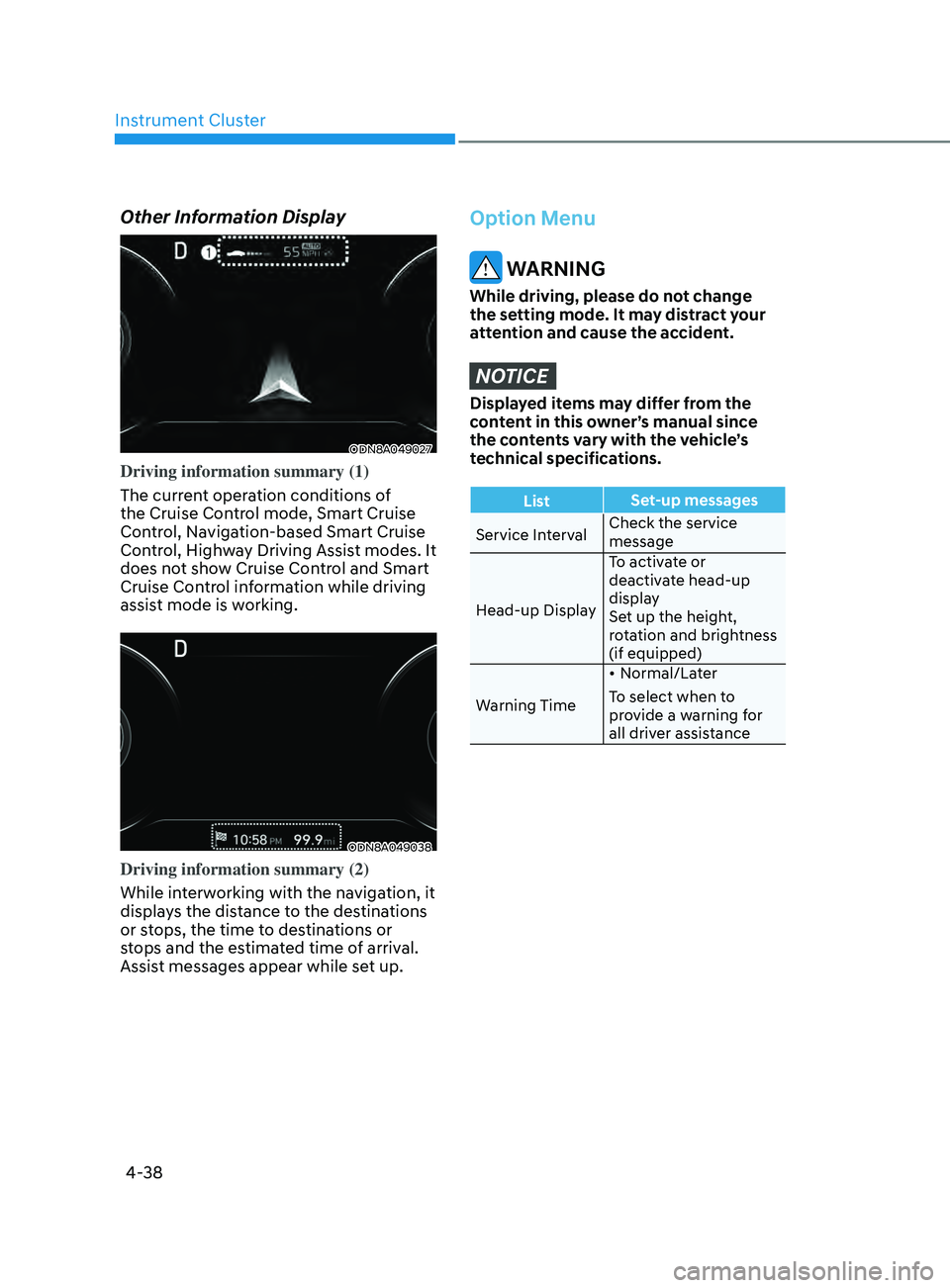
Other Information Display
ODN8A049027
Driving information summary (1)
The current operation conditions of
the Cruise Control mode, Smart Cruise
Control, Navigation-based Smart Cruise
Control, Highway Driving Assist modes. It
does not show Cruise Control and Smart
Cruise Control information while driving
assist mode is working.
ODN8A049038
Driving information summary (2)
While interworking with the navigation, it
displays the distance to the destinations
or stops, the time to destinations or
stops and the estimated time of arrival.
Assist messages appear while set up.
Page 125 of 546
Instrument Cluster
4-40
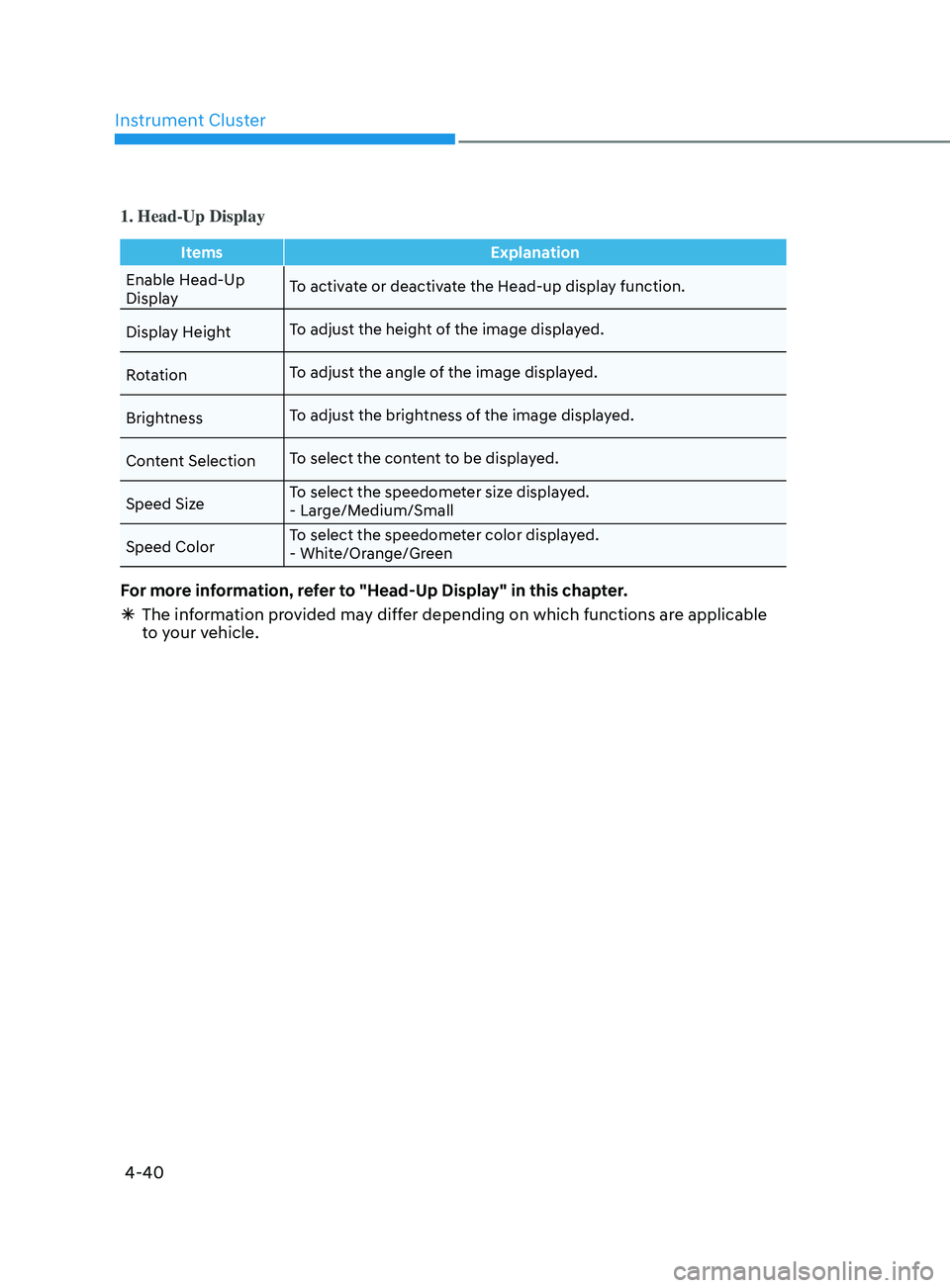
1. Head-Up Display
ItemsExplanation
Enable Head-Up
Display To activate or deactivate the Head-up display function.
Display Height To adjust the height of the image displayed.
Rotation To adjust the angle of the image displayed.
Brightness To adjust the brightness of the image displayed.
Content Selection To select the content to be displayed.
Speed Size To select the speedometer size displayed.
- Large/Medium/Small
Speed Color To select the speedometer color displayed.
- White/Orange/Green
For more information, refer to "Head-Up Display" in this chapter.
Ã
The in
formation provided may differ depending on which functions are applicable
to your vehicle.
Page 169 of 546
05
5-39
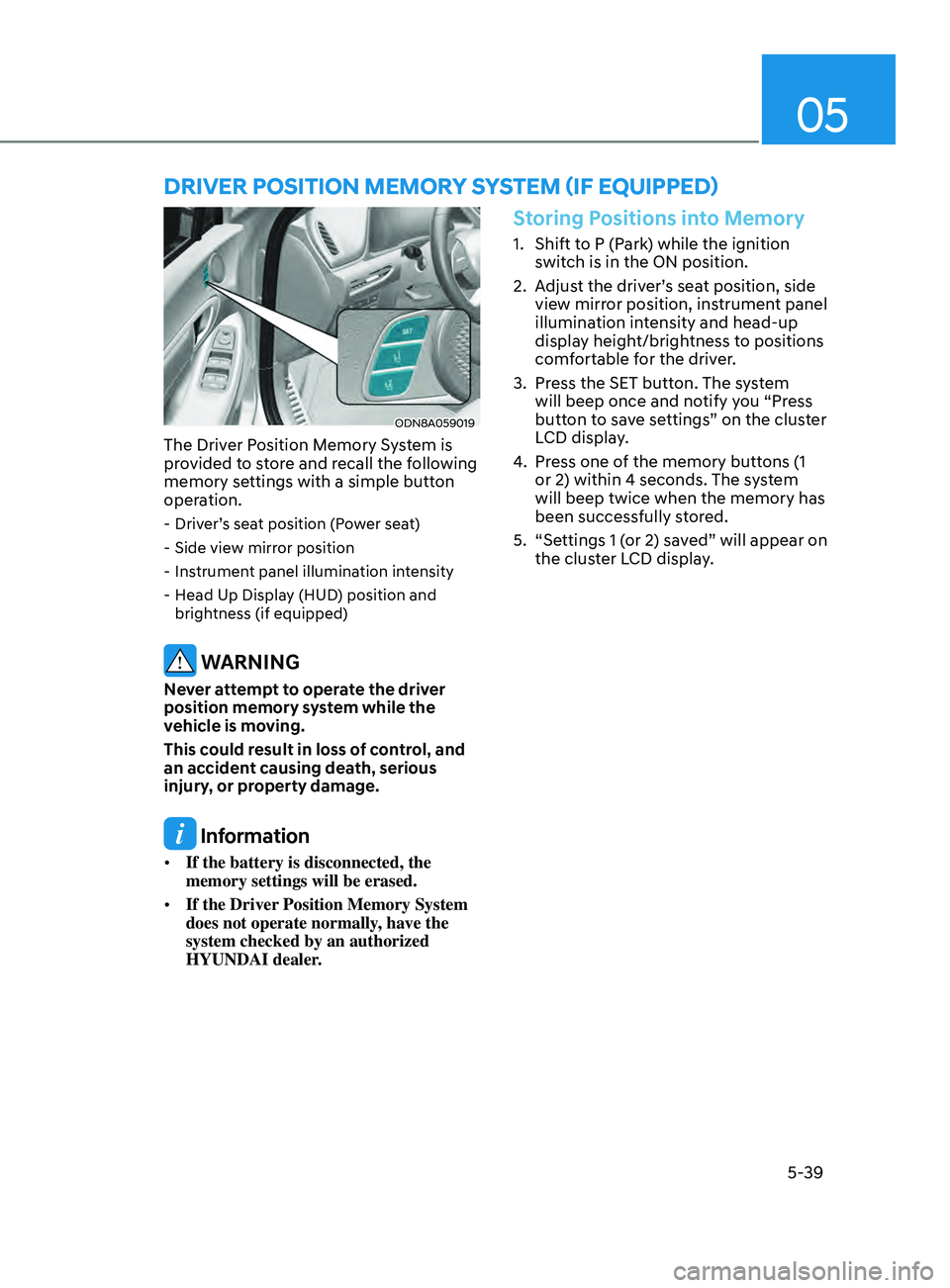
ODN8A059019
The Driver Position Memory System is
provided to store and recall the following
memory settings with a simple button
operation.
- Driver’s seat position (Power seat)
- Side vie
w mirror position
- Ins
trument panel illumination intensity
- H
ead Up Display (HUD) position and
brightness (if equipped)
WARNING
Never attempt to operate the driver
position memory system while the
vehicle is moving.
This could result in loss of control, and
an accident causing death, serious
injury, or property damage.
Information
• If the battery is disconnected, the
memory settings will be erased.
• If the Driver Position Memory System
does not operate normally, have the
system checked by an authorized
HYUNDAI dealer.
Storing Positions into Memory
1. Shift to P (Park) while the ignition
switch is in the ON position.
2.
A
djust the driver’s seat position, side
view mirror position, instrument panel
illumination intensity and head-up
display height/brightness to positions
comfortable for the driver.
3.
Pr
ess the SET button. The system
will beep once and notify you “Press
button to save settings” on the cluster
LCD display.
4.
Pr
ess one of the memory buttons (1
or 2) within 4 seconds. The system
will beep twice when the memory has
been successfully stored.
5.
“Se
ttings 1 (or 2) saved” will appear on
the cluster LCD display.
Driver poS i T ion memory SyS T em ( if eQU ippe D)
Page 170 of 546
Convenient Features
5-40
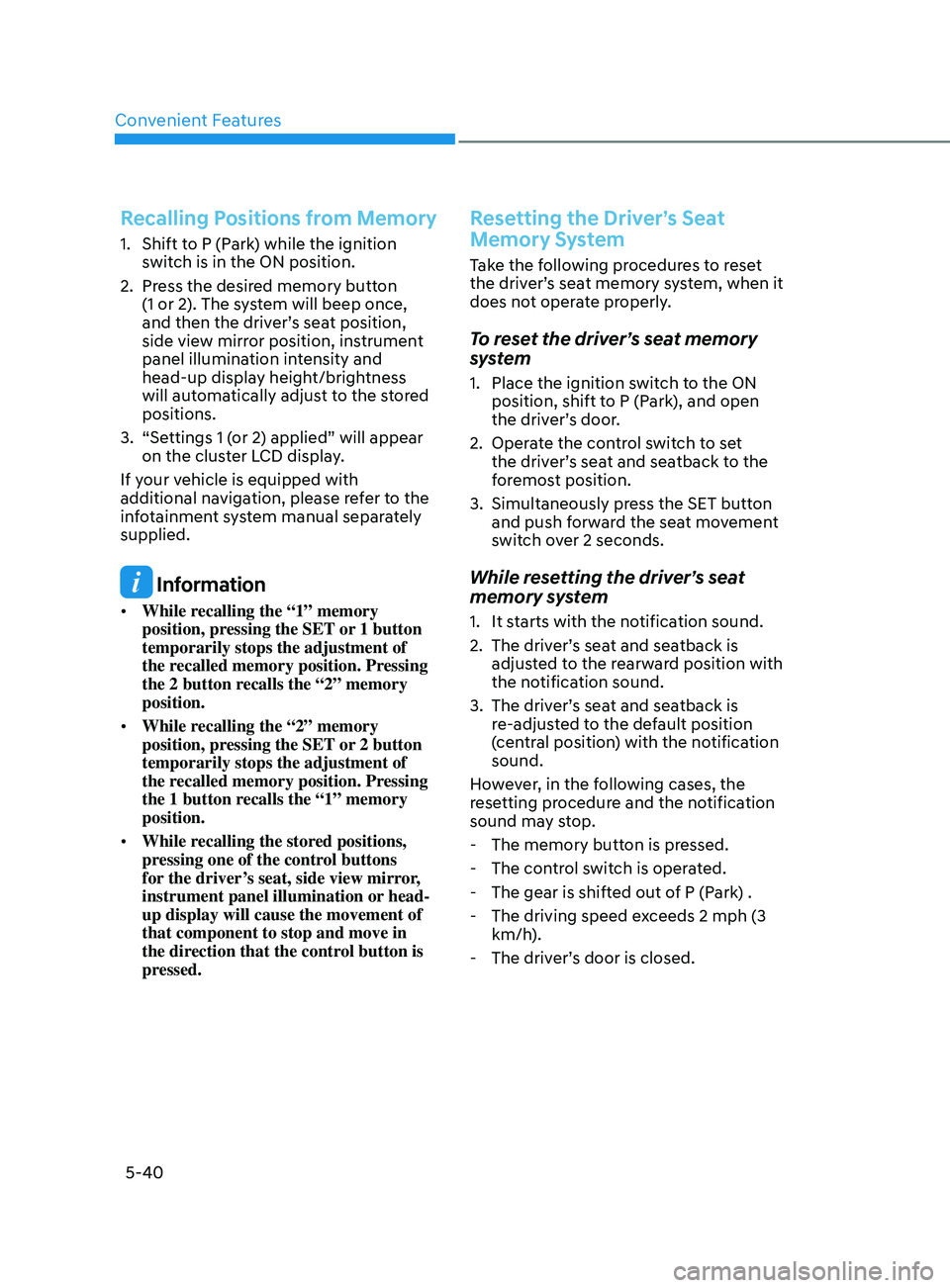
Recalling Positions from Memory
1. Shift to P (Park) while the ignition switch is in the ON position.
2.
Pr
ess the desired memory button
(1 or 2). The system will beep once,
and then the driver’s seat position,
side view mirror position, instrument
panel illumination intensity and
head-up display height/brightness
will automatically adjust to the stored
positions.
3.
“Se
ttings 1 (or 2) applied” will appear
on the cluster LCD display.
If your vehicle is equipped with
additional navigation, please refer to the
infotainment system manual separately
supplied.
Information
• While recalling the “1” memory
position, pressing the SET or 1 button
temporarily stops the adjustment of
the recalled memory position. Pressing
the 2 button recalls the “2” memory
position.
• While recalling the “2” memory
position, pressing the SET or 2 button
temporarily stops the adjustment of
the recalled memory position. Pressing
the 1 button recalls the “1” memory
position.
• While recalling the stored positions,
pressing one of the control buttons
for the driver’s seat, side view mirror,
instrument panel illumination or head-
up display will cause the movement of
that component to stop and move in
the direction that the control button is
pressed.
Resetting the Driver’s Seat
Memory System
Take the following procedures to reset
the driver’s seat memory system, when it
does not operate properly.
To reset the driver’s seat memory
system
1. Place the ignition s witch to the ON
position, shift to P (Park), and open
the driver’s door.
2.
Oper
ate the control switch to set
the driver’s seat and seatback to the
foremost position.
3.
Simultaneously pr
ess the SET button
and push forward the seat movement
switch over 2 seconds.
While resetting the driver’s seat
memory system
1. It starts with the notification sound.
2.
The driv
er’s seat and seatback is
adjusted to the rearward position with
the notification sound.
3.
The driv
er’s seat and seatback is
re-adjusted to the default position
(central position) with the notification
sound.
However, in the following cases, the
resetting procedure and the notification
sound may stop.
-
The memory butt
on is pressed.
-
The con
trol switch is operated.
-
The gear is shift
ed out of P (Park) .
-
The driving speed e
xceeds 2 mph (3
km/h).
-
The driv
er’s door is closed.
Page 173 of 546
05
5-43
Tilt Steering / Telescope Steering
When adjusting the steering wheel to a
comfortable position, adjust the steering
wheel so that it points toward your chest,
not toward your face. Make sure you can
see the instrument cluster warning lights
and gauges. After locking the lever, push
the steering wheel both up and down to
be certain it is locked in position. Always
adjust the position of the steering wheel
before driving.
WARNING
NEVER adjust the steering wheel while
driving. This may cause loss of vehicle
control resulting in an accident.
ODN8059021
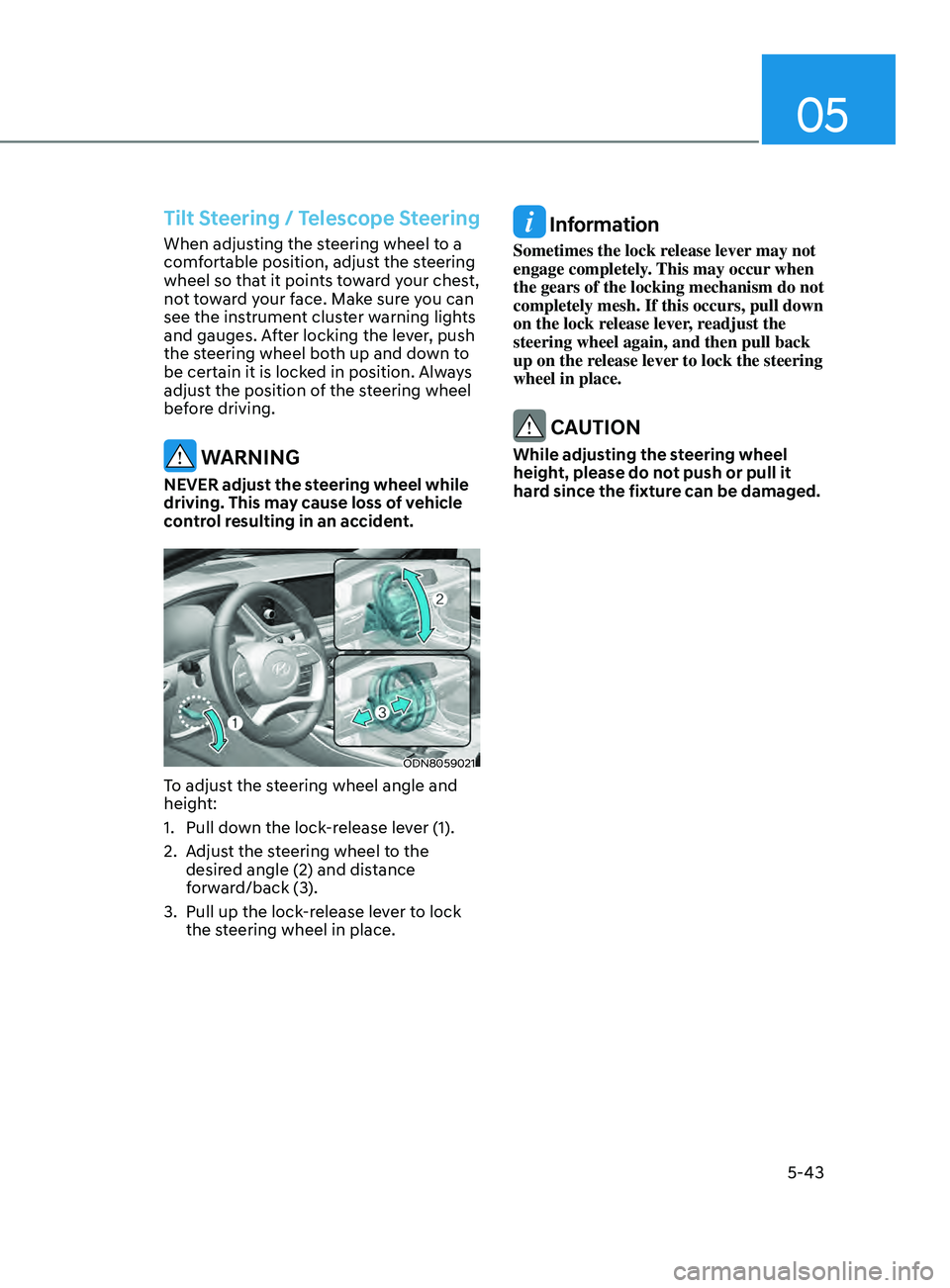
To adjust the steering wheel angle and
height:
1.
Pull do
wn the lock-release lever (1).
2.
A
djust the steering wheel to the
desired angle (2) and distance
forward/back (3).
3.
Pull up the lock
-release lever to lock
the steering wheel in place.
Information
Sometimes the lock release lever may not
engage completely. This may occur when
the gears of the locking mechanism do not
completely mesh. If this occurs, pull down
on the lock release lever, readjust the
steering wheel again, and then pull back
up on the release lever to lock the steering
wheel in place.
CAUTION
While adjusting the steering wheel
height, please do not push or pull it
hard since the fixture can be damaged.
Page 203 of 546
05
5-73
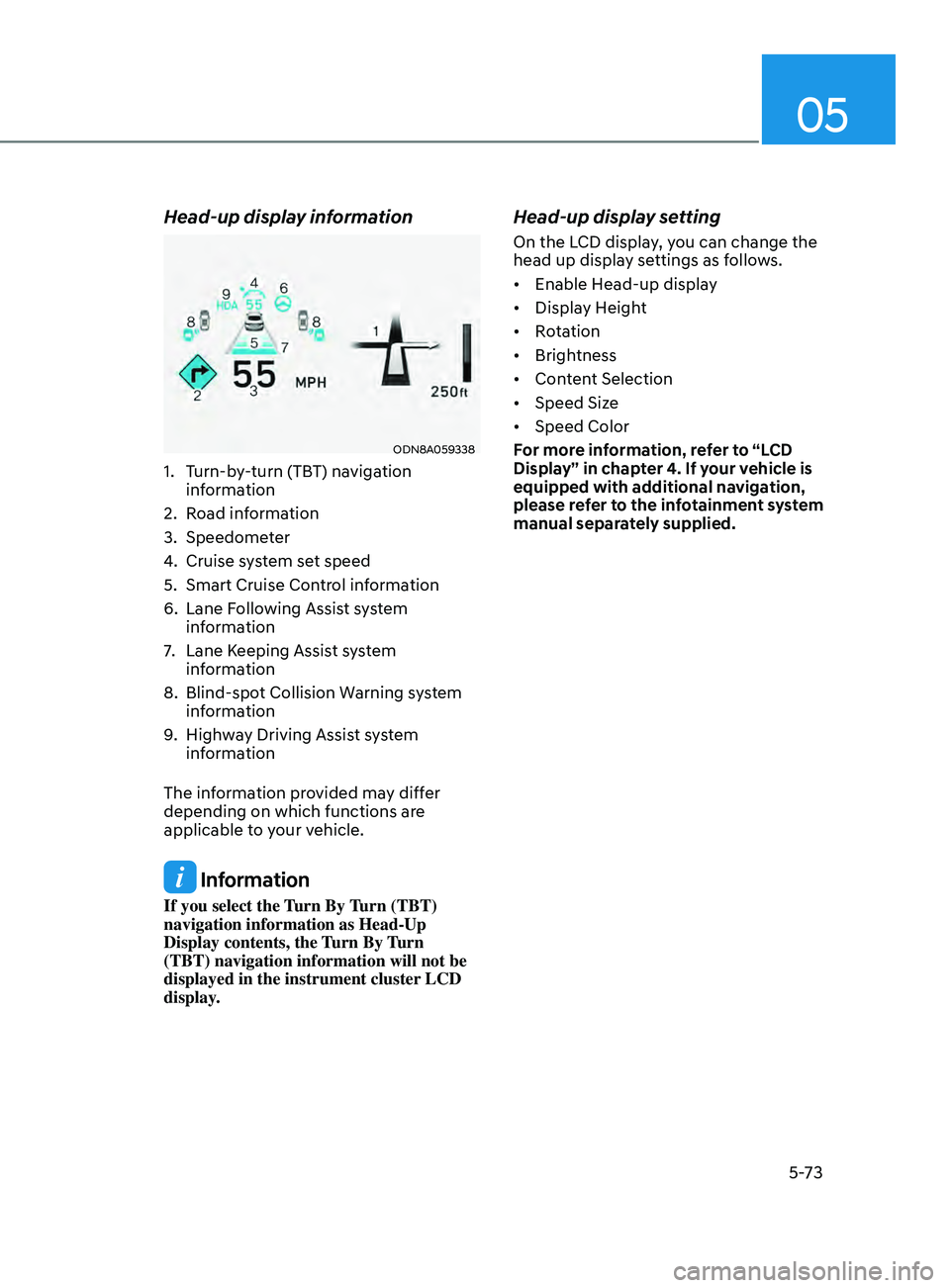
Head-up display information
ODN8A059338
1. Turn-by-turn (TBT) navigation
information
2.
Road information
3.
Speedome
ter
4.
Cruise s
ystem set speed
5.
Smart Cruise Con
trol information
6.
Lane F
ollowing Assist system
information
7.
Lane K
eeping Assist system
information
8.
Blind-spo
t Collision Warning system
information
9.
High
way Driving Assist system
information
The information provided may differ
depending on which functions are
applicable to your vehicle.
Information
If you select the Turn By Turn (TBT)
navigation information as Head-Up
Display contents, the Turn By Turn
(TBT) navigation information will not be
displayed in the instrument cluster LCD
display.
Head-up display setting
On the LCD display, you can change the
head up display settings as follows.
• Enable
Head-up display
• Display
Height
• Rotation
• Brightness
• Content
Selection
• Speed
Size
• Speed
Color
For more information, refer to “LCD
Display” in chapter 4. If your vehicle is
equipped with additional navigation,
please refer to the infotainment system
manual separately supplied.