key battery HYUNDAI SONATA 2021 User Guide
[x] Cancel search | Manufacturer: HYUNDAI, Model Year: 2021, Model line: SONATA, Model: HYUNDAI SONATA 2021Pages: 546, PDF Size: 51.21 MB
Page 209 of 546
05
5-79
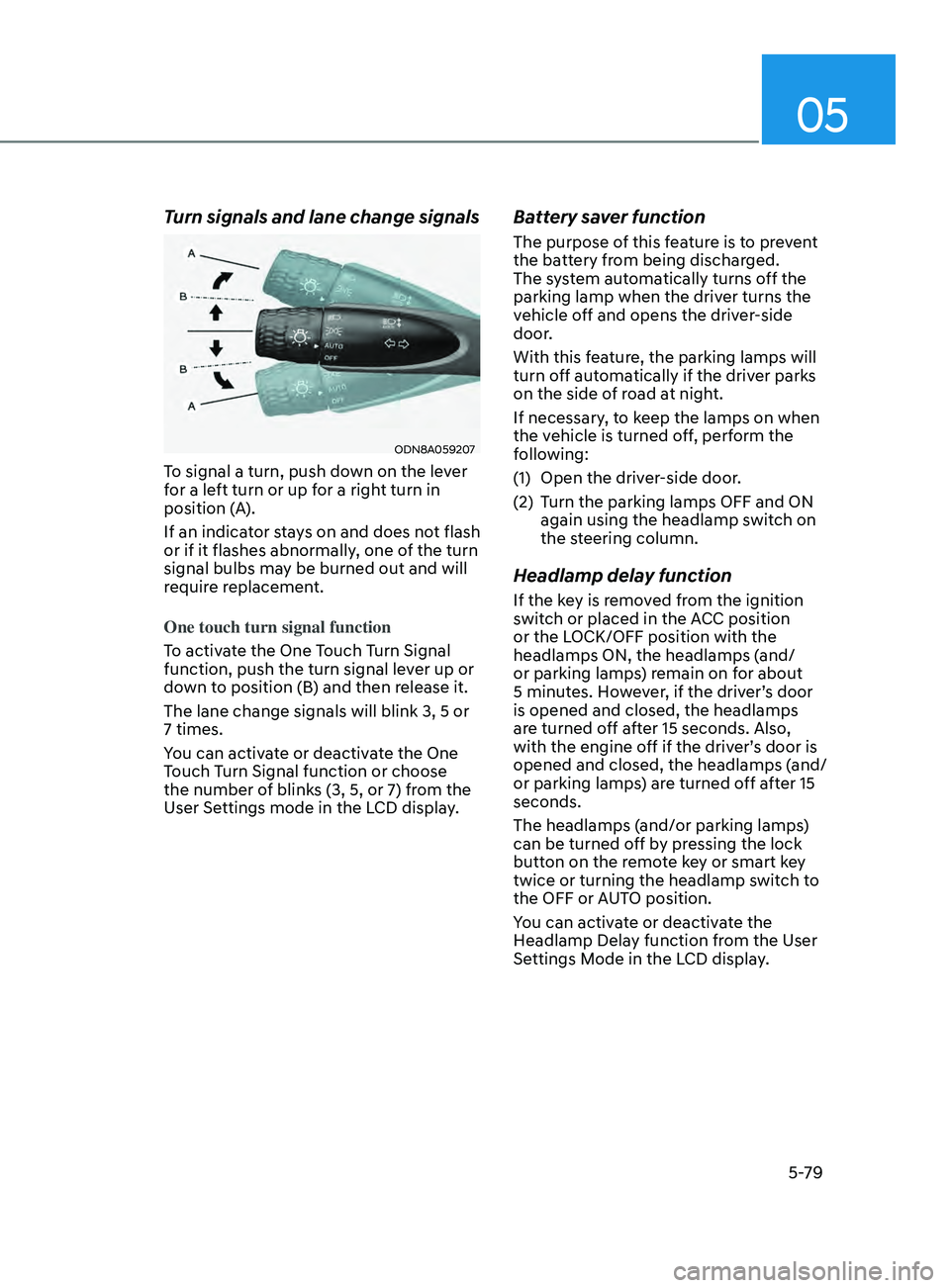
Turn signals and lane change signals
ODN8A059207
To signal a turn, push down on the lever
for a left turn or up for a right turn in
position (A).
If an indicator stays on and does not flash
or if it flashes abnormally, one of the turn
signal bulbs may be burned out and will
require replacement.
One touch turn signal function
To activate the One Touch Turn Signal
function, push the turn signal lever up or
down to position (B) and then release it.
The lane change signals will blink 3, 5 or
7 times.
You can activate or deactivate the One
Touch Turn Signal function or choose
the number of blinks (3, 5, or 7) from the
User Settings mode in the LCD display.
Battery saver function
The purpose of this feature is to prevent
the battery from being discharged.
The system automatically turns off the
parking lamp when the driver turns the
vehicle off and opens the driver-side
door.
With this feature, the parking lamps will
turn off automatically if the driver parks
on the side of road at night.
If necessary, to keep the lamps on when
the vehicle is turned off, perform the
following:
(1)
Open the driv
er-side door.
(2)
T
urn the parking lamps OFF and ON
again using the headlamp switch on
the steering column.
Headlamp delay function
If the key is removed from the ignition
switch or placed in the ACC position
or the LOCK/OFF position with the
headlamps ON, the headlamps (and/
or parking lamps) remain on for about
5 minutes. However, if the driver’s door
is opened and closed, the headlamps
are turned off after 15 seconds. Also,
with the engine off if the driver’s door is
opened and closed, the headlamps (and/
or parking lamps) are turned off after 15
seconds.
The headlamps (and/or parking lamps)
can be turned off by pressing the lock
button on the remote key or smart key
twice or turning the headlamp switch to
the OFF or AUTO position.
You can activate or deactivate the
Headlamp Delay function from the User
Settings Mode in the LCD display.
Page 210 of 546
Convenient Features
5-80
NOTICE
If the driver exits the vehicle through
another door besides the driver
door, the battery saver function
does not operate and the headlamp
delay function does not turn OFF
automatically.
This may cause the battery to
discharge. To avoid battery discharge,
turn OFF the headlamps manually from
the headlamp switch before exiting the
vehicle.
Headlamp leveling device
It automatically adjusts the headlamp
beam level according to the number of
passengers and loading weight in the
luggage area.
And it offers proper headlamp beam
under various conditions.
WARNING
If the function does not work properly,
have the vehicle inspected by an
authorized HYUNDAI dealer. Do not
attempt to inspect or replace the wiring
yourself.
Interior Lights
WARNING
Do not use the interior lights when
driving in the dark. The interior lights
may obscure your view and cause an
accident.
NOTICE
Do not use the interior lights for
extended periods when the vehicle is
turned off or the battery will discharge.
Interior lamp AUTO cut
The interior lamps will automatically go
off approximately 20 minutes after the
engine is turned off and the doors are
closed. If a door is opened, the lamp
will go off 40 minutes after the engine is
turned off. If the doors are locked by the
remote key or smart key and the vehicle
enters the armed stage of the theft
alarm system, the lamps will go off five
seconds later.
Page 235 of 546
05
5-105
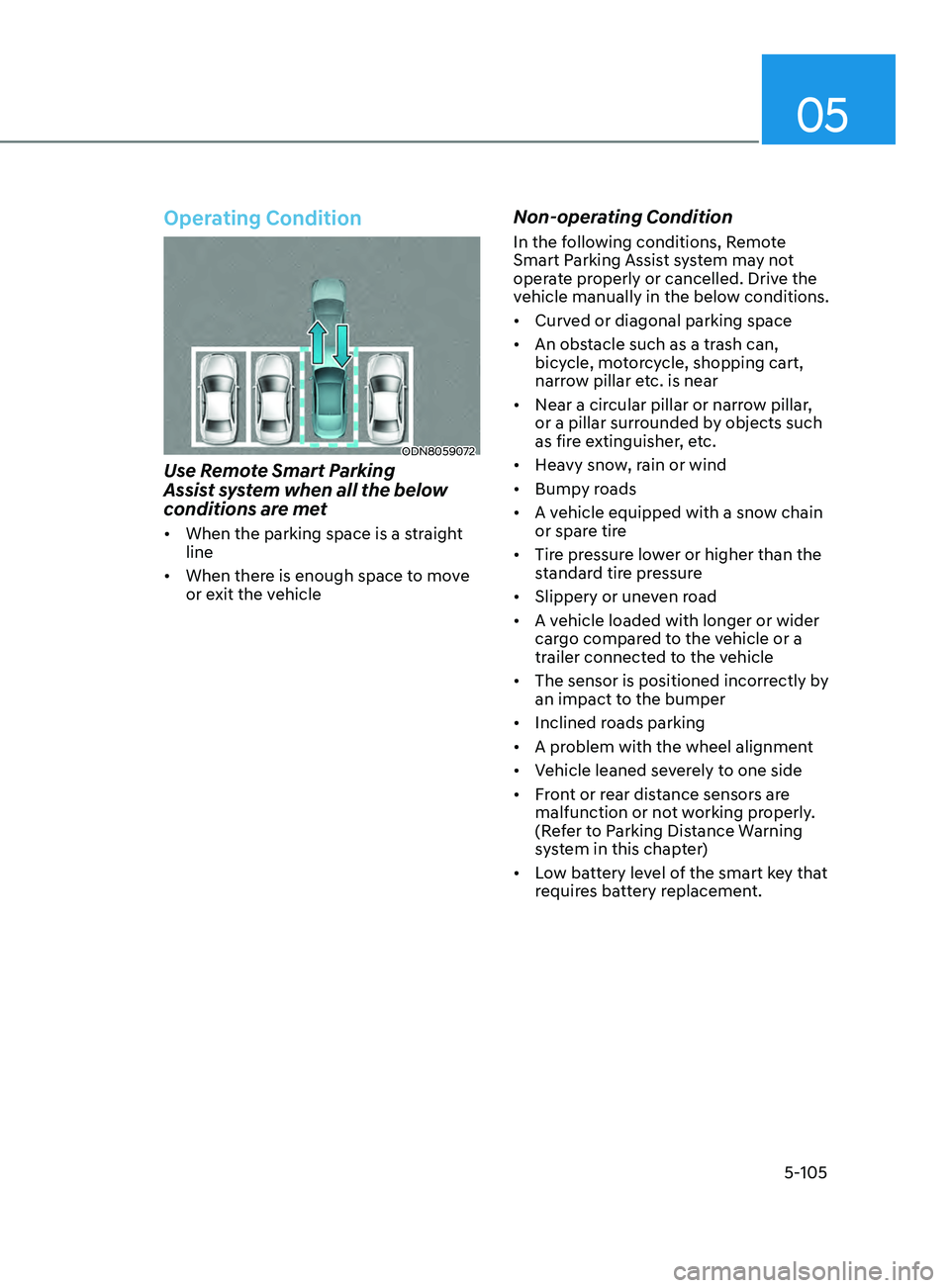
Operating Condition
ODN8059072
Use Remote Smart Parking
Assist system when all the below
conditions are met
• When the parking space is a straight
line
• When there is enough space to move
or exit the vehicle
Non-operating Condition
In the following conditions, Remote
Smart Parking Assist system may not
operate properly or cancelled. Drive the
vehicle manually in the below conditions.
• Curved or diagonal parking space
• An obstacle such as a trash can,
bicycle, motorcycle, shopping cart,
narrow pillar etc. is near
• Near a circular pillar or narrow pillar,
or a pillar surrounded by objects such
as fire extinguisher, etc.
• Heavy snow, rain or wind
• Bumpy roads
• A vehicle equipped with a snow chain
or spare tire
• Tire pressure lower or higher than the
standard tire pressure
• Slippery or uneven road
• A vehicle loaded with longer or wider
cargo compared to the vehicle or a
trailer connected to the vehicle
• The sensor is positioned incorrectly by
an impact to the bumper
• Inclined roads parking
• A problem with the wheel alignment
• Vehicle leaned severely to one side
• Front or rear distance sensors are
malfunction or not working properly.
(Refer to Parking Distance Warning
system in this chapter)
• Low battery level of the smart key that
requires battery replacement.
Page 285 of 546

6
6. While Driving
Before Driving ........................................................................\
........................6-5Before Entering the Vehicle ........................................................................\
.............6-5
Be fore Starting ........................................................................\
................................. 6-5
Ignition Switch ........................................................................\
.......................6-6Key Ignition Switch ........................................................................\
........................... 6-6
E ngine Start/Stop Button ........................................................................\
................ 6-9
Remote Start
........................................................................\
.................................... 6-12
Automatic Transmission ........................................................................\
.......6- 13Automatic Transmission Operation ........................................................................\
6- 13
Parking ........................................................................\
............................................. 6-16
LCD Display Message
........................................................................\
...................... 6-17
Good Driving Practices
........................................................................\
.................. 6-18
Paddle Shifter (Manual Shift Mode)
......................................................................
6-19
Brake System ........................................................................\
........................6- 20Power Brakes ........................................................................\
..................................6- 20
Disc Brakes Wear Indicator........................................................................\
............ 6-20
Electronic Parking Brake (EPB)
........................................................................\
....... 6-21
Auto Hold
........................................................................\
........................................ 6-24
Anti-lock Brake System (ABS) .....................................................................6- 27Electronic Stability Control (ESC) ........................................................................\
.6- 29
Vehicle Stability Management (VSM) .................................................................... 6-31
Hill-Start Assist Control (HAC)
........................................................................\
....... 6-32
Good Braking Practices
........................................................................\
................. 6-32
ISG (Idle Stop and Go) system..................................................................... 6-33To Activate the ISG System ........................................................................\
............6- 33
To Deactivate the ISG System ........................................................................\
....... 6-35
ISG System Malfunction
........................................................................\
................ 6-35
Battery Sensor Deactivation
........................................................................\
.......... 6-36
Drive Mode Integrated Control System ......................................................6- 37Drive Mode ........................................................................\
.....................................6- 37
Forward Collision – Avoidance Assist (FCA) - Sensor Fusion ..................6-40System Setting and Activation ........................................................................\
..... 6-40
F CA Warning Message and Brake Control ............................................................6-42
FCA Sensor
........................................................................\
..................................... 6-45
System Malfunction
........................................................................\
....................... 6-47
Limitations of the System
........................................................................\
.............. 6-48
Forward Collision-Avoidance Assist - Junction Turning
......................................6-55
Page 291 of 546
06
6 -7
Key ignition switch positions
Switch
Position Action
Notice
LOCK To turn the ignition switch to the
LOCK position, put the key in at
the ACC position and turn the key
towards the LOCK position.
The ignition key can be removed in
the LOCK position.
(The shift button must be in the P
(Park) position)
ACC Electrical accessories are usable.
The steering wheel unlocks.
ON This is the normal key position when
the engine has started.
All features and accessories are
usable.
The warning lights can be checked
when you turn the ignition switch
from ACC to ON. Do not leave the ignition switch in
the ON position when the engine is
not running in order to prevent the
battery from discharging.
START To start the engine, turn the ignition
switch to the START position. The
switch returns to the ON position
when you let go of the key. The engine will crank until you
release the key.
Page 296 of 546
6-12
NOTICE
To prevent damage to the vehicle:
When the stop lamp switch fuse is
blown, you can't start the engine
normally. Replace the fuse with a new
one. If you are not able to replace
the fuse, you can start the engine by
pressing and holding the Engine Start/
Stop button for 10 seconds with the
Engine Start/Stop button in the ACC
position.
Do not press the Engine Start/Stop
button for more than 10 seconds except
when the stop lamp switch fuse is
blown.
For your safety always depress the
brake pedal before starting the engine.
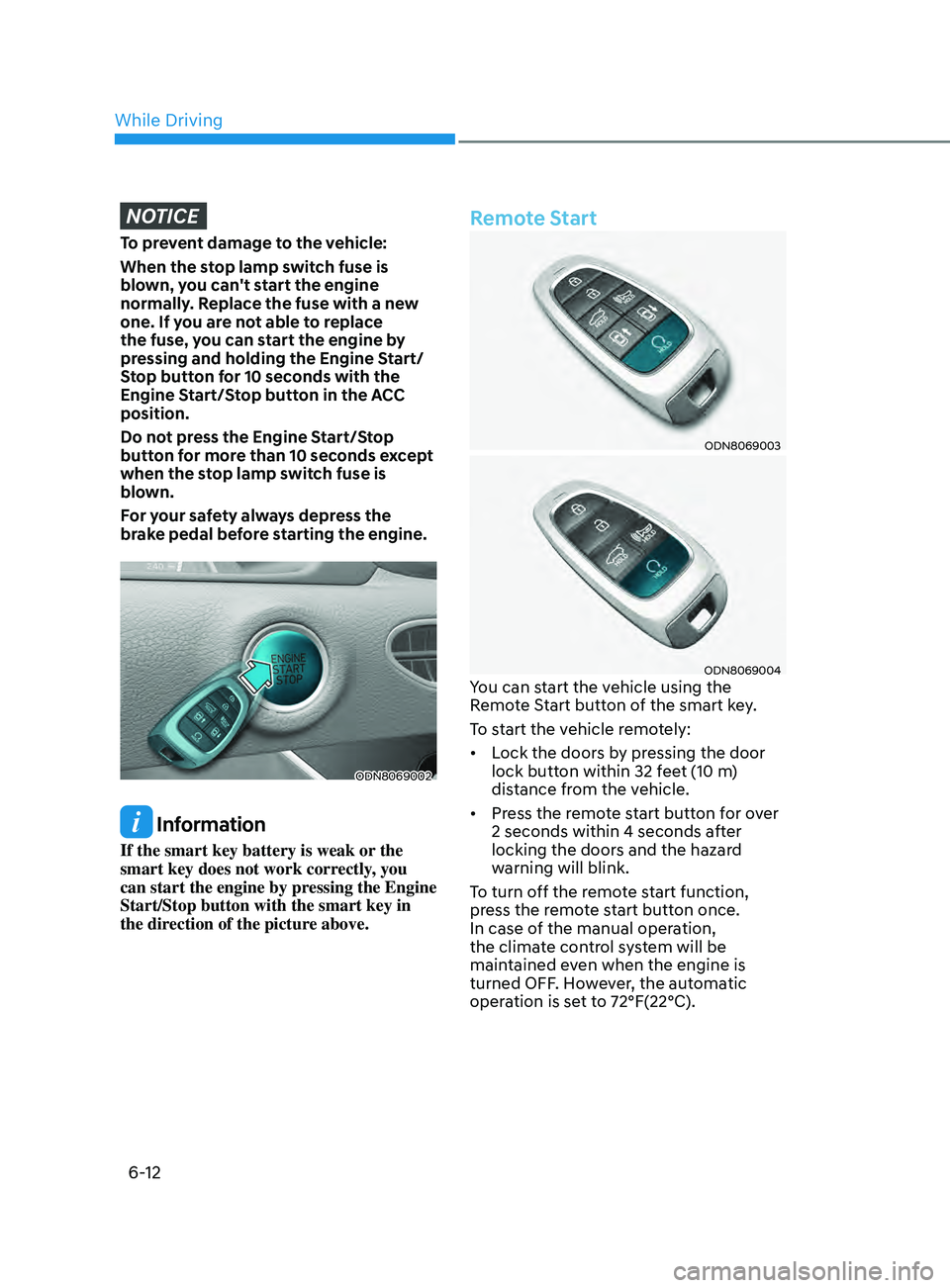
ODN8069002
Information
If the smart key battery is weak or the
smart key does not work correctly, you
can start the engine by pressing the Engine
Start/Stop button with the smart key in
the direction of the picture above.
Remote Start
ODN8069003
ODN8069004You can start the vehicle using the
Remote Start button of the smart key.
To start the vehicle remotely:
• Lock the doors by pressing the door
lock button within 32 feet (10 m)
distance from the vehicle.
• Press the remote start button for over
2 seconds within 4 seconds after
locking the doors and the hazard
warning will blink.
To turn off the remote start function,
press the remote start button once.
In case of the manual operation,
the climate control system will be
maintained even when the engine is
turned OFF. However, the automatic
operation is set to 72°F(22°C).
While Driving
Page 300 of 546
6-16
When the battery is discharged:
You cannot shift the gear when the
battery is discharged.
In emergencies, do the following to
move the shift button to N (Neutral) on a
level ground.
1.
Connect the ba
ttery cables from
another vehicle or from a another
battery to the jump-starting terminals
inside the engine compartment.
F
or more information refer to "Jump
Starting" in chapter 7.
2.
R
elease the parking brake with the
Engine Start/Stop button in the ON
position.
3.
Shift the gear t
o the N(Neutral)
position. Refer to the "Stay in Neutral
when vehicle is Off" in this chapter.
Parking
Always come to a complete stop and
continue to depress the brake pedal.
Press the P button, apply the parking
brake, and place the ignition switch in
the LOCK/OFF position. Take the Key
with you when exiting the vehicle.
• The gear is shifted to P (Park) position
automatically for safety under the
following conditions.
- When the driv
er unfastens the seat
belt and opens the driver’s door.
- When the engine is turned o
ff with
the gear shifted to R (Reverse), D
(Drive) or N (Neutral).
WARNING
When you stay in the vehicle with
the engine running, be careful not to
depress the accelerator pedal for a long
period of time. The engine or exhaust
system may overheat and start a fire.
The exhaust gas and the exhaust system
are very hot. Keep away from the
exhaust system components.
Do not stop or park over flammable
materials, such as dry grass, paper or
leaves. They may ignite and cause a fire.
While Driving
Page 429 of 546
06
6-145
Change to "winter weight" oil if
necessary
In some climates it is recommended that
a lower viscosity "winter weight" oil be
used during cold weather. See chapter 8
for recommendations. If you aren't sure
what weight oil you should use, consult
an authorized HYUNDAI dealer.
Check battery and cables
Winter puts additional burdens on the
battery system. Visually inspect the
battery and cables as described in
chapter 8. The level of charge in your
battery can be checked by an authorized
HYUNDAI dealer or a service station.
Check spark plugs and ignition
system
Inspect your spark plugs as described in
chapter 8 and replace them if necessary.
Also check all ignition wiring and
components to be sure they are not
cracked, worn or damaged in any way.
Use approved window washer anti-
freeze in system
To keep the water in the window washer
system from freezing, add an approved
window washer anti-freeze solution in
accordance with instructions on the
container. Window washer anti-freeze is
available from an authorized HYUNDAI
dealer and most auto parts outlets. Do
not use engine coolant or other types
of antifreeze as these may damage the
paint finish.
Do not let your parking brake freeze
Under some conditions your parking
brake can freeze in the engaged position.
This is most likely to happen when
there is an accumulation of snow or
ice around or near the rear brakes or
if the brakes are wet. If there is a risk
the parking brake may freeze, apply
it only temporarily while you put the
gear selector lever in P and block the
rear wheels so the car cannot roll. Then
release the parking brake.
Do not let ice and snow accumulate
underneath
Under some conditions, snow and ice
can build up under the fenders and
interfere with the steering. When driving
in severe winter conditions where this
may happen, you should periodically
check underneath the car to be sure the
movement of the front wheels and the
steering components is not obstructed.
Don't place foreign objects
or materials in the engine
compartment
Placement of foreign object or materials
which prevent cooling of the engine, in
the engine compartment, may cause a
failure or combustion. The manufacturer
is not responsible for the damage caused
by such placement.
To keep locks from freezing
To keep the locks from freezing, squirt
an approved de-icer fluid or glycerine
into the key opening. If a lock is covered
with ice, squirt it with an approved de-
icing fluid to remove the ice. If the lock
is frozen internally, you may be able to
thaw it out by using a heated key. Handle
the heated key with care to avoid injury.
Page 538 of 546

Index
I-10
L
LabelVehicle certification label
........................................................................\
........ 2-13
Tire specification and pressure label
............................................................... 2-14
Refrigerant label
........................................................................\
...................... 2-15
Lane change signals
........................................................................\
..................... 5-79
Lane Following Assist (LFA)
........................................................................\
.... 6-116
Lane Keeping Assist (LKA)
........................................................................\
........ 6-59
LCD display (T
ype A, B) ........................................................................\
............. 4-19
LCD display control
........................................................................\
................ 4-19
LCD display modes
........................................................................\
................. 4-20
Trip computer
........................................................................\
.......................... 4-31
LCD display (Type C)
........................................................................\
................. 4-34
LCD display control
........................................................................\
................ 4-34
View modes
........................................................................\
............................. 4-35
Utility view mode
........................................................................\
.................... 4-36
Option menu
........................................................................\
............................ 4-38
User settings mode
........................................................................\
.................. 4-39
LCD display messages
........................................................................\
................. 4-15
Shift to P
or N to start engine
........................................................................\
.. 4-15
Shift to P
........................................................................\
.................................. 4-15
Low key battery........................................................................\
....................... 4-15
Press brake pedal to start engine
..................................................................... 4-15
Key not in vehicle
........................................................................\
................... 4-16
Key not detected
........................................................................\
...................... 4-16
Press START button again
........................................................................\
...... 4-16
Press START button with key
........................................................................\
. 4-16
Battery discharging due to external electrical devices
....................................4-16
Check BRAKE SWITCH fuse
........................................................................\
4-16
Door, Hood, Trunk open indicator
.................................................................. 4-17
Sunroof open indicator
........................................................................\
............ 4-17
Lights mode
........................................................................\
............................. 4-17
Wiper mode
........................................................................\
............................. 4-18
Low pressure
........................................................................\
........................... 4-17
Page 541 of 546

.............")
I
I-13
R
Range ........................................................................\
............................................. 4-6
Rear Cross-Traffic Collision Warning (RCCW)
................................................6-128
Rear Cross-Traffic Collision Avoidance Assist (RCCA)
...................................6-128
Rear Occupant Alert (ROA) system
.................................................................... 5-36
Rear seat adjustment
........................................................................\
.................... 3-10
Folding the rear seat
........................................................................\
................ 3-10
Rear seat head restraints
........................................................................\
.............. 3-14
Adjusting the height up and down
.................................................................. 3-14
Rear View Monitor (RVM)
........................................................................\
.......... 5-86
Recommended cold tire inflation pressures
.........................................................8-34
Recommended lubricants and capacities
.............................................................2-11
Refrigerant label
........................................................................\
.......................... 2-15
Remote key
........................................................................\
.................................... 5-4
Locking
........................................................................\
..................................... 5-4
Unlocking
........................................................................\
.................................. 5-4
T
runk unlocking
........................................................................\
........................ 5-5
Mechanical key
........................................................................\
......................... 5-5
Battery replacement
........................................................................\
.................. 5-6
Remote Smart Parking Assist (RSPA)
............................................................... 5-104
Remote start
........................................................................\
................................. 6-12
Reverse Parking Collision-Avoidance Assist (PCA)
...........................................5-89
Reverse Parking Distance Warning (PDW)
.........................................................5-95
Rocking the vehicle
........................................................................\
................... 6-140
Rotation (T
ire) ........................................................................\
............................. 8-36
S
Safe Exit Assist (SEA)
........................................................................\
................. 6-80
Function settings
........................................................................\
..................... 6-81
Function operation
........................................................................\
.................. 6-82
Function malfunction and limitations
.............................................................6-84
Safety messages
........................................................................\
............................. 1-4
Scheduled maintenance services........................................................................\
.... 8-7
Seat belt warning light Driver
’s seat ........................................................................\
............................ 3-20
Front passenger’s seat
........................................................................\
............ 3-20