transmission HYUNDAI SONATA 2021 User Guide
[x] Cancel search | Manufacturer: HYUNDAI, Model Year: 2021, Model line: SONATA, Model: HYUNDAI SONATA 2021Pages: 546, PDF Size: 51.21 MB
Page 298 of 546
6-14
Transmission ranges
The indicator in the instrument cluster
displays the gear position when the
ignition switch is in the ON position.
WARNING
To reduce the risk of serious injury or
death:
• ALWAYS check the surrounding
areas near your vehicle for people,
especially children, before shifting a
vehicle into D (Drive) or R (Reverse).
• Before leaving the driver’s seat,
always make sure the gear is in
the P (Park) position, then set
the parking brake, and place the
ignition switch in the LOCK/OFF
position. Unexpected and sudden
vehicle movement can occur if these
precautions are not followed.
• If equipped, do not use the engine
brake (shifting from a high gear to
lower gear using the paddle shifters)
rapidly on slippery roads.
P (Park)
Always come to a complete stop before
shifting into P (Park).
To shift from P (Park), you must depress
firmly on the brake pedal and make sure
your foot is off the accelerator pedal.
The gear must be in P (Park) before
turning the engine off.
WARNING
• Shifting into P (Park) while the
vehicle is in motion may cause you to
lose control of the vehicle.
• After the vehicle has stopped, always
make sure the gear is in P (Park),
apply the parking brake, and turn
the engine off.
• Do not use the P (Park) position in
place of the parking brake.
R (Reverse)
Use this position to drive the vehicle
backward.
NOTICE
Always come to a complete stop before
shifting into or out of R (Reverse); you
may damage the transmission if you
shift into R (Reverse) while the vehicle is
in motion.
When the vehicle is stopped in
R (Reverse) position, if you open
the driver's door with the seat belt
unfastened, the gear is shifted to P (Park)
position automatically.
However when the vehicle moves
in R (Reverse) position, if you open
the driver's door with the seat belt
unfastened, the gear may be not shifted
to P (Park) position automatically for
protecting the automatic transmission.
N (Neutral)
The wheels and transmission are not
engaged.
Use N (Neutral) if you need to restart a
stalled engine, or if it is necessary to stop
with the engine ON. Shift into P (Park)
if you need to leave your vehicle for any
reason.
Always depress the brake pedal when
you are shifting from N (Neutral) to
another gear.
WARNING
Do not shift into gear unless your foot is
firmly on the brake pedal. Shifting into
gear when the engine is running at high
speed can cause the vehicle to move
very rapidly. You could lose control of
the vehicle and hit people or objects.
While Driving
Page 299 of 546
06
6-15
D (Drive)
This is the normal driving position. The
transmission will automatically shift
through a 8-gear sequence, providing
the best fuel economy and power.
To start the vehicle forward, push the D
(Drive) button by depressing the brake
pedal with the engine ON. Then depress
the accelerator pedal smoothly.
For extra power when passing another
vehicle or driving uphill, depress the
accelerator fully. The transmission will
automatically downshift to the next
lower gear (or gears, as appropriate).
When the vehicle is stopped in D (Drive)
position, if you open the driver's door
with the seat belt unfastened, the gear is
shifted to P (Park) position automatically.
However when the vehicle moves in D
(Drive) position, if you open the driver's
door with the seat belt unfastened, the
gear may not shift to P (Park) position
automatically to protect the automatic
transmission.
Shift-lock system
For your safety, the automatic
transmission has a shift-lock system
which prevents shifting the gear from
P (Park) or N (Neutral) to R (Reverse)
or D (Drive) unless the brake pedal is
depressed.
To shift the gear from P (Park) or N
(Neutral) to R (Reverse) or D (Drive):
1.
Depr
ess and hold the brake pedal.
2.
S
tart the engine or place the ignition
switch in the ON position.
3.
Depr
ess the brake pedal and push the
R (Reverse) or D (Drive) button.
Stay in N (Neutral) position when
engine is Off
ODN8069006
ODN8069008If you want to keep the N (Neutral)
position after the engine is OFF, do the
following.
1.
Deactiv
ate the AUTO HOLD and
release the parking brake when the
ignition switch is ON.
2.
S
tart the engine. Push the N (neutral)
button while depressing the brake
pedal. If the message ("Press and
hold OK button to stay in Neutral
when vehicle is OFF") appears on the
cluster LCD display, press and hold
the OK button on the steering wheel
for more than 1 second.
3.
When the message ("V
ehicle will
stay in (N). Change gear to cancel")
appears on the cluster LCD display,
turn off the engine.
In this situation, if you unfasten the
driver's seat belt and open the driver's
door within 3 minutes, the gear stays in
the N (Neutral) position and the ignition
switch is turned off.
Page 301 of 546
06
6-17
LCD Display Message
Shifting conditions not met
The warning message appears on the
LCD display, when engine RPM is too
high, or when driving speed is too fast to
shift the gear.
We recommend you decrease the engine
speed or slow down before shifting the
gear.
Press brake pedal to change gear
The warning message appears on the
LCD display, when the brake pedal is not
depressed while shifting the gear.
We recommend you to depress the brake
pedal and then shift the gear.
Shift to P after stopping
The warning message appears on the
LCD display, when the gear is shifted to P
(Park) while the vehicle is moving.
Stop the vehicle before shifting to P
(Park).
PARK engaged
The warning message appears on the
LCD display, when the gear is shifted to P
(Park) while the vehicle is moving.
Stop the vehicle before shifting to P
(Park).
Press and hold OK button to stay in
Neutral when vehicle is Off
The warning message appears on
the LCD display, when pushing the N
(Neutral) button. If you want to stay N
(Neutral) after turning off the engine,
press and hold the “OK” button on the
steering wheel more than 1 second.
Vehicle will stay in (N). Change gear
to cancel
The warning message appears on the
LCD display, when depressing the "OK"
button on the steering wheel after the
message ("Press and hold OK button
to stay in Neutral when vehicle is Off")
appears on the cluster LCD display. The
gear stays in N(Neutral) position after
turning off the engine.
NEUTRAL engaged
The message appears on the LCD
display, when the N (Neutral) position is
engaged.
Gear already selected
The message appears on the LCD
display, when pushing the current shift
button again.
Shift button held down
The warning message appears on the
LCD display, when the shift button is
pressed continuously or the shift button
does not properly operate. Clean the
surroundings of gear shift button.
If this message appears again, have
the vehicle inspected by an authorized
HYUNDAI dealer.
Shifter system malfunction
The warning message appears on the
LCD display, when the transmission
or the shift button does not properly
operate in the P (Park) position.
In this case, have the vehicle inspected
by an authorized HYUNDAI dealer.
Check shift controls
The warning message appears on the
LCD display, when there is a malfunction
with transmission shift button.
In this case, have the vehicle inspected
by an authorized HYUNDAI dealer.
Page 302 of 546
6-18
Good Driving Practices
• Never shift the gear from P (Park) or
N (Neutral) to any other position with
the accelerator pedal depressed.
• Never shift the gear into P (Park) when
the vehicle is in motion.
Be sure the vehicle is completely
stopped before you attempt to shift
into R (Reverse) or D (Drive).
• Do not shift the gear to N (Neutral)
when driving. Doing so may result
in an accident because of a loss of
engine braking and the transmission
could be damaged.
• While driving up or downhill, check
the gear position, indicated on the
cluster, to ensure the vehicle is
driving forward while in D (Drive), or
backward while in R (Reverse).
If y
ou drive in the opposite direction
of the selected gear, the engine will
turn off and a serious accident may
occur due to the degraded brake
performance.
• Do not drive with your foot resting
on the brake pedal. Even light, but
consistent pedal pressure can result
in the brakes overheating, brake wear
and possibly even brake failure.
• When driving in the manual shift
mode, slow down before shifting to a
lower gear. Otherwise, the lower gear
may not be engaged if the engine
rpms are outside of the allowable
range.
• Always apply the parking brake when
leaving the vehicle. Do not depend on
placing the transmission in P (Park) to
keep the vehicle from moving. •
Exercise extreme caution when
driving on a slippery surface. Be
especially careful when braking,
accelerating or shifting gears. On a
slippery surface, an abrupt change
in vehicle speed can cause the drive
wheels to lose traction and may cause
loss of vehicle control resulting in an
accident
• Optimum vehicle performance and
economy is obtained by smoothly
depressing and releasing the
accelerator.
While Driving
Page 315 of 546
06
6-31
ESC OFF usage
When Driving
The ESC OFF mode should only be used
briefly to help free the vehicle if stuck in
snow by temporarily stopping operation
of the ESC to maintain wheel torque.
To turn ESC off while driving, press the
ESC OFF button while driving on a flat
road surface.
NOTICE
To prevent damage to the transmission:
• Do not allow wheel(s) of one axle to
spin excessively while the ESC, ABS,
and parking brake warning lights
are displayed. The repairs would not
be covered by the vehicle warranty.
Reduce engine power and do not
spin the wheel(s) excessively while
these lights are displayed.
• When operating the vehicle on
a dynamometer, make sure the
ESC is turned off (ESC OFF light
illuminated).
Information
Turning the ESC off does not affect ABS
or standard brake system operation.
Vehicle Stability Management
(VSM)
The Vehicle Stability Management (VSM)
is a function of the Electronic Stability
Control (ESC) system. It helps ensure the
vehicle stays stable when accelerating
or braking suddenly on wet, slippery and
rough roads where traction over the four
tires can suddenly become uneven.
WARNING
Take the following precautions when
using the Vehicle Stability Management
(VSM):
• ALWAYS check the speed and the
distance to the vehicle ahead. The
VSM is not a substitute for safe
driving practices.
• Never drive too fast for the road
conditions. The VSM system will not
prevent accidents. Excessive speed
in bad weather, slippery and uneven
roads can result in severe accidents.
VSM operation
VSM ON condition
The VSM operates when:
The Electronic Stability Control (ESC) is
on.
When operating
When you apply your brakes under
conditions which may activate the ESC,
you may hear sounds from the brakes,
or feel a corresponding sensation in the
brake pedal. This is normal and it means
your VSM is active.
NOTICE
The VSM does not operate when:
• Driving on a banked road such as
gradient or incline.
• Driving rearward.
• ESC OFF indicator light is on.
• EPS (Electric Power Steering)
warning light (
) is on or blinks.
Page 321 of 546
06
6-37
drIve mode InteGrated Control SyStem ( I f equ I pped)
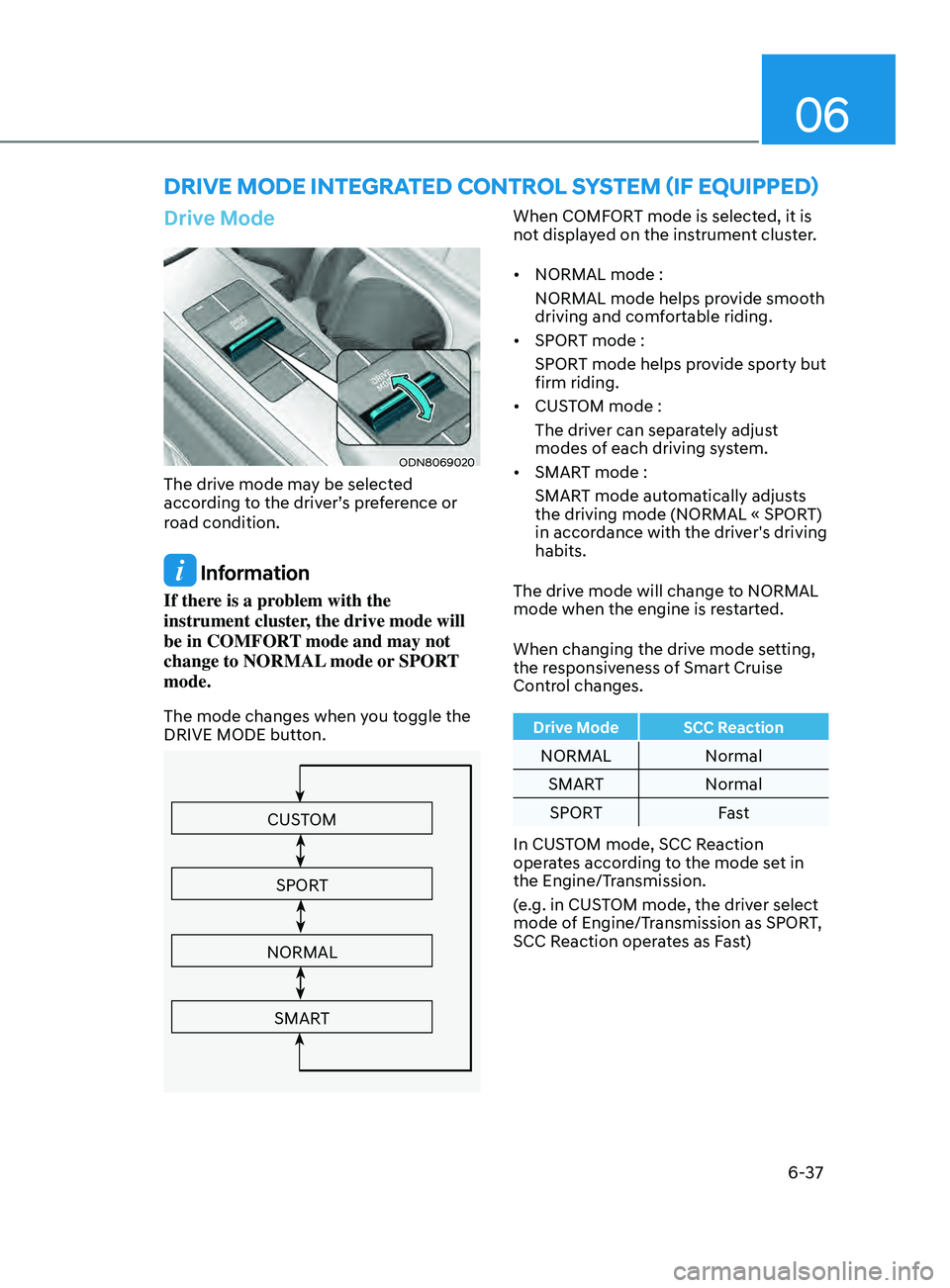
Drive Mode
ODN8069020
The drive mode may be selected
according to the driver’s preference or
road condition.
Information
If there is a problem with the
instrument cluster, the drive mode will
be in COMFORT mode and may not
change to NORMAL mode or SPORT
mode.
The mode changes when you toggle the
DRIVE MODE button.
CUSTOM
SPORT
NORMAL
SMART
When COMFORT mode is selected, it is
not displayed on the instrument cluster.
• NORMAL mode :
NORMAL mode helps provide smooth
driving and comfortable riding.
• SPORT mode :
SPORT mode helps provide sporty but
firm riding.
• CUSTOM mode :
The driver can separately adjust
modes of each driving system.
• SMART mode :
SMART mode automatically adjusts
the driving mode (NORMAL « SPORT)
in accordance with the driver's driving
habits.
The drive mode will change to NORMAL
mode when the engine is restarted.
When changing the drive mode setting,
the responsiveness of Smart Cruise
Control changes.
Drive Mode SCC Reaction
NORMAL Normal
SMART Normal
SPORT Fast
In CUSTOM mode, SCC Reaction
operates according to the mode set in
the Engine/Transmission.
(e.g. in CUSTOM mode, the driver select
mode of Engine/Transmission as SPORT,
SCC Reaction operates as Fast)
Page 322 of 546
6-38
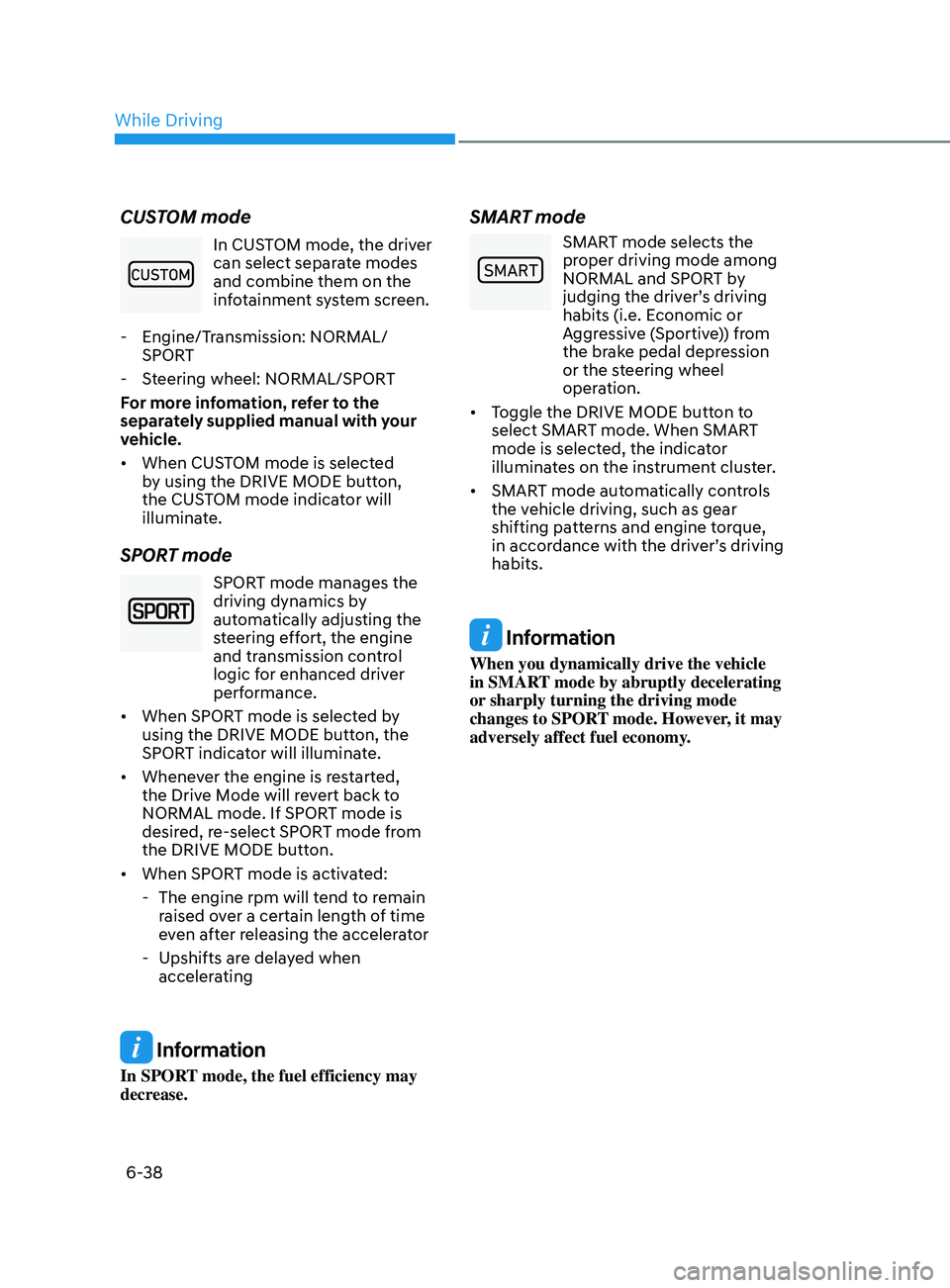
CUSTOM mode
In CUSTOM mode, the driver
can select separate modes
and combine them on the
infotainment system screen.
- E
ngine/Transmission: NORMAL/
SPORT
- S
teering wheel: NORMAL/SPORT
For more infomation, refer to the
separately supplied manual with your
vehicle.
• When CUSTOM mode is selected
by using the DRIVE MODE button,
the CUSTOM mode indicator will
illuminate.
SPORT mode
SPORT mode manages the
driving dynamics by
automatically adjusting the
steering effort, the engine
and transmission control
logic for enhanced driver
performance.
• When SPORT mode is selected by
using the DRIVE MODE button, the
SPORT indicator will illuminate.
• Whenever the engine is restarted,
the Drive Mode will revert back to
NORMAL mode. If SPORT mode is
desired, re-select SPORT mode from
the DRIVE MODE button.
• When SPORT mode is activated:
- The engine rpm will t
end to remain
raised over a certain length of time
even after releasing the accelerator
- Upshifts ar
e delayed when
accelerating
Information
In SPORT mode, the fuel efficiency may
decrease.
SMART mode
00360030002400350037
SMART mode selects the
proper driving mode among
NORMAL and SPORT by
judging the driver’s driving
habits (i.e. Economic or
Aggressive (Sportive)) from
the brake pedal depression
or the steering wheel
operation.
• Toggle the DRIVE MODE button to
select SMART mode. When SMART
mode is selected, the indicator
illuminates on the instrument cluster.
• SMART mode automatically controls
the vehicle driving, such as gear
shifting patterns and engine torque,
in accordance with the driver’s driving
habits.
Information
When you dynamically drive the vehicle
in SMART mode by abruptly decelerating
or sharply turning the driving mode
changes to SPORT mode. However, it may
adversely affect fuel economy.
While Driving
Page 323 of 546
06
6-39
Various driving situations, which you may
encounter in SMART mode
• The driving mode automatically
changes to SMART SPORT, when
you abruptly accelerate the vehicle
or repetitively operate the steering
wheel (Your driving is categorized
to be sporty.). In this mode, your
vehicle drives in a lower gear for
abrupt accelerating/decelerating
and increases the engine brake
performance.
• You may still sense the engine
braking performance, even when
you release the accelerator pedal in
SMART SPORT mode. It is because
your vehicle remains in lower gear
over a certain period of time for next
acceleration. Thus, it is a normal
driving situation, not indicating any
malfunction.
• The driving mode automatically
changes to SMART SPORT mode only
in harsh driving situations. In most
of the normal driving situations, the
driving mode sets to be in SMART
NORMAL mode. Limitation of SMART mode
The SMART mode may be limited in
following situations. (The OFF indicator
illuminates in those situations.)
•
The driver uses the paddle shifter
(manual shift mode) :
It deactivates SMART mode. The
vehicle drives, as the driver manually
changes gear with the paddle shifter.
• The cruise control is activated :
The cruise control system may
deactivate the SMART mode when
the vehicle is controlled by the set
speed of Smart Cruise Control system.
(SMART mode is not deactivated
just by activating the cruise control
system.)
• The transmission oil temperature is
either extremely low or extremely
high :
The SMART mode can be active in
most of the normal driving situations.
However, an extremely high/ low
transmission oil temperature may
temporarily deactivate the SMART
mode, because the transmission
condition is out of normal operation
condition.
Page 386 of 546
6-102
• Do not use Smart Cruise Control
when it may not be safe to keep the
vehicle at a constant speed:
-When driving in hea
vy traffic or
when traffic conditions make it
difficult to drive at a constant
speed
- When driving on r
ainy, icy, or
snow-covered roads
- When driving on a s
teep downhill
or uphill
- When driving in windy ar
eas
-When driving in parking lo
ts
-When driving near cr
ash barriers
-When driving on a sharp curv
e
-When driving with limit
ed view
(possibly due to bad weather, such
as fog, snow, rain or sandstorm)
- When the v
ehicle sensing
ability decreases due to vehicle
modification resulting level
difference of the vehicle’s front
and rear
• Unexpected situations may lead to
possible accidents. Pay attention
continuously to road conditions and
driving even when Smart Cruise
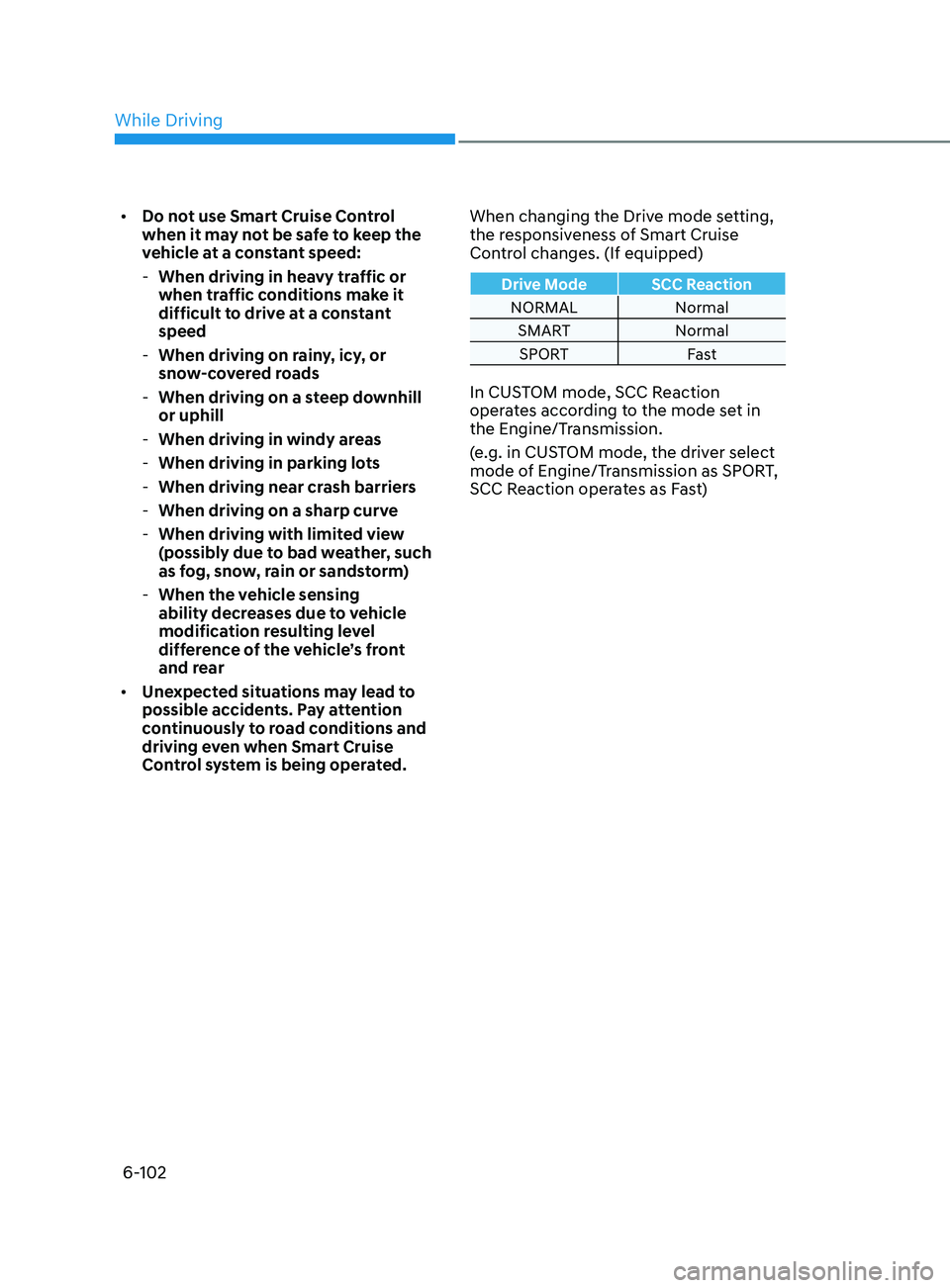
Control system is being operated. When changing the Drive mode setting,
the responsiveness of Smart Cruise
Control changes. (If equipped)
Drive Mode SCC Reaction
NORMAL Normal
SMART Normal
SPORT Fast
In CUSTOM mode, SCC Reaction
operates according to the mode set in
the Engine/Transmission.
(e.g. in CUSTOM mode, the driver select
mode of Engine/Transmission as SPORT,
SCC Reaction operates as Fast)
While Driving
Page 424 of 546
6-140
Hazardous Driving Conditions
When hazardous driving elements
are encountered such as water, snow,
ice, mud and sand, take the below
suggestions:
• Drive cautiously and keep a longer
braking distance.
• Avoid abrupt braking or steering.
• When your vehicle is stuck in
snow, mud, or sand, use second
gear. Accelerate slowly to avoid
unnecessary wheel spin.
• Put sand, rock salt, tire chains or other
non-slip materials under the wheels to
provide additional traction while the
vehicle becomes stuck in ice, snow,
or mud.
WARNING
Downshifting with an automatic
transmission while driving on slippery
surfaces can cause an accident. The
sudden change in tire speed could
cause the tires to skid. Be careful when
downshifting on slippery surfaces.
Rocking the Vehicle
If it is necessary to rock the vehicle to
free it from snow, sand, or mud, first turn
the steering wheel right and left to clear
the area around your front wheels. Then,
shift back and forth between R (Reverse)
and a forward gear.
Try to avoid spinning the wheels, and do
not race the engine.
To prevent transmission wear, wait until
the wheels stop spinning before shifting
gears. Release the accelerator pedal
while shifting, and press lightly on the
accelerator pedal while the transmission
is in gear. Slowly spinning the wheels in
forward and reverse directions causes a
rocking motion that may free the vehicle.
WARNING
If the vehicle is stuck and excessive
wheel spin occurs, the temperature
of the tires can increase very quickly.
If the tires become damaged, a tire
blow out or tire explosion can occur.
This condition is dangerous - you and
others may be injured. Do not attempt
this procedure if people or objects are
anywhere near the vehicle.
If you attempt to free the vehicle, the
vehicle can overheat quickly, possibly
causing an engine compartment fire
or other damage. Try to avoid spinning
the wheels as much as possible to
prevent overheating of either the tires
or the engine. DO NOT allow the vehicle
to spin the wheels above 35 mph (56
km/h).
Information
The ESC system must be turned OFF
before rocking the vehicle.
NOTICE
If you are still stuck after rocking the
vehicle a few times, have the vehicle
pulled out by a tow vehicle to avoid
engine overheating, possible damage to
the transmission, and tire damage. See
"Towing" in chapter 7.
SpeCI al d r I v I n G Cond I t I on S
While Driving