Door HYUNDAI SONATA 2021 Manual PDF
[x] Cancel search | Manufacturer: HYUNDAI, Model Year: 2021, Model line: SONATA, Model: HYUNDAI SONATA 2021Pages: 546, PDF Size: 51.21 MB
Page 238 of 546
Convenient Features
5-108
How Remote Smart Parking
Assist System Works
Remote Moving Forward/Backward
Remote Moving Forward/Backward is
available with the driver outside the
vehicle. Make sure the conditions are
met before activating Remote Moving
Forward/Backward function. With the
function, you can park or exit the vehicle
and the procedure is as follows.
1.
R
emote Moving Forward/Backward
ready:
(1)
With the v
ehicle off: Remotely turn
on the vehicle.
(2)
With the v
ehicle on: with shift
button is in P (Park) position,
then press Remote Smart Parking
Assist system button. Then exit the
vehicle possessing the smart key.
2.
R
emote Moving Forward/Backward
assist: Press and hold the Moving
Forward/Backward button of the
smart key to provide the Remote
Moving Forward/Backward assist
through steering wheel, gear shift and
vehicle speed control.
3.
R
emote Moving Forward/Backward
complete: When the vehicle reaches
the desired position, release the
smart key button. Then complete the
Remote Moving Forward/Backward
by entering the vehicle possessing the
smart key or by pressing the remote
start button of the smart key.
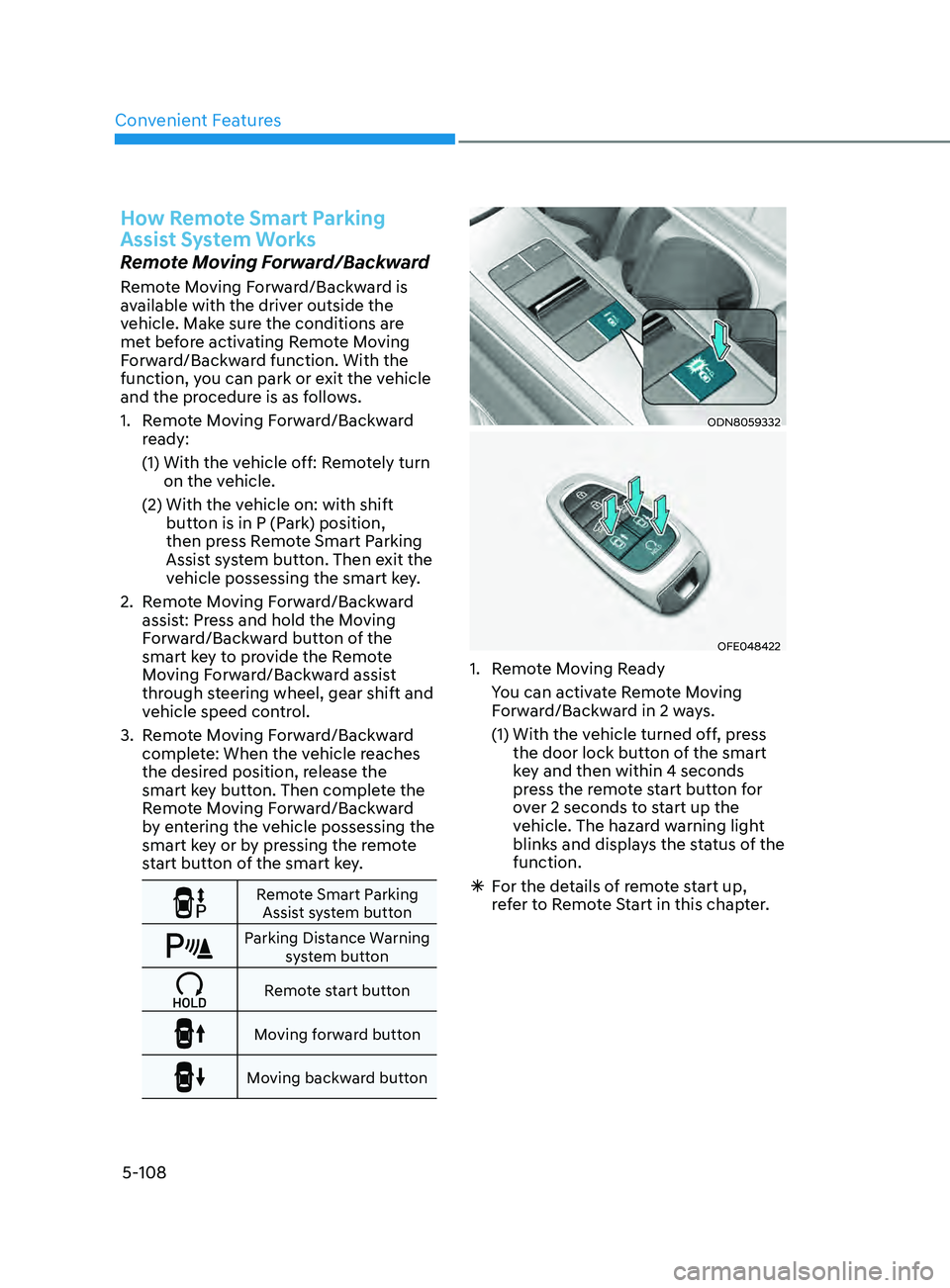
Remote Smart Parking
Assist system button
Parking Distance Warning system button
Remote start button
Moving forward button
Moving backward button
ODN8059332
OFE048422
1. Remote Moving Ready
Y
ou can activate Remote Moving
Forward/Backward in 2 ways.
(1)
With the v
ehicle turned off, press
the door lock button of the smart
key and then within 4 seconds
press the remote start button for
over 2 seconds to start up the
vehicle. The hazard warning light
blinks and displays the status of the
function.
à F
or the details of remote start up,
refer to Remote Start in this chapter.
Page 239 of 546
05
5-109
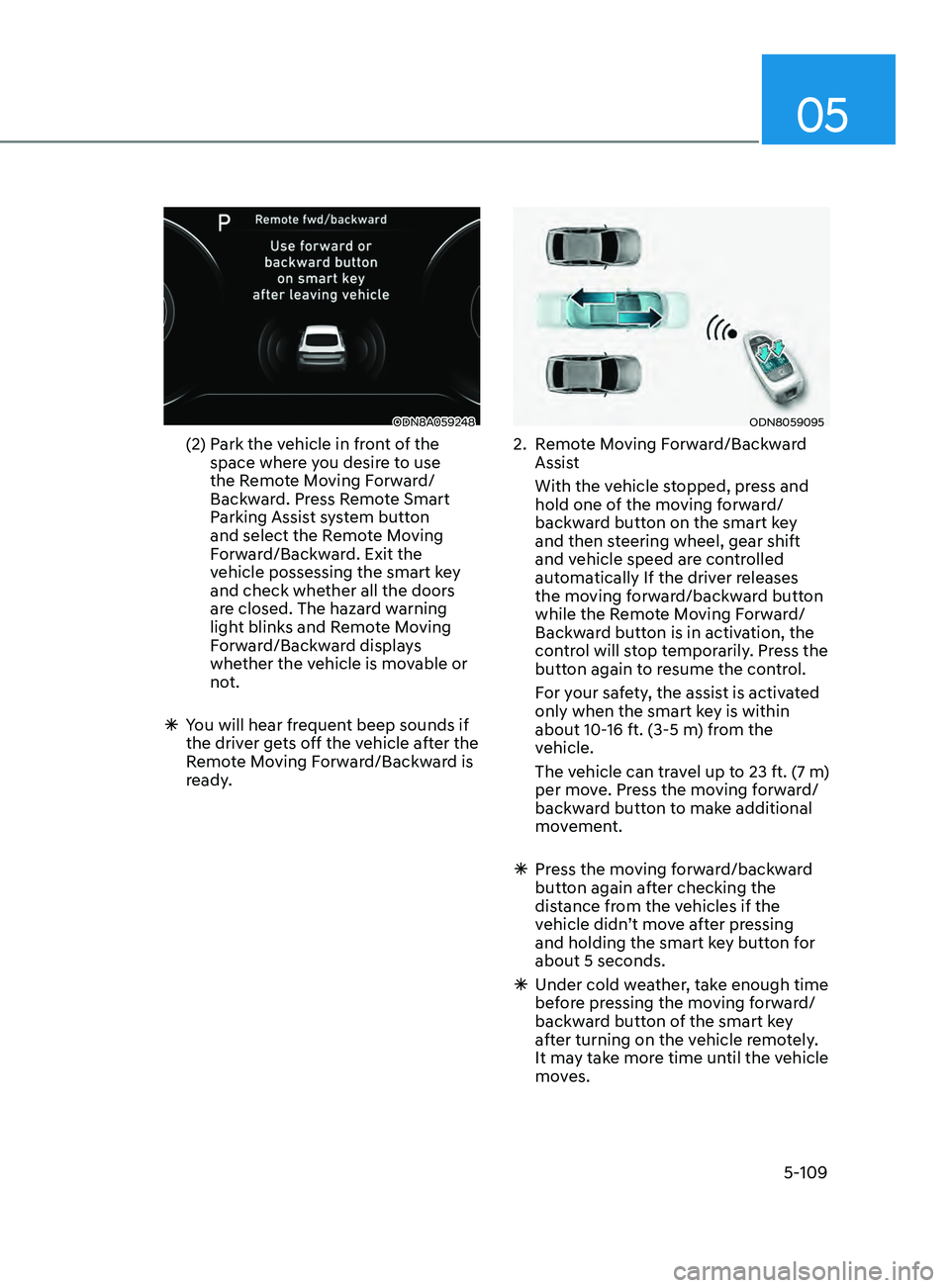
ODN8A059248
(2) Park the vehicle in front of the
space where you desire to use
the Remote Moving Forward/
Backward. Press Remote Smart
Parking Assist system button
and select the Remote Moving
Forward/Backward. Exit the
vehicle possessing the smart key
and check whether all the doors
are closed. The hazard warning
light blinks and Remote Moving
Forward/Backward displays
whether the vehicle is movable or
not.
ÃY
ou will hear frequent beep sounds if
the driver gets off the vehicle after the
Remote Moving Forward/Backward is
ready.
ODN8059095
2. Remote Moving Forward/Backward Assist
With the v
ehicle stopped, press and
hold one of the moving forward/
backward button on the smart key
and then steering wheel, gear shift
and vehicle speed are controlled
automatically If the driver releases
the moving forward/backward button
while the Remote Moving Forward/
Backward button is in activation, the
control will stop temporarily. Press the
button again to resume the control.
F
or your safety, the assist is activated
only when the smart key is within
about 10-16 ft. (3-5 m) from the
vehicle.
The v
ehicle can travel up to 23 ft. (7 m)
per move. Press the moving forward/
backward button to make additional
movement.
à Pr
ess the moving forward/backward
button again after checking the
distance from the vehicles if the
vehicle didn’t move after pressing
and holding the smart key button for
about 5 seconds.
à Under cold w
eather, take enough time
before pressing the moving forward/
backward button of the smart key
after turning on the vehicle remotely.
It may take more time until the vehicle
moves.
Page 241 of 546
05
5-111
CAUTION
• The driver should check for obstacles
directly around the vehicle.
• The function may be cancelled if you
attach something (cover, etc.) to the
steering wheel.
• Make sure all the passengers exit the
vehicle when the Remote Moving
Forward/Backward is in activation.
• Make sure all the smart keys are
outside the vehicle when the Remote
Moving Forward/Backward assist is
in activation.
• The detection range of the smart key
can be differed by the surroundings
(ex: Indoor/outdoor, strong electric
field area)
• If the parking distance warning
sounds three consecutive times
during operating the Remote Moving
Forward/Backward system, you
should not move your vehicle in that
direction since the objects are too
close. The driver should operate the
vehicle manually.
To cancel the Remote Moving
Forward/Backward while in
operation
1. Press the remote start button on the
smart key.
2.
The driv
er should press Remote Smart
Parking Assist system button while
Remote Moving Forward/Backward is
instructed.
3.
The driv
er should shift the gear
besides P (parking) while Remote
Moving Forward/Backward is
instructed.
4.
The driv
er should press Parking
Distance Warning system button
while the Remote Moving Forward/
Backward is instructed.
5.
During R
emote Moving Forward/
Backward operation, the vehicle
turns off when the driver presses the
remote start button on the smart key.
6.
The function is cancelled but the
v
ehicle stays on when the driver
enters the vehicle with the smart key
and all the doors are open.
Page 242 of 546
Convenient Features
5-112
The Remote Moving Forward/
Backward assist will stop
temporarily when:
7. An obstacle is detected at the direction the vehicle is heading.
8.
The door or trunk is opened.
9.
The mo
ving forward/backward button
on the smart key is released.
10.
Multiple butt
ons on the smart key are
pressed at the same time.
11.
The dis
tance between the smart key
and vehicle is over 13 ft. (4 m).
12.
A butt
on on the other smart key is
pressed during operation.
13.
R
ear Cross-Traffic Collision-Avoidance
Assist system is activated while
reserving.
14.
The v
ehicle moves 23 ft. (7 m) with the
Remote Moving Forward/Backward
while the smart key is pressed.
(Maximum travel distance per move)
à The v
ehicle stops when the Remote
Smart Parking Assist system will stop
temporarily and the function will
resume when the above condition is
cleared.
The Remote Moving Forward/
Backward assist is cancelled while
in operation when:
1. The driver holds the steering wheel while the steering wheel is controlled.
2.
The gear is shift
ed or the Electronic
Parking Brake (EPB) is activated.
3.
The hood opens.
4.
The v
ehicle speed exceeds 3 mph
(5km/h).
5.
The v
ehicle accelerates suddenly.
6.
The v
ehicle slips back while
controlling the vehicle speed.
7.
The wheel is s
tuck and the vehicle is
unable to move.
8.
About 3 minut
es and 50 seconds
have passed after the Remote Moving
Forward/Backward assist starts. 9.
The gr
adient of the road exceeds
the range supported by the Remote
Moving Forward/Backward assist.
10.
The s
teering, shifting gear and drive
assist are difficult.
11.
The suspended s
tatus lasts for over 1
minute.
12.
The driv
er continuously presses and
releases the smart key’s moving
forward/backward button over 10
times.
13.
The T
raction Control System (TCS) is
activated while controlling the vehicle
speed.
14.
The smart k
ey is damaged.
15.
The acceler
ator/brake pedal is
depressed while all the doors are
closed.
16.
The br
ake pedal is depressed while
the driver’s door is open and the smart
key is outside the vehicle.
17. The vehicle travels more than 46 ft. (14
m) after the Remote Moving Forward/
Backward assist is activated.
18.
The the
ft alarm system is activated.
Ã
When the R
emote Moving Forward/
Backward is completed, the gear in
P(Park) and Electronic Parking Brake
(EPB) are engaged automatically and
the vehicle turns off. Ã The fr equent beep sounds are
generated to show the deactivation
status.
Page 246 of 546
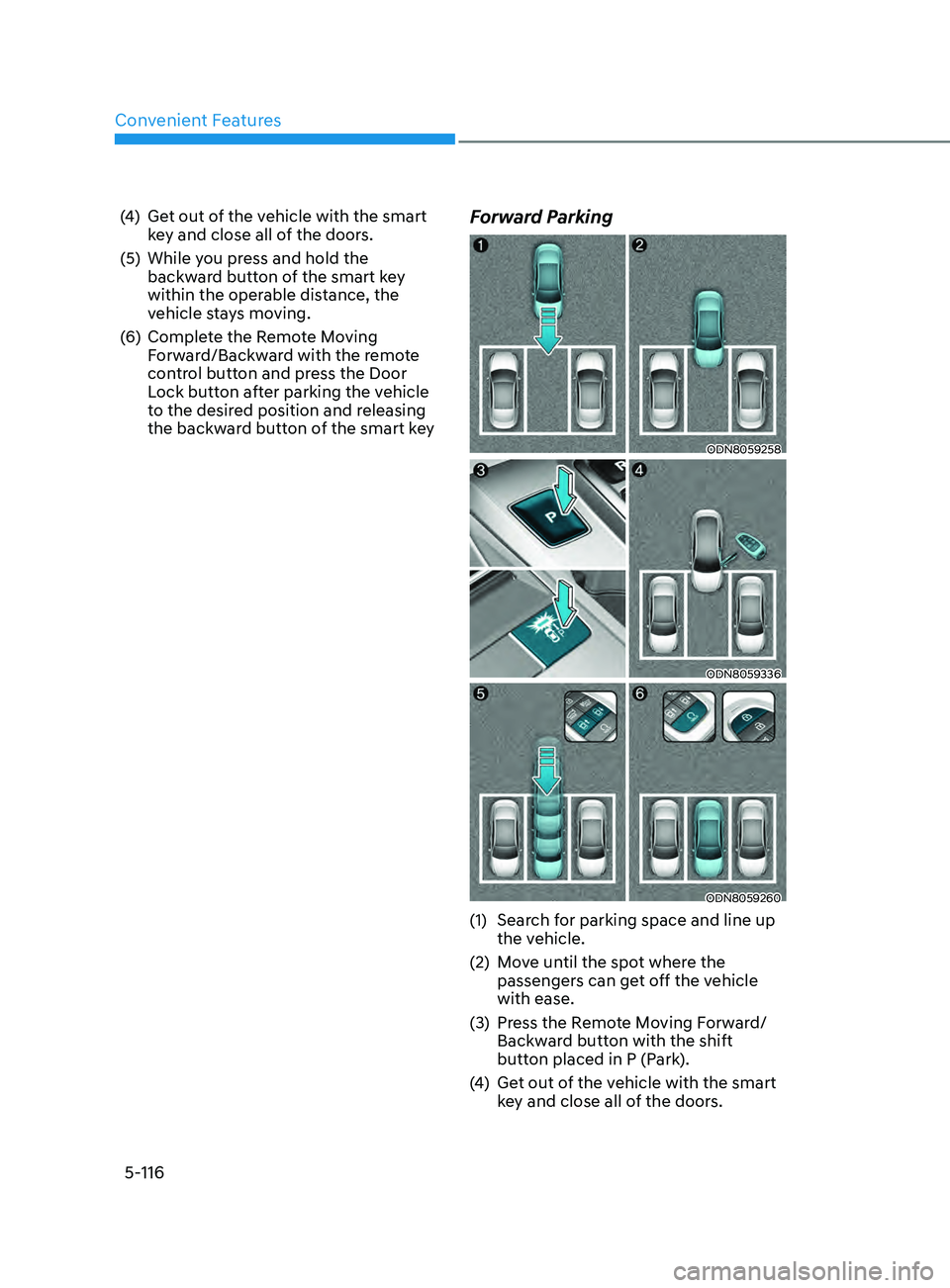
Convenient Features
5-116
(4) Get out of the vehicle with the smart key and close all of the doors.
(5)
While y
ou press and hold the
backward button of the smart key
within the operable distance, the
vehicle stays moving.
(6)
Comple
te the Remote Moving
Forward/Backward with the remote
control button and press the Door
Lock button after parking the vehicle
to the desired position and releasing
the backward button of the smart keyForward Parking
ODN8059258
ODN8059336
ODN8059260
(1) Search for parking space and line up the vehicle.
(2)
M
ove until the spot where the
passengers can get off the vehicle
with ease.
(3)
Pr
ess the Remote Moving Forward/
Backward button with the shift
button placed in P (Park).
(4)
Ge
t out of the vehicle with the smart
key and close all of the doors.
Page 247 of 546
05
5-117
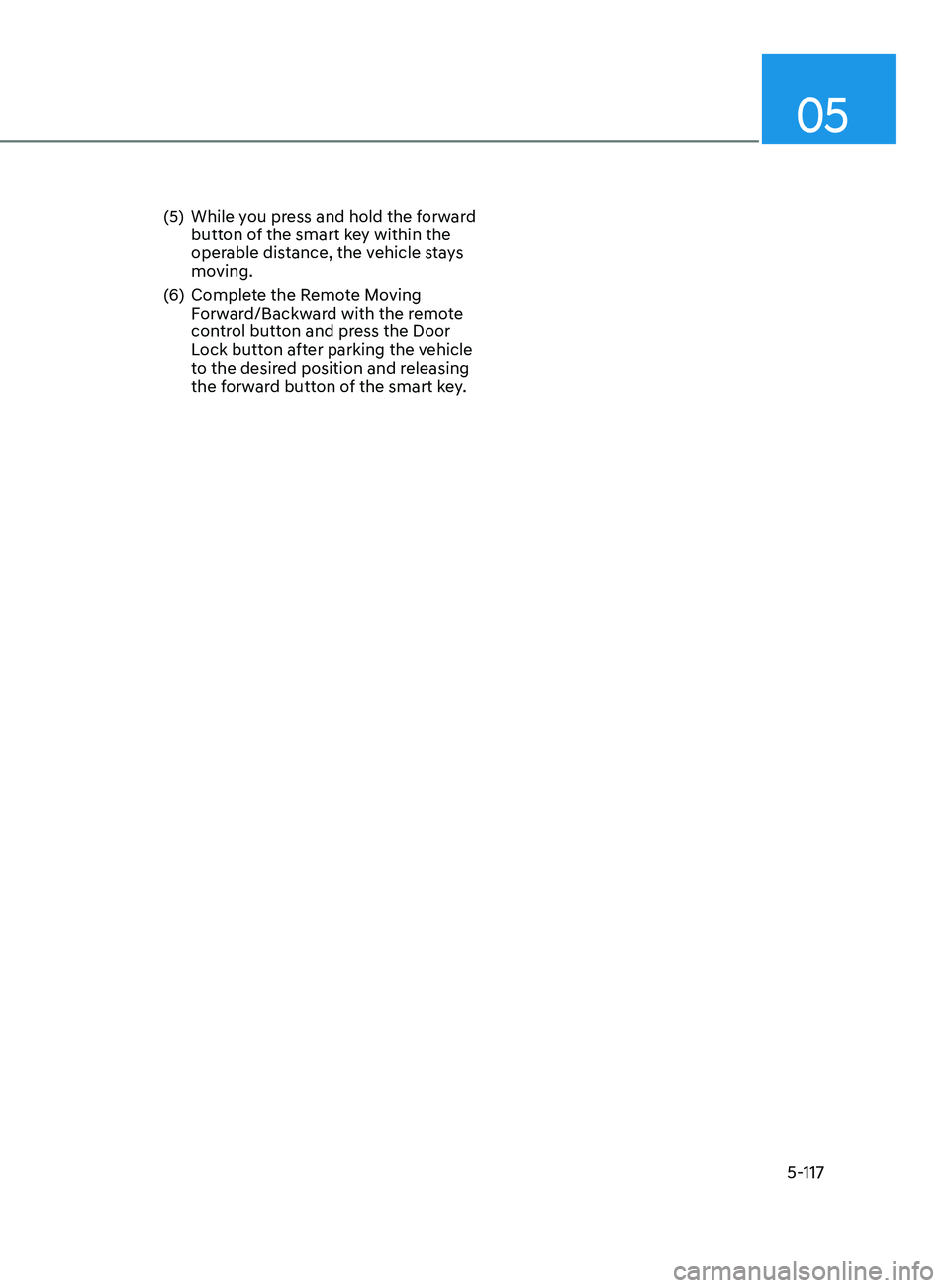
(5) While you press and hold the forward button of the smart key within the
operable distance, the vehicle stays
moving.
(6)
Comple
te the Remote Moving
Forward/Backward with the remote
control button and press the Door
Lock button after parking the vehicle
to the desired position and releasing
the forward button of the smart key.
Page 273 of 546
05
5-143
climATe conTrol ADDiTionAl feATUreS
Sunroof Inside Air Recirculation
(if equipped)
When the sunroof is opened, outside
(fresh) air will be automatically selected.
At this time, if you press the air intake
control button, recirculated air position
will be selected but will change back
to outside (fresh) air after 3 minutes.
When the sunroof is closed, the air
intake position will return to the original
position that was selected.
Automatic Ventilation
The system automatically selects the
fresh mode when the climate control
system operates Floor-Level or Bi-Level
for more than 5 minutes and the outdoor
temperature is under 59°F (15°C).
Page 274 of 546
Convenient Features5-144
WARNING
Never store cigarette lighters, propane
cylinders, or other flammable/explosive
materials in the vehicle. These items
may catch fire and/or explode if the
vehicle is exposed to hot temperatures
for extended periods.
WARNING
ALWAYS keep the storage compartment
covers closed securely while driving.
Items inside your vehicle are moving as
fast as the vehicle. If you have to stop
or turn quickly, or if there is a crash, the
items may fly out of the compartment
and may cause an injury if they strike
the driver or a passenger.
NOTICE
To avoid possible theft, do not leave
valuables in the storage compartments.
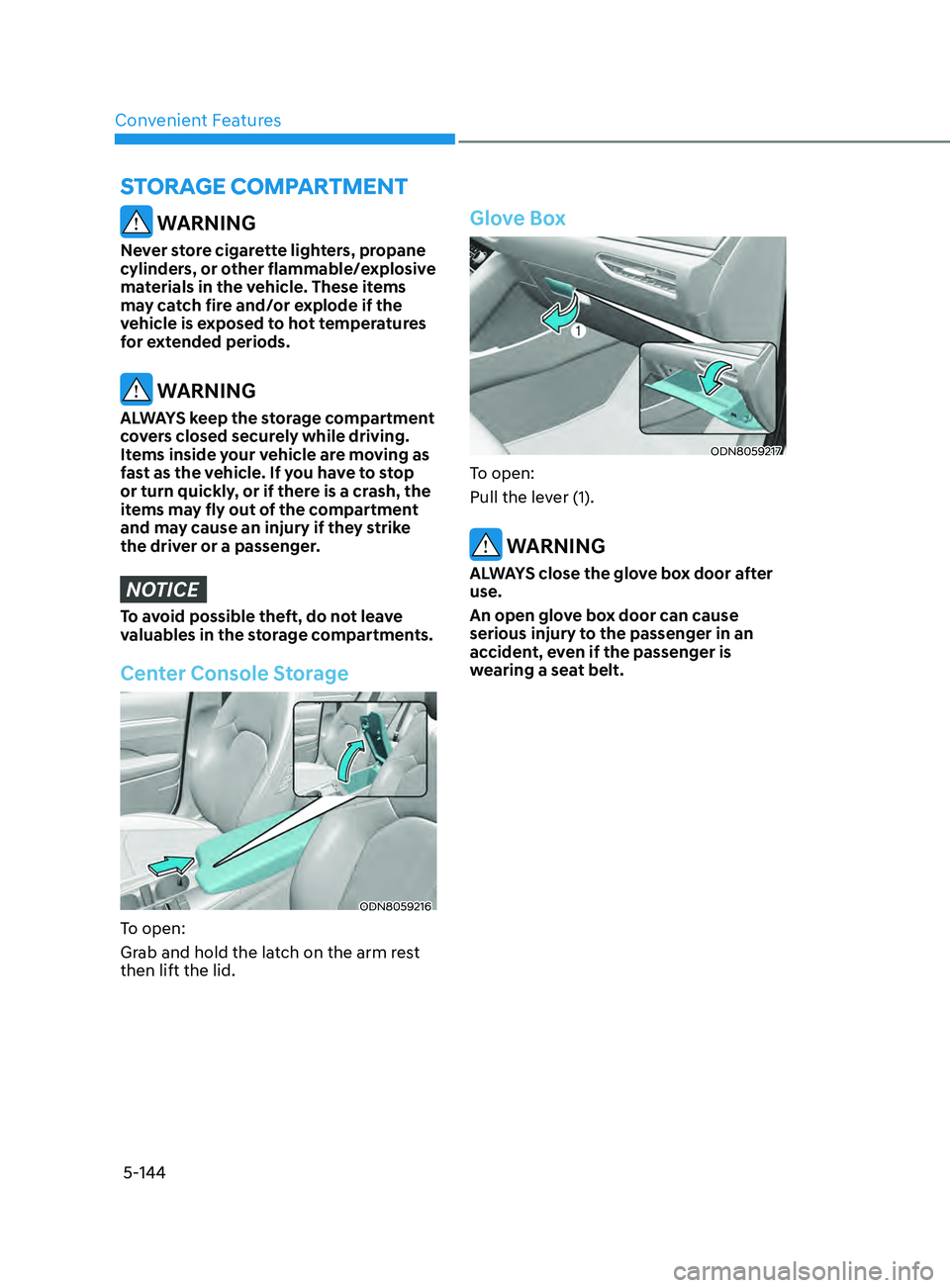
Center Console Storage
ODN8059216
To open:
Grab and hold the latch on the arm rest
then lift the lid.
Glove Box
ODN8059217
To open:
Pull the lever (1).
WARNING
ALWAYS close the glove box door after
use.
An open glove box door can cause
serious injury to the passenger in an
accident, even if the passenger is
wearing a seat belt.
STor AG e compA rT men T
Page 278 of 546
![HYUNDAI SONATA 2021 Manual PDF Convenient Features
5-148
Wireless Cellular Phone
Charging System (if equipped)
ODN8059223
[A]: Indicator light, [B]: Charging pad
On certain models, the vehicle comes
equipped with a wireless cellu](/img/35/41164/w960_41164-277.png "HYUNDAI SONATA 2021 Manual PDF Convenient Features
5-148
Wireless Cellular Phone
Charging System (if equipped)
ODN8059223
[A]: Indicator light, [B]: Charging pad
On certain models, the vehicle comes
equipped with a wireless cellu")
Convenient Features
5-148
Wireless Cellular Phone
Charging System (if equipped)
ODN8059223
[A]: Indicator light, [B]: Charging pad
On certain models, the vehicle comes
equipped with a wireless cellular phone
charger.
The system is available when all doors
are closed, and when the ignition switch
is ON.
To charge a cellular phone
The wireless cellular phone charging
system charges only the Qi-enabled
cellular phones. Read the label on the
cellular phone accessory cover or visit
your cellular phone manufacturer’s
website to check whether your cellular
phone supports the Qi technology.
The wireless charging process starts
when you put a Qi-enabled cellular
phone on the wireless charging unit.
1.
R
emove other items, including the
smart key, from the wireless charging
unit. If not, the wireless charging
process may be interrupted. Place
the cellular phone on the center of
the charging pad (
).
2.
The indica
tor light is orange when
the cellular phone is charging. The
indicator light turns green when
phone charging is complete.
3.
Y
ou can turn ON or OFF the wireless
charging function in the user settings
mode on the instrument cluster. For
further information, refer to the “LCD
Display Modes” in this chapter.
If your cellular phone is not charging:
-
Sligh
tly change the position of the
cellular phone on the charging pad.
-
Mak
e sure the indicator light is
orange.
The indicator light will blink orange for 10
seconds if there is a malfunction in the
wireless charging system.
In this case, temporarily stop the
charging process, and re-attempt to
charge your cellular phone again.
The system warns you with a message
on the LCD display if the cellular phone
is still on the wireless charging unit after
the engine is turned OFF and the front
door is opened.
Information
For some manufacturers’ cellular phones,
the system may not warn you even though
the cellular phone is left on the wireless
charging unit. This is due to the particular
characteristic of the cellular phone and
not a malfunction of the wireless charging.
NOTICE
• The wireless cellular phone charging system may not support certain
cellular phones, which are not
verified for the Qi specification (
).
•
When placing y
our cellular phone
on the charging mat, position the
phone in the middle of the mat for
optimal charging performance. If
your cellular phone is off to the side,
the charging rate may be less and in
some cases the cellular phone may
experience higher heat conduction.
•
In some cases, the wir
eless charging
may stop temporarily when the
Remote Key or Smart Key is used,
either when starting the vehicle or
locking/unlocking the doors, etc.
•
When char
ging certain cellular
phones, the charging indicator
may not change to green when the
cellular phone is fully charged.
Page 288 of 546
6-4
WARNING
Carbon monoxide (CO) gas is toxic. Breathing CO can cause unconsciousness and
death.
Engine exhaust contains carbon monoxide which cannot be seen or smelled.
Do not inhale engine exhaust.
If at any time you smell engine exhaust inside the vehicle, open the windows
immediately. Exposure to CO can cause unconsciousness and death by asphyxiation.
Be sure the exhaust system does not leak.
The exhaust system should be checked whenever the vehicle is raised to change the
oil or for any other purpose. If you hear a change in the sound of the exhaust or if you
drive over something that strikes the underneath side of the vehicle, have the exhaust
system checked as soon as possible by an authorized HYUNDAI dealer.
Do not run the engine in an enclosed area.
Letting the engine idle in your garage, even with the garage door open, is a hazardous
practice. Run the engine only long enough to start the engine and to move the vehicle
out of the garage.
Avoid idling the engine for prolonged periods with people inside the vehicle.
If it is necessary to idle the engine for a prolonged period with people inside the
vehicle, be sure to do so only in an open area with the air intake set at "Fresh" and fan
control set to high so fresh air is drawn into the interior.
Keep the air intakes clear.
To assure proper operation of the ventilation system, keep the ventilation air intakes
located in front of the windshield clear of snow, ice, leaves, or other obstructions.
If you must drive with the trunk open:
Close all windows.
Open instrument panel air vents.
Set the air intake control at "Fresh", the air flow control at "Floor" or "Face", and the fan
control set to high.
WARNING
CALIFORNIA PROPOSITION 65 WARNING
Engine exhaust and a wide variety of automobile components including
components found in the interior furnishings in a vehicle, contain or emit harmful
chemicals known to the State of California to cause cancer and birth defects and
reproductive harm. In addition, certain fluids contained in vehicles and certain
products of components contain or emit chemicals known to the State of California
to cause cancer and birth defects or other reproductive harm.
While Driving