lighting HYUNDAI SONATA 2021 Owners Manual
[x] Cancel search | Manufacturer: HYUNDAI, Model Year: 2021, Model line: SONATA, Model: HYUNDAI SONATA 2021Pages: 546, PDF Size: 51.21 MB
Page 102 of 546
04
4-17
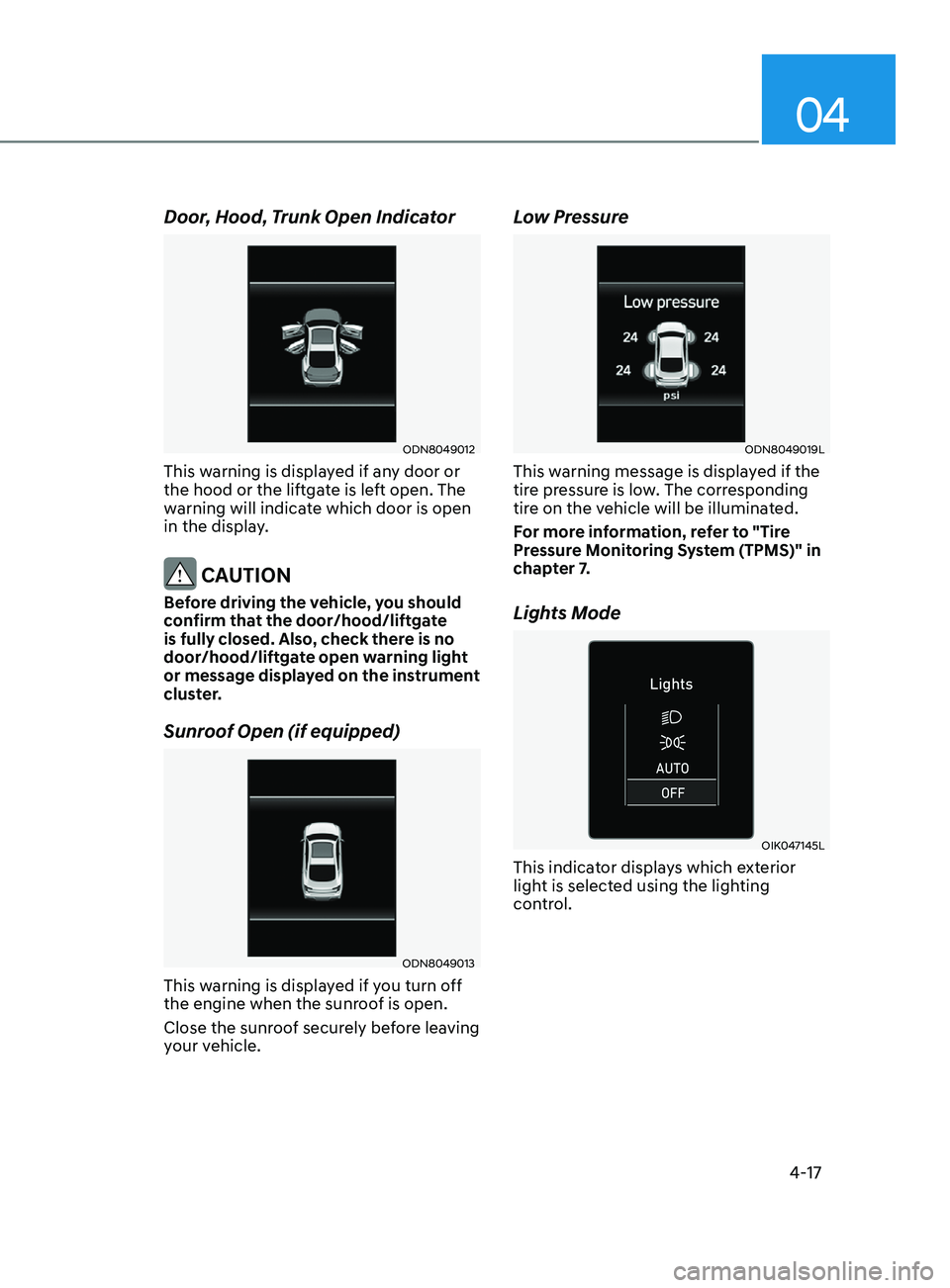
Door, Hood, Trunk Open Indicator
ODN8049012
This warning is displayed if any door or
the hood or the liftgate is left open. The
warning will indicate which door is open
in the display.
CAUTION
Before driving the vehicle, you should
confirm that the door/hood/liftgate
is fully closed. Also, check there is no
door/hood/liftgate open warning light
or message displayed on the instrument
cluster.
Sunroof Open (if equipped)
ODN8049013
This warning is displayed if you turn off
the engine when the sunroof is open.
Close the sunroof securely before leaving
your vehicle.
Low Pressure
ODN8049019L
This warning message is displayed if the
tire pressure is low. The corresponding
tire on the vehicle will be illuminated.
For more information, refer to "Tire
Pressure Monitoring System (TPMS)" in
chapter 7.
Lights Mode
OIK047145L
This indicator displays which exterior
light is selected using the lighting
control.
Page 112 of 546
04
4-27
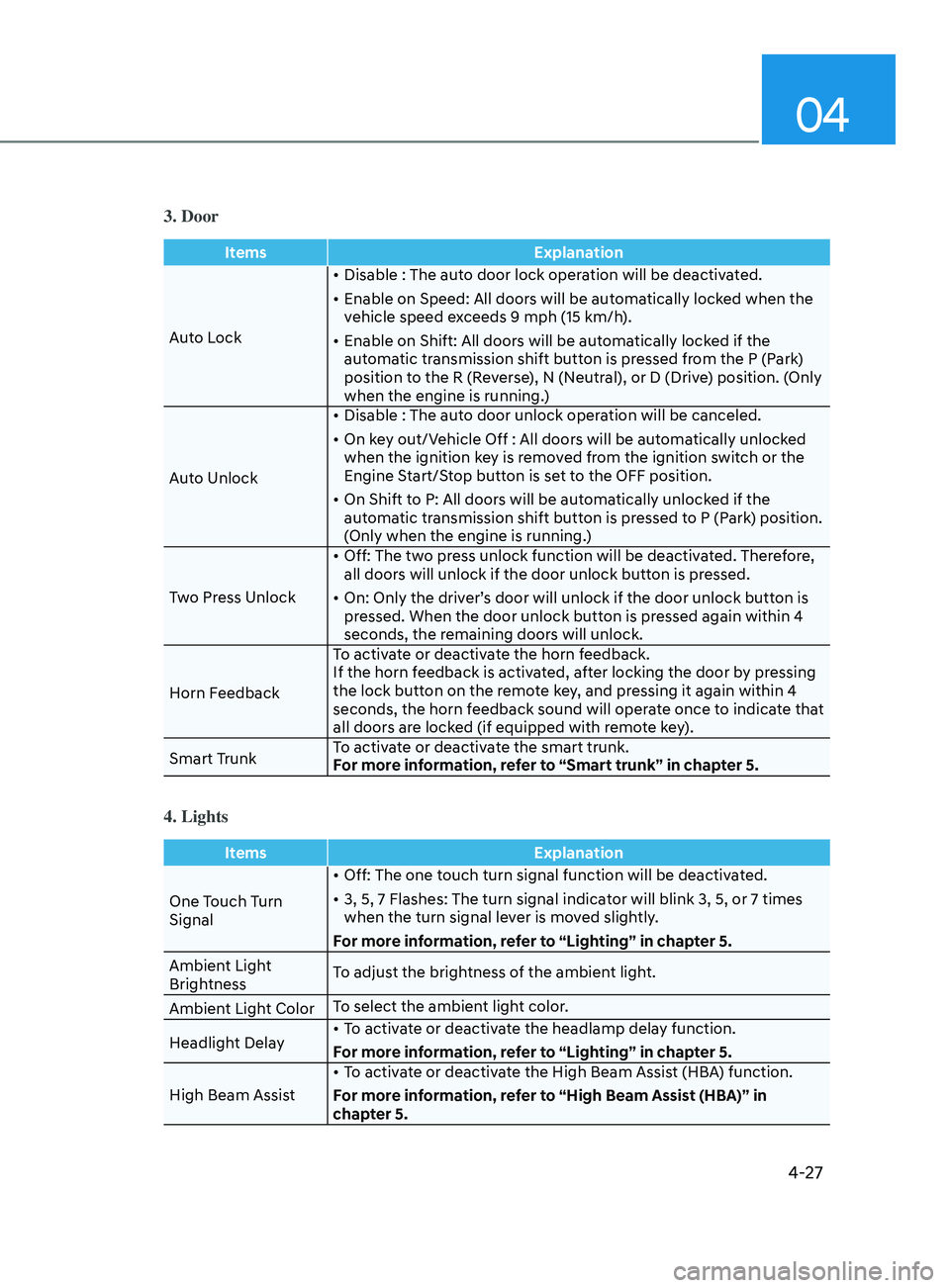
3. Door
ItemsExplanation
Auto Lock •
Disable : The auto door lock operation will be deactivated.
•
E
nable on Speed: All doors will be automatically locked when the
vehicle speed exceeds 9 mph (15 km/h).
•
E
nable on Shift: All doors will be automatically locked if the
automatic transmission shift button is pressed from the P (Park)
position to the R (Reverse), N (Neutral), or D (Drive) position. (Only
when the engine is running.)
Auto Unlock •
Disable : The aut
o door unlock operation will be canceled.
•
On k
ey out/Vehicle Off : All doors will be automatically unlocked
when the ignition key is removed from the ignition switch or the
Engine Start/Stop button is set to the OFF position.
•
On Shift t
o P: All doors will be automatically unlocked if the
automatic transmission shift button is pressed to P (Park) position.
(Only when the engine is running.)
Two Press Unlock •
Off: The tw
o press unlock function will be deactivated. Therefore,
all doors will unlock if the door unlock button is pressed.
•
On: Only the driv
er’s door will unlock if the door unlock button is
pressed. When the door unlock button is pressed again within 4
seconds, the remaining doors will unlock.
Horn Feedback To activate or deactivate the horn feedback.
If the horn feedback is activated, after locking the door by pressing
the lock button on the remote key, and pressing it again within 4
seconds, the horn feedback sound will operate once to indicate that
all doors are locked (if equipped with remote key).
Smart Trunk To activate or deactivate the smart trunk.
For more information, refer to “Smart trunk” in chapter 5.
4. Lights
Items
Explanation
One Touch Turn
Signal •
Off: The one touch turn signal function will be deactivated.
•
3, 5, 7 Flashes: The turn signal indica
tor will blink 3, 5, or 7 times
when the turn signal lever is moved slightly.
For more information, refer to “Lighting” in chapter 5.
Ambient Light
Brightness To adjust the brightness of the ambient light.
Ambient Light Color To select the ambient light color.
Headlight Delay •
To activate or deactivate the headlamp delay function.
For more information, refer to “Lighting” in chapter 5.
High Beam Assist •
To activate or deactivate the High Beam Assist (HBA) function.
For more information, refer to “High Beam Assist (HBA)” in
chapter 5.
Page 127 of 546
Instrument Cluster
4-42
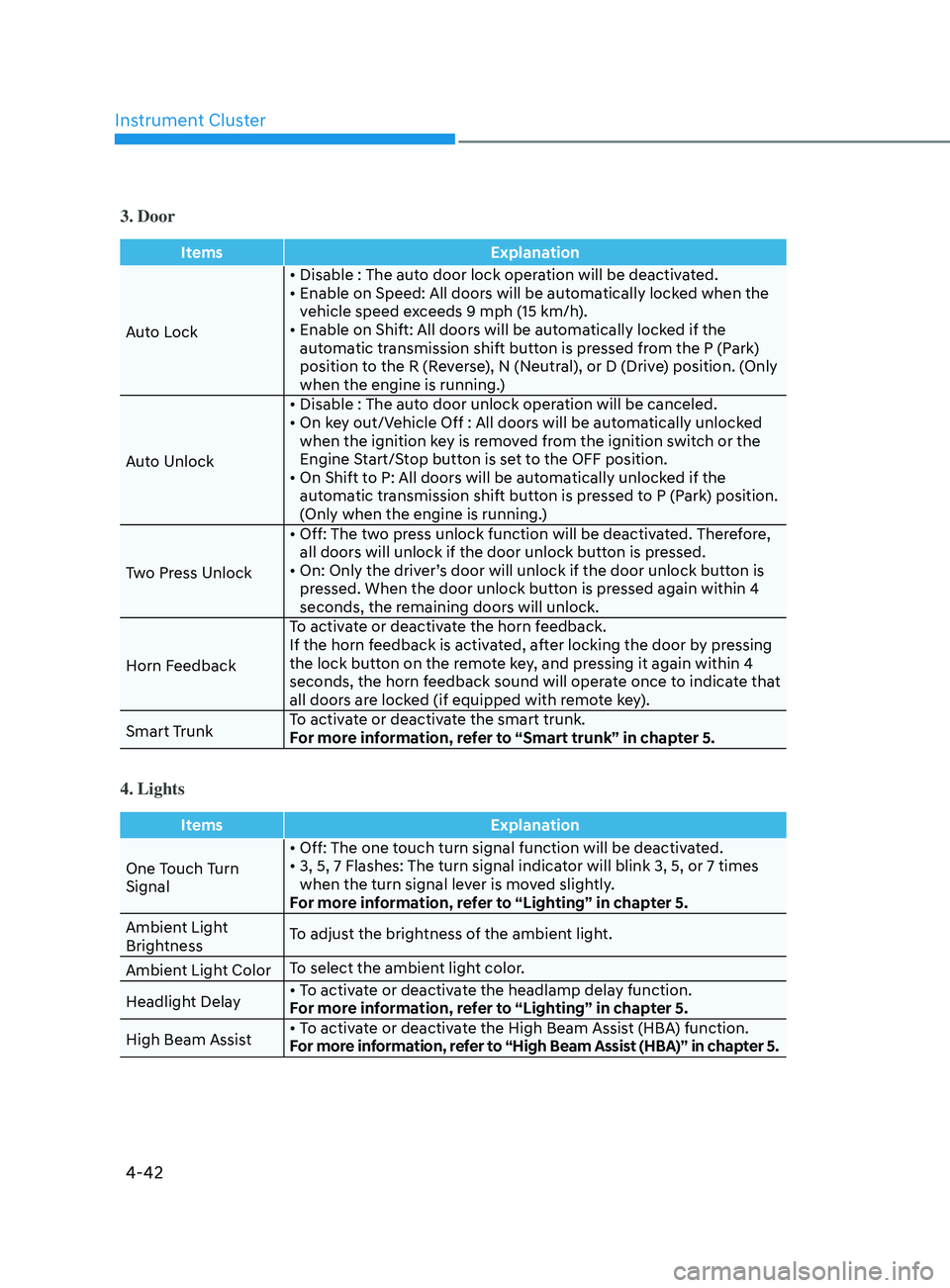
3. Door
ItemsExplanation
Auto Lock •
Disable : The auto door lock operation will be deactivated.
•
E
nable on Speed: All doors will be automatically locked when the
v
ehicle speed exceeds 9 mph (15 km/h).
•
E
nable on Shift: All doors will be automatically locked if the
aut
omatic transmission shift button is pressed from the P (Park)
position to the R (Reverse), N (Neutral), or D (Drive) position. (Only
when the engine is running.)
Auto Unlock •
Disable
: The auto door unlock operation will be canceled.
•
On
key out/Vehicle Off : All doors will be automatically unlocked
when the ignition k
ey is removed from the ignition switch or the
Engine Start/Stop button is set to the OFF position.
•
On
Shift to P: All doors will be automatically unlocked if the
aut
omatic transmission shift button is pressed to P (Park) position.
(Only when the engine is running.)
Two Press Unlock •
Off:
The two press unlock function will be deactivated. Therefore,
all door
s will unlock if the door unlock button is pressed.
•
On:
Only the driver’s door will unlock if the door unlock button is
pr
essed. When the door unlock button is pressed again within 4
seconds, the remaining doors will unlock.
Horn Feedback To activate or deactivate the horn feedback.
If the horn feedback is activated, after locking the door by pressing
the lock button on the remote key, and pressing it again within 4
seconds, the horn feedback sound will operate once to indicate that
all doors are locked (if equipped with remote key).
Smart Trunk To activate or deactivate the smart trunk.
For more information, refer to “Smart trunk” in chapter 5.
4. Lights
Items
Explanation
One Touch Turn
Signal •
Off: The one touch turn signal function will be deactivated.
•
3,
5, 7 Flashes: The turn signal indicator will blink 3, 5, or 7 times
when the turn signal le
ver is moved slightly.
For more information, refer to “Lighting” in chapter 5.
Ambient Light
Brightness To adjust the brightness of the ambient light.
Ambient Light Color To select the ambient light color.
Headlight Delay •
To activate or deactivate the headlamp delay function.
For more information, refer to “Lighting” in chapter 5.
High Beam Assist •
To activate or deactivate the High Beam Assist (HBA) function.
For more information, refer to “High Beam Assist (HBA)” in chapter 5.
Page 132 of 546
 ........................................................................\
......5- 72
Lighting ........................................................................\
....")
5
Head Up Display (HUD) ........................................................................\
......5- 72
Lighting ........................................................................\
................................. 5 -74
Exterior Lights ........................................................................\
.................................5 -74
Interior Lights ........................................................................\
................................. 5-80
Welcome System
........................................................................\
........................... 5-83
Wipers and Washers ........................................................................\
............5-84Windshield Wipers ........................................................................\
......................... 5-84
Windshield W ashers ........................................................................\
....................... 5-85
Rear View Monitor (RVM) ........................................................................\
...5-86Rear View Monitor with Parking Guidance ...........................................................5-86
R ear View Monitor - Top View ........................................................................\
....... 5-86
Surround View Monitor (SVM) ...................................................................5-88
R everse Parking Collision-Avoidance Assist ..............................................5-89
System Setting and Operation ........................................................................\
...... 5-89
W arning and System Control ........................................................................\
......... 5-90
Detecting Sensor
........................................................................\
............................ 5-92
System Malfunction
........................................................................\
....................... 5-93
Limitations of the System
........................................................................\
.............. 5-93
Reverse Parking Distance Warning (PDW) ................................................5-95Operation of Reverse Parking Distance Warning System ....................................5-95
T o Turn Off Reverse Parking Distance Warning System .....................................5-97
Non-Operational Conditions of Reverse Parking Distance Warning System
.....5-97
Reverse Parking Distance Warning System Precautions
.....................................5-98
Forward/Reverse Parking Distance Warning (PDW) ................................5-99Operation of Forward/Reverse Parking Distance Warning System ..................5- 100
Non-Operational Conditions of Forward/Reverse Parking Distance Warning
System
........................................................................\
............................................ 5-102
Forward/Reverse Parking Distance Warning System Precautions
....................5-103
Remote Smart Parking Assist (RSPA) ....................................................... 5- 104Operating Condition ........................................................................\
.....................5- 105
How Remote Smart Parking Assist System Works .............................................5-108
Additional Instructions
........................................................................\
................... 5-113
Display Operation Status
........................................................................\
.............. 5-114
How the Remote Moving Forward/Backward System Works
.............................5-115
Manual Climate Control System ............................................................... 5- 118Heating and Air Conditioning ........................................................................\
.......5- 119
System Operation ........................................................................\
.......................... 5-124
System Maintenance
........................................................................\
.................... 5-125
Page 133 of 546
5
Automatic Climate Control System ...........................................................5- 127Automatic Heating and Air Conditioning ............................................................5- 128
Manual Temperature Control Mode ..................................................................... 5-129
System Operation
........................................................................\
.......................... 5-135
System Maintenance
........................................................................\
.................... 5-136
Windshield Defrosting and Defogging ......................................................5- 138Manual Climate Control System........................................................................\
...5-138
Automatic Climate Control System......................................................................5-139
Defogging Logic
........................................................................\
.......................... 5-140
Auto Defogging System (Only for Automatic Climate Control System)
............5-141
Defroster
........................................................................\
........................................ 5-142
Climate Control Additional Features .........................................................5- 143Sunroof Inside Air Recirculation ........................................................................\
..5- 143
Automatic Ventilation ........................................................................\
................... 5-143
Storage Compartment ........................................................................\
........5- 144Center Console Storage ........................................................................\
................5- 144
Glove Box ........................................................................\
....................................... 5-144
Interior Features ........................................................................\
..................5- 145Cup Holder ........................................................................\
.....................................5- 145
Sunvisor ........................................................................\
......................................... 5-146
Power Outlet
........................................................................\
.................................. 5-146
USB Charger
........................................................................\
................................. 5-147
Wireless Cellular Phone Charging System
..........................................................5-148
Clock
........................................................................\
.............................................. 5-150
Clothes Hanger
........................................................................\
.............................. 5-150
Floor Mat Anchor(S)
........................................................................\
....................... 5-151
Infotainment System ........................................................................\
..........5- 152USB And Ipod® Port ........................................................................\
.......................5- 152
Antenna ........................................................................\
.......................................... 5-152
Steering Wheel Audio Control
........................................................................\
...... 5-153
Bluetooth® Wireless Technology Hands-Free
.....................................................5-154
Audio (Display Audio) / Video / Navigation System (AVN)
................................5-154
Head Up Display (HUD) ........................................................................\
...... 5-72
Lighting ........................................................................\
................................. 5 -74
Exterior Lights ........................................................................\
................................. 5 -74
Interior Lights ........................................................................\
................................. 5-80
Welcome System ........................................................................\
........................... 5-83
Wipers and Washers ........................................................................\
............5-84Windshield Wipers ........................................................................\
......................... 5-84
Windshield Washers ........................................................................\
....................... 5-85
Rear View Monitor (RVM) ........................................................................\
... 5-86Rear View Monitor with Parking Guidance ........................................................... 5-86
Rear View Monitor - Top View ........................................................................\
....... 5-86
Surround View Monitor (SVM) ................................................................... 5-88
Reverse Parking Collision-Avoidance Assist .............................................. 5-89
System Setting and Operation ........................................................................\
...... 5-89
Warning and System Control ........................................................................\
......... 5-90
Detecting Sensor ........................................................................\
............................ 5-92
System Malfunction ........................................................................\
....................... 5-93
Limitations of the System ........................................................................\
.............. 5-93
Reverse Parking Distance Warning (PDW) ................................................5-95Operation of Reverse Parking Distance Warning System .................................... 5-95
To Turn Off Reverse Parking Distance Warning System ..................................... 5-97
Non-Operational Conditions of Reverse Parking Distance Warning System ..... 5-97
Reverse Parking Distance Warning System Precautions ..................................... 5-98
Forward/Reverse Parking Distance Warning (PDW) ................................5-99Operation of Forward/Reverse Parking Distance Warning System .................. 5-100
Non-Operational Conditions of Forward/Reverse Parking Distance Warning
System ........................................................................\
............................................ 5-102
Forward/Reverse Parking Distance Warning System Precautions .................... 5-103
Remote Smart Parking Assist (RSPA) .......................................................5-104Operating Condition ........................................................................\
..................... 5-105
How Remote Smart Parking Assist System Works ............................................. 5-108
Additional Instructions ........................................................................\
................... 5-113
Display Operation Status ........................................................................\
.............. 5-114
How the Remote Moving Forward/Backward System Works ............................. 5-115
Manual Climate Control System ............................................................... 5-118Heating and Air Conditioning ........................................................................\
....... 5-119
System Operation ........................................................................\
.......................... 5-124
System Maintenance ........................................................................\
.................... 5-125
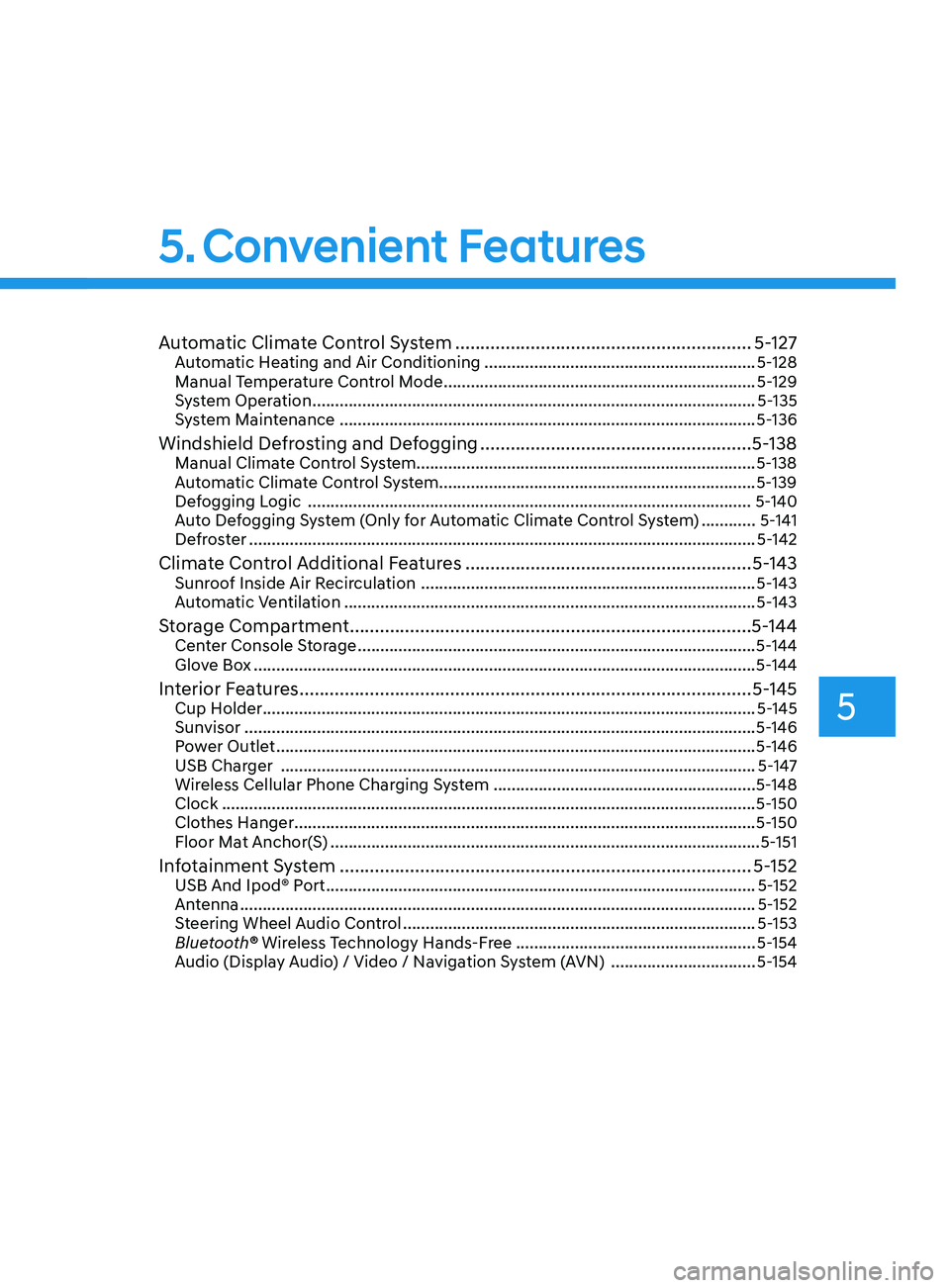
5. Convenient Features
Page 177 of 546
05
5-47
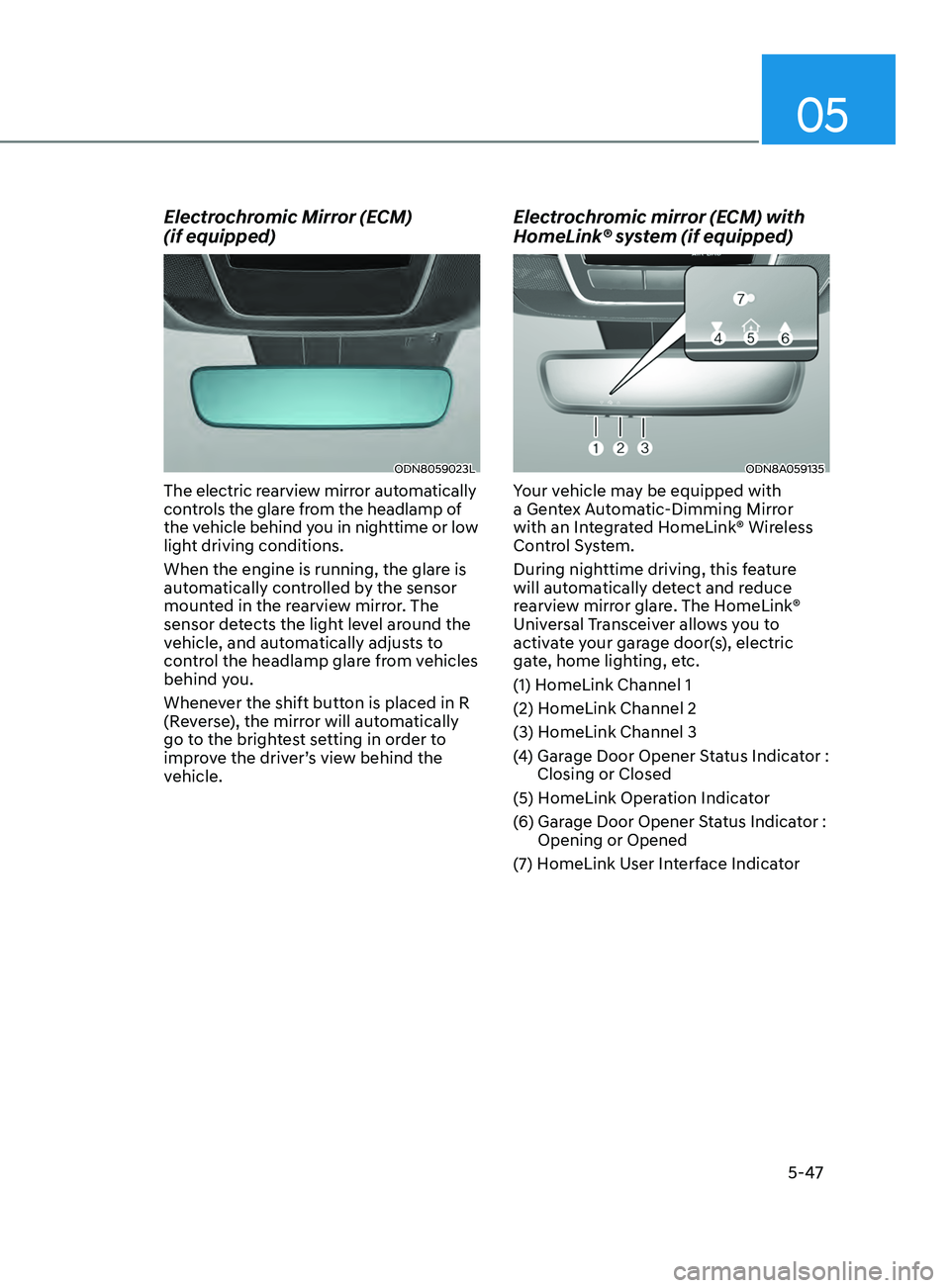
Electrochromic Mirror (ECM)
(if equipped)
ODN8059023L
The electric rearview mirror automatically
controls the glare from the headlamp of
the vehicle behind you in nighttime or low
light driving conditions.
When the engine is running, the glare is
automatically controlled by the sensor
mounted in the rearview mirror. The
sensor detects the light level around the
vehicle, and automatically adjusts to
control the headlamp glare from vehicles
behind you.
Whenever the shift button is placed in R
(Reverse), the mirror will automatically
go to the brightest setting in order to
improve the driver’s view behind the
vehicle.
Electrochromic mirror (ECM) with
HomeLink® system (if equipped)
ODN8A059135
Your vehicle may be equipped with
a Gentex Automatic-Dimming Mirror
with an Integrated HomeLink® Wireless
Control System.
During nighttime driving, this feature
will automatically detect and reduce
rearview mirror glare. The HomeLink®
Universal Transceiver allows you to
activate your garage door(s), electric
gate, home lighting, etc.
(1) HomeLink Channel 1
(2) HomeLink Channel 2
(3) HomeLink Channel 3
(4)
Gar
age Door Opener Status Indicator :
Closing or Closed
(5) HomeLink Operation Indicator
(6)
Gar
age Door Opener Status Indicator :
Opening or Opened
(7)
H
omeLink User Interface Indicator
Page 178 of 546
Convenient Features5-48
Automatic-Dimming Night Vision Safety™
(NVS®) Mirror (if equipped)
The NVS® Mirror automatically reduces
glare by monitoring light levels in the
front and the rear of the vehicle. Any
object that obstructs either light sensor
will degrade the automatic dimming
control feature.
For more information regarding NVS®
mirrors and other applications, please
refer to the Gentex website:
www.gentex.com
Your mirror will automatically dim
upon detecting glare from the vehicles
traveling behind you.
The mirror defaults to the ON position
each time the vehicle is started.
Integrated HomeLink
® Wireless Control
System
The HomeLink® Wireless Control System
can replace up to three hand-held
radio-frequency (RF) transmitters with
a single built-in device. This innovative
feature will learn the radio frequency
codes of most current transmitters to
operate devices such as gate operators,
garage door openers, entry door locks,
security systems, even home lighting.
Both standard and rolling code-equipped
transmitters can be programmed by
following the outlined procedures.
Additional HomeLink® information can
be found at: www.homelink.com, www.
youtube.com/HomeLinkGentex or by
calling 1-800-355-3515.
Retain the original transmitter of the
RF device you are programming for use
in other vehicles as well as for future
HomeLink® programming. It is also
suggested that upon the sale of the
vehicle, the programmed HomeLink®
buttons be erased for security purposes.
WARNING
Before programming HomeLink® to a
garage door opener or gate operator,
make sure people and objects are out
of the way of the device to prevent
potential harm or damage. Do not
use the HomeLink® with any garage
door opener that lacks the safety
stop and reverse features required
by U.S. federal safety standards (this
includes any garage door opener model
manufactured before April 1, 1982).
A garage door that cannot detect an
object - signaling the door to stop and
reverse - does not meet current U.S.
federal safety standards. Using a garage
door opener without these features
increases the risk of serious injury or
death.
Programming HomeLink
®
Please note the following:
• When
programming a garage door
opener
, it is advised to park the
vehicle outside of the garage.
• It
is recommended that a new battery
be placed in the hand-held tr
ansmitter
of the device being programmed to
HomeLink® for quicker training and
accurate transmission of the radio-
frequency signal.
• Some
vehicles may require the
E
ngine Start/Stop button to be in the
ACC (or “Accessories”) position for
programming and/or operation of
HomeLink®.
• In
the event that there are still
pr
ogramming difficulties or questions
after following the programming steps
listed below, contact HomeLink® at:
www.homelink.com, www.youtube.
com/HomeLinkGentex or by calling
1-800-355-3515.
Page 202 of 546
Convenient Features5-72
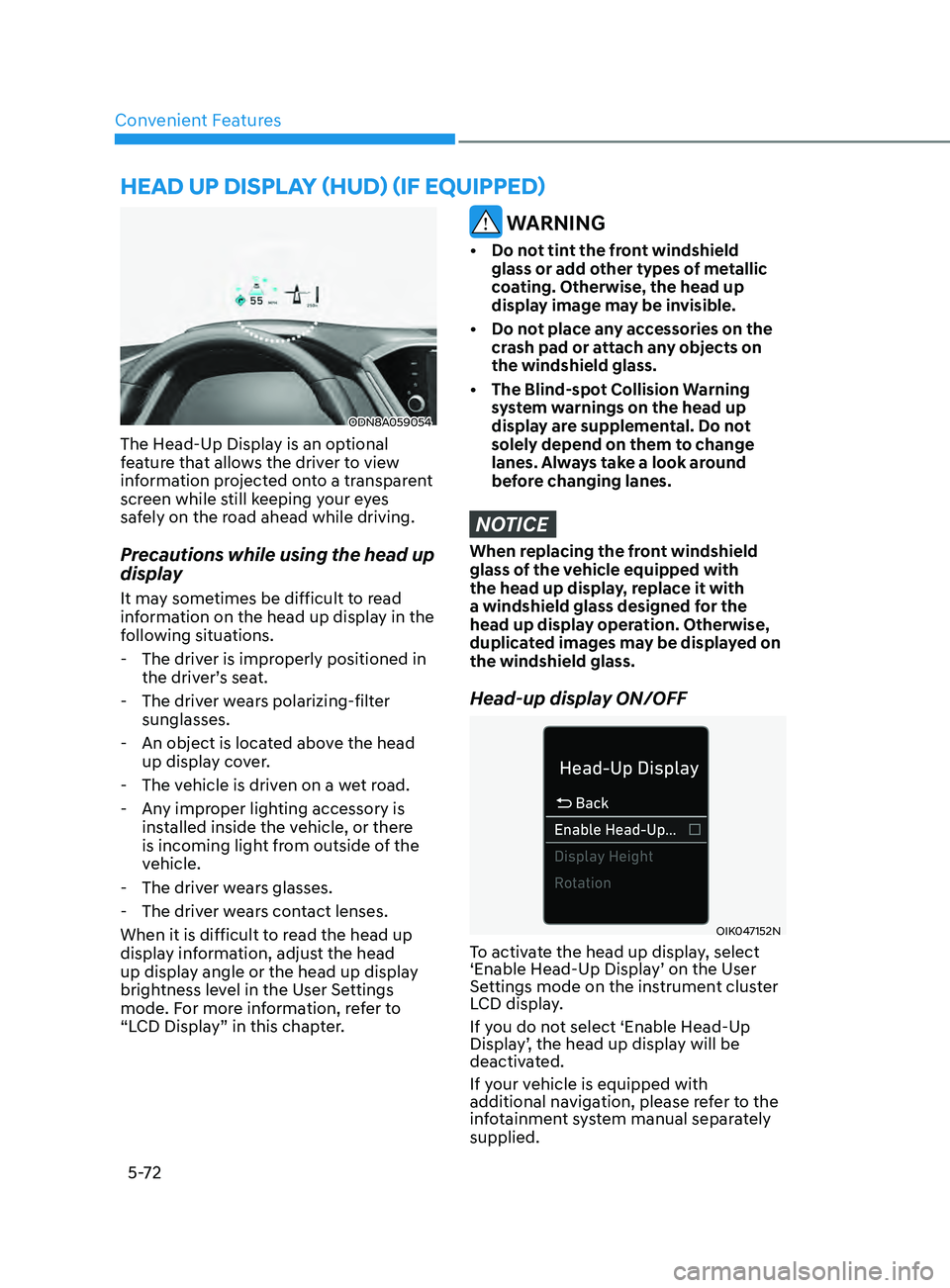
heAD Up DiSplAy ( h UD) (if eQU ippe D )
ODN8A059054
The Head-Up Display is an optional
feature that allows the driver to view
information projected onto a transparent
screen while still keeping your eyes
safely on the road ahead while driving.
Precautions while using the head up
display
It may sometimes be difficult to read
information on the head up display in the
following situations.
-
The driv
er is improperly positioned in
the driver’s seat.
-
The driv
er wears polarizing-filter
sunglasses.
-
An object is loca
ted above the head
up display cover.
-
The v
ehicle is driven on a wet road.
-
An
y improper lighting accessory is
installed inside the vehicle, or there
is incoming light from outside of the
vehicle.
-
The driv
er wears glasses.
-
The driv
er wears contact lenses.
When it is difficult to read the head up
display information, adjust the head
up display angle or the head up display
brightness level in the User Settings
mode. For more information, refer to
“LCD Display” in this chapter.
WARNING
• Do not tint the front windshield glass or add other types of metallic
coating. Otherwise, the head up
display image may be invisible.
•
Do no
t place any accessories on the
crash pad or attach any objects on
the windshield glass.
•
The Blind-spo
t Collision Warning
system warnings on the head up
display are supplemental. Do not
solely depend on them to change
lanes. Always take a look around
before changing lanes.
NOTICE
When replacing the front windshield
glass of the vehicle equipped with
the head up display, replace it with
a windshield glass designed for the
head up display operation. Otherwise,
duplicated images may be displayed on
the windshield glass.
Head-up display ON/OFF
OIK047152N
To activate the head up display, select
‘Enable Head-Up Display’ on the User
Settings mode on the instrument cluster
LCD display.
If you do not select ‘Enable Head-Up
Display’, the head up display will be
deactivated.
If your vehicle is equipped with
additional navigation, please refer to the
infotainment system manual separately
supplied.
Page 204 of 546
Convenient Features5 -74
lighting
Exterior Lights
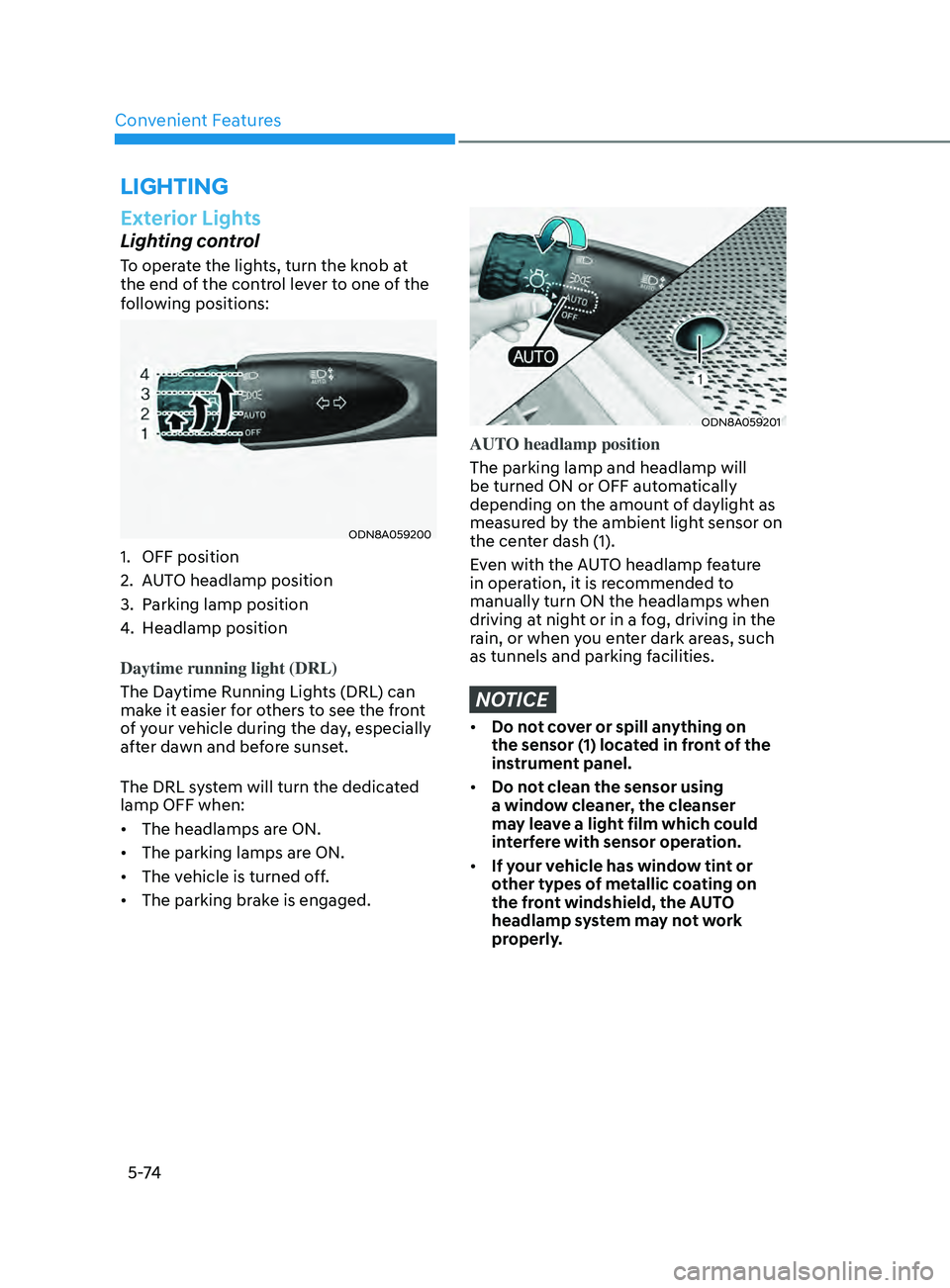
Lighting control
To operate the lights, turn the knob at
the end of the control lever to one of the
following positions:
ODN8A059200
1. OFF position
2.
A
UTO headlamp position
3.
P
arking lamp position
4.
H
eadlamp position
Daytime running light (DRL)
The Daytime Running Lights (DRL) can
make it easier for others to see the front
of your vehicle during the day, especially
after dawn and before sunset.
The DRL system will turn the dedicated
lamp OFF when:
• The headlamps are ON.
• The parking lamps are ON.
• The vehicle is turned off.
• The parking brake is engaged.
ODN8A059201
AUTO headlamp position
The parking lamp and headlamp will
be turned ON or OFF automatically
depending on the amount of daylight as
measured by the ambient light sensor on
the center dash (1).
Even with the AUTO headlamp feature
in operation, it is recommended to
manually turn ON the headlamps when
driving at night or in a fog, driving in the
rain, or when you enter dark areas, such
as tunnels and parking facilities.
NOTICE
• Do not cover or spill anything on
the sensor (1) located in front of the
instrument panel.
• Do not clean the sensor using
a window cleaner, the cleanser
may leave a light film which could
interfere with sensor operation.
• If your vehicle has window tint or
other types of metallic coating on
the front windshield, the AUTO
headlamp system may not work
properly.
Page 338 of 546
6-54
• The pedestrian or cyclist is not fully
detected by the camera recognition
system, for example, if the pedestrian
is leaning over or is not fully walking
upright
• The pedestrian or cyclist is moving
very quickly or appears abruptly in the
camera detection area
• The pedestrian or cyclist is wearing
clothing that easily blends into the
background, making it difficult to be
detected by the camera recognition
system
• The outside lighting is too bright (e.g.
when driving in bright sunlight or
in sun glare) or too dark (e.g. when
driving on a dark rural road at night)
• It is difficult to detect and distinguish
the pedestrian or cyclist from other
objects in the surroundings, for
example, when there is a group of
pedestrians, cyclists or a large crowd
• There is an item similar to a person’s
body structure
• The pedestrian or cyclist is small
• The pedestrian has impaired mobility
• The sensor recognition is limited •
The radar sensor or camera is blocked
with a foreign object or debris
• Inclement weather such as heavy rain
or snow obscures the field of view of
the radar sensor or camera
• When light coming from a street light
or an oncoming vehicle is reflected on
a wet road surface such as a puddle in
the road
• The field of view in front is obstructed
by sun glare
• The windshield glass is fogged up; a
clear view of the road is obstructed
• The adverse road conditions cause
excessive vehicle vibrations while
driving
• The sensor recognition changes
suddenly when passing over a speed
bump
• You are on a roundabout
• The pedestrian or cyclist suddenly
interrupts in front of the vehicle
• The cyclist in front is riding intersected
with the driving direction
• There is any other electromagnetic
interference
• The construction area, rail or other
metal object is near the cyclist
• The bicycle material is not reflected
well on the radar
WARNING
Turn off Forward Collision avoidance
Assist system through cluster or
infotainment system before towing
a vehicle. Application of FCA system
while towing may adversely affect the
safety of your vehicle or the towing
vehicle.
Use extreme caution when the vehicle
in front of you has cargo that extends
rearward from the cab, or when the
vehicle in front of you has higher
ground clearance.
While Driving