auto stop HYUNDAI SONATA 2022 Owner's Manual
[x] Cancel search | Manufacturer: HYUNDAI, Model Year: 2022, Model line: SONATA, Model: HYUNDAI SONATA 2022Pages: 546, PDF Size: 51.21 MB
Page 187 of 546
05
5-57
Power Windows
The ignition switch must be in the
ON position to be able to raise or
lower the windows. Each door has a
Power Window switch to control that
door’s window. The driver has a Power
Window Lock switch which can block
the operation of passenger windows.
The power windows will operate for
approximately 30 seconds after the
ignition switch is placed in the ACC or
LOCK/OFF position. However, if the front
doors are opened, the Power Windows
will not operate even within the 30
second period.
WARNING
To avoid serious injury or death, do not
extend your head, arms or body outside
the windows while driving.
Information
• In cold and wet climates, power
windows may not work properly due to
freezing conditions.
• While driving with the rear windows
down or with the sunroof (if equipped)
opened (or partially opened), your
vehicle may demonstrate a wind
buffeting or pulsation noise. This
noise is normal and can be reduced
or eliminated by taking the following
actions. If the noise occurs with one
or both of the rear windows down,
partially lower both front windows
approximately one inch. If you
experience the noise with the sunroof
open, slightly close the sunroof.
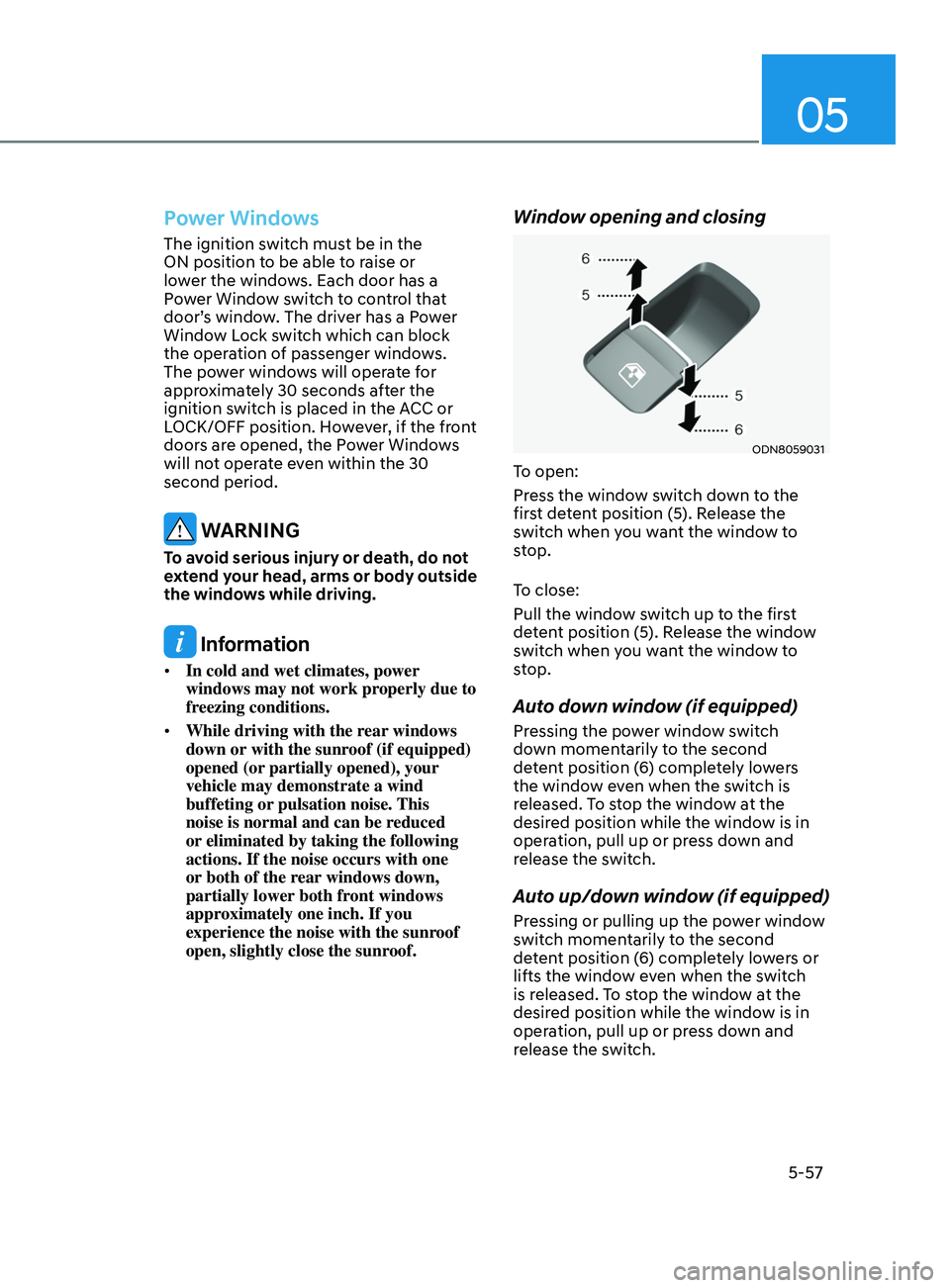
Window opening and closing
ODN8059031
To open:
Press the window switch down to the
first detent position (5). Release the
switch when you want the window to
stop.
To close:
Pull the window switch up to the first
detent position (5). Release the window
switch when you want the window to
stop.
Auto down window (if equipped)
Pressing the power window switch
down momentarily to the second
detent position (6) completely lowers
the window even when the switch is
released. To stop the window at the
desired position while the window is in
operation, pull up or press down and
release the switch.
Auto up/down window (if equipped)
Pressing or pulling up the power window
switch momentarily to the second
detent position (6) completely lowers or
lifts the window even when the switch
is released. To stop the window at the
desired position while the window is in
operation, pull up or press down and
release the switch.
Page 188 of 546
Convenient Features
5-58
To reset the power windows
If the power windows do not operate
normally, the automatic power window
system must be reset as follows:
1.
Place the ignition s
witch to the ON
position.
2.
Close the windo
w and continue
pulling up on the power window
switch for at least one second.
If the power windows do not operate
properly after resetting, have the system
checked by an authorized HYUNDAI
dealer.
WARNING
The automatic reverse feature doesn’t
activate while resetting the power
window system. Make sure body parts
or other objects are safely out of the
way before closing the windows to
avoid injuries or vehicle damage.
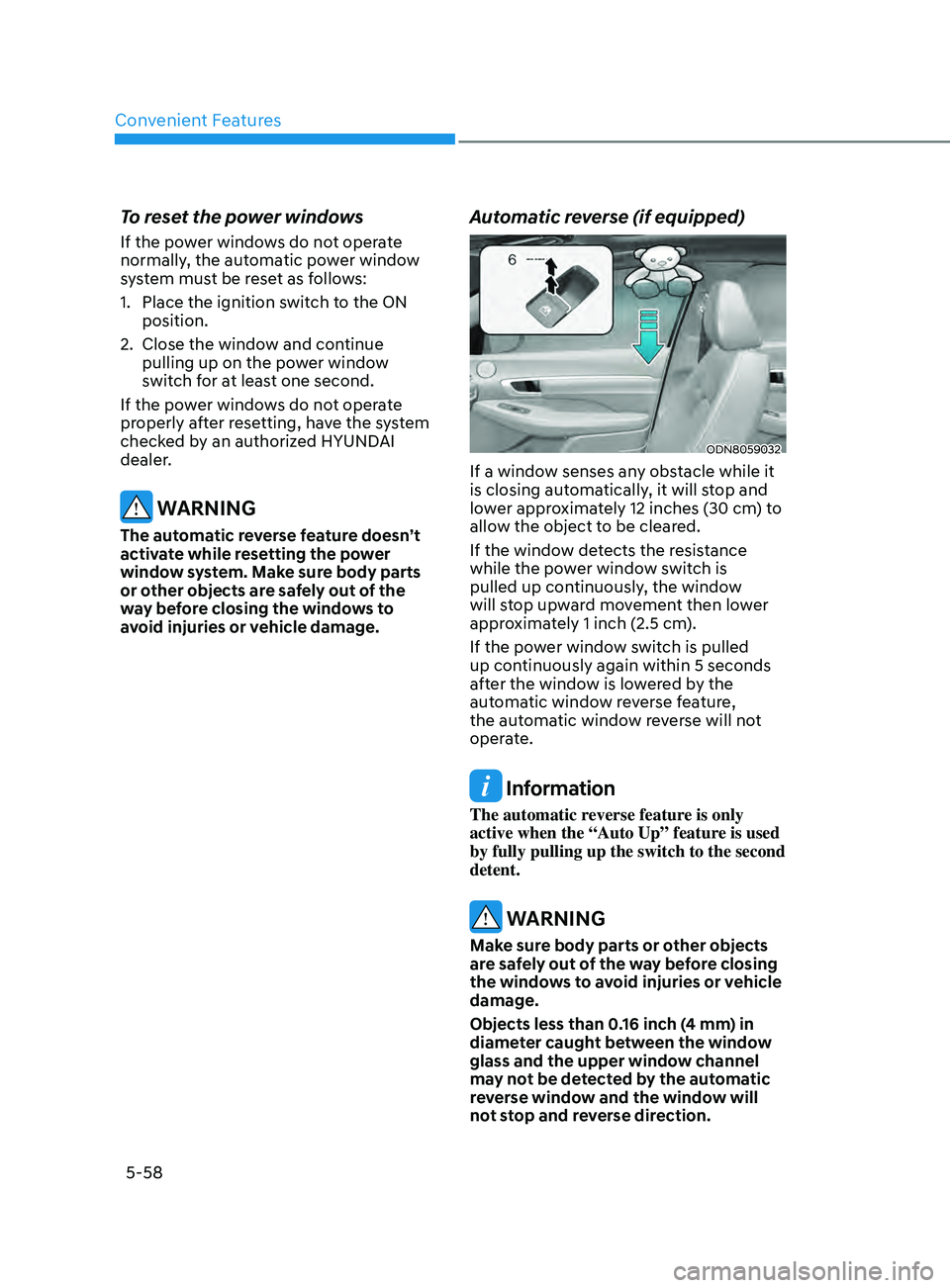
Automatic reverse (if equipped)
ODN8059032
If a window senses any obstacle while it
is closing automatically, it will stop and
lower approximately 12 inches (30 cm) to
allow the object to be cleared.
If the window detects the resistance
while the power window switch is
pulled up continuously, the window
will stop upward movement then lower
approximately 1 inch (2.5 cm).
If the power window switch is pulled
up continuously again within 5 seconds
after the window is lowered by the
automatic window reverse feature,
the automatic window reverse will not
operate.
Information
The automatic reverse feature is only
active when the “Auto Up” feature is used
by fully pulling up the switch to the second
detent.
WARNING
Make sure body parts or other objects
are safely out of the way before closing
the windows to avoid injuries or vehicle
damage.
Objects less than 0.16 inch (4 mm) in
diameter caught between the window
glass and the upper window channel
may not be detected by the automatic
reverse window and the window will
not stop and reverse direction.
Page 189 of 546
05
5-59
NOTICE
Do not install any accessories on the
windows. The automatic reverse
feature may not operate.
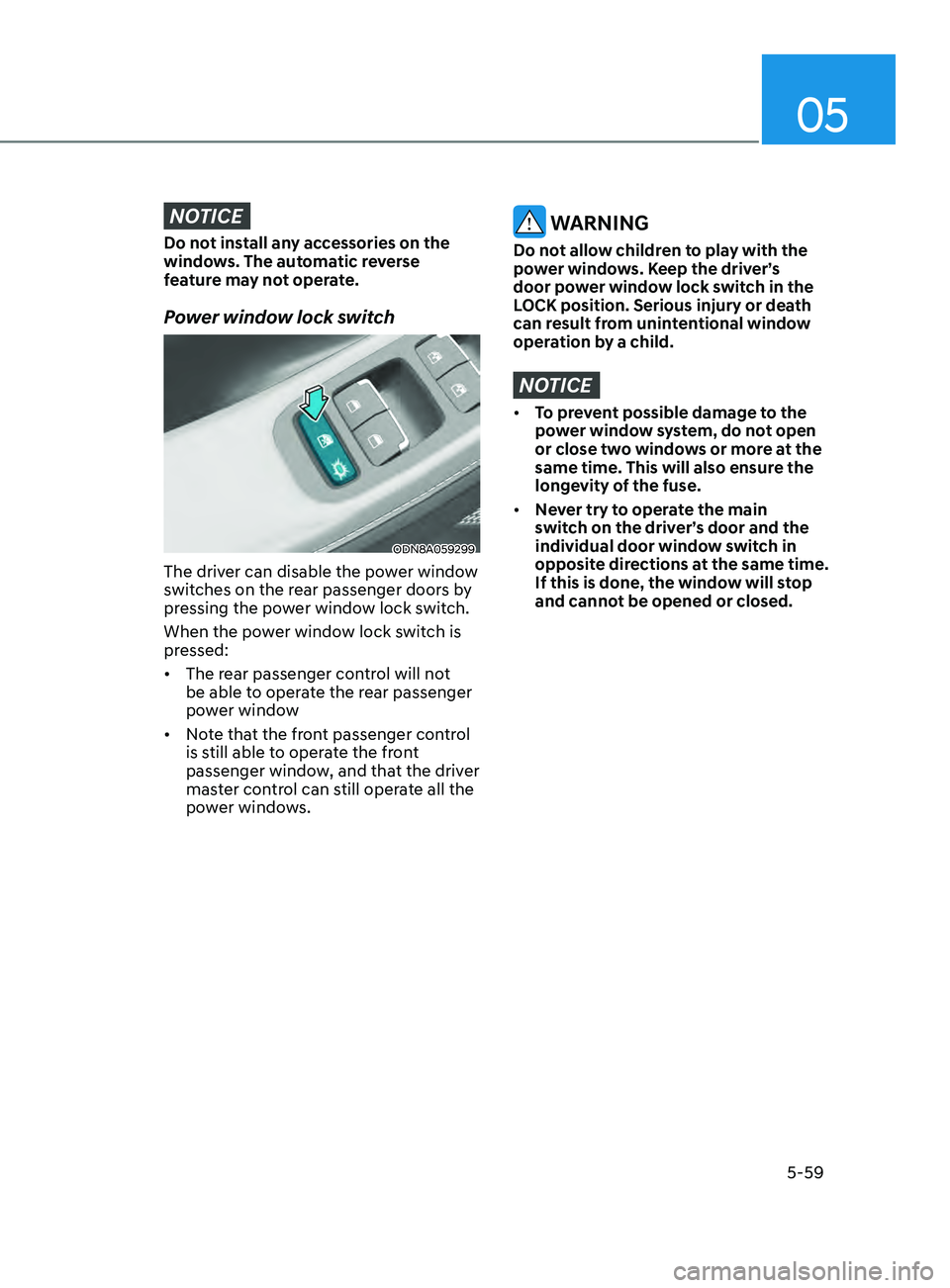
Power window lock switch
ODN8A059299
The driver can disable the power window
switches on the rear passenger doors by
pressing the power window lock switch.
When the power window lock switch is
pressed:
• The rear passenger control will not
be able to operate the rear passenger
power window
• Note that the front passenger control
is still able to operate the front
passenger window, and that the driver
master control can still operate all the
power windows.
WARNING
Do not allow children to play with the
power windows. Keep the driver’s
door power window lock switch in the
LOCK position. Serious injury or death
can result from unintentional window
operation by a child.
NOTICE
• To prevent possible damage to the
power window system, do not open
or close two windows or more at the
same time. This will also ensure the
longevity of the fuse.
• Never try to operate the main
switch on the driver’s door and the
individual door window switch in
opposite directions at the same time.
If this is done, the window will stop
and cannot be opened or closed.
Page 192 of 546
Convenient Features
5-62
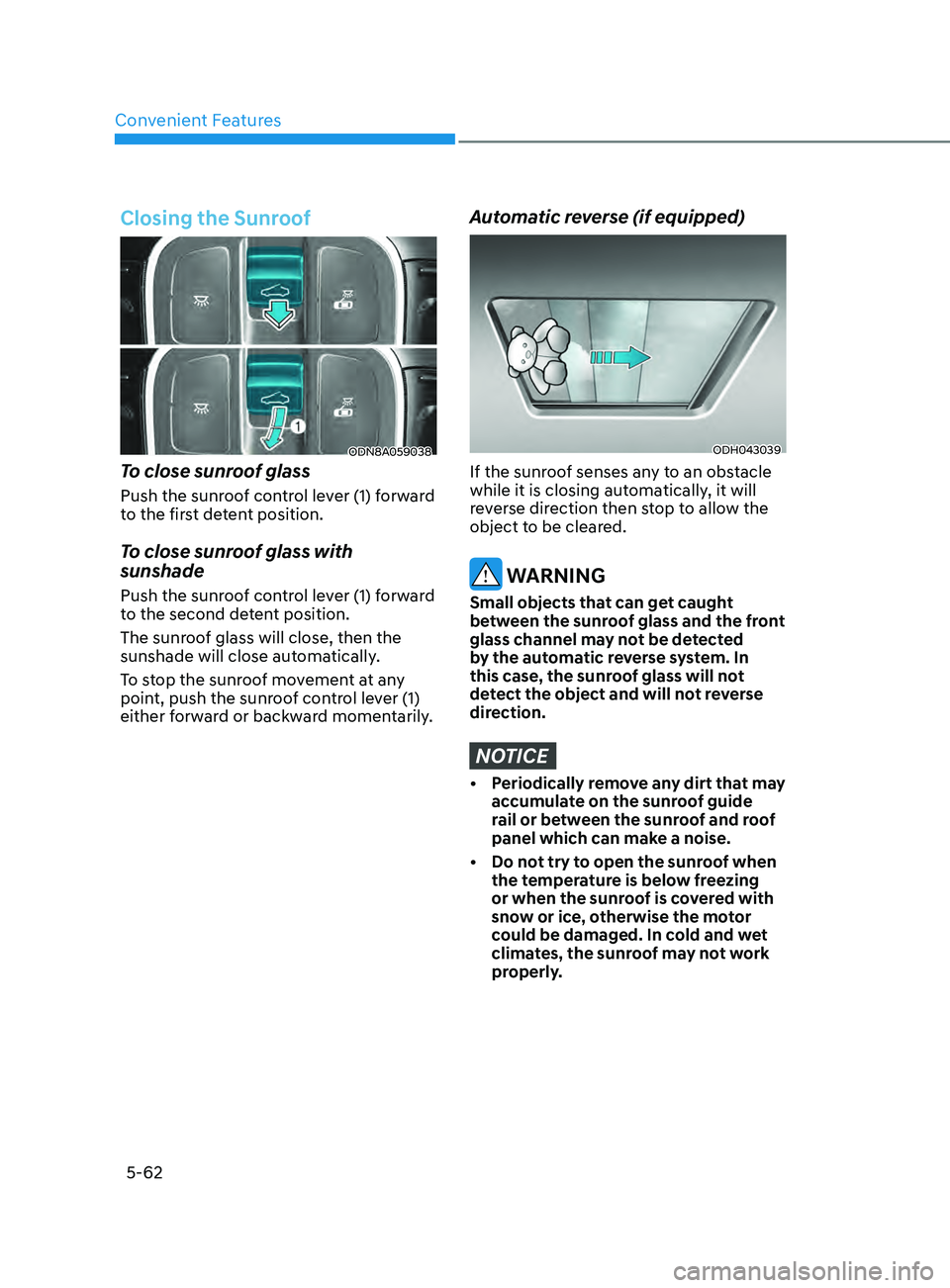
Closing the Sunroof
ODN8A059038
To close sunroof glass
Push the sunroof control lever (1) forward
to the first detent position.
To close sunroof glass with
sunshade
Push the sunroof control lever (1) forward
to the second detent position.
The sunroof glass will close, then the
sunshade will close automatically.
To stop the sunroof movement at any
point, push the sunroof control lever (1)
either forward or backward momentarily.
Automatic reverse (if equipped)
ODH043039
If the sunroof senses any to an obstacle
while it is closing automatically, it will
reverse direction then stop to allow the
object to be cleared.
WARNING
Small objects that can get caught
between the sunroof glass and the front
glass channel may not be detected
by the automatic reverse system. In
this case, the sunroof glass will not
detect the object and will not reverse
direction.
NOTICE
• Periodically remove any dirt that may accumulate on the sunroof guide
rail or between the sunroof and roof
panel which can make a noise.
•
Do no
t try to open the sunroof when
the temperature is below freezing
or when the sunroof is covered with
snow or ice, otherwise the motor
could be damaged. In cold and wet
climates, the sunroof may not work
properly.
Page 199 of 546
05
5-69
Information
• If you press the door unlock button (2), the Smart
Trunk with Auto
Open function will be deactivated
temporarily. But, if you do not open
any door for 30 seconds, the Smart
Trunk with Auto Open function will be
activated again.
• If
you press the trunk open button
(3) for
more than 1 second, the trunk
opens.
• If
you press the door
lock button (1) or
trunk open button (3) when the Smart
T
runk with Auto Open in the Detect
and Alert stage, the Smart Trunk
with Auto Open function will not be
deactivated.
• In
case you have deactivated the Smart
T
runk with Auto Open function by
pressing the smart key button and
opened a door, the Smart Trunk with
Auto Open function can be activated
again by closing and locking all doors.
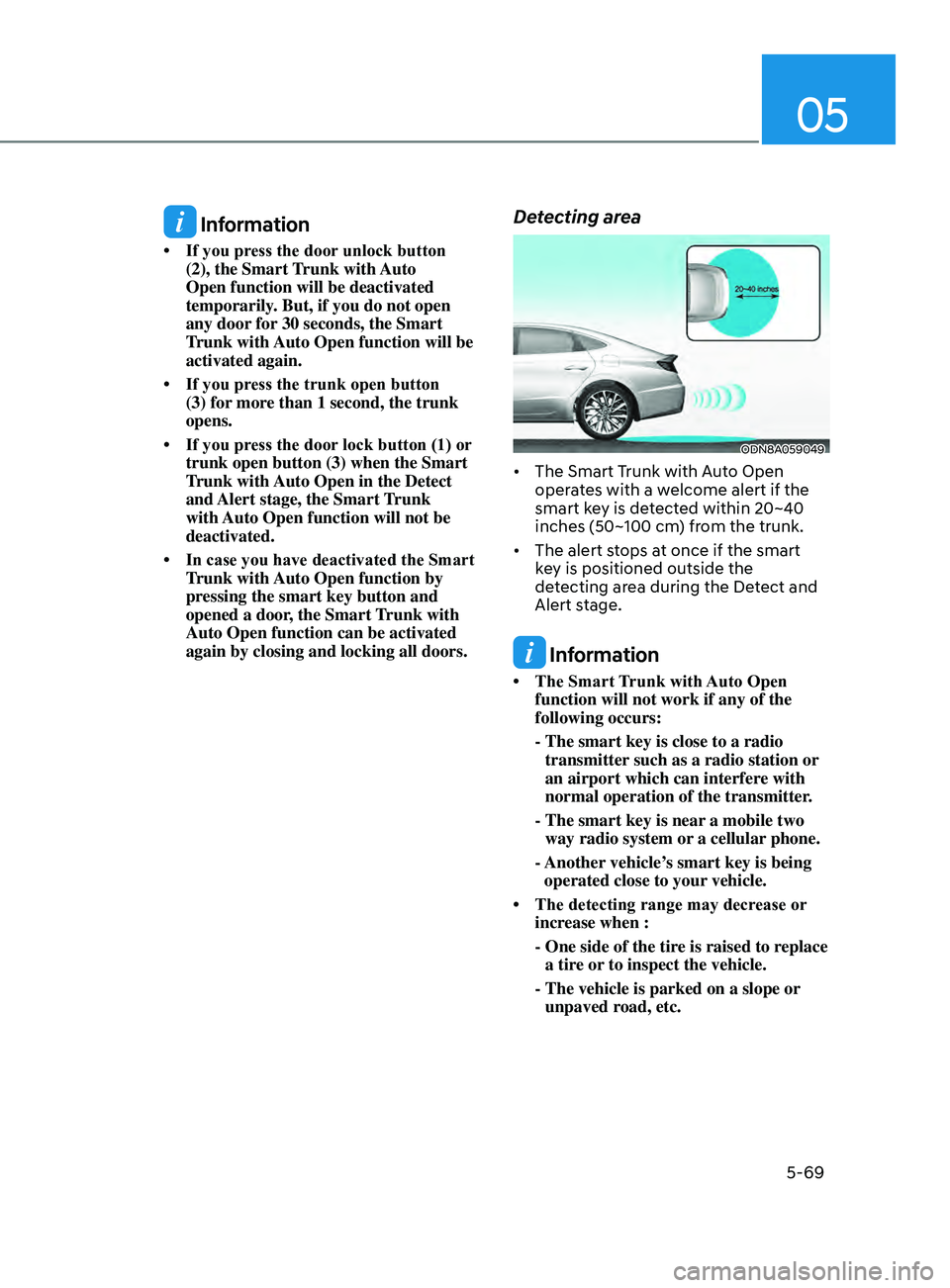
Detecting area
ODN8A059049
• The Smart Trunk with Auto Open oper ates with a welcome alert if the
smart key is detected within 20~40
inches (50~100 cm) from the trunk.
• The
alert stops at once if the smart
k
ey is positioned outside the
detecting area during the Detect and
Alert stage.
Information
• The Smart T runk with Auto Open function will not work if any of the
following occurs:
- The smart key is close to a radio
transmitter
such as a radio station or
an airport which can interfere with
normal operation of the transmitter.
- The smart key is near
a mobile two
way radio system or a cellular phone.
- Another
vehicle’s smart key is being
operated close to your vehicle.
• The
detecting
range
may decrease or
incr
ease when :
-
One side of the tir
e is raised to replace
a tire or to inspect the vehicle.
- The vehicle i
s parked on a slope or
unpaved road, etc.
Page 214 of 546
Convenient Features5-84
Wipers AnD WAsher s
ODN8059208L
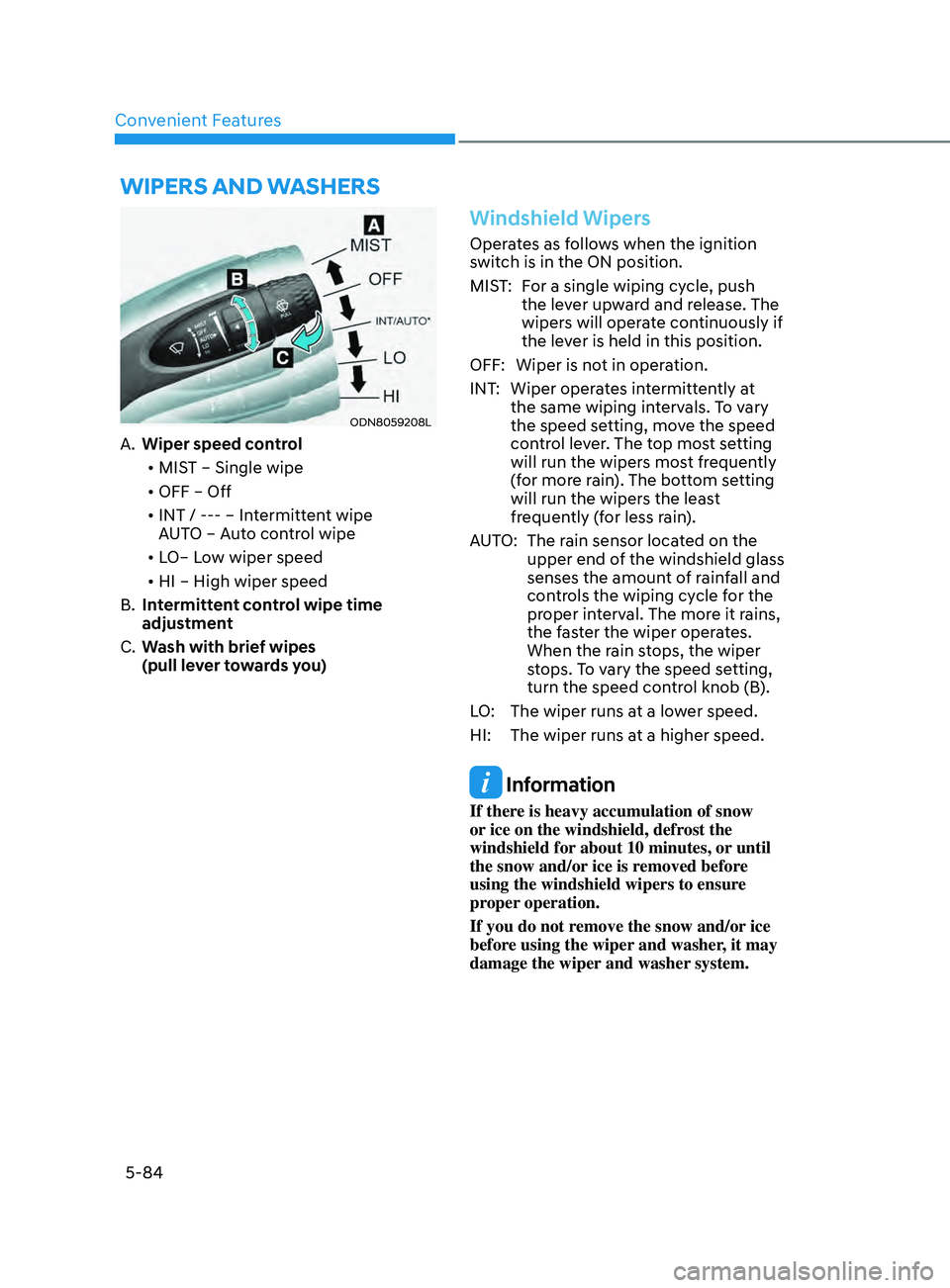
A. Wiper speed control
• MIST – Single wipe
• OFF – Off
• INT / --- – Intermittent wipe
AUTO – Auto control wipe
• LO– Low wiper speed
• HI – High wiper speed
B.
In
termittent control wipe time
adjustment
C.
W
ash with brief wipes
(pull lever towards you)
Windshield Wipers
Operates as follows when the ignition
switch is in the ON position.
MIST: For a single wiping cycle, push the lever upward and release. The
wipers will operate continuously if
the lever is held in this position.
OFF: Wiper is not in operation.
INT: Wiper operates intermittently at the same wiping intervals. To vary
the speed setting, move the speed
control lever. The top most setting
will run the wipers most frequently
(for more rain). The bottom setting
will run the wipers the least
frequently (for less rain).
AUTO: The rain sensor located on the upper end of the windshield glass
senses the amount of rainfall and
controls the wiping cycle for the
proper interval. The more it rains,
the faster the wiper operates.
When the rain stops, the wiper
stops. To vary the speed setting,
turn the speed control knob (B).
LO: The wiper runs at a lower speed.
HI: The wiper runs at a higher speed.
Information
If there is heavy accumulation of snow
or ice on the windshield, defrost the
windshield for about 10 minutes, or until
the snow and/or ice is removed before
using the windshield wipers to ensure
proper operation.
If you do not remove the snow and/or ice
before using the wiper and washer, it may
damage the wiper and washer system.
Page 215 of 546
05
5-85
Information
If the wiper switch is set in AUTO mode
when Engine Start/Stop button is in the
ON position, the wiper will operate once to
perform a self-check of the system. Set the
wiper to the OFF position when the wiper
is not in use.
WARNING
To avoid personal injury from the
windshield wipers, when the engine
is running and the windshield wiper
switch is placed in the AUTO mode:
•
Do no
t touch the upper end of the
windshield glass facing the rain
sensor.
•
Do no
t wipe the upper end of the
windshield glass with a damp or wet
cloth.
•
Do no
t put pressure on the
windshield glass.
Windshield Washers
ODN8059209K
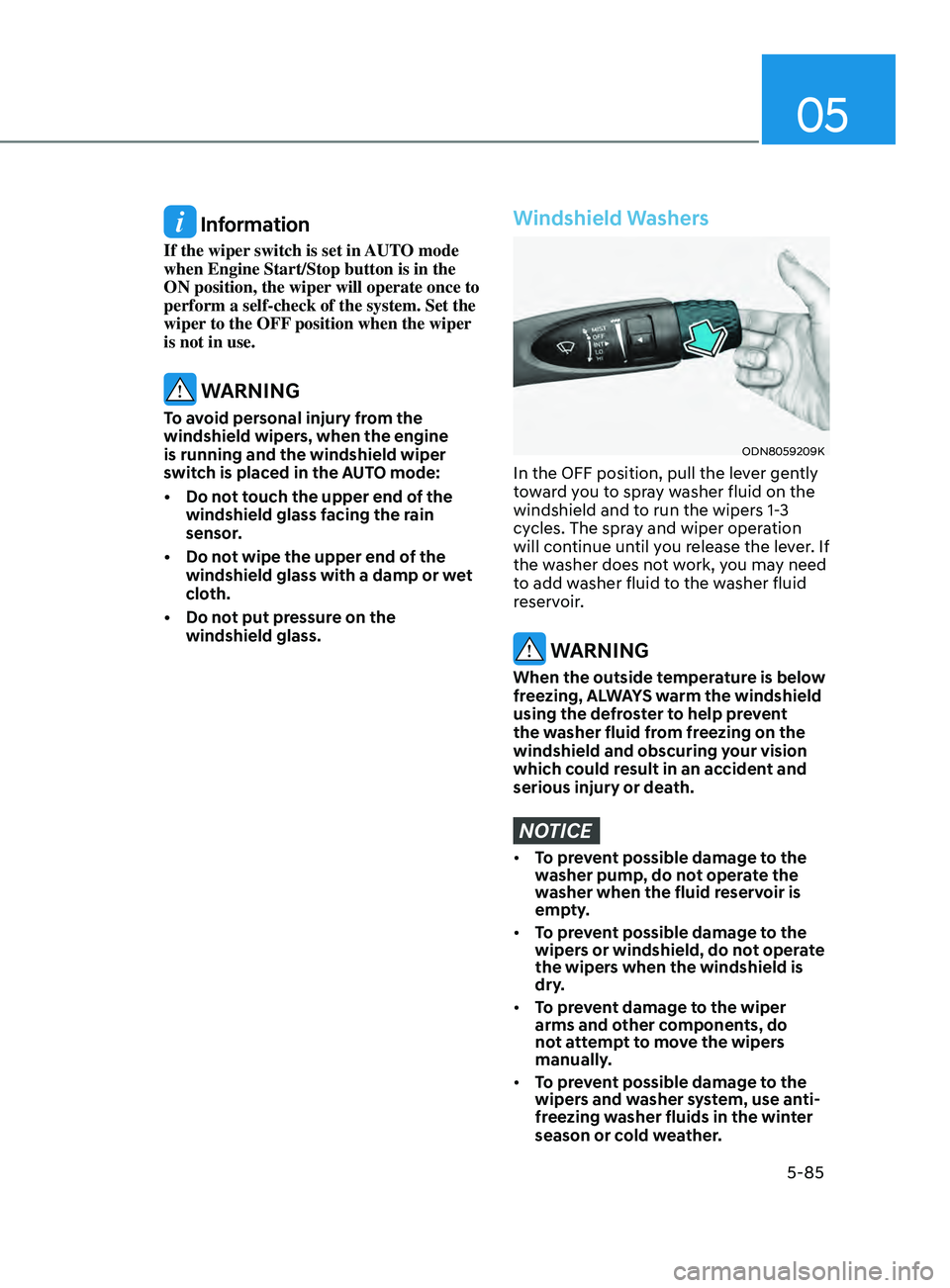
In the OFF position, pull the lever gently
toward you to spray washer fluid on the
windshield and to run the wipers 1-3
cycles. The spray and wiper operation
will continue until you release the lever. If
the washer does not work, you may need
to add washer fluid to the washer fluid
reservoir.
WARNING
When the outside temperature is below
freezing, ALWAYS warm the windshield
using the defroster to help prevent
the washer fluid from freezing on the
windshield and obscuring your vision
which could result in an accident and
serious injury or death.
NOTICE
• To prevent possible damage to the
washer pump, do not operate the
washer when the fluid reservoir is
empty.
• To prevent possible damage to the
wipers or windshield, do not operate
the wipers when the windshield is
dry.
• To prevent damage to the wiper
arms and other components, do
not attempt to move the wipers
manually.
• To prevent possible damage to the
wipers and washer system, use anti-
freezing washer fluids in the winter
season or cold weather.
Page 239 of 546
05
5-109
ODN8A059248
(2) Park the vehicle in front of the
space where you desire to use
the Remote Moving Forward/
Backward. Press Remote Smart
Parking Assist system button
and select the Remote Moving
Forward/Backward. Exit the
vehicle possessing the smart key
and check whether all the doors
are closed. The hazard warning
light blinks and Remote Moving
Forward/Backward displays
whether the vehicle is movable or
not.
ÃY
ou will hear frequent beep sounds if
the driver gets off the vehicle after the
Remote Moving Forward/Backward is
ready.
ODN8059095
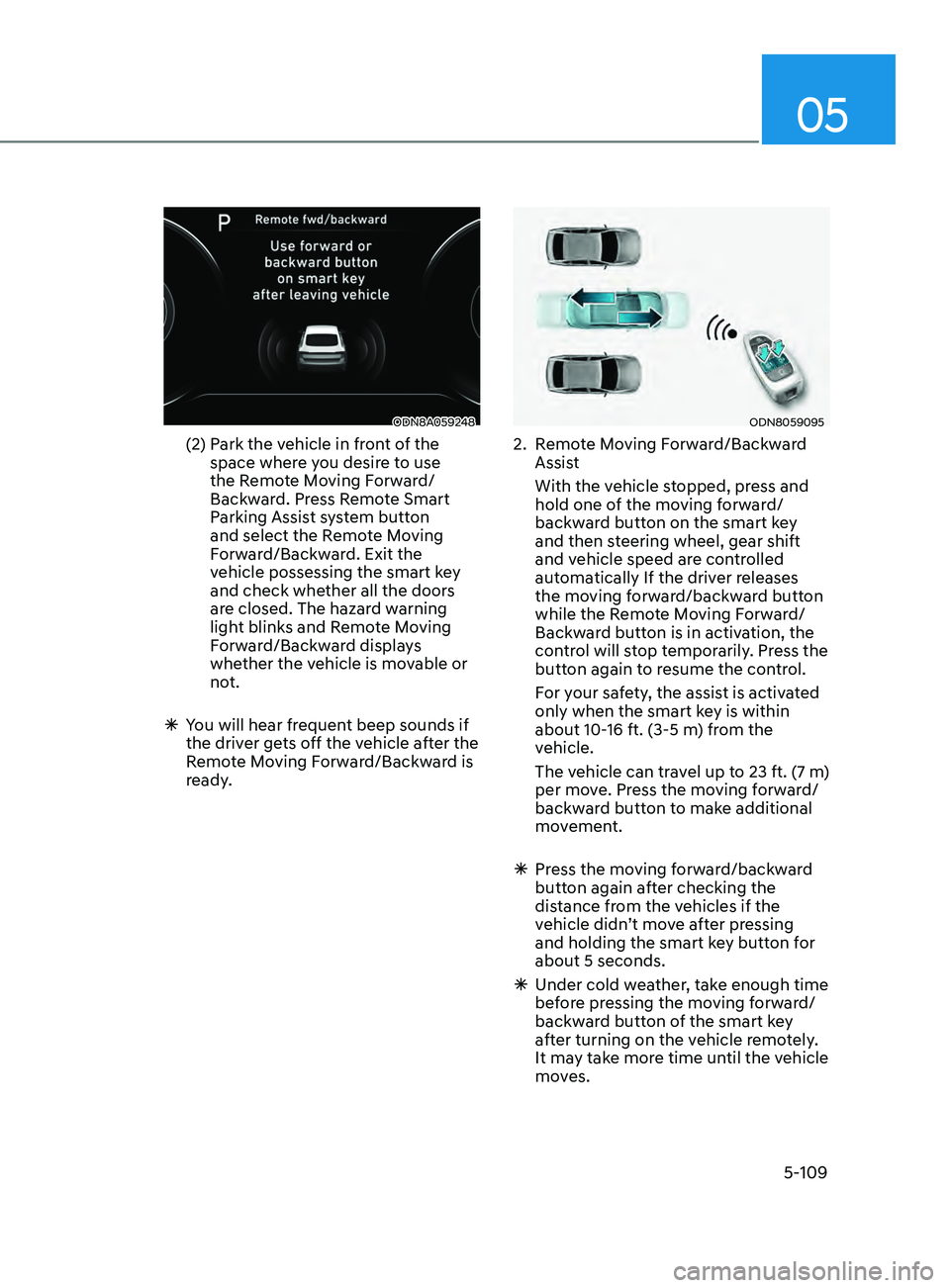
2. Remote Moving Forward/Backward Assist
With the v
ehicle stopped, press and
hold one of the moving forward/
backward button on the smart key
and then steering wheel, gear shift
and vehicle speed are controlled
automatically If the driver releases
the moving forward/backward button
while the Remote Moving Forward/
Backward button is in activation, the
control will stop temporarily. Press the
button again to resume the control.
F
or your safety, the assist is activated
only when the smart key is within
about 10-16 ft. (3-5 m) from the
vehicle.
The v
ehicle can travel up to 23 ft. (7 m)
per move. Press the moving forward/
backward button to make additional
movement.
à Pr
ess the moving forward/backward
button again after checking the
distance from the vehicles if the
vehicle didn’t move after pressing
and holding the smart key button for
about 5 seconds.
à Under cold w
eather, take enough time
before pressing the moving forward/
backward button of the smart key
after turning on the vehicle remotely.
It may take more time until the vehicle
moves.
Page 242 of 546
Convenient Features
5-112
The Remote Moving Forward/
Backward assist will stop
temporarily when:
7. An obstacle is detected at the direction the vehicle is heading.
8.
The door or trunk is opened.
9.
The mo
ving forward/backward button
on the smart key is released.
10.
Multiple butt
ons on the smart key are
pressed at the same time.
11.
The dis
tance between the smart key
and vehicle is over 13 ft. (4 m).
12.
A butt
on on the other smart key is
pressed during operation.
13.
R
ear Cross-Traffic Collision-Avoidance
Assist system is activated while
reserving.
14.
The v
ehicle moves 23 ft. (7 m) with the
Remote Moving Forward/Backward
while the smart key is pressed.
(Maximum travel distance per move)
à The v
ehicle stops when the Remote
Smart Parking Assist system will stop
temporarily and the function will
resume when the above condition is
cleared.
The Remote Moving Forward/
Backward assist is cancelled while
in operation when:
1. The driver holds the steering wheel while the steering wheel is controlled.
2.
The gear is shift
ed or the Electronic
Parking Brake (EPB) is activated.
3.
The hood opens.
4.
The v
ehicle speed exceeds 3 mph
(5km/h).
5.
The v
ehicle accelerates suddenly.
6.
The v
ehicle slips back while
controlling the vehicle speed.
7.
The wheel is s
tuck and the vehicle is
unable to move.
8.
About 3 minut
es and 50 seconds
have passed after the Remote Moving
Forward/Backward assist starts. 9.
The gr
adient of the road exceeds
the range supported by the Remote
Moving Forward/Backward assist.
10.
The s
teering, shifting gear and drive
assist are difficult.
11.
The suspended s
tatus lasts for over 1
minute.
12.
The driv
er continuously presses and
releases the smart key’s moving
forward/backward button over 10
times.
13.
The T
raction Control System (TCS) is
activated while controlling the vehicle
speed.
14.
The smart k
ey is damaged.
15.
The acceler
ator/brake pedal is
depressed while all the doors are
closed.
16.
The br
ake pedal is depressed while
the driver’s door is open and the smart
key is outside the vehicle.
17. The vehicle travels more than 46 ft. (14
m) after the Remote Moving Forward/
Backward assist is activated.
18.
The the
ft alarm system is activated.
Ã
When the R
emote Moving Forward/
Backward is completed, the gear in
P(Park) and Electronic Parking Brake
(EPB) are engaged automatically and
the vehicle turns off. Ã The fr equent beep sounds are
generated to show the deactivation
status.
Page 245 of 546
05
5-115
Link with other systems
Activation of other systems may
be restricted according to the
circumstances while Remote Smart
Parking Assist system is in activation.
The systems linked to the Remote Smart
Parking Assist system are as follows:
1.
I
dle Stop & Go
(1)
While R
emote Smart Parking
Assist system is operating, ISG is
deactivated.
(2)
If R
emote Smart Parking Assist
system is completed or cancelled,
ISG can be activated.
2.
A
uto Hold
(1)
The activ
ated Auto Hold is
switched to deactivation status
when Remote Smart Parking Assist
system starts.
(2)
The A
uto Hold button will not
respond while Remote Smart
Parking Assist system is in
activation.
(3
)
A
fter Remote Smart Parking
Assist system is completed or
deactivated, the Auto Hold will
return to the status before Remote
Smart Parking Assist system was
activated.
3.
Electr
onic Stability Control (ESC)
(1)
Electr
onic Stability Control (ESC)
system switches from OFF to
activation status (ESC OFF button
turns off) when Remote Smart
Parking Assist system is activated.
(2)
The ESC OFF butt
on will not
respond while Remote Smart
Parking Assist system is in
activation.
(3
)
The ABS/T
CS/ESC system activates
while Remote Smart Parking Assist
system is in activation.
(
4)
A
fter Remote Smart Parking
Assist system is completed or
deactivated, the ESC maintains the
ON status.
How the Remote Moving
Forward/Backward System
Works
Backward Parking
ODN8059255
ODN8059335
ODN8059257
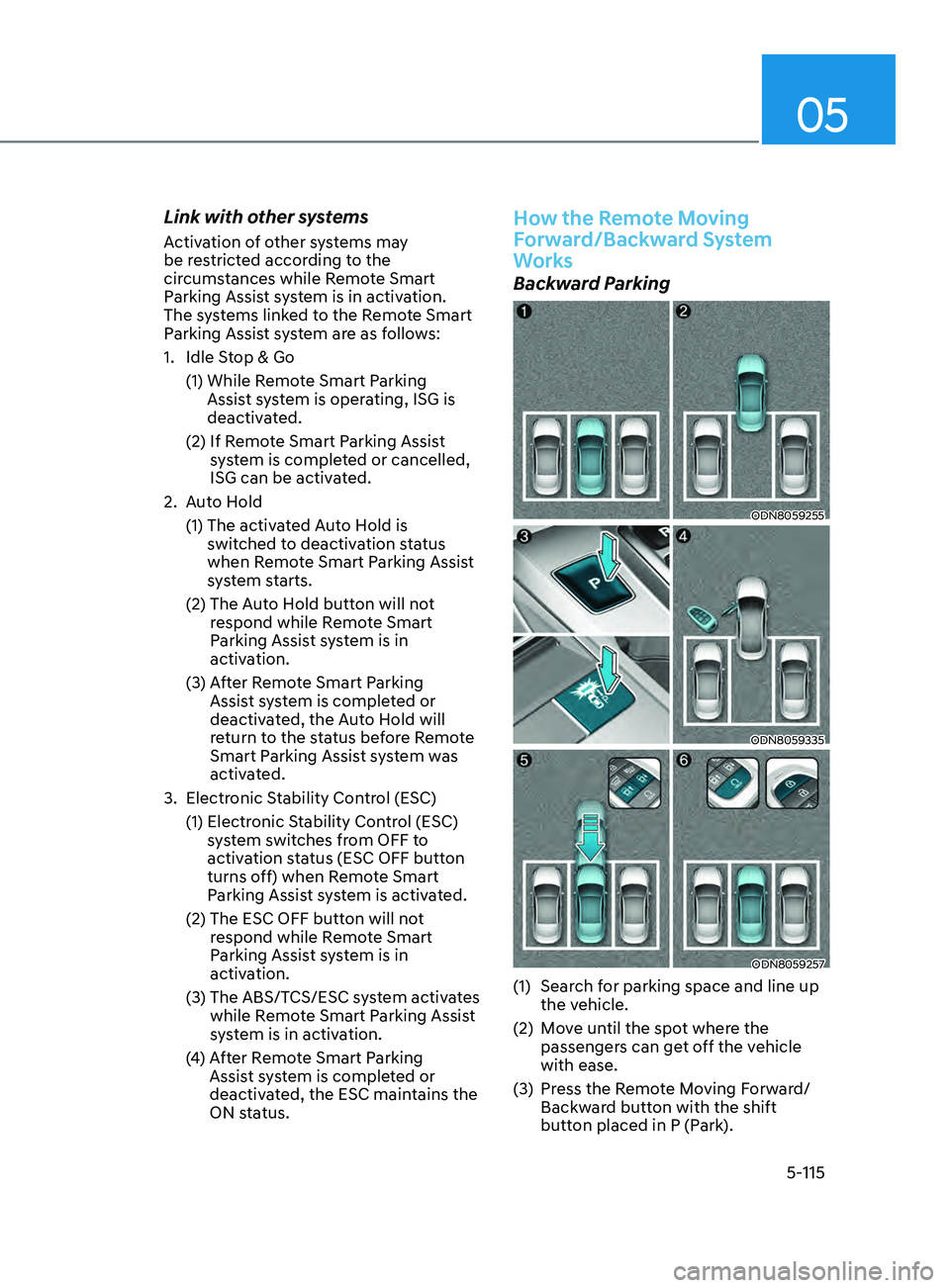
(1) Search for parking space and line up the vehicle.
(2)
M
ove until the spot where the
passengers can get off the vehicle
with ease.
(3)
Pr
ess the Remote Moving Forward/
Backward button with the shift
button placed in P (Park).