FCA HYUNDAI SONATA 2022 Owners Manual
[x] Cancel search | Manufacturer: HYUNDAI, Model Year: 2022, Model line: SONATA, Model: HYUNDAI SONATA 2022Pages: 546, PDF Size: 51.21 MB
Page 100 of 546
04
4-15
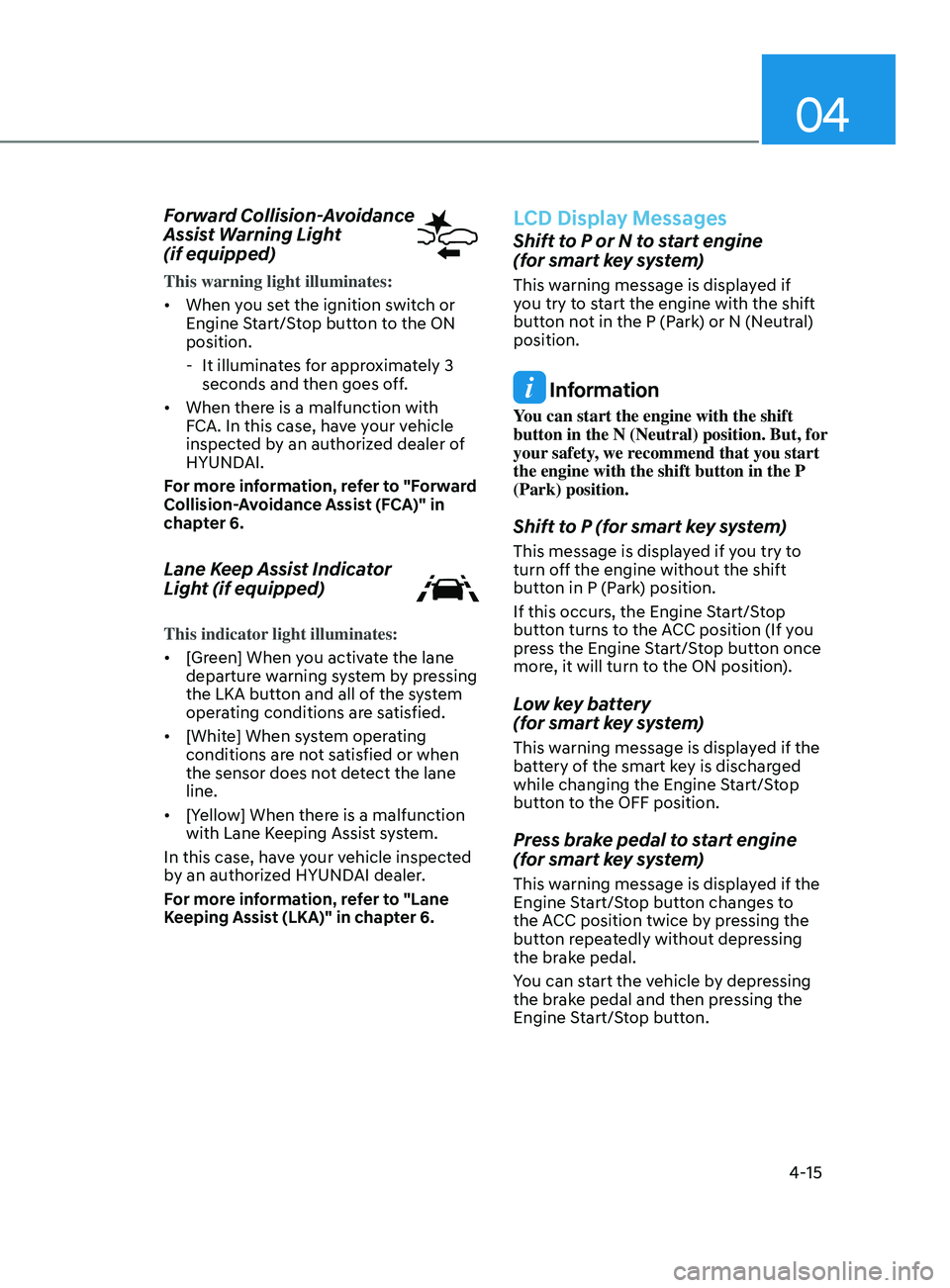
Forward Collision-Avoidance
Assist Warning Light
(if equipped)
This warning light illuminates:
• When you set the ignition switch or
Engine Start/Stop button to the ON
position.
- It illumina
tes for approximately 3
seconds and then goes off.
• When there is a malfunction with
FCA. In this case, have your vehicle
inspected by an authorized dealer of
HYUNDAI.
For more information, refer to "Forward
Collision-Avoidance Assist (FCA)" in
chapter 6.
Lane Keep Assist Indicator
Light (if equipped)
This indicator light illuminates:
• [Green] When you activate the lane
departure warning system by pressing
the LKA button and all of the system
operating conditions are satisfied.
• [White] When system operating
conditions are not satisfied or when
the sensor does not detect the lane
line.
• [Yellow] When there is a malfunction
with Lane Keeping Assist system.
In this case, have your vehicle inspected
by an authorized HYUNDAI dealer.
For more information, refer to "Lane
Keeping Assist (LKA)" in chapter 6.
LCD Display Messages
Shift to P or N to start engine
(for smart key system)
This warning message is displayed if
you try to start the engine with the shift
button not in the P (Park) or N (Neutral)
position.
Information
You can start the engine with the shift
button in the N (Neutral) position. But, for
your safety, we recommend that you start
the engine with the shift button in the P
(Park) position.
Shift to P (for smart key system)
This message is displayed if you try to
turn off the engine without the shift
button in P (Park) position.
If this occurs, the Engine Start/Stop
button turns to the ACC position (If you
press the Engine Start/Stop button once
more, it will turn to the ON position).
Low key battery
(for smart key system)
This warning message is displayed if the
battery of the smart key is discharged
while changing the Engine Start/Stop
button to the OFF position.
Press brake pedal to start engine
(for smart key system)
This warning message is displayed if the
Engine Start/Stop button changes to
the ACC position twice by pressing the
button repeatedly without depressing
the brake pedal.
You can start the vehicle by depressing
the brake pedal and then pressing the
Engine Start/Stop button.
Page 110 of 546
04
4-25
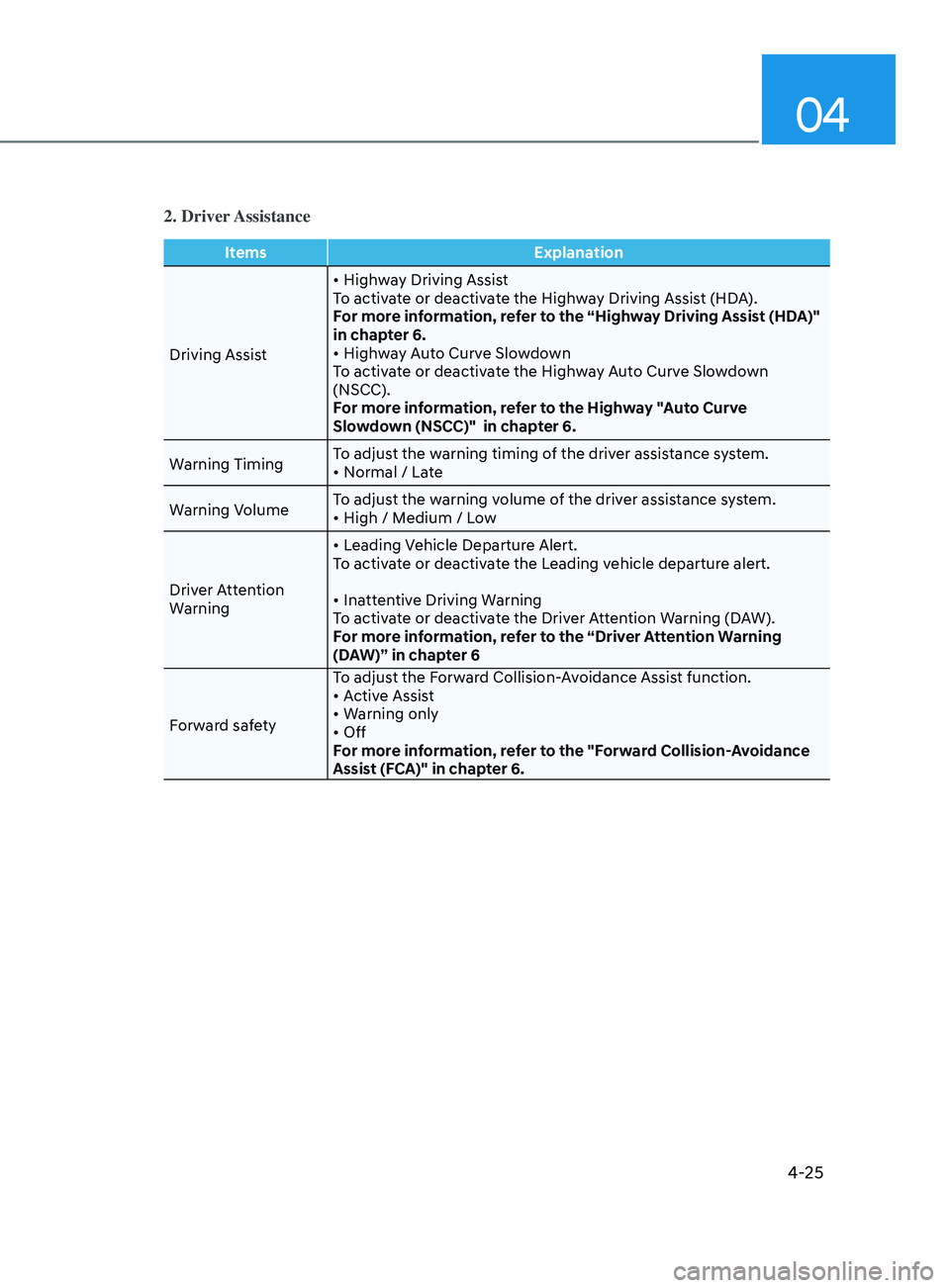
2. Driver Assistance
ItemsExplanation
Driving Assist •
Highway Driving Assist
To activate or deactivate the Highway Driving Assist (HDA).
For more information, refer to the “Highway Driving Assist (HDA)"
in chapter 6.
•
Highway Auto Curve Slowdown
To activate or deactivate the Highway Auto Curve Slowdown
(NSCC).
For more information, refer to the Highway "Auto Curve
Slowdown (NSCC)" in chapter 6.
Warning Timing To adjust the warning timing of the driver assistance system.
•
Normal / Late
W
arning Volume To adjust the warning volume of the driver assistance system.
•
High / Medium / Low
Driver Attention
Warning •
Leading Vehicle Departure Alert.
To activate or deactivate the Leading vehicle departure alert.
•
Inattentive Driving Warning
To activate or deactivate the Driver Attention Warning (DAW).
For more information, refer to the “Driver Attention Warning
(DAW)” in chapter 6
Forward safety To adjust the Forward Collision-Avoidance Assist function.
•
Active Assist
•
Warning only
•
Off
For more information, refer to the "Forward Collision-Avoidance
Assist (FCA)" in chapter 6.
Page 126 of 546
04
4-41
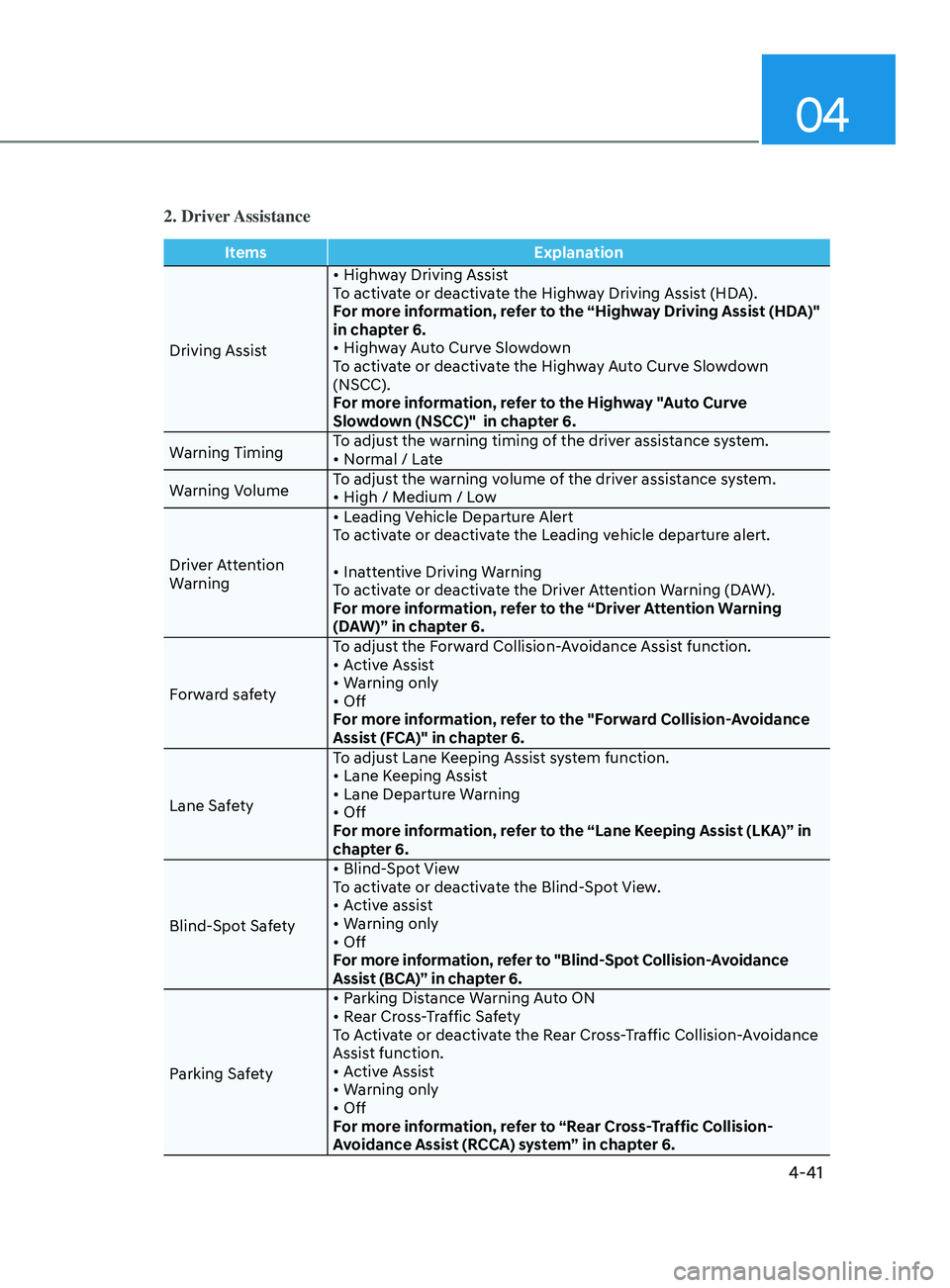
2. Driver Assistance
ItemsExplanation
Driving Assist •
Highway Driving Assist
To activate or deactivate the Highway Driving Assist (HDA).
For more information, refer to the “Highway Driving Assist (HDA)"
in chapter 6.
•
Highway Auto Curve Slowdown
To activate or deactivate the Highway Auto Curve Slowdown
(NSCC).
For more information, refer to the Highway "Auto Curve
Slowdown (NSCC)" in chapter 6.
Warning Timing To adjust the warning timing of the driver assistance system.
•
Normal / Late
W
arning Volume To adjust the warning volume of the driver assistance system.
•
High / Medium / Low
Driver Attention
Warning •
Leading Vehicle Departure Alert
To activate or deactivate the Leading vehicle departure alert.
•
Inattentive Driving Warning
To activate or deactivate the Driver Attention Warning (DAW).
For more information, refer to the “Driver Attention Warning
(DAW)” in chapter 6.
Forward safety To adjust the Forward Collision-Avoidance Assist function.
•
Active Assist
•
Warning only
•
Off
For more information, refer to the "Forward Collision-Avoidance
Assist (FCA)" in chapter 6.
Lane Safety To adjust Lane Keeping Assist system function.
•
Lane Keeping Assist
•
Lane Departure Warning
•
Off
For more information, refer to the “Lane Keeping Assist (LKA)” in
chapter 6.
Blind-Spot Safety •
Blind-Spot View
To activate or deactivate the Blind-Spot View.
•
Active assist
•
Warning only
•
Off
For more information, refer to "Blind-Spot Collision-Avoidance
Assist (BCA)” in chapter 6.
Parking Safety •
Parking Distance Warning Auto ON
•
Rear Cross-Traffic Safety
T
o Activate or deactivate the Rear Cross-Traffic Collision-Avoidance
Assist function.
•
Active Assist
•
Warning only
•
Off
F
or more information, refer to “Rear Cross-Traffic Collision-
Avoidance Assist (RCCA) system” in chapter 6.
Page 285 of 546

6
6. While Driving
Before Driving ........................................................................\
........................6-5Before Entering the Vehicle ........................................................................\
.............6-5
Be fore Starting ........................................................................\
................................. 6-5
Ignition Switch ........................................................................\
.......................6-6Key Ignition Switch ........................................................................\
........................... 6-6
E ngine Start/Stop Button ........................................................................\
................ 6-9
Remote Start
........................................................................\
.................................... 6-12
Automatic Transmission ........................................................................\
.......6- 13Automatic Transmission Operation ........................................................................\
6- 13
Parking ........................................................................\
............................................. 6-16
LCD Display Message
........................................................................\
...................... 6-17
Good Driving Practices
........................................................................\
.................. 6-18
Paddle Shifter (Manual Shift Mode)
......................................................................
6-19
Brake System ........................................................................\
........................6- 20Power Brakes ........................................................................\
..................................6- 20
Disc Brakes Wear Indicator........................................................................\
............ 6-20
Electronic Parking Brake (EPB)
........................................................................\
....... 6-21
Auto Hold
........................................................................\
........................................ 6-24
Anti-lock Brake System (ABS) .....................................................................6- 27Electronic Stability Control (ESC) ........................................................................\
.6- 29
Vehicle Stability Management (VSM) .................................................................... 6-31
Hill-Start Assist Control (HAC)
........................................................................\
....... 6-32
Good Braking Practices
........................................................................\
................. 6-32
ISG (Idle Stop and Go) system..................................................................... 6-33To Activate the ISG System ........................................................................\
............6- 33
To Deactivate the ISG System ........................................................................\
....... 6-35
ISG System Malfunction
........................................................................\
................ 6-35
Battery Sensor Deactivation
........................................................................\
.......... 6-36
Drive Mode Integrated Control System ......................................................6- 37Drive Mode ........................................................................\
.....................................6- 37
Forward Collision – Avoidance Assist (FCA) - Sensor Fusion ..................6-40System Setting and Activation ........................................................................\
..... 6-40
F CA Warning Message and Brake Control ............................................................6-42
FCA Sensor
........................................................................\
..................................... 6-45
System Malfunction
........................................................................\
....................... 6-47
Limitations of the System
........................................................................\
.............. 6-48
Forward Collision-Avoidance Assist - Junction Turning
......................................6-55
Page 324 of 546
6-40
Forward Collision-Avoidance Assist
system is designed to detect the
vehicle, a pedestrian or cyclist ahead (if
equipped) in the roadway through front
radar signals and front view camera
recognition to warn the driver that a
collision is imminent, and if necessary,
apply emergency braking.
WARNING
Take the following precautions when
using Forward Collision-Avoidance
Assist system:
• This system is only a supplemental
system and it is not intended to,
nor does it replace the need for
extreme care and attention of
the driver. The sensing range and
objects detectable by the sensors
are limited. Pay attention to the road
conditions at all times.
• Drive at posted speed limits and
accordance to road conditions.
• Always drive cautiously to prevent
unexpected and sudden situations
from occurring. FCA does not always
stop the vehicle completely.
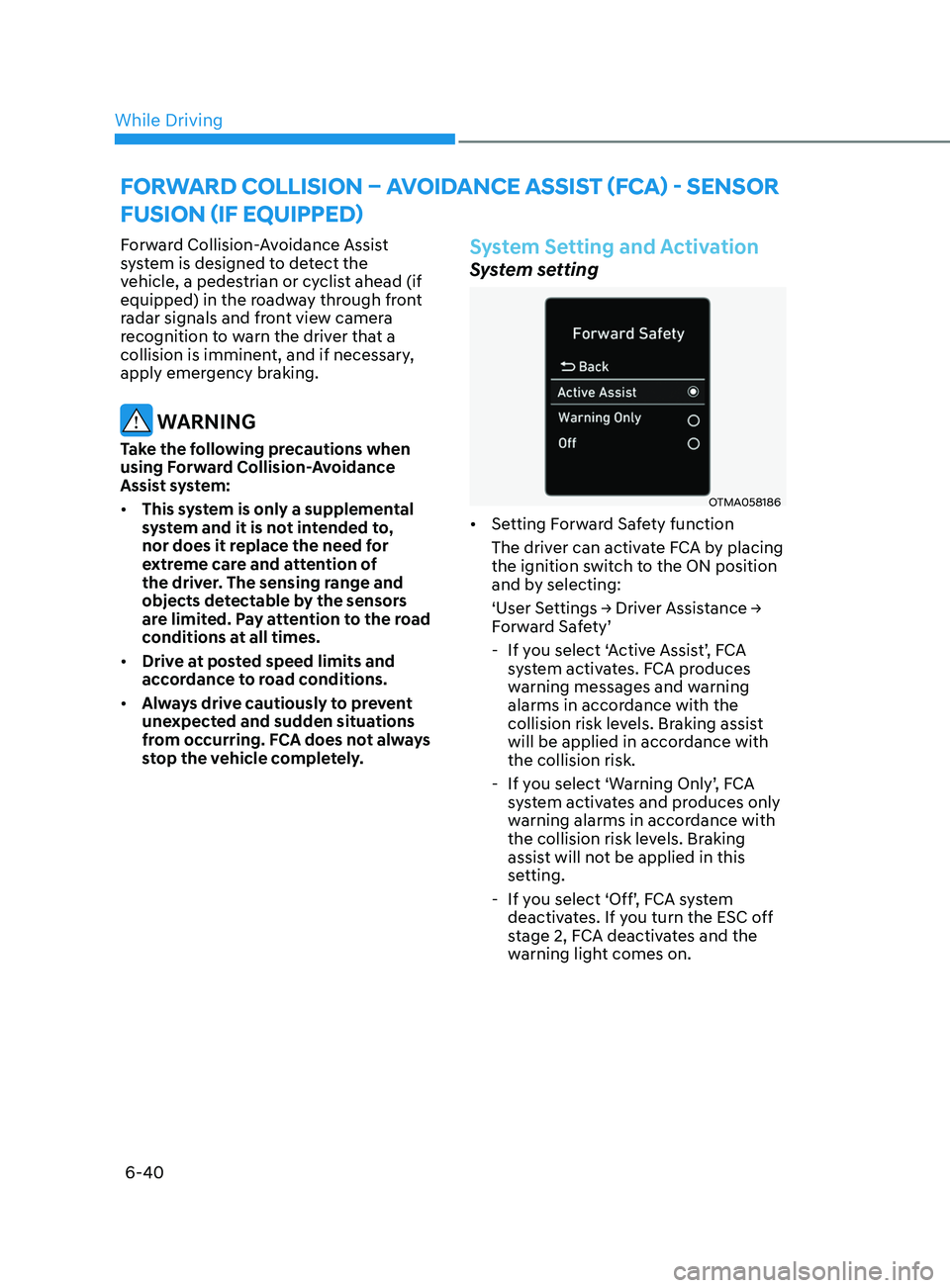
System Setting and Activation
System setting
OTMA058186
• Setting Forward Safety function
The driver can activate FCA by placing
the ignition switch to the ON position
and by selecting:
‘User
Settings → Driver Assistance →
F
orward Safety’
- If y
ou select ‘Active Assist’, FCA
system activates. FCA produces
warning messages and warning
alarms in accordance with the
collision risk levels. Braking assist
will be applied in accordance with
the collision risk.
- If y
ou select ‘Warning Only’, FCA
system activates and produces only
warning alarms in accordance with
the collision risk levels. Braking
assist will not be applied in this
setting.
- If y
ou select ‘Off’, FCA system
deactivates. If you turn the ESC off
stage 2, FCA deactivates and the
warning light comes on.
forward Coll ISI on – av o I dan C e aSSISt ( fCa ) - Sen S or
f
u SI on ( I f equ I pped)
While Driving
Page 325 of 546
06
6-41
• The warning light illuminates
on the instrument cluster,
when you cancel FCA
system.
The driver can monitor the FCA ON/OFF
status on the LCD display or infotainment
system display (if equipped). Also, the
warning light illuminates when ESC
(Electronic Stability Control) is turned
off. If the warning light remains ON
when FCA is activated, have the vehicle
inspected by an authorized HYUNDAI
dealer.
OTMA058089
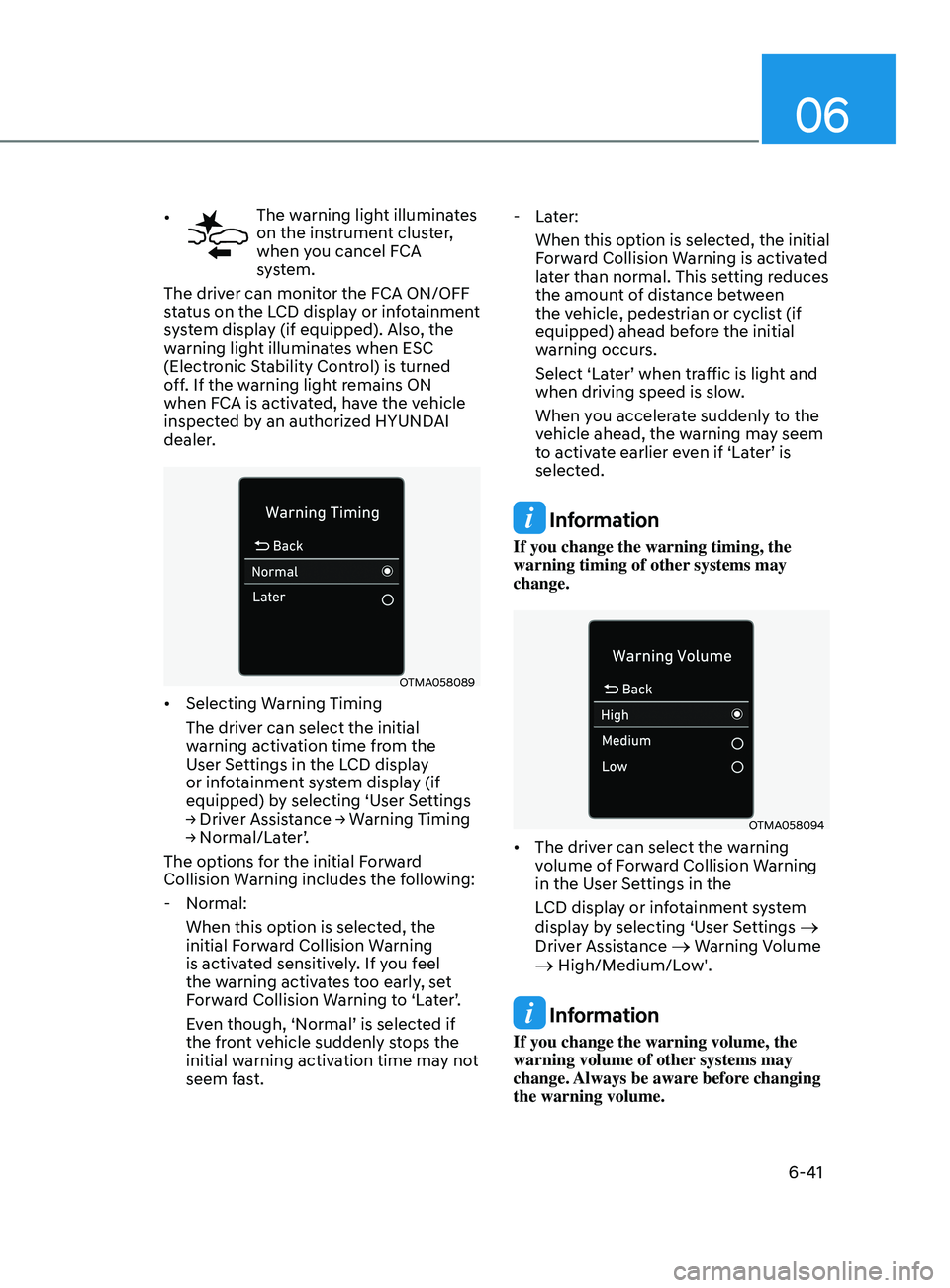
• Selecting Warning Timing
The driver can select the initial
warning activation time from the
User Settings in the LCD display
or infotainment system display (if
equipped) by selecting ‘User Settings
→
Driver Assistance → Warning Timing
→
Normal/Later’.
The options for the initial Forward
Collision Warning includes the following:
- N
ormal:
When this option is selected, the
initial Forward Collision Warning
is activated sensitively. If you feel
the warning activates too early, set
Forward Collision Warning to ‘Later’.
Even though, ‘Normal’ is selected if
the front vehicle suddenly stops the
initial warning activation time may not
seem fast.
- La
ter:
When this option is selected, the initial
Forward Collision Warning is activated
later than normal. This setting reduces
the amount of distance between
the vehicle, pedestrian or cyclist (if
equipped) ahead before the initial
warning occurs.
Select ‘Later’ when traffic is light and
when driving speed is slow.
When you accelerate suddenly to the
vehicle ahead, the warning may seem
to activate earlier even if ‘Later’ is
selected.
Information
If you change the warning timing, the
warning timing of other systems may
change.
OTMA058094
• The driver can select the warning
volume of Forward Collision Warning
in the User Settings in the
LCD display or infotainment system
display by selecting ‘User Settings
→
Driver Assistance → Warning Volume → High/Medium/Low'.
Information
If you change the warning volume, the
warning volume of other systems may
change. Always be aware before changing
the warning volume.
Page 326 of 546
6-42
Prerequisite for activation
FCA gets ready to be activated, when
‘Active Assist’ or ‘Warning Only’ under
Forward Safety is selected in the cluster
LCD display, and when the following
prerequisites are satisfied.
-ESC (Electr
onic Stability Control) is on.
- Vehicle speed is over 6 mph (10 km/h ).
(FCA is only activated within a certain
speed range.)
- The s
ystem detects a pedestrian,
cyclist or a vehicle in front, which may
collide with your vehicle. However,
FCA may not be activated or may only
sound a warning alarm depending on
the driving or vehicle conditions.
FCA may not operate properly according
to the frontal situation, condition of the
vehicle, the direction of pedestrian or
cyclist or speed. If you select "Warning
Only", only warnings occur.
WARNING
To avoid driver distractions, do not
attempt to set or cancel FCA while
driving the vehicle. Always completely
stop the vehicle at a safe place before
setting or canceling the system.
FCA automatically activates upon
placing the ignition switch to the ON
position. The driver can deactivate FCA
by canceling the system setting on the
cluster LCD display or infotainment
system display (if equipped).
FCA automatically deactivates upon
canceling ESC (Electronic Stability
Control). When ESC is canceled, FCA
cannot be activated in the LCD display
or infotainment system display (if
equipped). In this situation, the FCA
warning light will illuminate which is
normal.
FCA Warning Message and Brake
Control
FCA produces warning messages,
warning alarms, and emergency braking
based on the level of risk of a frontal
collision, such as when a vehicle ahead
suddenly brakes, or the system detects
that a collision with a pedestrian or
cyclist is imminent.
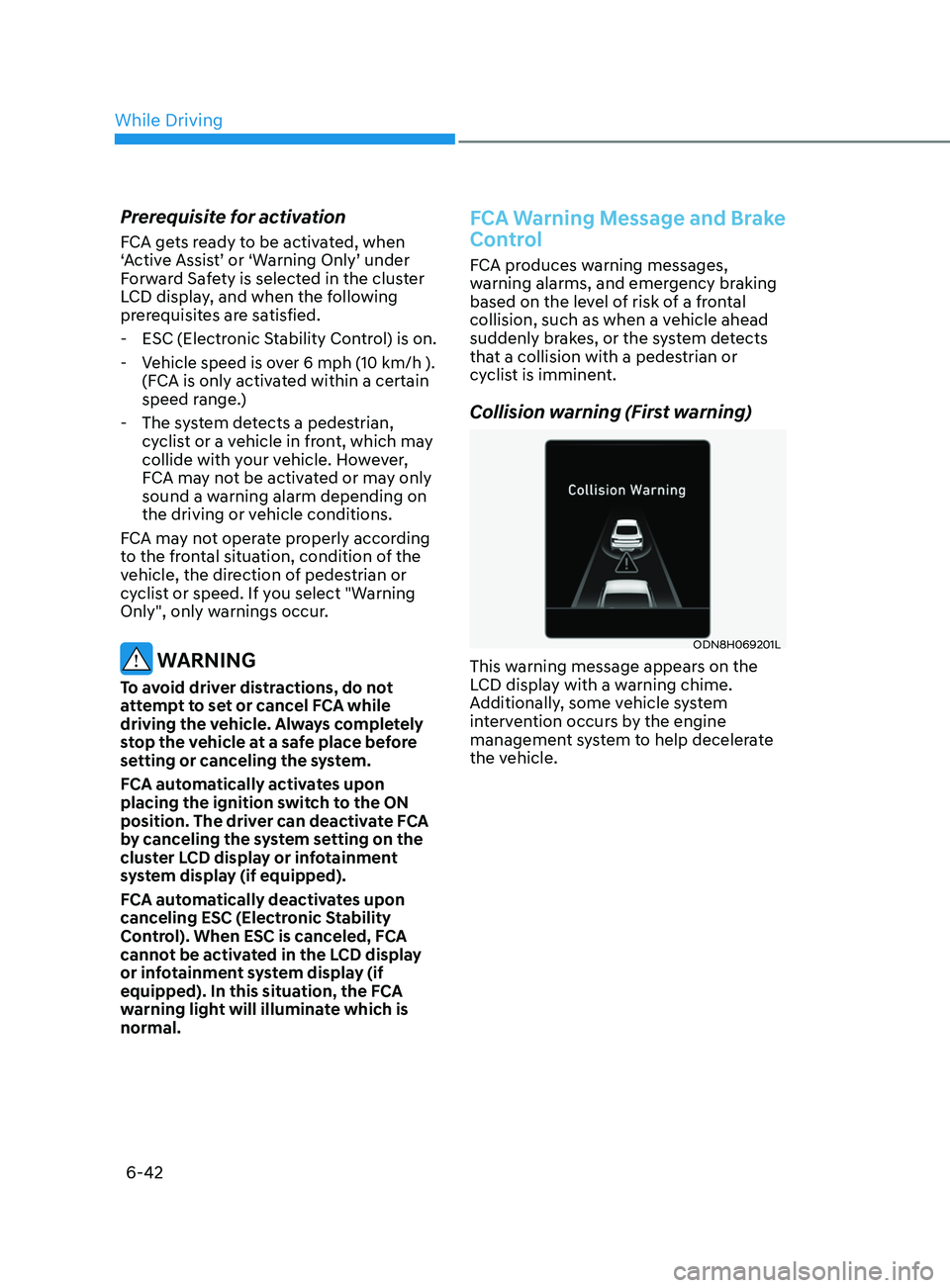
Collision warning (First warning)
ODN8H069201L
This warning message appears on the
LCD display with a warning chime.
Additionally, some vehicle system
intervention occurs by the engine
management system to help decelerate
the vehicle.
While Driving
Page 327 of 546
06
6-43
• Your vehicle speed may decelerate
moderately.
• If FCA detects a vehicle in front, the
system operates when your vehicle
speed is between 6 mph (10 km/h )
and 112 mph (180 km/h). Maximum
vehicle speed may decrease
depending on the condition of the
vehicle ahead and surroundings.
• If FCA detects a pedestrian or cyclist
in front, the system operates when
your vehicle speed is between 6
mph (10 km/h ) and 53 mph (85
km/h). Maximum vehicle speed may
decrease depending on the condition
of the pedestrian or cyclist ahead and
surroundings.
• If you select ‘Warning Only’ for the
system setting, FCA system activates
and produces only warning alarms
in accordance with the collision risk
levels. You should control the brake
directly because FCA system will not
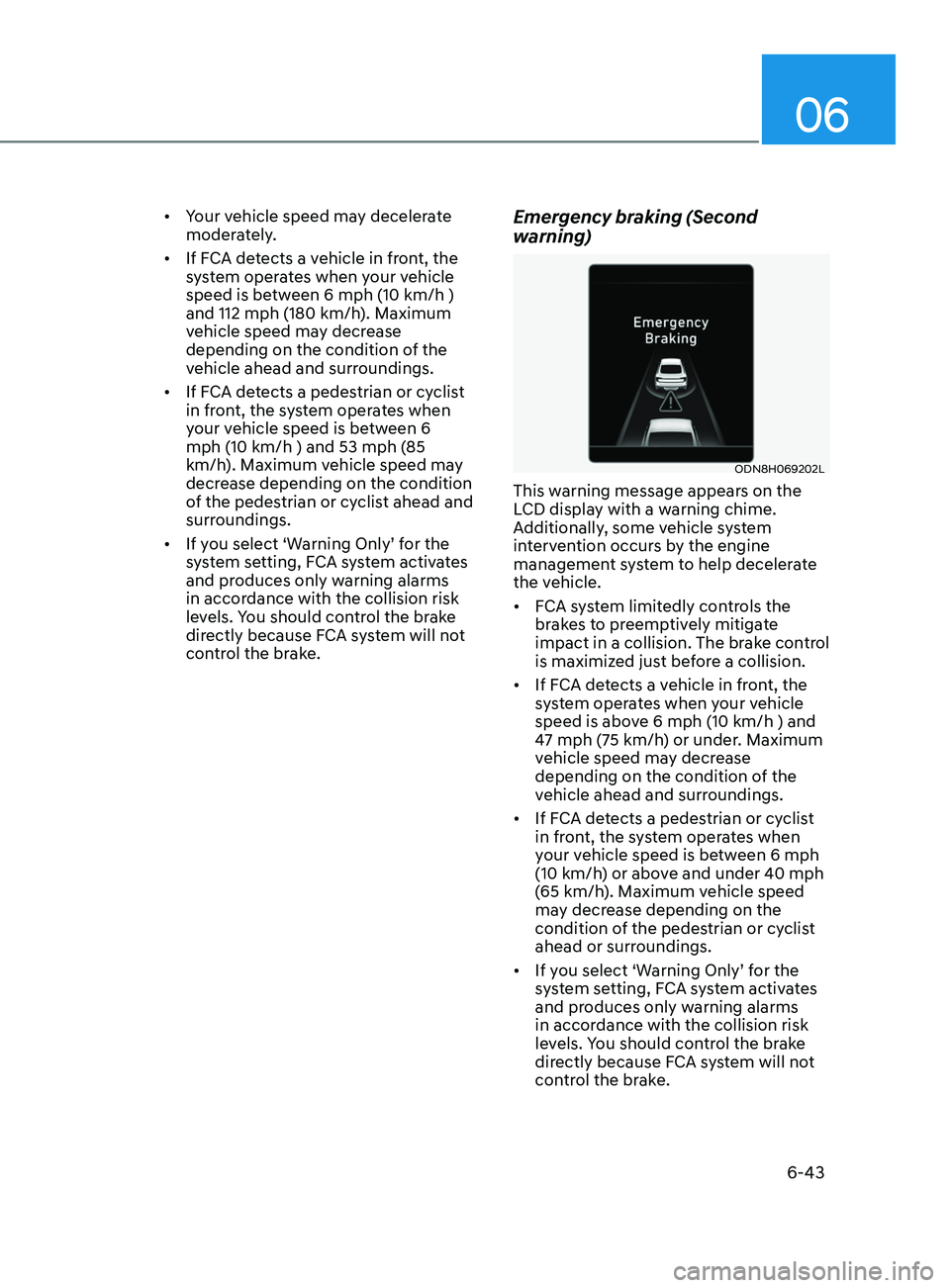
control the brake.Emergency braking (Second
warning)
ODN8H069202L
This warning message appears on the
LCD display with a warning chime.
Additionally, some vehicle system
intervention occurs by the engine
management system to help decelerate
the vehicle.
• FCA system limitedly controls the
brakes to preemptively mitigate
impact in a collision. The brake control
is maximized just before a collision.
• If FCA detects a vehicle in front, the
system operates when your vehicle
speed is above 6 mph (10 km/h ) and
47 mph (75 km/h) or under. Maximum
vehicle speed may decrease
depending on the condition of the
vehicle ahead and surroundings.
• If FCA detects a pedestrian or cyclist
in front, the system operates when
your vehicle speed is between 6 mph
(10 km/h) or above and under 40 mph
(65 km/h). Maximum vehicle speed
may decrease depending on the
condition of the pedestrian or cyclist
ahead or surroundings.
• If you select ‘Warning Only’ for the
system setting, FCA system activates
and produces only warning alarms
in accordance with the collision risk
levels. You should control the brake
directly because FCA system will not
control the brake.
Page 328 of 546
6-44
Brake operation
• In an urgent situation, the braking
system enters into the ready status for
prompt reaction against the driver’s
depressing the brake pedal.
• FCA provides additional braking
power for optimum braking
performance, when the driver
depresses the brake pedal.
• The braking control is automatically
deactivated, when the driver sharply
depresses the accelerator pedal, or
when the driver abruptly operates the
steering wheel.
• FCA brake control is automatically
canceled, when risk factors disappear.
CAUTION
• The driver should always use
extreme caution while operating
the vehicle, whether or not there is a
warning message or alarm from FCA
system.
• After the brake control is activated,
the driver must immediately depress
the brake pedal and check the
surroundings. The brake activation
by the system lasts for about 2
seconds.
• If any other warning sound such as
seat belt warning chime is already
generated, Forward Collision-
Avoidance Assist system warning
may not sound.
• Playing the vehicle audio system at
high volume may prevent occupants
from hearing the system warning
sounds.
WARNING
The braking control cannot completely
stop the vehicle nor avoid all
collisions. The driver should hold the
responsibility to safely drive and control
the vehicle.
WARNING
The FCA system logic operates within
certain parameters, such as the
distance from the vehicle, pedestrian or
cyclist (if equipped) ahead, the speed
of the vehicle ahead, and the driver’s
vehicle speed. Certain conditions
such as inclement weather and road
conditions may affect the operation of
FCA system.
WARNING
Never deliberately drive dangerously to
activate the system.
Information
Exceptional operation of the braking assist
system
• The vehicle drives on a slope or curve.
• The vehicle drives by a pedestrian or
cyclist at the crossroads, traffic signals
or structure.
• The vehicle drives through a tunnel or
near a railroad.
• The vehicle drives where steam, smoke
or shadow is on the road.
• The vehicle drives the road tree planted
or streetlamps installed.
• There is interference by
electromagnetic waves or electric noise.
While Driving
Page 329 of 546
06
6-45
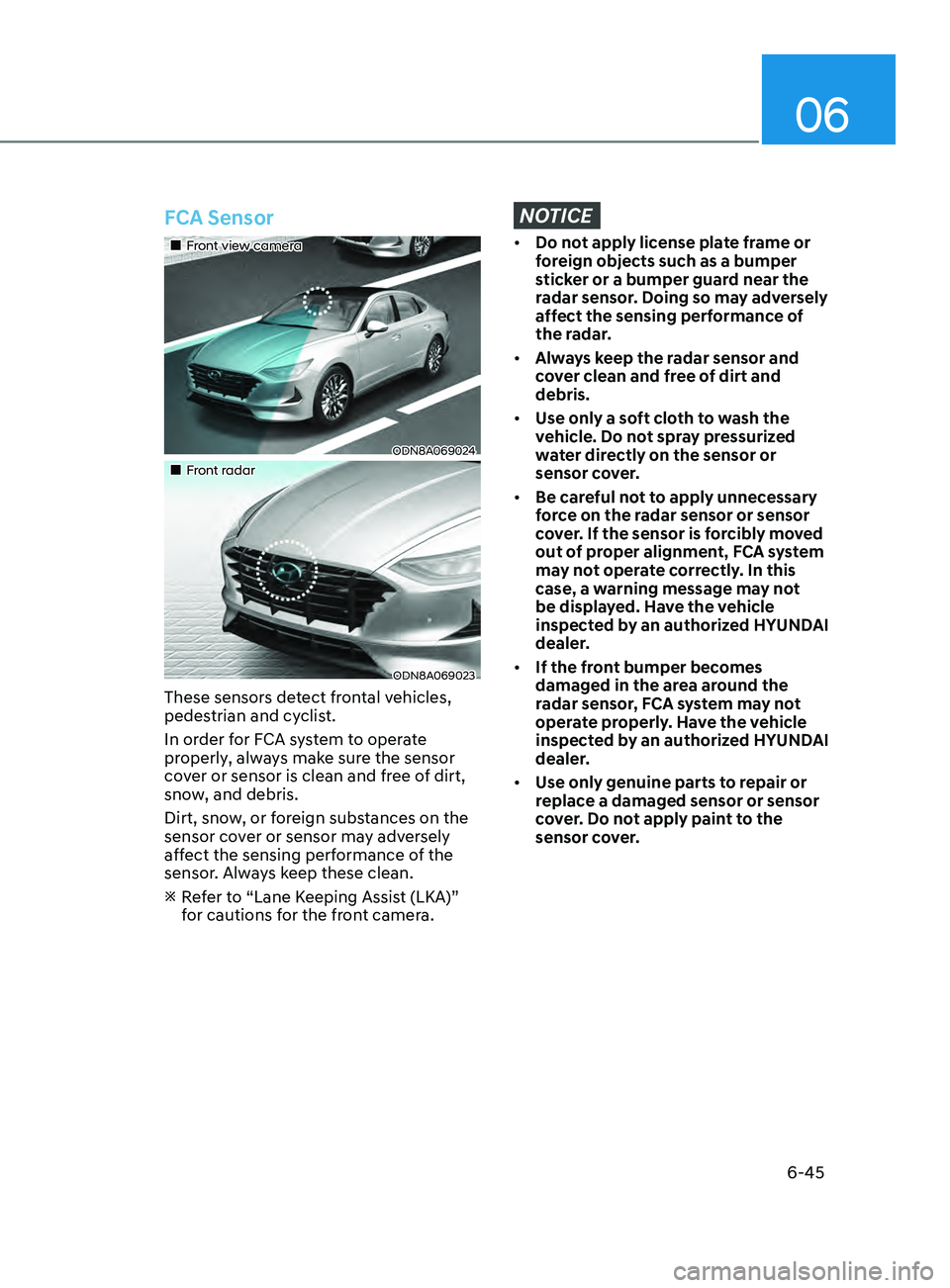
FCA Sensor
•„Front view camera
ODN8A069024
•„Front radar
ODN8A069023
These sensors detect frontal vehicles,
pedestrian and cyclist.
In order for FCA system to operate
properly, always make sure the sensor
cover or sensor is clean and free of dirt,
snow, and debris.
Dirt, snow, or foreign substances on the
sensor cover or sensor may adversely
affect the sensing performance of the
sensor. Always keep these clean.
R
efer to “Lane Keeping Assist (LKA)”
for cautions for the front camera.
NOTICE
• Do not apply license plate frame or
foreign objects such as a bumper
sticker or a bumper guard near the
radar sensor. Doing so may adversely
affect the sensing performance of
the radar.
• Always keep the radar sensor and
cover clean and free of dirt and
debris.
• Use only a soft cloth to wash the
vehicle. Do not spray pressurized
water directly on the sensor or
sensor cover.
• Be careful not to apply unnecessary
force on the radar sensor or sensor
cover. If the sensor is forcibly moved
out of proper alignment, FCA system
may not operate correctly. In this
case, a warning message may not
be displayed. Have the vehicle
inspected by an authorized HYUNDAI
dealer.
• If the front bumper becomes
damaged in the area around the
radar sensor, FCA system may not
operate properly. Have the vehicle
inspected by an authorized HYUNDAI
dealer.
• Use only genuine parts to repair or
replace a damaged sensor or sensor
cover. Do not apply paint to the
sensor cover.