antenna HYUNDAI SONATA 2022 Owners Manual
[x] Cancel search | Manufacturer: HYUNDAI, Model Year: 2022, Model line: SONATA, Model: HYUNDAI SONATA 2022Pages: 546, PDF Size: 51.21 MB
Page 133 of 546
5
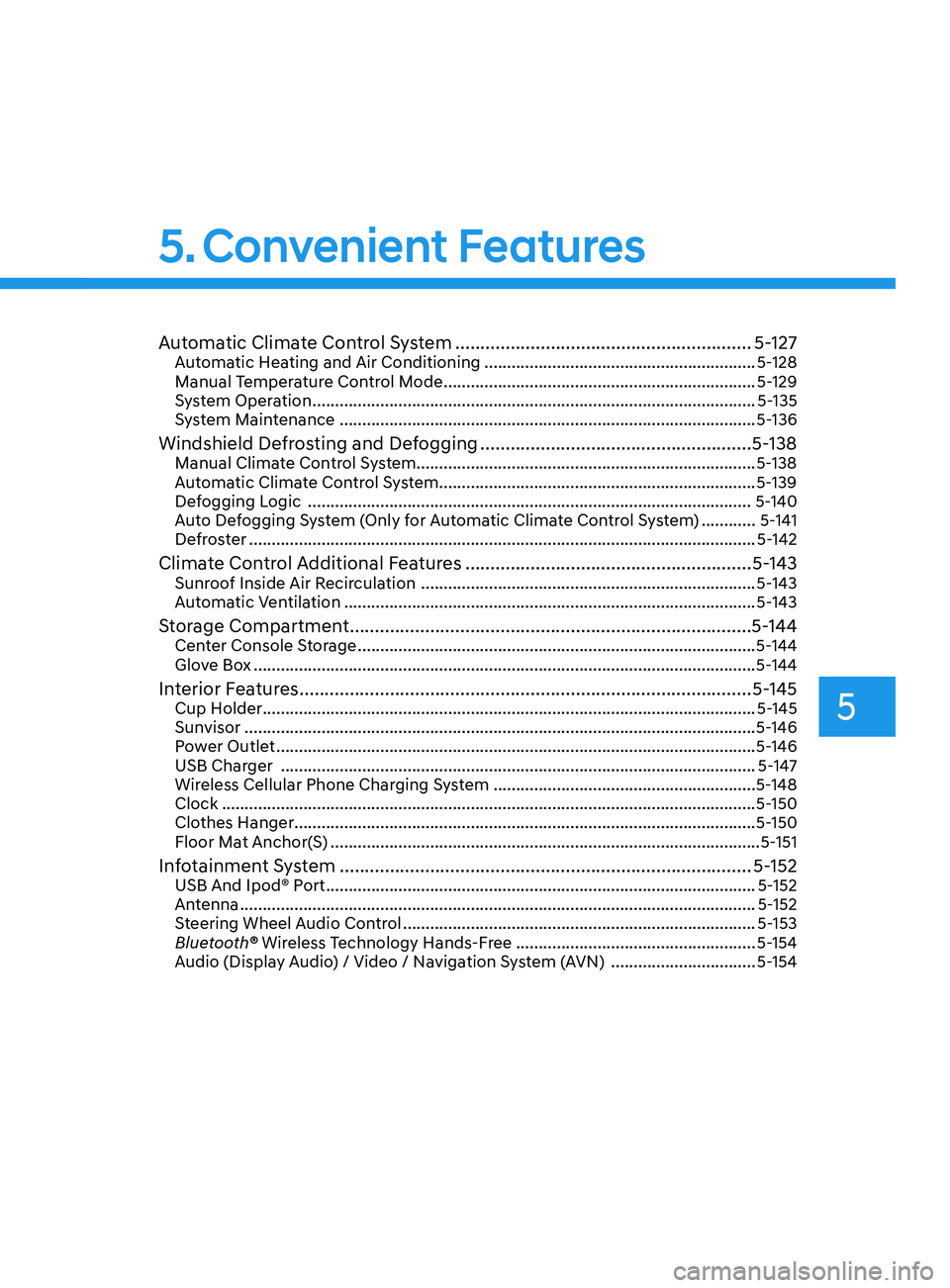
Automatic Climate Control System ...........................................................5- 127Automatic Heating and Air Conditioning ............................................................5- 128
Manual Temperature Control Mode ..................................................................... 5-129
System Operation
........................................................................\
.......................... 5-135
System Maintenance
........................................................................\
.................... 5-136
Windshield Defrosting and Defogging ......................................................5- 138Manual Climate Control System........................................................................\
...5-138
Automatic Climate Control System......................................................................5-139
Defogging Logic
........................................................................\
.......................... 5-140
Auto Defogging System (Only for Automatic Climate Control System)
............5-141
Defroster
........................................................................\
........................................ 5-142
Climate Control Additional Features .........................................................5- 143Sunroof Inside Air Recirculation ........................................................................\
..5- 143
Automatic Ventilation ........................................................................\
................... 5-143
Storage Compartment ........................................................................\
........5- 144Center Console Storage ........................................................................\
................5- 144
Glove Box ........................................................................\
....................................... 5-144
Interior Features ........................................................................\
..................5- 145Cup Holder ........................................................................\
.....................................5- 145
Sunvisor ........................................................................\
......................................... 5-146
Power Outlet
........................................................................\
.................................. 5-146
USB Charger
........................................................................\
................................. 5-147
Wireless Cellular Phone Charging System
..........................................................5-148
Clock
........................................................................\
.............................................. 5-150
Clothes Hanger
........................................................................\
.............................. 5-150
Floor Mat Anchor(S)
........................................................................\
....................... 5-151
Infotainment System ........................................................................\
..........5- 152USB And Ipod® Port ........................................................................\
.......................5- 152
Antenna ........................................................................\
.......................................... 5-152
Steering Wheel Audio Control
........................................................................\
...... 5-153
Bluetooth® Wireless Technology Hands-Free
.....................................................5-154
Audio (Display Audio) / Video / Navigation System (AVN)
................................5-154
Head Up Display (HUD) ........................................................................\
...... 5-72
Lighting ........................................................................\
................................. 5 -74
Exterior Lights ........................................................................\
................................. 5 -74
Interior Lights ........................................................................\
................................. 5-80
Welcome System ........................................................................\
........................... 5-83
Wipers and Washers ........................................................................\
............5-84Windshield Wipers ........................................................................\
......................... 5-84
Windshield Washers ........................................................................\
....................... 5-85
Rear View Monitor (RVM) ........................................................................\
... 5-86Rear View Monitor with Parking Guidance ........................................................... 5-86
Rear View Monitor - Top View ........................................................................\
....... 5-86
Surround View Monitor (SVM) ................................................................... 5-88
Reverse Parking Collision-Avoidance Assist .............................................. 5-89
System Setting and Operation ........................................................................\
...... 5-89
Warning and System Control ........................................................................\
......... 5-90
Detecting Sensor ........................................................................\
............................ 5-92
System Malfunction ........................................................................\
....................... 5-93
Limitations of the System ........................................................................\
.............. 5-93
Reverse Parking Distance Warning (PDW) ................................................5-95Operation of Reverse Parking Distance Warning System .................................... 5-95
To Turn Off Reverse Parking Distance Warning System ..................................... 5-97
Non-Operational Conditions of Reverse Parking Distance Warning System ..... 5-97
Reverse Parking Distance Warning System Precautions ..................................... 5-98
Forward/Reverse Parking Distance Warning (PDW) ................................5-99Operation of Forward/Reverse Parking Distance Warning System .................. 5-100
Non-Operational Conditions of Forward/Reverse Parking Distance Warning
System ........................................................................\
............................................ 5-102
Forward/Reverse Parking Distance Warning System Precautions .................... 5-103
Remote Smart Parking Assist (RSPA) .......................................................5-104Operating Condition ........................................................................\
..................... 5-105
How Remote Smart Parking Assist System Works ............................................. 5-108
Additional Instructions ........................................................................\
................... 5-113
Display Operation Status ........................................................................\
.............. 5-114
How the Remote Moving Forward/Backward System Works ............................. 5-115
Manual Climate Control System ............................................................... 5-118Heating and Air Conditioning ........................................................................\
....... 5-119
System Operation ........................................................................\
.......................... 5-124
System Maintenance ........................................................................\
.................... 5-125
5. Convenient Features
Page 148 of 546
Convenient Features
5-18
Set up main vehicle
You can manage multiple digital keys
from the Digital key app. From the list of
digital keys you own, select the vehicle
you want to make your priority vehicle.
For more information, please refer to
the ‘Tutorial’ on your Digital key app.
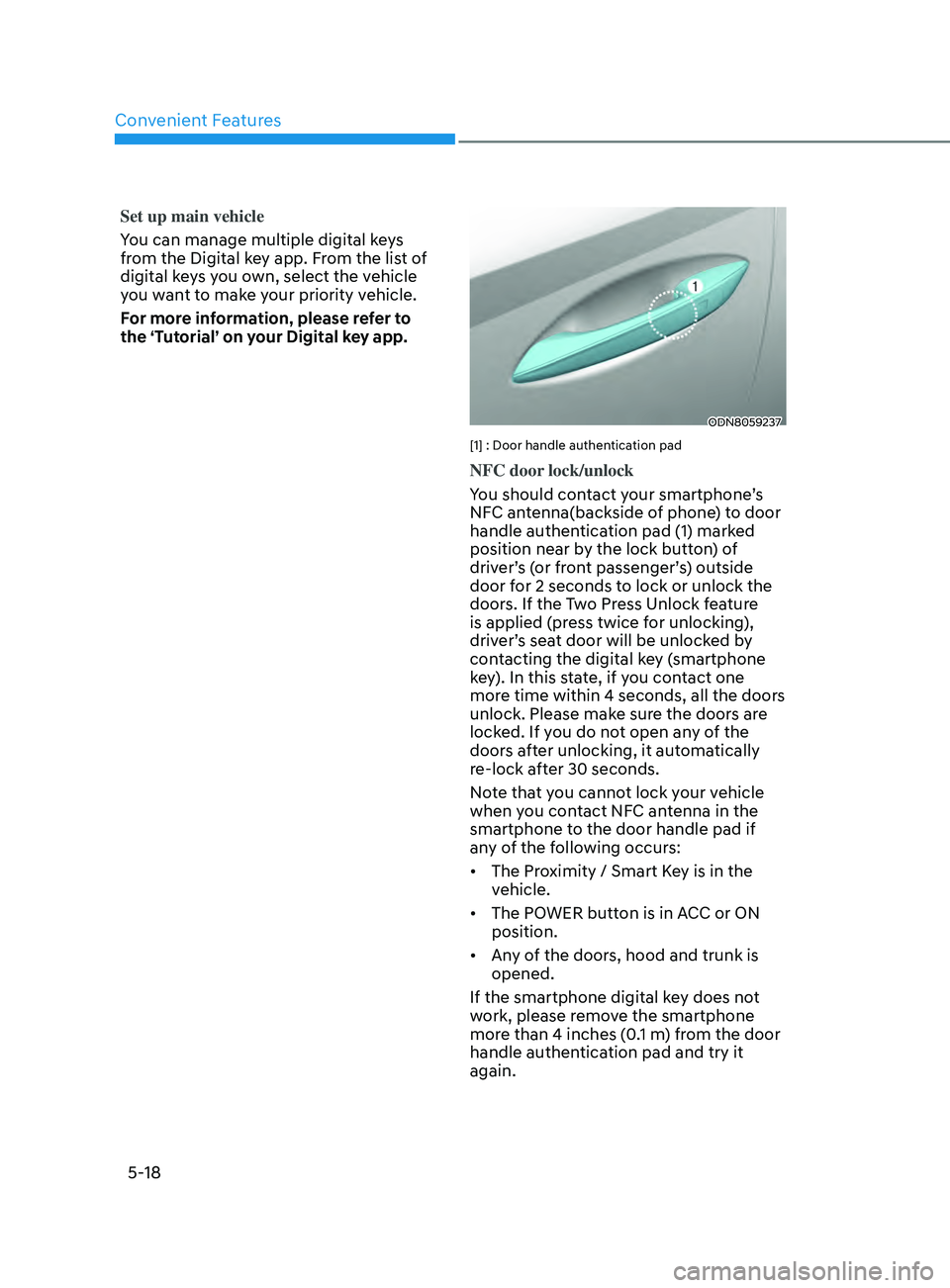
ODN8059237
[1] : Door handle authentication pad
NFC door lock/unlock
You should contact your smartphone’s
NFC antenna(backside of phone) to door
handle authentication pad (1) marked
position near by the lock button) of
driver’s (or front passenger’s) outside
door for 2 seconds to lock or unlock the
doors. If the Two Press Unlock feature
is applied (press twice for unlocking),
driver’s seat door will be unlocked by
contacting the digital key (smartphone
key). In this state, if you contact one
more time within 4 seconds, all the doors
unlock. Please make sure the doors are
locked. If you do not open any of the
doors after unlocking, it automatically
re-lock after 30 seconds.
Note that you cannot lock your vehicle
when you contact NFC antenna in the
smartphone to the door handle pad if
any of the following occurs:
• The Proximity / Smart Key is in the
vehicle.
• The POWER button is in ACC or ON
position.
• Any of the doors, hood and trunk is
opened.
If the smartphone digital key does not
work, please remove the smartphone
more than 4 inches (0.1 m) from the door
handle authentication pad and try it
again.
Page 151 of 546
05
5-21
Remote Start with Digital Key
• When the shift button of your vehicle
is in P (Park) and all of the doors
including trunk and hood is locked
and the vehicle is off, press the Door
Lock button in the Hyundai Digital
Key app then press the Remote Start
button within 4 seconds.
You can confirm the engine is on if the
hazard warning lights blinks two times
and the chime sounds.
• If you want to turn off the engine,
press Remote Engine Stop. Air
Conditioner / Heating system
maintains the same status as when
you last used the vehicle.
• Unless you put the registered digital
key(smartphone) on the interior
authentication pad (wireless charger)
when the remote start function is on,
the engine will turn off.
• If you do not get on the vehicle within
10 minutes after the engine turns on,
the vehicle will turn off.
For more information, refer to the Engine
Start/Stop button in chapter 6.
Vehicle information Display
The digital key application displays
the vehicle information such as
driving or door conditions through the
communication with the vehicle.
• How to check : Select the vehicle
what you want to check and touch
the vehicle image, then vehicle
information display page will be
shown.
• Contents : accumulated odometer,
latest fuel economy, driving range,
fuel remaining, tire pressure, doors
lock/unlock status and last data
updated time.
ÃDispla
yed vehicle date could be
differed from the current vehicle
condition.
à F
or more information, please refer to
the ‘Tutorial’ on your Digital key app. Smartphone change/App deletion
If you change your smartphone or delete
the Hyundai Digital Key App, please refer
to the following to set up your Digital
Key:
Smartphone Change/ Reset
If you change or reset the smartphone,
the registered digital key in your previous
smartphone may not be used. Please
refer to following procedure to use the
digital key.
1.
Ins
tall the digital key application and
log in.
2.
If y
ou are the owner, retry the Digital
key save process.
3.
If y
ou are the sharer, need to re-share
the key from owner.
App delete & reinstall/ Delete App data
You can re-download the digital key
from server in these cases as follow
procedure.
1.
R
einstall the application and log in.
2.
Input the PIN number f
or user
verification.
3.
If PIN is corr
ect, digital key data
will be re-downloaded to your
smartphone and you can use it
without any further registration or
sharing.
Smartphone operability with Digital Key
The digital key application may not
be available to old type smartphones.
Please check the available smartphone
models with your dealer. NFC antenna
position on the smartphone can be
confirmed on each smartphone’s manual
or contact to customer service center of
the smartphone manufacture.
Page 153 of 546
05
5-23
-If you use a smart phone cover that
uses wireless communication or is
made of metal, the digital key NFC
function may not work properly.
Remove the smart phone cover
before using the digital key NFC
function.
• The vehicle may not be controlled by
the smartphone if any of the following
occurs:
- Basic and nec essary functions of
the smartphone manufacturer are
operating. (General call, urgent
call, audio or NFC payment)
- Wir
eless earphone is operating.
(General call, urgent call or audio)
- The digital k
ey app function such
as basic setting or app launching
is limited by prior policy according
to the manufacturer while using a
smartphone produced by domestic
and foreign manufactures.
à I
f you change the smartphone
number, you should modify the user
account information on the HYUNDAI
customer web site to use the digital
key app.
à I
f the vehicle owner changes
the smartphone device, the new
smartphone should be registered in
the car after deleting the registered
digital key(smartphone).
à I
f a sharer changes or reset the
smartphone, the key should be re-
shared from owner.
à Some o
f the old smartphone may
not work properly. Please check the
available smartphone models with
your dealer.
à NF
C antenna position on the
smartphone can be confirmed
on each smartphone’s manual or
contact to customer service center
of the smartphone manufacture.
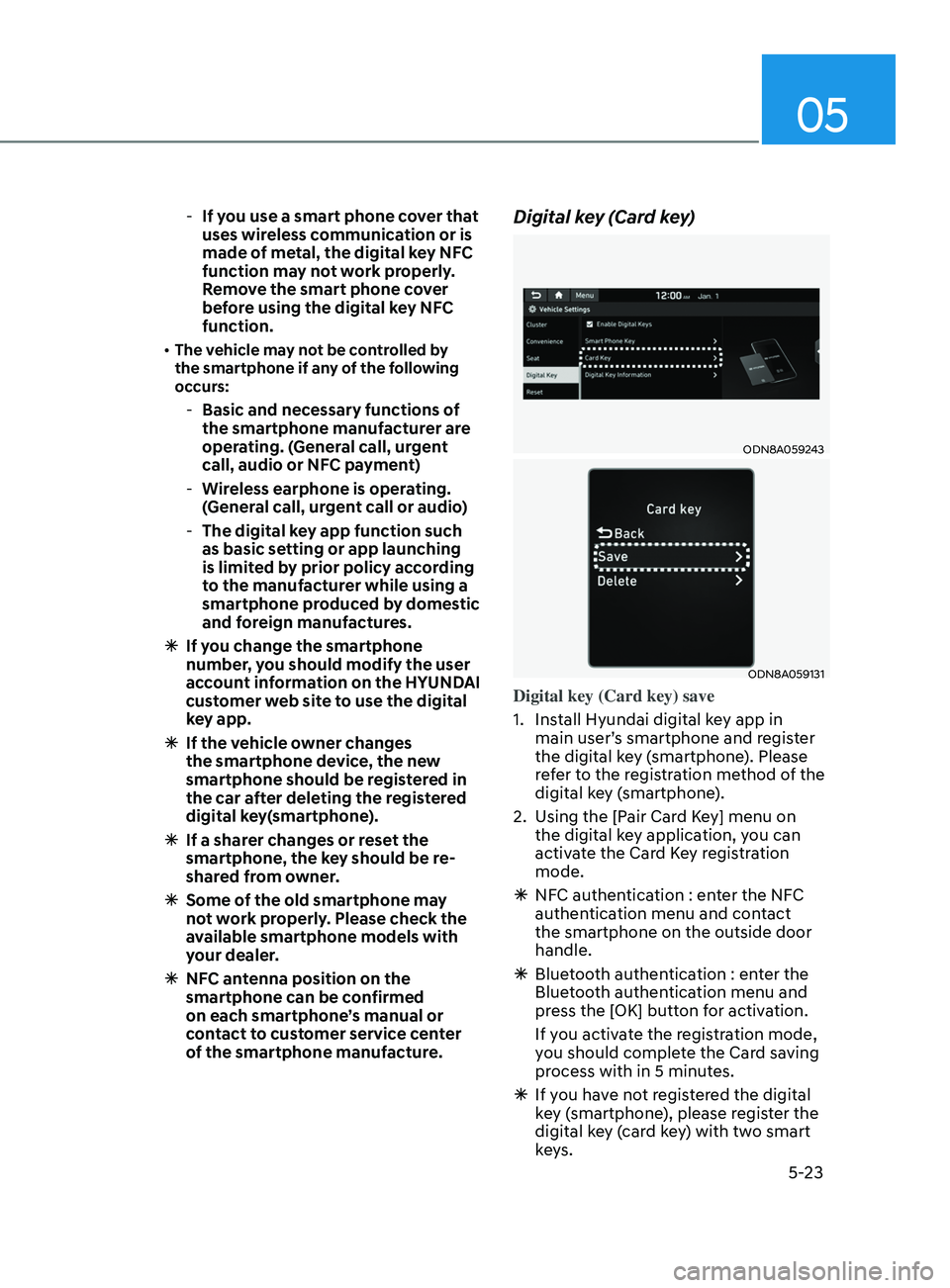
Digital key (Card key)
ODN8A059243
ODN8A059131
Digital key (Card key) save
1.
Ins
tall Hyundai digital key app in
main user’s smartphone and register
the digital key (smartphone). Please
refer to the registration method of the
digital key (smartphone).
2.
U
sing the [Pair Card Key] menu on
the digital key application, you can
activate the Card Key registration
mode.
à NF
C authentication : enter the NFC
authentication menu and contact
the smartphone on the outside door
handle.
à Blue
tooth authentication : enter the
Bluetooth authentication menu and
press the [OK] button for activation.
If you activate the registration mode,
you should complete the Card saving
process with in 5 minutes.
à If y
ou have not registered the digital
key (smartphone), please register the
digital key (card key) with two smart
keys.
Page 179 of 546
05
5-49
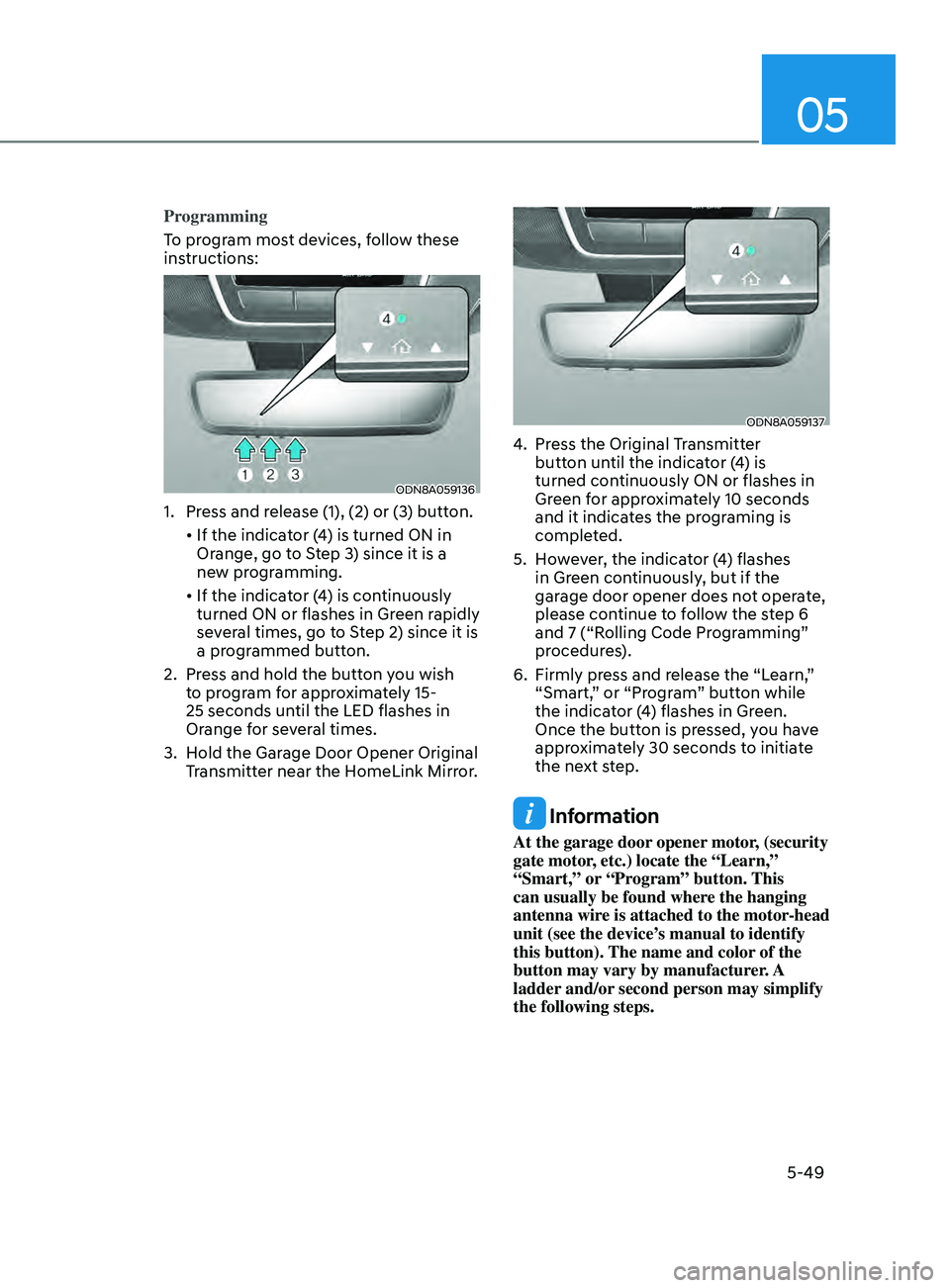
Programming
To program most devices, follow these
instructions:
ODN8A059136
1. Press and release (1), (2) or (3) button.
•
If
the indicator (4) is turned ON in
Or
ange, go to Step 3) since it is a
new programming.
•
If
the indicator (4) is continuously
turned ON or flashes in Gr
een rapidly
several times, go to Step 2) since it is
a programmed button.
2.
Pr
ess and hold the button you wish
to program for approximately 15-
25 seconds until the LED flashes in
Orange for several times.
3.
H
old the Garage Door Opener Original
Transmitter near the HomeLink Mirror.
ODN8A059137
4. Press the Original Transmitter button until the indicator (4) is
turned continuously ON or flashes in
Green for approximately 10 seconds
and it indicates the programing is
completed.
5.
H
owever, the indicator (4) flashes
in Green continuously, but if the
garage door opener does not operate,
please continue to follow the step 6
and 7 (“Rolling Code Programming”
procedures).
6.
Firmly pr
ess and release the “Learn,”
“Smart,” or “Program” button while
the indicator (4) flashes in Green.
Once the button is pressed, you have
approximately 30 seconds to initiate
the next step.
Information
At the garage door opener motor, (security
gate motor, etc.) locate the “Learn,”
“Smart,” or “Program” button. This
can usually be found where the hanging
antenna wire is attached to the motor-head
unit (see the device’s manual to identify
this button). The name and color of the
button may vary by manufacturer. A
ladder and/or second person may simplify
the following steps.
Page 282 of 546
Convenient Features
5-152
infoTAinmen T SyS T em
NOTICE
• If you install an aftermarket HID
head lamp, your vehicle’s audio and
electronic devices may not function
properly.
• Prevent chemicals such as perfume,
cosmetic oil, sunscreen, hand
cleaner, and air freshener from
contacting the interior parts
because they may cause damage or
discoloration.
USB and iPod® Port
ODN8059229
You can use an AUX or USB cable to
connect audio devices to the vehicle AUX
or USB port.
Information
When using a portable audio device
connected to the power outlet, noise may
occur during playback. If this happens,
use the portable audio device’s power
source.
ÃiP
od® is a trademark of Apple Inc.
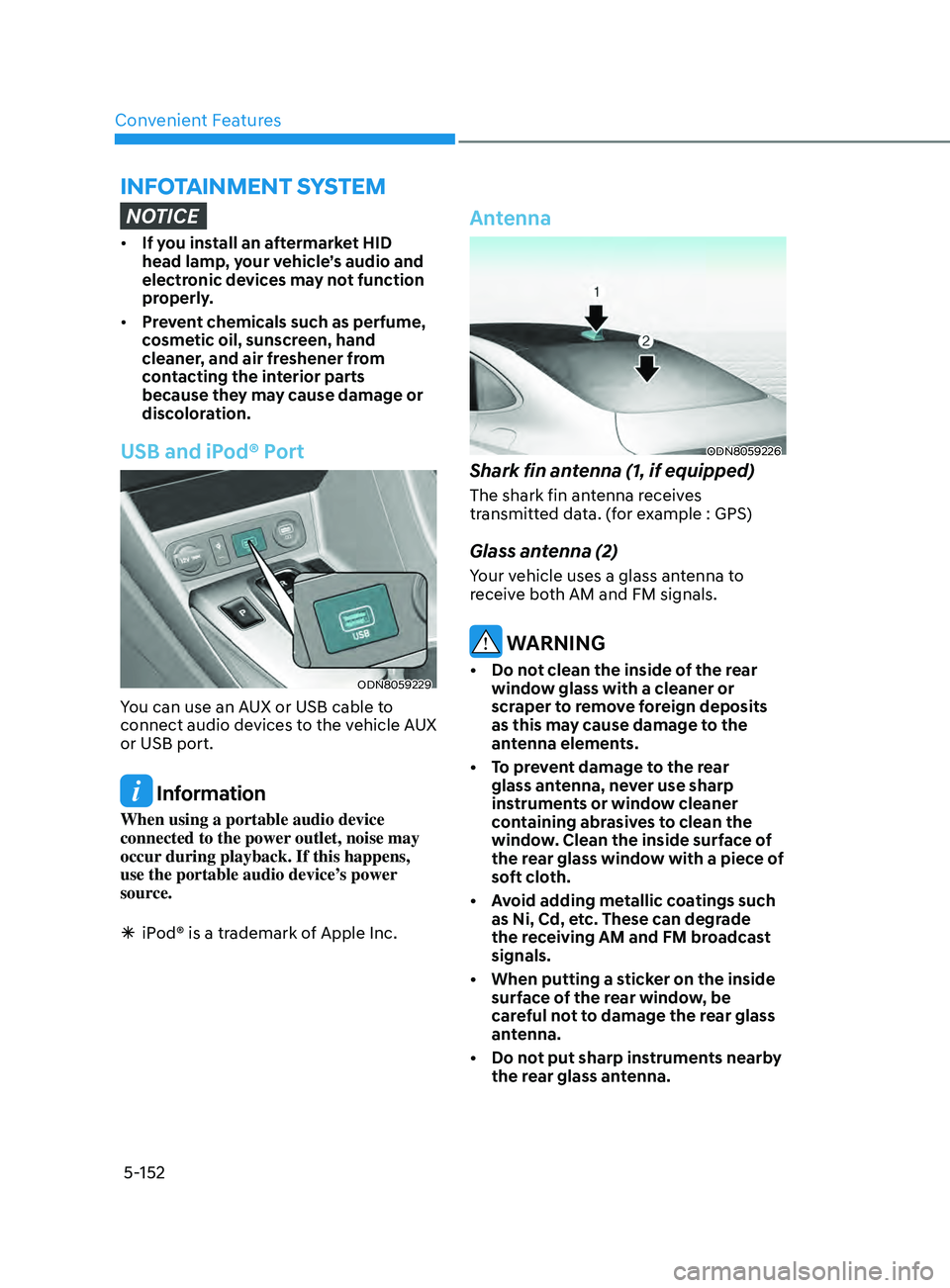
Antenna
ODN8059226
Shark fin antenna (1, if equipped)
The shark fin antenna receives
transmitted data. (for example : GPS)
Glass antenna (2)
Your vehicle uses a glass antenna to
receive both AM and FM signals.
WARNING
• Do not clean the inside of the rear window glass with a cleaner or
scraper to remove foreign deposits
as this may cause damage to the
antenna elements.
•
T
o prevent damage to the rear
glass antenna, never use sharp
instruments or window cleaner
containing abrasives to clean the
window. Clean the inside surface of
the rear glass window with a piece of
soft cloth.
•
A
void adding metallic coatings such
as Ni, Cd, etc. These can degrade
the receiving AM and FM broadcast
signals.
•
When putting a s
ticker on the inside
surface of the rear window, be
careful not to damage the rear glass
antenna.
•
Do no
t put sharp instruments nearby
the rear glass antenna.
Page 399 of 546
06
6-115
CAUTION
Navigation-based Cruise Control
system may not function properly in the
following situations:
• The navigation is not working
properly.
• The navigation is not updated.
• The real-time GPS or map
information provided has errors.
• The navigation is overloaded by
performing functions such as route
search, video playback, voice
recognition, etc. are performing
simultaneously.
• GPS signals are blocked in areas such
as a tunnel.
• The driver goes off course or the
route to the destination is changed
or canceled by resetting the
navigation.
• The vehicle enters a service station
or rest area.
• A section of the highway’s shape has
changed.
• Android Auto or Car Play is operating.
• The navigation cannot detect the
current vehicle position (ex: elevated
roads including overpass adjacent to
general roads or nearby roads exist
in a parallel way).
• The navigation is being updated
while driving.
• The navigation is being reset while
driving.
• The road is slippery due to bad
weather such as rain or snow.
Information
This device complies with Part 15 of the
FCC rules.
Operation is subject to the following three
conditions:
1.
This device may not cause harmful
interfer
ence, and
2.
This device must accept any
interfer
ence received, including
interference that may cause undesired
operation.
3.
Changes or
modifications not expressly
approved by the party responsible
for compliance could void the user's
authority to operate the device.
Information
Radio frequency radiation exposure
information:
This equipment complies with FCC
radiation exposure limits set forth for an
uncontrolled environment.
This equipment should be installed and
operated with minimum distance of 8 in.
(20 cm) between the radiator (antenna)
and your body.
This transmitter must not be co-located or
operating in conjunction with any other
antenna or transmitter.
Page 411 of 546
06
6-127
CAUTION
Highway Driving Assist system may
not function properly in the following
situations:
• The navigation is not working
properly.
• The navigation is not updated.
• The real-time GPS or map
information provided has errors.
• The navigation is overloaded by
performing functions such as route
search, video playback, voice
recognition, etc. are performing
simultaneously.
• GPS signals are blocked in areas such
as a tunnel.
• The driver goes off course or the
route to the destination is changed
or canceled by resetting the
navigation.
• The vehicle enters a service station
or rest area
• Android Auto or Car Play is operating.
• The navigation cannot detect the
current vehicle position (ex: elevated
roads including overpass adjacent to
general roads or nearby roads exist
in a parallel way).
• The navigation is being updated
while driving.
• The navigation is being reset while
driving.
• The road is slippery due to bad
weather such as rain or snow.
Information
• For information's on vehicle to vehicle
distance control and the front radar,
refer to "Smart Cruise Control (SCC)"
in this chapter.
• For information's on steering control
and distance control and the front
camera, refer to "Lane Following Assist
(LFA)" in this chapter.
Information
This device complies with Part 15 of the
FCC rules.
Operation is subject to the following three
conditions:
1.
This device may not cause harmful
interfer
ence, and
2.
This device must accept any
interfer
ence received, including
interference that may cause undesired
operation.
3.
Changes or
modifications not expressly
approved by the party responsible
for compliance could void the user's
authority to operate the device.
Information
Radio frequency radiation exposure
information:
This equipment complies with FCC
radiation exposure limits set forth for an
uncontrolled environment.
This equipment should be installed and
operated with minimum distance of 8 in.
(20 cm) between the radiator (antenna)
and your body.
This transmitter must not be co-located or
operating in conjunction with any other
antenna or transmitter.
Page 530 of 546

Index
I-2
A
Air bag warning labels
........................................................................\
................. 3-57
Air bags
........................................................................\
........................................ 3-37
Driver’s air bag
........................................................................\
....................... 3-39
Passenger’s front air bag
........................................................................\
......... 3-39
Side air bags
........................................................................\
............................ 3-40
Curtain air bags
........................................................................\
....................... 3-41
How does the air bags system operate?........................................................... 3-42
SRS components and functions
....................................................................... 3-42
SRS warning light
........................................................................\
................... 3-43
What to expect after an air bag inflates
...........................................................3-46
Occupant Classification System (OCS)
.......................................................... 3-47
Why didn’
t my air bag go off in a collision
....................................................3-52
Air bag collision sensors
........................................................................\
......... 3-53
Air bag inflation conditions
........................................................................\
.... 3-54
Air bag non-inflation conditions
..................................................................... 3-54
SRS Care
........................................................................\
................................. 3-56
Additional safety precautions
........................................................................\
.. 3-57
Air bag warning labels
........................................................................\
............ 3-57
Air cleaner
........................................................................\
................................... 8-26
Air cleaner filter replacement
........................................................................\
...... 8-26
Air conditioning system specification
................................................................. 2-10
Antenna
........................................................................\
...................................... 5-152
Anti-lock Brake System (ABS)
........................................................................\
... 6-27
Appearance care........................................................................\
........................... 8-63 Exterior care
........................................................................\
............................ 8-63
Interior care
........................................................................\
............................. 8-67
Armrest
........................................................................\
........................................ 3-11
Audio / Video / Navigation system
.................................................................... 5-154
Auto defogging system
........................................................................\
.............. 5-141
AUT
O headlamp position
........................................................................\
............ 5-74
Auto LOCK - Enable on shift
........................................................................\
...... 5-34
Auto LOCK - Enable on speed
........................................................................\
.... 5-34
Auto UNLOCK - Enable on shift
........................................................................\
5-34
Auto UNLOCK -Air bag deployment
................................................................. 5-34
Automatic climate control system
..................................................................... 5-127
Automatic heating and air conditioning
........................................................5-128
Manual temperature control mode
................................................................ 5-129
Page 536 of 546

Index
I-8
Horn ........................................................................\
.............................................5-45
How to use this manual
........................................................................\
................. 1-4
Hyundai digital key........................................................................\
...................... 5-15 Digital key application
........................................................................\
............ 5-15
Digital key (smartphone) NFC function
.........................................................5-15
Digital key (smartphone)........................................................................\
......... 5-16
Digital key (card key)........................................................................\
.............. 5-23
I
If the engine doesn’t turn over or turns over slowly
.............................................. 7-3
If the engine overheats
........................................................................\
................... 7-6
If the engine stalls at a crossroad or crossing
........................................................7-2
If the engine stalls while driving
........................................................................\
... 7-2
If the engine turns over normally but doesn’t start
................................................7-3
If the engine will not start
........................................................................\
.............. 7-3
If you have a flat tire while driving
....................................................................... 7-3
Ignition switch
........................................................................\
............................... 6-6
Key ignition switch
........................................................................\
................... 6-6
Engine Start/Stop button
........................................................................\
........... 6-9
Remote start
........................................................................\
............................ 6-12
Immobilizer system
........................................................................\
..................... 5-14
Improtant safety precautions........................................................................\
.......... 3-2 Always wear your seat belt
........................................................................\
....... 3-2
Restrain all children
........................................................................\
.................. 3-2
Air bag hazards
........................................................................\
......................... 3-2
Driver distraction
........................................................................\
...................... 3-2
Control your speed
........................................................................\
.................... 3-2
Keep your vehicle in safe condition
.................................................................. 3-2
In case of emergency while driving
....................................................................... 7-2
Infotainment system........................................................................\
................... 5-152 AUX, USB and iPo
d® port ........................................................................\
..... 5-152
Antenna
........................................................................\
................................. 5-152
Steering wheel audio controls
....................................................................... 5-153
Bluetooth
® Wireless Technology hands-free ................................................. 5-154
Audio /
Video / Navigation system
............................................................... 5-154
Blue Link
® center ........................................................................\
.................. 5-154
Inside rearview mirror
........................................................................\
................. 5-46