warning HYUNDAI SONATA 2023 Owners Manual
[x] Cancel search | Manufacturer: HYUNDAI, Model Year: 2023, Model line: SONATA, Model: HYUNDAI SONATA 2023Pages: 555, PDF Size: 42.72 MB
Page 235 of 555
05
5-89
Non-Operational Conditions
of Forward/Reverse Parking
Distance Warning System
Forward/Reverse Parking Distance
Warning system may not operate normally when: • Moisture is frozen to the sensor.
• Sensor is covered with foreign matter,
such as snow or water, or the sensor
cover is blocked.
There is a possibility of Forward/
Reverse Parking Distance Warning
system malfunction when: • Driving on uneven road surfaces such
as unpaved roads, gravel, bumps, or
gradient.
• Objects generating excessive
noise such as vehicle horns, loud
motorcycle engines, or truck air
brakes can interfere with the sensor.
• Heavy rain or water spray is present.
• Wireless transmitters or mobile
phones are present near the sensor.
• The sensor is covered with snow.
• Any non-factory equipment or
accessories have been installed, or if
the vehicle bumper height or sensor
installation has been modified. Detecting range may decrease when: •
Outside air temperature is extremely
hot or cold.
The following objects may not be
recognized by the sensor: • Sharp or slim objects such as ropes, chains or small poles.
• Objects, which tend to absorb sensor
frequency such as clothes, spongy
material or snow.
• Undetectable objects smaller than 100
cm (40 in) and narrower than 14 cm (6
in) in diameter.
WARNING
Your new vehicle warranty does not
cover any accidents or damage to the
vehicle or injuries to its occupants
related to Forward/Reverse Parking
Distance Warning system. Always drive
safely and cautiously.
Page 236 of 555
Convenience Features
5-90
Forward/Reverse Parking
Distance Warning System
Precautions
• Forward/Reverse Parking Distance
Warning system may not sound
consistently depending on the speed
and shapes of the objects detected.
• Forward/Reverse Parking Distance
Warning system may malfunction if
the vehicle bumper height or sensor
installation has been modified or
damaged. Any non-factory installed
equipment or accessories may also
interfere with the sensor performance.
• The sensor may not recognize objects
less than 30 cm (12 in) from the
sensor, or it may sense an incorrect
distance. Use caution.
• When the sensor is frozen or stained
with snow, dirt, or water, the sensor
may be inoperative until the stains are
removed using a soft cloth.
• Do not push, scratch or strike the
sensor. Sensor damage could occur.
• Do not spray the sensors or its
surrounding area directly with a high
pressure washer. Shock applied from
high pressure water may cause the
device to not operate normally.
Page 237 of 555
05
5-91
Remote Smart Parking Assist system
helps drivers recognize surrounding
objects by using sensors to detect
parking spaces control the steering
wheel, shift the gear and adjust vehicle
speed automatically.
Remote moving forward and backward
function provides assistance for forward
and backward movement as well as
taking the vehicle out of the parking
space with driver outside the vehicle.
The driver should check the distance
between the parking space and the
objects in direct and be careful to
operate.
Due to the surrounding environment and
array or shape of the parked vehicles, the
vehicle may not be parked or exit at the
exact spot you have wished.
à RSPA stands for Remote Smart
Parking Assist.
Remote Smart Parking
Assist system button
Parking Distance Warning system button
Function
Remote Moving Forward/
Backward Available
Deactivate Remote Smart Parking
Assist system and park/exit your vehicle
manually if it is necessary. While using
Remote Smart Parking Assist system,
Parking Distance Warning system
activates as well. Remote Smart Parking
Assist system will be cancelled if Parking
Distance Warning system is cancelled by
pressing the button to the OFF position.
For operation of Parking Distance
Warning system, refer to the relevant
description in this manual.
WARNING
• Remote Smart Parking Assist system
may not operate normally if the
vehicle needs wheel alignment
adjustment. Have the vehicle
checked by an authorized HYUNDAI
dealer.
• If you use a different tire or
wheel size rather than the size
recommended by the HYUNDAI
dealer, Remote Smart Parking Assist
system may not work properly.
Always use the same size tire and wheel.
• Do not use Remote Smart Parking
Assist system when under the
influence of alcohol or drugs.
• Remote Smart Parking Assist system
may not operate properly depending
on the surrounding environment and
other conditions.
• Remote Smart Parking Assist system
may not recognize the object too
close to the vehicle.
• When operating Remote Smart
Parking Assist system, be careful
of the objects such as flower pots
or parking blocks located above
or below the sensor position. Such
object may damage the vehicle or
other objects.
• Remote Smart Parking Assist system
should only be considered as a
supplementary function. The driver
must check the front and rear view
for objects. The operational function
of the system can be affected by
many factors and conditions of the
surroundings, so the responsibility
rests always with the driver.
• Do not let children or other person to
use the smart key.
remoTe SmArT pArKinG ASSiST (rSpA) (if eQUippeD)
Page 238 of 555
Convenience Features
5-92
Operating Condition
ODN8059072
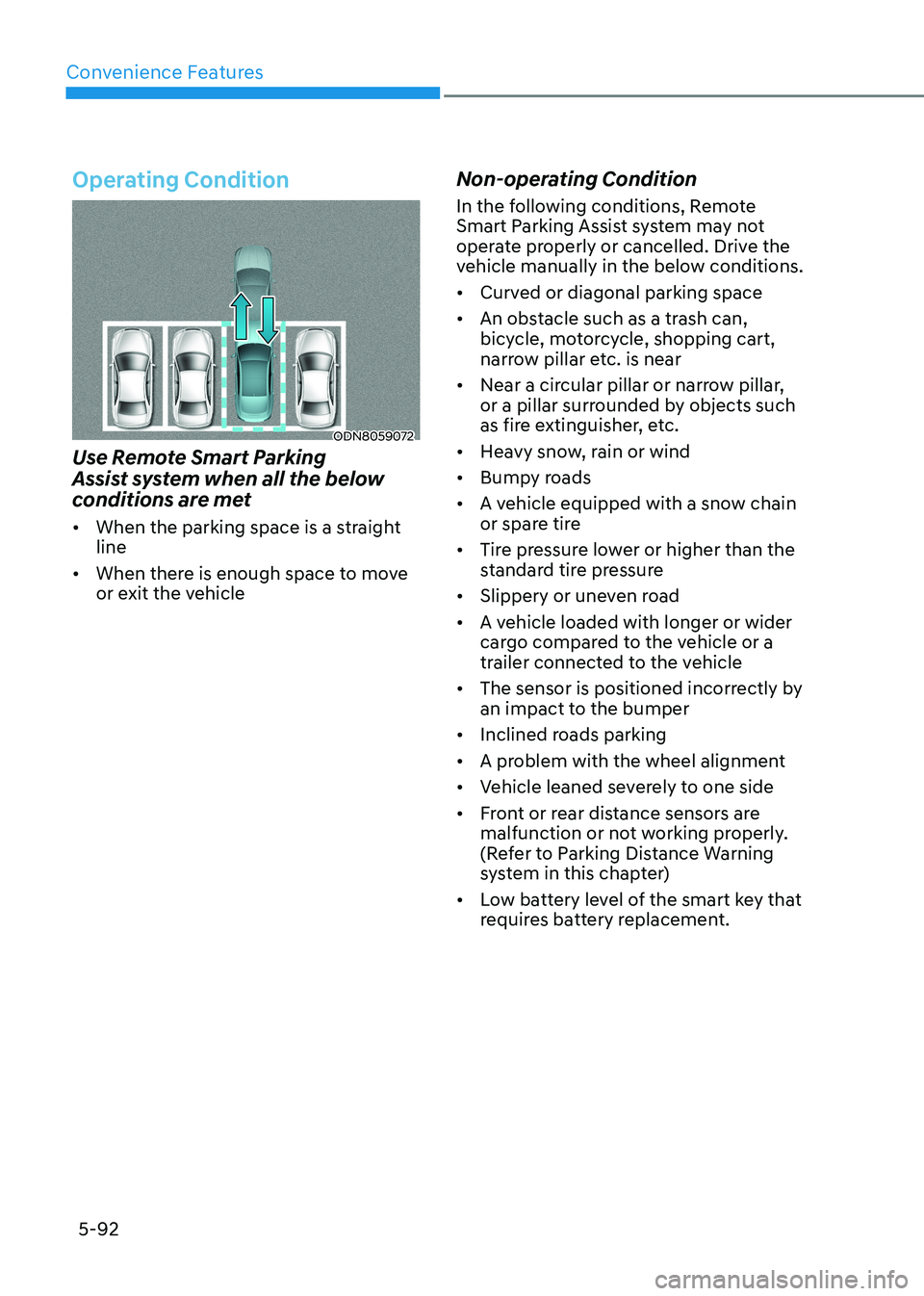
Use Remote Smart Parking
Assist system when all the below
conditions are met • When the parking space is a straight line
• When there is enough space to move
or exit the vehicle Non-operating Condition
In the following conditions, Remote
Smart Parking Assist system may not
operate properly or cancelled. Drive the
vehicle manually in the below conditions. •
Curved or diagonal parking space
• An obstacle such as a trash can,
bicycle, motorcycle, shopping cart,
narrow pillar etc. is near
• Near a circular pillar or narrow pillar,
or a pillar surrounded by objects such
as fire extinguisher, etc.
• Heavy snow, rain or wind
• Bumpy roads
• A vehicle equipped with a snow chain
or spare tire
• Tire pressure lower or higher than the
standard tire pressure
• Slippery or uneven road
• A vehicle loaded with longer or wider
cargo compared to the vehicle or a
trailer connected to the vehicle
• The sensor is positioned incorrectly by
an impact to the bumper
• Inclined roads parking
• A problem with the wheel alignment
• Vehicle leaned severely to one side
• Front or rear distance sensors are
malfunction or not working properly.
(Refer to Parking Distance Warning
system in this chapter)
• Low battery level of the smart key that
requires battery replacement.
Page 239 of 555
05
5-93
Limitations of the system •
When the vehicle has been parked/
stopped for a long time in a cold
environment, the Remote Moving
Forward/Backward may be delayed
depending on the vehicle condition
when the vehicle is turned on
remotely.
• Remote Smart Parking Assist system
may suddenly apply brake to avoid
collision against stationary or moving object.
• The performance of the system may
be degraded and frequently stop
when driving in strong electric field
area.
• When there is any obstacle within
the blind-spot area, drive out of the parking space manually
• Remote Smart Parking Assist system
may not recognize the object that
appears suddenly.
WARNING
Do not use Remote Smart Parking Assist
system in the following conditions for
unexpected results may occur and
cause a serious accident.
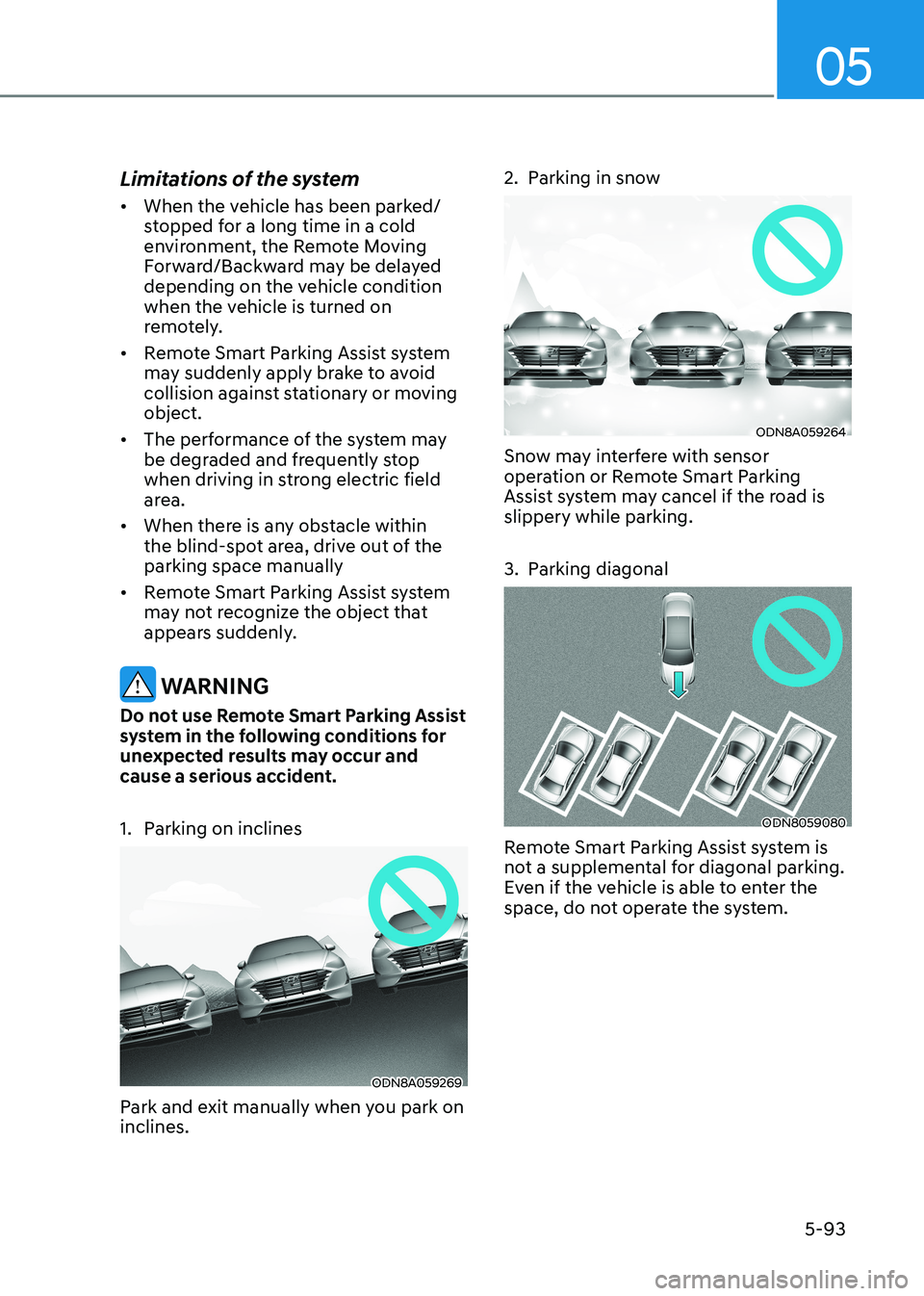
1. Parking on inclines
ODN8A059269
Park and exit manually when you park on inclines. 2. Parking in snow
ODN8A059264
Snow may interfere with sensor
operation or Remote Smart Parking
Assist system may cancel if the road is slippery while parking.
3. Parking diagonal
ODN8059080
Remote Smart Parking Assist system is
not a supplemental for diagonal parking.
Even if the vehicle is able to enter the
space, do not operate the system.
Page 240 of 555
Convenience Features
5-94
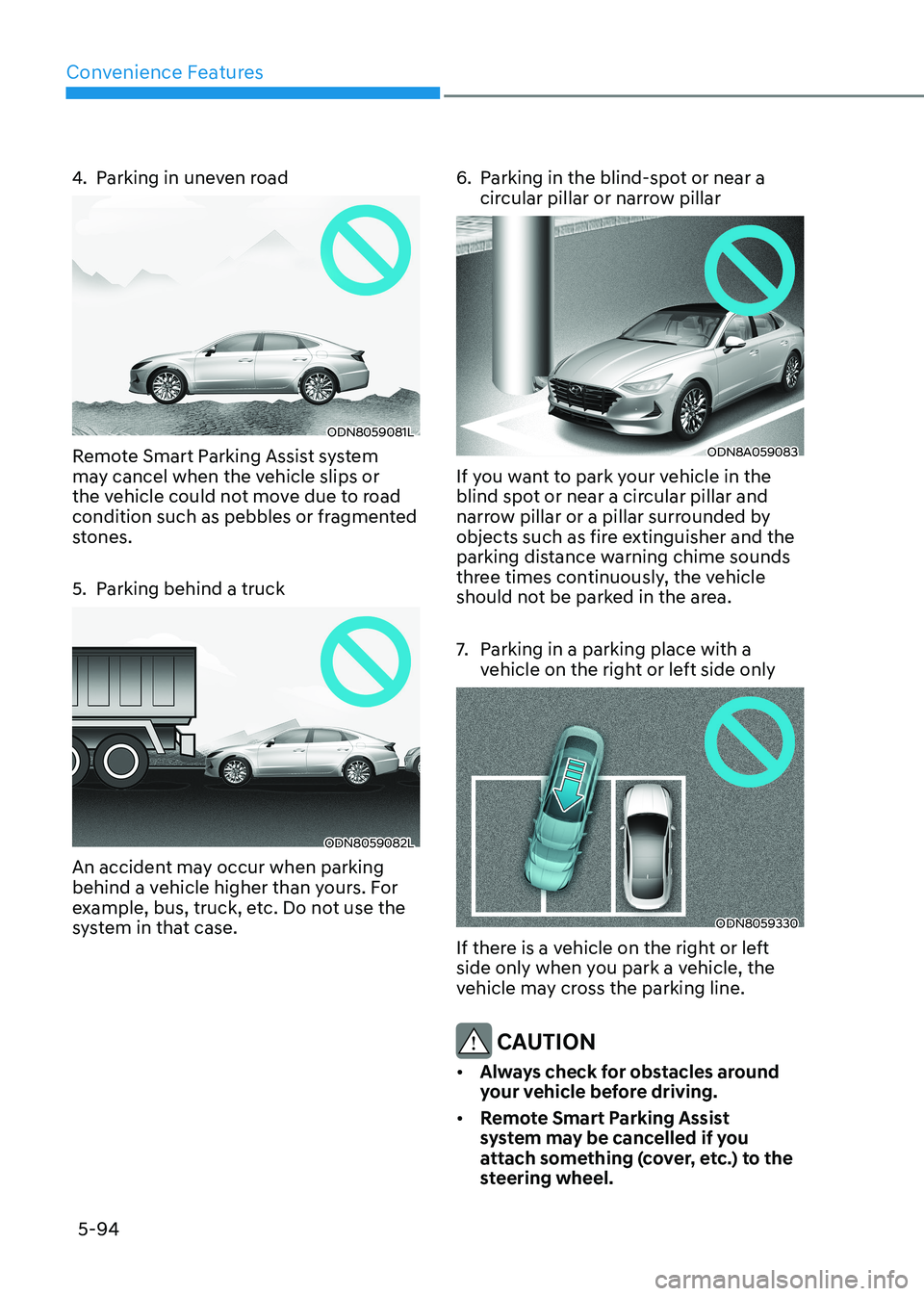
4. Parking in uneven road
ODN8059081L
Remote Smart Parking Assist system
may cancel when the vehicle slips or
the vehicle could not move due to road
condition such as pebbles or fragmented
stones.
5. Parking behind a truck
ODN8059082L
An accident may occur when parking
behind a vehicle higher than yours. For
example, bus, truck, etc. Do not use the
system in that case. 6. Parking in the blind-spot or near a
circular pillar or narrow pillar
ODN8A059083
If you want to park your vehicle in the
blind spot or near a circular pillar and
narrow pillar or a pillar surrounded by
objects such as fire extinguisher and the
parking distance warning chime sounds
three times continuously, the vehicle
should not be parked in the area.
7. Parking in a parking place with a vehicle on the right or left side only
ODN8059330
If there is a vehicle on the right or left
side only when you park a vehicle, the
vehicle may cross the parking line.
CAUTION
• Always check for obstacles around
your vehicle before driving.
• Remote Smart Parking Assist
system may be cancelled if you
attach something (cover, etc.) to the
steering wheel.
Page 241 of 555
05
5-95
How Remote Smart Parking
Assist System Works
Remote Moving Forward/Backward
Remote Moving Forward/Backward is
available with the driver outside the
vehicle. Make sure the conditions are
met before activating Remote Moving
Forward/Backward function. With the
function, you can park or exit the vehicle
and the procedure is as follows.
1. Remote Moving Forward/Backward ready:
(1) With the vehicle off: Remotely turn on the vehicle.
(2) With the vehicle on: with shift button is in P (Park) position,
then press Remote Smart Parking
Assist system button. Then exit the
vehicle possessing the smart key.
2. Remote Moving Forward/Backward assist: Press and hold the Moving
Forward/Backward button of the
smart key to provide the Remote
Moving Forward/Backward assist
through steering wheel, gear shift and
vehicle speed control.
3. Remote Moving Forward/Backward complete: When the vehicle reaches
the desired position, release the
smart key button. Then complete the
Remote Moving Forward/Backward
by entering the vehicle possessing the
smart key or by pressing the remote
start button of the smart key.
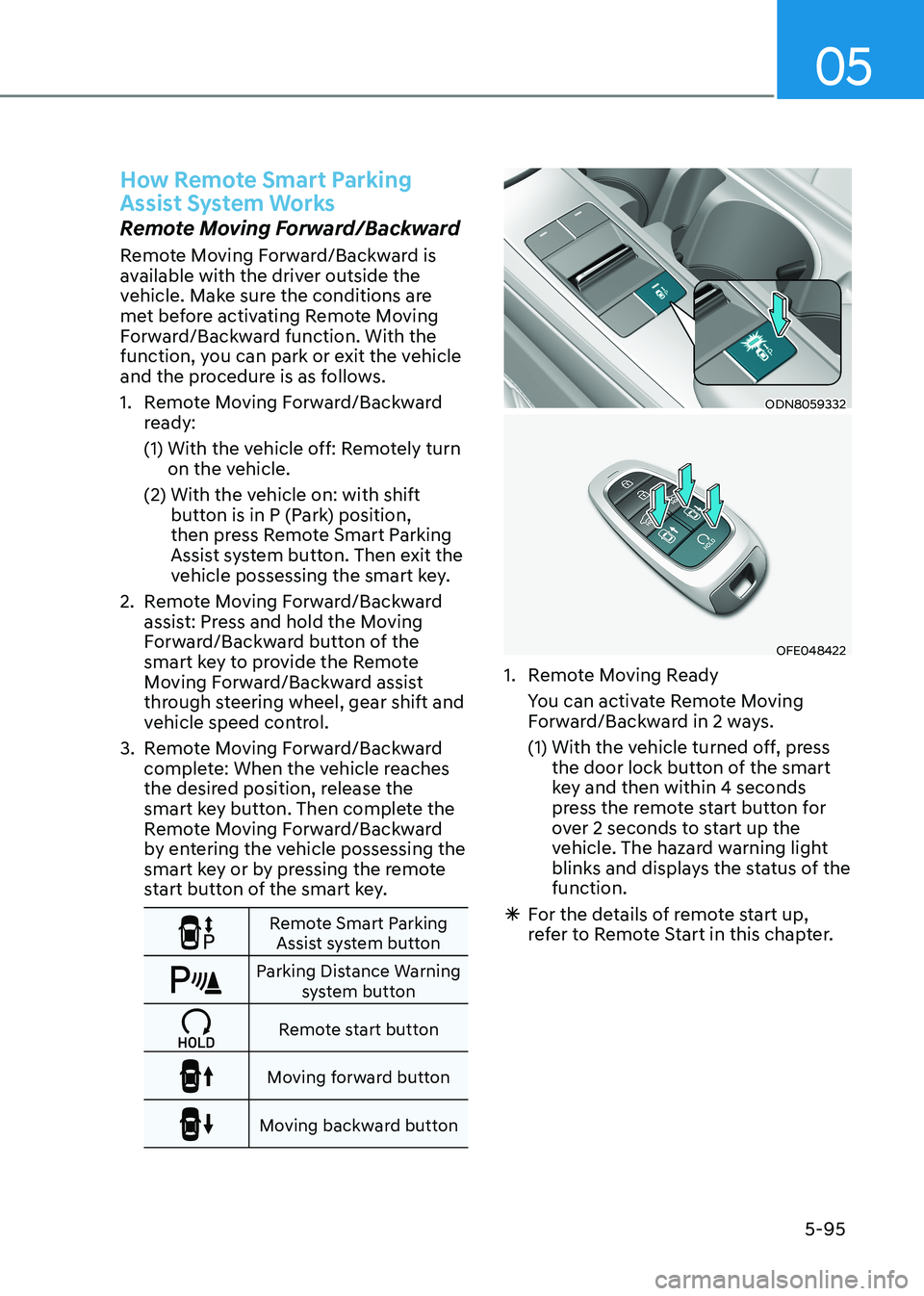
Remote Smart Parking Assist system button
Parking Distance Warning system button
Remote start button
Moving forward button
Moving backward button
ODN8059332
OFE048422
1. Remote Moving Ready
You can activate Remote Moving Forward/Backward in 2 ways.
(1) With the vehicle turned off, press the door lock button of the smart
key and then within 4 seconds
press the remote start button for
over 2 seconds to start up the
vehicle. The hazard warning light
blinks and displays the status of the function.
à For the details of remote start up,
refer to Remote Start in this chapter.
Page 242 of 555
Convenience Features
5-96
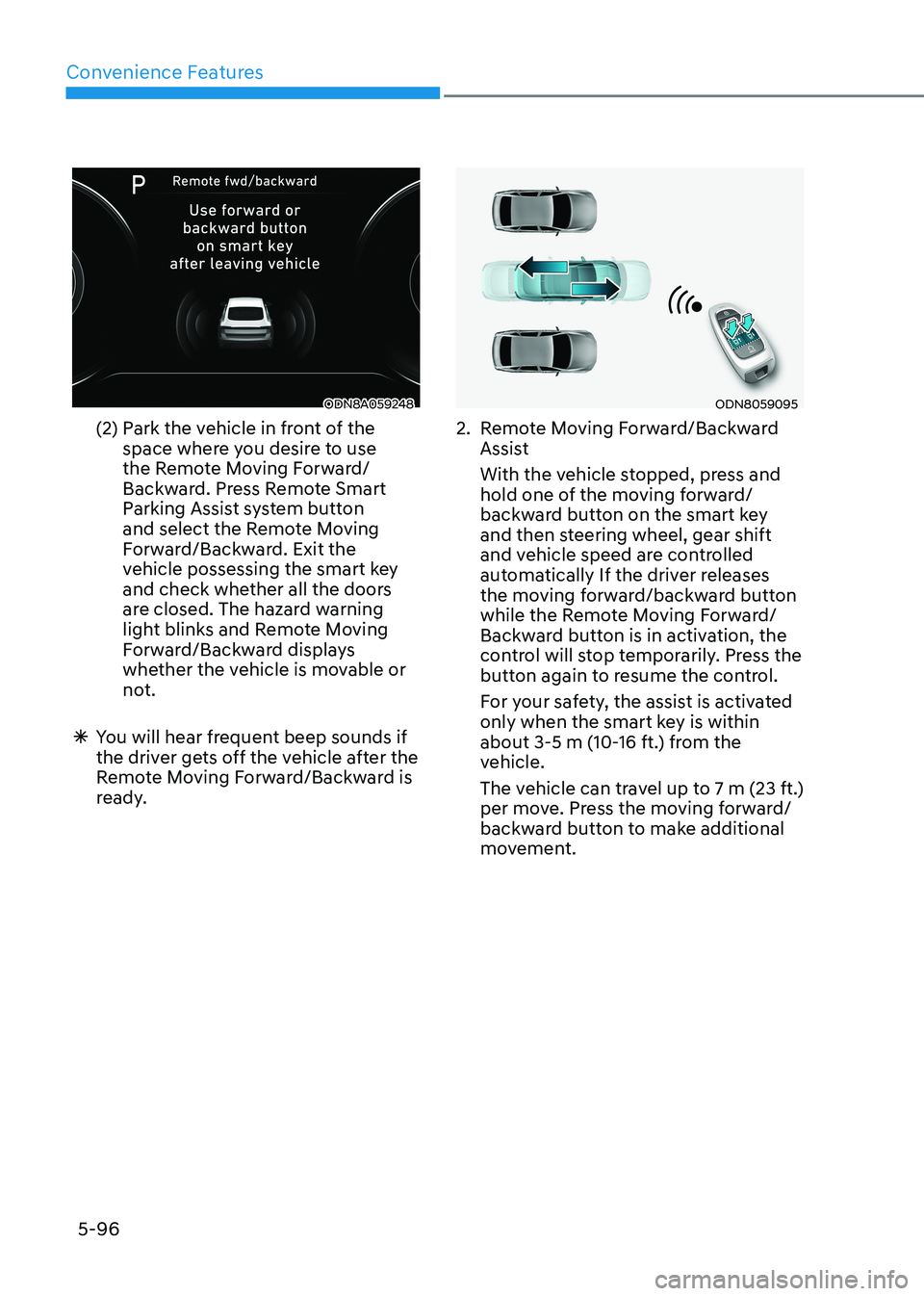
ODN8A059248
(2) Park the vehicle in front of the space where you desire to use
the Remote Moving Forward/
Backward. Press Remote Smart
Parking Assist system button
and select the Remote Moving
Forward/Backward. Exit the
vehicle possessing the smart key
and check whether all the doors
are closed. The hazard warning
light blinks and Remote Moving
Forward/Backward displays
whether the vehicle is movable or
not.
à You will hear frequent beep sounds if
the driver gets off the vehicle after the
Remote Moving Forward/Backward is
ready.ODN8059095
2. Remote Moving Forward/Backward Assist
With the vehicle stopped, press and hold one of the moving forward/
backward button on the smart key
and then steering wheel, gear shift
and vehicle speed are controlled
automatically If the driver releases
the moving forward/backward button
while the Remote Moving Forward/
Backward button is in activation, the
control will stop temporarily. Press the
button again to resume the control.
For your safety, the assist is activated only when the smart key is within
about 3-5 m (10-16 ft.) from the
vehicle.
The vehicle can travel up to 7 m (23 ft.) per move. Press the moving forward/
backward button to make additional
movement.
Page 243 of 555
05
5-97
à Press the moving forward/backward
button again after checking the
distance from the vehicles if the
vehicle didn’t move after pressing
and holding the smart key button for about 5 seconds.
à Under cold weather, take enough time
before pressing the moving forward/
backward button of the smart key
after turning on the vehicle remotely.
It may take more time until the vehicle
moves.
à When Remote Moving Forward is
ready by the above No. (1) method,
the vehicle recognizes the condition
as exit. After confirming the
surroundings within 4 m (13 ft.), it
allows to operate the steering wheel
up to the conditions ahead.
à When Remote Moving Forward is
ready by the above No. (2) method,
the vehicle recognizes the condition
as entering to the parking space.
According to the front condition, it
immediately allows the vehicle to
enter to the parking space and line
up with the steering wheel control.
However, the function performance
can be degraded up to the shape or
position of the surrounding objects.
à If you select the remote moving
backward, both of the No. (1) and (2)
methods make the vehicle go straight
after lining up.
à While Remote Moving Forward/
Backward assist is operating, the
brake light turns on.
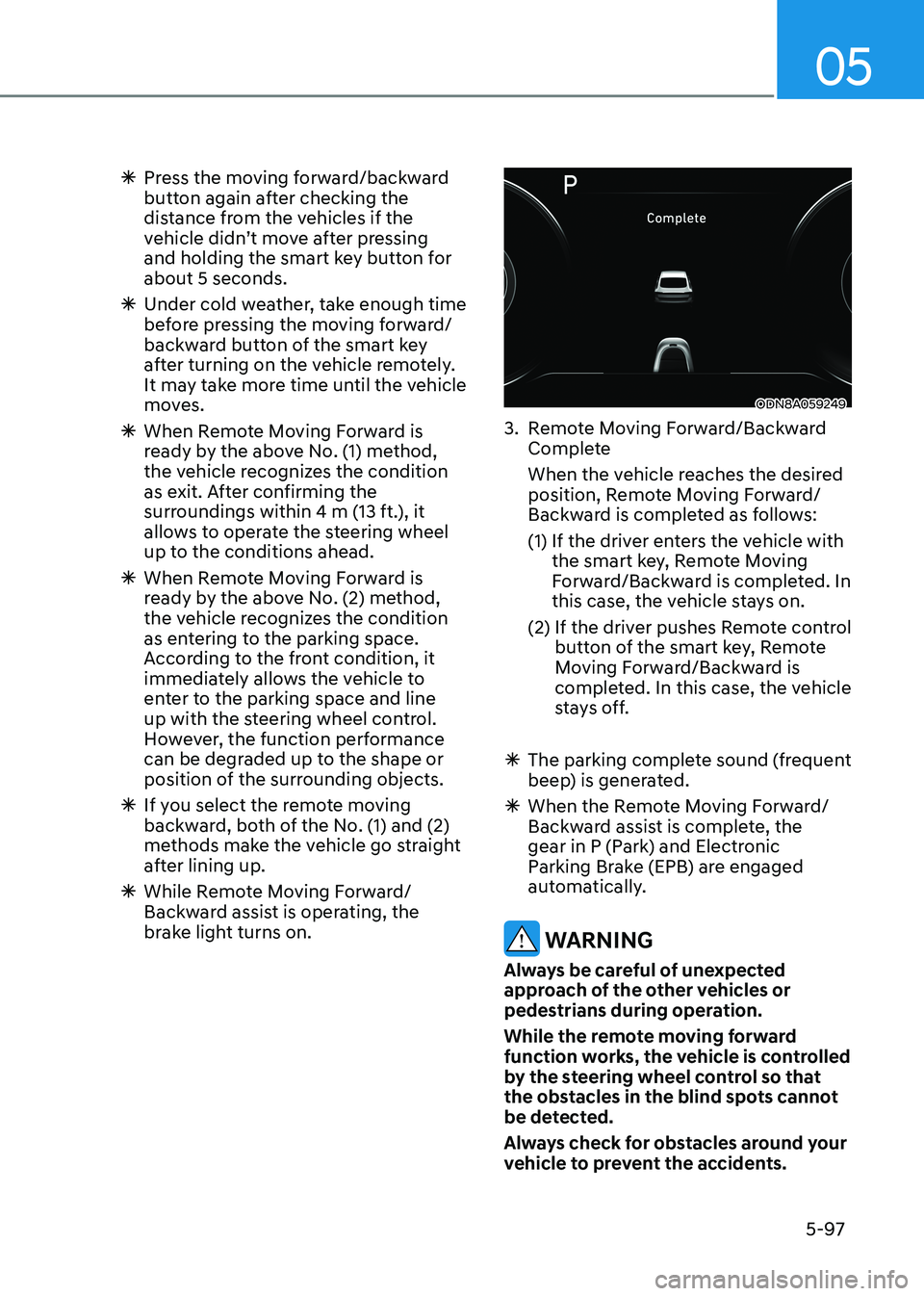
ODN8A059249
3. Remote Moving Forward/Backward Complete
When the vehicle reaches the desired position, Remote Moving Forward/
Backward is completed as follows:
(1) If the driver enters the vehicle with the smart key, Remote Moving
Forward/Backward is completed. In
this case, the vehicle stays on.
(2) If the driver pushes Remote control button of the smart key, Remote
Moving Forward/Backward is
completed. In this case, the vehicle
stays off.
à The parking complete sound (frequent
beep) is generated.
à When the Remote Moving Forward/
Backward assist is complete, the
gear in P (Park) and Electronic
Parking Brake (EPB) are engaged
automatically.
WARNING
Always be careful of unexpected
approach of the other vehicles or
pedestrians during operation.
While the remote moving forward
function works, the vehicle is controlled
by the steering wheel control so that
the obstacles in the blind spots cannot
be detected.
Always check for obstacles around your
vehicle to prevent the accidents.
Page 244 of 555
Convenience Features
5-98
CAUTION
• The driver should check for obstacles
in directly around the vehicle.
• The function may be cancelled if you
attach something (cover, etc.) to the
steering wheel.
• Make sure all the passengers exit the
vehicle when the Remote Moving
Forward/Backward is in activation.
• Make sure all the smart keys are
outside the vehicle when the Remote
Moving Forward/Backward assist is
in activation.
• The detection range of the smart key
can be differed by the surroundings
(ex: Indoor/outdoor, strong electric
field area)
• If the parking distance warning
sounds three consecutive times
during operating the Remote Moving
Forward/Backward system, you
should not move your vehicle in that
direction since the objects are too
close. The driver should operate the
vehicle manually. To cancel the Remote Moving
Forward/Backward while in
operation
1. Press the remote start button on the
smart key.
2. The driver should press Remote Smart Parking Assist system button while
Remote Moving Forward/Backward is
instructed.
3. The driver should shift the gear besides P (parking) while Remote
Moving Forward/Backward is
instructed.
4. The driver should press Parking
Distance Warning system button
while the Remote Moving Forward/
Backward is instructed.
5. During Remote Moving Forward/ Backward operation, the vehicle
turns off when the driver presses the
remote start button on the smart key.
6. The function is cancelled but the vehicle stays on when the driver
enters the vehicle with the smart key
and all the doors are open.