ESP HYUNDAI SONATA 2023 Workshop Manual
[x] Cancel search | Manufacturer: HYUNDAI, Model Year: 2023, Model line: SONATA, Model: HYUNDAI SONATA 2023Pages: 555, PDF Size: 42.72 MB
Page 399 of 555
While Driving
6-112
•
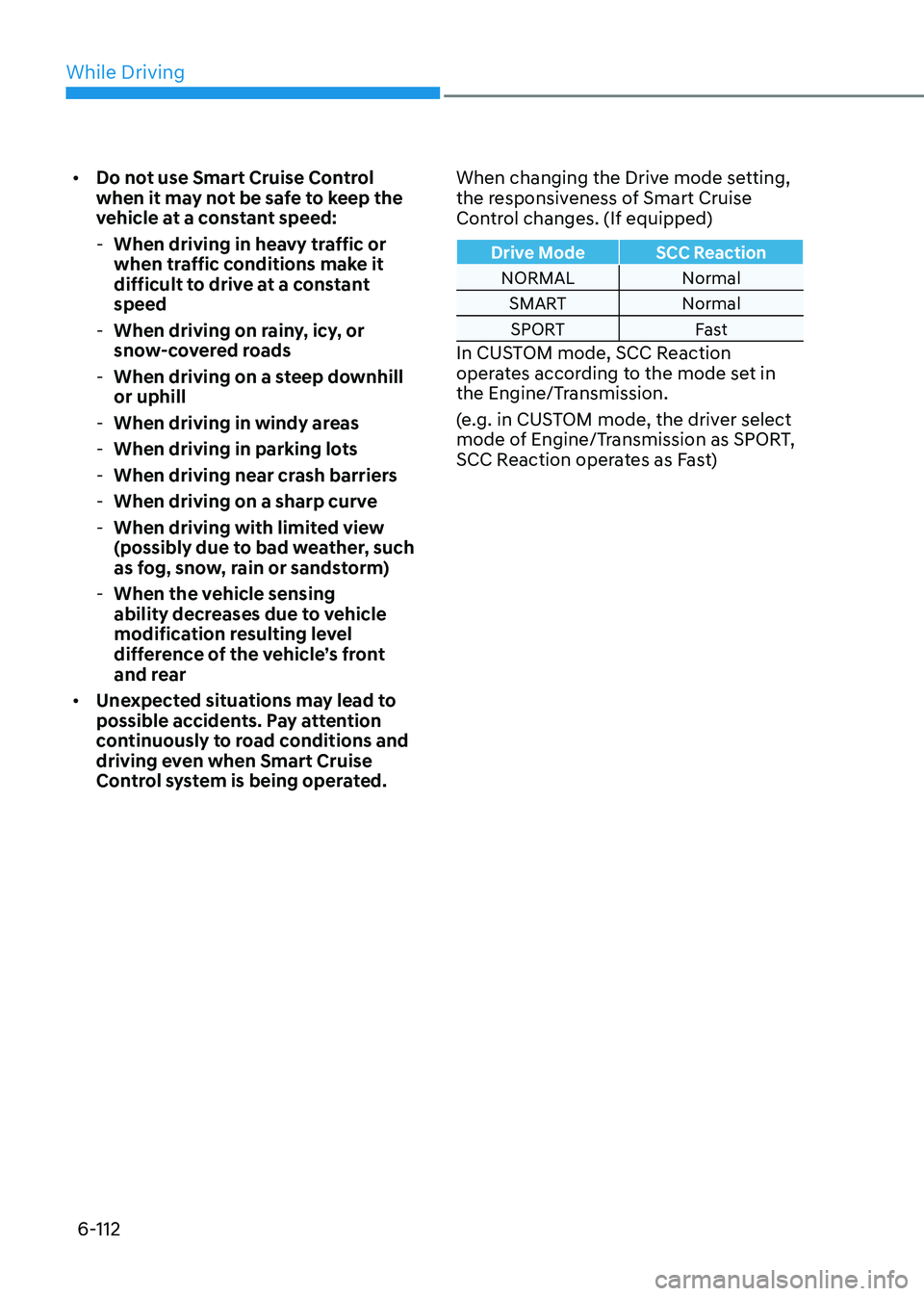
Do not use Smart Cruise Control
when it may not be safe to keep the
vehicle at a constant speed:
- When driving in heavy traffic or
when traffic conditions make it
difficult to drive at a constant speed
- When driving on rainy, icy, or
snow-covered roads
- When driving on a steep downhill or uphill
- When driving in windy areas
- When driving in parking lots
- When driving near crash barriers
- When driving on a sharp curve
- When driving with limited view
(possibly due to bad weather, such
as fog, snow, rain or sandstorm)
- When the vehicle sensing
ability decreases due to vehicle
modification resulting level
difference of the vehicle’s front
and rear
• Unexpected situations may lead to
possible accidents. Pay attention
continuously to road conditions and
driving even when Smart Cruise
Control system is being operated. When changing the Drive mode setting,
the responsiveness of Smart Cruise
Control changes. (If equipped)
Drive Mode SCC Reaction
NORMAL Normal
SMART NormalSPORT Fast
In CUSTOM mode, SCC Reaction
operates according to the mode set in
the Engine/Transmission.
(e.g. in CUSTOM mode, the driver select
mode of Engine/Transmission as SPORT,
SCC Reaction operates as Fast)
Page 409 of 555
While Driving
6-122
Navigation-based Smart Cruise Control
system will help automatically adjust
your speed when a curved road is ahead
by receiving road information from
the navigation while the Smart Cruise
Control is operating.
WARNING
• Navigation-based Smart Cruise
Control system is not a substitute
for safe driving practices, but a
convenience function. It is the
responsibility of the driver to always
be aware of the surroundings and
drive safely.
• Navigation-based Smart Cruise
Control system relies entirely on
the road information provided by
the navigation system and may
accelerate above speed limit. It is the
responsibility of the driver to follow
traffic laws and avoid accidents.
• For your safety, please read the
owner's manual before using the
system.
Information
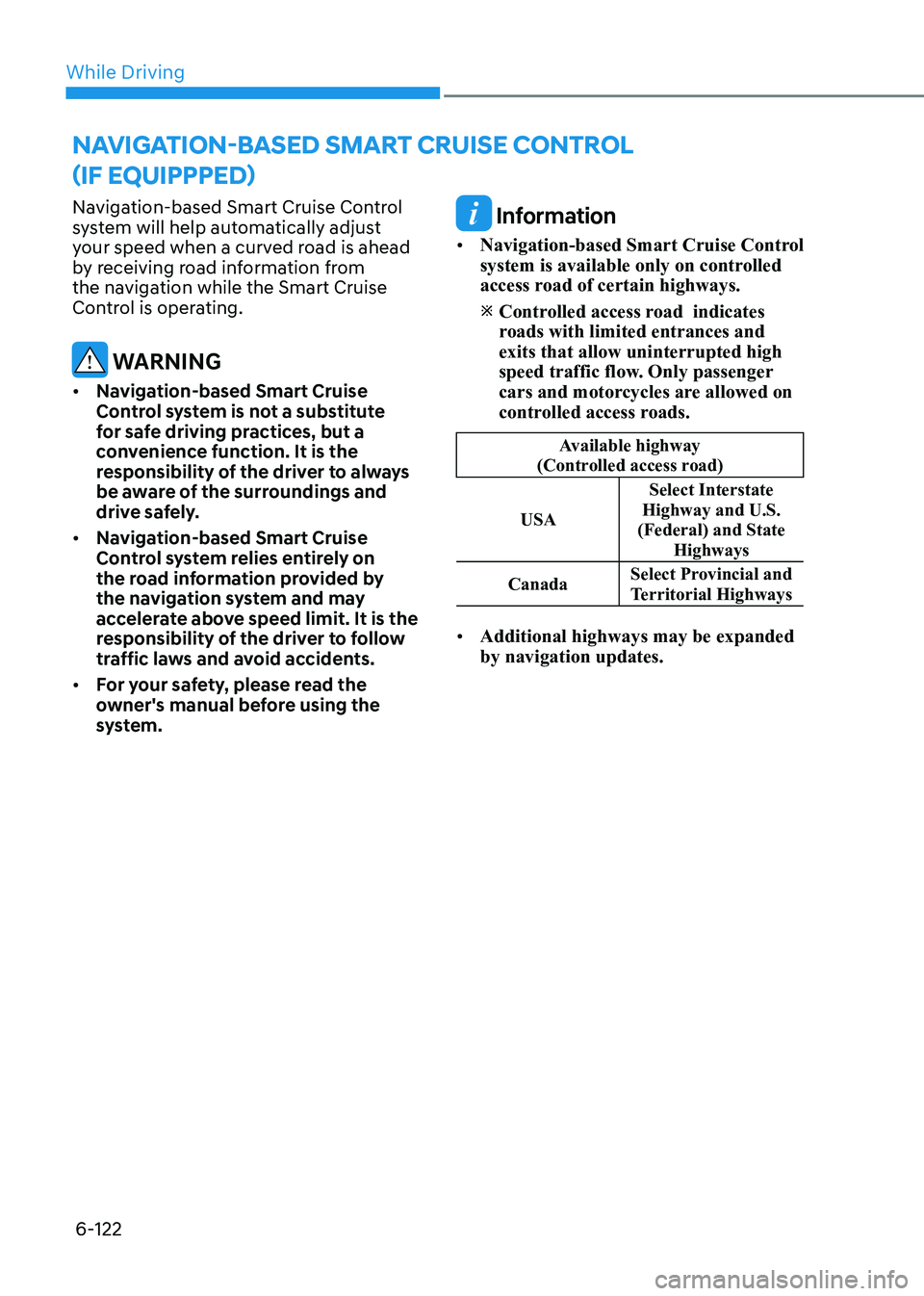
• Navigation-based Smart Cruise Control
system is available only on controlled
access road of certain highways. Controlled access road indicates
roads with limited entrances and exits that allow uninterrupted high
speed traffic flow. Only passenger
cars and motorcycles are allowed on
controlled access roads.
Available highway
(Controlled access road)
USA Select Interstate
Highway and U.S.
(Federal) and State
Highways
Canada Select Provincial and
Territorial Highways
• Additional highways may be expanded by navigation updates.
navigation-BaseD smart cruise control
(if equipppeD)
Page 410 of 555
06
6-123
System Setting and Operation
System setting • With the Engine Start/Stop button in
the ON or START position, Navigation-
based Smart Cruise Control can
be activated by selecting 'Driver
Assistance →
Highway Auto Curve
Slowdown' from the User Settings
mode on the infotainment system.
For detailed information, please refer
to the infotainment system manual
separately supplied.
• If the engine is turned off then on
again, the system maintains the last
setting.
Operating conditions
Select 'Highway Auto Curve Slowdown'
from the Settings menu in the
infotainment system screen and satisfy
the following conditions for the system
to operate. • Driving on the highway main line
• Smart Cruise Control is operating
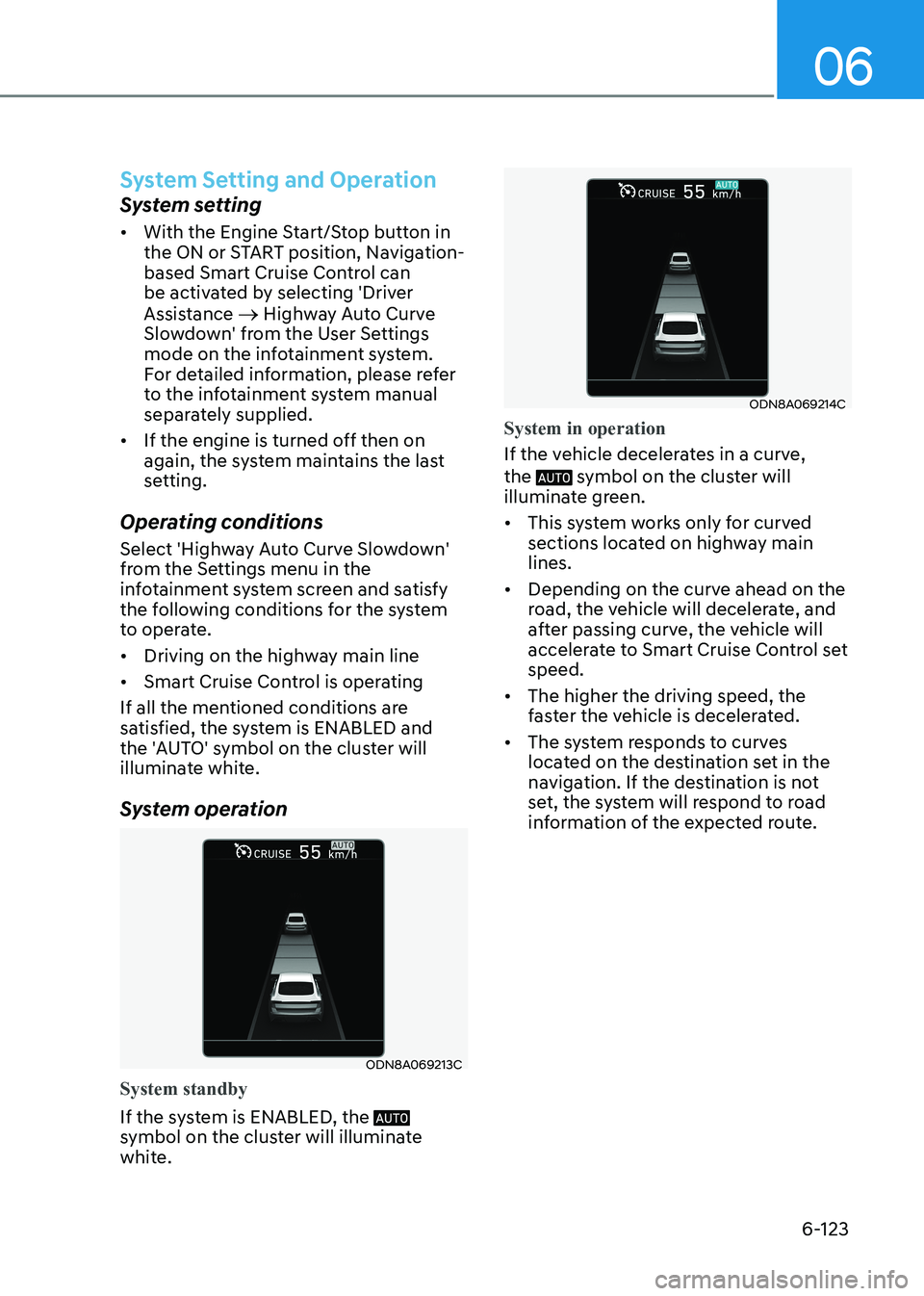
If all the mentioned conditions are
satisfied, the system is ENABLED and
the 'AUTO' symbol on the cluster will
illuminate white.
System operation
ODN8A069213C
System standby
If the system is ENABLED, the
symbol on the cluster will illuminate
white.
ODN8A069214C
System in operation
If the vehicle decelerates in a curve, the
symbol on the cluster will
illuminate green. • This system works only for curved
sections located on highway main lines.
• Depending on the curve ahead on the
road, the vehicle will decelerate, and
after passing curve, the vehicle will
accelerate to Smart Cruise Control set speed.
• The higher the driving speed, the
faster the vehicle is decelerated.
• The system responds to curves
located on the destination set in the
navigation. If the destination is not
set, the system will respond to road
information of the expected route.
Page 412 of 555
06
6-125
CAUTION
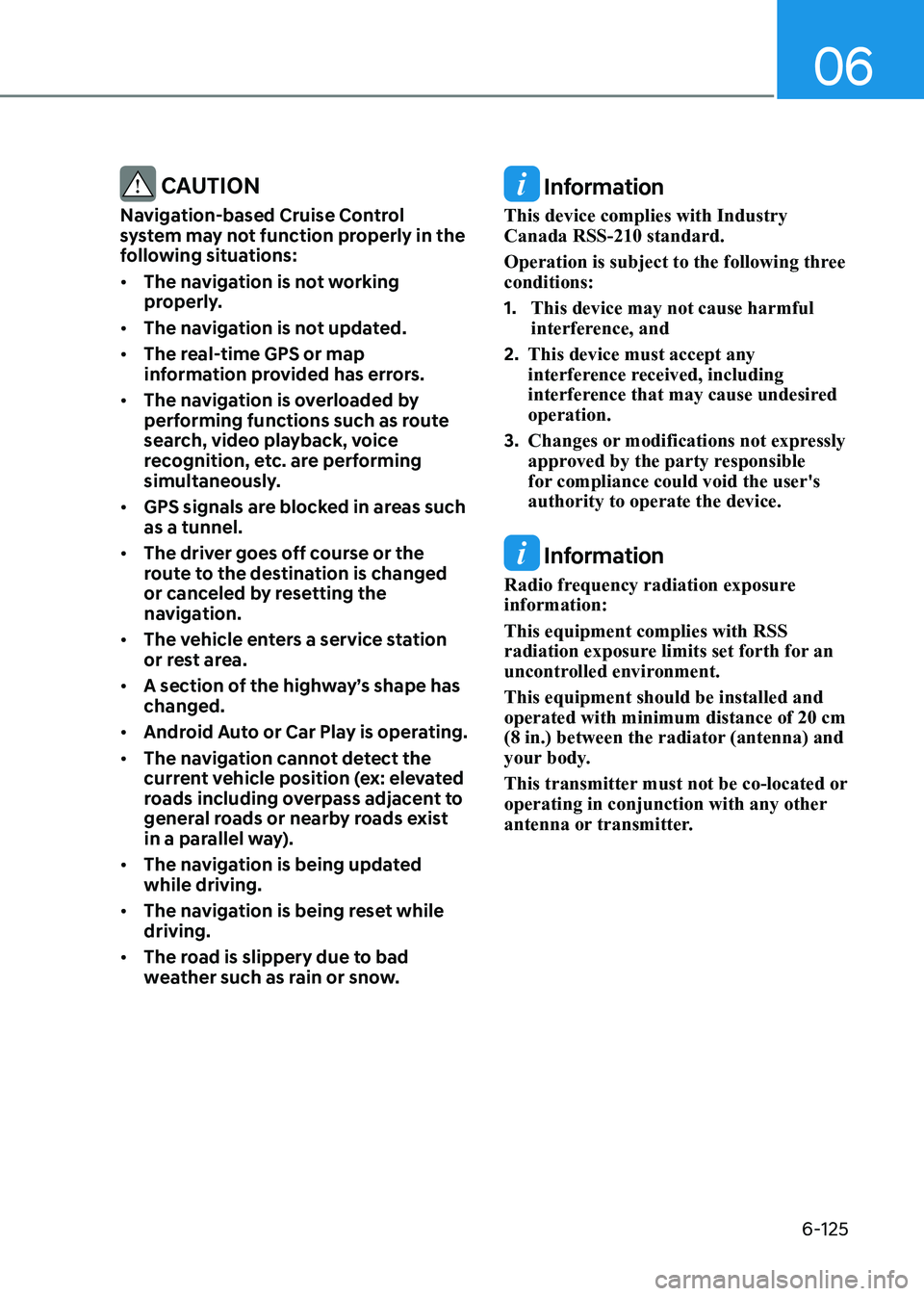
Navigation-based Cruise Control
system may not function properly in the
following situations: • The navigation is not working
properly.
• The navigation is not updated.
• The real-time GPS or map
information provided has errors.
• The navigation is overloaded by
performing functions such as route
search, video playback, voice
recognition, etc. are performing
simultaneously.
• GPS signals are blocked in areas such as a tunnel.
• The driver goes off course or the
route to the destination is changed
or canceled by resetting the
navigation.
• The vehicle enters a service station
or rest area.
• A section of the highway’s shape has changed.
• Android Auto or Car Play is operating.
• The navigation cannot detect the
current vehicle position (ex: elevated
roads including overpass adjacent to
general roads or nearby roads exist
in a parallel way).
• The navigation is being updated while driving.
• The navigation is being reset while driving.
• The road is slippery due to bad
weather such as rain or snow. Information
This device complies with Industry Canada RSS-210 standard.
Operation is subject to the following three conditions: 1. This device may not cause harmful
interference, and
2. This device must accept any
interference received, including
interference that may cause undesired operation.
3. Changes or modifications not expressly
approved by the party responsible
for compliance could void the user's authority to operate the device.
Information
Radio frequency radiation exposure information: This equipment complies with RSS
radiation exposure limits set forth for an
uncontrolled environment. This equipment should be installed and operated with minimum distance of 20 cm
(8 in.) between the radiator (antenna) and
your body.
This transmitter must not be co-located or
operating in conjunction with any other
antenna or transmitter.
Page 413 of 555
While Driving
6-126
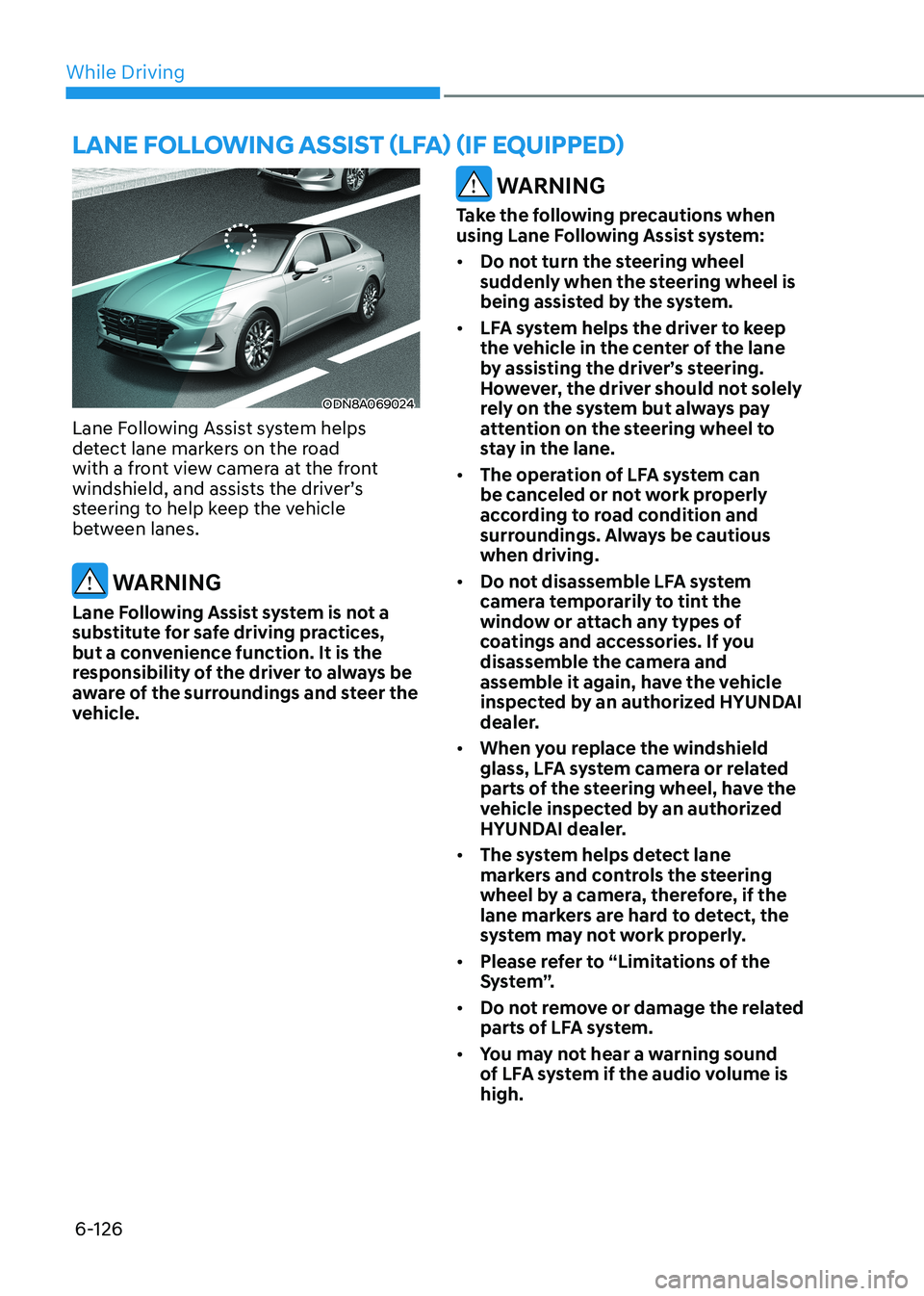
ODN8A069024
Lane Following Assist system helps
detect lane markers on the road
with a front view camera at the front
windshield, and assists the driver’s
steering to help keep the vehicle
between lanes.
WARNING
Lane Following Assist system is not a
substitute for safe driving practices,
but a convenience function. It is the
responsibility of the driver to always be
aware of the surroundings and steer the
vehicle.
WARNING
Take the following precautions when
using Lane Following Assist system: • Do not turn the steering wheel
suddenly when the steering wheel is
being assisted by the system.
• LFA system helps the driver to keep
the vehicle in the center of the lane
by assisting the driver’s steering.
However, the driver should not solely
rely on the system but always pay
attention on the steering wheel to
stay in the lane.
• The operation of LFA system can
be canceled or not work properly
according to road condition and
surroundings. Always be cautious when driving.
• Do not disassemble LFA system
camera temporarily to tint the
window or attach any types of
coatings and accessories. If you
disassemble the camera and
assemble it again, have the vehicle
inspected by an authorized HYUNDAI
dealer.
• When you replace the windshield
glass, LFA system camera or related
parts of the steering wheel, have the
vehicle inspected by an authorized
HYUNDAI dealer.
• The system helps detect lane
markers and controls the steering
wheel by a camera, therefore, if the
lane markers are hard to detect, the
system may not work properly.
• Please refer to “Limitations of the
S y s t e m ”.
• Do not remove or damage the related
parts of LFA system.
• You may not hear a warning sound
of LFA system if the audio volume is high.
lane following assist (lfa) (if equippeD)
Page 415 of 555
While Driving
6-128
Warning Message
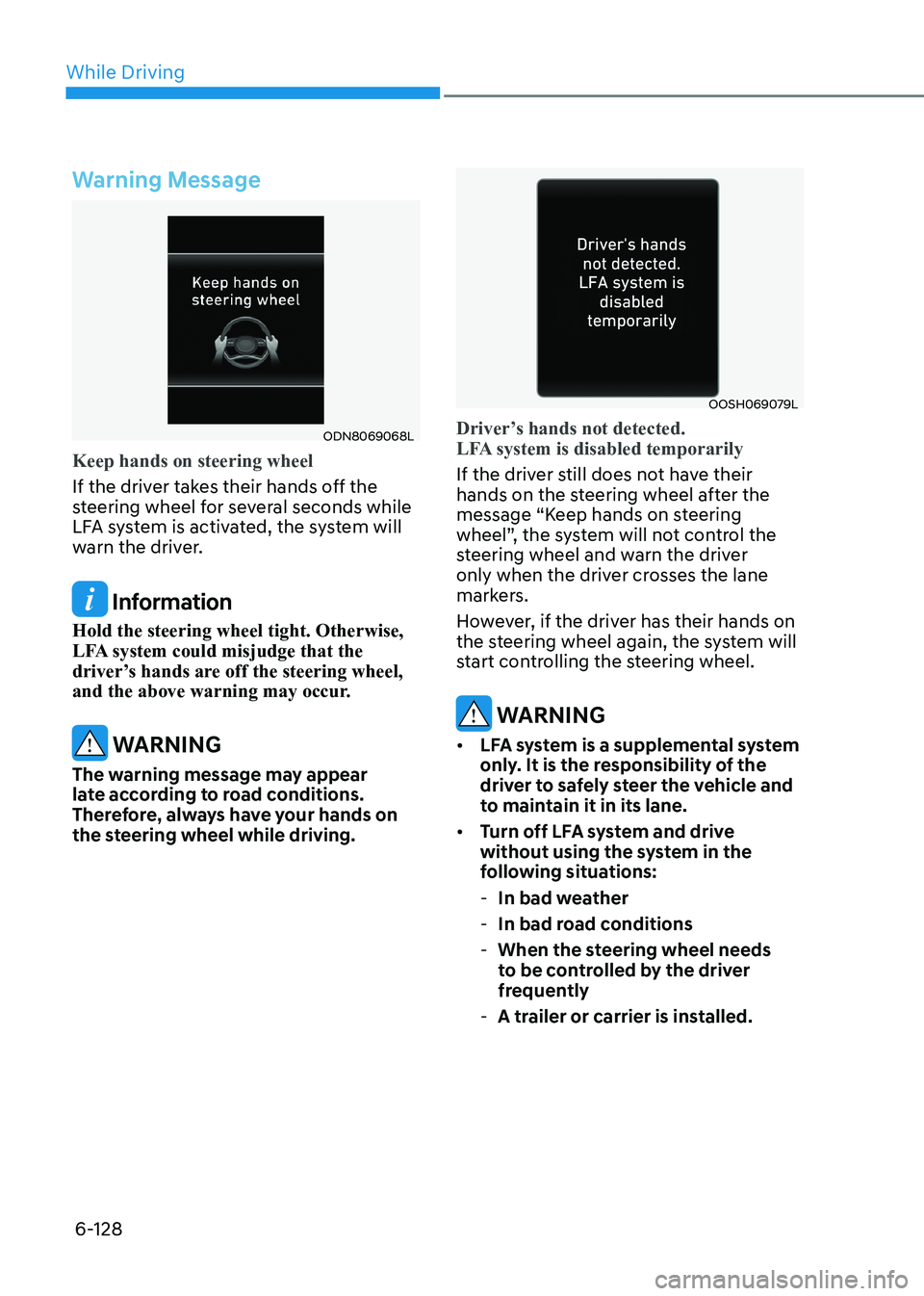
ODN8069068L
Keep hands on steering wheel
If the driver takes their hands off the
steering wheel for several seconds while
LFA system is activated, the system will
warn the driver.
Information
Hold the steering wheel tight. Otherwise,
LFA system could misjudge that the
driver’s hands are off the steering wheel,
and the above warning may occur.
WARNING
The warning message may appear
late according to road conditions.
Therefore, always have your hands on
the steering wheel while driving.
OOSH069079L
Driver’s hands not detected.
LFA system is disabled temporarily
If the driver still does not have their
hands on the steering wheel after the
message “Keep hands on steering
wheel”, the system will not control the
steering wheel and warn the driver
only when the driver crosses the lane
markers.
However, if the driver has their hands on
the steering wheel again, the system will
start controlling the steering wheel.
WARNING
• LFA system is a supplemental system
only. It is the responsibility of the
driver to safely steer the vehicle and
to maintain it in its lane.
• Turn off LFA system and drive
without using the system in the
following situations:
- In bad weather
- In bad road conditions
- When the steering wheel needs
to be controlled by the driver
frequently
- A trailer or carrier is installed.
Page 419 of 555
While Driving
6-132
Highway Driving Assist system helps
keep the vehicle between lanes, maintain
a distance with the vehicle ahead, and
automatically adjusts the vehicle speed
to the speed limit while driving on the
highway.
WARNING
• Highway Driving Assist system is
not a substitute for safe driving
practices, but a convenience
function. It is the responsibility of
the driver to always be aware of the
surroundings and drive safely.
• Highway Driving Assist system relies
entirely on the road information
provided by the navigation system.
It is the responsibility of the driver
to follow traffic laws and avoid
accidents.
• For your safety, please read the
owner's manual before using the
system.
Information
• Highway Driving Assist system is
available only on controlled access road of certain highways. Controlled access road indicates
roads with limited entrances and exits that allow uninterrupted high
speed traffic flow. Only passenger
cars and motorcycles are allowed on
controlled access roads.
Available highway
(Controlled access road)
USA Select Interstate
Highway and U.S.
(Federal) and State
Highways
Canada Select Provincial and
Territorial Highways
• Additional highways may be expanded by navigation updates.
highway Driving assist (hDa) (if equippeD)
Page 424 of 555
06
6-137
CAUTION
Highway Driving Assist system may
not function properly in the following
situations: • The navigation is not working
properly.
• The navigation is not updated.
• The real-time GPS or map
information provided has errors.
• The navigation is overloaded by
performing functions such as route
search, video playback, voice
recognition, etc. are performing
simultaneously.
• GPS signals are blocked in areas such as a tunnel.
• The driver goes off course or the
route to the destination is changed
or canceled by resetting the
navigation.
• The vehicle enters a service station
or rest area
• Android Auto or Car Play is operating.
• The navigation cannot detect the
current vehicle position (ex: elevated
roads including overpass adjacent to
general roads or nearby roads exist
in a parallel way).
• The navigation is being updated while driving.
• The navigation is being reset while driving.
• The road is slippery due to bad
weather such as rain or snow. Information
• For information's on vehicle to vehicle
distance control and the front radar,
refer to "Smart Cruise Control (SCC)"
in this chapter.
• For information's on steering control
and distance control and the front
camera, refer to "Lane Following Assist
(LFA)" in this chapter.
Information
This device complies with Industry Canada RSS-210 standard.
Operation is subject to the following three conditions: 1. This device may not cause harmful
interference, and
2. This device must accept any
interference received, including
interference that may cause undesired operation.
3. Changes or modifications not expressly
approved by the party responsible
for compliance could void the user's authority to operate the device.
Information
Radio frequency radiation exposure information: This equipment complies with RSS
radiation exposure limits set forth for an
uncontrolled environment. This equipment should be installed and operated with minimum distance of 20 cm
(8 in.) between the radiator (antenna) and
your body.
This transmitter must not be co-located or
operating in conjunction with any other
antenna or transmitter.
Page 430 of 555
06
6-143
CAUTION
• When the operation condition of
Rear Cross-Traffic Collision Warning
system is satisfied, the warning
will occur every time a vehicle
approaches the side or rear of your
stopped (0 km/h (0 mph) vehicle
speed) vehicle.
• The system’s warning or brake may
not operate properly if the left or
right of your vehicle’s rear bumper is
blocked by a vehicle or obstacle.
• The driver should always use
extreme caution while operating
the vehicle, whether or not the
warning light on the side view mirror
illuminates or there is a warning alarm.
• Playing the vehicle audio system at
high volume may offset the system’s
warning sounds.
• The warning of Rear Cross-Traffic
Collision Warning System may not
sound while other system’s warning sounds.
• If any other warning sound such as
seat belt warning chime is already
generated, Rear Cross-Traffic
Collision Warning system warning
may not sound. WARNING
• Drive safely even though the vehicle
is equipped with Rear Cross-Traffic
Collision Warning system and Rear
Cross-Traffic Collision-Avoidance
Assist system. Do not solely rely
on the system but check your
surrounding when backing the
vehicle up.
• The driver is responsible for accurate
brake control.
• Always pay extreme caution while
driving. Rear Cross-Traffic Collision
Warning system and Rear Cross-
Traffic Collision-Avoidance Assist
system may not operate properly or
unnecessarily operate in accordance
with your driving situations.
• Rear Cross-Traffic Collision-
Avoidance Assist system is not a
substitute for safe driving practices,
but a convenience function only. It
is the responsibility of the driver to
always drive cautiously to prevent
unexpected and sudden situations
from occurring. Pay attention to the
road conditions at all times.
Page 438 of 555
06
6-151
Smooth Cornering
Avoid braking or gear changing in
corners, especially when roads are wet.
Ideally, corners should always be taken
under gentle acceleration.
Driving at Night
Night driving presents more hazards than
driving in the daylight. Here are some
important tips to remember: • Slow down and keep more distance
between you and other vehicles, as it
may be more difficult to see at night,
especially in areas where there may
not be any street lights.
• Adjust your mirrors to reduce the glare
from other driver's headlamps.
• Keep your headlamps clean and
properly aimed. Dirty or improperly
aimed headlamps will make it much
more difficult to see at night.
• Avoid staring directly at the
headlamps of oncoming vehicles. You
could be temporarily blinded, and it
will take several seconds for your eyes
to readjust to the darkness.
Driving in the Rain
Rain and wet roads can make driving
dangerous. Here are a few things to
consider when driving in the rain or on
slick pavement: • Slow down and allow extra following
distance. A heavy rainfall makes
it harder to see and increases the
distance needed to stop your vehicle.
• Turn OFF your Cruise Control.
• Replace your windshield wiper blades
when they show signs of streaking or
missing areas on the windshield.
• Tires should be properly maintained
with at least 1.6mm (2/32nds of an
inch) of tread depth. If your tires
do not have enough tread, making
a quick stop on wet pavement can
cause a skid and possibly lead to an
accident. See "Tire replacement" in
chapter 8.
• Turn on your headlamps to make it
easier for others to see you.
• Driving too fast through large puddles
can affect your brakes. If you must go
through puddles, try to drive through
them slowly.
• If you believe your brakes may be wet,
apply them lightly while driving until
normal braking operation returns.
Hydroplaning
If the road is wet enough and you are
going fast enough, your vehicle may
have little or no contact with the road
surface and actually ride on the water.
The best advice is SLOW DOWN when
the road is wet.
The risk of hydroplaning increases as
the depth of tire tread decreases, refer
to “Tire replacement” in chapter 8.