power seat HYUNDAI SONATA 2023 Owners Manual
[x] Cancel search | Manufacturer: HYUNDAI, Model Year: 2023, Model line: SONATA, Model: HYUNDAI SONATA 2023Pages: 555, PDF Size: 42.72 MB
Page 17 of 555
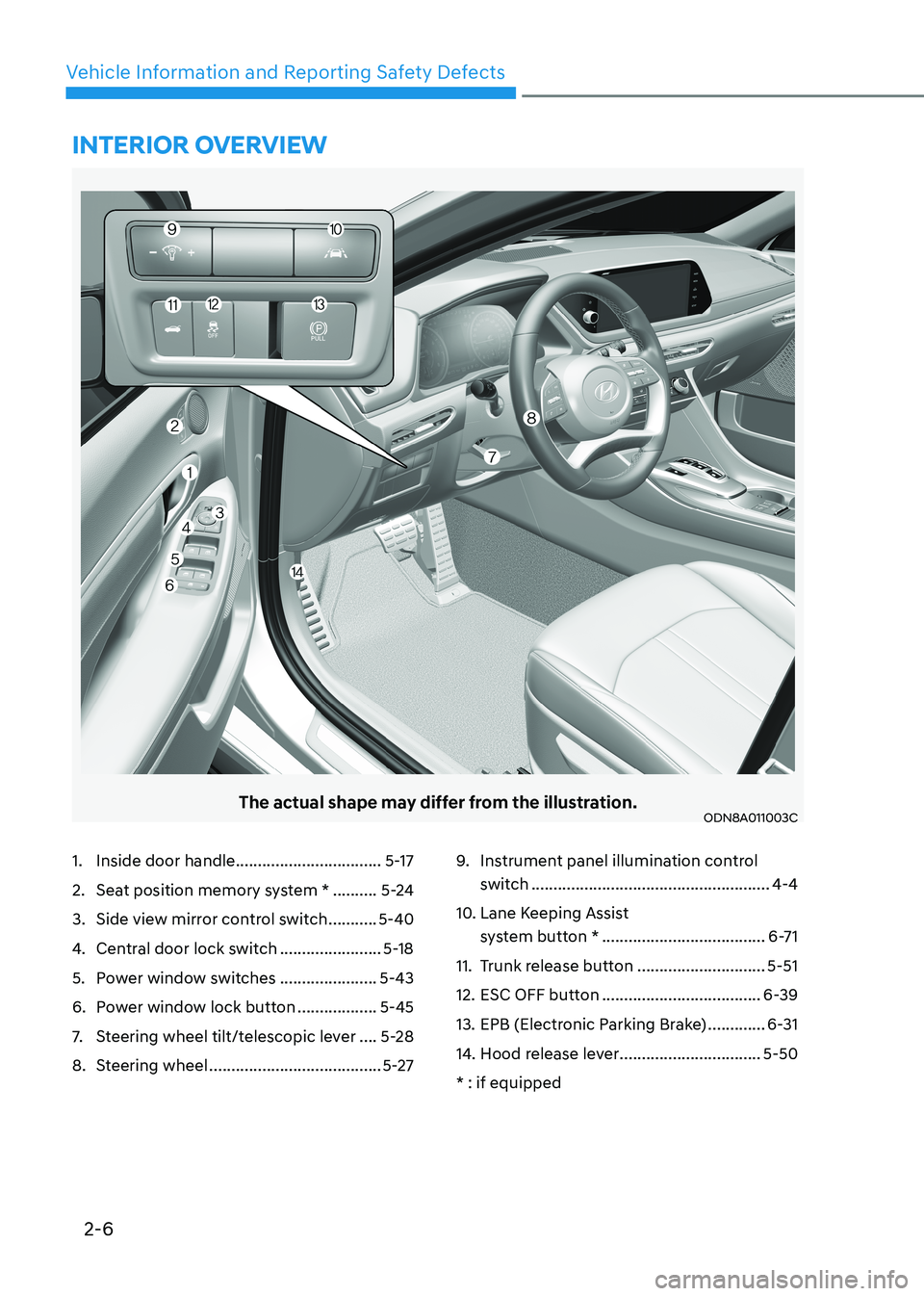
2-6
Vehicle Information and Reporting Safety Defects
The actual shape may differ from the illustration.ODN8A011003C
1. Inside door handle .................................5-17
2. Seat position memory system * ..........5-24
3. Side view mirror control switch ...........5-40
4. Central door lock switch .......................5-18
5. Power window switches ......................5-43
6. Power window lock button ..................5-45
7. Steering wheel tilt/telescopic lever ....5-28
8. Steering wheel ....................................... 5-279.
Instrument panel illumination control
switch ...................................................... 4-4
10. Lane Keeping Assist system button * ..................................... 6-71
11. Trunk release button .............................5-51
12. ESC OFF button .................................... 6-39
13. EPB (Electronic Parking Brake) .............6-31
14. Hood release lever ................................5-50
* : if equipped
intErior ovErviEw
Page 32 of 555
3-3
03
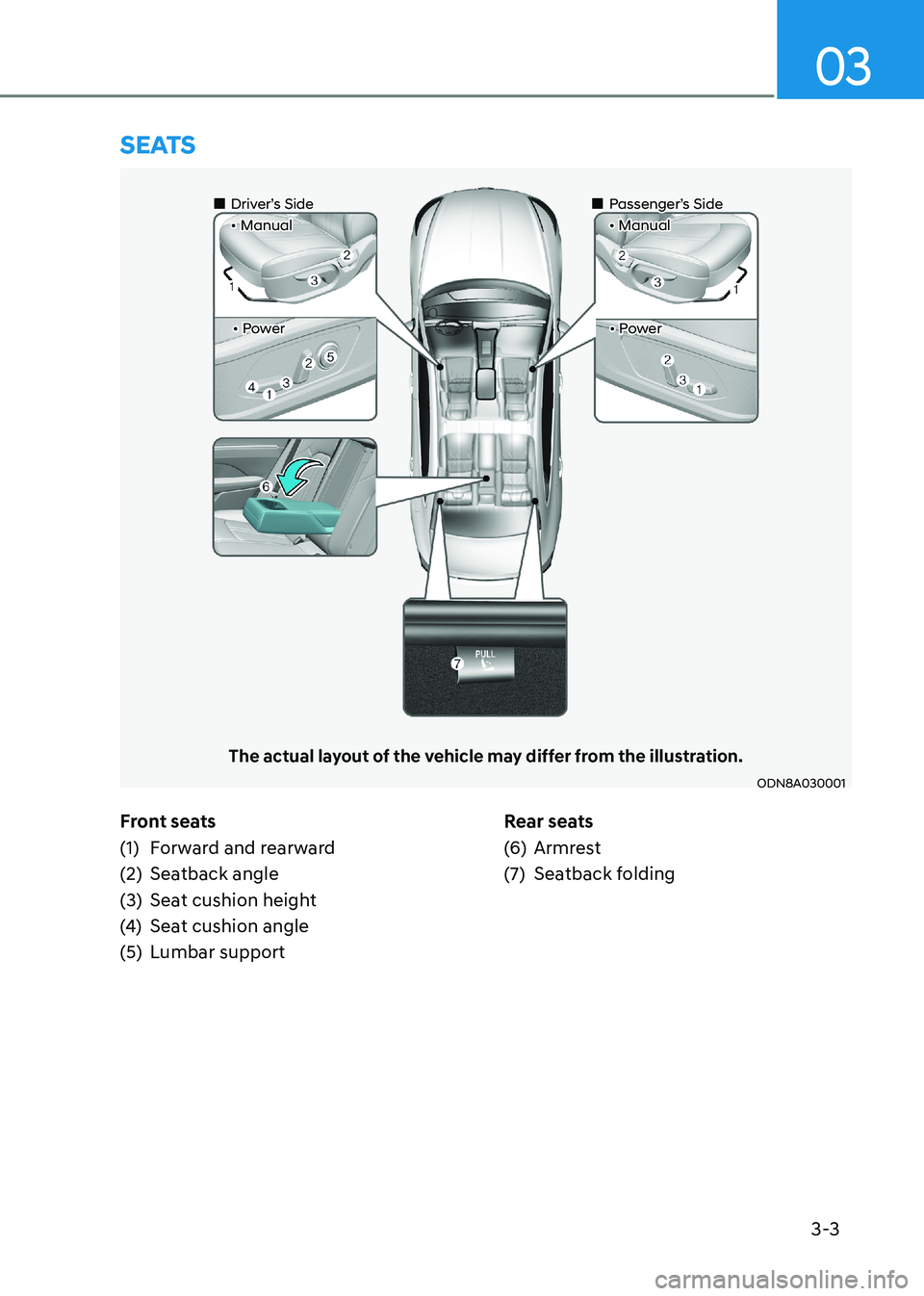
Front seats
(1) Forward and rearward
(2) Seatback angle
(3) Seat cushion height
(4) Seat cushion angle
(5) Lumbar support Rear seats
(6) Armrest
(7) Seatback folding
SeatS
ODN8A030001
The actual layout of the vehicle may differ from the illustration.
„
„Driver’s Side • Manual
„„Passenger’s Side
• Manual
• Power• Power
Page 36 of 555
03
3 -7
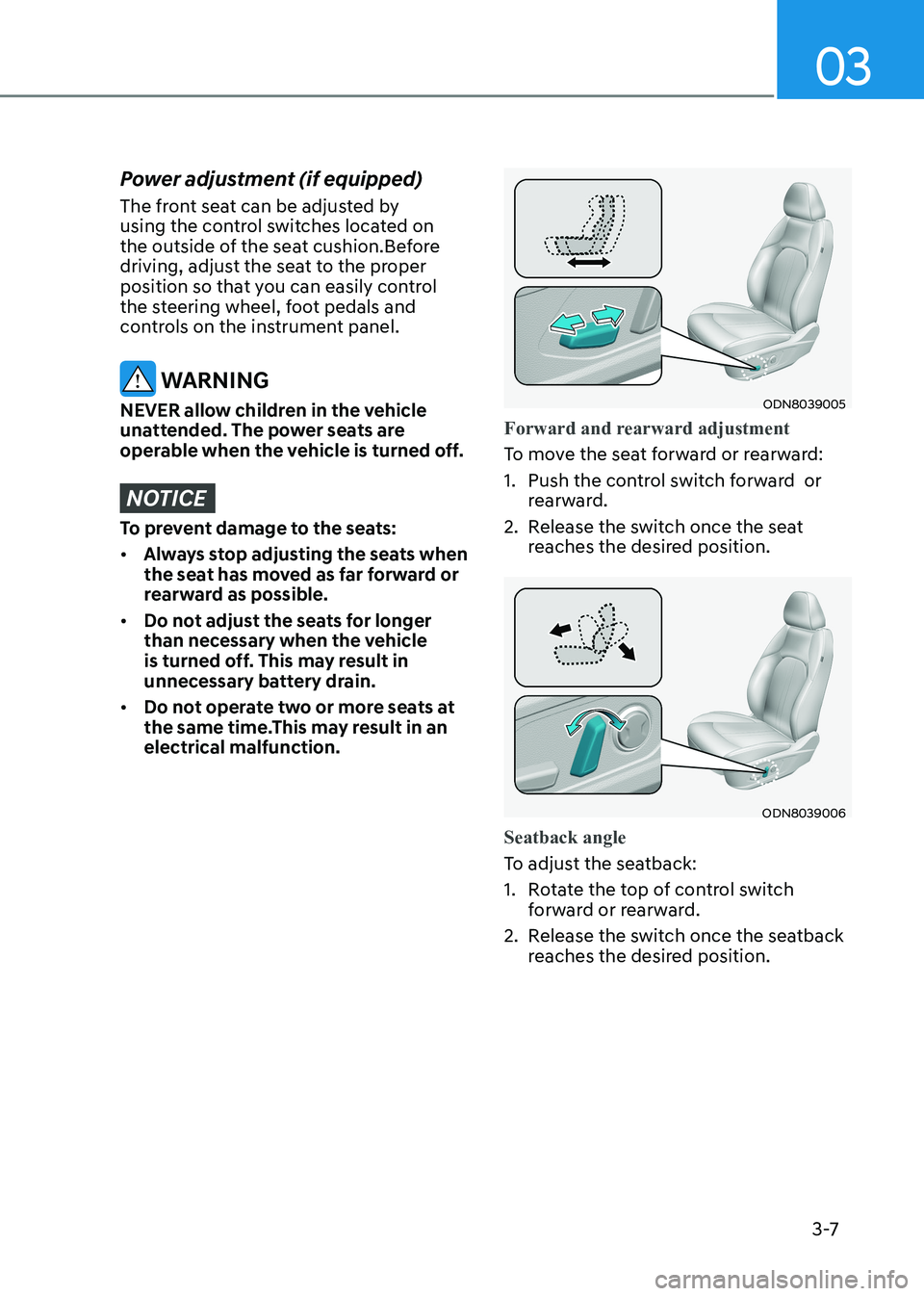
Power adjustment (if equipped)
The front seat can be adjusted by
using the control switches located on
the outside of the seat cushion.Before
driving, adjust the seat to the proper
position so that you can easily control
the steering wheel, foot pedals and
controls on the instrument panel.
WARNING
NEVER allow children in the vehicle
unattended. The power seats are
operable when the vehicle is turned off.
NOTICE
To prevent damage to the seats: • Always stop adjusting the seats when
the seat has moved as far forward or
rearward as possible.
• Do not adjust the seats for longer
than necessary when the vehicle
is turned off. This may result in
unnecessary battery drain.
• Do not operate two or more seats at
the same time.This may result in an electrical malfunction.
ODN8039005
Forward and rearward adjustment
To move the seat forward or rearward:
1. Push the control switch forward or rearward.
2. Release the switch once the seat reaches the desired position.
ODN8039006
Seatback angle
To adjust the seatback:
1. Rotate the top of control switch
forward or rearward.
2. Release the switch once the seatback reaches the desired position.
Page 147 of 555
5. Convenience Features
Accessing Your Vehicle .................................................................................. 5-4
Remote Key .............................................................................................................. 5-4
Smart Key .................................................................................................................. 5 -7
Immobilizer System ................................................................................................ 5-14
Door Locks .................................................................................................... 5-16
Operating Door Locks from Outside the Vehicle ..................................................5-16
Operating Door Locks from Inside the Vehicle .....................................................5-17
Automatic Door Lock and Unlock Features ..........................................................5-20
Child-Protector Rear Door Locks .......................................................................... 5-20
Rear Occupant Alert (ROA) System ........................................................................ 5-21
Vehicle Auto-Shut Off Function ............................................................................ 5-22
Theft-Alarm System ..................................................................................... 5-23
Driver position memory system ................................................................. 5-24
Storing Positions into Memory ............................................................................. 5-24
Recalling Positions from Memory ......................................................................... 5-25
Resetting the Driver’s Seat Memory System ........................................................5-25
Easy Access Function ............................................................................................. 5-26
Steering Wheel ............................................................................................. 5-27
Electric Power Steering (EPS) ................................................................................. 5-27
Tilt Steering / Telescope Steering ......................................................................... 5-28
Heated Steering Wheel ......................................................................................... 5-29
Horn......................................................................................................................... 5-30
Mirrors ........................................................................................................... 5-31
Inside Rearview Mirror ............................................................................................ 5-31
Side View Mirrors ................................................................................................... 5-39
Reverse Parking Aid Function ................................................................................ 5-41
Windows ....................................................................................................... 5-42
Power Windows ...................................................................................................... 5-43
Panoramic Sunroof ..................................................................................... 5-46
Sunshade ................................................................................................................ 5-47
Sliding the Sunroof ................................................................................................. 5-47
Tilting the Sunroof ................................................................................................. 5-47
Closing the Sunroof ............................................................................................... 5-48
Resetting the Sunroof ............................................................................................ 5-49
Sunroof Open Warning .......................................................................................... 5-49
5
Page 170 of 555
Convenience Features
5-24
Driver poSiTion memory SySTem (if eQUippeD)
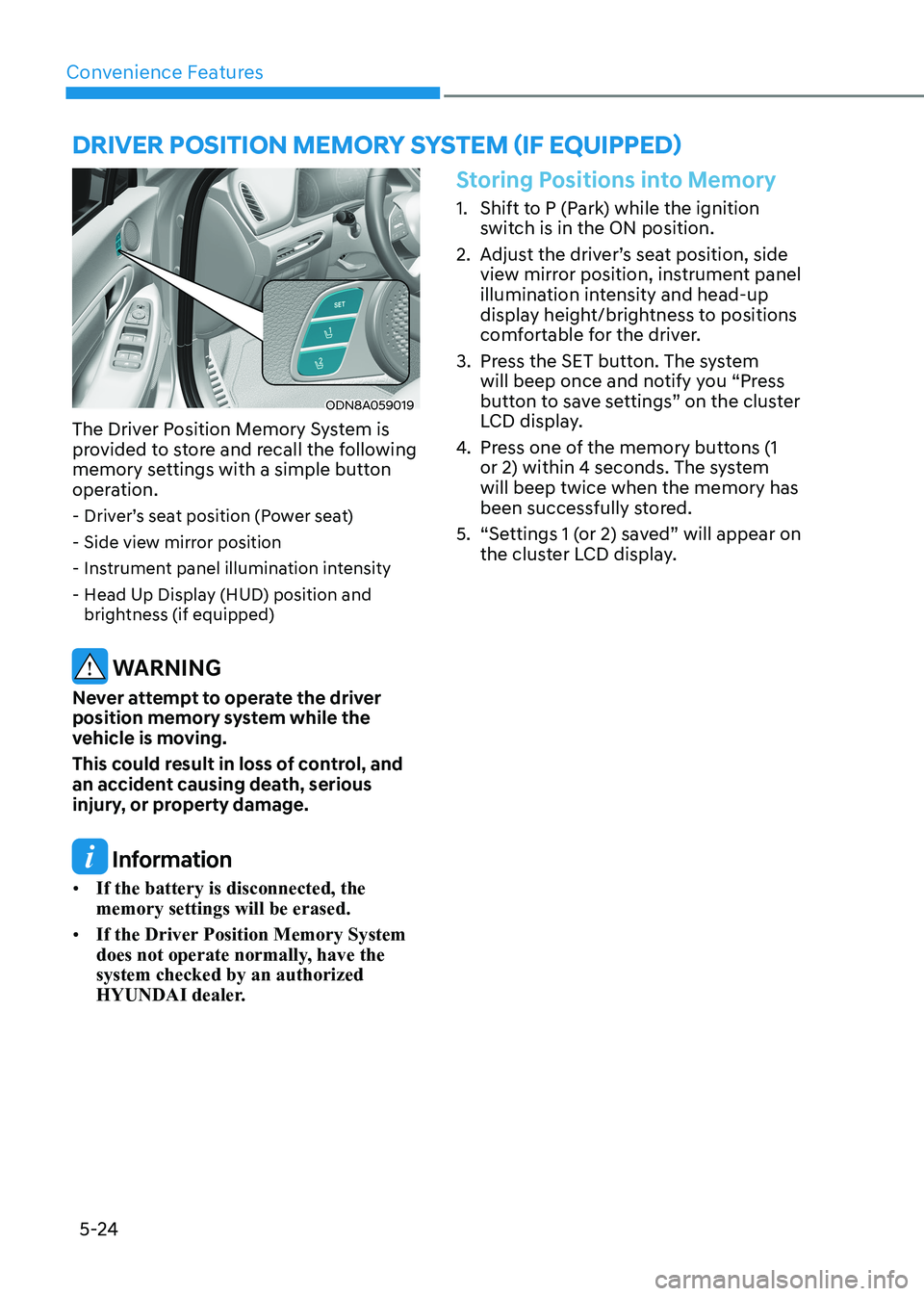
ODN8A059019
The Driver Position Memory System is
provided to store and recall the following
memory settings with a simple button
operation. - Driver’s seat position (Power seat)
- Side view mirror position
- Instrument panel illumination intensity
- Head Up Display (HUD) position and brightness (if equipped)
WARNING
Never attempt to operate the driver
position memory system while the
vehicle is moving.
This could result in loss of control, and
an accident causing death, serious
injury, or property damage.
Information
• If the battery is disconnected, the memory settings will be erased.
• If the Driver Position Memory System
does not operate normally, have the system checked by an authorized
HYUNDAI dealer.
Storing Positions into Memory
1. Shift to P (Park) while the ignition
switch is in the ON position.
2. Adjust the driver’s seat position, side view mirror position, instrument panel
illumination intensity and head-up
display height/brightness to positions
comfortable for the driver.
3. Press the SET button. The system will beep once and notify you “Press
button to save settings” on the cluster
LCD display.
4. Press one of the memory buttons (1
or 2) within 4 seconds. The system will beep twice when the memory has
been successfully stored.
5. “Settings 1 (or 2) saved” will appear on the cluster LCD display.
Page 224 of 555
Convenience Features
5-78
The brake assist will turn off when:
- The driver shifts the gear to P (Park) or
D (Drive)
- The driver depresses the brake pedal with sufficient power
- The braking has been assisted for approximately 2 seconds
The warning will turn off when:
- The driver shifts the gear to P (Park), N (Neutral), or D (Drive)
The brake control may not operate
properly depending on the status of the
ESC (Electronic Stability Control). There
will only be a warning when:
- The ESC (Electronic Stability Control) warning light is on
- The ESC (Electronic Stability Control) is engaged in a different function
Warning only
• If the system detects a risk of collision with a pedestrian or an object, the
system will warn the driver with
audible warning and warnings on the
cluster LCD display or infotainment
system display.
• If ‘Warning Only’ is selected, braking will not be assisted.
The warning will turn off when:
- The driver shifts the gear to P (Park), N (Neutral), or D (Drive)
WARNING
• Reverse Parking Collision- Avoidance Assist system may
not operate properly or may
operate unnecessarily in some
circumstances.
• Always pay extreme caution while driving. The driver is responsible for
controlling the brake appropriately.
CAUTION
• Always pay attention to road and traffic conditions while driving, whether or not there is a warning.
• Playing the vehicle audio system at high volume may prevent occupants from hearing Reverse Parking Collision-Avoidance Assist system warning sounds.
• If any other warning sound, such as seat belt warning chime, is already generated, Reverse Parking Collision-Avoidance Assist system warning may not sound.
Information
The system can detect a pedestrian or an object when:
- A pedestrian is standing behind the vehicle.
- A large obstacle, such as a vehicle, is parked in the rear center of the vehicle.
Page 293 of 555
While Driving
6-6
Key Ignition Switch (if equipped)
WARNING
To reduce the risk of SERIOUS INJURY or
DEATH, take the following precautions: • NEVER allow children or any person
who is unfamiliar with the vehicle to
touch the ignition switch or related
parts. Unexpected and sudden
vehicle movement can occur.
• NEVER reach through the steering
wheel for the ignition switch, or any
other control, while the vehicle is in
motion. The presence of your hand
or arm in this area may cause a loss
of vehicle control resulting in an
accident.
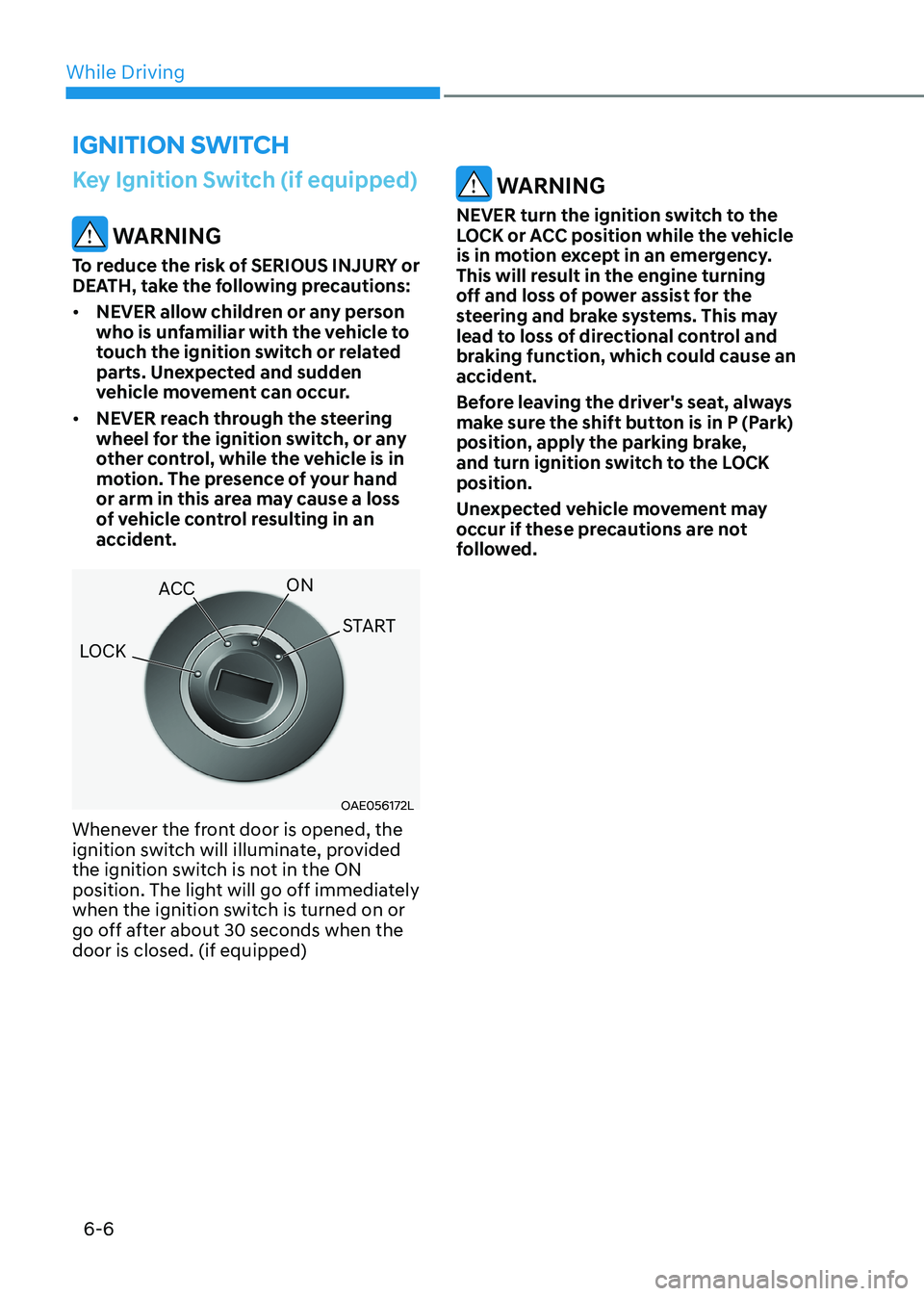
OAE056172L
Whenever the front door is opened, the
ignition switch will illuminate, provided
the ignition switch is not in the ON
position. The light will go off immediately
when the ignition switch is turned on or
go off after about 30 seconds when the door is closed. (if equipped)
WARNING
NEVER turn the ignition switch to the
LOCK or ACC position while the vehicle
is in motion except in an emergency.
This will result in the engine turning
off and loss of power assist for the
steering and brake systems. This may
lead to loss of directional control and
braking function, which could cause an
accident.
Before leaving the driver's seat, always
make sure the shift button is in P (Park)
position, apply the parking brake,
and turn ignition switch to the LOCK position.
Unexpected vehicle movement may
occur if these precautions are not
followed.
ignition Switch
LOCK ACC
ON
START
Page 296 of 555
06
6-9
Engine Start/Stop Button (if equipped)
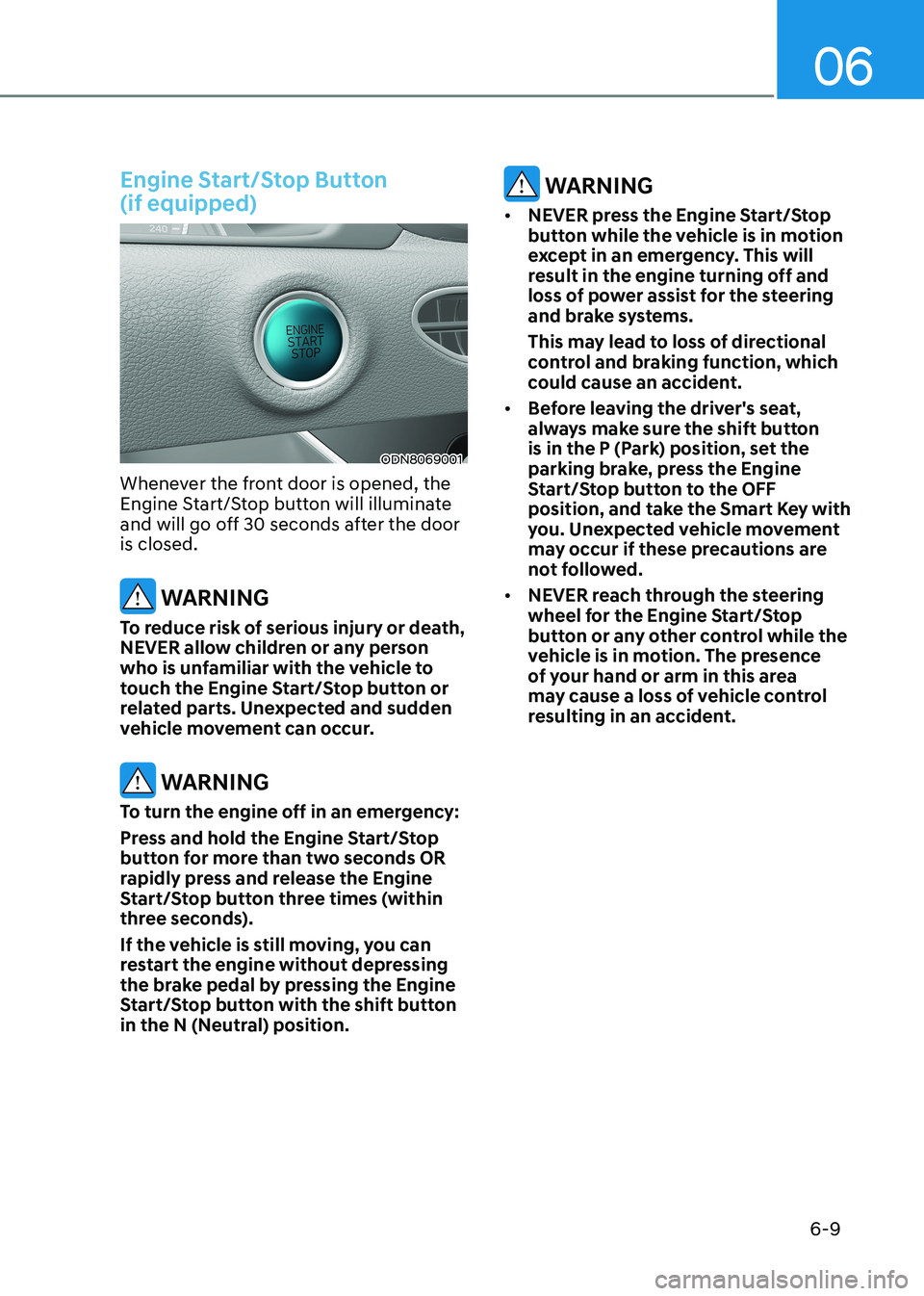
ODN8069001
Whenever the front door is opened, the
Engine Start/Stop button will illuminate
and will go off 30 seconds after the door is closed.
WARNING
To reduce risk of serious injury or death,
NEVER allow children or any person
who is unfamiliar with the vehicle to
touch the Engine Start/Stop button or
related parts. Unexpected and sudden
vehicle movement can occur.
WARNING
To turn the engine off in an emergency:
Press and hold the Engine Start/Stop
button for more than two seconds OR
rapidly press and release the Engine
Start/Stop button three times (within
three seconds).
If the vehicle is still moving, you can
restart the engine without depressing
the brake pedal by pressing the Engine
Start/Stop button with the shift button
in the N (Neutral) position.
WARNING
• NEVER press the Engine Start/Stop
button while the vehicle is in motion
except in an emergency. This will
result in the engine turning off and
loss of power assist for the steering
and brake systems.
This may lead to loss of directional
control and braking function, which
could cause an accident.
• Before leaving the driver's seat,
always make sure the shift button
is in the P (Park) position, set the
parking brake, press the Engine
Start/Stop button to the OFF
position, and take the Smart Key with
you. Unexpected vehicle movement
may occur if these precautions are
not followed.
• NEVER reach through the steering
wheel for the Engine Start/Stop
button or any other control while the
vehicle is in motion. The presence
of your hand or arm in this area
may cause a loss of vehicle control
resulting in an accident.
Page 302 of 555
06
6-15
D (Drive)
This is the normal driving position. The
transmission will automatically shift
through a 8-gear sequence, providing
the best fuel economy and power.
To start the vehicle forward, push the D
(Drive) button by depressing the brake
pedal with the engine ON. Then depress
the accelerator pedal smoothly.
For extra power when passing another
vehicle or driving uphill, depress the
accelerator fully. The transmission will
automatically downshift to the next
lower gear (or gears, as appropriate).
When the vehicle is stopped in D (Drive)
position, if you open the driver's door
with the seat belt unfastened, the gear is
shifted to P (Park) position automatically.
However when the vehicle moves in D
(Drive) position, if you open the driver's
door with the seat belt unfastened, the
gear may not shift to P (Park) position
automatically to protect the automatic
transmission.
Shift-lock system
For your safety, the automatic
transmission has a shift-lock system
which prevents shifting the gear from
P (Park) or N (Neutral) to R (Reverse)
or D (Drive) unless the brake pedal is
depressed.
To shift the gear from P (Park) or N
(Neutral) to R (Reverse) or D (Drive):
1. Depress and hold the brake pedal.
2. Start the engine or place the ignition switch in the ON position.
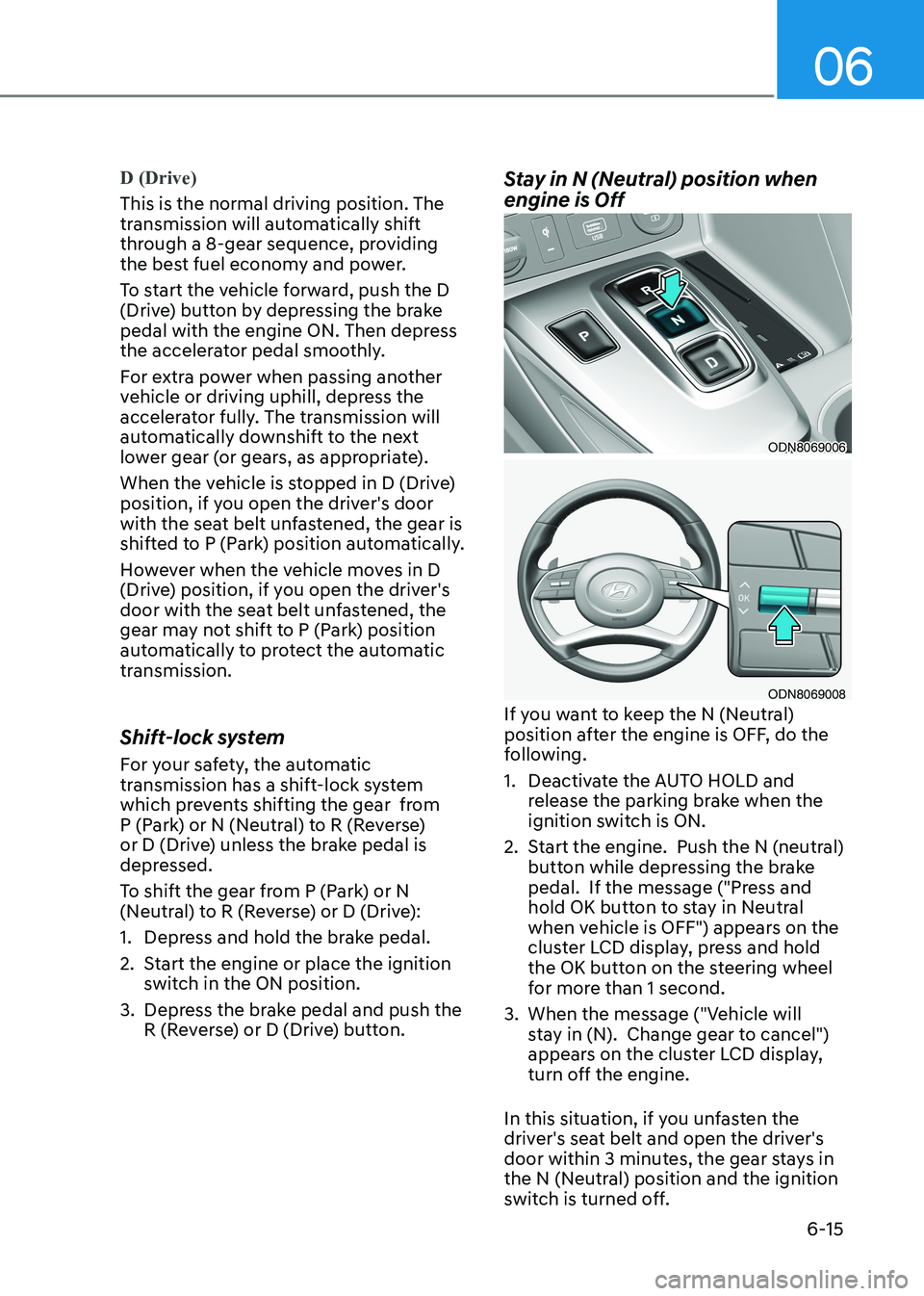
3. Depress the brake pedal and push the R (Reverse) or D (Drive) button. Stay in N (Neutral) position when engine is Off
ODN8069006
ODN8069008
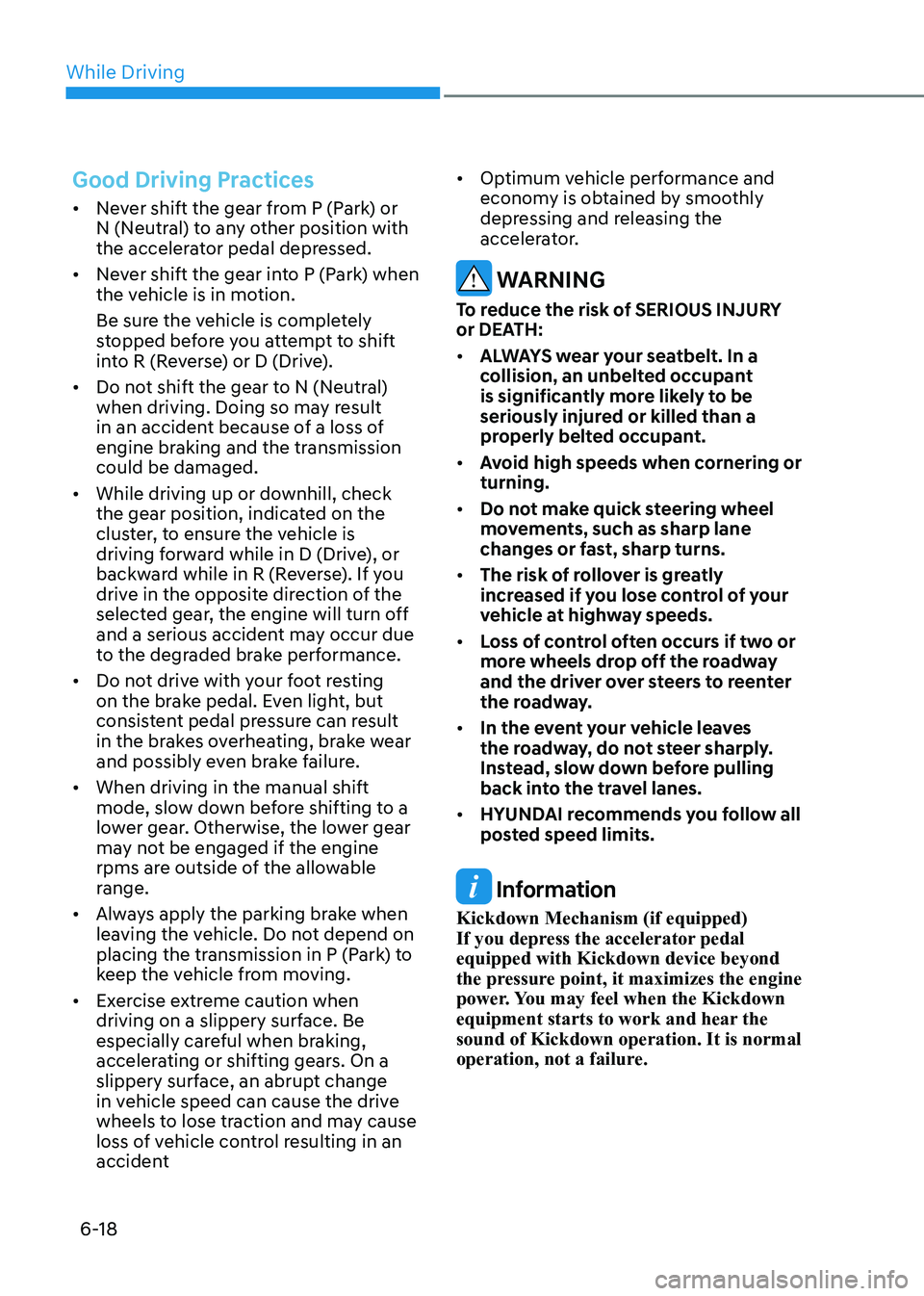
If you want to keep the N (Neutral)
position after the engine is OFF, do the
following.
1. Deactivate the AUTO HOLD and release the parking brake when the
ignition switch is ON.
2. Start the engine. Push the N (neutral) button while depressing the brake
pedal. If the message ("Press and
hold OK button to stay in Neutral
when vehicle is OFF") appears on the
cluster LCD display, press and hold
the OK button on the steering wheel
for more than 1 second.
3. When the message ("Vehicle will stay in (N). Change gear to cancel")
appears on the cluster LCD display,
turn off the engine.
In this situation, if you unfasten the
driver's seat belt and open the driver's
door within 3 minutes, the gear stays in
the N (Neutral) position and the ignition
switch is turned off.
Page 305 of 555
While Driving
6-18
Good Driving Practices
• Never shift the gear from P (Park) or
N (Neutral) to any other position with
the accelerator pedal depressed.
• Never shift the gear into P (Park) when
the vehicle is in motion.
Be sure the vehicle is completely
stopped before you attempt to shift
into R (Reverse) or D (Drive).
• Do not shift the gear to N (Neutral)
when driving. Doing so may result
in an accident because of a loss of
engine braking and the transmission could be damaged.
• While driving up or downhill, check
the gear position, indicated on the
cluster, to ensure the vehicle is
driving forward while in D (Drive), or
backward while in R (Reverse). If you
drive in the opposite direction of the
selected gear, the engine will turn off
and a serious accident may occur due
to the degraded brake performance.
• Do not drive with your foot resting
on the brake pedal. Even light, but
consistent pedal pressure can result
in the brakes overheating, brake wear
and possibly even brake failure.
• When driving in the manual shift
mode, slow down before shifting to a
lower gear. Otherwise, the lower gear
may not be engaged if the engine
rpms are outside of the allowable
range.
• Always apply the parking brake when
leaving the vehicle. Do not depend on
placing the transmission in P (Park) to
keep the vehicle from moving.
• Exercise extreme caution when
driving on a slippery surface. Be
especially careful when braking,
accelerating or shifting gears. On a
slippery surface, an abrupt change
in vehicle speed can cause the drive
wheels to lose traction and may cause
loss of vehicle control resulting in an
accident •
Optimum vehicle performance and
economy is obtained by smoothly
depressing and releasing the
accelerator.
WARNING
To reduce the risk of SERIOUS INJURY
or DEATH: • ALWAYS wear your seatbelt. In a
collision, an unbelted occupant
is significantly more likely to be
seriously injured or killed than a
properly belted occupant.
• Avoid high speeds when cornering or turning.
• Do not make quick steering wheel
movements, such as sharp lane
changes or fast, sharp turns.
• The risk of rollover is greatly
increased if you lose control of your
vehicle at highway speeds.
• Loss of control often occurs if two or
more wheels drop off the roadway
and the driver over steers to reenter
the roadway.
• In the event your vehicle leaves
the roadway, do not steer sharply.
Instead, slow down before pulling
back into the travel lanes.
• HYUNDAI recommends you follow all
posted speed limits.
Information
Kickdown Mechanism (if equipped)
If you depress the accelerator pedal equipped with Kickdown device beyond
the pressure point, it maximizes the engine
power. You may feel when the Kickdown
equipment starts to work and hear the sound of Kickdown operation. It is normal
operation, not a failure.