display Hyundai Sonata
[x] Cancel search | Manufacturer: HYUNDAI, Model Year: , Model line: , Model:Pages: 283, PDF Size: 13.5 MB
Page 123 of 283
1
FEATURES OF YOUR HYUNDAI
109109
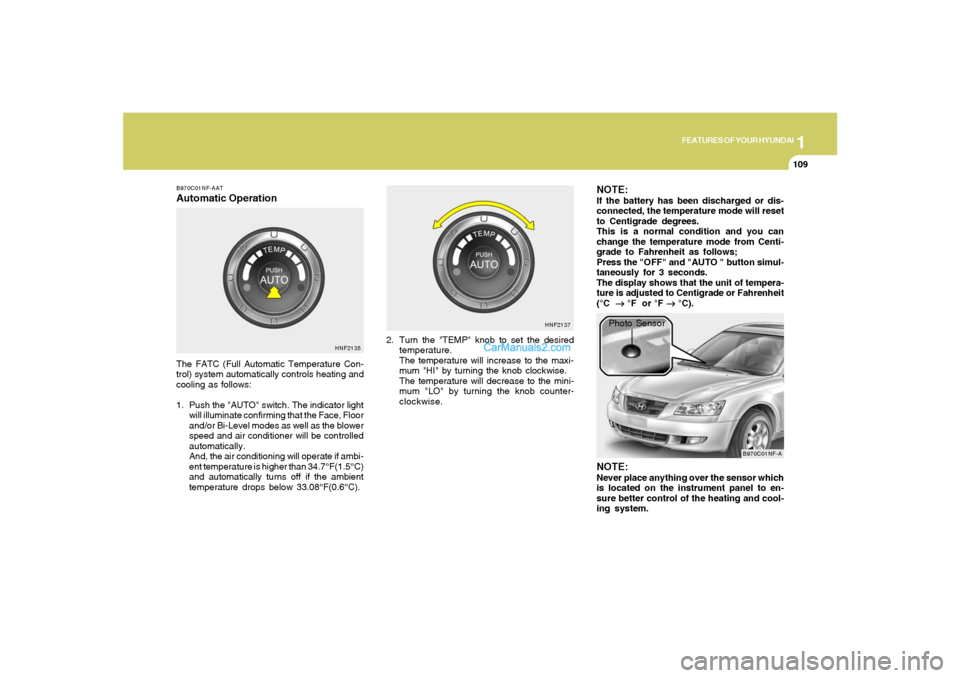
B970C01NF-AATAutomatic OperationThe FATC (Full Automatic Temperature Con-
trol) system automatically controls heating and
cooling as follows:
1. Push the "AUTO" switch. The indicator light
will illuminate confirming that the Face, Floor
and/or Bi-Level modes as well as the blower
speed and air conditioner will be controlled
automatically.
And, the air conditioning will operate if ambi-
ent temperature is higher than 34.7°F(1.5°C)
and automatically turns off if the ambient
temperature drops below 33.08°F(0.6°C).2. Turn the "TEMP" knob to set the desired
temperature.
The temperature will increase to the maxi-
mum "HI" by turning the knob clockwise.
The temperature will decrease to the mini-
mum "LO" by turning the knob counter-
clockwise.
NOTE:If the battery has been discharged or dis-
connected, the temperature mode will reset
to Centigrade degrees.
This is a normal condition and you can
change the temperature mode from Centi-
grade to Fahrenheit as follows;
Press the "OFF" and "AUTO " button simul-
taneously for 3 seconds.
The display shows that the unit of tempera-
ture is adjusted to Centigrade or Fahrenheit
(°C
→ →→ →
→ °F or °F
→ →→ →
→ °C).
HNF2135HNF2137
B970C01NF-A
Photo Sensor
NOTE:Never place anything over the sensor which
is located on the instrument panel to en-
sure better control of the heating and cool-
ing system.
Page 134 of 283
1FEATURES OF YOUR HYUNDAI
120
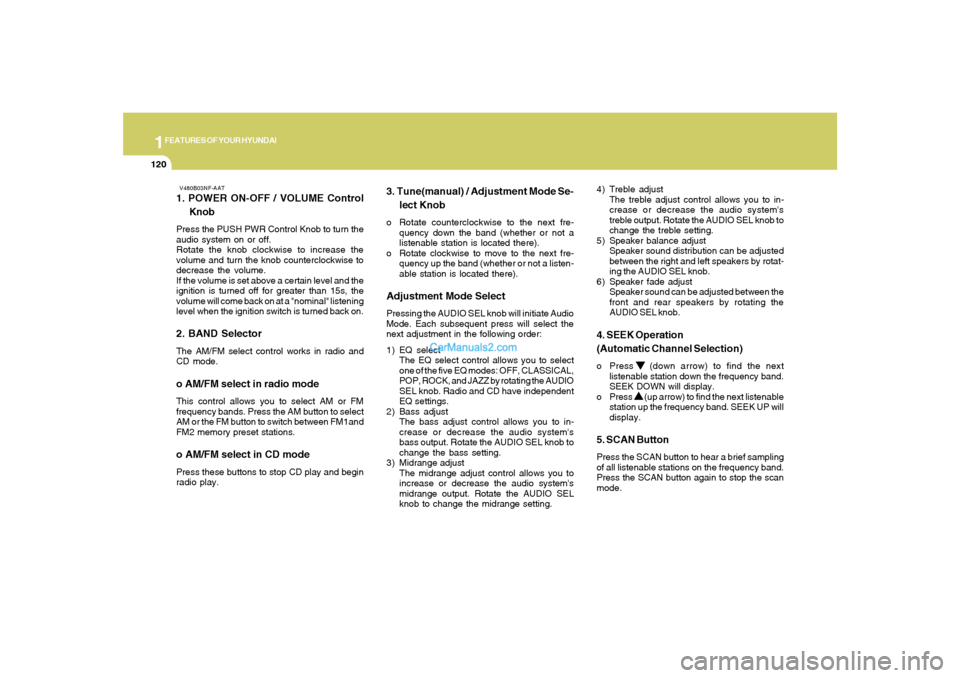
V480B03NF-AAT1. POWER ON-OFF / VOLUME Control
KnobPress the PUSH PWR Control Knob to turn the
audio system on or off.
Rotate the knob clockwise to increase the
volume and turn the knob counterclockwise to
decrease the volume.
If the volume is set above a certain level and the
ignition is turned off for greater than 15s, the
volume will come back on at a "nominal" listening
level when the ignition switch is turned back on.2. BAND SelectorThe AM/FM select control works in radio and
CD mode.o AM/FM select in radio modeThis control allows you to select AM or FM
frequency bands. Press the AM button to select
AM or the FM button to switch between FM1and
FM2 memory preset stations.o AM/FM select in CD modePress these buttons to stop CD play and begin
radio play.
3. Tune(manual) / Adjustment Mode Se-
lect Knobo Rotate counterclockwise to the next fre-
quency down the band (whether or not a
listenable station is located there).
o Rotate clockwise to move to the next fre-
quency up the band (whether or not a listen-
able station is located there).Adjustment Mode SelectPressing the AUDIO SEL knob will initiate Audio
Mode. Each subsequent press will select the
next adjustment in the following order:
1) EQ select
The EQ select control allows you to select
one of the five EQ modes: OFF, CLASSICAL,
POP, ROCK, and JAZZ by rotating the AUDIO
SEL knob. Radio and CD have independent
EQ settings.
2 ) Bass adjust
The bass adjust control allows you to in-
crease or decrease the audio system's
bass output. Rotate the AUDIO SEL knob to
change the bass setting.
3) Midrange adjust
The midrange adjust control allows you to
increase or decrease the audio system's
midrange output. Rotate the AUDIO SEL
knob to change the midrange setting.4) Treble adjust
The treble adjust control allows you to in-
crease or decrease the audio system's
treble output. Rotate the AUDIO SEL knob to
change the treble setting.
5) Speaker balance adjust
Speaker sound distribution can be adjusted
between the right and left speakers by rotat-
ing the AUDIO SEL knob.
6) Speaker fade adjust
Speaker sound can be adjusted between the
front and rear speakers by rotating the
AUDIO SEL knob.
4. SEEK Operation
(Automatic Channel Selection)o Press (down arrow) to find the next
listenable station down the frequency band.
SEEK DOWN will display.
o Press (up arrow) to find the next listenable
station up the frequency band. SEEK UP will
display.5. SCAN ButtonPress the SCAN button to hear a brief sampling
of all listenable stations on the frequency band.
Press the SCAN button again to stop the scan
mode.
Page 137 of 283
1
FEATURES OF YOUR HYUNDAI
123
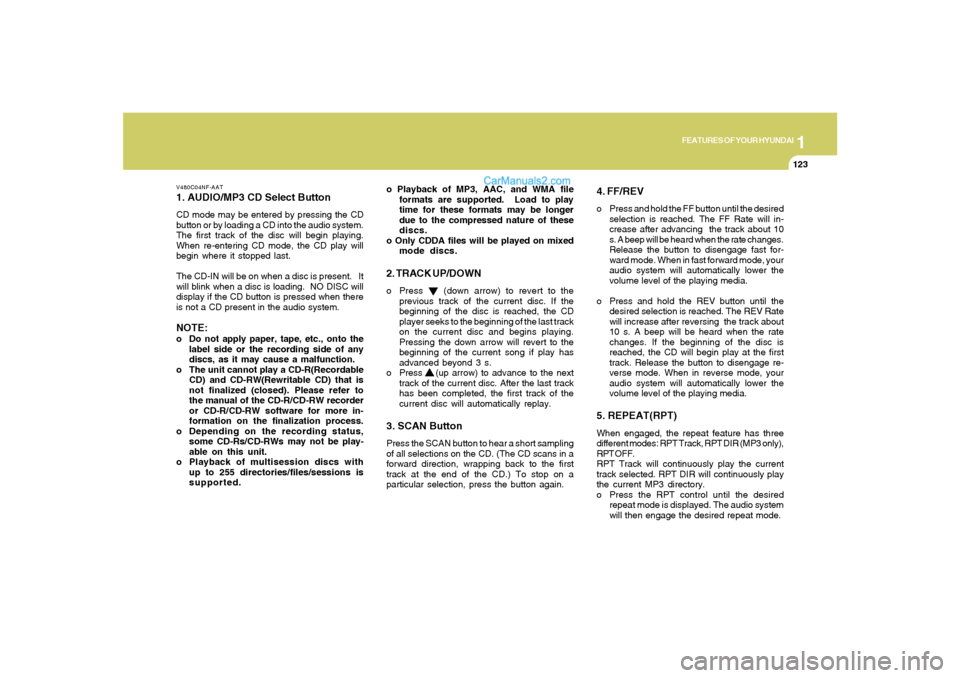
V480C04NF-AAT1. AUDIO/MP3 CD Select ButtonCD mode may be entered by pressing the CD
button or by loading a CD into the audio system.
The first track of the disc will begin playing.
When re-entering CD mode, the CD play will
begin where it stopped last.
The CD-IN will be on when a disc is present. It
will blink when a disc is loading. NO DISC will
display if the CD button is pressed when there
is not a CD present in the audio system.NOTE:o Do not apply paper, tape, etc., onto the
label side or the recording side of any
discs, as it may cause a malfunction.
o The unit cannot play a CD-R(Recordable
CD) and CD-RW(Rewritable CD) that is
not finalized (closed). Please refer to
the manual of the CD-R/CD-RW recorder
or CD-R/CD-RW software for more in-
formation on the finalization process.
o Depending on the recording status,
some CD-Rs/CD-RWs may not be play-
able on this unit.
o Playback of multisession discs with
up to 255 directories/files/sessions is
supported.o Playback of MP3, AAC, and WMA file
formats are supported. Load to play
time for these formats may be longer
due to the compressed nature of these
discs.
o Only CDDA files will be played on mixed
mode discs.
2. TRACK UP/DOWNo Press (down arrow) to revert to the
previous track of the current disc. If the
beginning of the disc is reached, the CD
player seeks to the beginning of the last track
on the current disc and begins playing.
Pressing the down arrow will revert to the
beginning of the current song if play has
advanced beyond 3 s.
o Press (up arrow) to advance to the next
track of the current disc. After the last track
has been completed, the first track of the
current disc will automatically replay.3. SCAN ButtonPress the SCAN button to hear a short sampling
of all selections on the CD. (The CD scans in a
forward direction, wrapping back to the first
track at the end of the CD.) To stop on a
particular selection, press the button again.
4. FF/REVo Press and hold the FF button until the desired
selection is reached. The FF Rate will in-
crease after advancing the track about 10
s. A beep will be heard when the rate changes.
Release the button to disengage fast for-
ward mode. When in fast forward mode, your
audio system will automatically lower the
volume level of the playing media.
o Press and hold the REV button until the
desired selection is reached. The REV Rate
will increase after reversing the track about
10 s. A beep will be heard when the rate
changes. If the beginning of the disc is
reached, the CD will begin play at the first
track. Release the button to disengage re-
verse mode. When in reverse mode, your
audio system will automatically lower the
volume level of the playing media.5. REPEAT(RPT)When engaged, the repeat feature has three
different modes: RPT Track, RPT DIR (MP3 only),
RPT OFF.
RPT Track will continuously play the current
track selected. RPT DIR will continuously play
the current MP3 directory.
o Press the RPT control until the desired
repeat mode is displayed. The audio system
will then engage the desired repeat mode.
Page 138 of 283
1FEATURES OF YOUR HYUNDAI
124
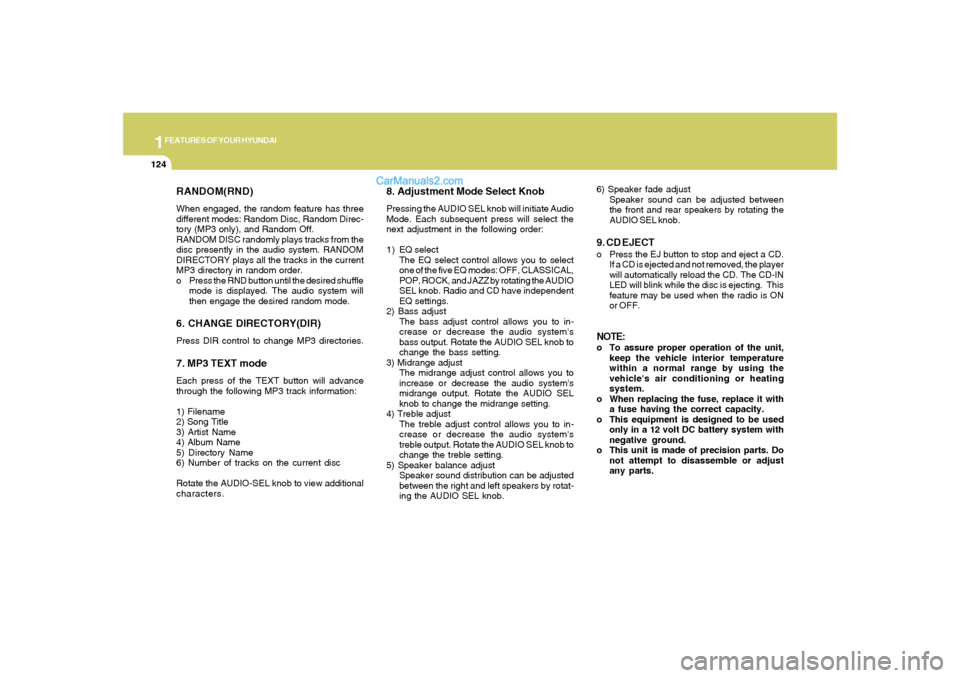
RANDOM(RND)When engaged, the random feature has three
different modes: Random Disc, Random Direc-
tory (MP3 only), and Random Off.
RANDOM DISC randomly plays tracks from the
disc presently in the audio system. RANDOM
DIRECTORY plays all the tracks in the current
MP3 directory in random order.
o Press the RND button until the desired shuffle
mode is displayed. The audio system will
then engage the desired random mode.6. CHANGE DIRECTORY(DIR)Press DIR control to change MP3 directories.7. MP3 TEXT modeEach press of the TEXT button will advance
through the following MP3 track information:
1) Filename
2) Song Title
3) Artist Name
4) Album Name
5) Directory Name
6) Number of tracks on the current disc
Rotate the AUDIO-SEL knob to view additional
characters.
8. Adjustment Mode Select KnobPressing the AUDIO SEL knob will initiate Audio
Mode. Each subsequent press will select the
next adjustment in the following order:
1) EQ select
The EQ select control allows you to select
one of the five EQ modes: OFF, CLASSICAL,
POP, ROCK, and JAZZ by rotating the AUDIO
SEL knob. Radio and CD have independent
EQ settings.
2) Bass adjust
The bass adjust control allows you to in-
crease or decrease the audio system's
bass output. Rotate the AUDIO SEL knob to
change the bass setting.
3) Midrange adjust
The midrange adjust control allows you to
increase or decrease the audio system's
midrange output. Rotate the AUDIO SEL
knob to change the midrange setting.
4) Treble adjust
The treble adjust control allows you to in-
crease or decrease the audio system's
treble output. Rotate the AUDIO SEL knob to
change the treble setting.
5) Speaker balance adjust
Speaker sound distribution can be adjusted
between the right and left speakers by rotat-
ing the AUDIO SEL knob.6) Speaker fade adjust
Speaker sound can be adjusted between
the front and rear speakers by rotating the
AUDIO SEL knob.
9. CD EJECTo Press the EJ button to stop and eject a CD.
If a CD is ejected and not removed, the player
will automatically reload the CD. The CD-IN
LED will blink while the disc is ejecting. This
feature may be used when the radio is ON
or OFF.NOTE:o To assure proper operation of the unit,
keep the vehicle interior temperature
within a normal range by using the
vehicle's air conditioning or heating
system.
o When replacing the fuse, replace it with
a fuse having the correct capacity.
o This equipment is designed to be used
only in a 12 volt DC battery system with
negative ground.
o This unit is made of precision parts. Do
not attempt to disassemble or adjust
any parts.
Page 141 of 283
1
FEATURES OF YOUR HYUNDAI
127
V490B03NF-AAT1. POWER ON-OFF / VOLUME Control
KnobPress the PUSH PWR Control Knob to turn the
audio system on or off.
Rotate the knob clockwise to increase the
volume and turn the knob counterclockwise to
decrease the volume.
If the volume is set above a certain level and the
ignition is turned off for greater than 15 s, the
volume will come back on at a "nominal" listening
level when the ignition switch is turned back on.2. BAND SelectorThe AM/FM select control works in radio and
CD modes.o AM/FM select in radio modeThis control allows you to select AM or FM
frequency bands. Press the AM button to select
AM or the FM button to switch between FM1and
FM2 memory preset stations.o AM/FM select in CD modePress these buttons to stop CD play and begin
radio play.
3. Tune(manual) / Adjustment Mode Se-
lect Knobo Rotate counterclockwise to the next fre-
quency down the band (whether or not a
listenable station is located there).
o Rotate clockwise to move to the next fre-
quency up the band (whether or not a listen-
able station is located there).Adjustment Mode SelectPressing the AUDIO SEL knob will initiate Audio
Mode. Each subsequent press will select the
next adjustment in the following order:
1) EQ select
The EQ select control allows you to select
one of the five EQ modes: OFF, CLASSICAL,
POP, ROCK, and JAZZ by rotating the AUDIO
SEL knob. Radio and CD have independent
EQ settings.
2) Bass adjust
The bass adjust control allows you to in-
crease or decrease the audio system's
bass output. Rotate the AUDIO SEL knob to
change the bass setting.
3) Midrange adjust
The midrange adjust control allows you to
increase or decrease the audio system's
midrange output. Rotate the AUDIO SEL
knob to change the midrange setting.4) Treble adjust
The treble adjust control allows you to in-
crease or decrease the audio system's
treble output. Rotate the AUDIO SEL knob to
change the treble setting.
5) Speaker balance adjust
Speaker sound distribution can be adjusted
between the right and left speakers by rotat-
ing the AUDIO SEL knob.
6) Speaker fade adjust
Speaker sound can be adjusted between
the front and rear speakers by rotating the
AUDIO SEL knob.
4. SEEK Operation
(Automatic Channel Selection)o Press (down arrow) to find the next
listenable station down the frequency band.
SEEK DOWN will display.
o Press (up arrow) to find the next listenable
station up the frequency band. SEEK UP will
display.5. SCAN ButtonPress the SCAN button to hear a brief sampling
of all listenable stations on the frequency band.
Press the SCAN button again to stop the scan
mode.
Page 144 of 283
1FEATURES OF YOUR HYUNDAI
130
V490D01NF-AAT1. AUDIO/MP3 CD Select ButtonCD mode may be entered by pressing the CD
button or by loading a CD into the audio system.
The first track of the disc will begin playing.
When returning to CD mode, the CD play will
begin where it stopped last.
If an alternative CD is desired, press the DISC
select button to access the other loaded CDs.
The CD-IN will be on when a disc is present. It
will blink when a disc is loading. NO DISC will
display if the CD button is pressed when there
is not a CD present in the audio system.NOTE:o Do not apply paper, tape, etc., onto the
label side or the recording side of any
discs, as it may cause a malfunction.
o The unit cannot play a CD-R(Recordable
CD) and CD-RW(Rewritable CD) that is
not finalized (closed). Please refer to
the manual of the CD-R/CD-RW recorder
or CD-R/CD-RW software for more in-
formation on the finalization process.
o Depending on the recording status,
some CD-Rs/CD-RWs may not be play-
able on this unit.
o Playback of MP3, AAC and WMA file
formats are supported. Load to play
time for these formats may be longer
due to the compressed nature of these
discs.
2. LOAD ButtonThe load feature allows you to load single CDs
into the player internal to the audio.
o Press the LOAD button. Wait until the CD
displays the insert CD message.
o Load the CD into the player. The CD-IN LED
will blink while the disc is being loaded.AutoloadThis feature allows you to autoload up to six
discs into the multi-disc CD player internal to the
audio.
o Press and hold the LOAD button until
AUTOLOAD# is displayed.
o Load the desired discs, one at a time. The CD
is loaded into position and the audio system
will display CD#. Each time the audio is ready
for another CD, AUTOLOADING DISC
SLOT# message will be displayed. The CD-
IN LED will blink while a disc is being loaded.
The player will move to the next slot after
each disc has been loaded. The process is
repeated until all six slots are full. The autoload
process can be cancelled by pressing the
load button again.
The audio system plays the last CD loaded and
the display is updated. If some slots are already
full and autoload is activated, the system will fill
all empty slots.
NOTE:o This CD player is suitable only for 4.7
inch discs, do not use irregular shaped
CDs.
o The disc player holds up to six discs.
Do not try to load more than six.
o This six-disc CD player is equipped
with a CD door.
Compact discs should only be inserted
into the player after the door has opened.
Do not attempt to force the door open.
Compact discs should only be loaded by
pressing the LOAD control.
o Playback of multisession discs with
up to 255 directories/files/sessions is
supported.
o Playback of MP3, AAC, and WMA file
formats are supported. Load to play
time for these formats may be longer
due to the compressed nature of these
discs.
o Only CDDA files will be played on mixed
mode discs.3. DISC Select Buttono Press (left arrow) to select the previous
disc. (Play will begin on the first track of the
disc unless shuffle mode is engaged.) Hold
the button to continue reversing through the
discs.
Page 145 of 283
1
FEATURES OF YOUR HYUNDAI
131
o Press (right arrow) to select the next disc.
Hold the button to fast-forward through the
remaining discs.
Display descriptionThere are six CD slots in the audio system. When
a disc is loaded into a particular slot (1- 6), the
number of a loaded slot is displayed by a circle
to indicate the currently selected CD.4. TRACK UP/DOWNo Press (down arrow) to revert to the previ-
ous track of the current disc. If the beginning
of the disc is reached, the CD player seeks
to the beginning of the last track on the
current disc and begins playing. Pressing
the down arrow will revert to the beginning
of the current song if play has advanced
beyond 3 s.
o Press (up arrow) to advance to the next
track of the current disc. After the last track
has been completed, the first track of the
current disc will automatically replay.5. SCAN ButtonPress the SCAN button to hear a short sampling
of all selections on the CD. (The CD scans in a
forward direction, wrapping back to the first
track at the end of the CD.) To stop on a
particular selection, press the button again.
6. CD EJECTo Press the EJ button to stop and eject a CD.
If a CD is ejected and not removed, the player
will automatically reload the CD. The CD-IN LED
will blink while the disc is ejecting. This feature
may be used when the ignition is ON or OFF.Auto ejecto Press and momentarily hold the EJ button to
engage auto eject. All CDs which are present
in the player will be ejected one at a time. If
a CD is ejected and not removed, the player
will automatically reload the CD. This feature
may be used when the ignition is ON or OFF.7. FF/REVo Press and hold the FF button until the desired
selection is reached. The FF Rate will in-
crease after advancing the track about 10
s. A beep will be heard when the rate
changes. If the end of the disc is reached,
the CD will return to the first track on the first
disc. Release the button to disengage fast
forward mode. When in fast forward mode,
your audio system will automatically lower
the volume level of the playing media.o Press and hold the REV button until the
desired selecion is reached. The REV Rate
will increase after reversing the track about
10 s. A beep will be heard when the rate
changes. If the beginning of the disc is
reached, the CD will begin play at the first
track. Release the button to disengage re-
verse mode. When in reverse mode, your
audio system will automatically lower the
volume level of the playing media.
8. REPEAT(RPT)When engaged, the repeat feature has four
different modes: RPT Track, RPT DIR(MP3 only),
RPT DISC, RPT OFF.
RPT Track will continuously play the current
track selected. RPT DIR will continuously play
the current MP3 directory, and RPT DISC will
continuously play the current DISC.
o Press the RPT control until the desired repeat
mode is displayed. The audio system will
then engage the desired repeat mode.
Page 146 of 283
1FEATURES OF YOUR HYUNDAI
132
RANDOM(RND)When engaged, the random feature has three
different modes: Random Disc, Random Di-
rectory (MP3 only), and Random Off.
RANDOM DISC randomly plays tracks from
the disc presently in the audio system. RAN-
DOM DIRECTORY plays all the tracks on the
current MP3 directory in random order.
o Press the RND control until the desired
shuffle mode is displayed. The audio sys-
tem will then engage the desired random
mode.9. CHANGE DIRECTORY(DIR)Press DIR control to change MP3 directories.10. MP3 TEXT modeEach press of the TEXT button will advance
through the following MP3 track information:
1) Song Title
2) Artist Name
3) Album Name
4) Filename
5) Directory Name
6) Number of tracks on the current disc
Rotate the AUDIO-SEL knob to view additional
characters.
11. Adjustment Mode Select KnobPressing the AUDIO SEL knob will initiate Audio
Mode. Each subsequent press will select the
next adjustment in the following order.
1) EQ select
The EQ select control allows you to select
one of the five EQ modes: OFF, CLASSICAL,
POP, ROCK, and JAZZ by rotating the AUDIO
SEL knob. Radio and CD have independent
EQ settings.
2) Bass adjust
The bass adjust control allows you to in-
crease or decrease the audio system's bass
output. Rotate the AUDIO SEL knob to change
the bass setting.
3) Midrange adjust
The midrange adjust control allows you to
increase or decrease the audio system's
midrange output. Rotate the AUDIO SEL
knob to change the midrange setting.
4) Treble adjust
The treble adjust control allows you to in-
crease or decrease the audio system's
treble output. Rotate the AUDIO SEL knob to
change the treble setting.
5) Speaker balance adjust
Speaker sound distribution can be adjusted
between the right and left speakers by
rotating the AUDIO SEL knob.6) Speaker fade adjust
Speaker sound can be adjusted between
the front and rear speakers by rotating the
AUDIO SEL knob.
NOTE:o To assure proper operation of the unit,
keep the vehicle interior temperature
within a normal range by using the
vehicle's air conditioning or heating
system.
o When replacing the fuse, replace it
with a fuse having the correct capacity.
o This equipment is designed to be used
only in a 12 volt DC battery system with
negative ground.
o This unit is made of precision parts. Do
not attempt to disassemble or adjust
any parts.
o When driving your vehicle, be sure to
keep the volume of the unit set low
enough to allow you to hear sounds
coming from the outside.
o Do not expose this equipment (includ-
ing the speakers) to water or exces-
sive moisture.
Page 149 of 283
1
FEATURES OF YOUR HYUNDAI
135
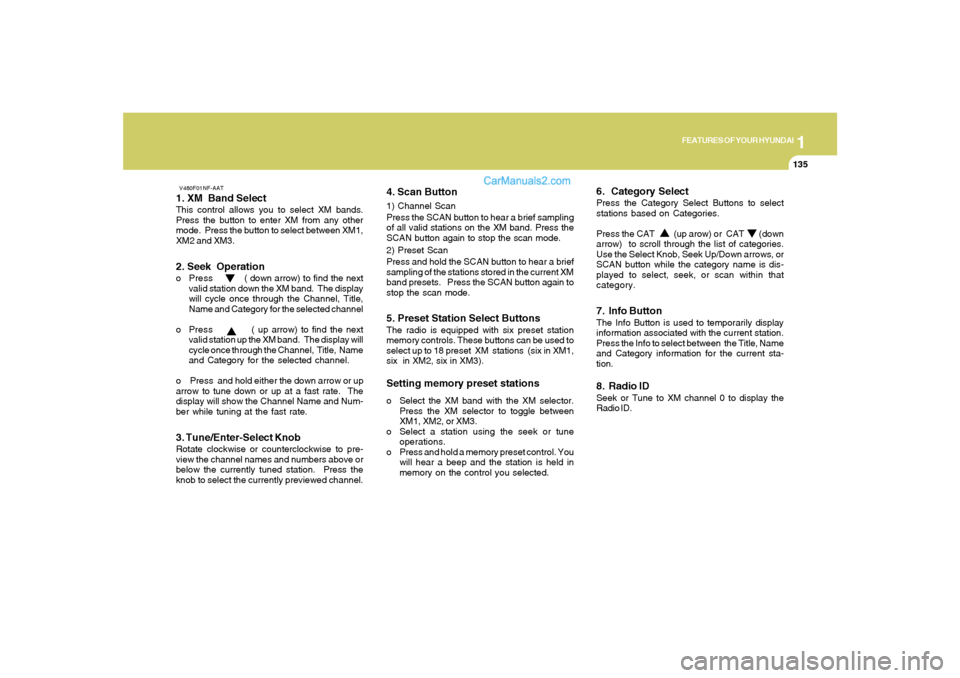
V480F01NF-AAT1. XM Band SelectThis control allows you to select XM bands.
Press the button to enter XM from any other
mode. Press the button to select between XM1,
XM2 and XM3.2. Seek Operationo Press ( down arrow) to find the next
valid station down the XM band. The display
will cycle once through the Channel, Title,
Name and Category for the selected channel
o Press ( up arrow) to find the next
valid station up the XM band. The display will
cycle once through the Channel, Title, Name
and Category for the selected channel.
o Press and hold either the down arrow or up
arrow to tune down or up at a fast rate. The
display will show the Channel Name and Num-
ber while tuning at the fast rate.3. Tune/Enter-Select KnobRotate clockwise or counterclockwise to pre-
view the channel names and numbers above or
below the currently tuned station. Press the
knob to select the currently previewed channel.
4. Scan Button1) Channel Scan
Press the SCAN button to hear a brief sampling
of all valid stations on the XM band. Press the
SCAN button again to stop the scan mode.
2) Preset Scan
Press and hold the SCAN button to hear a brief
sampling of the stations stored in the current XM
band presets. Press the SCAN button again to
stop the scan mode.5. Preset Station Select ButtonsThe radio is equipped with six preset station
memory controls. These buttons can be used to
select up to 18 preset XM stations (six in XM1,
six in XM2, six in XM3).Setting memory preset stationso Select the XM band with the XM selector.
Press the XM selector to toggle between
XM1, XM2, or XM3.
o Select a station using the seek or tune
operations.
o Press and hold a memory preset control. You
will hear a beep and the station is held in
memory on the control you selected.
6. Category SelectPress the Category Select Buttons to select
stations based on Categories.
Press the CAT (up arow) or CAT (down
arrow) to scroll through the list of categories.
Use the Select Knob, Seek Up/Down arrows, or
SCAN button while the category name is dis-
played to select, seek, or scan within that
category.7. Info ButtonThe Info Button is used to temporarily display
information associated with the current station.
Press the Info to select between the Title, Name
and Category information for the current sta-
tion.8. Radio IDSeek or Tune to XM channel 0 to display the
Radio ID.
Page 157 of 283
2
DRIVING YOUR HYUNDAI
8
NOTE:
Depress the brake pedal when shift-
ing.
The selector lever can be shifted freely.
The first few shifts on a new vehicle, or if the
battery has been disconnected, may be
somewhat abrupt. This is a normal condi-
tion, and the shifting sequence will adjust
after shifts are cycled a few times by the
T.C.M (Transaxle Control Module).
!
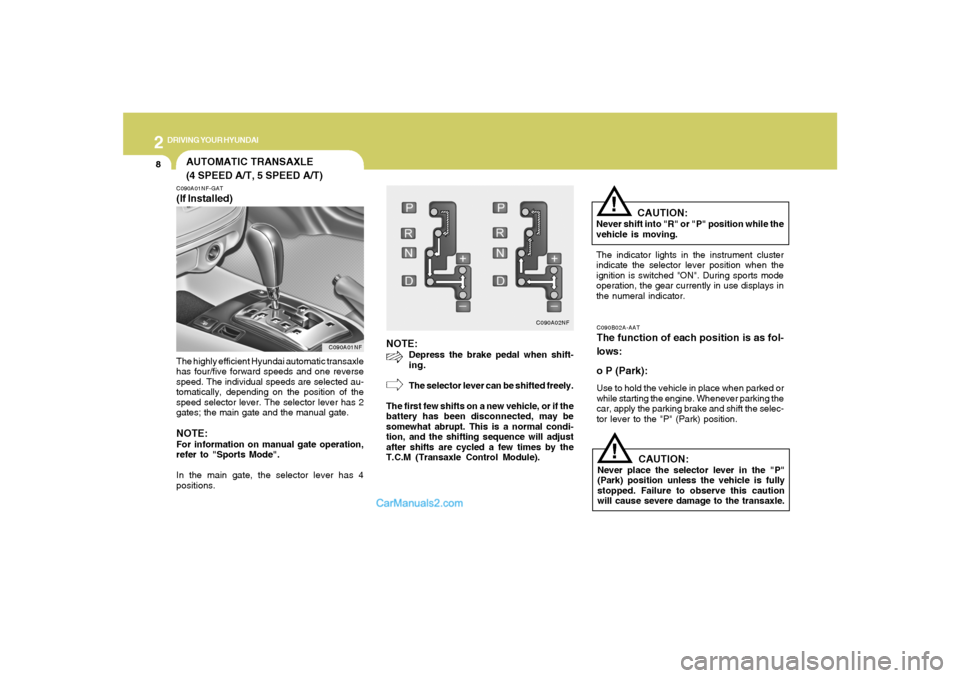
C090A02NF
CAUTION:
Never shift into "R" or "P" position while the
vehicle is moving.
The indicator lights in the instrument cluster
indicate the selector lever position when the
ignition is switched "ON". During sports mode
operation, the gear currently in use displays in
the numeral indicator.C090B02A-AATThe function of each position is as fol-
lows:
o P (Park):Use to hold the vehicle in place when parked or
while starting the engine. Whenever parking the
car, apply the parking brake and shift the selec-
tor lever to the "P" (Park) position.
CAUTION:
Never place the selector lever in the "P"
(Park) position unless the vehicle is fully
stopped. Failure to observe this caution
will cause severe damage to the transaxle.
!
AUTOMATIC TRANSAXLE
(4 SPEED A/T, 5 SPEED A/T)C090A01NF-GAT(If Installed)The highly efficient Hyundai automatic transaxle
has four/five forward speeds and one reverse
speed. The individual speeds are selected au-
tomatically, depending on the position of the
speed selector lever. The selector lever has 2
gates; the main gate and the manual gate.NOTE:For information on manual gate operation,
refer to "Sports Mode".
In the main gate, the selector lever has 4
positions.
C090A01NF