radio Hyundai Sonata
[x] Cancel search | Manufacturer: HYUNDAI, Model Year: , Model line: , Model:Pages: 276, PDF Size: 12.9 MB
Page 138 of 276
1FEATURES OF YOUR HYUNDAI
124
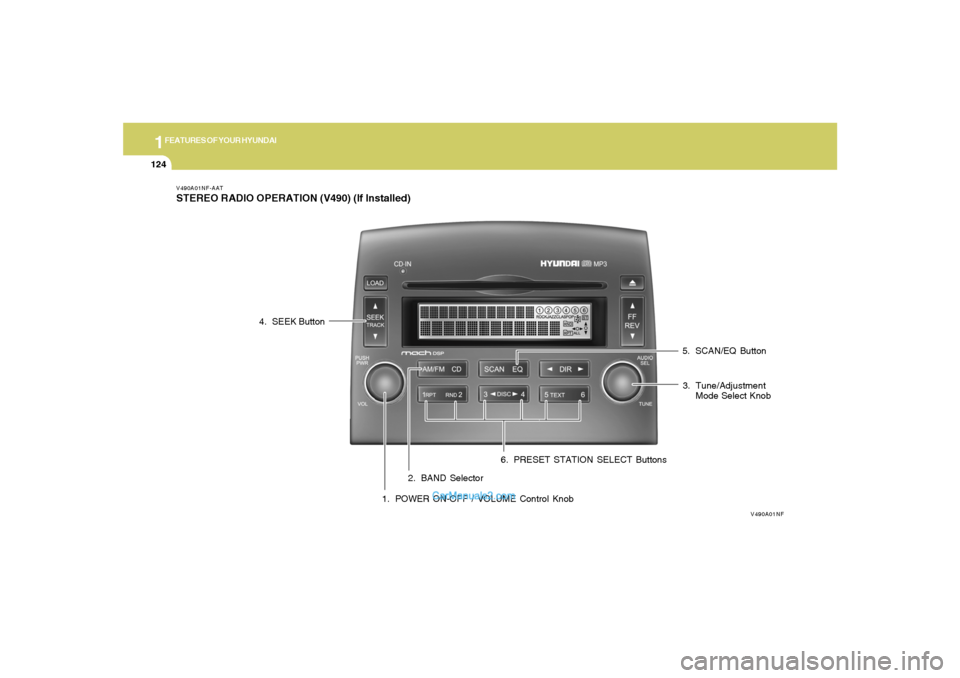
V490A01NF-AATSTEREO RADIO OPERATION (V490) (If Installed)
V490A01NF
1. POWER ON-OFF / VOLUME Control Knob2. BAND Selector3. Tune/Adjustment
Mode Select Knob 4. SEEK Button
5. SCAN/EQ Button
6. PRESET STATION SELECT Buttons
Page 139 of 276
1
FEATURES OF YOUR HYUNDAI
125125
V490B02NF-AAT1. POWER ON-OFF / VOLUME Control
KnobPress the PUSH PWR Control Knob to turn the
audio system on or off.
Rotate the knob clockwise to increase the
volume and turn the knob counterclockwise to
decrease the volume.
If the volume is set above a certain level and the
ignition is turned off for greater than 15 s, the
volume will come back on at a "nominal" listening
level when the ignition switch is turned back on.2. BAND SelectorThe AM/FM select control works in radio and
CD modes.o AM/FM select in radio modeThis control allows you to select AM or FM
frequency bands. Press the button to switch
between FM1, FM2 and AM memory preset
stations.o AM/FM select in CD modePress this button to stop CD play and begin radio
play.
3. Tune(manual) / Adjustment Mode Se-
lect Knobo Rotate counterclockwise to the next fre-
quency down the band (whether or not a
listenable station is located there).
o Rotate clockwise to move to the next fre-
quency up the band (whether or not a listen-
able station is located there).Adjustment Mode SelectPressing the AUDIO SEL knob will initiate Audio
Mode. Each subsequent press will select the
next adjustment in the following order:
1) Bass adjust
The bass adjust control allows you to in-
crease or decrease the audio system's
bass output. Rotate the AUDIO SEL knob to
change the bass setting.
2) Midrange adjust
The midrange adjust control allows you to
increase or decrease the audio system's
midrange output. Rotate the AUDIO SEL
knob to change the midrange setting.
3) Treble adjust
The treble adjust control allows you to in-
crease or decrease the audio system's
treble output. Rotate the AUDIO SEL knob to
change the treble setting.4) Speaker balance adjust
Speaker sound distribution can be adjusted
between the right and left speakers by rotat-
ing the AUDIO SEL knob.
5) Speaker fade adjust
Speaker sound can be adjusted between
the front and rear speakers by rotating the
AUDIO SEL knob.
4. SEEK Operation
(Automatic Channel Selection)o Press (down arrow) to find the next
listenable station down the frequency band.
SEEK DOWN will display.
o Press (up arrow) to find the next listenable
station up the frequency band. SEEK UP will
display.5. SCAN EQ ButtonPress the SCAN button to hear a brief sampling
of all listenable stations on the frequency band.
Press the SCAN button again to stop the scan
mode.
Page 140 of 276
1FEATURES OF YOUR HYUNDAI
126
EQ Button- Equalization FeatureThe radio has five EQ modes: OFF, CLASSI-
CAL, POP, ROCK, and JAZZ.
Each press of the EQ button will advance to the
next EQ setting. Radio and CD have indepen-
dent EQ settings.6. PRESET STATION SELECT ButtonsThe radio is equipped with six preset station
memory controls. These buttons can be used
to select up to 6 preset AM stations and 12
preset FM stations (six in AM, six in FM1, six in
FM2). There are a total possible of 18 preset
stations.Setting memory preset stationso Select the frequency band with the BAND
selector. Press the AM/ FM control to toggle
between AM, FM1, or FM2.
o Press the SEEK control to access the next
listenable station up or down the frequency
band. Rotate the TUNE control to go up or
down the listening band in individual incre-
ments.
o Select a station.
o Press and hold a memory preset control.
You will hear a beep and the station is held
in memory on the control you selected.
CAUTION:
o Do not place beverages close to the
audio system. The playback mechanism
may be damaged if you spill them.
o Do not impact or strike the audio system,
or the playback mechanism could be
damaged.
!
Page 143 of 276
1
FEATURES OF YOUR HYUNDAI
129129
Display descriptionThere are six CD slots in the audio system.
When a disc is loaded into a particular slot (1-
6), the number of a loaded slot is displayed by
a circle to indicate the currently selected CD.4. TRACK UP/DOWNo Press
(down arrow) to revert to the
previous track of the current disc. If the
beginning of the disc is reached, the CD
player seeks to the beginning of the last
track on the current disc and begins playing.
Pressing the down arrow will revert to the
beginning of the current song if play has
advanced beyond 3 s.
o Press (up arrow) to advance to the next
track of the current disc. After the last track
has been completed, the first track of the
current disc will automatically replay.
5. SCAN /EQ ButtonPress the SCAN button to hear a short sampling
of all selections on the CD. (The CD scans in a
forward direction, wrapping back to the first
track at the end of the CD.) To stop on a
particular selection, press the button again.
EQ Button - Equalization FeatureThe radio has five EQ modes: OFF, CLASSI-
CAL, POP, ROCK, and JAZZ.
Each press of the EQ button will advance to the
next EQ setting. Radio and CD have indepen-
dent EQ settings.6. CD EJECTo Press the EJ button to stop and eject a CD.
If a CD is ejected and not removed, the player
will automatically reload the CD. The CD-IN LED
will blink while the disc is ejecting. This feature
may be used when the ignition is ON or OFF.Auto ejecto Press and momentarily hold the EJ button to
engage auto eject. All CDs which are present
in the player will be ejected one at a time. If
a CD is ejected and not removed, the player
will automatically reload the CD. This feature
may be used when the ignition is ON or OFF.7. FF/REVo Press and hold the FF button until the desired
selection is reached. The FF Rate will in-
crease after advancing the track about 10
s. A beep will be heard when the rate changes.
If the end of the disc is reached, the CD will
return to the first track on the first disc.Release the button to disengage fast for-
ward mode. When in fast forward mode, your
audio system will automatically lower the
volume level of the playing media.
o Press and hold the REV button until the
desired selecion is reached. The REV Rate
will increase after reversing the track about
10 s. A beep will be heard when the rate
changes. If the beginning of the disc is
reached, the CD will begin play at the first
track. Release the button to disengage re-
verse mode. When in reverse mode, your
audio system will automatically lower the
volume level of the playing media.
8. REPEAT(RPT)When engaged, the repeat feature has four
different modes: RPT Track, RPT DIR(MP3
only), RPT DISC, RPT OFF.
RPT Track will continuously play the current
track selected. RPT DIR will continuously play
the current MP3 directory, and RPT DISC will
continuously play the current DISC.
o Press the RPT control until the desired
repeat mode is displayed. The audio system
will then engage the desired repeat mode.
Page 146 of 276
1FEATURES OF YOUR HYUNDAI
132
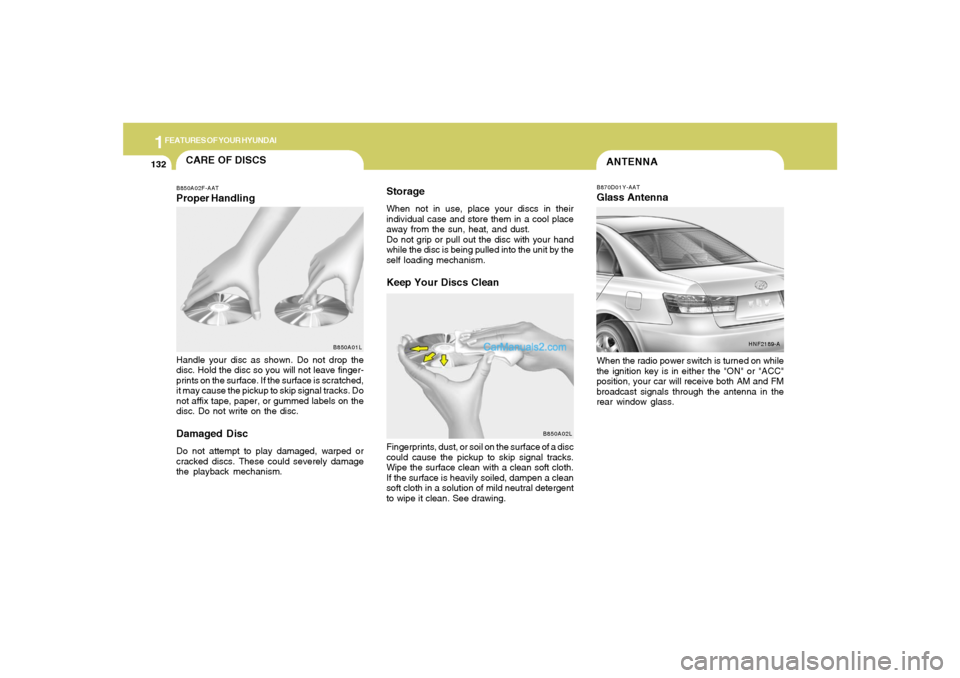
ANTENNAB870D01Y-AATGlass AntennaWhen the radio power switch is turned on while
the ignition key is in either the "ON" or "ACC"
position, your car will receive both AM and FM
broadcast signals through the antenna in the
rear window glass.
HNF2189-A
CARE OF DISCS
B850A02L B850A02F-AAT
Proper HandlingStorage
When not in use, place your discs in their
individual case and store them in a cool place
away from the sun, heat, and dust.
Do not grip or pull out the disc with your hand
while the disc is being pulled into the unit by the
self loading mechanism.Keep Your Discs Clean
Handle your disc as shown. Do not drop the
disc. Hold the disc so you will not leave finger-
prints on the surface. If the surface is scratched,
it may cause the pickup to skip signal tracks. Do
not affix tape, paper, or gummed labels on the
disc. Do not write on the disc.Damaged DiscDo not attempt to play damaged, warped or
cracked discs. These could severely damage
the playback mechanism.Fingerprints, dust, or soil on the surface of a disc
could cause the pickup to skip signal tracks.
Wipe the surface clean with a clean soft cloth.
If the surface is heavily soiled, dampen a clean
soft cloth in a solution of mild neutral detergent
to wipe it clean. See drawing.
B850A01L
Page 151 of 276
2
DRIVING YOUR HYUNDAI
4
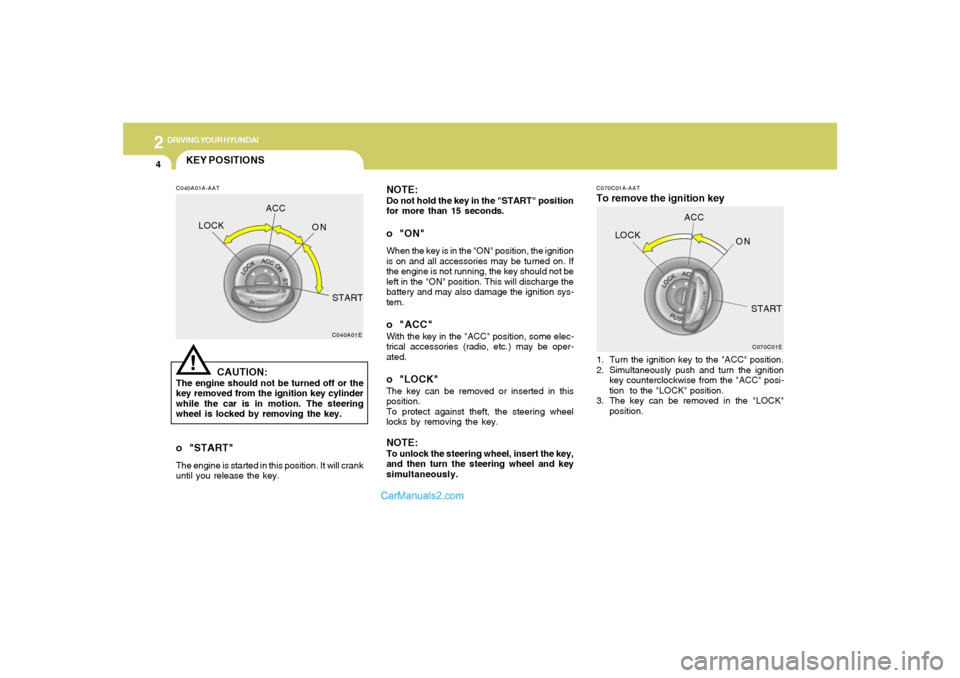
NOTE:Do not hold the key in the "START" position
for more than 15 seconds.o "ON"When the key is in the "ON" position, the ignition
is on and all accessories may be turned on. If
the engine is not running, the key should not be
left in the "ON" position. This will discharge the
battery and may also damage the ignition sys-
tem.o "ACC"With the key in the "ACC" position, some elec-
trical accessories (radio, etc.) may be oper-
ated.o "LOCK"The key can be removed or inserted in this
position.
To protect against theft, the steering wheel
locks by removing the key.NOTE:To unlock the steering wheel, insert the key,
and then turn the steering wheel and key
simultaneously.
C070C01A-AATTo remove the ignition key1. Turn the ignition key to the "ACC" position.
2. Simultaneously push and turn the ignition
key counterclockwise from the "ACC" posi-
tion to the "LOCK" position.
3. The key can be removed in the "LOCK"
position.
C070C01E
LOCKACC
ON
START
KEY POSITIONSC040A01A-AAT
CAUTION:
The engine should not be turned off or the
key removed from the ignition key cylinder
while the car is in motion. The steering
wheel is locked by removing the key.
C040A01E
LOCKACC
ON
START!
o "START"The engine is started in this position. It will crank
until you release the key.
Page 227 of 276
6
DO-IT-YOURSELF MAINTENANCE
23
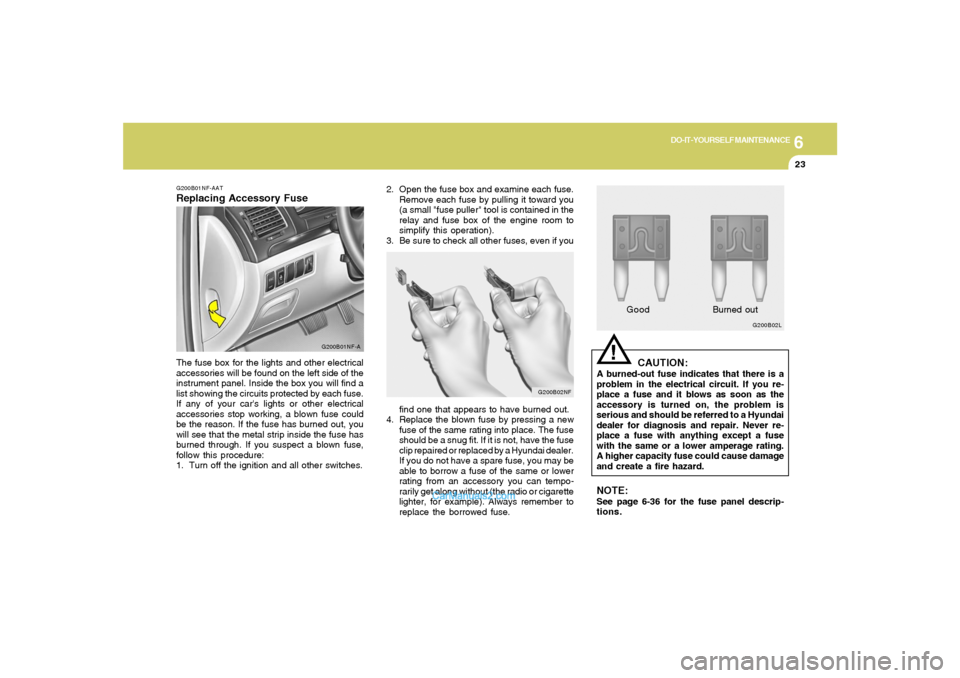
2. Open the fuse box and examine each fuse.
Remove each fuse by pulling it toward you
(a small "fuse puller" tool is contained in the
relay and fuse box of the engine room to
simplify this operation).
3. Be sure to check all other fuses, even if you
G200B02NF
find one that appears to have burned out.
4. Replace the blown fuse by pressing a new
fuse of the same rating into place. The fuse
should be a snug fit. If it is not, have the fuse
clip repaired or replaced by a Hyundai dealer.
If you do not have a spare fuse, you may be
able to borrow a fuse of the same or lower
rating from an accessory you can tempo-
rarily get along without (the radio or cigarette
lighter, for example). Always remember to
replace the borrowed fuse.
!
G200B02L
GoodBurned outCAUTION:
A burned-out fuse indicates that there is a
problem in the electrical circuit. If you re-
place a fuse and it blows as soon as the
accessory is turned on, the problem is
serious and should be referred to a Hyundai
dealer for diagnosis and repair. Never re-
place a fuse with anything except a fuse
with the same or a lower amperage rating.
A higher capacity fuse could cause damage
and create a fire hazard.NOTE:See page 6-36 for the fuse panel descrip-
tions.
G200B01NF-AATReplacing Accessory Fuse
G200B01NF-A
The fuse box for the lights and other electrical
accessories will be found on the left side of the
instrument panel. Inside the box you will find a
list showing the circuits protected by each fuse.
If any of your car's lights or other electrical
accessories stop working, a blown fuse could
be the reason. If the fuse has burned out, you
will see that the metal strip inside the fuse has
burned through. If you suspect a blown fuse,
follow this procedure:
1. Turn off the ignition and all other switches.
Page 270 of 276
10
INDEX
2
A
Accessory Box................................................................................1-76
Advanced Supplemental Restraint (AIRBAG) System (SRS) ......1-36
Curtain airbag...............................................................................1-47
Driver's and passenger's front airbag.......................................1-37
Occupant classification system..................................................1-42
Side impact airbag .......................................................................1-46
Air Cleaner Filter ..............................................................................6-14
Air Conditioning
Care..............................................................................................6-18
Filter.................................................................................. 1-114, 6-19
Operation.......................................................................... 1-105, 6-18
Switch.........................................................................................1-105
Antenna..........................................................................................1-132
Ashtray.............................................................................................1-69
Audio System
Audio remote control switch .......................................................1-97
Compact disc player operation (V480)....................................1-120
Compact disc player operation (V490)....................................1-127
Stereo radio operation (V480) ..................................................1-117
Stereo radio operation (V490) ..................................................1-124
Automatic Heating and Cooling Control System.........................1-108
Automatic-Dimming Mirror with Z-Nav™ Electronic Compass
Display and HomeLink
®
...........................................................................................................
1-80B
Battery..............................................................................................6-24
Binding Arbitration............................................................................8-17
Brake
Anti-lock brake system (ABS) ....................................................2-12
Checking the brakes...................................................................6-17
Fluid ..............................................................................................6-17
Pedal clearance...........................................................................6-21
Pedal free-play.............................................................................6-20
Practices......................................................................................2-15
Breaking-In your New Hyundai ........................................................ 1-3
C
Care of Discs ................................................................................1-132
Catalytic Converter............................................................................ 7-3
Center Console Compartment........................................................1-77
Child Restraint System ...................................................................1-28
Installing a child restraint system with
"Tether Anchorage" system ......................................................1-30
Securing a child restraint system with "ISOFIX" system .........1-31
Child-Protector Rear Door Lock ...................................................... 1-6
Cigarette Lighter..............................................................................1-68
Clock................................................................................................1-67
Clutch
Pedal free-play.............................................................................6-20